Title here
Summary here
Your definition of done tells a loop when it’s finished. But it doesn’t tell the loop where it’s allowed to work, which rules to respect, or which parts to keep its hands off. Leave those unsaid and even a well-defined loop will wander — tightening your headline while quietly rewriting your sign-off, or “improving” a layout you were happy with. This lesson is about drawing the boundaries that keep a loop fixing what you meant and leaving everything else alone.
By the end of this lesson, you will be able to:
You’ve got a definition of done from Lesson 2; now let’s fence it in.
Once a loop can run on its own — especially an automated one — it will do everything it thinks helps, not just the thing you had in mind. Three boundaries keep that in check, and they answer three different questions.
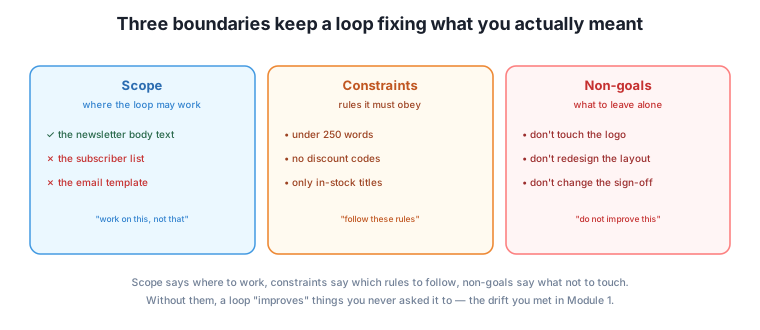
These three are easy to blur together, but keeping them separate matters. A constraint is a rule the result must satisfy; a non-goal is a part of the work the loop shouldn’t touch at all. “Under 250 words” is a constraint — it shapes the thing you want. “Don’t change the sign-off” is a non-goal — it protects a thing you already like.
Here’s the drift you already met in Module 1, seen from the goal side. You ask the AI to “tighten the opening paragraph.” It does — and while it’s in there, it also rephrases your call-to-action, swaps a word in your tagline, and reformats a list you liked. None of that was wrong to want in general; it just wasn’t what you asked for now. The loop had no non-goals, so it treated everything in reach as fair game for “improvement.”
Non-goals stop that. Written down, “don’t change the call-to-action, tagline, or list formatting” tells the loop exactly what to protect. This is doubly important once you hand a loop to an automated agent (Module 5): a human collaborator infers what not to touch from context, but an agent given “improve the newsletter” and access to the whole file may rewrite far more than you wanted, confidently and fast. Non-goals are how you say “hands off this part” in a way the loop can actually follow.
The most expensive drift is silent
The dangerous kind of scope creep isn’t the change you notice and undo — it’s the one you don’t notice, that ships. A loop that quietly “corrected” a real product detail or changed a legal line, because nothing told it that part was off-limits, is how a small task becomes a real problem. When something matters and shouldn’t change, make it an explicit non-goal.
It’s worth being clear about what makes a constraint different from a criterion in your definition of done. A definition-of-done criterion is a target you’re aiming for; a constraint is a line you must never cross on any attempt. In practice they feel different: a criterion can be “not yet met, keep going,” but a constraint being broken means “throw this attempt out entirely.”
For Harborlight, “leads with this week’s event” is a done-criterion — an attempt that buries the event is just not finished yet. But “must not invent a book we don’t stock” is a constraint — an attempt that invents a title isn’t merely incomplete, it’s disqualified, because a false claim to customers is a hard line. Marking your true hard rules as constraints tells the check to reject any attempt that breaks them outright, rather than trying to nudge them into shape.
Keep constraints few and genuinely hard. If everything is a constraint, nothing is — and you’re back to a list too long to check. Reserve them for the lines that, if crossed, make the whole result unacceptable regardless of anything else.
Take the definition of done from Lesson 2 and add its boundaries:
Scope — the newsletter’s body text only. Not the subject line (handled separately), not the subscriber list, not the email template’s header and footer.
Constraints (hard rules, every attempt)
Non-goals (leave alone)
Now the loop knows the full shape of the job: what “done” looks like (Lesson 2), where it may work, which rules it can’t break, and what to keep its hands off. That’s a goal a loop can finish and trust — the drifting, “why did it change that?” frustration is designed out from the start. In the next lesson you’ll pack all of this into a single reusable brief.
Label each as scope, constraint, or non-goal for a “refresh our About page” loop: (a) “work on the text, not the photos,” (b) “keep it under 200 words,” (c) “don’t change the ‘family-run since 2009’ line,” (d) “no spelling of the town’s name other than ‘Harborlight’.”
Hint
(a) scope — where the loop may work. (b) constraint — a hard rule the result must meet. (c) non-goal — a specific thing to leave untouched. (d) constraint — a hard rule about correctness on every attempt.
A loop is told: “Improve our event flyer’s wording.” It comes back with better wording — but also a new colour scheme and a different font. Which boundary was missing, and how would you write it?
Hint
A non-goal. Add: “Non-goals: don’t change the colours, fonts, or layout — wording only.” That protects the design you were happy with and keeps the loop’s changes inside what you actually asked for.
From this list for a customer email, choose the ones that should be hard constraints (disqualify an attempt if broken): mentions the order number; sounds friendly; never promises a refund we haven’t approved; is under 150 words; uses the customer’s name.
Hint
The genuine hard rule is “never promises a refund we haven’t approved” — breaking it is unacceptable regardless of the rest. The others are done-criteria you’re aiming for; you’d keep looping to meet them, but breaking one doesn’t disqualify the attempt the way a false refund promise does.
A definition of done says when a loop is finished; boundaries say where it may work and what it must not touch. Scope is the part of the world the loop is allowed to change; constraints are hard rules every attempt must obey, where breaking one disqualifies the attempt outright; and non-goals are the things within reach that the loop must deliberately leave alone. Non-goals are the most-skipped and often the most important, because without them a loop treats everything nearby as fair game and drifts — sometimes silently, in ways that ship. Keep constraints few and truly hard, separate them from the softer targets in your definition of done, and write explicit non-goals around anything that matters and shouldn’t change. Together with a definition of done, these boundaries turn a fuzzy request into a goal a loop can both finish and be trusted with.
Most of the “why did it change that?” frustration people have with AI comes from missing boundaries, not a bad model — the loop did more than you wanted because nothing told it where to stop. Setting scope, constraints, and non-goals up front is what makes it safe to hand a loop real work, especially an automated one that can touch a whole file at once. It’s also, again, exactly how you delegate to a person well: good delegation is as much about “don’t touch these” as “please do this.” Next, you’ll fold the definition of done and these boundaries into a single reusable brief — the one document that captures a finishable goal.
You can now fence a goal in: scope for where to work, constraints for the hard rules, and non-goals for what to protect. That last one — writing down what not to touch — is the habit that ends the “why did it change that?” surprise for good. Next, you’ll gather the definition of done and these boundaries into a single brief you can reuse for any loop, so you never have to reconstruct a good goal from scratch again.
Keep DATATWEETS free. Help fund practical data, AI, and engineering lessons for learners worldwide.
