Title here
Summary here
This is the module’s project, and it’s deliberately hands-on. Real requests almost never arrive as clean briefs — they show up as one-line wishes dashed off in a hurry: “make it pop,” “can you tidy this up,” “we need something for the sale.” Your job as a loop engineer is to take that raw request and, in a couple of minutes, turn it into a brief a loop can finish. This lesson gives you a repeatable diagnosis and five requests to practice on.
By the end of this lesson, you will be able to:
Let’s start with the diagnosis you’ll run every time.
Here’s the useful truth this module has been building toward: vague requests all fail in the same three ways. Once you see the pattern, fixing them becomes fast and almost mechanical.
The fix for all three is the same object: a brief (Lesson 4). Writing the brief forces you to supply a finish line, checkable criteria, and boundaries — so a single tool repairs every fault at once.
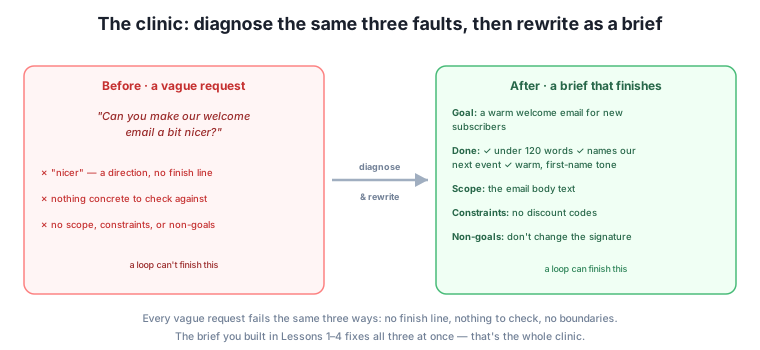
Run this diagnosis on any request and you’ll know exactly what’s missing and how to fix it. Now let’s work through five.
Here are five real-sounding Harborlight requests. For each, we’ll name the faults and rewrite it. Read the rewrite, but also try covering it and drafting your own first — the reps are the point.
Faults: “nicer” is a direction (no finish line); nothing checkable; no boundaries.
BRIEF
Context:     Automated welcome email to new Harborlight newsletter subscribers.
Goal:        A warm welcome email that makes a new subscriber glad they signed up.
Definition of done:
  - Under 120 words
  - Thanks them and names one upcoming event
  - Warm, first-name tone; addresses the reader as "you"
Scope:       The email body text only.
Constraints: No discount codes. Don't promise anything we don't offer.
Non-goals: Don't change the signature or the unsubscribe footer.Faults: “needs work” names no outcome; no criteria; no scope.
BRIEF
Context:     A single book's description on the Harborlight online shop.
Goal:        A clear, appealing description that helps a browser decide to buy.
Definition of done:
  - 40–70 words
  - States genre, and who it's for in one phrase
  - No spoilers; no invented praise or fake quotes
Scope:       This one description's text.
Constraints: Never invent review quotes or awards. Only claims we can support.
Non-goals: Don't change the price, title, or cover image.Faults: “something” isn’t an outcome; no format, length, or channel; nothing checkable.
BRIEF
Context:     Harborlight's two-week summer sale, promoted on Instagram.
Goal:        One Instagram post that drives shop visits during the sale.
Definition of done:
  - Under 60 words plus a one-line caption
  - States the sale dates and that it's in-store
  - One clear call to action ("come in this week")
Scope:       The post caption text.
Constraints: No specific discount percentages (not finalised). No hashtags.
Non-goals: Don't change our handle, bio, or profile image.Faults: “tidy up” is a direction; no criteria; and dangerously, no non-goals on a page with facts that must not change.
BRIEF
Context:     The About page on Harborlight's website.
Goal:        A cleaner, easier-to-read About page that still tells our story.
Definition of done:
  - Under 200 words
  - Keeps: family-run since 2009, our two weekly events, opening hours
  - No paragraph longer than three sentences
Scope:       The About page body text.
Constraints: Every fact above must remain accurate and present.
Non-goals: Don't change the opening-hours figures, the founding year, or the page title.Faults: the classic “better” (no finish line); no criteria; no design boundaries.
BRIEF
Context:     A printable one-page flyer for Harborlight's Saturday poetry night.
Goal:        A flyer that makes someone want to come and tells them how.
Definition of done:
  - Fits on one page (A4)
  - Shows event name, date, time, location, and "free entry"
  - No more than two fonts
Scope:       The flyer's text and layout.
Constraints: Details must match our event listing exactly. Uses our logo.
Non-goals:   Don't change our colours or logo. Don't add sponsors.
Notice how similar the work was each time, even though the tasks differ: name the outcome, list a few checkable criteria, set scope, add the genuinely hard rules, and protect what shouldn’t change. That repeatability is the skill. After a dozen of these, you’ll draft a solid brief almost as fast as you can read the original request.
Here’s a habit that turns this lesson into a permanent time-saver: don’t throw your briefs away. The tasks you brief tend to recur — a newsletter every week, a product description for every new book, a flyer for every event — so the brief you write today is the starting point for the same task next month. Keep them somewhere simple: a notes file, a doc, a folder of plain-text briefs named by task.
The payoff compounds. The first newsletter brief takes five minutes; the second week you tweak last week’s in thirty seconds; by month three you have a small library that covers most of what you do, and “writing a goal” becomes “grabbing the right brief and adjusting a line.” This library is also what you’ll feed into the tools ahead: a saved brief drops straight into a ChatGPT or Claude Project (Module 4), and its DNA reappears in the CLAUDE.md and AGENTS.md files you’ll write for file agents (Module 5). The briefs you write in this clinic aren’t disposable exercises — they’re the first entries in a toolkit you’ll carry through the rest of the course and your real work.
For the request “can you punch up our newsletter intro?”, name which of the three faults are present before writing anything.
Hint
All three. “Punch up” is a direction (no finish line); there are no checkable criteria; and there are no boundaries — nothing says how long, what to keep, or what not to touch. That’s the usual full set, which is why the brief is the standard fix.
Take five vague requests from your own work — real one-liners you’ve received or sent — and rewrite each as a brief using the template. This is the module project; keep them, you’ll reuse the skill constantly.
Hint
Run the three-fault diagnosis on each first, then fill the six-part template. If you get stuck on the definition of done, use the “what would I see?” trick from Lesson 2 to make the soft criteria checkable.
Take one brief you wrote and ask: if an automated agent followed this literally, with no common sense, could it produce something you’d hate while still passing every criterion? Fix the gap.
Hint
This is how you find missing constraints and non-goals. If “under 120 words, names an event, warm tone” could still let the agent invent an event or change your signature, add “only real, listed events” as a constraint and “don’t change the signature” as a non-goal. Literal-minded agents are exactly what Module 5’s loops will be.
Vague requests all fail the same three ways — no finish line (Lesson 1), nothing checkable (Lesson 2), and no boundaries (Lesson 3) — and a single object, the brief (Lesson 4), fixes all three at once. Running that three-fault diagnosis turns rewriting a request into a fast, almost mechanical routine: name the outcome, list a few checkable criteria, set scope, add the genuinely hard rules as constraints, and protect what shouldn’t change with non-goals. You worked through five real Harborlight requests and saw that the work was the same each time, even as the tasks differed — which is exactly what makes it a reusable skill. Writing finishable goals is no longer a concept; it’s a routine you can run on anything.
This clinic is the module cashing out: you can now take the messy, one-line requests real work actually produces and, in a couple of minutes, turn them into goals a loop can finish. That single skill removes most of the frustration people have with AI, because most of that frustration was never the model — it was launching loops at goals that had no end. You’ll use these briefs immediately: in Module 3 you’ll build the check that runs against your definition of done, and from Module 4 on you’ll paste these very briefs into the tools that run your loops. You’ve built the goals; next you’ll build the thing that judges them.
You’ve finished the module project: a repeatable routine that turns any vague request into a brief a loop can finish. That routine — diagnose the three faults, then fill the six-part template — is now yours for good. You’ve built goals that can finish; next, in Module 3, you’ll build the other half of every loop: the check that decides whether an attempt has actually met them. It’s the heart of the whole course.
Keep DATATWEETS free. Help fund practical data, AI, and engineering lessons for learners worldwide.
