Title here
Summary here
In the previous lesson you saw how the sigmoid function turns a straight-line score into a probability, which is what lets logistic regression do classification. In this lesson you go one level deeper: you fit a real model and learn to read what it is telling you. A logistic regression is not a black box. Every coefficient has a precise, business-friendly meaning, once you know how to translate it.
By the end of this lesson, you will be able to:
LogisticRegression model with scikit-learnintercept_ and coef_ attributesYou should be comfortable with the machine learning workflow from the foundations module and with the sigmoid idea from Lesson 1 of this module. Let’s begin.
Imagine you work at a telecom company. Every month some customers cancel their service, an event the business calls churn. Losing a customer is expensive, and winning them back is harder than keeping them in the first place. So the question that matters is: which customers are at risk of leaving, and why?
That second word, why, is the heart of this lesson. A model that only spits out “this customer will churn” is useful, but a model that also tells you what drives churn is far more valuable. It lets the business act: offer a longer contract, fix a pain point, target a retention campaign. Logistic regression is popular precisely because it answers both questions at once. It predicts, and it explains.
You will work with the real customer churn dataset, a classic record of telecom subscribers and whether each one canceled.
import pandas as pd

# download: https://datatweets.com/datasets/customer_churn.csv
df = pd.read_csv("customer_churn.csv")

print("Shape:", df.shape)
print(df["Churn"].value_counts().to_dict())
# Output:
# Shape: (7032, 12)
# {'No': 5163, 'Yes': 1869}
The dataset has 7,032 customers described by 11 features, plus the Churn column that records whether each one left. About 27 percent of customers churned.
churn_rate = (df["Churn"] == "Yes").mean()
print("churn rate:", round(churn_rate, 3))
# Output: churn rate: 0.266
The features are already model-ready
The version of the dataset you load here has already been prepared for modeling: the numeric columns are present as numbers, and the categorical columns (like Contract and InternetService) have been turned into 0/1 indicator columns through one-hot encoding. That is why you see names like Contract_Two year and InternetService_Fiber optic. You will learn how to do this encoding yourself in a later lesson; for now it lets you focus entirely on interpreting the fitted model.
Logistic regression in scikit-learn follows the exact same three-step pattern you already know: prepare your features and target, instantiate the model, then call .fit(). The only new idea in this lesson comes after fitting, when you read the coefficients.
First, separate the features from the target and convert the text target into numbers.
from sklearn.model_selection import train_test_split

feature_cols = [
    "tenure", "MonthlyCharges", "TotalCharges", "SeniorCitizen",
    "Contract_One year", "Contract_Two year",
    "InternetService_Fiber optic", "InternetService_No",
    "Partner_Yes", "Dependents_Yes", "PaperlessBilling_Yes",
]

X = df[feature_cols]                     # features
y = (df["Churn"] == "Yes").astype(int)   # target: 1 = churned, 0 = stayed

X_train, X_test, y_train, y_test = train_test_split(
    X, y, test_size=0.25, random_state=42, stratify=y
)
Just as in the foundations module, the numeric features sit on very different scales: tenure runs from 0 to about 72 months, while TotalCharges reaches into the thousands of dollars. To make the coefficients comparable to each other, you standardize the features so each one has a mean of 0 and a standard deviation of 1.
from sklearn.preprocessing import StandardScaler

scaler = StandardScaler()
X_train_scaled = scaler.fit_transform(X_train)  # fit on TRAIN only
X_test_scaled = scaler.transform(X_test)        # apply same transform to test
Now build and train the model. The interface is identical to the KNN classifier you met earlier, just a different import.
from sklearn.linear_model import LogisticRegression

model = LogisticRegression(max_iter=1000, random_state=42)
model.fit(X_train_scaled, y_train)

print("Model trained!")
# Output: Model trained!
That is the whole training step. Behind that single .fit() call, scikit-learn searched for the set of coefficients that best separates churners from non-churners. The interesting work now is understanding the numbers it found.
Why standardize before interpreting?
You scaled the features so every coefficient is expressed in the same unit: “one standard deviation of this feature.” Without scaling, a coefficient on TotalCharges (measured in dollars) and one on tenure (measured in months) would not be directly comparable, because a one-unit change means something completely different for each. Standardizing puts them on equal footing, so a bigger coefficient genuinely means a bigger effect.
Here is the single most important idea in this lesson. In ordinary linear regression, a coefficient directly changes the predicted number: add one to the feature, add the coefficient to the output. Logistic regression looks almost identical, but there is a twist. The linear part does not act on the probability directly. It acts on the log-odds of the outcome.
Let be the probability that a customer churns. The odds of churn are the ratio of churning to not churning, , and the log-odds (also called the logit) are the natural logarithm of that ratio. Logistic regression assumes this log-odds is a straight-line function of the features:
So each coefficient tells you how much the log-odds of churn change when feature increases by one unit (one standard deviation, since you scaled). The coefficients are perfectly linear, but on the log-odds scale, not on the probability scale.
This is why you cannot read a logistic coefficient as “this raises the churn probability by 0.3.” It does not. It raises the log-odds by its value, and log-odds are not intuitive on their own. Fortunately, there is a clean way to translate them into something a business person can act on.
It helps to keep three views of the same outcome straight in your head:
   probability            odds                  log-odds (logit)
   -----------            ----                  ----------------
   p                      p / (1 - p)           log( p / (1 - p) )
   between 0 and 1        between 0 and inf      between -inf and +inf
   "how likely"          "how many times more   "the linear score the
                          likely than not"        model actually fits"
The model fits the log-odds because that quantity can range freely from negative to positive infinity, which is exactly what a linear combination produces. You will interpret in terms of odds, because odds are the most intuitive of the three. The bridge between them is the exponential function, which you will use next.
Start with the simplest parameter, the intercept , stored in the intercept_ attribute.
print("intercept:", round(model.intercept_[0], 3))
# Output: intercept: -1.703
What does mean? Set every feature to zero in the logit equation and everything but the intercept disappears:
So the intercept is the log-odds of churn for a customer whose features are all zero. Because you standardized, “all features zero” means a customer sitting at the average of every numeric feature and at the baseline category of every indicator. Log-odds are hard to feel, so exponentiate to get the odds:
import numpy as np

baseline_odds = np.exp(model.intercept_[0])
print("baseline odds:", round(baseline_odds, 3))
# Output: baseline odds: 0.182
Odds of about 0.18 means this baseline customer is roughly five times more likely to stay than to churn (since ). That makes sense: only about a quarter of customers churn overall, so the average customer is far more likely to stay. A negative intercept always corresponds to odds below 1, which means the event is less likely than not.
Read the sign first
Before doing any arithmetic, glance at the sign of a log-odds value. Positive log-odds mean the event is more likely than not (odds above 1). Negative log-odds mean it is less likely than not (odds below 1). Exactly zero log-odds means a coin flip, with odds of exactly 1. This quick check tells you the direction of every effect at a glance.
Now the part that makes logistic regression so useful. Look at the coefficient for tenure, how long a customer has been with the company.
coefs = dict(zip(feature_cols, model.coef_[0]))
print("tenure coef:", round(coefs["tenure"], 3))
# Output: tenure coef: -1.337
The coefficient is . On the log-odds scale, a one-standard-deviation increase in tenure lowers the log-odds of churn by 1.337. That is correct but unintuitive. To make it speak plainly, exponentiate it to get the odds ratio.
The reason exponentiating works is worth seeing once. Compare the odds at two feature values that differ by one unit. Call the odds when the feature is at some value , and the odds after a one-unit increase . From the logit equation, the difference in log-odds is exactly the coefficient:
That ratio is the odds ratio: the factor by which the odds get multiplied when the feature goes up by one unit. Compute it for tenure:
tenure_or = np.exp(coefs["tenure"])
print("tenure odds ratio:", round(tenure_or, 3))
# Output: tenure odds ratio: 0.263
An odds ratio of 0.263 has a clean reading: each one-standard-deviation increase in tenure multiplies the odds of churn by about 0.26, cutting them to roughly a quarter. In plain English, the longer a customer has been with the company, the far less likely they are to leave. That matches intuition, and now you have it as a precise, defensible number.
The rules for reading an odds ratio are simple:
Now contrast tenure with a feature that pushes the other way, TotalCharges, the cumulative amount a customer has paid.
tc_coef = coefs["TotalCharges"]
tc_or = np.exp(tc_coef)
print("TotalCharges coef:", round(tc_coef, 3))
print("TotalCharges odds ratio:", round(tc_or, 3))
# Output:
# TotalCharges coef: 0.631
# TotalCharges odds ratio: 1.879
Here the coefficient is positive (), so the odds ratio is above 1 (). Each one-standard-deviation increase in total charges multiplies the odds of churn by about 1.88, nearly doubling them. The sign tells you the direction; the size tells you the strength.
Odds ratio, not probability ratio
An odds ratio of 1.88 does not mean the customer is 1.88 times more likely to churn. It means the odds are multiplied by 1.88. Because the odds-to-probability relationship is non-linear, the same odds ratio shifts the probability a lot when churn is near 50 percent and only a little when it is near 0 or 100 percent. Keep odds ratios in odds language, and use predict_proba when you specifically need a probability.
Because you standardized the features, every coefficient is on the same scale, so you can line them up and compare magnitudes directly. Sorting them turns the model into a ranked story of what drives churn.
import numpy as np

# pair each feature with its coefficient and odds ratio, sorted
order = np.argsort(model.coef_[0])
for i in order:
    name = feature_cols[i]
    coef = model.coef_[0][i]
    print(f"{name:<28} coef={coef:+.3f}  odds_ratio={np.exp(coef):.3f}")
# Output:
# tenure                       coef=-1.337  odds_ratio=0.263
# Contract_Two year            coef=-0.695  odds_ratio=0.499
# InternetService_No           coef=-0.407  odds_ratio=0.665
# Contract_One year            coef=-0.329  odds_ratio=0.719
# Dependents_Yes               coef=-0.124  odds_ratio=0.884
# MonthlyCharges               coef=-0.113  odds_ratio=0.894
# Partner_Yes                  coef=+0.019  odds_ratio=1.019
# SeniorCitizen                coef=+0.118  odds_ratio=1.125
# PaperlessBilling_Yes         coef=+0.208  odds_ratio=1.231
# InternetService_Fiber optic  coef=+0.499  odds_ratio=1.647
# TotalCharges                 coef=+0.631  odds_ratio=1.879
A bar chart makes the pattern obvious at a glance. Features with negative coefficients (to the left of zero) protect against churn; features with positive coefficients (to the right) raise the risk, and the length of each bar shows how strong the effect is.
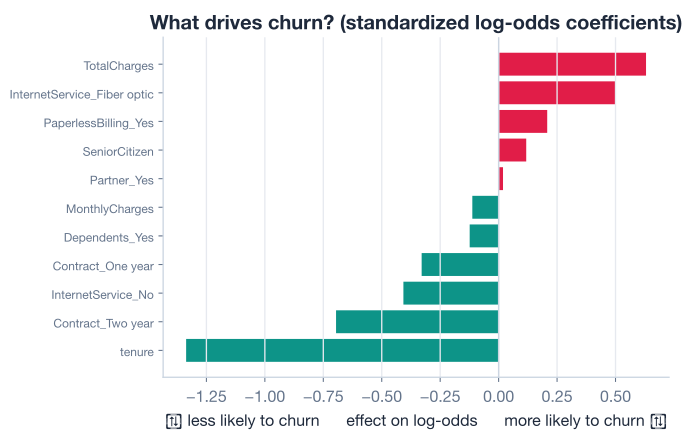
Read top to bottom, this is a complete business briefing:
tenure is by far the strongest protective factor. Long-tenured customers are stable; the odds of churn shrink to about a quarter (odds ratio 0.263) per standard deviation of tenure.Contract_Two year roughly halves the odds of churn (odds ratio 0.499) compared with the baseline month-to-month contract. Locking customers into longer contracts clearly keeps them.InternetService_Fiber optic and TotalCharges are the biggest churn drivers, with odds ratios of 1.647 and 1.879. Fiber customers and high-total-spend customers leave more often, a strong signal for the retention team to investigate.Partner_Yes (odds ratio 1.019), barely move the odds at all. The model is telling you they carry little independent information about churn.This single chart is why teams reach for logistic regression even when fancier models exist. It does not just predict; it hands you a prioritized list of levers.
Coefficients are ‘controlling for’ the others
In a model with many predictors, each coefficient describes the effect of that feature holding the others fixed. Researchers call this “controlling for” the other variables. So the TotalCharges odds ratio of 1.879 is the effect of total charges after accounting for tenure, contract type, and everything else in the model, not its effect in isolation.
Odds and odds ratios are the natural language for interpreting the model, but sometimes you genuinely need a probability for a specific customer, for example to rank everyone by churn risk. The predict_proba method gives you that, applying the sigmoid you met in Lesson 1 to the log-odds.
probs = model.predict_proba(X_test_scaled)
print(probs[:3])
# Output:
# [[0.91 0.09]
#  [0.62 0.38]
#  [0.78 0.22]]
Each row has two numbers: the probability of staying (class 0) and the probability of churning (class 1), which always sum to 1. The first customer has only a 9 percent chance of churning; the second is much riskier at 38 percent.
Because tenure dominates the model, you can see the whole story by plotting predicted churn probability against tenure while holding the other features at their average. The curve is the sigmoid in action: high churn risk for brand-new customers, falling steeply as tenure grows, then leveling off for long-term loyalists.
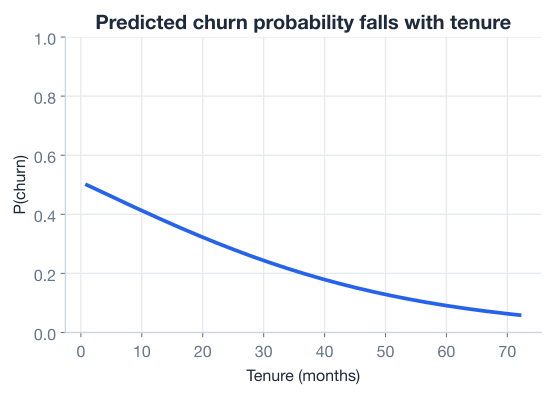
Notice that the relationship is not a straight line, even though the coefficient was. That is the whole point of the logit: the model is linear on the log-odds scale, which becomes an S-shaped curve once you convert back to probability. A constant change in log-odds moves the probability a lot in the middle of the curve and very little near the flat ends.
Now it is your turn. Try these before checking the hints. Assume the fitted model, feature_cols, and X_test_scaled from the lesson are available.
Find the coefficient for Contract_Two year, convert it to an odds ratio, and write one sentence explaining what it means for a customer’s churn risk.
import numpy as np

# Your code here
Hint
Build a lookup with coefs = dict(zip(feature_cols, model.coef_[0])), then exponentiate: np.exp(coefs["Contract_Two year"]). You should get about 0.499, meaning a two-year contract roughly halves the odds of churn compared with the month-to-month baseline.
A coefficient’s magnitude (distance from zero) measures how strongly it affects churn, regardless of direction. Print the features sorted by the absolute value of their coefficients, largest first.
import numpy as np

# Your code here
Hint
Use np.argsort(np.abs(model.coef_[0]))[::-1] to get indices ordered by absolute coefficient, then loop over them and print feature_cols[i] alongside the coefficient. tenure (coef -1.337) should come out on top, with Partner_Yes (coef +0.019) at the bottom.
Use predict_proba to get each test customer’s churn probability (the second column), and print how many test customers have a predicted churn probability above 0.5.
import numpy as np

# Your code here
Hint
The churn probability is column index 1: churn_probs = model.predict_proba(X_test_scaled)[:, 1]. Then count with (churn_probs > 0.5).sum(). This is a preview of the next lesson, where you will turn these probabilities into yes/no predictions with a threshold.
Excellent work! You fitted a real logistic regression model and, more importantly, learned to translate its parameters into plain business language. Let’s review what you learned.
Fitting the Model
LogisticRegression uses the same scikit-learn pattern as every other model: instantiate, then .fit()model.intercept_ and the feature coefficients in model.coef_The Log-Odds Scale
Odds Ratios
Reading the Model
tenure and a two-year contract are the strongest protective factors, while TotalCharges and fiber internet drive churn up the mostpredict_proba converts the log-odds back into a probability via the sigmoid, producing an S-shaped curveMost powerful models are hard to explain. Logistic regression is the rare exception that is both genuinely useful and fully interpretable, which is why it remains a workhorse in business, medicine, and credit scoring decades after fancier methods appeared. When a regulator asks “why did the model flag this customer,” or a manager asks “what should we actually change,” an odds ratio gives you a precise, defensible answer.
The skill you practiced here, moving fluently between coefficients, log-odds, odds ratios, and probabilities, is exactly what separates someone who can run .fit() from someone who can explain a model to a decision-maker. Every interpretation you wrote, from “tenure cuts churn odds to a quarter” to “fiber nearly doubles them,” came straight from numbers the model handed you. That is the quiet power of a well-understood linear model.
You can now fit a logistic regression and explain exactly what it has learned. But interpreting coefficients does not tell you whether the model’s predictions are any good. In the next lesson, you will measure that directly with a confusion matrix and the metrics built on it.
Measure how well your classifier actually predicts using the confusion matrix, accuracy, precision, and recall.
Return to the Classification module overview.
You have learned to read a logistic regression the way a practitioner does, turning raw coefficients into a ranked story of what drives an outcome. Keep that habit as you go: whenever you fit a model, ask not only “how accurate is it” but “what is it telling me about the problem.” The odds ratio will follow you well beyond this course, into any field where decisions hinge on understanding why, not just what.