Title here
Summary here
This lesson teaches you how to judge a classifier honestly. In the previous lessons you built a logistic regression model that predicts customer churn, and you measured it with a single number: accuracy. Here you will discover why that single number can be dangerously misleading, and you will learn the richer set of metrics that practitioners actually rely on.
By the end of this lesson, you will be able to:
You should have completed the earlier classification lessons and be comfortable with fitting a LogisticRegression model in scikit-learn, plus basic pandas and NumPy. Let’s begin.
Imagine you run the retention team at a subscription business. Every month some customers cancel, and you want a model that flags who is about to leave so you can intervene with a discount or a phone call. You train a logistic regression classifier, score it on held-out data, and get an accuracy of about 0.80. Eighty percent correct sounds great. Should you ship it?
Not yet. Here is the trap. In this dataset, only about 27 percent of customers actually churn. That means a lazy model that simply predicts “nobody will churn” for every single customer would be right about 73 percent of the time, just by ignoring the problem entirely. A model can score high on accuracy while completely failing at the one task you care about: catching the customers who are about to leave.
This is the central lesson of model evaluation. Accuracy treats every mistake as equal and every class as equally important, but in the real world they rarely are. Missing a customer who churns costs you a paying subscriber. Flagging a loyal customer who was never going to leave costs you a wasted discount. Those are different errors with different price tags, and accuracy hides both of them inside one blurry number.
To see what a model truly does, you need to break its predictions down by which class it got right and which way it went wrong. That breakdown is the confusion matrix.
The imbalance problem
Whenever one class is much rarer than the other (churn, fraud, disease, defaults), accuracy flatters lazy models. A classifier that always predicts the majority class can look excellent on accuracy while being useless. Always check the class balance before you trust an accuracy score.
You will work with the real Customer Churn dataset, where each row is one telecom customer and the target records whether they cancelled their service. This is the same data you modeled in the previous lessons, so the setup will look familiar.
import numpy as np
import pandas as pd
from sklearn.model_selection import train_test_split
from sklearn.linear_model import LogisticRegression

# download: https://datatweets.com/datasets/customer_churn.csv
churn = pd.read_csv("customer_churn.csv")

print("Shape:", churn.shape)
print(churn["Churn"].value_counts().to_dict())
# Output:
# Shape: (7032, 12)
# {'No': 5163, 'Yes': 1869}
The dataset has 7,032 customers and 12 columns. The target Churn is the text "Yes" or "No". Notice the balance straight away: 1,869 customers churned and 5,163 did not.
# What fraction of customers churned?
print("churn rate:", round((churn["Churn"] == "Yes").mean(), 3))
# Output: churn rate: 0.266
Only about 27 percent of customers churned. Keep that number in mind, because it is exactly the imbalance that makes accuracy untrustworthy here.
Now build the features and target, split the data, and fit a logistic regression. The features are already numeric and one-hot encoded from the earlier lesson, so you can model them directly.
feature_cols = [
    "tenure", "MonthlyCharges", "TotalCharges", "SeniorCitizen",
    "Contract_One year", "Contract_Two year",
    "InternetService_Fiber optic", "InternetService_No",
    "Partner_Yes", "Dependents_Yes", "PaperlessBilling_Yes",
]

X = churn[feature_cols]
y = (churn["Churn"] == "Yes").astype(int)   # 1 = churned, 0 = stayed

X_train, X_test, y_train, y_test = train_test_split(
    X, y, test_size=0.25, random_state=42, stratify=y
)

model = LogisticRegression(max_iter=1000, random_state=42)
model.fit(X_train, y_train)

print("Test accuracy:", round(model.score(X_test, y_test), 3))
# Output: Test accuracy: 0.796
The model scores about 0.796 on the test set. That is your starting number. For the rest of the lesson you will pull that number apart to see what it is really made of.
Every prediction a binary classifier makes falls into one of four buckets. The customer either churned or stayed, and the model either predicted churn or predicted stay. Crossing those two facts gives a 2x2 grid called the confusion matrix.
Before going further, fix the vocabulary. By convention the class you care about detecting, churn here, is the positive class (label 1), and the other class is the negative class (label 0). The four buckets are then:
The two “True” cells are the model’s successes; the two “False” cells are its two distinct kinds of mistakes. scikit-learn computes the whole grid for you with confusion_matrix.
from sklearn.metrics import confusion_matrix

predictions = model.predict(X_test)
cm = confusion_matrix(y_test, predictions)
print(cm)
# Output:
# [[1155  136]
#  [ 222  245]]
scikit-learn orders the matrix with the negative class first. Reading the grid: the top-left is TN, top-right is FP, bottom-left is FN, and bottom-right is TP.
tn, fp, fn, tp = cm.ravel()
print("TN:", tn, " FP:", fp)
print("FN:", fn, " TP:", tp)
# Output:
# TN: 1155  FP: 136
# FN: 222  TP: 245
So on the 1,758 test customers, the model made 1,155 + 245 = 1,400 correct calls and 136 + 222 = 358 mistakes. The picture below lays the four counts out in the familiar grid so you can see them at a glance.
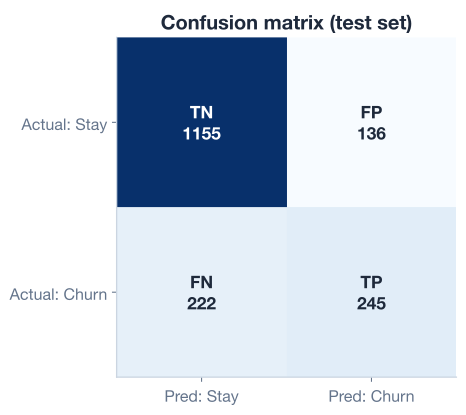
Look closely at the bottom row. Of the 467 customers who actually churned (222 + 245), the model only caught 245 of them. It missed 222 real churners by predicting they would stay. That weakness is completely invisible in the 0.796 accuracy figure, and it is exactly the kind of failure the confusion matrix exposes.
Accuracy from the matrix
Accuracy is just the two correct cells divided by everything: . Here that is , matching the score from before. The matrix contains accuracy, but it contains far more besides.
The confusion matrix is the raw material. From it you derive metrics that each answer a specific question. The first is sensitivity, also called recall or the true positive rate.
Sensitivity asks: of all the customers who actually churned, what fraction did the model correctly catch? It focuses entirely on the positive class.
The denominator, , is everyone who truly belongs to the positive class: the churners the model caught plus the churners it missed. Sensitivity is therefore a conditional measure. Given that a customer really did churn, what is the probability the model flagged them?
sensitivity = tp / (tp + fn)
print("Sensitivity (recall):", round(sensitivity, 3))
# Output: Sensitivity (recall): 0.525
A sensitivity of 0.525 means the model catches only about 53 percent of the customers who are genuinely about to leave. Nearly half of all real churners slip through unnoticed. For a retention team, that is a serious limitation: every missed churner is a paying customer you never got a chance to save.
Sensitivity is the metric you reach for whenever missing a positive case is expensive: catching disease, detecting fraud, flagging churn. In those settings you would rather tolerate some false alarms than let real cases go undetected.
Recall and sensitivity are the same thing
You will see this metric called “recall” in machine learning circles and “sensitivity” or “true positive rate” in statistics and medicine. They are identical: . Don’t let the different names trip you up.
Sensitivity describes the positive class. Its mirror image, specificity, describes the negative class. It is also called the true negative rate.
Specificity asks: of all the customers who actually stayed, what fraction did the model correctly leave alone?
The denominator, , is everyone who truly belongs to the negative class: the stayers the model correctly recognized plus the stayers it wrongly flagged. Like sensitivity, it is conditional: given that a customer really stayed, what is the probability the model said so?
specificity = tn / (tn + fp)
print("Specificity:", round(specificity, 3))
# Output: Specificity: 0.895
Specificity is 0.895. The model is excellent at recognizing loyal customers, correctly leaving about 90 percent of them alone. Out of 1,291 customers who stayed (1,155 + 136), it raised a false alarm on only 136.
Now the imbalance story becomes clear. The model is strong on the majority class (specificity 0.895) and weak on the minority class (sensitivity 0.525). Because stayers vastly outnumber churners, the strong specificity props up the overall accuracy and masks the weak sensitivity. One blurry accuracy number averaged two very different performances together. This is precisely why you split the matrix apart.
You favor specificity when a false alarm is the costly error, for example a spam filter that must almost never send a real, important email to the junk folder.
Sensitivity and specificity both start from the true class: they ask, given the real answer, how often was the model right? The next metric flips the question around. Precision, also known as positive predictive value (PPV), starts from the model’s prediction.
Precision asks: of all the customers the model flagged as churners, what fraction actually churned?
The denominator, , is everyone the model predicted to be positive: the real churners it caught plus the false alarms. So precision is also conditional, but on the prediction rather than the truth. Given that the model says “this customer will churn,” what is the probability it is correct?
precision = tp / (tp + fp)
print("Precision (PPV):", round(precision, 3))
# Output: Precision (PPV): 0.643
Precision is 0.643. When the model raises a churn flag, it is right about 64 percent of the time; the other 36 percent are loyal customers caught by mistake. If each flag triggers a costly retention offer, precision tells you how much of that budget is well spent.
The contrast with sensitivity is worth pinning down, because the two are easy to confuse:
Both have on top, but the denominators differ. Sensitivity divides by everyone who is truly positive; precision divides by everyone the model called positive. Keeping those denominators straight is the whole game.
Precision and recall pull against each other
You can usually raise one of these metrics by sacrificing the other. Flag more customers as churners and you catch more real ones (higher recall) but also rack up more false alarms (lower precision). Flag fewer and the reverse happens. There is no free lunch; the right balance depends on the relative cost of a missed churn versus a wasted offer. You will explore this tradeoff directly in the next lesson.
You have now computed four numbers from one confusion matrix. Here is the full picture side by side.
from sklearn.metrics import accuracy_score

predictions = model.predict(X_test)
tn, fp, fn, tp = confusion_matrix(y_test, predictions).ravel()

print("Accuracy:   ", round(accuracy_score(y_test, predictions), 3))
print("Sensitivity:", round(tp / (tp + fn), 3))
print("Specificity:", round(tn / (tn + fp), 3))
print("Precision:  ", round(tp / (tp + fp), 3))
# Output:
# Accuracy:    0.796
# Sensitivity: 0.525
# Specificity: 0.895
# Precision:   0.643
Read as a story, these four numbers say something the single accuracy figure never could. The model is a solid all-rounder (accuracy 0.796) that is genuinely good at spotting loyal customers (specificity 0.895) and reasonably trustworthy when it does raise a flag (precision 0.643), but it is weak at the job that matters most for retention: it catches only about half of the customers who actually churn (sensitivity 0.525).
scikit-learn can also print these for you in one call. The classification_report shows precision and recall (sensitivity) for each class at once, which is a handy sanity check.
from sklearn.metrics import classification_report

print(classification_report(y_test, predictions, digits=3))
# The row for class 1 (churn) shows precision 0.643 and recall 0.525,
# matching the values you computed by hand from the confusion matrix.
Which metric should you optimize? That depends entirely on the cost of each error in your business. There is no universally “best” metric, only the metric that matches the question you are actually asking. For a churn team that wants to save as many leaving customers as possible, sensitivity is the number to push up, even at some cost to precision.
Now it is your turn. Try these before checking the hints. Each one uses the trained model, X_test, and y_test from the lesson.
Without using confusion_matrix, count the true positives, true negatives, false positives, and false negatives directly with boolean comparisons on y_test and the model’s predictions, then compute sensitivity. Confirm you get 0.525.
predictions = model.predict(X_test)

# Your code here
Hint
A true positive is a row where both the truth and the prediction equal 1. Count them with ((y_test == 1) & (predictions == 1)).sum(). A false negative is ((y_test == 1) & (predictions == 0)).sum(). Sensitivity is tp / (tp + fn), which should give 0.525.
The model’s specificity (0.895) is far higher than its sensitivity (0.525). In one or two sentences, explain why this gap exists for this dataset and why the overall accuracy of 0.796 sits much closer to the specificity than to the sensitivity.
# No code needed — write your explanation as a comment.Hint
Recall that only about 27 percent of customers churn. Because the negative (stayed) class dominates the test set, the model’s strong performance on that class carries most of the weight in the accuracy average, while its weak performance on the small positive class barely moves the overall number.
Instead of computing precision and recall by hand, import precision_score and recall_score from sklearn.metrics and use them on y_test and predictions. Confirm they match the hand-computed values of 0.643 and 0.525.
from sklearn.metrics import precision_score, recall_score

# Your code here
Hint
Both functions take the true labels first and the predictions second: precision_score(y_test, predictions) and recall_score(y_test, predictions). By default they report the metric for the positive class (label 1), so you should see 0.643 and 0.525, exactly matching the manual calculations.
Well done! You have moved beyond a single accuracy score and learned to evaluate a classifier the way professionals do. Let’s review what you covered.
Why Accuracy Misleads
The Confusion Matrix
confusion_matrix(y_test, predictions) returns the grid as [[TN, FP], [FN, TP]]Class-Focused Metrics
Prediction-Focused Metrics
Choosing a Metric
The metrics in this lesson are the difference between a model that looks good on a slide and a model that actually helps your business. The churn classifier you evaluated had a respectable 0.796 accuracy, yet it quietly missed nearly half of the customers it was built to catch. Only by splitting the confusion matrix into sensitivity, specificity, and precision did that weakness come into focus.
This habit transfers to every classification problem you will ever build. Whenever the classes are imbalanced, and in the real world they usually are, you must look past accuracy and ask which errors you can afford and which you cannot. The confusion matrix and the metrics derived from it give you that vocabulary, and they set up the next question naturally: if the default decision threshold produces this balance of errors, what happens when you change it?
You now know how to measure a classifier honestly across all four kinds of outcomes. In the next lesson, you will put these metrics to work by tuning the decision threshold and reading the ROC curve to find the operating point that best fits your business.
Tune the decision threshold and use the ROC curve to balance recall against precision.
Return to the Classification module overview.
Evaluation is where machine learning meets reality. A model is only as valuable as your ability to judge it, and the confusion matrix gives you a clear-eyed view of exactly what your classifier does well and where it falls short. Carry this mindset into every project: before you celebrate an accuracy score, break it apart and ask what kinds of mistakes hide inside it. That discipline is what separates a model that demos well from one that earns its place in production.