Title here
Summary here
In the previous lesson you trained a logistic regression to predict customer churn and measured it with a confusion matrix at the default threshold. This lesson is where that model starts earning its keep. You will look underneath the single accuracy number, work with the probabilities the model actually produces, and learn how to turn those probabilities into decisions that serve a real business goal.
By the end of this lesson, you will be able to:
predict_proba to inspect the probabilities behind every predictionThis lesson assumes you have completed Lessons 1 through 3 of this module and are comfortable training a LogisticRegression, reading a confusion matrix, and computing sensitivity, specificity, and precision.
When you call model.predict(X), scikit-learn hands back a clean column of 0s and 1s. That tidiness hides something important: a logistic regression never actually decides in 0s and 1s. Underneath, it produces a probability between 0 and 1 for every customer, and only at the very last moment does it round that probability into a hard label.
That rounding step uses a decision threshold. By default the threshold is 0.5: any customer whose predicted churn probability is at least 0.5 is labeled 1 (will churn), and everyone below is labeled 0 (will stay). The threshold is not part of what the model learned. It is a separate dial you control, and choosing it well is one of the most practical skills in classification.
Before you can move the dial, you need to see the probabilities themselves. Let’s reload the churn data and refit the model from the previous lesson so the rest of this lesson has something concrete to work with.
import numpy as np
import pandas as pd
from sklearn.model_selection import train_test_split
from sklearn.preprocessing import StandardScaler
from sklearn.linear_model import LogisticRegression

# download: https://datatweets.com/datasets/customer_churn.csv
df = pd.read_csv("customer_churn.csv")

feature_cols = [
    "tenure", "MonthlyCharges", "TotalCharges", "SeniorCitizen",
    "Contract_One year", "Contract_Two year",
    "InternetService_Fiber optic", "InternetService_No",
    "Partner_Yes", "Dependents_Yes", "PaperlessBilling_Yes",
]

X = df[feature_cols]
y = (df["Churn"] == "Yes").astype(int)

X_train, X_test, y_train, y_test = train_test_split(
    X, y, test_size=0.25, random_state=42, stratify=y
)

scaler = StandardScaler()
X_train = scaler.fit_transform(X_train)
X_test = scaler.transform(X_test)

model = LogisticRegression(max_iter=1000, random_state=42)
model.fit(X_train, y_train)

print("Test accuracy:", round(model.score(X_test, y_test), 3))
# Output: Test accuracy: 0.796
This is the same model you evaluated last lesson: about 79.6 percent accurate on the held-out test set. Accuracy is a fine headline, but it commits you to a single threshold and hides everything interesting. Let’s pry it open.
The method that reveals the probabilities is predict_proba. For a binary classifier it returns one row per observation and two columns: the probability of class 0 and the probability of class 1. The two columns always sum to 1.
probabilities = model.predict_proba(X_test)

print(probabilities[:5])
# Output:
# [[0.78 0.22]
#  [0.34 0.66]
#  [0.91 0.09]
#  [0.62 0.38]
#  [0.55 0.45]]
The first column is P(stay), the second is P(churn). The second column is the one you almost always want, so it is worth pulling out on its own.
churn_probs = model.predict_proba(X_test)[:, 1]

print(np.round(churn_probs[:5], 2))
# Output: [0.22 0.66 0.09 0.38 0.45]
Now compare these to the hard predictions model.predict would give at the default threshold of 0.5.
hard_preds = (churn_probs >= 0.5).astype(int)

print("Probabilities:", np.round(churn_probs[:5], 2))
print("At 0.5:       ", hard_preds[:5])
# Output:
# Probabilities: [0.22 0.66 0.09 0.38 0.45]
# At 0.5:        [0 1 0 0 0]
Look closely at the last two customers. One sits at 0.38 and the other at 0.45. Both are labeled 0 (will stay), but the 0.45 customer is genuinely on the fence; the model is nearly split on them. The hard label throws that nuance away. Two customers with very different risk get the same flat 0. This is exactly the information the threshold lets you recover.
The model outputs confidence, not certainty
A predicted probability of 0.45 does not mean the customer will definitely stay. It means that among customers who look like this one, the model expects roughly 45 percent to churn. Treating probabilities as graded confidence rather than yes/no verdicts is what unlocks everything in the rest of this lesson.
Here is the central idea of this lesson: you do not have to keep the threshold at 0.5. It is just the default. You can set it anywhere between 0 and 1, and where you set it should depend on what mistake you can least afford to make.
Recall the two kinds of error from the previous lesson:
Lowering the threshold makes the model more eager to shout “churn.” That catches more real churners (sensitivity goes up) but also flags more loyal customers by mistake (specificity goes down). Raising the threshold does the opposite: the model only flags customers it is very sure about, so it misses more churners but wastes fewer offers.
To see this concretely, define a small helper that scores the model at any threshold you choose. The metrics are the same ones from Lesson 3, computed straight from the confusion matrix.
def metrics_at_threshold(y_true, probs, threshold):
    preds = (probs >= threshold).astype(int)
    tp = ((preds == 1) & (y_true == 1)).sum()
    tn = ((preds == 0) & (y_true == 0)).sum()
    fp = ((preds == 1) & (y_true == 0)).sum()
    fn = ((preds == 0) & (y_true == 1)).sum()
    sensitivity = tp / (tp + fn)            # share of real churners caught
    specificity = tn / (tn + fp)            # share of stayers correctly cleared
    precision = tp / (tp + fp) if (tp + fp) else 0.0
    return sensitivity, specificity, precision
Now sweep the threshold from 0.1 to 0.9 and watch the three metrics move.
y_test_arr = y_test.values

print(f"{'thresh':>6}  {'sens':>5}  {'spec':>5}  {'prec':>5}")
for t in np.arange(0.1, 0.95, 0.1):
    sens, spec, prec = metrics_at_threshold(y_test_arr, churn_probs, t)
    print(f"{t:>6.1f}  {sens:>5.3f}  {spec:>5.3f}  {prec:>5.3f}")
# Output:
# thresh   sens   spec   prec
#    0.1  0.953  0.466  0.392
#    0.2  0.880  0.616  0.453
#    0.3  0.777  0.721  0.502
#    0.4  0.687  0.820  0.580
#    0.5  0.525  0.895  0.643
#    0.6  0.358  0.938  0.676
#    0.7  0.105  0.989  0.778
#    0.8  0.000  1.000  0.000
#    0.9  0.000  1.000  0.000
Read this table slowly, because it is the heart of the lesson. At a very low threshold of 0.1 the model catches 95.3 percent of churners, but its specificity collapses to 0.466: it is flagging more than half of your loyal customers too. At the default 0.5 you catch only 52.5 percent of churners but rarely bother a stayer. Push past 0.7 and the model becomes so cautious it catches almost no one, and by 0.8 it never predicts churn at all, which is why both sensitivity and precision fall to zero.
The picture below plots all three curves together so you can see the trade-off at a glance.
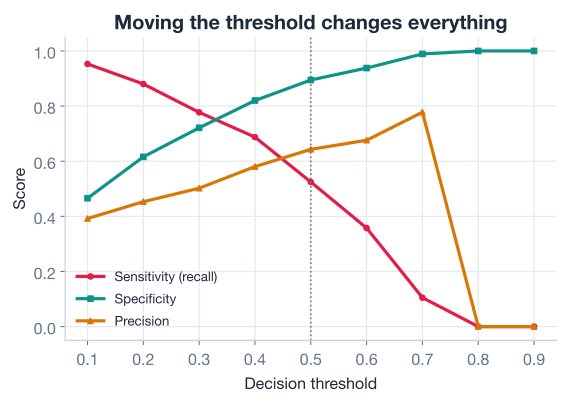
There is no universally correct threshold on this chart. The crossing point looks balanced, but “balanced” is rarely what a business wants. The right choice falls out of the cost of each mistake, which is the next thing to pin down.
Accuracy alone will steer you wrong here
At the default threshold the model is 79.6 percent accurate yet catches barely half the churners. Because only about 27 percent of customers actually churn, a model could score high accuracy while quietly missing the very people you most need to find. Once you care about a specific class, watch sensitivity and precision, not accuracy.
A threshold is not a statistics question; it is a business question. To choose one, you have to say out loud what you are trying to achieve and what each error costs.
Imagine the retention team’s plan: every customer flagged as a likely churner gets a phone call and a modest discount offer. Two facts shape the decision.
When false negatives hurt much more than false positives, you want high sensitivity, so you deliberately choose a low threshold. Suppose the team decides it must catch at least 85 percent of churners. Reading the sweep table, a threshold of 0.2 delivers sensitivity 0.880 while keeping specificity at a workable 0.616.
sens, spec, prec = metrics_at_threshold(y_test_arr, churn_probs, 0.2)
print(f"At threshold 0.2 -> sensitivity={sens:.3f}, "
      f"specificity={spec:.3f}, precision={prec:.3f}")
# Output: At threshold 0.2 -> sensitivity=0.880, specificity=0.616, precision=0.453

preds_02 = (churn_probs >= 0.2).astype(int)
print("Customers flagged for a retention call:", preds_02.sum())
# Output: Customers flagged for a retention call: 907
At this threshold the model catches 88 percent of the customers who would have churned. The cost is precision: only about 45 percent of the flagged customers were truly going to leave, so the team spends some effort on loyal customers. Given that a wasted call is cheap and a lost customer is not, that is exactly the trade this business should make.
Now flip the scenario. Suppose instead of phone calls the retention offer is an expensive concierge package that only makes sense for customers who are genuinely about to leave. Now a false positive is costly, so you want high precision and accept that you will miss some churners. A higher threshold like 0.6 fits.
sens, spec, prec = metrics_at_threshold(y_test_arr, churn_probs, 0.6)
print(f"At threshold 0.6 -> sensitivity={sens:.3f}, "
      f"specificity={spec:.3f}, precision={prec:.3f}")
# Output: At threshold 0.6 -> sensitivity=0.358, specificity=0.938, precision=0.676
Same model, same probabilities, completely different behavior, all from one number. At 0.6 the model catches only about 36 percent of churners but is right about two-thirds of the customers it flags, so the expensive package mostly goes to people who really need it.
Pick the threshold from the cost, not the chart
A reliable recipe: write down roughly how much a false negative costs and how much a false positive costs, decide which metric matters most (sensitivity when misses hurt, precision when false alarms hurt), then read the threshold off the sweep table that hits your target. The model never changes. Only the dial does.
The threshold sweep showed how one model behaves across many thresholds. The ROC curve (Receiver Operating Characteristic) packages that same idea into a single picture, and it is the standard way practitioners compare classifiers.
An ROC curve plots, for every possible threshold, the true positive rate (sensitivity, on the vertical axis) against the false positive rate (which is just , on the horizontal axis). Each point on the curve corresponds to one threshold setting. As you slide the threshold from high to low, you trace the curve from the bottom-left corner up to the top-right.
scikit-learn builds it for you with roc_curve, which returns the false positive rates, true positive rates, and the thresholds that produced them.
from sklearn.metrics import roc_curve

fpr, tpr, thresholds = roc_curve(y_test, churn_probs)

print("First few false positive rates:", np.round(fpr[:4], 3))
print("First few true positive rates: ", np.round(tpr[:4], 3))
# Output:
# First few false positive rates: [0.    0.    0.    0.002]
# First few true positive rates:  [0.    0.002 0.021 0.021]
You can plot those arrays directly to see the curve.
import matplotlib.pyplot as plt

plt.plot(fpr, tpr, label="Logistic regression")
plt.plot([0, 1], [0, 1], linestyle="--", label="Random guessing")
plt.xlabel("False positive rate (1 - specificity)")
plt.ylabel("True positive rate (sensitivity)")
plt.title("ROC curve for the churn model")
plt.legend()
plt.show()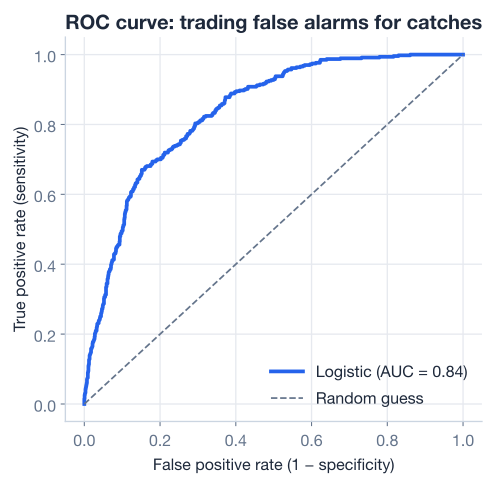
How do you read it? The dashed diagonal is the line a useless model would follow, one that does no better than flipping a coin: every gain in true positives comes with an equal cost in false positives. A good model bows up and to the left, toward the ideal corner at the top-left, where you catch every churner (sensitivity 1) without ever flagging a stayer (false positive rate 0). The further the curve pulls away from the diagonal toward that corner, the better the model separates churners from stayers.
The curve also gives you a geometric view of the threshold choices you made earlier. The low threshold of 0.2 lives toward the upper-right of the curve (high sensitivity, higher false positive rate), while the cautious 0.6 lives toward the lower-left. Choosing a threshold is just choosing a point to operate at along this curve.
A whole curve is hard to compare at a glance. The AUC, or area under the ROC curve, collapses it into a single number between 0 and 1.
There is a clean way to interpret AUC in words: it is the probability that the model assigns a higher churn score to a randomly chosen customer who actually churned than to a randomly chosen customer who stayed. In other words, it measures how well the model ranks churners above stayers, independent of any threshold.
from sklearn.metrics import roc_auc_score

auc = roc_auc_score(y_test, churn_probs)
print("AUC:", round(auc, 3))
# Output: AUC: 0.836
An AUC of 0.836 means that if you pick one real churner and one customer who stayed at random, the model gives the churner a higher risk score about 84 percent of the time. That is solid, useful ranking power, and crucially it does not depend on where you set the threshold. AUC tells you how good the raw probabilities are; the threshold then decides how you act on them.
AUC and accuracy answer different questions
Accuracy asks “at one fixed threshold, how often is the model right?” AUC asks “across all thresholds, how well does the model rank positives above negatives?” A model can have mediocre accuracy at 0.5 yet a strong AUC, which is your signal that simply moving the threshold could unlock much better real-world performance.
Here is the full arc of this lesson in one runnable script: train the model, pull out probabilities, evaluate at a threshold chosen for the business goal, and report the AUC.
import numpy as np
import pandas as pd
from sklearn.model_selection import train_test_split
from sklearn.preprocessing import StandardScaler
from sklearn.linear_model import LogisticRegression
from sklearn.metrics import roc_auc_score

# 1. Load and prepare (download: https://datatweets.com/datasets/customer_churn.csv)
df = pd.read_csv("customer_churn.csv")
feature_cols = [
    "tenure", "MonthlyCharges", "TotalCharges", "SeniorCitizen",
    "Contract_One year", "Contract_Two year",
    "InternetService_Fiber optic", "InternetService_No",
    "Partner_Yes", "Dependents_Yes", "PaperlessBilling_Yes",
]
X = df[feature_cols]
y = (df["Churn"] == "Yes").astype(int)

X_train, X_test, y_train, y_test = train_test_split(
    X, y, test_size=0.25, random_state=42, stratify=y
)
scaler = StandardScaler()
X_train = scaler.fit_transform(X_train)
X_test = scaler.transform(X_test)

# 2. Train
model = LogisticRegression(max_iter=1000, random_state=42)
model.fit(X_train, y_train)

# 3. Probabilities, not hard labels
churn_probs = model.predict_proba(X_test)[:, 1]

# 4. Act at a business-chosen threshold (catch churners -> low threshold)
threshold = 0.2
preds = (churn_probs >= threshold).astype(int)
tp = ((preds == 1) & (y_test.values == 1)).sum()
fn = ((preds == 0) & (y_test.values == 1)).sum()
print("Sensitivity at 0.2:", round(tp / (tp + fn), 3))
# Output: Sensitivity at 0.2: 0.880

# 5. Threshold-free quality
print("AUC:", round(roc_auc_score(y_test, churn_probs), 3))
# Output: AUC: 0.836
This is the capstone of the churn thread: you started by loading raw customer records, and you have arrived at a model whose probabilities you can dial into concrete retention decisions while reporting a single, honest measure of its quality.
Try each one before opening the hint. Reuse churn_probs, y_test, and the metrics_at_threshold helper from the lesson.
The hard labels hide customers the model is unsure about. Count how many test customers have a predicted churn probability between 0.4 and 0.6, the band where the model is closest to a coin flip.
# Your code here (use churn_probs)Hint
Build a boolean mask combining two conditions with &: (churn_probs >= 0.4) & (churn_probs <= 0.6). Calling .sum() on a boolean array counts the True values, since True counts as 1.
The retention team now wants to catch at least 75 percent of churners. Loop over thresholds from 0.1 to 0.5 and print the sensitivity at each, then identify the highest threshold that still hits the 0.75 target.
# Your code here (use metrics_at_threshold and y_test.values)Hint
Loop with for t in np.arange(0.1, 0.55, 0.05), call metrics_at_threshold(y_test.values, churn_probs, t), and print t with the sensitivity. You should find that a threshold of about 0.3 gives sensitivity 0.777, just clearing the 0.75 goal while keeping specificity higher than the lower thresholds do.
Train a second logistic regression that uses only the three numeric columns (tenure, MonthlyCharges, TotalCharges), compute its AUC on the test set, and compare it to the full model’s AUC of 0.836. Does dropping the other features hurt the ranking?
from sklearn.metrics import roc_auc_score

# Your code here (refit on a smaller feature set, then score with roc_auc_score)
Hint
Select the smaller feature set before scaling, fit a fresh StandardScaler and LogisticRegression(max_iter=1000, random_state=42) on those columns only, then call roc_auc_score(y_test, small_model.predict_proba(X_test_small)[:, 1]). Comparing AUCs is the cleanest way to ask whether extra features improve a model, because it ignores any single threshold.
You have turned a trained logistic regression into a decision-making tool. Let’s review what you learned.
Probabilities vs. Hard Labels
0/1 label is just that probability rounded at a thresholdpredict_proba(X)[:, 1] gives the probability of the positive class, which carries far more information than the hard labelThe Decision Threshold
0.5 is a convention, not a rule; you can set it anywhere from 0 to 1Choosing a Threshold
The ROC Curve and AUC
Most beginners stop at a single accuracy number, and that number quietly hides the decisions that actually determine whether a model is useful. The skills in this lesson are what separate a classifier that looks fine in a notebook from one that helps a business. By working with probabilities instead of labels, you keep the model’s confidence intact. By choosing the threshold from the cost of each mistake, you align the model with what the organization is trying to do. And by reading the ROC curve and AUC, you can judge and compare models without being misled by any one threshold. These ideas carry directly into every classification problem you will meet, from churn to fraud to medical diagnosis, which is exactly where you head next.
You have now learned the full classification workflow with logistic regression, from the sigmoid and coefficients through evaluation, thresholds, and the ROC curve. In the next lesson you will put all of it to work on a brand-new dataset in a hands-on guided project.
Apply the complete logistic regression workflow end to end on a real medical dataset.
Return to the Classification module overview.
You have reached the capstone of the churn thread and learned to apply a logistic regression the way professionals do: with probabilities, a deliberately chosen threshold, and a threshold-free view of quality through the ROC curve and AUC. Hold on to the central lesson here. A model produces evidence; you decide how to act on it. Master that distinction, and you will get far more value out of every classifier you build, no matter which algorithm sits underneath.