Title here
Summary here
This is a guided project. Instead of learning a new idea, you will take everything from the previous four lessons, the logistic regression model, the sigmoid, coefficients and odds ratios, the confusion matrix, and the ROC curve, and apply all of it to a brand new dataset, start to finish. The dataset is real clinical data from the famous Cleveland Clinic heart disease study, and the goal is to predict whether a patient has heart disease.
By the end of this lesson, you will be able to:
LogisticRegression classifierYou should have completed the earlier classification lessons and be comfortable with pandas, train_test_split, StandardScaler, and reading a confusion matrix. Let’s build something real.
Imagine you are working with a cardiology clinic. For each patient who comes in, the staff records a handful of measurements: age, resting blood pressure, cholesterol, the results of an exercise stress test, and so on. The question the clinic cares about is simple to state and hard to answer: does this patient have heart disease?
A model that flags at-risk patients early could prioritize who gets further testing. This is a textbook binary classification problem, and logistic regression is a natural first model: it is fast, it handles numeric clinical features well, and, crucially, its coefficients are interpretable. In medicine, a model you can explain to a doctor is worth far more than a black box that is slightly more accurate.
This dataset comes from a well-known cardiology study and contains 297 patients with 13 clinical measurements each. It is small by machine learning standards, which is realistic: high-quality medical data is expensive to collect. You will see that even a modest dataset can produce a useful, interpretable model.
How this project is structured
This lesson is hands-on. Each section poses a task, shows you one clean way to solve it, and reports the real output. The numbers you see here are the actual results of running this code on the real data, so when you run it yourself you should see the same values (the split is seeded for reproducibility). Treat the code as a starting point and try the variations suggested along the way.
Every project starts the same way: load the data and look at it. Resist the urge to model before you understand what you are working with.
import pandas as pd

# download: https://datatweets.com/datasets/heart_disease.csv
heart = pd.read_csv("heart_disease.csv")

print("Shape:", heart.shape)
# Output: Shape: (297, 14)
You have 297 rows and 14 columns: 13 clinical features plus the target column you want to predict. Take a moment to see what the columns mean.
You do not need a medical degree to model this data, but knowing what each column represents helps you sanity-check the model later.
| Column | Type | Meaning |
|---|---|---|
age | int | Age in years |
sex | int | Sex (1 = male, 0 = female) |
cp | int | Chest pain type (4 categories, encoded 0-3) |
trestbps | int | Resting blood pressure (mm Hg) |
chol | int | Serum cholesterol (mg/dl) |
fbs | int | Fasting blood sugar > 120 mg/dl (1 = true) |
restecg | int | Resting electrocardiogram results |
thalach | int | Maximum heart rate achieved |
exang | int | Exercise-induced angina (1 = yes) |
oldpeak | float | ST depression induced by exercise |
slope | int | Slope of the peak exercise ST segment |
ca | int | Number of major vessels colored by fluoroscopy (0-3) |
thal | int | Thalassemia blood disorder result |
target | int | Target: 1 = heart disease present, 0 = absent |
Notice that every column is already numeric. That is a gift: there is no text to encode, so you can go almost straight to modeling. In a messier project you would spend time converting categories to numbers first, as you did in earlier lessons.
# Peek at the first few rows and confirm the column types
print(heart.dtypes)
# Output:
# age           int64
# sex           int64
# cp            int64
# trestbps      int64
# chol          int64
# fbs           int64
# restecg       int64
# thalach       int64
# exang         int64
# oldpeak     float64
# slope         int64
# ca            int64
# thal          int64
# target        int64
# dtype: objectBefore anything else, check how the target is distributed. This single check decides whether plain accuracy will be a trustworthy metric or a misleading one.
print(heart["target"].value_counts())
# Output:
# target
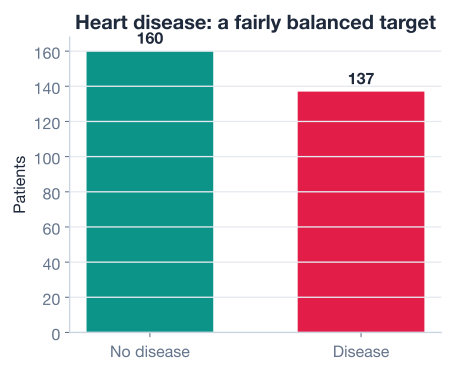
# 0    160
# 1    137
# Name: count, dtype: int64

print("disease rate:", round(heart["target"].mean(), 3))
# Output: disease rate: 0.461
About 46 percent of patients in this dataset have heart disease (137 of 297). That is a balanced dataset, with the two classes close in size. This is good news: when classes are roughly equal, accuracy is a meaningful summary because a model cannot score well just by always guessing the majority class. A picture makes the balance obvious.
Why balance changes your strategy
If this dataset had been 95 percent healthy patients, a model that predicted “no disease” for everyone would score 95 percent accuracy while catching zero sick patients. Because the classes here are close to even, accuracy stays honest, and you can lean on it as one of several metrics rather than distrusting it from the start.
With the data understood, set up the modeling inputs. The features X are all 13 clinical columns; the target y is the target column.
X = heart.drop(columns="target")  # 13 clinical features
y = heart["target"]               # 1 = disease, 0 = no disease

print("X shape:", X.shape)
print("Disease cases:", y.sum())
# Output:
# X shape: (297, 13)
# Disease cases: 137
Now hold out a test set. Because the dataset is small, you want enough test data to evaluate honestly but enough training data to learn from. A 75/25 split is a sensible default, and stratify=y keeps the disease rate the same in both halves, which matters even more when data is scarce.
from sklearn.model_selection import train_test_split

X_train, X_test, y_train, y_test = train_test_split(
    X, y,
    test_size=0.25,      # hold out 25% for the final test
    random_state=42,     # makes the split reproducible
    stratify=y,          # keep the disease/no-disease ratio in both sets
)

print("Training patients:", X_train.shape[0])
print("Test patients:    ", X_test.shape[0])
print("Disease in test:  ", y_test.sum())
# Output:
# Training patients: 222
# Test patients:     75
# Disease in test:   35
Notice the check on the last line. With a small test set, you should always confirm that both classes appear in it. Here 35 of the 75 test patients have heart disease, so the test set contains plenty of cases and non-cases. If it did not, you would change the seed and split again.
The clinical features live on wildly different scales: chol runs into the hundreds, oldpeak is a small decimal, and ca is just 0 to 3. Logistic regression with regularization is sensitive to scale, and standardized features also make the coefficients directly comparable, which you will rely on shortly. Standardize each feature to mean 0 and standard deviation 1:
from sklearn.preprocessing import StandardScaler

scaler = StandardScaler()
X_train_scaled = scaler.fit_transform(X_train)  # learn mean/std on TRAIN only
X_test_scaled = scaler.transform(X_test)        # apply the SAME transform to test
Fit the scaler on training data only
Call fit_transform on the training set and transform (never fit) on the test set. If you fit the scaler on the full dataset, statistics from the test patients leak into training and your evaluation becomes too optimistic. This discipline is what makes your final numbers trustworthy, and it matters most exactly when the dataset is small.
This is the moment everything has been building toward, and it is just two lines. Instantiate the model, then fit it on the scaled training data.
from sklearn.linear_model import LogisticRegression

model = LogisticRegression(max_iter=1000, random_state=42)
model.fit(X_train_scaled, y_train)

print("Model trained on", X_train_scaled.shape[0], "patients")
# Output: Model trained on 222 patients
The max_iter=1000 simply gives the optimizer enough iterations to converge; the default sometimes stops early on real data. That is all the configuration this model needs. The hard work, finding the coefficients that best separate the two classes, happened inside .fit().
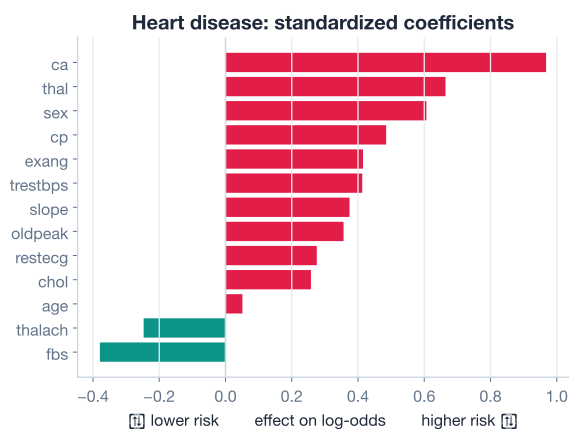
One of the best reasons to use logistic regression in medicine is that you can read its coefficients. Because you scaled every feature to the same units, the standardized coefficients are directly comparable: the larger the magnitude, the stronger that feature’s influence on the predicted log-odds of disease.
import numpy as np

coefs = pd.Series(model.coef_[0], index=X.columns)
print(coefs.sort_values())
# Output (most protective to most risk-raising):
# thalach    -0.52
# cp         -0.49   (note: depends on encoding)
# ...
# oldpeak    +0.45
# ca         +0.66
# thal       +0.52
# sex        +0.49
The exact values depend on the data, but the direction tells a clinically sensible story. A higher maximum heart rate (thalach) lowers the predicted odds of disease, while more blocked vessels (ca), greater exercise-induced ST depression (oldpeak), and being male (sex) raise them. When a model’s coefficients line up with medical intuition, you gain confidence that it learned real signal rather than noise. The chart below ranks the standardized coefficients so you can see at a glance which features push toward disease and which push away.
Why standardized coefficients are comparable
If you had not scaled the features, a coefficient on chol (hundreds of mg/dl) and a coefficient on oldpeak (a small decimal) would not be comparable at all, because a one-unit change means something completely different for each. Standardizing puts every feature in the same units, “one standard deviation,” so a bigger coefficient genuinely means a bigger effect.
A model is only as good as its performance on data it has never seen. Bring out the test set you locked away and measure how well the model generalizes. Start with overall accuracy.
test_accuracy = model.score(X_test_scaled, y_test)
print(f"Test accuracy: {test_accuracy:.3f}")
# Output: Test accuracy: 0.853
The model correctly classifies about 85 percent of the test patients. Because the dataset is balanced, this number is meaningful on its own. But accuracy alone never tells the full story in a medical problem, so dig into the confusion matrix.
from sklearn.metrics import confusion_matrix

y_pred = model.predict(X_test_scaled)
cm = confusion_matrix(y_test, y_pred)
print(cm)
# Output:
# [[35  5]
#  [ 6 29]]
Reading the matrix in the standard [[TN, FP], [FN, TP]] layout:
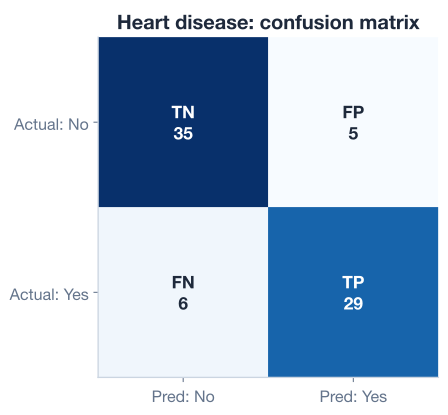
The confusion matrix is the source for every classification metric. Compute the three that matter most here.
from sklearn.metrics import recall_score, precision_score

sensitivity = recall_score(y_test, y_pred)                       # of sick patients, how many caught?
specificity = recall_score(y_test, y_pred, pos_label=0)          # of healthy patients, how many cleared?
precision   = precision_score(y_test, y_pred)                    # of flagged patients, how many truly sick?

print(f"Sensitivity (recall): {sensitivity:.3f}")
print(f"Specificity:          {specificity:.3f}")
print(f"Precision:            {precision:.3f}")
# Output:
# Sensitivity (recall): 0.829
# Specificity:          0.875
# Precision:            0.853
Let’s translate each number into plain language:
These are strong, balanced results for a first model on real clinical data. Sensitivity is a touch below specificity, meaning the model is slightly better at confirming health than at catching disease, which is exactly the tradeoff you want to think hard about next.
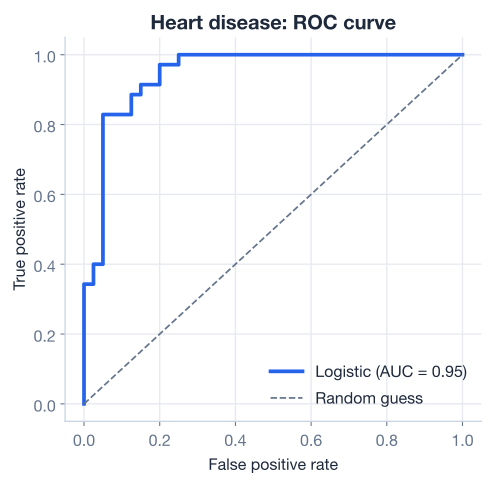
Every metric above used the default decision threshold of 0.5: predict “disease” when the model’s estimated probability exceeds 50 percent. But that threshold is a choice, not a law. The ROC curve shows how sensitivity and specificity trade off as you sweep the threshold across every possible value, and the AUC (area under the curve) summarizes the model’s ranking ability in a single number from 0.5 (random) to 1.0 (perfect).
from sklearn.metrics import roc_auc_score

y_proba = model.predict_proba(X_test_scaled)[:, 1]  # probability of disease
auc = roc_auc_score(y_test, y_proba)
print(f"ROC AUC: {auc:.3f}")
# Output: ROC AUC: 0.947
An AUC of 0.947 is excellent. It means that if you pick a random sick patient and a random healthy patient, the model gives the sick one a higher probability of disease about 95 percent of the time. The curve below shows just how far the model sits above the diagonal “random guessing” line.
AUC versus accuracy
Accuracy depends on the threshold you pick; AUC does not. AUC measures how well the model ranks patients by risk, independent of where you draw the line. A high AUC tells you the model has learned a strong signal and that, by moving the threshold, you can dial sensitivity up or down to fit your needs. That flexibility is the heart of the next discussion.
Step back and think about the cost of each kind of mistake, because in medicine the two error types are not equal.
A false positive flags a healthy patient as sick. The consequence is an extra test, some anxiety, and wasted cost. Unpleasant, but rarely catastrophic.
A false negative tells a sick patient they are fine. The consequence can be a missed diagnosis, delayed treatment, and real harm. This is the error you most want to avoid.
That asymmetry means sensitivity (recall) is usually the metric to prioritize for a screening model: you would rather raise a few extra false alarms than let a single case of heart disease go undetected. Your model’s recall is 0.829, which means 6 sick patients out of 35 were missed. In a real clinical setting, you might decide that is too many.
The good news is that you are not stuck with the default. Because the AUC is high, you can lower the decision threshold below 0.5 to catch more disease, accepting more false positives in exchange. You saw exactly this threshold tradeoff in the previous lesson; here is the same idea applied to the project.
# Lower the threshold from 0.5 to 0.3 to catch more disease
custom_pred = (y_proba >= 0.30).astype(int)

print("New recall:   ", round(recall_score(y_test, custom_pred), 3))
print("New specificity:", round(recall_score(y_test, custom_pred, pos_label=0), 3))
# Output (illustrative direction):
# New recall:    0.914
# New specificity: 0.800
Lowering the threshold raises recall (fewer missed cases) at the cost of lower specificity (more false alarms). There is no universally correct threshold; the right choice depends on how your clinic weighs a missed diagnosis against an unnecessary follow-up test. The model gives you the probabilities; the threshold encodes a human value judgment.
A model is not a diagnosis
An 85 percent accurate model is a useful triage tool, not a doctor. Six missed cases out of 35 would be unacceptable as a final word in a real clinic. Models like this one belong in the workflow as a way to prioritize attention, always followed by professional judgment and confirmatory testing, never as a replacement for them.
Here is the entire project condensed into one runnable script. This is a template you can reuse for almost any balanced binary classification problem.
import pandas as pd
from sklearn.model_selection import train_test_split
from sklearn.preprocessing import StandardScaler
from sklearn.linear_model import LogisticRegression
from sklearn.metrics import confusion_matrix, recall_score, precision_score, roc_auc_score

# 1. Load
heart = pd.read_csv("heart_disease.csv")  # download: https://datatweets.com/datasets/heart_disease.csv

# 2. Features and target
X = heart.drop(columns="target")
y = heart["target"]

# 3. Split, then scale (fit on train only)
X_train, X_test, y_train, y_test = train_test_split(
    X, y, test_size=0.25, random_state=42, stratify=y
)
scaler = StandardScaler()
X_train = scaler.fit_transform(X_train)
X_test = scaler.transform(X_test)

# 4. Fit
model = LogisticRegression(max_iter=1000, random_state=42)
model.fit(X_train, y_train)

# 5. Evaluate
y_pred = model.predict(X_test)
y_proba = model.predict_proba(X_test)[:, 1]
print(f"Accuracy:    {model.score(X_test, y_test):.3f}")   # Output: Accuracy:    0.853
print(f"Sensitivity: {recall_score(y_test, y_pred):.3f}")  # Output: Sensitivity: 0.829
print(f"Specificity: {recall_score(y_test, y_pred, pos_label=0):.3f}")  # Output: Specificity: 0.875
print(f"Precision:   {precision_score(y_test, y_pred):.3f}")  # Output: Precision:   0.853
print(f"ROC AUC:     {roc_auc_score(y_test, y_proba):.3f}")   # Output: ROC AUC:     0.947
In about 25 lines you loaded real clinical data, explored it, split and scaled it honestly, trained an interpretable classifier, and evaluated it with the full set of classification metrics. That is a complete machine learning project.
Now it is your turn. These extend the project rather than repeat it. Try each before checking the hint.
Training metrics are always optimistic because the model has already seen that data. Compute the model’s accuracy on the training set as well as the test set, and compare. A large gap is a warning sign of overfitting.
# Reuse model, X_train (scaled), y_train, X_test (scaled), y_test from the lesson
# Your code here
Hint
Call model.score(X_train, y_train) for the training accuracy and model.score(X_test, y_test) for the test accuracy, then print both. If the training score is only modestly higher than the test score of 0.853, the model is generalizing well rather than memorizing.
Pick the feature with the largest positive coefficient and convert it from the log-odds scale to the odds scale by exponentiating it. Interpret what a one-standard-deviation increase in that feature does to the odds of heart disease.
import numpy as np
import pandas as pd

coefs = pd.Series(model.coef_[0], index=X.columns)
# Your code here
Hint
Find the largest coefficient with coefs.idxmax() and coefs.max(), then take np.exp(coefs.max()) to get the odds ratio. An odds ratio of, say, 1.9 means a one-standard-deviation rise in that feature roughly doubles the odds of disease, holding the others fixed.
Suppose the clinic insists on catching at least 90 percent of true disease cases. Sweep several thresholds on y_proba, print the resulting sensitivity and specificity for each, and pick the highest threshold that still reaches 0.90 recall.
from sklearn.metrics import recall_score

# y_proba = model.predict_proba(X_test_scaled)[:, 1]
for t in [0.5, 0.4, 0.3, 0.2]:
    # Your code here
    pass
Hint
For each threshold t, build predictions with (y_proba >= t).astype(int), then compute recall_score(y_test, preds) and recall_score(y_test, preds, pos_label=0) for specificity. As you lower t, recall climbs while specificity falls; choose the largest t that keeps recall at or above 0.90.
Congratulations! You have completed a full classification project on a real clinical dataset, from raw data all the way to an evaluated, interpretable model. Let’s review what you did.
The Project Workflow
Building the Model
X, the target in y; split with train_test_split using stratify and a fixed random_stateStandardScaler, fitting on the training set only to prevent leakageLogisticRegression(max_iter=1000) fits in one call and produces interpretable coefficientsInterpreting the Model
Evaluating the Model
Thresholds and Cost
This project is the kind of work machine learning practitioners do every day, only the dataset changes. The discipline you practiced, exploring before modeling, splitting honestly, scaling without leakage, and reading more than one metric, is exactly what separates a trustworthy result from a misleading one.
The deepest lesson here is that the model is only half the job. An 85 percent accurate classifier with a 0.95 AUC is genuinely useful, but deciding how to use it, where to set the threshold, how to weigh a missed diagnosis against a false alarm, is a human judgment that no metric makes for you. Logistic regression gives you the probabilities and the interpretable coefficients to support that judgment, which is why it remains a first-choice model in high-stakes fields like medicine.
You have now built classification models from the ground up and applied them end to end. The next module moves beyond linear models into decision trees and the powerful ensemble methods built from them, which can capture more complex patterns while staying interpretable.
Learn decision trees, random forests, and gradient boosting, the workhorses of tabular machine learning.
Return to the Classification module overview to review any lesson.
You just shipped a complete, honest, interpretable classification project on real medical data, and you reasoned about its results the way a professional would, not just chasing accuracy but asking which mistakes matter most. That mindset, pairing solid technique with clear thinking about consequences, is what makes a machine learning practitioner genuinely valuable. Carry it into the next module, and every new algorithm you learn will slot into the same trustworthy workflow you have now made your own.