Title here
Summary here
This lesson introduces you to convolutional neural networks (CNNs), the family of models behind nearly every modern computer vision system, from face unlock on your phone to medical image diagnosis. You will learn why ordinary dense networks struggle with images, what a convolution actually does, and the handful of ideas, kernels, feature maps, parameter sharing, and translation invariance, that make CNNs so effective. Along the way you will meet Fashion-MNIST, the clothing image dataset you will use throughout this module.
By the end of this lesson, you will be able to:
You should be comfortable with basic Python and NumPy, and have seen a simple neural network before (layers, weights, and training). Let’s begin.
Your brain processes the visual world effortlessly. You glance at a photo and instantly know it shows a sneaker, a coat, or a face. A computer has no such intuition. To a machine, an image is nothing more than a grid of numbers.
Every digital image is stored as a matrix of values. Each cell in that matrix is a pixel, short for “picture element.” A pixel holds a number describing how bright that point is. If an image is 1920 pixels wide and 1080 pixels tall, it contains pixels, and the device stores one number per pixel.
For a grayscale image, each pixel stores a single value from 0 to 255. A value of 0 is pure black, 255 is pure white, and everything in between is a shade of gray. A color image is stored a little differently: it stacks three grids, one each for red, green, and blue intensity, so a color pixel is described by three numbers instead of one. The number of stacked grids is called the number of channels: a grayscale image has one channel, a color image has three.
The clothing images you will work with in this module are grayscale and small, just 28 by 28 pixels, so each image is a single 28-by-28 grid of numbers between 0 and 255. That is 784 numbers per image.
Channels in one sentence
A grayscale image has shape (height, width, 1) and a color image has shape (height, width, 3). The final number is the channel count, and it is the one beginners forget most often when defining a model’s input shape.
If you have built a neural network before, you have used dense (also called fully connected) layers, where every input connects to every neuron with its own weight. Dense networks work beautifully for tabular data. For images, they fall apart for two related reasons.
To feed an image into a dense layer, you first have to flatten it into a long vector. A tiny 28-by-28 grayscale image flattens into 784 values. If the first hidden layer has just 128 neurons, that single layer already needs:
That is manageable. But real photographs are not 28 by 28. A modest 200-by-200 color image flattens into values. Connect that to 128 neurons and the first layer alone needs over 15 million weights, before you have added a single additional layer. The number of parameters grows with the size of the image, and large models with too many parameters are slow to train and quick to overfit.
The deeper problem is more subtle. The moment you flatten an image, you destroy the information about which pixels are next to each other. Pixel (5, 5) and pixel (5, 6) sit side by side in the picture, but after flattening they are just two arbitrary positions in a long list. A dense layer has no idea they are neighbors.
This matters because the meaning in an image lives in local patterns: an edge, a corner, a curve, the texture of fabric. These patterns are made of nearby pixels working together. A model that treats every pixel as independent has to relearn the same edge detector separately for every possible location in the image. That is wasteful and fragile.
We need an approach that respects two facts about images: meaningful patterns are local, and the same pattern can appear anywhere in the frame. That approach is the convolution.
A convolution is a small, repeatable operation that scans an image looking for a specific local pattern. Here is the whole idea in one sentence: you slide a tiny grid of numbers, called a kernel (or filter), across the image, and at each position you multiply the kernel against the patch of pixels underneath it and add up the result.
Each output number answers one question: “How strongly does the pattern in this kernel appear at this spot?” Doing this everywhere produces a new grid called a feature map, which highlights where the pattern was found.
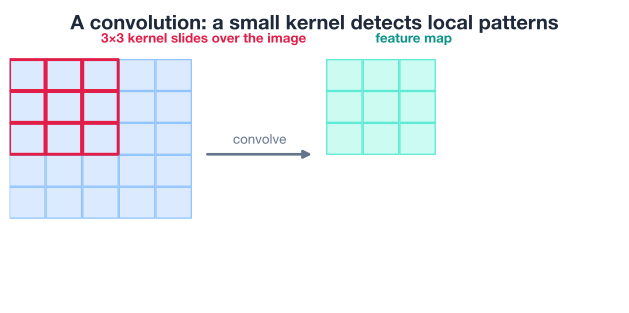
The small patch of the image that a single output value depends on is called its local receptive field. A 3-by-3 kernel has a 3-by-3 receptive field: each output value looks at only 9 input pixels, not the entire image. This is exactly the locality that dense layers lacked.
The best way to understand a convolution is to compute one yourself. Let’s use a small binary “image” (just 0s and 1s) and a 3-by-3 kernel.
import numpy as np

image = np.array([[1, 1, 0, 0, 0, 0, 1, 1],
                  [1, 0, 1, 1, 1, 1, 0, 1],
                  [1, 0, 1, 1, 1, 1, 0, 1],
                  [1, 0, 0, 0, 0, 0, 0, 1],
                  [1, 0, 0, 0, 0, 0, 0, 1],
                  [1, 0, 1, 1, 1, 1, 0, 1],
                  [1, 0, 1, 1, 1, 1, 0, 1],
                  [1, 1, 0, 0, 0, 0, 1, 1]])

kernel = np.array([[-1, 0, 1],
                   [-2, 0, 2],
                   [-1, 0, 1]])
This particular kernel is a classic vertical edge detector. Notice its left column is negative and its right column is positive. Where the image is dark on the left and bright on the right (a vertical edge), the kernel produces a large value; where the image is flat, the positives and negatives cancel out to roughly zero.
The kernel is 3 by 3 and the image is 8 by 8. The kernel can slide to 6 distinct horizontal positions and 6 vertical positions, so the output feature map will be 6 by 6. We loop over every position, multiply element by element, and sum.
# The kernel fits in 6 horizontal and 6 vertical positions -> a 6x6 output
conv_output = np.zeros((6, 6), dtype=int)

for i in range(6):          # slide top to bottom
    for j in range(6):      # slide left to right
        patch = image[i:i+3, j:j+3]          # the 3x3 receptive field
        conv_output[i, j] = np.sum(patch * kernel)

print(conv_output)
# Output:
# [[-1  2  0  0 -2  1]
#  [-1  3  0  0 -3  1]
#  [-3  1  0  0 -1  3]
#  [-3  1  0  0 -1  3]
#  [-1  3  0  0 -3  1]
#  [-1  2  0  0 -2  1]]
Look at the structure of that output. The large-magnitude values cluster on the left and right columns, exactly where the original shape had vertical edges, while the flat middle columns are zero. The kernel found the vertical edges in the image. That is feature extraction in action.
Let’s confirm one cell by hand. The top-left output value comes from the top-left 3-by-3 patch of the image:
Multiplying element by element and summing gives , which matches the -1 in the top-left corner of conv_output.
One kernel, one pattern
Transposing this kernel (swapping rows for columns) turns it into a horizontal edge detector instead. Each kernel detects exactly one kind of pattern. That is why a real convolutional layer uses many kernels at once, so it can look for many patterns in parallel.
A convolutional neural network is a network whose early layers are convolutional layers instead of dense layers. Each convolutional layer slides one or more kernels across its input and produces a feature map for each kernel. An activation function such as ReLU is then applied to each feature map, just as in a dense network. The result is the layer’s set of feature maps, the patterns it found.
The crucial difference from the dense networks you know: in a convolutional layer you do not have a separate weight for every input pixel. Instead, the kernel is the weight matrix, and the same small kernel is reused at every position as it slides. This single idea, called parameter sharing, is what makes CNNs both efficient and powerful.
Recall that a dense layer connecting a 200-by-200 color image to 128 neurons needed over 15 million weights. Now compare that to a convolutional layer. A single 3-by-3 kernel on a color image has weights, plus one bias, for 28 parameters total. Even with 64 different kernels in the layer, you have only parameters, regardless of how large the image is.
The reason is that the kernel is shared. The same 9 (or 27) numbers are applied at every location, so the parameter count depends on the kernel size and the number of kernels, not on the size of the image. This is a dramatic reduction, and it is also a form of built-in regularization: with fewer free parameters, the model is far less prone to overfitting.
Parameter sharing buys you a second, almost magical property. Because the same kernel scans the entire image, a pattern is detected the same way no matter where it appears. A vertical-edge kernel finds a vertical edge in the top-left corner using the exact same weights it uses in the bottom-right corner.
This is called translation invariance: shifting an object around the frame does not stop the network from recognizing it. A dense network would have to learn the same feature over and over for each possible position. A CNN learns it once and applies it everywhere. For real images, where a sneaker might sit anywhere in the photo, this is exactly the behavior you want.
In our hand example, we chose the edge-detector kernel ourselves. In a real CNN, you do not hand-pick kernel values. You specify only how many kernels a layer should have and how big each one is; the network learns the kernel weights automatically through training, just like any other weights, using backpropagation.
As training proceeds, the early layers tend to learn simple, generic patterns like edges and color blobs, while deeper layers combine those into more complex features like textures, fabric patterns, and eventually whole-object shapes such as a collar or a heel. You will see this layered architecture in detail in the next lesson.
The three big ideas
Everything about why CNNs work for images reduces to three connected ideas: local receptive fields (each output looks at a small patch), parameter sharing (one kernel reused everywhere), and translation invariance (patterns are found regardless of position). Keep these three in mind and the rest of this module will feel intuitive.
For the rest of this module you will work with Fashion-MNIST, a dataset of small grayscale photos of clothing. It is a popular benchmark because it is small enough to train quickly yet hard enough to be interesting, much harder than recognizing handwritten digits.
Fashion-MNIST contains 70,000 images in total: 60,000 for training and 10,000 for testing. Every image is 28 by 28 pixels, grayscale (one channel), and belongs to exactly one of 10 clothing categories:
| Label | Class | Label | Class |
|---|---|---|---|
| 0 | T-shirt/top | 5 | Sandal |
| 1 | Trouser | 6 | Shirt |
| 2 | Pullover | 7 | Sneaker |
| 3 | Dress | 8 | Bag |
| 4 | Coat | 9 | Ankle boot |
Keras ships this dataset, so you can download and load it with a single function call.
from tensorflow import keras
import numpy as np

# Downloads on first call:
# keras.datasets.fashion_mnist.load_data()
(X_train_full, y_train_full), (X_test_full, y_test_full) = \
    keras.datasets.fashion_mnist.load_data()

print("Full train images:", X_train_full.shape)
print("Full test images: ", X_test_full.shape)
# Output:
# Full train images: (60000, 28, 28)
# Full test images:  (10000, 28, 28)
The training images arrive as a NumPy array of shape (60000, 28, 28): 60,000 images, each a 28-by-28 grid. The labels are integers from 0 to 9.
Convolutional layers in Keras expect each image to carry an explicit channel dimension, so a grayscale image should have shape (28, 28, 1) rather than (28, 28). We add that final axis. Training on all 60,000 images can be slow without a GPU, so for the lessons in this module we use a smaller, representative subset of 15,000 training images and 3,000 test images. This keeps experiments fast while still being plenty of data to learn from.
# Add the channel axis: (28, 28) -> (28, 28, 1)
X_train_full = X_train_full[..., np.newaxis]
X_test_full = X_test_full[..., np.newaxis]

# Use a subset to keep training fast
X_train = X_train_full[:15000]
y_train = y_train_full[:15000]
X_test = X_test_full[:3000]
y_test = y_test_full[:3000]

print("Train subset:", X_train.shape)
print("Test subset: ", X_test.shape)
# Output:
# Train subset: (15000, 28, 28, 1)
# Test subset:  (3000, 28, 28, 1)
You now have a training subset of shape (15000, 28, 28, 1) and a test subset of shape (3000, 28, 28, 1). That trailing 1 is the channel dimension you just added.
Don’t forget to normalize later
Pixel values here range from 0 to 255. Neural networks train far more reliably when inputs are scaled to a small range, typically by dividing by 255 to put every value in [0, 1]. We will handle normalization when we build and train the actual model in the next lesson; just remember that raw pixel values are not yet ready for training.
Numbers in an array are hard to reason about, so let’s actually look at the clothing. The grid below shows a sample of Fashion-MNIST images with their class labels.
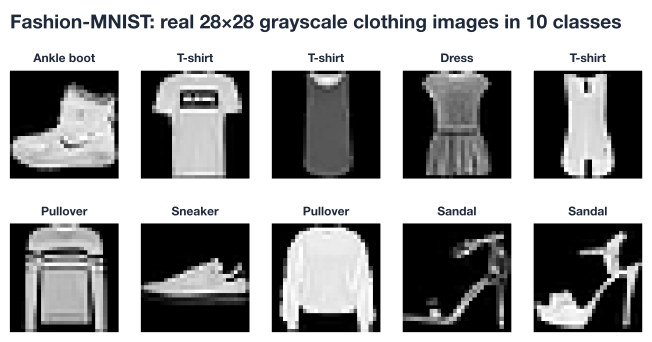
Notice the challenge. Items in the same class vary in shape, orientation, and lighting; a pullover and a coat can look almost identical at 28 by 28 pixels; and the object is not always centered. This variety is exactly why we need a model that detects local patterns wherever they appear, rather than memorizing fixed pixel positions. You can reproduce a view like this yourself with Matplotlib.
import matplotlib.pyplot as plt

class_names = ["T-shirt/top", "Trouser", "Pullover", "Dress", "Coat",
               "Sandal", "Shirt", "Sneaker", "Bag", "Ankle boot"]

plt.figure(figsize=(8, 4))
for i in range(8):
    plt.subplot(2, 4, i + 1)
    plt.imshow(X_train[i].squeeze(), cmap="gray")
    plt.title(class_names[y_train[i]])
    plt.axis("off")
plt.tight_layout()
plt.show()
The .squeeze() call drops the trailing channel dimension so Matplotlib sees a plain 28-by-28 grid, and cmap="gray" renders the single channel in grayscale.
Try these before checking the hints. They reinforce the core ideas without building a full model yet.
The lesson used a vertical edge detector. Build the horizontal edge detector by transposing that kernel, then convolve it with the same 8-by-8 image and print the 6-by-6 output. Compare the result to the vertical version.
import numpy as np

image = np.array([[1, 1, 0, 0, 0, 0, 1, 1],
                  [1, 0, 1, 1, 1, 1, 0, 1],
                  [1, 0, 1, 1, 1, 1, 0, 1],
                  [1, 0, 0, 0, 0, 0, 0, 1],
                  [1, 0, 0, 0, 0, 0, 0, 1],
                  [1, 0, 1, 1, 1, 1, 0, 1],
                  [1, 0, 1, 1, 1, 1, 0, 1],
                  [1, 1, 0, 0, 0, 0, 1, 1]])

# Your code here
Hint
Create the horizontal kernel with kernel = np.array([[-1, -2, -1], [0, 0, 0], [1, 2, 1]]) (or transpose the vertical one with .T). Then reuse the same nested loop from the lesson: build a (6, 6) zero array, slide the kernel with image[i:i+3, j:j+3], multiply, and sum. The large values will now appear in the top and bottom rows instead of the left and right columns.
Compute how many parameters a dense first layer versus a convolutional first layer would need for a 28-by-28-by-1 Fashion-MNIST image. For the dense layer assume 128 neurons. For the convolutional layer assume 32 kernels of size 3-by-3. Print both numbers.
# Your code here (just arithmetic, no Keras needed)Hint
A dense layer needs inputs * neurons + neurons parameters, where inputs = 28 * 28 * 1 = 784, giving 784 * 128 + 128 = 100480. A convolutional layer needs (kernel_h * kernel_w * channels + 1) * num_kernels, which is (3 * 3 * 1 + 1) * 32 = 320. The convolutional layer uses hundreds of times fewer parameters thanks to parameter sharing.
Load Fashion-MNIST, take the 15,000-image training subset, and check how many examples each of the 10 classes has. Is the dataset balanced?
from tensorflow import keras
import numpy as np

(X_train_full, y_train_full), _ = keras.datasets.fashion_mnist.load_data()

# Your code here
Hint
Slice the labels with y_train = y_train_full[:15000], then call np.unique(y_train, return_counts=True) to get each class and its count. You should see all 10 classes present with roughly similar counts, so the subset is close to balanced, which means plain accuracy will be a sensible metric later.
You have built the conceptual foundation for everything that follows in this module. Let’s review what you learned.
How Images Are Stored
Why Dense Networks Struggle
Convolutions
Why CNNs Work
The Dataset
(28, 28, 1) and took a 15000 / 3000 subset for speedConvolutional neural networks are the workhorse of computer vision, and the three ideas you learned here, local receptive fields, parameter sharing, and translation invariance, explain why they work so well. They are not arbitrary engineering tricks; they are a direct response to the structure of images, where meaning is local and patterns can appear anywhere.
Understanding these foundations now will pay off repeatedly. When you later tune kernel sizes, stack many layers, add pooling, or reach for a pretrained model, you will be making informed decisions rather than copying recipes. Every advanced technique in this module is built on the simple sliding-kernel operation you computed by hand in this lesson.
You now understand what a convolution does and why CNNs are the right tool for images. In the next lesson, you will assemble these pieces into a working architecture, stacking convolutional layers, pooling, and a classifier head, and train it on Fashion-MNIST in Keras.
Stack convolutional and pooling layers into a complete CNN and train it in Keras.
Return to the Computer Vision with CNNs module overview.
You have taken your first real step into computer vision. The convolution you computed by hand is the same operation running billions of times inside the largest vision models in the world; the only difference is scale and learned kernels. Hold on to the intuition you built here, that a CNN scans for local patterns and reuses what it learns everywhere, and the architectures, regularization tricks, and transfer-learning techniques in the coming lessons will fall neatly into place.