Title here
Summary here
In the previous lesson you saw what makes images hard for ordinary neural networks and how a single convolution slides a small filter across an image to detect a feature like an edge. This lesson takes the next step: you will assemble those convolutions, together with a few other layer types, into a complete convolutional neural network (CNN) that classifies images end to end. You will build it in Keras, compile it, and train it on a real clothing-image dataset, then read its accuracy curves to judge how well it learned.
By the end of this lesson, you will be able to:
Conv2D, MaxPooling2D, Flatten, Dense, and a softmax outputkeras.Sequential model and read its summary()You should be comfortable with basic Python and NumPy, and you should have completed Lesson 1, where convolution was introduced. Let’s begin.
A single convolutional filter detects one kind of pattern, such as a vertical edge. That is useful, but recognizing a sneaker versus a shirt requires far more than one pattern. Real images contain edges, corners, textures, and eventually whole shapes, and these patterns build on one another. An edge detector feeds a corner detector, which feeds a part detector, which feeds an object detector.
A CNN captures exactly this hierarchy by stacking layers. Each convolutional layer learns many filters at once, and each layer sees the output of the layer before it. Early layers respond to simple local patterns; deeper layers combine those into more complex, more abstract features. By the time the signal reaches the final layers, the network has transformed raw pixels into a compact summary that a small classifier can turn into a prediction.
The diagram below shows the architecture you will build in this lesson. Notice the repeating rhythm of convolution followed by pooling, then a flatten step, then dense layers, ending in a softmax output that produces class probabilities.
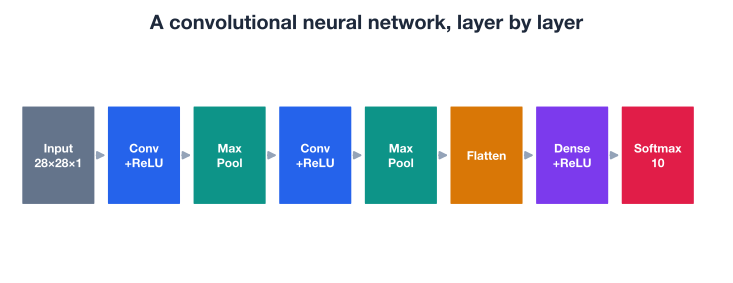
There are two phases in this picture. The feature extraction phase (the convolution and pooling layers) turns pixels into features. The classification phase (flatten plus dense layers) turns those features into a decision. Let’s look at each building block in turn before we wire them together.
The Conv2D layer is the heart of a CNN. It applies a set of learnable filters across the image, and each filter produces one feature map showing where its pattern appears. Four settings control its behavior.
3 for a 3x3 window. Small kernels (3x3) are the modern default: they keep the number of parameters low, and stacking several of them can cover the same area as one large kernel while learning richer patterns.padding="valid" (the default) the filter only sits fully inside the image, so the output shrinks. With padding="same", Keras pads the input with zeros so the output keeps the same height and width as the input.1 visits every pixel; a stride of 2 skips every other position, halving the output size in each dimension.A convolutional layer with shape input, a kernel of size , padding , and stride produces an output whose height and width follow:
For a 28x28 input with a 3x3 kernel, padding="same", and stride=1, the output stays 28x28. With padding="valid" it becomes 26x26, because the filter loses one pixel on each side.
In Keras, a convolutional layer with 32 filters of size 3x3, same padding, and a ReLU activation looks like this:
from tensorflow.keras import layers

layers.Conv2D(filters=32, kernel_size=3, padding="same", activation="relu")
The activation="relu" applies the rectified linear unit element-wise, replacing negatives with zero. ReLU is the standard choice inside CNNs because it is cheap to compute and helps the network learn faster.
Why convolution beats a plain dense layer on images
A convolutional filter reuses the same small set of weights at every position in the image. This is called parameter sharing, and it has two big payoffs. First, the layer has far fewer parameters than a dense layer connecting every pixel to every neuron, so it trains faster and overfits less. Second, a pattern learned in one corner of the image is automatically recognized everywhere else, which is exactly what you want when an object can appear anywhere in the frame.
After a convolutional layer, you usually want to reduce the spatial size of the feature maps. Smaller maps mean fewer computations downstream and a wider field of view for later layers. The most common way to do this is max pooling.
MaxPooling2D slides a small window (typically 2x2) across each feature map and keeps only the largest value in each window. A 2x2 pool with a stride of 2 halves the height and width, so a 28x28 feature map becomes 14x14. Keeping the maximum preserves the strongest response in each region, which is usually the presence of the feature you care about, while discarding precise location detail you do not need.
layers.MaxPooling2D(pool_size=2)Pooling has no learnable weights. It is a fixed operation that summarizes a neighborhood, which is why it both shrinks the data and adds a little robustness to small shifts in the input.
Convolutional and pooling layers work on three-dimensional data: height, width, and channels. A dense (fully connected) layer, by contrast, expects a flat vector of numbers. The Flatten layer is the bridge. It takes a feature map of shape, say, (7, 7, 64) and unrolls it into a single vector of values, ready to feed into a dense layer.
layers.Flatten()Flatten has no parameters and changes no values; it only reshapes.
Once the features are a flat vector, one or more Dense layers combine them into a prediction. A dense layer connects every input to every output neuron, each with its own weight. A hidden dense layer typically uses ReLU; the final dense layer is special.
The output layer has exactly one neuron per class, and it uses the softmax activation. Softmax turns the raw scores into probabilities that are all positive and sum to one. For raw scores (logits) over classes, the probability of class is:
Fashion-MNIST has 10 classes, so the output layer has 10 neurons and softmax gives you a 10-way probability distribution. The class with the highest probability is the model’s prediction.
layers.Dense(128, activation="relu")     # hidden classifier layer
layers.Dense(10, activation="softmax") # one probability per classYou will train your CNN on Fashion-MNIST, a widely used benchmark of grayscale clothing images. It contains 70,000 images (60,000 for training and 10,000 for testing), each a 28x28 pixel picture belonging to one of 10 categories: t-shirt/top, trouser, pullover, dress, coat, sandal, shirt, sneaker, bag, and ankle boot. It is a drop-in replacement for the classic handwritten-digit dataset but a bit harder, which makes it perfect for learning CNNs.
Keras can download and load it in one line.
import numpy as np
import tensorflow as tf
from tensorflow import keras

# downloads on first call: keras.datasets.fashion_mnist.load_data()
(X_train_full, y_train_full), (X_test_full, y_test_full) = \
    keras.datasets.fashion_mnist.load_data()

print("Full train:", X_train_full.shape)
print("Full test: ", X_test_full.shape)
# Output:
# Full train: (60000, 28, 28)
# Full test:  (10000, 28, 28)
To keep training fast enough to run comfortably while you experiment, you will work with a representative subset: 15,000 training images and 3,000 test images. CNNs still learn well on this many examples, and everything you see scales to the full dataset.
A CNN expects each image to carry an explicit channel dimension. These images are grayscale, so they have a single channel, and you reshape them from (28, 28) to (28, 28, 1). You also scale the pixel values from the original 0 to 255 range down to 0 to 1, which helps the network train more smoothly.
# Take a subset and add the channel dimension, then scale to [0, 1]
X_train = X_train_full[:15000].reshape(-1, 28, 28, 1).astype("float32") / 255.0
y_train = y_train_full[:15000]

X_test = X_test_full[:3000].reshape(-1, 28, 28, 1).astype("float32") / 255.0
y_test = y_test_full[:3000]

print("Train subset:", X_train.shape)
print("Test subset: ", X_test.shape)
# Output:
# Train subset: (15000, 28, 28, 1)
# Test subset:  (3000, 28, 28, 1)
Always scale and shape your inputs first
Two preprocessing steps trip up beginners constantly. First, forgetting the channel dimension: a Conv2D layer needs a 4D batch of shape (samples, height, width, channels), so a plain (samples, 28, 28) array will raise an error. Second, leaving pixels in the 0 to 255 range: large input values make the gradients harder to control and slow learning. Reshape and rescale before you build the model.
Now you assemble the layers into a keras.Sequential model. A sequential model is simply a linear stack: data flows from the first layer to the last, in order. This matches the CNN architecture perfectly.
The architecture below follows the standard pattern: two convolution-plus-pooling blocks for feature extraction, then a flatten and two dense layers for classification. The first Conv2D layer declares the input_shape so Keras knows the shape of one image.
from tensorflow.keras import layers

model = keras.Sequential([
    # Feature extraction
    layers.Conv2D(32, kernel_size=3, padding="same", activation="relu",
                  input_shape=(28, 28, 1)),
    layers.MaxPooling2D(pool_size=2),

    layers.Conv2D(64, kernel_size=3, padding="same", activation="relu"),
    layers.MaxPooling2D(pool_size=2),

    # Classification
    layers.Flatten(),
    layers.Dense(128, activation="relu"),
    layers.Dense(10, activation="softmax"),
])
Trace the shapes as data flows through. An input image is (28, 28, 1). The first Conv2D with same padding keeps it at (28, 28, 32) (32 feature maps). The first pool halves it to (14, 14, 32). The second Conv2D makes it (14, 14, 64), and the second pool gives (7, 7, 64). Flatten unrolls that into a vector of values, which the dense layers reduce to 128 and finally to 10 class probabilities.
You can confirm this with model.summary(), which prints every layer, its output shape, and how many parameters it holds.
model.summary()Reading the summary is a habit worth building. The output shapes should match the trace above, and the parameter counts tell you where the model’s capacity lives. In this network, the convolutional layers have relatively few parameters thanks to weight sharing, while the first dense layer (connecting 3,136 flattened values to 128 neurons) holds the bulk of them. That concentration of parameters in the dense layer is one reason CNNs can later overfit, a thread you will pick up in the next lesson.
Building the architecture defines what the model computes. Compiling tells Keras how to train it. Three choices matter.
"adam" is a reliable, fast default that works well across many problems, so you will use it here.sparse_categorical_crossentropy, the standard loss for multi-class classification with integer labels. If your labels were one-hot vectors instead, you would use categorical_crossentropy."accuracy" is the natural choice.model.compile(
optimizer="adam",
loss="sparse_categorical_crossentropy",
metrics=["accuracy"],
)Matching the loss to your labels
The single most common compile-time error is mismatching the loss to the label format. Integer labels like 3 go with sparse_categorical_crossentropy; one-hot labels like [0, 0, 0, 1, ...] go with categorical_crossentropy. Both pair with a softmax output of 10 neurons. If training crashes with a shape error right after fit, check this first.
Training happens in model.fit(). You pass the training data, set the number of epochs (full passes over the training set), and provide a validation split so Keras sets aside part of the training data to evaluate after each epoch. The validation accuracy is your early-warning signal: it estimates how well the model generalizes to data it did not train on.
history = model.fit(
    X_train, y_train,
    epochs=10,
    batch_size=64,
    validation_split=0.2,
)
The batch_size controls how many images the optimizer processes before each weight update. The validation_split=0.2 holds out 20 percent of the training images for validation. The call returns a History object whose history attribute is a dictionary of per-epoch metrics.
print(history.history.keys())
# Output: dict_keys(['loss', 'accuracy', 'val_loss', 'val_accuracy'])
After 10 epochs, the training accuracy climbs high while the validation accuracy levels off lower. Here are the final values this baseline reached:
print(f"Final train accuracy: {history.history['accuracy'][-1]:.3f}")
print(f"Final val accuracy:   {history.history['val_accuracy'][-1]:.3f}")
# Output:
# Final train accuracy: 0.949
# Final val accuracy:   0.883
The model fits the training data very well (about 95 percent) but generalizes a bit less well to the held-out validation data (about 88 percent). That gap is the key thing to notice, and you will return to it shortly.
Validation accuracy guided you during training, but the honest final score comes from the test set, which the model has never seen in any form. Use model.evaluate().
test_loss, test_acc = model.evaluate(X_test, y_test, verbose=0)
print(f"Test accuracy: {test_acc:.3f}")
# Output: Test accuracy: 0.883
The baseline CNN reaches about 88.3 percent test accuracy on Fashion-MNIST. For a compact model trained on a subset in a handful of epochs, that is a strong result, and far better than the roughly 10 percent you would get from random guessing across 10 classes. You can also look at individual predictions to see the model in action.
probs = model.predict(X_test[:5], verbose=0)
predicted = np.argmax(probs, axis=1)

print("Predicted:", predicted)
print("Actual:   ", y_test[:5])
# Output:
# Predicted: [9 2 1 1 6]
# Actual:    [9 2 1 1 6]
Each row of probs is a 10-way probability distribution from the softmax layer, and np.argmax picks the most likely class. On these five examples the model is correct on all of them.
Numbers tell you the final score, but the training curve tells you the story of how the model learned, and whether you can trust it. Plotting training and validation accuracy across epochs is one of the most informative things you can do.
import matplotlib.pyplot as plt

plt.plot(history.history["accuracy"], label="train")
plt.plot(history.history["val_accuracy"], label="validation")
plt.xlabel("epoch")
plt.ylabel("accuracy")
plt.legend()
plt.title("Baseline CNN accuracy across epochs")
plt.show()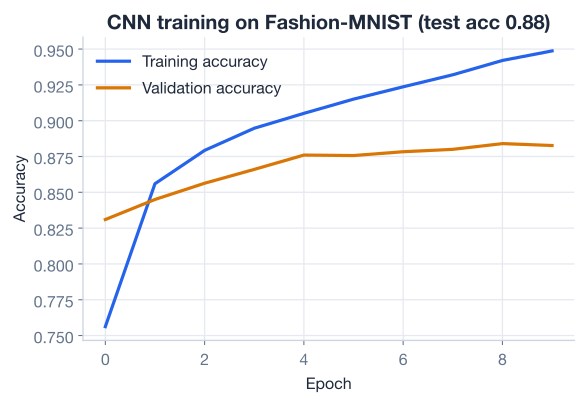
Look closely at the two lines. Early on, both rise together: the model is learning genuine patterns that help on both seen and unseen data. But as training continues, the training curve keeps climbing toward 95 percent while the validation curve flattens out near 88 percent. The widening space between them is the signature of overfitting: the model is starting to memorize quirks of the training images that do not transfer to new data.
A small gap like this is normal and not alarming, your test accuracy confirms the model is genuinely useful. But the gap is real, and it caps how well the model performs in the wild. If you trained for many more epochs, the gap would likely widen, with training accuracy approaching 100 percent while validation accuracy stalled or even dropped.
What the gap is telling you
A model that scores far higher on training data than on validation data has learned details specific to the training set rather than patterns that generalize. The cure is regularization: techniques that deliberately make the model a little worse at fitting the training data so that it generalizes better. Closing this train/validation gap is exactly the focus of the next lesson.
Here is the complete baseline, from loading data to the final test score, in one runnable script. This is a template you can adapt to almost any image-classification problem: change the dataset, adjust the number of output neurons, and the rest stays the same.
import numpy as np
import tensorflow as tf
from tensorflow import keras
from tensorflow.keras import layers

# 1. Load and preprocess (downloads: keras.datasets.fashion_mnist.load_data())
(X_train_full, y_train_full), (X_test_full, y_test_full) = \
    keras.datasets.fashion_mnist.load_data()

X_train = X_train_full[:15000].reshape(-1, 28, 28, 1).astype("float32") / 255.0
y_train = y_train_full[:15000]
X_test = X_test_full[:3000].reshape(-1, 28, 28, 1).astype("float32") / 255.0
y_test = y_test_full[:3000]

# 2. Build
model = keras.Sequential([
    layers.Conv2D(32, 3, padding="same", activation="relu", input_shape=(28, 28, 1)),
    layers.MaxPooling2D(2),
    layers.Conv2D(64, 3, padding="same", activation="relu"),
    layers.MaxPooling2D(2),
    layers.Flatten(),
    layers.Dense(128, activation="relu"),
    layers.Dense(10, activation="softmax"),
])

# 3. Compile
model.compile(optimizer="adam",
              loss="sparse_categorical_crossentropy",
              metrics=["accuracy"])

# 4. Train
history = model.fit(X_train, y_train, epochs=10,
                    batch_size=64, validation_split=0.2)

# 5. Evaluate
test_loss, test_acc = model.evaluate(X_test, y_test, verbose=0)
print(f"Test accuracy: {test_acc:.3f}")
# Output: Test accuracy: 0.883
In well under 40 lines you loaded a real image dataset, built a CNN from standard layers, trained it, and measured it honestly on unseen data. That is the full CNN workflow.
Now it is your turn. Try these before checking the hints.
Without running any code, work out the output shape after each layer of the model for a single input image of shape (28, 28, 1): the first Conv2D, the first MaxPooling2D, the second Conv2D, the second MaxPooling2D, and the Flatten. Then verify your answer by calling model.summary().
# Predict on paper first, then check:
model.summary()
Hint
With padding="same" and stride=1, a Conv2D keeps the height and width unchanged and sets the channel count to the number of filters. A MaxPooling2D(2) halves both height and width. So the chain is (28, 28, 32), (14, 14, 32), (14, 14, 64), (7, 7, 64), and finally a flat vector of .
Rebuild the first Conv2D layer with padding="valid" instead of padding="same", keeping everything else identical, and print model.summary(). How does the first layer’s output height and width change, and why?
from tensorflow.keras import layers
# Your code here: rebuild the model with padding="valid" on the first Conv2D
Hint
With padding="valid", the 3x3 filter cannot extend past the image border, so it loses one pixel on each side. A 28x28 input becomes 26x26, giving a first-layer output of (26, 26, 32). Valid padding always shrinks the spatial dimensions; same padding preserves them.
Insert a third convolution-plus-pooling block (a Conv2D with 64 filters followed by a MaxPooling2D(2)) before the Flatten layer. Recompile and retrain for a few epochs. Does adding capacity raise the validation accuracy, or does it widen the train/validation gap?
# Your code here: add layers.Conv2D(64, 3, padding="same", activation="relu")
# and layers.MaxPooling2D(2) before Flatten, then compile and fit
Hint
After two pools the maps are 7x7; a third MaxPooling2D(2) reduces them to 3x3 (Keras floors odd dimensions). Adding capacity sometimes helps and sometimes just lets the model memorize the training set faster, widening the gap. Watch both the training and validation curves, not just the training accuracy, to tell which is happening.
Congratulations! You built, compiled, trained, and evaluated a complete convolutional neural network on a real image dataset. Let’s review what you learned.
CNN Building Blocks
filters, the kernel_size, the padding (same keeps size, valid shrinks it), and the strideAssembling and Training
keras.Sequential model stacks layers in order, matching the CNN’s data flowmodel.summary() shows each layer’s output shape and parameter count; the first dense layer usually holds most of the parametersadam), the loss (sparse_categorical_crossentropy for integer labels), and the metric (accuracy)model.fit() runs for several epochs; a validation_split estimates generalization after each epochmodel.evaluate() on a never-seen test set gives the honest final scoreInterpreting Results
The architecture you built here, alternating convolution and pooling for feature extraction, then flattening into dense layers for classification, is the foundation of nearly every image model you will encounter. The famous networks that power photo tagging, medical imaging, and self-driving perception are larger and more refined, but they are built from these exact pieces in this exact order.
Just as importantly, you learned to read the training curve, not just the final number. The train/validation gap you saw is not a bug; it is information. It tells you the model has more capacity than it can use cleanly on this data, and it points directly to the next skill you need. Knowing how to spot overfitting is what separates someone who can run fit() from someone who can build a model that holds up in the real world.
You now have a working CNN and you can see, in its training curve, exactly where it falls short. In the next lesson, you will learn the techniques that close that train/validation gap and make your models generalize better.
Close the train/validation gap with dropout, data augmentation, and other regularization techniques.
Return to the Computer Vision with CNNs module overview.
You have gone from a single convolution to a full network that classifies clothing images at 88 percent accuracy. That is a real milestone: every component you used here scales up to the largest vision models in production. As you move on, keep the habit you started in this lesson of watching both the training and validation curves together. The next lesson turns that observation into action, teaching you to deliberately shape how your model learns so it performs as well on new images as it does on the ones it trained on.