Title here
Summary here
This lesson shows you one of the most practical ideas in deep learning: instead of training a convolutional network from scratch, you can borrow the visual knowledge already baked into a model that someone else trained on millions of images. You will load MobileNetV2 with ImageNet weights, freeze it so its learned filters stay intact, add a small trainable head, and classify Fashion-MNIST using only a fraction of the data a from-scratch model would need.
By the end of this lesson, you will be able to:
preprocess_inputYou should be comfortable with Keras, convolutional layers, and the training loop from earlier lessons in this module. Let’s begin.
In the earlier lessons of this module you built convolutional networks from the ground up. Each one started with random weights, and every filter had to be discovered through training: edges, then textures, then shapes, then whole-object patterns. That works, but it demands two expensive things, a lot of labeled data and a lot of training time.
Now imagine someone has already trained a deep network on ImageNet, a dataset of over a million photographs spanning a thousand categories: dogs, cars, mushrooms, coffee mugs, and far more. To classify all of that, the network had to learn an enormous library of general-purpose visual features. Its early layers detect edges and corners. Its middle layers detect textures and repeated motifs. Its later layers assemble those into parts and objects.
Here is the key insight: those features are not specific to ImageNet’s categories. An edge detector is useful whether you are looking at a husky or a handbag. A texture detector helps with both fur and fabric. So instead of throwing that knowledge away and starting from random weights, you can transfer it to your own problem.
A model that has already been trained on a large dataset is called a pretrained model. Transfer learning is the practice of reusing a pretrained model’s learned weights as the starting point for a new task on a different dataset.
Why this is a big deal
Training a strong image model from scratch can require tens of thousands of labeled examples and hours of GPU time. Transfer learning lets you reach comparable accuracy with a small fraction of that data and a tiny fraction of the compute, because the hard part, learning to see, has already been done for you.
There are two distinct strategies, and the difference comes down to one question: do you let the pretrained weights change?
This lesson focuses on feature extraction, the workhorse approach, and explains when fine-tuning is worth the risk.
            FEATURE EXTRACTION                 FINE-TUNING
   +-----------------------------+    +-----------------------------+
   |  pretrained base  [FROZEN]  |    |  pretrained base [TRAINABLE]|
   |  (edges, textures, shapes)  |    |  (weights allowed to shift) |
   +-------------+---------------+    +-------------+---------------+
                 |                                  |
   +-------------v---------------+    +-------------v---------------+
   |  small head    [TRAINABLE]  |    |  small head    [TRAINABLE]  |
   +-----------------------------+    +-----------------------------+
fast, little data, safe slower, more data, can win bigYou will revisit Fashion-MNIST, the dataset of 28x28 grayscale clothing images you used earlier in this module. Your goal is to classify garments using a MobileNetV2 base pretrained on ImageNet, training only a small head, and then compare the result against the from-scratch convolutional baseline.
There is an honesty point to make up front, and it matters. Fashion-MNIST is small, grayscale, and low-resolution. ImageNet is large, color, and high-resolution natural photography. That is a real mismatch, so transfer learning will not beat a from-scratch model here. What it will show you is something more useful: the pretrained features reach near-equal accuracy from far less data. On natural color photos, which is transfer learning’s ideal case, it usually wins decisively.
You will use MobileNetV2, a compact, efficient architecture that is a popular choice for transfer learning because it is small enough to train quickly while still carrying strong ImageNet features.
Fashion-MNIST ships with Keras, so loading it is a single call. To keep the comparison fair and the focus on data efficiency, you will deliberately train the transfer-learning head on only 4,000 images, while the from-scratch baseline you are comparing against used 15,000.
import numpy as np
import tensorflow as tf
from tensorflow import keras

# download: keras.datasets.fashion_mnist.load_data()
(x_train_full, y_train_full), (x_test, y_test) = keras.datasets.fashion_mnist.load_data()

print("Full train:", x_train_full.shape)
print("Test:      ", x_test.shape)
# Output:
# Full train: (60000, 28, 28)
# Test:       (10000, 28, 28)

# Use a small subset for transfer learning, and a 3000-image test subset
x_train = x_train_full[:4000]
y_train = y_train_full[:4000]
x_test = x_test[:3000]
y_test = y_test[:3000]

print("Transfer-learning train subset:", x_train.shape)
print("Test subset:                   ", x_test.shape)
# Output:
# Transfer-learning train subset: (4000, 28, 28)
# Test subset:                    (3000, 28, 28)
The ten classes are the familiar clothing categories: t-shirt, trouser, pullover, dress, coat, sandal, shirt, sneaker, bag, and ankle boot.
This is the part beginners most often get wrong, so go slowly. A pretrained model is picky: it expects its input to look exactly like the images it was trained on. MobileNetV2 trained on ImageNet expects three things that raw Fashion-MNIST does not provide.
preprocess_input function that scales pixels the same way the original training did. For MobileNetV2 this maps pixel values into the range . You must apply it, or the model sees nonsense.Here is the full preprocessing pipeline.
from tensorflow.keras.applications.mobilenet_v2 import preprocess_input

IMG_SIZE = 96

def preprocess(images):
    # images: (N, 28, 28) uint8 in [0, 255]
    x = images.astype("float32")
    x = np.expand_dims(x, axis=-1)          # (N, 28, 28, 1)
    x = np.repeat(x, 3, axis=-1)            # grayscale -> RGB: (N, 28, 28, 3)
    x = tf.image.resize(x, (IMG_SIZE, IMG_SIZE)).numpy()  # (N, 96, 96, 3)
    x = preprocess_input(x)                 # scale pixels to MobileNetV2's expected range
    return x

x_train_pp = preprocess(x_train)
x_test_pp = preprocess(x_test)

print("Preprocessed train shape:", x_train_pp.shape)
print("Pixel range: min =", round(float(x_train_pp.min()), 2),
      " max =", round(float(x_train_pp.max()), 2))
# Output:
# Preprocessed train shape: (4000, 96, 96, 3)
# Pixel range: min = -1.0  max = 1.0
Match the preprocessing, always
The single most common transfer-learning bug is skipping preprocess_input or inventing your own scaling. If your pretrained model performs terribly for no obvious reason, this is the first thing to check. The training, validation, and test sets must all go through the exact preprocessing the pretrained model was originally trained with.
You also need the labels as integers for the loss function you will use. Fashion-MNIST already provides them that way, so no one-hot encoding is required here.
Now load the pretrained base. Keras exposes dozens of pretrained architectures through keras.applications. Three arguments matter most.
from tensorflow.keras.applications import MobileNetV2

base_model = MobileNetV2(
    include_top=False,              # drop ImageNet's 1000-class classifier head
    weights="imagenet",            # load the weights learned on ImageNet
    input_shape=(IMG_SIZE, IMG_SIZE, 3),
)

# Freeze the base so its learned weights never update during training
base_model.trainable = False

print("Base model layers:", len(base_model.layers))
print("Trainable:", base_model.trainable)
# Output:
# Base model layers: 154
# Trainable: False
Let’s unpack the three arguments:
include_top=False drops MobileNetV2’s original 1,000-class classifier. (“Top” is an old naming convention for the final dense layers.) You drop it because you do not want ImageNet’s categories, you want Fashion-MNIST’s ten. What remains is the convolutional feature extractor.weights="imagenet" loads the weights learned on ImageNet. Without this you would just get a random network with MobileNetV2’s shape, defeating the entire purpose.input_shape tells the model what size images to expect, which is why you resized to 96x96 earlier.Setting base_model.trainable = False is what makes this feature extraction. The frozen base will transform each image into a feature map, and only the head you add next will learn.
A frozen base outputs a feature map for each image, but you need ten class scores. The head bridges that gap. A clean, standard pattern is: feed images through the base, collapse each feature map to a single vector with global average pooling, then map that vector to ten outputs with a dense layer.
from tensorflow.keras import layers, Model

inputs = keras.Input(shape=(IMG_SIZE, IMG_SIZE, 3))

# training=False keeps the base's batch-norm layers in inference mode while frozen
features = base_model(inputs, training=False)

# Collapse each feature map (H x W x C) into a single C-length vector
pooled = layers.GlobalAveragePooling2D()(features)

# A little dropout for regularization, then the 10-class output
pooled = layers.Dropout(0.2)(pooled)
outputs = layers.Dense(10)(pooled)   # raw logits, no softmax here

model = Model(inputs, outputs)
model.summary()
# Output (abridged):
# Total params: 2,270,794
# Trainable params: 12,810
# Non-trainable params: 2,257,984
Look closely at the parameter counts in the summary. The model has over two million parameters, but only about 13,000 of them are trainable, the weights in your tiny dense head. The 2.25 million parameters inside the frozen base are locked. That is exactly why transfer learning trains so fast and needs so little data: you are only fitting a handful of new weights on top of features that are already excellent.
Why training=False on the base
MobileNetV2 contains many batch-normalization layers, which track running statistics of the data they see. When the base is frozen, you call it with training=False so those statistics stay fixed at their ImageNet values rather than drifting toward your small new dataset. Forgetting this is a subtle source of poor results when working with pretrained models.
A note on the final layer: it outputs raw logits (no softmax activation). You will pair it with a loss configured for logits, which is more numerically stable than applying softmax yourself.
With the base frozen and the head built, training is the familiar compile-and-fit loop. Because only the head learns, a handful of epochs is plenty.
model.compile(
    optimizer=keras.optimizers.Adam(learning_rate=1e-3),
    loss=keras.losses.SparseCategoricalCrossentropy(from_logits=True),
    metrics=["accuracy"],
)

history = model.fit(
    x_train_pp, y_train,
    validation_split=0.2,
    epochs=5,
    batch_size=64,
    verbose=2,
)
Two choices are worth calling out. First, SparseCategoricalCrossentropy(from_logits=True) lets you keep integer labels (no one-hot encoding) and tells Keras the model outputs logits, so it applies softmax internally and stably. Second, validation_split=0.2 carves a validation slice out of your 4,000 training images so you can watch for overfitting while you train.
Now the honest comparison. Evaluate the trained model on the held-out test subset.
test_loss, test_acc = model.evaluate(x_test_pp, y_test, verbose=0)
print(f"Transfer-learning test accuracy: {test_acc:.3f}")
# Output:
# Transfer-learning test accuracy: 0.859
The transfer-learning head reaches a test accuracy of 0.859. Earlier in this module, a convolutional network trained from scratch on Fashion-MNIST reached a baseline test accuracy of 0.883. Here is the part that matters:
| Approach | Training images | Test accuracy |
|---|---|---|
| From scratch (baseline) | 15,000 | 0.883 |
| Transfer learning (frozen MobileNetV2 + head) | 4,000 | 0.859 |
The chart below makes the trade-off vivid.
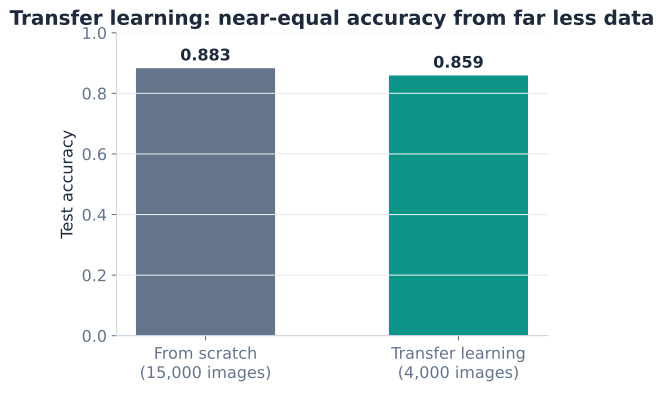
Read this result carefully, because it is the real lesson. Transfer learning did not beat the from-scratch model here: 0.859 is a touch below 0.883. That is expected. Fashion-MNIST is small, grayscale, and low-resolution, the opposite of the natural color photographs MobileNetV2 was trained on. The mismatch caps how much its ImageNet features can help.
But notice how it got there. The transfer model used barely a quarter of the data, trained only a tiny head, and still landed within about two and a half percentage points of the baseline. That is the headline: near-equal accuracy from far less data and far less training. When your problem looks more like ImageNet, natural RGB photos of real-world objects, the pretrained features fit beautifully and transfer learning routinely wins decisively, often by a wide margin and with very little data.
When does transfer learning shine?
The closer your data is to the pretrained model’s original domain, and the less labeled data you have, the bigger the win. Color photos of everyday objects, animals, food, or scenes are ideal. Highly specialized or stylistically alien images (grayscale icons, medical scans, satellite imagery) benefit less from feature extraction alone, and that is exactly where fine-tuning starts to earn its keep.
Feature extraction keeps the whole base frozen. Fine-tuning goes a step further: after the head has learned, you unfreeze some of the base’s later layers and continue training with a very small learning rate. The idea is to gently nudge the pretrained features so they adapt to your specific data, without erasing what they already know.
# Unfreeze the base, then re-freeze everything except the last 20 layers
base_model.trainable = True
for layer in base_model.layers[:-20]:
    layer.trainable = False

# Recompile with a MUCH smaller learning rate after changing trainability
model.compile(
    optimizer=keras.optimizers.Adam(learning_rate=1e-5),  # 100x smaller
    loss=keras.losses.SparseCategoricalCrossentropy(from_logits=True),
    metrics=["accuracy"],
)

# Continue training for a few more epochs
# history_ft = model.fit(x_train_pp, y_train, validation_split=0.2,
#                        epochs=5, batch_size=64, verbose=2)
Three rules keep fine-tuning from backfiring:
Whenever you change a layer’s trainable flag, you must recompile the model for the change to take effect. That is a frequent and frustrating gotcha.
Fine-tuning can make things worse
Fine-tuning is not a free upgrade. With a small or mismatched dataset, unfreezing too many layers or using too large a learning rate can cause the model to overfit or to forget useful features, ending up worse than plain feature extraction. Start conservative: train the head, unfreeze a little, use a tiny learning rate, and only expand if validation accuracy actually improves.
Try these before checking the hints. They reuse the variables and pipeline from the lesson.
Before adding the head, the frozen base turns each image into a feature map. Run the preprocessed training images through base_model (in inference mode) and a GlobalAveragePooling2D layer, and print the shape of the resulting feature vector for the batch.
# Your code here (use base_model, x_train_pp, GlobalAveragePooling2D)Hint
Call the base in inference mode with feats = base_model(x_train_pp[:8], training=False), then pool with pooled = layers.GlobalAveragePooling2D()(feats). Print pooled.shape. You should get a 2D shape of (8, 1280): eight images, each reduced to a 1,280-length feature vector (MobileNetV2’s final channel count).
Verify that freezing actually worked. Print the number of trainable and non-trainable parameters in model, and confirm that the trainable count is tiny (just the head) while the non-trainable count holds the millions of frozen base weights.
# Your code here (use model)Hint
Use model.count_params() for the total, and sum over model.trainable_weights and model.non_trainable_weights with np.sum([np.prod(w.shape) for w in ...]). You should see roughly 12,810 trainable parameters (the dense head) versus about 2.26 million non-trainable ones (the frozen base).
Swap MobileNetV2 for another Keras application, such as ResNet50, as the frozen feature extractor. Load it with include_top=False and ImageNet weights, freeze it, and rebuild the same head. Remember to use that model’s matching preprocess_input.
from tensorflow.keras.applications import ResNet50
from tensorflow.keras.applications.resnet50 import preprocess_input as resnet_pp

# Your code here
Hint
The pattern is identical: base = ResNet50(include_top=False, weights="imagenet", input_shape=(96, 96, 3)), then base.trainable = False, then the same GlobalAveragePooling2D and Dense(10) head. The crucial change is preprocessing, you must rerun your pipeline with ResNet50’s preprocess_input instead of MobileNetV2’s, because each architecture expects a different pixel scaling.
You used a model pretrained on millions of images to classify clothing with only a few thousand examples. Let’s review what you learned.
Transfer Learning
Feature Extraction vs. Fine-Tuning
base_model.trainable = False) and train only a small head; fast, data-efficient, the safe defaulttrainable flagPreprocessing for Pretrained Models
preprocess_input so pixels match the original training scaleThe Keras Pattern
MobileNetV2(include_top=False, weights="imagenet", input_shape=...) loads the basebase_model.trainable = False freezes itbase_model(inputs, training=False) runs it in inference mode (keeps batch-norm stats fixed)GlobalAveragePooling2D then Dense(n_classes) forms a clean headSparseCategoricalCrossentropy(from_logits=True)The Honest Result
Transfer learning is how most real-world computer vision gets done. Almost nobody trains a large image model from scratch anymore, because someone has already paid the enormous cost of teaching a network to see, and they have shared the result. By reusing those weights, you can ship an accurate classifier from a few hundred or few thousand labeled images, which is often all you can realistically collect.
The Fashion-MNIST experiment also taught you to be honest about results. A pretrained model is not magic: when your data is far from its original domain, the benefit shrinks. Knowing this lets you set expectations, choose between feature extraction and fine-tuning wisely, and recognize the situations, natural color photos with limited labels, where transfer learning turns a hard problem into an easy one.
You now know how to stand on the shoulders of a pretrained network. In the next lesson, you will put everything from this module together in a guided project, applying transfer learning to a real medical-imaging problem.
Apply transfer learning end to end to classify chest X-rays in a real medical-imaging project.
Return to the Computer Vision and CNNs module overview.
You just learned a technique that professional practitioners reach for first, not last. The next time you face an image problem with limited data, your instinct should be to grab a pretrained base before writing a single convolutional layer of your own. Master the two-step rhythm, freeze and extract features, then carefully fine-tune if needed, and you will get strong models from small datasets again and again.