Title here
Summary here
This is the capstone of the computer vision module: a complete, end-to-end project on a real medical-imaging task. You will train a convolutional neural network to look at a chest X-ray and decide whether it shows signs of pneumonia. Along the way you will see how the pieces you learned in earlier lessons, convolution, pooling, dropout, and honest evaluation, come together on a problem that genuinely matters.
By the end of this lesson, you will be able to:
.npz fileYou should be comfortable with the CNN building blocks from earlier lessons (convolutional layers, pooling, dropout) and with basic NumPy and Keras. Let’s begin.
Pneumonia is one of the leading causes of death in young children worldwide. A fast, reliable read of a chest X-ray can be the difference between early treatment and a missed diagnosis. In many clinics, though, a trained radiologist is not always available the moment an X-ray is taken. A model that can flag likely pneumonia cases for urgent review is a genuinely useful tool, not a replacement for a doctor, but a second pair of eyes that never gets tired.
In this project you will play the role of a machine learning engineer building exactly that kind of screening tool. The task is binary classification: given a chest X-ray, predict normal or pneumonia.
Before you write any model code, it is worth being clear about what “good” means here. In most of the projects so far, you optimized for accuracy. Medical screening is different. The cost of the two kinds of mistakes is not symmetric:
Keep that asymmetry in mind. It will shape how you evaluate the model at the end, and it is the single most important idea in this lesson.
A model is a screen, not a diagnosis
Throughout this project, think of the model as a triage tool that decides who gets looked at first, not as a system that makes the final call. That framing is what justifies tuning the model to almost never miss a real case, even if it raises a few false alarms.
You will use PneumoniaMNIST, a curated collection of real pediatric chest X-rays. Each image has been resized to a tiny 28x28 grayscale square, which keeps the project fast enough to run on a laptop while preserving the signal a model needs to learn.
The dataset ships as a single compressed NumPy file (.npz) containing the images and labels for the training and test splits. You can download it directly from its public archive.
import numpy as np
import urllib.request

# download: https://zenodo.org/records/10519652/files/pneumoniamnist.npz
urllib.request.urlretrieve(
    "https://zenodo.org/records/10519652/files/pneumoniamnist.npz",
    "pneumoniamnist.npz",
)

data = np.load("pneumoniamnist.npz")
print(data.files)
# Output:
# ['train_images', 'train_labels', 'val_images', 'val_labels', 'test_images', 'test_labels']
The archive bundles three splits. For this project you will combine the provided training and validation images into one training pool, then carve out your own validation set later so you stay in control of the split. Load the arrays and look at their shapes.
# Combine the provided train + val into one training pool
train_images = np.concatenate([data["train_images"], data["val_images"]], axis=0)
train_labels = np.concatenate([data["train_labels"], data["val_labels"]], axis=0)
test_images = data["test_images"]
test_labels = data["test_labels"]

# Add the channel dimension Keras expects: (samples, 28, 28, 1)
train_images = train_images[..., np.newaxis]
test_images = test_images[..., np.newaxis]

print("Train:", train_images.shape)
print("Test: ", test_images.shape)
# Output:
# Train: (4708, 28, 28, 1)
# Test:  (624, 28, 28, 1)
You have 4,708 training images and 624 test images, each a single-channel 28x28 array. The trailing 1 is the channel dimension: these are grayscale, so there is exactly one channel (a color image would have 3). Convolutional layers in Keras expect this (height, width, channels) shape, which is why you added it.
Before modeling, always look at how the labels are distributed. Here the label is 0 for normal and 1 for pneumonia.
unique, counts = np.unique(train_labels, return_counts=True)
print(dict(zip(unique.ravel(), counts)))
# Output:
# {0: 1214, 1: 3494}
This dataset is imbalanced. Of the 4,708 training images, only 1,214 are normal while 3,494 show pneumonia, roughly a 1-to-3 split. That imbalance has two consequences you need to remember:
Imbalance makes accuracy misleading
Whenever one class dominates, treat a single accuracy number with suspicion. A 90 percent accurate model on a 90/10 dataset might be doing nothing more than guessing the majority class. The confusion matrix and per-class metrics you compute at the end of this lesson are what reveal the truth.
Numbers only go so far. Look at a few actual X-rays so you understand what the model has to work with.
import matplotlib.pyplot as plt

label_names = {0: "Normal", 1: "Pneumonia"}

fig, axes = plt.subplots(2, 4, figsize=(10, 5))
for ax, img, lbl in zip(axes.ravel(), train_images, train_labels.ravel()):
    ax.imshow(img.squeeze(), cmap="gray")
    ax.set_title(label_names[int(lbl)])
    ax.axis("off")
plt.tight_layout()
plt.show()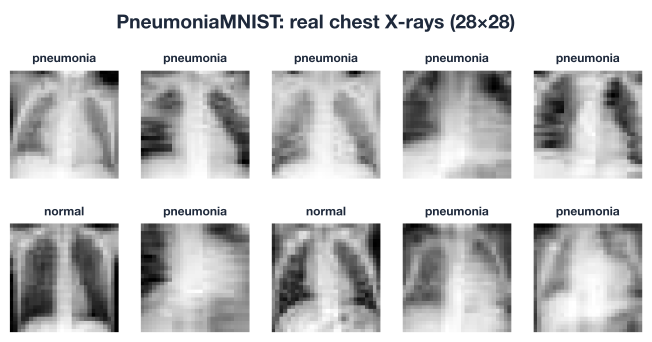
Even at 28x28, you can make out the difference. Normal lungs appear as relatively dark, evenly textured regions. Pneumonia tends to show hazy white areas where fluid or inflammation blocks the X-rays. That cloudiness is the signal your CNN will learn to detect.
Two small preparation steps remain before you can train.
First, scale the pixel values. The raw images store pixel intensities as integers from 0 to 255. Neural networks train far more reliably when their inputs are small floating-point numbers, so you rescale to the [0, 1] range by dividing by 255.
Second, hold out a validation set. You will train on most of the data but watch performance on a slice the model never trains on, so you can detect overfitting as it happens.
# Scale pixels to [0, 1]
train_images = train_images.astype("float32") / 255.0
test_images = test_images.astype("float32") / 255.0

# Hold out 20% of training data for validation
from sklearn.model_selection import train_test_split

X_train, X_val, y_train, y_val = train_test_split(
    train_images, train_labels,
    test_size=0.20,
    random_state=42,
    stratify=train_labels,   # keep the same normal/pneumonia ratio in both
)

print("Train:", X_train.shape, " Val:", X_val.shape)
# Output:
# Train: (3766, 28, 28, 1)  Val: (942, 28, 28, 1)
Notice stratify=train_labels. Because the dataset is imbalanced, you want the validation split to mirror the same roughly 1-to-3 ratio as the training data. Without stratification, a random split could end up with a lopsided validation set that gives you a misleading read on performance.
The test set stays untouched. You will not look at it until the very end, exactly once. That discipline is what makes the final numbers trustworthy.
Now build the model. The architecture is deliberately small: a single convolutional block to extract features, a dense layer to combine them, and dropout to fight overfitting. Starting small is good practice. You can always add capacity later if the model underfits, but a compact model trains quickly and is easier to reason about.
import tensorflow as tf
from tensorflow.keras import layers, models

model = models.Sequential([
    layers.Input(shape=(28, 28, 1)),

    # Feature extraction
    layers.Conv2D(32, (3, 3), activation="relu"),
    layers.MaxPooling2D((2, 2)),

    # Classification head
    layers.Flatten(),
    layers.Dense(64, activation="relu"),
    layers.Dropout(0.5),          # regularization: drop half the units while training
    layers.Dense(1, activation="sigmoid"),   # one output: P(pneumonia)
])

model.summary()
A few design choices are worth unpacking:
Conv2D layer slides 32 learnable 3x3 filters over the image, each one looking for a small visual pattern such as an edge or a cloudy patch.MaxPooling2D shrinks the feature maps by taking the strongest activation in each 2x2 window, which makes the model cheaper and slightly translation-tolerant.Dropout(0.5) randomly silences half the dense-layer units on each training step. This is your main defense against overfitting: the network cannot lean too hard on any single feature.Compiling tells Keras how to train: which loss to minimize, which optimizer to use, and which metrics to report.
model.compile(
    optimizer="adam",
    loss="binary_crossentropy",   # the right loss for binary classification
    metrics=["accuracy"],
)
Because the target is a single 0/1 label and the output is a single probability, the correct loss is binary cross-entropy. It penalizes confident wrong predictions heavily, which is exactly what you want. For a true label and predicted probability , the loss for one example is:
When the prediction is close to the truth, the loss is near zero; when it is confidently wrong, the loss grows quickly. The Adam optimizer adjusts the network’s weights to drive this loss down across the whole training set.
With the architecture compiled, training is a single call to .fit(). You pass the training data, point Keras at your held-out validation set, and let it run for a handful of epochs.
history = model.fit(
    X_train, y_train,
    validation_data=(X_val, y_val),
    epochs=15,
    batch_size=64,
    verbose=2,
)
Each epoch is one full pass over the training data. After every epoch Keras evaluates on the validation set and prints both the training and validation accuracy. Watching those two numbers side by side is how you diagnose the model’s health:
The plot below shows the training and validation accuracy over the run.
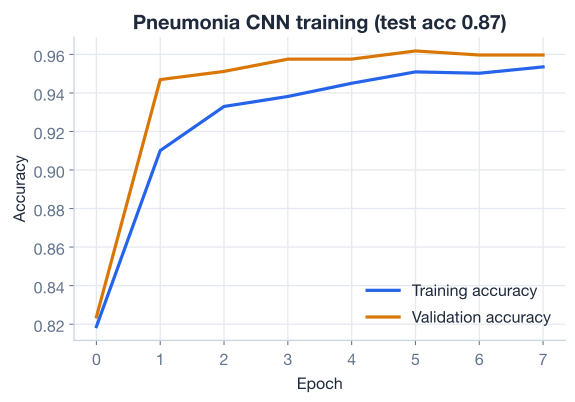
The two curves rising together, without a large gap opening up, is exactly what you hope to see. It tells you the model is learning real, generalizable patterns rather than memorizing individual X-rays, and that the Dropout(0.5) layer is doing its job.
Try this: add an EarlyStopping callback
Once you have a baseline, experiment with tf.keras.callbacks.EarlyStopping(monitor="val_loss", patience=3, restore_best_weights=True) and pass it to .fit() via callbacks=[...]. It stops training automatically when validation loss stops improving and rewinds to the best weights, so you never have to guess the right number of epochs.
Now for the moment of truth. You evaluate on the 624 test images the model has never seen. This single measurement is your honest estimate of how the model would perform in the real world.
test_loss, test_acc = model.evaluate(test_images, test_labels, verbose=0)
print(f"Test accuracy: {test_acc:.3f}")
# Output:
# Test accuracy: 0.865
A test accuracy of 0.865 is a solid result, and reassuringly close to the validation accuracy, which means the model generalizes. But remember the imbalance warning: accuracy alone does not tell the whole story for a medical screen. You need to look deeper.
To understand what kind of mistakes the model makes, build a confusion matrix. First convert the model’s probability outputs into hard 0/1 predictions using a 0.5 threshold, then count the four outcomes.
import numpy as np

probs = model.predict(test_images, verbose=0).ravel()
preds = (probs >= 0.5).astype(int)

from sklearn.metrics import confusion_matrix
cm = confusion_matrix(test_labels, preds)
print(cm)
# Output:
# [[161  73]
#  [ 11 379]]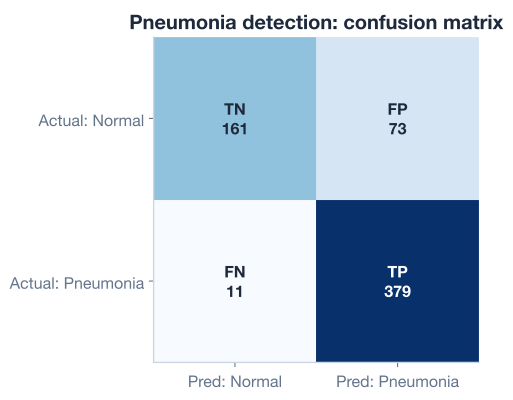
Read the matrix one cell at a time. Rows are the true label, columns are the prediction:
Now look at the trade-off the model has made. It missed only 11 real pneumonia cases out of 390, but it raised 73 false alarms among the 234 healthy patients. That is exactly the asymmetry you want in a screening tool: it is cautious, erring toward flagging anything suspicious rather than letting a sick child slip through.
Two numbers turn those raw counts into the metrics clinicians actually care about.
Sensitivity (also called recall) answers: of all the patients who truly have pneumonia, what fraction did the model catch?
Specificity answers: of all the truly healthy patients, what fraction did the model correctly clear?
tn, fp, fn, tp = cm.ravel()
sensitivity = tp / (tp + fn)
specificity = tn / (tn + fp)
print(f"Sensitivity (recall): {sensitivity:.3f}")
print(f"Specificity:          {specificity:.3f}")
# Output:
# Sensitivity (recall): 0.972
# Specificity:          0.688
The model catches 97.2 percent of all pneumonia cases. Its specificity is lower at 68.8 percent, meaning it does over-flag healthy patients, but in a screening context that is the right trade to make: a false alarm costs a doctor a few minutes, while a missed case costs far more.
Finally, compute the AUC (area under the ROC curve), a single number summarizing how well the model separates the two classes across all possible thresholds, not just 0.5.
from sklearn.metrics import roc_auc_score
auc = roc_auc_score(test_labels, probs)
print(f"AUC: {auc:.3f}")
# Output:
# AUC: 0.928
An AUC of 0.928 is strong. A value of 1.0 would be a perfect classifier and 0.5 would be random guessing, so 0.928 tells you the model’s probability scores rank pneumonia cases above normal ones the vast majority of the time. Crucially, AUC does not depend on your choice of threshold, which makes it a fairer overall measure than accuracy on an imbalanced dataset.
Why recall is the metric that matters here
If you could optimize only one number for a pneumonia screen, it would be recall. A model that catches 97 percent of real cases and occasionally cries wolf is doing its job: every flagged patient gets a closer look, and almost no sick child is sent home untreated. A model with high accuracy but lower recall might look better on paper while quietly missing the cases that matter most. Always match your metric to the real-world cost of being wrong.
Here is a powerful idea that costs you nothing to retrain. The 0.5 threshold is just a default. Because the model outputs a probability, you can move the threshold to dial recall up or down.
If you wanted to catch even more pneumonia cases, you could lower the threshold so that the model flags an X-ray as pneumonia at, say, 0.3 instead of 0.5. That would push recall higher (fewer false negatives) at the cost of more false positives. Try it as an experiment.
for threshold in [0.3, 0.5, 0.7]:
    preds_t = (probs >= threshold).astype(int)
    tn, fp, fn, tp = confusion_matrix(test_labels, preds_t).ravel()
    recall = tp / (tp + fn)
    print(f"threshold={threshold}  recall={recall:.3f}  false negatives={fn}")
Lowering the threshold trades specificity for recall, and raising it does the reverse. The right choice is not a machine learning question; it is a clinical and ethical one about how much you are willing to over-flag in order to never miss a real case. The model gives you the dial. A human decides where to set it.
Now it is your turn. Try these before checking the hints.
You checked the class balance of the training set. Do the same for the test set: count how many of the 624 test images are normal versus pneumonia, and compute what accuracy a “always predict pneumonia” baseline would achieve.
import numpy as np
# test_labels is already loaded

# Your code here
Hint
Use np.unique(test_labels, return_counts=True) to get the counts. The pneumonia count divided by 624 is the accuracy of always guessing pneumonia. Compare that naive baseline to the model’s 0.865 to confirm the model is genuinely adding value.
The lesson used a single convolutional layer. Add a second Conv2D(64, (3,3)) followed by another MaxPooling2D before the Flatten, retrain, and compare validation accuracy to the original model.
from tensorflow.keras import layers, models

# Your code here: rebuild the model with two conv blocks, then compile and fit
Hint
Insert the new layers.Conv2D(64, (3, 3), activation="relu") and layers.MaxPooling2D((2, 2)) right after the first pooling layer, before Flatten. Keep everything else the same so the comparison is fair. A second block gives the model more capacity to learn richer features, though on tiny 28x28 images the gain may be modest.
Using the trained model’s predicted probabilities probs, find the lowest threshold from [0.1, 0.2, 0.3, 0.4] that brings the number of false negatives down to 5 or fewer, and report the specificity at that threshold.
from sklearn.metrics import confusion_matrix
# probs and test_labels are already available

# Your code here
Hint
Loop over the thresholds, build (probs >= t).astype(int), unpack tn, fp, fn, tp = confusion_matrix(...).ravel(), and watch how fn shrinks as the threshold drops. Note how specificity falls at the same time: this is the recall-versus-specificity trade-off made concrete.
Congratulations! You have built a complete, end-to-end medical-imaging classifier on real chest X-rays and evaluated it the way a careful practitioner would. Let’s review what you learned.
Loading and Exploring Real Data
.npz archives holding multiple arrays(28, 28, 1)Building and Training a CNN
Dropout(0.5) is your main defense against overfitting on a small datasetsigmoid output and binary_crossentropy loss for binary classificationHonest Evaluation
The Big Idea
The workflow you just practiced, load, explore, prepare, build, train, and evaluate, is the same skeleton behind nearly every applied deep learning project. What makes this lesson different is the lens you brought to evaluation. You did not stop at a single accuracy number. You looked at the confusion matrix, separated the two kinds of errors, and asked which one actually hurts.
That habit transfers far beyond X-rays. Fraud detection, spam filtering, predictive maintenance, and credit risk all share the same structure: the two mistakes cost different amounts, and the right model is the one whose errors are the cheap kind. A model that catches 97 percent of pneumonia cases while raising a manageable number of false alarms is, for this problem, exactly the model you want. Learning to choose and defend your metric is what separates someone who can train a model from someone who can deploy one responsibly.
You have completed the computer vision module by building a real, end-to-end medical-imaging classifier. CNNs gave you a powerful tool for data laid out on a grid, like images. Next you will turn to data that unfolds over time, like text and sequences, where a different family of architectures takes over.
Move from images to ordered data and learn the architectures built for text and time series.
Return to the Computer Vision and CNNs module overview.
You just shipped a project that mirrors real applied machine learning work: a real dataset, a real model, and an evaluation honest enough to defend to a doctor. The technical pieces, convolution, dropout, and a confusion matrix, will stay with you, but the most valuable thing you take from here is a way of thinking. Always ask what a wrong answer costs, choose the metric that reflects that cost, and let it guide every decision from architecture to threshold. Master that mindset, and you will build models people can actually trust.