Title here
Summary here
This lesson gives you the mathematical foundation that every neural network is built on, expressed entirely in NumPy. You will learn what vectors and matrices are, how the dot product turns inputs and weights into a single prediction, how matrix multiplication scales that idea to a whole layer at once, and how broadcasting lets you add a bias cleanly. By the end you will have implemented a single neuron and a full dense-layer forward pass on real medical data.
By the end of this lesson, you will be able to:
X @ W + b patternYou should be comfortable with basic Python and have seen NumPy arrays before. No prior deep learning or linear algebra experience is required. Let’s begin.
A neural network looks intimidating from the outside, but at its core it does one thing over and over: it multiplies numbers by weights, adds them up, adds a bias, and squashes the result through a function. That single operation, repeated across thousands of connections and stacked in layers, is what gives networks their power.
The language that describes “multiply many numbers by many weights and add them up” compactly is linear algebra. Instead of writing a loop over every input, you express the whole computation as a multiplication between arrays. This is not just elegant notation. NumPy runs these array operations in optimized, compiled code, so the matrix form is also dramatically faster than a hand-written Python loop.
In this lesson you will use a real dataset throughout: the Pima Indians Diabetes dataset, where each row describes a patient and the goal is eventually to predict whether they have diabetes. You will not train anything yet. Instead, you will learn the exact arithmetic a network performs when it makes a prediction, so that gradient descent and backpropagation in later lessons feel like natural extensions rather than magic.
import numpy as np
import pandas as pd

# download: https://datatweets.com/datasets/diabetes.csv
df = pd.read_csv("diabetes.csv")

print("Shape:", df.shape)
print("Outcome balance:")
print(df["outcome"].value_counts())
# Output:
# Shape: (768, 9)
# Outcome balance:
# outcome
# 0    500
# 1    268
# Name: count, dtype: int64
The dataset has 768 patients and 9 columns: eight numeric measurements (such as glucose, blood pressure, BMI, and age) plus the outcome column, which is 1 for a diabetes diagnosis and 0 otherwise. Of the 768 patients, 500 are negative and 268 are positive.
A vector is a one-dimensional array of numbers. You can think of it as a single row, or a single patient’s measurements lined up in order. In NumPy you create one with np.array.
# A vector with 8 numbers (one patient's measurements)
v = np.array([6, 148, 72, 35, 0, 33.6, 0.627, 50])
print(v)
print("Number of elements:", v.shape)
# Output:
# [  6.    148.     72.     35.      0.     33.6     0.627  50.   ]
# Number of elements: (8,)
The shape attribute tells you the size of the array. Here it is (8,), meaning a one-dimensional array with eight elements. You index a vector with a single number, because there is only one direction to move in.
print("First element :", v[0])
print("Last element  :", v[-1])
# Output:
# First element : 6.0
# Last element  : 50.0
In a neural network, the inputs to a neuron form one vector and the weights form another vector of the same length. The whole point of the next few sections is to combine those two vectors into a single number.
Mathematical notation for vectors
By convention, vectors are written with lowercase letters, like for inputs and for weights. A vector with elements is written . Matrices, which you will meet shortly, use uppercase letters like and . Keeping lowercase for vectors and uppercase for matrices will save you a lot of confusion later.
Before going further, pull the eight numeric features out of the dataset and into a NumPy array. Each row is one patient (a vector), and stacking all the rows gives you a two-dimensional array, which is a matrix.
feature_cols = [
    "pregnancies", "glucose", "blood_pressure", "skin_thickness",
    "insulin", "bmi", "diabetes_pedigree", "age",
]

X = df[feature_cols].to_numpy(dtype=float)
print("X shape:", X.shape)
# Output:
# X shape: (768, 8)
X has shape (768, 8): 768 rows (patients) and 8 columns (features). This is the standard machine learning convention, where the first dimension is the number of examples and the second is the number of features.
Look at the raw numbers in v above. Glucose is in the hundreds, the diabetes pedigree is below 1, and age is in the dozens. When features live on wildly different scales, the large ones dominate any weighted sum and drown out the small ones. The fix is standardization: rescale each feature so it has a mean of 0 and a standard deviation of 1. The transform applied to each value is
where is the feature’s mean and is its standard deviation. With NumPy you can compute this for every feature at once.
mu = X.mean(axis=0)   # mean of each column
sd = X.std(axis=0)    # standard deviation of each column

X_std = (X - mu) / sd

print("Means after scaling:", np.round(X_std.mean(axis=0)[:3], 6))
print("Stds after scaling :", np.round(X_std.std(axis=0)[:3], 6))
# Output:
# Means after scaling: [-0.  0. -0.]
# Stds after scaling : [1. 1. 1.]
axis=0 tells NumPy to compute the statistic down each column. The subtraction and division you see here are your first taste of broadcasting, which you will study in detail soon. For now, just note that the standardized first patient looks like this:
print(np.round(X_std[0], 4))
# Output:
# [ 0.6399  0.8483  0.1496  0.9073 -0.6929  0.204   0.4685  1.426 ]
These are the inputs you will feed to your neuron. Every value is now a small number centered near zero, which is exactly what neural networks like.
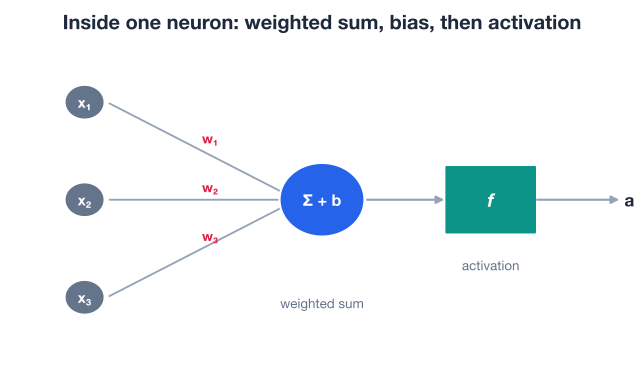
A single artificial neuron takes a vector of inputs, multiplies each input by a corresponding weight, sums the results, and adds a single bias term. That weighted sum is written mathematically as
The first part of that expression, the sum of element-by-element products of two vectors, is called the dot product. Written with vector notation, the whole computation becomes compact:
Let’s compute it by hand first, then with NumPy. Suppose you assign these eight weights and a bias, and apply them to the first standardized patient.
x0 = X_std[0]   # first patient's standardized features

w = np.array([0.10, 0.40, -0.20, 0.05, -0.10, 0.30, 0.15, 0.25])
b = -0.50

# The dot product: multiply elementwise, then sum
manual = np.sum(w * x0)
print("Elementwise then sum:", round(manual, 6))
# Output:
# Elementwise then sum: 0.976025
NumPy gives you the same result directly with np.dot, which is the idiomatic way to write a dot product.
dp = np.dot(w, x0)
print("np.dot(w, x0):", round(float(dp), 6))
# Output:
# np.dot(w, x0): 0.976025
The two approaches agree exactly. np.dot is preferred because it is clearer and runs in optimized code. Now add the bias to finish the weighted sum.
z = np.dot(w, x0) + b
print("Weighted sum z:", round(float(z), 6))
# Output:
# Weighted sum z: 0.476025
That single number z is what flows into the neuron’s activation function. The diagram below shows the whole picture: inputs arrive on the left, each is scaled by its weight, the products are summed with the bias, and the result passes through an activation.
What the dot product really measures
The dot product measures how much two vectors point in the same direction. When the inputs align with the weights, the dot product is large and positive; when they point in opposite directions, it is negative. A neuron’s weights therefore act like a “template” the inputs are compared against, and the weighted sum is the strength of the match.
The weighted sum z is a single number that can range anywhere from large negative to large positive. To turn it into something interpretable, like a probability, you pass it through an activation function. A common choice is the sigmoid, which squashes any number into the range between 0 and 1:
def sigmoid(z):
    return 1 / (1 + np.exp(-z))

output = sigmoid(z)
print("Neuron output:", round(float(output), 6))
# Output:
# Neuron output: 0.616809
You now have a complete neuron. It took eight standardized measurements, combined them with weights and a bias into a single weighted sum, and produced 0.6168, which you could read as “about a 62 percent activation” for this patient. That is the entire forward computation of one neuron.
You are not training yet
The weights and bias above were chosen by hand purely to demonstrate the arithmetic. A real network learns these values from data using gradient descent, which is the subject of the next lesson. For now, the goal is to understand exactly what a neuron computes once its weights are fixed.
Computing one neuron for one patient is fine, but a real network processes a batch of patients through a layer of many neurons. Doing that with loops would be slow and tedious. Matrices let you express the whole thing in a single expression.
A matrix is a two-dimensional array of numbers, with rows and columns. Your feature array X_std is already a matrix. You index it with two numbers: row first, then column.
print("Full matrix shape:", X_std.shape)
print("Element at row 0, column 1:", round(X_std[0, 1], 4))
print("Entire first row :", np.round(X_std[0], 4))
print("First column, first 3 values:", np.round(X_std[:3, 0], 4))
# Output:
# Full matrix shape: (768, 8)
# Element at row 0, column 1: 0.8483
# Entire first row : [ 0.6399  0.8483  0.1496  0.9073 -0.6929  0.204   0.4685  1.426 ]
# First column, first 3 values: [ 0.6399 -0.8449  1.2339]
X_std[0, 1] selects row 0, column 1 (the standardized glucose of the first patient). The slice X_std[:3, 0] selects the first three rows of column 0. Reading and slicing matrices by [row, column] is something you will do constantly.
To keep the upcoming math readable, take a small batch of just the first five patients.
batch = X_std[:5]
print("Batch shape:", batch.shape)
# Output:
# Batch shape: (5, 8)
This batch is a (5, 8) matrix: five patients, eight features each.
Here is the key insight. Running one neuron over the whole batch means taking the dot product of the weight vector with every row of the batch. Running a layer of several neurons means doing that for several weight vectors. Matrix multiplication does exactly this in a single operation.
Matrix multiplication combines two matrices by taking the dot product of each row of the first with each column of the second. For the result to be defined, the number of columns in the first matrix must equal the number of rows in the second. A simple two-by-two example makes the rule concrete:
\begin{bmatrix} a_{11}b_{11} + a_{12}b_{21} \ a_{21}b_{11} + a_{22}b_{21} \end{bmatrix} $$
Each entry of the output is one dot product. To run a layer, you arrange the layer’s weights into a matrix where each column is one neuron’s weight vector. The whole layer is then the matrix product of the input batch with , plus a bias vector :
In NumPy, matrix multiplication uses the @ operator. Build a weight matrix that maps the 8 input features to a layer of 3 neurons. Its shape must be (8, 3): 8 rows (one per input feature) and 3 columns (one per neuron).
# Weight matrix: 8 input features -> 3 neurons
W = np.round(np.linspace(-0.3, 0.3, 24).reshape(8, 3), 4)
print("W shape:", W.shape)
print(W)
# Output:
# W shape: (8, 3)
# [[-0.3    -0.2739 -0.2478]
#  [-0.2217 -0.1957 -0.1696]
#  [-0.1435 -0.1174 -0.0913]
#  [-0.0652 -0.0391 -0.013 ]
#  [ 0.013   0.0391  0.0652]
#  [ 0.0913  0.1174  0.1435]
#  [ 0.1696  0.1957  0.2217]
#  [ 0.2478  0.2739  0.3   ]]
Now check that the shapes line up. The batch is (5, 8) and W is (8, 3). The inner dimensions match (8 and 8), so the product is valid and the result will be (5, 3): five patients, each scored by three neurons.
print("batch shape:", batch.shape)
print("W shape    :", W.shape)

scores = batch @ W
print("scores shape:", scores.shape)
# Output:
# batch shape: (5, 8)
# W shape    : (8, 3)
# scores shape: (5, 3)
Shapes must line up
The single most common error in neural network code is a shape mismatch in matrix multiplication. For A @ B, the number of columns of A must equal the number of rows of B, and the result has the rows of A and the columns of B. Whenever a multiplication fails, print the .shape of both arrays first. Reading shapes as “(examples, features) @ (features, neurons) → (examples, neurons)” makes the layer logic click.
The layer is not finished until you add a bias. Each of the 3 neurons has its own bias, so the bias is a vector of length 3. But scores is a (5, 3) matrix. How do you add a 3-element vector to a 5-by-3 matrix?
The answer is broadcasting, a NumPy feature that automatically stretches a smaller array across a larger one when their shapes are compatible. Two shapes are compatible when, comparing them from the right, each pair of dimensions is either equal or one of them is 1. Here the bias of shape (3,) lines up with the last dimension of scores, so NumPy adds the bias to every row without you writing a loop.
bias = np.array([0.1, -0.2, 0.0])

Z = batch @ W + bias
print("Z shape:", Z.shape)
print(np.round(Z, 4))
# Output:
# Z shape: (5, 3)
# [[ 0.0818 -0.1152  0.1879]
#  [ 0.4103  0.0182  0.1261]
#  [-0.6126 -0.9042 -0.6957]
#  [ 0.13   -0.2791 -0.1881]
#  [ 1.5514  1.4185  1.7851]]
The single line batch @ W + bias is the complete linear part of a layer: matrix multiplication followed by a broadcast bias add. This is the famous X @ W + b pattern that appears in essentially every neural network.
To see broadcasting on its own, here are a couple of small examples. A column vector of shape (5, 1) happily broadcasts against a scalar or a length-1 array, while mismatched shapes raise an error.
A = np.ones((5, 1))

print((A + np.ones((1, 1))).ravel())   # works: shapes are compatible
print((A * 2).ravel())                 # works: scalar broadcasts to every element
# Output:
# [2. 2. 2. 2. 2.]
# [2. 2. 2. 2. 2.]
# This fails: trailing dimensions 1 and 1 are fine, but 5 and 2 conflict
A + np.ones((2, 1))
# Output:
# ValueError: operands could not be broadcast together with shapes (5,1) (2,1)Broadcasting saves memory and code
Broadcasting does not actually copy the smaller array in memory; NumPy simulates the stretch internally, so it is both fast and memory-efficient. The mental model, though, is simple: imagine the bias vector duplicated down every row of the matrix before the addition.
You now have every piece needed to implement a complete dense layer (also called a fully connected layer): the matrix multiplication, the broadcast bias, and the activation. A forward pass is the act of pushing inputs through the layer to produce outputs.
Wrap the whole thing in a small function. It takes a batch of inputs, a weight matrix, and a bias vector, and returns the activated outputs.
def dense_forward(X, W, b):
    Z = X @ W + b          # linear part: matrix mult + broadcast bias
    A = sigmoid(Z)         # activation
    return A

A = dense_forward(batch, W, bias)
print("Activations shape:", A.shape)
print(np.round(A, 4))
# Output:
# Activations shape: (5, 3)
# [[0.5204 0.4712 0.5468]
#  [0.6012 0.5046 0.5315]
#  [0.3515 0.2882 0.3328]
#  [0.5324 0.4307 0.4531]
#  [0.8251 0.8051 0.8563]]
Every number is now between 0 and 1, because the sigmoid squashed each weighted sum. The output is a (5, 3) matrix: for each of the 5 patients, the layer produced 3 activations, one per neuron.
The same function scales to the entire dataset with no changes. Pass all 768 patients at once.
A_all = dense_forward(X_std, W, bias)
print("Full forward pass shape:", A_all.shape)
print("First patient's activations:", np.round(A_all[0], 4))
# Output:
# Full forward pass shape: (768, 3)
# First patient's activations: [0.5204 0.4712 0.5468]
In one line of array math, you ran 768 patients through a 3-neuron layer, performing 768 × 3 = 2,304 dot products. That is the efficiency linear algebra buys you, and it is why neural networks are written in terms of matrices rather than loops.
A real network simply stacks layers: the output of one dense_forward becomes the input to the next, with its own weight matrix and bias. The forward pass of a deep network is nothing more than this operation repeated, layer after layer.
Try these before checking the hints. Each one reinforces a piece of the forward pass.
Take the second standardized patient (X_std[1]), the weight vector w = np.array([0.10, 0.40, -0.20, 0.05, -0.10, 0.30, 0.15, 0.25]), and bias b = -0.50. Compute the weighted sum with np.dot, then pass it through sigmoid. What output do you get?
# Your code here (reuse X_std, w, b, and sigmoid from the lesson)Hint
Compute z = np.dot(w, X_std[1]) + b, then sigmoid(z). The weighted sum should be about -1.2137, which gives a sigmoid output of about 0.2291. The same two-step recipe, dot product then activation, defines every neuron.
Instead of looping over patients, use a dot-product-style multiplication to score the first five patients (batch) with the single weight vector w and bias b from Exercise 1, all at once. The result should be a vector of 5 weighted sums.
# Your code here (reuse batch, w, b)Hint
Because batch is (5, 8) and w is (8,), batch @ w produces a length-5 vector via broadcasting of the per-row dot products. Add b to broadcast the bias across all five. You should get approximately [ 0.476 -1.2137 0.1918 -1.503 1.0977].
Create a weight matrix W2 that maps the 8 input features to a layer of 5 neurons (so its shape is (8, 5)), with a bias vector of length 5. Run a full forward pass on the whole X_std matrix using dense_forward and confirm the output shape.
# Your code here (reuse X_std, dense_forward)Hint
Any (8, 5) array works for the weights, for example W2 = np.linspace(-0.2, 0.2, 40).reshape(8, 5), with b2 = np.zeros(5). Call dense_forward(X_std, W2, b2). The output shape should be (768, 5): 768 patients, 5 activations each. Notice that only the number of columns in the weight matrix changed the layer’s width.
You have built the entire mathematical machinery of a neural network’s forward pass from the ground up, using nothing but NumPy. Let’s review what you learned.
Vectors and Matrices
(examples, features)[row, column]The Dot Product and a Neuron
np.dot(w, x) + b is the idiomatic NumPy form of one neuron’s linear computationMatrix Multiplication for a Layer
(examples, features) @ (features, neurons) → (examples, neurons)@ operator runs a whole layer of neurons over a whole batch at onceBroadcasting and the Forward Pass
X @ W + b patternsigmoid(X @ W + b), and stacking these defines a deep networkEvery neural network you will ever build, from a tiny classifier to a large language model, is made of the operations in this lesson repeated at scale. The forward pass is just matrix multiplications, bias additions, and activations chained together. Once you see that X @ W + b is the heartbeat of a layer, the architecture diagrams of even very deep networks become readable.
This foundation also sets up everything that follows. In the next lesson you will stop choosing weights by hand and instead learn them. To do that, the network needs to know how to nudge each weight to reduce its error, and that requires derivatives flowing backward through exactly the matrix operations you just implemented. The cleaner your mental model of the forward pass, the easier gradient descent and backpropagation will be.
You can now run inputs through a neuron and a layer. The natural next question is: where do the right weights come from? That is what the next lesson answers.
Learn how a network automatically finds the weights that minimize its error.
Return to the Deep Learning Foundations module overview.
You have turned the abstract idea of a neuron into concrete, runnable NumPy code, and you have seen how matrix multiplication scales that idea to a full layer over real patient data. Keep the X @ W + b pattern firmly in mind, because it is the single most important expression in deep learning. As you move into training, watch how every learning step is really just adjusting the numbers inside the matrices you built here. Master the forward pass, and the rest of the network will feel like a natural extension of what you already know.