Title here
Summary here
This lesson introduces the two ideas that everything else in PyTorch is built on: the tensor, PyTorch’s core data structure, and autograd, the system that computes gradients for you automatically. You will create tensors, inspect and control their data types and shapes, move data back and forth with NumPy, run the operations you will use constantly, and finish by watching autograd differentiate a small expression whose answer you can verify with pencil and paper.
By the end of this lesson, you will be able to:
torch.zeros and torch.arangedtype and shape, and reshape data with view, reshape, unsqueeze, and squeezetorch.cat and torch.stack, and operate across shapes with broadcastingrequires_grad=True, call .backward(), and read gradients from .gradYou should be comfortable with basic Python and NumPy, and have PyTorch installed (pip install torch). Everything here runs on the CPU. Let’s begin.
In the previous lesson you saw why deep learning practitioners reach for a framework instead of writing every matrix operation by hand. PyTorch’s answer to “what do we compute on?” is the tensor.
A tensor is a multi-dimensional array, much like a NumPy array. It can hold a single number, a vector, a matrix, or a higher-dimensional block of numbers. What makes a tensor more than a NumPy array is two extra abilities:
For this lesson we stay on the CPU and focus on the mechanics. Everything you learn here is exactly what you will use when you build and train networks in the next lessons.
We will ground every example in a real problem. The Indian IPO dataset records 319 initial public offerings on Indian stock exchanges. For each IPO you have the issue size, how heavily different investor categories subscribed, the issue price, and whether the stock gained on its first day of listing. That final column is the kind of value a network learns to predict, and along the way the features become tensors.
import pandas as pd

# download: https://datatweets.com/datasets/indian_ipo.csv
ipo = pd.read_csv("indian_ipo.csv")

print("Shape:", ipo.shape)
print("Columns:", list(ipo.columns))
# Output:
# Shape: (319, 10)
# Columns: ['Date', 'IPOName', 'Issue_Size', 'Subscription_QIB', 'Subscription_HNI', 'Subscription_RII', 'Subscription_Total', 'Issue_Price', 'Listing_Gains_Percent', 'Listing_Gains']
The target column is Listing_Gains: 1 if the stock closed above its issue price on day one, 0 otherwise. About 55 percent of these IPOs gained.
print(ipo["Listing_Gains"].value_counts())
print("gain rate:", round(ipo["Listing_Gains"].mean(), 3))
# Output:
# Listing_Gains
# 1    174
# 0    145
# Name: count, dtype: int64
# gain rate: 0.545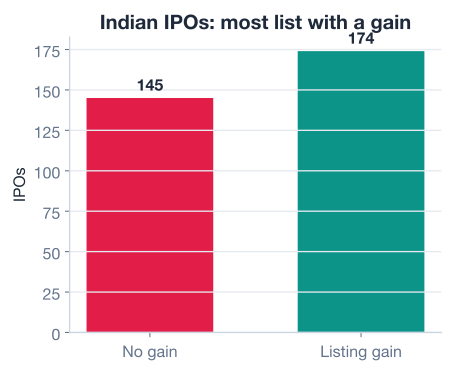
The most direct way to make a tensor is torch.tensor, which copies data from a Python list or a NumPy array. PyTorch infers the data type from the values you give it: a list of integers becomes an integer tensor, a list with decimals becomes a float tensor.
Two attributes are worth checking constantly. The .dtype attribute tells you the element type, and the .shape attribute tells you the size along each dimension.
import torch

# Three IPO issue prices (in rupees) as a 1D float tensor
issue_prices = torch.tensor([165.0, 145.0, 75.0])
print(issue_prices.dtype, issue_prices.shape)
# Output: torch.float32 torch.Size([3])

# Whole numbers infer an integer dtype
listing_gains = torch.tensor([1, 0, 1])
print(listing_gains.dtype)
# Output: torch.int64

# Override the inferred dtype when you need to
gains_as_float = torch.tensor([1, 0, 1], dtype=torch.float32)
print(gains_as_float.dtype)
# Output: torch.float32
Notice that 165.0 produced a float32 tensor, not float64. This is deliberate: float32 is the default and the standard for neural networks. It gives enough precision while using half the memory of float64.
PyTorch also has helper functions that generate tensors without you typing every value. torch.arange builds a range, and torch.zeros and torch.ones fill a shape with constants.
# A range, like Python's range(): starts at 1, stops before 5
days = torch.arange(1, 5)
print(days, days.dtype)
# Output: tensor([1, 2, 3, 4]) torch.int64

# A 2x3 block of zeros (default float32)
empty_batch = torch.zeros((2, 3))
print(empty_batch.dtype, empty_batch.shape)
# Output: torch.float32 torch.Size([2, 3])

# A vector of ones
ones_vector = torch.ones(3)
print(ones_vector.shape)
# Output: torch.Size([3])
Why dtype matters
The data type you pick affects both memory and speed. Use float32 for the inputs and parameters of a network, int64 for labels and indices, and reach for float64 only when you genuinely need extra precision. Most deep learning never does.
Networks are picky about shapes. A layer that expects a batch of rows will error if you hand it a flat vector, so you spend a surprising amount of time reshaping tensors into the form an operation wants. The good news is that the tools are simple.
unsqueeze(dim) inserts a new dimension of size 1 at the position you name, and squeeze(dim) removes a size-1 dimension. These are how you turn a flat vector into a single-column or single-row matrix and back.
subs = torch.tensor([43.22, 31.11, 5.17, 1.22])  # total subscription, 4 IPOs
print(subs.shape)
# Output: torch.Size([4])

# Add a dimension at position 1 -> a column
subs_col = subs.unsqueeze(1)
print(subs_col.shape)
# Output: torch.Size([4, 1])

# Add a dimension at position 0 -> a row
subs_row = subs.unsqueeze(0)
print(subs_row.shape)
# Output: torch.Size([1, 4])

# squeeze removes the size-1 dimension, recovering the original
back = subs_col.squeeze(1)
print(back.shape)
# Output: torch.Size([4])To reorganize the same values into a different shape, use view or reshape. Both keep the data identical and only change how it is laid out; the total number of elements must stay the same.
view is fast but needs the tensor to be stored contiguously in memory.reshape is more forgiving and will copy data if it must.A practical rule: start with view, and if PyTorch complains about contiguity, switch to reshape.
# Six subscription totals
sub_totals = torch.tensor([43.22, 31.11, 5.17, 1.22, 1.12, 2.40])
print(sub_totals.shape)
# Output: torch.Size([6])

# Organize into 2 rows of 3
grid = sub_totals.view(2, 3)
print(grid.shape)
# Output: torch.Size([2, 3])
print(grid)
# Output:
# tensor([[43.2200, 31.1100,  5.1700],
#         [ 1.2200,  1.1200,  2.4000]])

# reshape does the same here
grid_alt = torch.reshape(sub_totals, (2, 3))
print(grid_alt.shape)
# Output: torch.Size([2, 3])Pulling values out of a tensor works exactly as it does for NumPy arrays and Python lists.
prices = torch.tensor([165.0, 145.0, 75.0, 165.0, 0.0])
print(prices[0])      # Output: tensor(165.)
print(prices[:3])     # Output: tensor([165., 145.,  75.])
print(prices[-2:]) # Output: tensor([165., 0.])Real workflows constantly combine data. You might merge IPOs from two years, or group individual examples into a batch. PyTorch gives you two tools, and the difference between them is the single most common source of shape confusion, so it is worth getting straight now.
torch.cat concatenates along an existing dimension. It glues tensors end to end, so the result has the same number of dimensions, just larger along the axis you chose.
torch.stack stacks along a brand-new dimension. It places the inputs side by side as layers, so the result has one more dimension than the inputs.
# Two small batches: [Issue_Size, Subscription_Total] for 2 IPOs each
year_a = torch.tensor([[189.8, 43.22],
                       [328.7, 31.11]])
year_b = torch.tensor([[56.25, 5.17],
                       [199.8, 1.22]])

# Concatenate along rows -> one longer table of 4 IPOs
all_ipos = torch.cat([year_a, year_b], dim=0)
print(all_ipos.shape)
# Output: torch.Size([4, 2])

# Stack -> a new first dimension grouping the two years
by_year = torch.stack([year_a, year_b], dim=0)
print(by_year.shape)
# Output: torch.Size([2, 2, 2])
Use cat when you want more of the same thing (more rows, more examples). Use stack when you want to organize things into a new axis (group examples into a batch, compare across categories).
Often you want to combine tensors of different shapes, such as subtracting one mean value from every element of a matrix. Broadcasting is the set of rules PyTorch uses to make that work without you writing loops or manually copying data.
The rules, read from the rightmost dimension leftward, are:
Because PyTorch never actually materializes the expanded copies, broadcasting is both fast and memory-efficient.
# A 2x3 feature block (2 IPOs, 3 features)
data = torch.tensor([[189.8, 43.22, 165.0],
                     [328.7, 31.11, 145.0]])

# Add a single number to every element (scalar broadcasting)
print(data + 10.0)
# Output:
# tensor([[199.8000,  53.2200, 175.0000],
#         [338.7000,  41.1100, 155.0000]])

# Subtract a per-feature value: shape (3,) broadcasts across both rows
feature_means = torch.tensor([259.25, 37.165, 155.0])
print(data - feature_means)
# Output:
# tensor([[-69.4500,   6.0550,  10.0000],
#         [ 69.4500,  -6.0550, -10.0000]])
In the second example, the (3,) vector is treated as (1, 3) and applied to each row. This is exactly how feature normalization works in a real pipeline: one mean and one standard deviation per column, broadcast across every example.
Broadcasting is everywhere
Standardizing features, adding a bias to every neuron’s output, scaling a batch by a single learning rate, all of these are broadcasting. When an operation between two tensors fails, the cause is almost always shapes that do not broadcast. Print .shape on both operands first.
Most data arrives as NumPy arrays, often straight from pandas. Moving into PyTorch is easy, but there is one subtlety: torch.from_numpy shares memory with the array, so editing one changes the other.
import numpy as np

arr = np.array([43.22, 31.11, 5.17], dtype=np.float32)
t = torch.from_numpy(arr)
print(t)
# Output: tensor([43.2200, 31.1100,  5.1700])

arr[0] = 99.0          # change the NumPy array
print(t)               # the tensor changed too
# Output: tensor([99.0000, 31.1100,  5.1700])
When you need an independent copy that will not be affected by later edits, use .clone() (for an existing tensor) or torch.tensor(...) (which copies from a list or array).
independent = t.clone()
t[0] = 1.0
print(independent)
# Output: tensor([99.0000, 31.1100,  5.1700])  # unchanged
To pull a single number out of a one-element tensor as a plain Python float, use .item(). You will use this constantly to print loss values.
mean_sub = torch.tensor([43.22, 31.11, 5.17, 1.22]).mean()
print(mean_sub.item(), type(mean_sub.item()))
# Output: 20.179999351501465 <class 'float'>
NumPy defaults to float64
NumPy arrays are float64 by default, but PyTorch networks want float32. When you build an array you will turn into a tensor, pass dtype=np.float32 (as above) so you do not silently end up with double-precision tensors that waste memory and may even error inside some layers.
Let’s combine a few of these tools. Take the total subscription for the first four IPOs, convert from NumPy, and standardize the values to zero mean and unit standard deviation, the most common preprocessing step in deep learning.
sub_np = np.array([43.22, 31.11, 5.17, 1.22], dtype=np.float32)
sub = torch.from_numpy(sub_np)

standardized = (sub - sub.mean()) / sub.std()
print(standardized)
# Output: tensor([ 1.1355,  0.5387, -0.7398, -0.9344])

print("mean:", round(standardized.mean().item(), 4))
print("std: ", round(standardized.std().item(), 4))
# Output:
# mean: -0.0
# std:  1.0
The standardized values now have mean 0 and standard deviation 1, computed with broadcasting (the single mean and std are subtracted from and divided into every element). This is the same transform you applied with StandardScaler in scikit-learn, now in tensor form.
A neural network layer, at its heart, multiplies inputs by weights and sums them up, which is matrix multiplication. PyTorch provides torch.matmul for that, and ordinary operators (+, *, **) for element-wise math.
# Feature matrix: 4 IPOs, 3 features each
# columns: [Issue_Size, Subscription_Total, Issue_Price]
features = torch.tensor([[189.8, 43.22, 165.0],
                         [328.7, 31.11, 145.0],
                         [ 56.25, 5.17,  75.0],
                         [199.8,  1.22, 165.0]])

# A weight vector, one weight per feature
weights = torch.tensor([0.01, 0.5, 0.02])

# Matrix-vector multiply: (4, 3) @ (3,) -> (4,)
scores = torch.matmul(features, weights)
print(scores)
# Output: tensor([26.8080, 21.7420,  4.6475,  5.9080])
That single matmul computed a weighted sum of three features for all four IPOs at once. Element-wise operations then let you compare those scores to targets and build a loss.
targets = torch.tensor([1.0, 0.0, 1.0, 0.0])

squared_errors = (scores - targets) ** 2   # element-wise
mse = squared_errors.mean()                # reduce to one number
print("MSE:", round(mse.item(), 4))
# Output: MSE: 296.744
The loss here is large because the weights are arbitrary, the whole point of training is to adjust the weights to make it small. To do that, you need to know which direction to push each weight. That is what gradients tell you, and that is what autograd computes.
Training a network is an optimization problem. You have parameters (weights), and you want the values that make the loss as small as possible. A gradient is the rate of change of the loss with respect to a parameter: it tells you which way, and how steeply, the loss moves when you nudge that parameter. Picture walking down a hill in fog; the gradient is the direction of steepest descent under your feet.
Computing those gradients by hand for a real network would be hopeless. Autograd does it automatically. The mechanism is simple to state:
requires_grad=True..backward() on the final scalar result. PyTorch walks the graph backward and fills in each tensor’s .grad.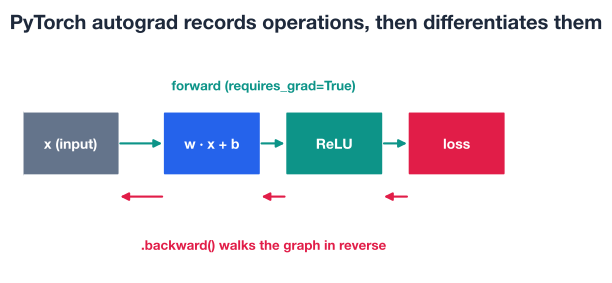
Start with the simplest possible case so you can verify the answer yourself. Take the function . From calculus, its derivative is , so at the gradient should be exactly .
x = torch.tensor(3.0, requires_grad=True)

y = x ** 2          # forward pass; PyTorch records this operation
y.backward()        # backward pass; compute dy/dx

print(x.grad)
# Output: tensor(6.)
Autograd returned 6.0, matching the hand calculation . You never wrote the derivative; PyTorch tracked the squaring operation and differentiated it for you.
You can only call .backward() on a scalar, a single number, because a gradient answers “how does this one value change as each input changes.” In a network, that single value is the loss. Let’s compute gradients for a small parameter vector through a scalar loss.
Take parameters and the loss . The derivative of the mean of squares with respect to each element is , so with we expect .
params = torch.tensor([2.0, -3.0, 1.0], requires_grad=True)

loss = (params ** 2).mean()   # a single scalar
loss.backward()

print(params.grad)
# Output: tensor([ 1.3333, -2.0000,  0.6667])
Again the gradients match the math exactly. Each number tells you how the loss responds to a tiny change in that parameter, and its sign tells you which way the loss moves. A training step would then nudge each parameter in the direction that reduces the loss, which is the topic of Lesson 4.
Gradients accumulate
PyTorch adds new gradients into .grad rather than overwriting them. That is intentional, but it means that in a training loop you must reset gradients to zero before each backward pass (you will see optimizer.zero_grad() in a later lesson). For the single-shot examples here it does not matter, but it is the most common autograd surprise for beginners.
Tracking operations costs memory and time, and you do not always need it. During data preprocessing or when simply making predictions, you want plain computation with no graph. Two tools turn tracking off: the torch.no_grad() context manager for whole blocks of code, and .detach() for a single tensor. You can check any tensor’s status through its .requires_grad attribute.
w = torch.tensor([2.0, 4.0, 6.0], requires_grad=True)

tracked = w ** 2                    # recorded in the graph
with torch.no_grad():
    untracked = (w - w.mean())      # not recorded
detached = w.detach() * 10          # also not recorded

print(tracked.requires_grad, untracked.requires_grad, detached.requires_grad)
# Output: True False False
Use torch.no_grad() to wrap an entire evaluation loop, and .detach() when you need to cut the gradient connection at one specific point. In evaluation, skipping tracking can save a large fraction of memory, sometimes the difference between a model that runs and one that runs out of memory.
You now have every piece needed to run the core of a training step on real data: load features, normalize them with broadcasting, predict with matmul, compute a scalar loss with element-wise operations, and get gradients from autograd. Here it is end to end on the Indian IPO features.
import torch
import numpy as np
import pandas as pd

# 1. Load real features (download: https://datatweets.com/datasets/indian_ipo.csv)
ipo = pd.read_csv("indian_ipo.csv")
cols = ["Issue_Size", "Subscription_Total", "Issue_Price"]
X_np = ipo[cols].to_numpy(dtype=np.float32)[:4]   # first 4 IPOs for a small demo
X = torch.from_numpy(X_np)

# 2. Normalize each feature with broadcasting
X_norm = (X - X.mean(dim=0)) / X.std(dim=0)

# 3. Create trainable parameters with gradient tracking
params = torch.tensor([0.5, -0.3, 0.2], requires_grad=True)

# 4. Predict with matrix multiplication, then a scalar MSE loss
preds = torch.matmul(X_norm, params)
targets = ipo["Listing_Gains"].to_numpy(dtype=np.float32)[:4]
targets = torch.from_numpy(targets)
loss = ((preds - targets) ** 2).mean()

# 5. Compute gradients automatically
loss.backward()

print("Loss:", round(loss.item(), 4))
print("Gradients:", params.grad)
# Output:
# Loss: 1.1952
# Gradients: tensor([ 1.3662, -0.1483,  1.0218])
This load, normalize, predict, loss, gradients flow is the skeleton of every training loop you will ever write in PyTorch. The next lessons add two things: a clean way to define the prediction step (layers), and a loop that uses these gradients to update the parameters over and over.
Try these before checking the hints. Each one reuses the ideas above on the real IPO data.
Load the Indian IPO dataset, take the Subscription_QIB column for the first five IPOs, and create a float32 tensor from it. Print the tensor’s dtype, its shape, and reshape it into a column with shape (5, 1).
import pandas as pd
import torch

ipo = pd.read_csv("indian_ipo.csv")  # download: https://datatweets.com/datasets/indian_ipo.csv

# Your code here
Hint
Get the values with ipo["Subscription_QIB"].to_numpy(dtype="float32")[:5], then torch.from_numpy(...). Check .dtype and .shape. Turn the flat vector into a column with .unsqueeze(1), which adds a size-1 dimension at position 1 to give shape (5, 1).
Build a tensor of the first four IPOs using the columns Issue_Size, Subscription_Total, and Issue_Price. Standardize each column to zero mean and unit standard deviation using broadcasting, then print the per-column mean and standard deviation of the result to confirm they are 0 and 1.
# Your code here (reuse the loaded ipo DataFrame)Hint
Make the matrix with torch.from_numpy(ipo[cols].to_numpy(dtype="float32")[:4]). Compute column statistics with X.mean(dim=0) and X.std(dim=0); both have shape (3,) and broadcast across the rows when you write (X - X.mean(dim=0)) / X.std(dim=0). Print result.mean(dim=0) and result.std(dim=0).
Define a scalar tensor x = torch.tensor(5.0, requires_grad=True), compute y = 3 * x ** 2 + 2 * x, call y.backward(), and print x.grad. First work out the derivative on paper, then confirm PyTorch agrees.
import torch

# Your code here
Hint
The derivative of is , so at you expect . After y.backward(), x.grad should print tensor(32.). Remember that .backward() only works because y is a single scalar.
You have met the tensor and the autograd engine, the foundation of everything you will build in PyTorch. Let’s review.
Tensors and Dtypes
torch.tensor, torch.arange, torch.zeros, and torch.onesdtype: float32 for network inputs and parameters, int64 for labels and indices.dtype and .shapeShapes and Combining
unsqueeze adds a size-1 dimension; squeeze removes oneview reshapes quickly on contiguous data; reshape is the flexible fallbacktorch.cat joins along an existing dimension (more rows); torch.stack adds a new dimension (a batch)NumPy and Values
torch.from_numpy shares memory with the array; use .clone() or torch.tensor(...) for an independent copyfloat64, so build arrays with dtype=np.float32 for PyTorch.item() extracts a single value as a plain Python numberAutograd
requires_grad=True to track their operations in a computation graph.backward() on a scalar result to populate each tensor’s .gradtorch.no_grad() (blocks) or .detach() (single tensors) to save memory during preprocessing and evaluationEvery neural network you train in PyTorch runs the same loop you assembled by hand in the mini pipeline: turn data into tensors, transform them with broadcasting and matrix multiplication, reduce to a scalar loss, and call .backward() to get gradients. The layers and optimizers you meet next are conveniences built on top of exactly these operations, not replacements for them.
The autograd examples were tiny on purpose. By choosing functions whose derivatives you could compute on paper, you saw that autograd is not magic; it is bookkeeping that records operations and applies the rules of calculus for you. That trust matters. When a real network misbehaves, knowing that gradients flow through a graph, that they accumulate, and that requires_grad controls tracking is what lets you debug it instead of guessing.
You can now create tensors, shape them, move data through NumPy, and let autograd compute gradients. Next you will stop wiring matrix multiplications by hand and let PyTorch’s layers do it, assembling a real network with nn.Sequential.
Stack layers into a real network and let PyTorch manage the parameters for you.
Return to the Deep Learning with PyTorch module overview.
Tensors and autograd are the two ideas you will lean on in every PyTorch project, from a three-line demo to a large network. The mini pipeline you built, data to tensors to loss to gradients, is the same skeleton that powers state-of-the-art models; they only add more layers and a loop. Keep that picture in mind as you move on: layers, losses, and optimizers are all just convenient ways to arrange the tensor operations and gradients you already understand.