Title here
Summary here
In the previous lesson you worked directly with tensors and autograd: you created weight tensors by hand, multiplied them with inputs, and watched gradients flow. That hands-on view is invaluable, but writing every layer manually does not scale to real networks. In this lesson you will learn the practical way to define models in PyTorch, using the building blocks nn.Module, nn.Linear, activation layers, and the nn.Sequential container that ties them together.
You will build a real classifier that predicts whether an Indian IPO lists at a gain, using the same 6 → 32 → 16 → 1 architecture you will train in the next two lessons.
By the end of this lesson, you will be able to:
nn.Module is and why every PyTorch model is built on itnn.Linear and connect their dimensions correctlynn.ReLU and nn.Sigmoidnn.SequentialYou should be comfortable with basic Python and have seen PyTorch tensors and autograd from the earlier lessons. We will not train the model here; defining optimizers and writing the training loop is the focus of the next lesson.
A neural network is just a stack of small, repeatable transformations. PyTorch gives you three things to express that stack cleanly:
nn.Module: the base class that every layer and every model inherits from. It knows how to keep track of parameters and how to run a forward pass.nn.Linear: the transformations themselves, each one a small nn.Module with its own weights.nn.Sequential: a way to chain layers so data flows through them in order.The key idea is that everything is an nn.Module. A single nn.Linear layer is a module. A ReLU activation is a module. And a whole network built from them is also a module. Because they all share the same interface, you can nest them, inspect them, and move them around with the same handful of methods. PyTorch handles parameter registration, initialization, and gradient tracking for you, so you focus on architecture instead of bookkeeping.
What ‘fully connected’ means
The networks in this lesson are made of nn.Linear layers, also called fully connected or dense layers. Every input value connects to every output neuron through its own weight. This is the workhorse layer for tabular data like the IPO dataset, where each row is a fixed set of numeric features.
The most fundamental layer in PyTorch is nn.Linear. It performs the same “multiply, then add” operation you implemented by hand earlier: it multiplies the input by a weight matrix and adds a bias vector. For an input vector , a single linear layer computes
where is the layer’s weight matrix and is its bias vector. When you create the layer you only specify two numbers: how many features come in and how many neurons go out. PyTorch creates the weights and biases for you, fills them with small random values, and registers them with autograd.
import torch
import torch.nn as nn

# A layer that takes 6 input features and produces 32 outputs
layer = nn.Linear(in_features=6, out_features=32)
print(layer)
# Output: Linear(in_features=6, out_features=32, bias=True)
The layer is callable: pass it a batch of inputs and it returns a batch of outputs. The input must have exactly in_features columns, but you can pass as many rows (samples) as you like.
# A batch of 4 samples, each with 6 features
batch = torch.randn(4, 6)
out = layer(batch)

print("Input shape: ", batch.shape)
print("Output shape:", out.shape)
# Output:
# Input shape:  torch.Size([4, 6])
# Output shape: torch.Size([4, 32])
Four samples went in with 6 features each, and four results came out with 32 values each. The layer transformed the feature dimension from 6 to 32 while leaving the number of samples untouched.
If you stacked nothing but nn.Linear layers, the whole network would collapse into a single linear transformation. Two linear layers in a row are mathematically equivalent to one linear layer, no matter how many you chain. That means the network could only ever learn straight-line relationships.
Activation functions fix this. Placed between linear layers, they apply a nonlinear function element by element, which lets the network bend and curve to fit complex patterns. PyTorch ships them as modules in torch.nn. Here are the two you will use in this lesson, shown on a small range of values:
x = torch.tensor([-2.0, -1.0, 0.0, 1.0, 2.0])

relu = nn.ReLU()
print("ReLU:   ", relu(x))
# Output: ReLU:    tensor([0., 0., 0., 1., 2.])

sigmoid = nn.Sigmoid()
print("Sigmoid:", sigmoid(x))
# Output: Sigmoid: tensor([0.1192, 0.2689, 0.5000, 0.7311, 0.8808])
nn.ReLU computes max(0, x): it zeros out negatives and leaves positives unchanged. It is simple, fast, and the default choice for hidden layers (the layers in the middle of a network). nn.Sigmoid squashes any number into the range , which is exactly what you want for the output of a binary classifier, because the result reads naturally as a probability.
Match the output activation to the task
For binary classification, end the network with a single output neuron and a sigmoid so the result is a probability between 0 and 1. For regression, where you want any real number, use no activation on the output layer. Choosing the wrong output activation quietly caps what your model can predict.
Activation layers have no learnable parameters and do not change the shape of the data. A ReLU after a layer that outputs 32 values still outputs 32 values; it just reshapes them through the nonlinearity.
You could connect layers by calling them one after another, but PyTorch gives you a tidier option: nn.Sequential. You list the layers in order, and the container runs your input through each one in turn during the forward pass. The result is a single model object you can call like a function.
Here is a small two-layer network that maps 6 features down to 1 output, with a ReLU in between:
model = nn.Sequential(
    nn.Linear(in_features=6, out_features=4),
    nn.ReLU(),
    nn.Linear(in_features=4, out_features=1),
)
print(model)
# Output:
# Sequential(
#   (0): Linear(in_features=6, out_features=4, bias=True)
#   (1): ReLU()
#   (2): Linear(in_features=4, out_features=1, bias=True)
# )
Look closely at how the dimensions connect. The first layer outputs 4 values, and the second layer expects exactly 4 inputs. This is not optional: each layer’s output size must equal the next layer’s input size. Mismatched dimensions, like outputting 4 values into a layer that expects 8, will raise an error. Likewise, your input data must have as many features as the first layer expects.
batch = torch.randn(4, 6)        # 4 samples, 6 features each
output = model(batch)

print("Output shape:", output.shape)
print(output)
# Output:
# Output shape: torch.Size([4, 1])
# tensor([[ 0.1934],
#         [-0.0577],
#         [ 0.0413],
#         [-0.1265]], grad_fn=<AddmmBackward0>)
Two things to notice. First, you simply call model(batch); there is no need to invoke each layer by hand, because nn.Sequential runs the forward pass for you in the order you listed. Second, the output carries a grad_fn. That is autograd quietly recording how the result was computed so it can produce gradients later during training. The exact numbers above come from random initialization and the random input, so do not read meaning into them yet, the model has learned nothing.
nn.Sequential behaves like a list
The numbers in the printout, (0), (1), (2), are positions in the container. You can index into the model like a list, so model[0] returns the first nn.Linear layer. You will use this in a moment to inspect a layer’s weights.
You will build a classifier for a real problem: predicting whether an Indian IPO lists at a gain on its first day of trading. Each row describes one initial public offering, including how heavily it was subscribed by different investor groups, and the target records whether the stock closed its first day above its issue price.
import pandas as pd

# download: https://datatweets.com/datasets/indian_ipo.csv
df = pd.read_csv("indian_ipo.csv")

print("Shape:", df.shape)
# Output: Shape: (319, 10)
The dataset has 319 rows and 10 columns. Most columns are numeric features; the last column, Listing_Gains, is the target, where 1 means the IPO listed at a gain and 0 means it did not.
| Column | Type | Meaning |
|---|---|---|
Date, IPOName | text | When the IPO listed and its name (identifiers, not features) |
Issue_Size | float | Size of the issue in crore rupees |
Subscription_QIB | float | Times subscribed by Qualified Institutional Buyers |
Subscription_HNI | float | Times subscribed by High Net-worth Individuals |
Subscription_RII | float | Times subscribed by Retail Individual Investors |
Subscription_Total | float | Overall subscription multiple |
Issue_Price | float | Price per share at issue |
Listing_Gains_Percent | float | First-day gain as a percentage |
Listing_Gains | int | Target: 1 if the IPO listed at a gain, else 0 |
You will use the six numeric columns from Issue_Size through Issue_Price as features. That gives a model with 6 inputs, which is why the first layer of your network will be nn.Linear(6, ...). Take a quick look at how the target is distributed.
print(df["Listing_Gains"].value_counts())
# Output:
# Listing_Gains
# 1    174
# 0    145
# Name: count, dtype: int64

print("gain rate:", round(df["Listing_Gains"].mean(), 3))
# Output: gain rate: 0.545
About 55 percent of IPOs listed at a gain (174 of 319), so the two classes are reasonably balanced. That matters, because on a balanced dataset accuracy is a meaningful score rather than something you can fake by always guessing the majority class.
Neural networks train best when inputs are on similar scales, and these columns are not: subscription multiples can run into the tens while issue prices reach the hundreds. You will standardize each feature to have zero mean and unit variance, then convert everything to PyTorch tensors. The data preparation here mirrors lesson 1’s workflow, so the focus stays on the model itself.
from sklearn.model_selection import train_test_split
from sklearn.preprocessing import StandardScaler
import torch

features = [
    "Issue_Size", "Subscription_QIB", "Subscription_HNI",
    "Subscription_RII", "Subscription_Total", "Issue_Price",
]

X = df[features].values
y = df["Listing_Gains"].values

# Split first, then scale (fit on train only to avoid leakage)
X_train, X_test, y_train, y_test = train_test_split(
    X, y, test_size=0.25, random_state=42, stratify=y
)

scaler = StandardScaler()
X_train = scaler.fit_transform(X_train)
X_test = scaler.transform(X_test)

# Convert to float32 tensors; reshape targets to a column vector
X_train_t = torch.tensor(X_train, dtype=torch.float32)
y_train_t = torch.tensor(y_train, dtype=torch.float32).view(-1, 1)
X_test_t = torch.tensor(X_test, dtype=torch.float32)
y_test_t = torch.tensor(y_test, dtype=torch.float32).view(-1, 1)

print("X_train_t:", X_train_t.shape)
print("X_test_t: ", X_test_t.shape)
# Output:
# X_train_t: torch.Size([239, 6])
# X_test_t:  torch.Size([80, 6])
The split holds out 25 percent for testing, leaving 239 training rows and 80 test rows, each with 6 features. Note dtype=torch.float32: PyTorch layers expect 32-bit floats, which are precise enough for training and lighter on memory than 64-bit. The .view(-1, 1) reshapes each target into a single-column tensor, matching the single-output shape the model will produce.
Fit the scaler on training data only
Call fit_transform on X_train but only transform on X_test. If you fit the scaler on the full dataset, statistics from the test set leak into training and your later evaluation becomes too optimistic. The split comes before the scaling for exactly this reason.
Now you can assemble the full network. The architecture is a classic shrinking funnel: start wide to let the first layers pick up many small patterns, then narrow toward a single decision. You will go from 6 input features, up to 32 neurons, down to 16, and finally to 1 output, with a ReLU after each hidden layer and a Sigmoid on the output to produce a probability.
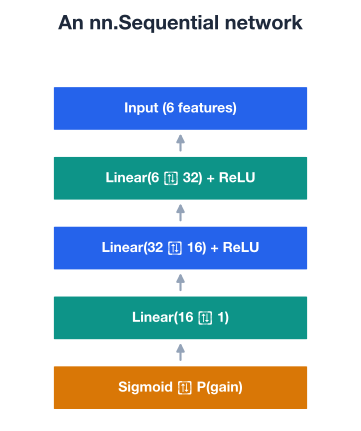
A best practice is to read the input size from the data rather than hard-coding 6. That way, if your feature set changes, the model adapts automatically.
input_size = X_train_t.shape[1]   # number of feature columns = 6

ipo_model = nn.Sequential(
    nn.Linear(input_size, 32),   # input layer: 6 -> 32
    nn.ReLU(),
    nn.Linear(32, 16),           # hidden layer: 32 -> 16
    nn.ReLU(),
    nn.Linear(16, 1),            # output layer: 16 -> 1
    nn.Sigmoid(),                # squash to a probability in (0, 1)
)
print(ipo_model)
# Output:
# Sequential(
#   (0): Linear(in_features=6, out_features=32, bias=True)
#   (1): ReLU()
#   (2): Linear(in_features=32, out_features=16, bias=True)
#   (3): ReLU()
#   (4): Linear(in_features=16, out_features=1, bias=True)
#   (5): Sigmoid()
# )
Trace the dimensions through the stack: 6 → 32 at layer 0, 32 → 16 at layer 2, and 16 → 1 at layer 4. Every output size feeds the next input size, and the final Sigmoid turns the single raw score into a probability that the IPO will list at a gain.
A note for the training lesson
Many PyTorch projects leave the Sigmoid off the model and instead pair the raw output with a loss function that applies the sigmoid internally for better numerical stability. We include Sigmoid here so the model directly outputs an interpretable probability, which keeps this construction-focused lesson clear. You will revisit this choice when you wire up the loss function in the next lesson.
Every nn.Linear layer holds two kinds of learnable values: a weight matrix that scales and mixes the inputs, and a bias vector that shifts each output. PyTorch created and registered all of them automatically when you built the model. You can reach into any layer by index and look at its shapes.
first_layer = ipo_model[0]   # the Linear(6, 32) layer

print("Weight shape:", first_layer.weight.shape)
print("Bias shape:  ", first_layer.bias.shape)
# Output:
# Weight shape: torch.Size([32, 6])
# Bias shape:   torch.Size([32])
The weight shape may look backwards at first. A Linear(6, 32) layer stores its weights as (32, 6), that is, (out_features, in_features), with outputs first. PyTorch uses this convention because of how it organizes the underlying matrix multiplication, and most deep learning frameworks do the same. The bias always has one value per output neuron, here 32.
To see the whole model at once, loop over named_parameters(), which yields each parameter’s name alongside its tensor.
for name, param in ipo_model.named_parameters():
    print(f"{name}: {tuple(param.shape)}")
# Output:
# 0.weight: (32, 6)
# 0.bias: (32,)
# 2.weight: (16, 32)
# 2.bias: (16,)
# 4.weight: (1, 16)
# 4.bias: (1,)
The names follow a layer_index.parameter_type pattern. Notice that layers 1, 3, and 5, the activations, do not appear, because ReLU and Sigmoid have no parameters to learn. Only the nn.Linear layers do.
Finally, you can count every learnable value in the model. The numel() method returns the number of elements in a tensor, so summing it across all parameters gives the model’s total size.
total_params = sum(p.numel() for p in ipo_model.parameters())
print("Total parameters:", total_params)
# Output: Total parameters: 769
That 769 breaks down cleanly: layer 0 contributes 32 * 6 + 32 = 224, layer 2 contributes 16 * 32 + 16 = 528, and layer 4 contributes 1 * 16 + 1 = 17, for 224 + 528 + 17 = 769. The parameter count is a quick measure of model capacity. More parameters can capture more complex patterns, but they also demand more data and care to avoid overfitting, a trade-off you will manage with regularization in a later lesson.
A forward pass is simply pushing data through the model to get predictions. Because the model is callable, you do this with one line. Since you are only inspecting outputs and not training, wrap the call in torch.no_grad() so PyTorch skips gradient bookkeeping, which is faster and lighter on memory.
with torch.no_grad():
    train_preds = ipo_model(X_train_t)

print("Predictions shape:", train_preds.shape)
print("Targets shape:    ", y_train_t.shape)
# Output:
# Predictions shape: torch.Size([239, 1])
# Targets shape:     torch.Size([239, 1])
The model turned 239 training rows into 239 predictions, one per IPO, and the shape matches the targets exactly. That alignment matters: when you compute a loss in the next lesson, predictions and targets must share the same shape.
Take a look at the first few predictions to confirm the Sigmoid is doing its job.
with torch.no_grad():
    sample = ipo_model(X_test_t[:5]).view(-1)

print(sample)
# Output (exact values vary by random initialization, but all sit near 0.5 before training):
# tensor([0.5061, 0.5028, 0.5217, 0.4790, 0.4942])
Every value sits between 0 and 1, just as a probability should, and they all hover near 0.5. That is exactly what you expect from an untrained network: with random initial weights, the model has no real opinion, so it predicts close to a coin flip for every IPO. Calling .view(-1) flattened the column of predictions into a 1D tensor purely for readable printing.
Predictions near 0.5 are a good sign right now
Before training, an untrained binary classifier should output probabilities clustered around 0.5. If your fresh model already produced confident 0.99 or 0.01 outputs, something would be off, perhaps unscaled inputs or a misconfigured final layer. Sanity-checking the output range is a cheap way to catch architecture bugs early.
You have now defined a complete neural network, examined its parameters, and run real data through it, all without writing a single matrix multiplication by hand. That is the leverage nn.Sequential gives you.
Try these before checking the hints. Reuse X_train_t, y_train_t, X_test_t, and y_test_t from the lesson where needed.
Build a smaller classifier for the same 6 features with the architecture 6 → 16 → 1 (one hidden layer of 16 neurons, ReLU, then Linear(16, 1) and Sigmoid). Print the model and its total parameter count, then compare it to the 769 parameters of the lesson’s model.
import torch.nn as nn

# Your code here
Hint
Stack nn.Linear(6, 16), nn.ReLU(), nn.Linear(16, 1), nn.Sigmoid() in an nn.Sequential. Count with sum(p.numel() for p in model.parameters()). The hidden layer adds 16 * 6 + 16 = 112 and the output layer adds 16 + 1 = 17, for 129 total, far fewer than 769.
Take the lesson’s ipo_model and access its output nn.Linear layer (the one mapping 16 to 1). Print the shapes of its weight and bias to confirm they follow the (out_features, in_features) convention.
# Your code here (use the ipo_model from the lesson)Hint
The output Linear sits at index 4 in the Sequential, so use ipo_model[4]. Then print .weight.shape and .bias.shape. You should see a weight of torch.Size([1, 16]) and a bias of torch.Size([1]), since the layer has one output neuron and 16 inputs.
Build an alternative version of the IPO model that uses nn.Tanh() instead of nn.ReLU() in the hidden layers, keeping the same 6 → 32 → 16 → 1 shape and Sigmoid output. Run a forward pass on the first 5 test rows and print the predictions to see that they still fall between 0 and 1.
# Your code here (use X_test_t from the lesson)Hint
Copy the lesson’s nn.Sequential but replace each nn.ReLU() with nn.Tanh(). Wrap the forward pass in with torch.no_grad(): and call .view(-1) for clean printing. The numbers will differ from the lesson because of the different activation and fresh random weights, but every value will still lie in thanks to the final Sigmoid.
You moved from hand-built tensors to real PyTorch models. You now know how to define a network declaratively, inspect what it contains, and push data through it. Let’s review what you learned.
PyTorch Building Blocks
nn.Module, which handles parameter tracking and the forward passnn.Linear(in, out) is the fully connected layer; it computes and creates its own weights and biasesnn.ReLU and nn.Sigmoid add nonlinearity and have no learnable parametersComposing a Network
nn.Sequential stacks layers so data flows through them in order during the forward passout_features must equal the next layer’s in_features, or PyTorch raises an errorReLU between hidden layers and a Sigmoid output for binary classificationInspecting a Model
Sequential like a list, for example model[0], to reach a specific layerLinear(a, b) layer stores its weight as (b, a), the (out_features, in_features) conventionnamed_parameters() lists every parameter and shape; activations are skipped because they have nonesum(p.numel() for p in model.parameters()) counts total parameters; the IPO model has 769Running the Model
model(data); PyTorch applies every layer in order automaticallytorch.no_grad() to skip gradient tracking and save memory(N, 1) for the IPO classifierAlmost every PyTorch model you will ever build, from this tiny IPO classifier to large production networks, is assembled from these same pieces: modules, linear layers, activations, and a container to hold them. Once you can read an architecture as a stack of dimensions and confirm it with a forward pass, you can pick up unfamiliar models quickly, because they are made of parts you already understand.
Just as important, you now have a complete, runnable model that produces sensible (if untrained) probabilities. That is the launchpad for everything ahead. The architecture is fixed; what is missing is learning. In the next lesson you will give this network a loss function and an optimizer and watch its predictions move from near-random guesses toward genuinely useful forecasts of which IPOs will list at a gain.
You have defined and inspected a real neural network. Next, you will bring it to life by training it: computing a loss, running backpropagation, and updating the weights with an optimizer until the model actually learns.
Add a loss function and optimizer, write the training loop, and watch your IPO model learn.
Return to the Deep Learning with PyTorch module overview.
You just built a neural network the way professionals do: as a clean stack of layers, with PyTorch handling the parameters and gradients underneath. The architecture you defined here, 6 → 32 → 16 → 1 with ReLU and a sigmoid output, is the exact model you will train and refine in the lessons that follow. Get comfortable reading a network as a flow of shapes, confirm it with a quick forward pass, and the rest of deep learning becomes far less mysterious.