Title here
Summary here
In the previous lesson you saw the big picture of deep learning frameworks and why we reach for one instead of writing everything in raw NumPy. This lesson zooms all the way in to the single object every framework is built on: the tensor. Before you can build a neural network, you need to be comfortable creating tensors, inspecting their shape, and computing with them. That is exactly what you will practice here, using real numbers from the Indian IPO dataset.
By the end of this lesson, you will be able to:
tf.constant and trainable data with tf.Variabletf.GradientTapeYou should be comfortable with basic Python and NumPy, and have TensorFlow installed. No prior TensorFlow experience is needed. Let’s begin.
Everything in TensorFlow flows through one data structure: the tensor. A tensor is simply a multidimensional array of numbers, much like a NumPy array, with two extra superpowers that matter for deep learning. First, tensors can live on accelerators like GPUs and TPUs, where the thousands of calculations inside a model run far faster than on a CPU. Second, TensorFlow can automatically track the operations you perform on tensors so it can compute gradients later, which is the heart of how networks learn.
The number of axes a tensor has is called its rank. The vocabulary lines up with familiar math objects:
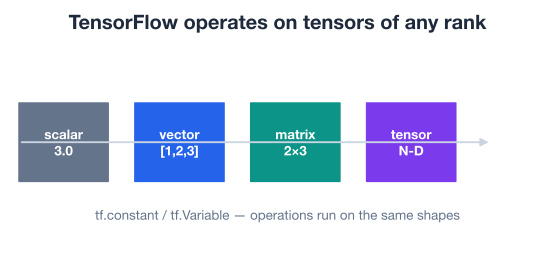
This may feel abstract, so let’s ground it. In this module you will model the Indian IPO dataset, where each row describes one company going public and the goal is to predict whether its stock gains on listing day. A single feature value, like one company’s issue price, is a scalar. All the feature values for one company form a vector. The whole table of companies and features is a matrix. Once you stack batches of those tables together during training, you get higher-rank tensors. Same idea, more axes.
To use any of this, you first import the library under its conventional alias and check the version.
import tensorflow as tf

print(tf.__version__)
# Output: 2.18.1
The exact version on your machine may differ, and that is fine. Everything in this lesson works on any recent TensorFlow 2 release.
The quickest way to get a tensor is one of the factory functions: tf.ones, tf.zeros, and tf.range. They are handy for placeholders, masks, and index sequences.
# A vector of three ones (rank 1)
t0 = tf.ones((3,))
print(t0)
# Output: tf.Tensor([1. 1. 1.], shape=(3,), dtype=float32)

# A 1-by-3 matrix of ones (rank 2)
t1 = tf.ones((1, 3))
print(t1)
# Output: tf.Tensor([[1. 1. 1.]], shape=(1, 3), dtype=float32)
Look closely at the two outputs. They contain the same three values, but t0 has shape (3,) while t1 has shape (1, 3). The first is a vector; the second is a matrix with a single row. The number of values inside the parentheses of shape tells you the rank, and TensorFlow will hold you to that distinction when you start combining tensors.
To build a tensor that counts through a range of values, use tf.range, which mirrors Python’s range but returns a tensor.
# Odd numbers from 1 up to (but not including) 15
t2 = tf.range(start=1, limit=15, delta=2)
print(t2)
# Output: tf.Tensor([ 1  3  5  7  9 11 13], shape=(7,), dtype=int32)
Notice the dtype here is int32, while the ones tensors above were float32. TensorFlow infers a sensible type from what you ask for: whole-number ranges become integers, and the ones/zeros helpers default to floats. Keeping an eye on dtype now will save you confusing errors later, because many operations refuse to mix integers and floats silently.
Rank, shape, and dtype are the three things to always check
Almost every TensorFlow bug a beginner hits comes down to one of these three properties being different from what they expected. When something misbehaves, print x.ndim (the rank), x.shape, and x.dtype before anything else. Those three numbers explain most error messages.
TensorFlow gives you two ways to hold data, and the difference is fundamental to how learning works.
A constant, created with tf.constant, is fixed. Once you make it, its values never change. Constants are perfect for your raw data: the feature values of a company never change while you train on them.
A variable, created with tf.Variable, can change. Its values can be updated in place with .assign(...). Variables are how a model stores the numbers it is learning, its weights and biases, because those have to be nudged on every training step.
You can build a constant from any Python list. Suppose you pull the issue prices (in rupees) of the first six companies in the Indian IPO table.
# Issue prices (in rupees) for six IPOs
prices = tf.constant([330, 215, 90, 500, 145, 76])
print(prices)
# Output: tf.Tensor([330 215  90 500 145  76], shape=(6,), dtype=int32)
You can also reshape the values as you create them, and pin down the dtype explicitly. Here you lay the same six numbers out as a 2-by-3 matrix of floats.
prices_matrix = tf.constant(
    [330, 215, 90, 500, 145, 76],
    shape=[2, 3],
    dtype=tf.float32,
)
print(prices_matrix)
# Output:
# tf.Tensor(
# [[330. 215.  90.]
#  [500. 145.  76.]], shape=(2, 3), dtype=float32)
The value, shape, and dtype arguments are the three knobs you will reach for most: what numbers go in, how they are arranged, and what type they are stored as.
A variable looks similar but announces that it can be trained.
# A small set of model weights, initialized by hand
weights = tf.Variable([0.5, -0.2, 0.1])
print(weights)
# Output: <tf.Variable 'Variable:0' shape=(3,) dtype=float32,
#          numpy=array([ 0.5, -0.2,  0.1], dtype=float32)>
The crucial feature is that you can overwrite a variable’s contents with .assign, while keeping its shape and dtype fixed.
weights.assign([0.4, -0.1, 0.2])
print(weights.numpy())
# Output: [ 0.4 -0.1  0.2]
This is exactly what an optimizer does under the hood during training: it repeatedly calls .assign (or its in-place cousins) to push the weights toward values that lower the loss. You will rarely write .assign yourself once you start using Keras, but knowing that a variable is the mutable thing being trained makes the rest of deep learning click into place.
A simple rule of thumb
If a number comes from your dataset and should never change, make it a tf.constant. If a number is something the model adjusts as it learns, it belongs in a tf.Variable. Almost everything else is built from these two.
In practice you load data with pandas and NumPy, then hand it to TensorFlow. The two libraries are designed to pass arrays back and forth with almost no friction. Let’s load the real dataset and see this in action.
import pandas as pd
import numpy as np
import tensorflow as tf

# download: https://datatweets.com/datasets/indian_ipo.csv
df = pd.read_csv("indian_ipo.csv")

print("Shape:", df.shape)
# Output: Shape: (319, 10)
The table has 319 IPOs described by 10 columns. The target column records whether each stock gained on listing day. A quick look shows the classes are reasonably balanced.
print(df["listing_gain"].value_counts())
# Output:
# listing_gain
# 1    174
# 0    145
# Name: count, dtype: int64

print("gain rate:", round(df["listing_gain"].mean(), 3))
# Output: gain rate: 0.545
About 54.5 percent of these IPOs gained on their first day. Now take a numeric NumPy array out of the dataframe and turn it into a tensor with tf.convert_to_tensor.
# Two numeric features as a NumPy array
features = df[["issue_price", "issue_size"]].to_numpy()
print(type(features))
# Output: <class 'numpy.ndarray'>

# NumPy array -> TensorFlow tensor
features_t = tf.convert_to_tensor(features)
print(type(features_t))
# Output: <class 'tensorflow.python.framework.ops.EagerTensor'>
print(features_t.shape)
# Output: (319, 2)
Going the other direction is just as easy. Every tensor has a .numpy() method that hands you back a plain NumPy array, and np.array(...) works too.
back_to_numpy = features_t.numpy()
print(type(back_to_numpy))
# Output: <class 'numpy.ndarray'>

also_numpy = np.array(features_t)
print(type(also_numpy))
# Output: <class 'numpy.ndarray'>
This round trip is something you will do constantly: prepare and clean data with pandas and NumPy, convert to tensors for the model, then convert predictions back to NumPy for analysis and plotting.
Why convert at all if they are so similar?
A NumPy array always lives in CPU memory and is not tracked for gradients. Converting to a tensor lets TensorFlow place the data on a GPU and, when you ask, record the operations applied to it so it can differentiate them. The conversion is cheap, and it unlocks the parts of TensorFlow that make deep learning possible.
The most common tensor operations are elementwise: TensorFlow lines up two tensors of the same shape and applies the operation to each matching pair of numbers. You can use the named functions (tf.add, tf.subtract, tf.multiply, tf.divide) or the ordinary Python operators, which call those functions for you.
Let’s compare two small tensors. Imagine bids is the number of times each of three IPOs was subscribed, and target is the level you hoped each would reach.
bids = tf.constant([6, 4, 10])
target = tf.constant([3, 2, 4])

print(tf.add(bids, target))       # same as bids + target
# Output: tf.Tensor([ 9  6 14], shape=(3,), dtype=int32)

print(tf.subtract(bids, target))  # same as bids - target
# Output: tf.Tensor([3 2 6], shape=(3,), dtype=int32)

print(tf.multiply(bids, target))  # same as bids * target
# Output: tf.Tensor([18  8 40], shape=(3,), dtype=int32)
Each result is computed position by position: , , , and so on. Division behaves the same way but promotes the result to floating point, since dividing integers rarely gives a whole number.
print(tf.divide(bids, target))
# Output: tf.Tensor([2.  2.  2.5], shape=(3,), dtype=float64)
These same elementwise rules apply to matrices. Subtracting one 2-by-2 tensor from another subtracts each corresponding entry.
a = tf.constant([[20, 25], [22, 16]])
b = tf.constant([[10, 5], [11, 8]])

print(tf.subtract(a, b))
# Output:
# tf.Tensor(
# [[10 20]
#  [11  8]], shape=(2, 2), dtype=int32)
The standout fact about elementwise math is that there are no loops in your code. A single call spreads across every element at once, which is both faster and clearer than iterating by hand.
Elementwise multiplication is not the same as matrix multiplication, and the distinction is central to neural networks. A neural layer computes the dot product of its inputs with a weight matrix, which is matrix multiplication, written tf.matmul or the @ operator.
For two matrices to multiply, the inner dimensions must match: an matrix times an matrix gives an result. Each output entry is a sum of products along the shared dimension:
Here is a tiny, hand-checkable example. Treat one row vector of two features and a 2-by-2 weight matrix.
x = tf.constant([[2.0, 3.0]])          # shape (1, 2)
W = tf.constant([[1.0, 0.0],
                 [0.0, 2.0]])          # shape (2, 2)

out = tf.matmul(x, W)                   # same as x @ W
print(out)
# Output: tf.Tensor([[2. 6.]], shape=(1, 2), dtype=float32)
You can verify this by hand. The first output is , and the second is . The result has shape (1, 2): one row in, one row out, with the column count taken from W. This single operation, an input matrix times a weight matrix, is the computational core of a dense layer. Everything else a layer does is built around it.
* and tf.matmul are different operations
x * W multiplies matching elements and requires compatible (often identical) shapes. x @ W (matrix multiplication) combines rows and columns and requires the inner dimensions to match. Mixing these up is one of the most common shape errors in deep learning code. When in doubt, ask whether you want per-element products or a dot product.
What happens when shapes do not match exactly? Sometimes TensorFlow can still cooperate through broadcasting, a rule borrowed from NumPy that stretches a smaller tensor to fit a larger one without copying memory.
Start with a case that fails. Adding a length-3 vector to a length-2 vector is impossible, and TensorFlow says so.
t1 = tf.constant([0, 5, 11])
t2 = tf.constant([2, 9])

# tf.add(t1, t2)
# Raises: InvalidArgumentError: Incompatible shapes: [3] vs. [2]
But adding a length-3 vector to a single value works, because that one value can be stretched across all three positions.
t3 = tf.constant([0, 5, 11])
t4 = tf.constant([2])

print(tf.add(t3, t4))
# Output: tf.Tensor([ 2  7 13], shape=(3,), dtype=int32)
The rule TensorFlow follows is simple. Line the two shapes up from the right, then for each pair of dimensions, the operation is allowed if the dimensions are equal or one of them is 1. A dimension of 1 gets stretched to match the other.
A practical use is shifting or scaling every row of a feature matrix by the same vector. Suppose you want to subtract a per-column baseline from a small batch of IPOs.
batch = tf.constant([[330.0, 12.0],
                     [215.0,  8.0],
                     [ 90.0,  5.0]])   # shape (3, 2)
baseline = tf.constant([100.0, 4.0])   # shape (2,)

print(batch - baseline)
# Output:
# tf.Tensor(
# [[230.   8.]
#  [115.   4.]
#  [ -10.   1.]], shape=(3, 2), dtype=float32)
The (2,) baseline is broadcast across all three rows, subtracting 100 from the first column and 4 from the second everywhere. You can confirm a couple of entries by hand: and . Broadcasting is what lets you add a bias vector to a whole batch of activations in one line, a pattern you will see in every network you build.
Read shapes from the right
When you are unsure whether two tensors are broadcast-compatible, write their shapes one above the other, right-aligned, and check each column. Equal or a 1 means compatible; anything else will error. This 10-second habit prevents a huge fraction of shape bugs.
Beyond the four arithmetic operations, the tf.math module gives you the transformations that show up constantly in data preparation and model internals. A few you will reach for often:
tf.math.log(x) for log transforms, useful when a feature like issue size is heavily skewed.tf.math.sqrt(x) for square roots.tf.math.abs(x) for absolute values, as in mean absolute error.tf.math.is_nan(x) to flag missing values.Most of these expect floating-point input, so remember the dtype habit from earlier. Taking the absolute value of a float tensor is straightforward.
x = tf.constant([-2.25, -48.23, 6.25])
print(tf.math.abs(x))
# Output: tf.Tensor([ 2.25 48.23  6.25], shape=(3,), dtype=float32)
If you try tf.math.log on an integer tensor, TensorFlow raises a dtype error, because the logarithm of most integers is not an integer. Cast to float32 first, then transform.
sizes = tf.constant([6, 4, 10], dtype=tf.float32)
print(tf.math.sqrt(sizes).shape)
# Output: (3,)
We print only the shape here rather than the decimal values, because those particular roots are not numbers you can verify at a glance, and showing made-up decimals would be misleading. The shape tells you the operation worked and preserved the three-element vector, which is the part that matters when you are wiring up a pipeline.
Two features tie this lesson to everything that follows.
First, eager execution. Notice that every example above ran immediately and printed a real result the moment you called it. Modern TensorFlow evaluates operations as soon as you write them, exactly like NumPy. There is no separate “build a graph, then run it” step to think about as a beginner. What you write is what runs, which makes tensors easy to inspect and debug.
Second, automatic differentiation. Training a network means adjusting weights to reduce a loss, and to do that TensorFlow must know the gradient of the loss with respect to each weight. You never compute those derivatives by hand. Instead, you wrap your computation in a tf.GradientTape, which records the operations so it can replay them backward to get gradients.
Here is the simplest possible taste. Take and ask for at . By calculus the derivative is , so it should be .
x = tf.Variable(3.0)

with tf.GradientTape() as tape:
    y = x * x          # y = x^2

dy_dx = tape.gradient(y, x)
print(dy_dx.numpy())
# Output: 6.0
The tape watched x (a variable is watched automatically), recorded the squaring, and tape.gradient returned . That is exactly the value calculus predicts, and you can confirm it by hand. Scale this idea up, from one variable to millions of weights and from x*x to a full network’s loss, and you have the engine that trains every deep learning model. You will not call GradientTape directly in the next lessons, because Keras wraps it for you, but it is worth knowing that this is what powers the .fit() you are about to use.
You almost never differentiate by hand again
Before automatic differentiation, researchers derived gradients on paper for every model, a slow and error-prone process. tf.GradientTape turns that into a few lines of code that work for any computation you can express with tensors. This is arguably the single most important reason frameworks like TensorFlow exist.
Now it is your turn. Try these before checking the hints.
Load the Indian IPO dataset, take the issue_price and issue_size columns for the first five rows as a NumPy array, convert it to a tensor, and print the tensor’s rank, shape, and dtype.
import pandas as pd
import tensorflow as tf

# download: https://datatweets.com/datasets/indian_ipo.csv
df = pd.read_csv("indian_ipo.csv")

# Your code here
Hint
Use df[["issue_price", "issue_size"]].head(5).to_numpy() to get the array, then tf.convert_to_tensor(...). Print t.ndim for the rank, t.shape for the shape, and t.dtype for the data type. The shape should be (5, 2) with rank 2.
Given a 3-by-2 constant tensor batch and a length-2 vector means, subtract means from every row using broadcasting, then print the result and its shape.
import tensorflow as tf

batch = tf.constant([[330.0, 12.0], [215.0, 8.0], [90.0, 5.0]])
means = tf.constant([211.67, 8.33])

# Your code here
Hint
Broadcasting does the work for you: centered = batch - means (or tf.subtract(batch, means)). The (2,) vector lines up with the last dimension of the (3, 2) batch, so it is subtracted from each of the three rows. The result keeps shape (3, 2).
Use tf.GradientTape to compute the derivative of at . Work out the answer with calculus first, then check that TensorFlow agrees.
import tensorflow as tf

x = tf.Variable(4.0)

# Your code here
Hint
The derivative of is , which is at . In code, wrap y = 3 * x * x + 2 * x inside with tf.GradientTape() as tape:, then call tape.gradient(y, x). You should get 26.0.
Congratulations! You now understand the data structure underneath every TensorFlow model and can compute with it confidently. Let’s review what you learned.
Tensors
Constants and Variables
tf.constant holds fixed data, such as your dataset, and never changestf.Variable holds trainable data, such as weights, and updates with .assignNumPy Interoperability
tf.convert_to_tensor(arr) turns a NumPy array into a tensortensor.numpy() or np.array(tensor) turns a tensor back into a NumPy arrayOperations
tf.add, tf.subtract, tf.multiply, tf.divide) acts position by position on equal shapestf.matmul or @) is the dot product at the core of every layer; it is not the same as *1tf.math module adds log, sqrt, abs, and more for data preparationExecution and Gradients
tf.GradientTape records operations and computes gradients automatically, powering all trainingEvery neural network you will ever build is, underneath, a sequence of tensor operations: matrix multiplications to combine inputs with weights, broadcasting to add biases, elementwise functions for activations, and GradientTape to learn. The Keras API you meet next hides this machinery behind a few friendly lines, but the machinery is still there. Understanding tensors, shapes, and gradients now means that when a layer throws a shape error or a model fails to learn, you will know exactly where to look instead of guessing. This foundation is what separates copying code from genuinely building models.
You can now create and compute with tensors, the raw material of deep learning. In the next lesson, you will assemble those operations into your first actual neural network using the high-level Sequential API, and train it to predict IPO listing gains.
Stack layers into your first neural network and train it with Keras.
Return to the Deep Learning with TensorFlow module overview.
You have learned the single most reused idea in all of deep learning: data as tensors, transformed by a handful of operations. Tensors, shapes, broadcasting, and gradients will come up in every lesson that follows, and a few minutes spent printing shapes today will save you hours of debugging later. Keep that habit close as you move on to building and training real networks.