Title here
Summary here
This lesson is where the abstract pieces from earlier lessons come together into a real, working neural network. You will use the Keras Sequential API, the simplest way to build a model in TensorFlow, to stack a few layers into a shallow network and turn it into a trainable classifier. Along the way you will meet Dense layers, activation functions, the input shape, the all-important model.summary(), and compile(). You will build a model that predicts whether an Indian IPO lists at a gain, inspect it carefully, and run a short training pass to confirm it learns.
By the end of this lesson, you will be able to:
Dense layers with keras.Sequentialmodel.summary() and account for every parameterfitYou should be comfortable with basic Python, pandas, and the tensor concepts from the previous lessons. Let’s build something.
A neural network is, at its core, a stack of layers. Data enters at the top, flows through each layer in turn, and a prediction comes out the bottom. When your network is exactly that, a straight pipe with one input and one output and no branching, the Sequential API is the cleanest way to describe it.
Keras is the high-level interface bundled with TensorFlow for building and training models. It gives you a small, consistent vocabulary: you describe what layers you want and in what order, and Keras handles the matrix math, the weight initialization, and the training loop for you. The Sequential API is the most direct corner of Keras. You hand it an ordered list of layers, and it wires them up so that each layer’s output becomes the next layer’s input, automatically.
   Input (6 features)
          |
   Dense(32, relu)      <- hidden layer 1
          |
   Dense(16, relu)      <- hidden layer 2
          |
   Dense(1, sigmoid)    <- output layer
          |
     prediction (probability)
That linear, one-after-another flow is exactly what “sequential” means. If you ever need a model with multiple inputs, multiple outputs, or layers that branch and merge, you will reach for the functional API instead, which a later lesson covers. For the vast majority of everyday models, including the one you build here, Sequential is all you need.
Sequential vs. everything else
The Sequential API is not a different kind of network, it is a different way of describing one. The same Dense layers, activations, and training loop apply no matter which API you use. Sequential just trades flexibility for simplicity, which is a great trade while you are learning.
To make this concrete, you will work with a real dataset of Indian IPOs. When a company goes public, its shares are offered at an issue price. On the first day of trading, the shares may list above that price (a listing gain) or below it (a loss). Investors care a lot about this: a quick listing gain is real money.
Your job is to predict, before listing day, whether an IPO will list at a gain. That is a binary classification problem: the answer is yes (1) or no (0). The features you will use describe how heavily the IPO was subscribed by different investor groups, along with the size and price of the issue.
Download the dataset and load it with pandas.
import pandas as pd

# download: https://datatweets.com/datasets/indian_ipo.csv
df = pd.read_csv("indian_ipo.csv")

print("Shape:", df.shape)
print(df["Listing_Gains"].value_counts())
# Output:
# Shape: (319, 10)
# Listing_Gains
# 1    174
# 0    145
# Name: count, dtype: int64
The dataset has 319 IPOs and 10 columns. The target, Listing_Gains, is 1 when the IPO listed above its issue price and 0 otherwise. Roughly 55 percent of these IPOs listed at a gain (174 out of 319), so the classes are reasonably balanced.
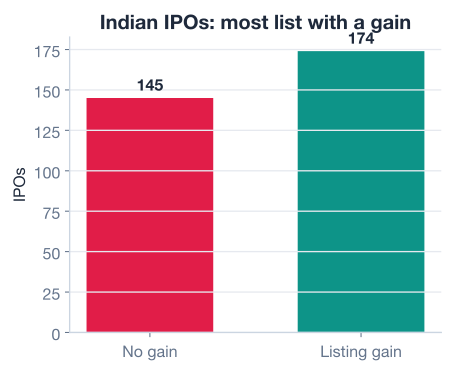
You will use six numeric columns as inputs. Three of them measure subscription demand from different investor categories, and the rest describe the issue itself.
| Column | Meaning |
|---|---|
Issue_Size | Size of the offering (in crores) |
Subscription_QIB | Times subscribed by qualified institutional buyers |
Subscription_HNI | Times subscribed by high-net-worth individuals |
Subscription_RII | Times subscribed by retail individual investors |
Subscription_Total | Total times the issue was subscribed |
Issue_Price | Price per share at the offering |
Neural networks train far more smoothly when every feature lives on a similar scale, so you split the data and standardize it, fitting the scaler on the training set only. This is the same discipline you have seen before, and it matters just as much here.
from sklearn.model_selection import train_test_split
from sklearn.preprocessing import StandardScaler

features = [
    "Issue_Size", "Subscription_QIB", "Subscription_HNI",
    "Subscription_RII", "Subscription_Total", "Issue_Price",
]
X = df[features].values.astype("float32")
y = df["Listing_Gains"].values.astype("float32")

X_train, X_test, y_train, y_test = train_test_split(
    X, y, test_size=0.25, random_state=42, stratify=y
)

scaler = StandardScaler().fit(X_train)          # learn on train only
X_train = scaler.transform(X_train).astype("float32")
X_test = scaler.transform(X_test).astype("float32")

print("Train shape:", X_train.shape)
print("Test shape: ", X_test.shape)
# Output:
# Train shape: (239, 6)
# Test shape:  (80, 6)
You now have 239 training examples and 80 test examples, each with 6 features. That number, 6, is about to become important: it is the input shape your network expects.
With the data ready, you can describe the network. The Sequential API lets you pass a Python list of layers straight to the constructor, top to bottom.
import tensorflow as tf
from tensorflow import keras

tf.random.set_seed(42)  # makes weight initialization reproducible

model = keras.Sequential([
    keras.layers.Input((6,)),                       # 6 input features
    keras.layers.Dense(32, activation="relu"),      # hidden layer 1
    keras.layers.Dense(16, activation="relu"),      # hidden layer 2
    keras.layers.Dense(1, activation="sigmoid"),    # output layer
])
That is the whole network. Three lines of layers describe a model with two hidden layers and one output. The diagram below shows exactly this architecture: six features flow into a 32-unit layer, then a 16-unit layer, then a single output neuron.
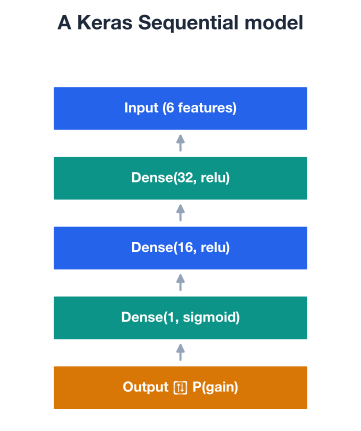
Let’s unpack each ingredient.
A Dense layer is the fundamental building block of these networks. “Dense” means fully connected: every neuron in the layer receives input from every value in the previous layer. A Dense(32) layer therefore has 32 neurons, and each one computes a weighted sum of all its inputs, adds a bias, and passes the result through an activation function.
Mathematically, a single Dense layer transforms an input vector into an output vector like this:
Here is the layer’s weight matrix, is the bias vector, and is the activation function. The weights and biases are exactly what training adjusts; everything else about the layer is fixed by your design.
How many neurons should a layer have? This is a design choice, not a rule. More units give the network more capacity to fit complex patterns, but too many invite overfitting and slow training. A common shape, the one used here, is a funnel: start wider (32 units), narrow down (16 units), then collapse to the output (1 unit). The network gradually compresses the six raw features into a single decision.
Without an activation function, stacking Dense layers would be pointless: a chain of linear transformations is just one bigger linear transformation. The activation function injects non-linearity, which is what lets the network learn curved, complex decision boundaries.
The two activations in this model are the workhorses of modern deep learning:
Match the output activation to the task
The output activation is dictated by what you are predicting. Use sigmoid with one output neuron for binary classification, softmax for multi-class classification, and no activation (a plain linear output) for regression, where you want an unbounded number. The hidden layers almost always use ReLU regardless of the task.
Every Keras model needs to know the shape of a single input example so it can size the first weight matrix. You declare it with keras.layers.Input((6,)), where 6 is the number of features per example. Notice the trailing comma: (6,) is a one-element tuple describing the shape of one observation. You never include the number of examples here; Keras handles the batch dimension automatically.
The input shape and the data must agree. Your X_train has shape (239, 6), so each example is a length-6 vector, which is exactly what Input((6,)) expects. Get this wrong and Keras will raise a shape error before training even starts.
Once a model has an input shape, Keras can build it and tell you everything about it. The model.summary() method prints a layer-by-layer table with output shapes and parameter counts. Reading it fluently is one of the most useful habits you can build.
model.summary()
# Output:
# Model: "sequential"
# ┌─────────────────────────────────┬────────────────────────┬───────────────┐
# │ Layer (type)                    │ Output Shape           │       Param # │
# ├─────────────────────────────────┼────────────────────────┼───────────────┤
# │ dense (Dense)                   │ (None, 32)             │           224 │
# │ dense_1 (Dense)                 │ (None, 16)             │           528 │
# │ dense_2 (Dense)                 │ (None, 1)              │            17 │
# └─────────────────────────────────┴────────────────────────┴───────────────┘
#  Total params: 769 (3.00 KB)
#  Trainable params: 769 (3.00 KB)
#  Non-trainable params: 0 (0.00 B)
Two columns deserve attention.
The Output Shape column shows (None, 32), (None, 16), and (None, 1). The None is the batch dimension: it is a placeholder that says “however many examples you pass in.” The second number is the layer’s unit count, which lines up exactly with the Dense(32), Dense(16), and Dense(1) you wrote.
The Param # column counts the trainable numbers, the weights and biases the network will learn. You can verify every one of them by hand. Each Dense layer has (inputs × units) weights plus units biases:
Adding those gives , exactly the total Keras reports. Being able to reproduce this count means you truly understand how your layers connect.
Why None instead of a number?
The same trained model must work whether you feed it one example or ten thousand. By leaving the batch dimension as None, Keras builds a model that accepts any batch size without rebuilding. The weights only depend on the feature dimension, never on how many examples you happen to pass.
A model fresh out of the constructor knows its architecture but not how to learn. Compiling fills in that missing piece. model.compile() takes three things:
model.compile(
    optimizer=keras.optimizers.Adam(learning_rate=0.01),
    loss="binary_crossentropy",
    metrics=["accuracy"],
)
Three ideas are worth separating in your mind. The loss is what the model optimizes; it must be differentiable so the optimizer can follow its gradient. A metric is what you read to judge progress; accuracy is intuitive for humans but is not directly optimized. The optimizer is the engine that turns the loss gradient into weight updates, and its learning_rate controls how big each update step is. Too large and training overshoots; too small and it crawls.
Loss and metric are not the same thing
It is tempting to assume the model is “optimizing accuracy” because that is the number you watch. It is not. The optimizer only ever minimizes the loss (binary cross-entropy here). Accuracy is a side report. The two usually move together, but when they diverge, trust the loss to tell you what the optimizer is actually doing.
Your model is now fully specified: an architecture, weights ready to learn, and a recipe for learning them. Training happens with model.fit(), which repeatedly shows the model the training data, measures the loss, and nudges the weights to reduce it. One full pass over the training data is called an epoch.
To confirm the wiring works end to end, run a short fit of just a few epochs. We keep it deliberately light here; the next lesson digs into training longer networks properly.
history = model.fit(
    X_train, y_train,
    epochs=5,
    batch_size=32,
    verbose=1,
)
# Output (numbers will vary slightly each run):
# Epoch 1/5
# 8/8 - 1s - loss: 0.71 - accuracy: 0.53
# Epoch 2/5
# 8/8 - 0s - loss: 0.69 - accuracy: 0.57
# ...
# Epoch 5/5
# 8/8 - 0s - loss: 0.66 - accuracy: 0.61
A few things are happening here. The 8/8 counts the batches per epoch: with 239 training examples and batch_size=32, the data splits into 8 batches (the last one is smaller). The optimizer updates the weights once per batch, so the model takes 8 steps each epoch. Watch the loss value: it should drift downward across epochs, which is your signal that the network is genuinely learning rather than sitting still. The exact numbers will differ slightly from run to run because of random batching, so do not worry if yours are not identical.
Once a model is trained, you ask it for predictions with model.predict(). Because the output layer is a sigmoid, each prediction is a probability between 0 and 1.
probs = model.predict(X_test[:5], verbose=0).ravel()
print("Predicted gain probabilities:", probs.round(2))
# Output: five probabilities between 0 and 1, e.g. [0.61 0.48 0.55 ...]
# (exact values vary by run)
You would turn those probabilities into hard yes/no decisions with a threshold (typically 0.5): probabilities above 0.5 become a predicted listing gain, the rest a predicted loss. That thresholding, along with proper evaluation over many epochs, is exactly where the next lesson picks up.
This is a hard problem on purpose
Predicting IPO listing gains from subscription numbers is genuinely difficult; markets are noisy and the signal is weak. Do not expect sky-high accuracy from this small network. The point of this lesson is the mechanics of the Sequential API, not a state-of-the-art result. You will tune and evaluate models seriously in the lessons that follow.
Here is the complete pipeline, from raw CSV to a compiled, briefly trained Sequential model, in one runnable script.
import pandas as pd
import tensorflow as tf
from tensorflow import keras
from sklearn.model_selection import train_test_split
from sklearn.preprocessing import StandardScaler

# 1. Load and prepare
df = pd.read_csv("indian_ipo.csv")  # download: https://datatweets.com/datasets/indian_ipo.csv
features = [
    "Issue_Size", "Subscription_QIB", "Subscription_HNI",
    "Subscription_RII", "Subscription_Total", "Issue_Price",
]
X = df[features].values.astype("float32")
y = df["Listing_Gains"].values.astype("float32")

X_train, X_test, y_train, y_test = train_test_split(
    X, y, test_size=0.25, random_state=42, stratify=y
)
scaler = StandardScaler().fit(X_train)
X_train = scaler.transform(X_train).astype("float32")
X_test = scaler.transform(X_test).astype("float32")

# 2. Build with the Sequential API
tf.random.set_seed(42)
model = keras.Sequential([
    keras.layers.Input((6,)),
    keras.layers.Dense(32, activation="relu"),
    keras.layers.Dense(16, activation="relu"),
    keras.layers.Dense(1, activation="sigmoid"),
])

# 3. Inspect
model.summary()  # Total params: 769

# 4. Compile
model.compile(
    optimizer=keras.optimizers.Adam(learning_rate=0.01),
    loss="binary_crossentropy",
    metrics=["accuracy"],
)

# 5. Brief fit to confirm it learns
model.fit(X_train, y_train, epochs=5, batch_size=32, verbose=0)
print("Model built, compiled, and trained.")
# Output: Model built, compiled, and trained.
In one screen of code you defined a neural network, accounted for all 769 of its parameters, gave it a learning recipe, and ran it. That is the entire Sequential API workflow.
Try these before checking the hints. Reuse the prepared X_train, y_train, X_test, y_test from the lesson.
Build a new Sequential model with a single hidden Dense layer of 8 ReLU units, followed by the same Dense(1, sigmoid) output. Call model.summary() and confirm the total parameter count by hand.
# Your code hereHint
Start with keras.layers.Input((6,)), then Dense(8, activation="relu"), then Dense(1, activation="sigmoid"). The hidden layer has parameters and the output has , for a total of 65. Check that summary() reports the same.
Take the original three-layer model and compile it with the Adam optimizer set to a learning rate of 0.001 instead of 0.01, keeping binary_crossentropy loss and accuracy as a metric. Then fit for 5 epochs and watch how the loss behaves.
# Your code hereHint
Pass keras.optimizers.Adam(learning_rate=0.001) to model.compile(). A smaller learning rate takes smaller steps, so the loss usually drops more slowly and smoothly across epochs than it did at 0.01. Neither is “wrong”; the learning rate is a knob you tune.
Using the original trained model, generate predictions on the first 10 test examples with model.predict(), then convert the probabilities into hard 0/1 predictions using a 0.5 threshold.
# Your code hereHint
Call model.predict(X_test[:10], verbose=0).ravel() to get probabilities. Then apply the threshold with (probs > 0.5).astype(int) to turn each probability into a class label. Compare them against y_test[:10] to see which the model got right.
You built, inspected, compiled, and briefly trained your first real neural network using the Keras Sequential API. Let’s review the key ideas.
The Sequential API
keras.Sequential([...])Layers and Activations
Dense layer is fully connected: every neuron sees every input from the previous layerInput Shape and summary()
keras.layers.Input((6,)) tells the model that each example is a length-6 vectormodel.summary() lists output shapes and parameter counts; the None in the shape is the flexible batch dimensionCompiling
compile() attaches an optimizer (Adam), a loss (binary cross-entropy), and metrics (accuracy)model.fit() trains over epochs, and model.predict() returns sigmoid probabilitiesThe Sequential API is the doorway to deep learning in TensorFlow. Almost every model you build early on, and many you build later, follows the exact pattern you just practiced: stack layers, set the input shape, read the summary, compile with an optimizer and loss, then fit. Once this loop is second nature, the only thing that changes from project to project is the shape of the network and the choice of loss and activations to match your task.
Just as important, you learned to inspect what you built rather than treat it as a black box. Reproducing the 769-parameter count by hand is a small skill with a big payoff: it means you understand precisely how your layers connect, which is exactly the understanding you need to debug shape errors, reason about model capacity, and design deeper networks with confidence in the next lesson.
You can now build, inspect, and compile a shallow neural network. Next, you will go deeper, literally, stacking more layers and learning how to train them well: how many epochs, how to watch for overfitting, and how to read training curves.
Stack deeper networks and learn to train and evaluate them properly.
Return to the Deep Learning with TensorFlow module overview.
You just turned a stack of layers into a living, learning model, and you can read every line of its summary. That fluency is the foundation everything else rests on. As your networks grow deeper in the lessons ahead, the Sequential pattern stays the same: describe the layers, set the shape, compile, and fit. Master this rhythm now, and the harder topics, deeper architectures, regularization, and careful evaluation, will feel like natural extensions rather than new mysteries.