Title here
Summary here
So far you have built networks by stacking layers one after another with the Sequential API. That style is clean and readable, and it covers a huge share of real models. But it can only describe a single straight line of layers, input at the top, output at the bottom, nothing branching off in between. The moment you need two inputs, two outputs, a shared layer, or a model that splits and rejoins, the Sequential API runs out of room. This lesson introduces the tool that handles all of those cases: the Keras functional API.
By the end of this lesson, you will be able to:
Input layer and connect layers by calling each layer on the previous onemodel.summary()Concatenate layerYou should already be comfortable building, compiling, and training a Sequential model in Keras, and with the basic data-preparation steps from earlier lessons. Let’s begin.
A neural network is really a graph: layers are nodes, and the arrows between them say which layer’s output feeds into which layer’s input. The Sequential and functional APIs are just two different ways of writing that graph down in code.
The Sequential API assumes the graph is a single unbranched chain. You hand Keras a list of layers, and it wires them top to bottom for you:
import tensorflow as tf

model = tf.keras.Sequential([
    tf.keras.layers.Input(shape=(12,)),
    tf.keras.layers.Dense(64, activation="relu"),
    tf.keras.layers.Dense(1, activation="sigmoid"),
])
This is wonderfully compact. The cost of that convenience is rigidity: each layer has exactly one input (the layer before it) and one output (the layer after it). There is no way to express a layer that receives from two places, or sends its output to two places.
The functional API drops that assumption. Instead of a list, you build the graph by hand, one connection at a time, by calling each layer on the tensor it should consume. The result is the same kind of model object, but you control every arrow.
import tensorflow as tf

inputs = tf.keras.Input(shape=(12,))
x = tf.keras.layers.Dense(64, activation="relu")(inputs)
outputs = tf.keras.layers.Dense(1, activation="sigmoid")(x)

model = tf.keras.Model(inputs=inputs, outputs=outputs)
Both snippets describe the same network. The difference is purely in how you express the wiring. Once you understand the three things that change, the functional style becomes second nature.
Every functional model differs from a Sequential one in exactly three places:
tf.keras.Input(...) tensor instead of passing the shape to the first hidden layer.Dense(64, activation="relu")(inputs) means “create a Dense layer, then run inputs through it.” The trailing (inputs) is what wires the arrow.tf.keras.Model(inputs=..., outputs=...) and naming which tensors are the entry and exit points.Keep these three ideas in mind and you can translate any Sequential model into functional form, and, far more usefully, build models the Sequential API simply cannot.
A layer is callable
The piece that surprises most people is the double set of parentheses: Dense(64)(inputs). The first pair constructs a layer object. The second pair calls that object on a tensor, returning a new tensor. Reading it as two steps, “make the layer, then apply it,” makes the syntax click.
To make this concrete, you will reuse the prediction task from earlier in this module: given the financial details of a company’s initial public offering (IPO), predict whether the stock gained on its first day of trading. This is a binary classification problem, exactly the kind the functional API handles well.
You will work with the real Indian IPO dataset, a record of companies that listed on Indian stock exchanges along with the offering’s financial characteristics and whether the stock closed its first day above its issue price.
import pandas as pd

# download: https://datatweets.com/datasets/indian_ipo.csv
df = pd.read_csv("indian_ipo.csv")

print("Shape:", df.shape)
# Output: Shape: (319, 10)
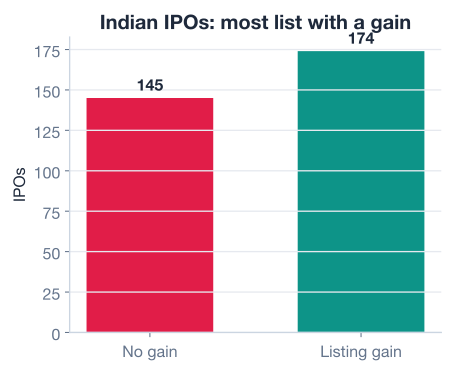
The dataset has 319 rows and 10 columns. Each row is one IPO. The final column is the target: 1 if the stock gained on listing day, 0 if it did not.
print(df["listing_gain"].value_counts())
# Output:
# listing_gain
# 1    174
# 0    145
# Name: count, dtype: int64

print("gain rate:", round(df["listing_gain"].mean(), 3))
# Output: gain rate: 0.545
About 54.5 percent of these IPOs gained on their first day (174 out of 319). That is a reasonably balanced target, which means accuracy will be a fair first measure of performance.
The preparation mirrors what you have done before, so we move quickly. You separate the predictors from the target, scale every predictor into the [0, 1] range so no single feature dominates, and split off a test set you never train on.
import numpy as np
from sklearn.model_selection import train_test_split

target = ["listing_gain"]
predictors = [c for c in df.columns if c not in target]

# Scale every predictor into [0, 1]
df[predictors] = df[predictors] / df[predictors].max()

X = df[predictors].astype(np.float32).values
y = df[target].astype(np.float32).values

X_train, X_test, y_train, y_test = train_test_split(
    X, y, test_size=0.20, random_state=100
)

print("Train features:", X_train.shape)
print("Test features: ", X_test.shape)
# Output:
# Train features: (255, 9)
# Test features:  (64, 9)
You now have nine numeric predictors, a scaled training set, and a held-out test set. Everything that follows builds on these arrays.
Now you rebuild the IPO classifier the functional way. Read this section slowly: each line corresponds to exactly one node in the network graph, and the order in which you write them is the order data flows through them.
A functional model begins with an Input tensor that declares the shape of one observation. You pass the shape as a tuple, not a bare integer, and you leave out the batch dimension because Keras adds it automatically.
import tensorflow as tf

inputs = tf.keras.Input(shape=(X_train.shape[1],))
X_train.shape[1] is 9, so this declares an input that accepts nine features per row. Unlike the Sequential API, where the input shape rides along on the first hidden layer, here it is its own explicit object that the rest of the graph hangs off of.
Each hidden layer is created and immediately called on the tensor that should feed it. The tensor in the trailing parentheses is the incoming connection.
x = tf.keras.layers.Dense(64, activation="relu")(inputs)
x = tf.keras.layers.Dropout(rate=0.3)(x)
x = tf.keras.layers.Dense(32, activation="relu")(x)
x = tf.keras.layers.Dropout(rate=0.2)(x)
x = tf.keras.layers.Dense(16, activation="relu")(x)
Reusing the name x is a common convention: each line overwrites x with the tensor coming out of the new layer, so the next line picks up exactly where the last left off. You could give every tensor a distinct name (hidden1, hidden2, and so on); the threaded-x style just keeps the graph readable when it is a straight chain.
The Dropout layers are a quick aside worth naming. Dropout is a regularization technique that randomly zeroes a fraction of a layer’s outputs during training. By forcing the network not to rely on any single neuron, it makes the model less likely to overfit the training data. A rate=0.3 means roughly 30 percent of the units are dropped on each training step; at prediction time dropout turns itself off automatically.
Because this is binary classification, the final layer is a single neuron with a sigmoid activation, which squashes any real number into a probability between 0 and 1.
outputs = tf.keras.layers.Dense(1, activation="sigmoid")(x)The graph is fully wired. You turn it into a trainable model by naming its entry and exit tensors.
model = tf.keras.Model(inputs=inputs, outputs=outputs)
model.summary()
# Output:
# Model: "functional"
# _________________________________________________________________
#  Layer (type)                Output Shape              Param #
# =================================================================
#  input_layer (InputLayer)    [(None, 9)]               0
#  dense (Dense)               (None, 64)                640
#  dropout (Dropout)           (None, 64)                0
#  dense_1 (Dense)             (None, 32)                2080
#  dropout_1 (Dropout)         (None, 32)                0
#  dense_2 (Dense)             (None, 16)                528
#  dense_3 (Dense)             (None, 1)                 17
# =================================================================
# Total params: 3,265
# Trainable params: 3,265
# Non-trainable params: 0
# _________________________________________________________________
The summary reads top to bottom in data-flow order. The None in every output shape is the batch dimension, left flexible so the model accepts any number of rows at once. Dropout layers have zero parameters because they only mask values; they learn nothing.
From here, training a functional model is identical to training a Sequential one. You compile with an optimizer, a loss, and a metric, then fit and evaluate.
model.compile(
    optimizer=tf.keras.optimizers.Adam(0.001),
    loss=tf.keras.losses.BinaryCrossentropy(),
    metrics=["accuracy"],
)

history = model.fit(X_train, y_train, epochs=150, verbose=0)

print("final train loss:", round(history.history["loss"][-1], 4))
# Output: final train loss: 0.2529

test_loss, test_acc = model.evaluate(X_test, y_test, verbose=0)
print(f"test accuracy: {test_acc:.3f}")
# Output: test accuracy: 0.537
The training curve below shows the loss falling steadily across epochs as the optimizer tunes the weights.
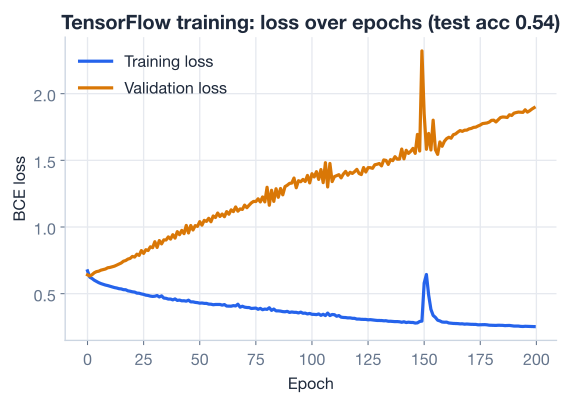
A test accuracy near 0.537, with a final training loss of about 0.2529, tells an honest story: the model fits the training data well but barely beats guessing on unseen IPOs. That gap is a textbook hint of overfitting, predicting a chaotic, news-driven outcome like first-day stock movement from a few financial features is genuinely hard. The point here is not a record-breaking score; it is that you built and trained this model entirely with the functional API. The numbers will vary slightly on your machine because weight initialization and dropout are random.
Watch the train/test gap
When training performance is much stronger than test performance, the model has memorized patterns that do not generalize. Dropout is one defense, and you saw it wired into this network. If the gap stays wide, more regularization, more data, or a simpler model are the usual next moves. Always evaluate on data the model never saw during training.
Everything so far could have been written with the Sequential API, the chain never branched. The real payoff arrives when the graph stops being a straight line. The functional API lets a single input feed two parallel paths that each transform the data differently, then merges them back together before the output.
The diagram below shows the shape you are about to build: one input that splits into two independent Dense branches, which are then concatenated and sent through a final output layer.
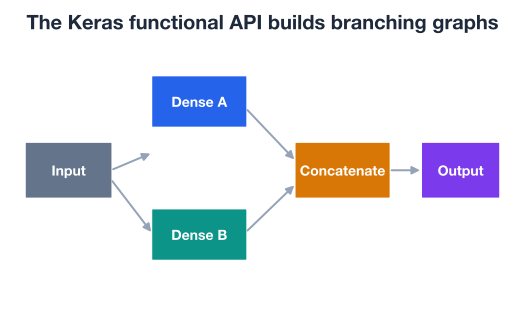
Here is the same structure in code. Notice that both branches call the same inputs tensor, which is exactly what the Sequential API cannot express.
inputs = tf.keras.Input(shape=(X_train.shape[1],))

# Branch A: a wider, shallow path
branch_a = tf.keras.layers.Dense(32, activation="relu")(inputs)

# Branch B: a narrower path that looks at the input differently
branch_b = tf.keras.layers.Dense(16, activation="relu")(inputs)

# Merge the two branches into a single tensor
merged = tf.keras.layers.Concatenate()([branch_a, branch_b])

outputs = tf.keras.layers.Dense(1, activation="sigmoid")(merged)

branching_model = tf.keras.Model(inputs=inputs, outputs=outputs)
branching_model.summary()
# Output:
# Model: "functional_1"
# __________________________________________________________________________________________________
#  Layer (type)            Output Shape        Param #   Connected to
# ==================================================================================================
#  input_layer_1           [(None, 9)]         0         []
#  dense_4 (Dense)         (None, 32)          320       ['input_layer_1[0][0]']
#  dense_5 (Dense)         (None, 16)          160       ['input_layer_1[0][0]']
#  concatenate             (None, 48)          0         ['dense_4[0][0]', 'dense_5[0][0]']
#  dense_6 (Dense)         (None, 1)           49        ['concatenate[0][0]']
# ==================================================================================================
# Total params: 529
# Trainable params: 529
# Non-trainable params: 0
# __________________________________________________________________________________________________
Read the Connected to column, which only appears for non-linear graphs. Both dense_4 and dense_5 connect to the same input_layer_1, confirming the split. The Concatenate layer then lists two inputs and produces a width-48 tensor (32 + 16), which the final Dense consumes. That branch-and-merge pattern is the functional API’s signature move.
branching_model.compile(
    optimizer=tf.keras.optimizers.Adam(0.001),
    loss=tf.keras.losses.BinaryCrossentropy(),
    metrics=["accuracy"],
)
branching_model.fit(X_train, y_train, epochs=150, verbose=0)
# trains exactly like any other Keras model
Once built, the branching model compiles, fits, and evaluates with the same calls as before. The graph got more interesting; the training loop did not change at all.
Concatenate vs. Add
Concatenate stacks two tensors side by side, so a width-32 and a width-16 branch become width-48 and every feature survives. Add instead sums them element-wise, which requires the branches to have the same width and blends them rather than preserving both. Concatenation keeps more information; addition is common in residual connections. Pick based on whether you want to combine or to preserve.
Neither API is “better.” They solve different shapes of problem, and the functional API is a strict superset, anything Sequential can do, functional can do too, just more verbosely.
Reach for Sequential when...        Reach for Functional when...
-----------------------------       -------------------------------
The model is one straight chain     The model branches or merges
Input -> layers -> output           Multiple inputs or outputs
You want the most compact code      Layers are shared / reused
Quick prototypes & tutorials        Residual or skip connections
In practice the guideline is simple: start with Sequential, switch to functional the moment your graph stops being a straight line. If you find yourself wishing a layer could read from two places, send its output to two places, or be reused, that wish is the signal to move to the functional API.
A few concrete cases that demand the functional style:
Try these before checking the hints. Reuse X_train, X_test, y_train, and y_test from the lesson.
Take this Sequential model and rewrite it using the functional API so it describes the exact same network. Build it, then call .summary() to confirm the layers match.
seq = tf.keras.Sequential([
    tf.keras.layers.Input(shape=(X_train.shape[1],)),
    tf.keras.layers.Dense(32, activation="relu"),
    tf.keras.layers.Dense(1, activation="sigmoid"),
])

# Your code here: rebuild this with the functional API
Hint
Create inputs = tf.keras.Input(shape=(X_train.shape[1],)), then x = tf.keras.layers.Dense(32, activation="relu")(inputs), then outputs = tf.keras.layers.Dense(1, activation="sigmoid")(x), and finish with tf.keras.Model(inputs=inputs, outputs=outputs). The parameter counts in .summary() should be identical to the Sequential version.
Extend the branching model from the lesson with a third parallel Dense branch of 8 units that also reads from inputs, and concatenate all three branches before the output layer.
inputs = tf.keras.Input(shape=(X_train.shape[1],))
branch_a = tf.keras.layers.Dense(32, activation="relu")(inputs)
branch_b = tf.keras.layers.Dense(16, activation="relu")(inputs)

# Your code here: add branch_c, concatenate all three, add the output
Hint
Create branch_c = tf.keras.layers.Dense(8, activation="relu")(inputs), then pass a list of all three to the merge: tf.keras.layers.Concatenate()([branch_a, branch_b, branch_c]). The concatenated tensor will have width 32 + 16 + 8 = 56, which you can confirm in the summary.
Build a branching model whose two branches each output 16 units, then merge them with tf.keras.layers.Add() instead of Concatenate(). Check the merged layer’s output shape in the summary and explain why Add would fail if the branches had different widths.
inputs = tf.keras.Input(shape=(X_train.shape[1],))

# Your code here: two width-16 branches, merged with Add()
Hint
Give both branches Dense(16, activation="relu")(inputs), then merge with tf.keras.layers.Add()([branch_a, branch_b]). The merged shape stays (None, 16) because Add sums element-wise. If the branches were different widths there would be no element-to-element correspondence, so the shapes would not align and Keras would raise an error.
You now know both ways to describe a Keras model and, more importantly, when each one is the right tool. Let’s review.
Why the Functional API Exists
The Three Differences
tf.keras.Input(shape=(...,)) tensor instead of putting the shape on the first hidden layerDense(64, activation="relu")(prev_tensor) returns the next tensortf.keras.Model(inputs=..., outputs=...) to name the entry and exit pointsBuilding and Training
model.summary() lists layers in data-flow order; None is the flexible batch dimension and dropout layers have zero parametersBranching
inputs tensor can feed two or more parallel Dense branchesConcatenate stacks branches side by side (widths add); Add sums them element-wise (widths must match)Connected to column in the summary reveals the graph’s true wiringThe functional API is the gateway from textbook networks to the architectures used in practice. Real models rarely stay on a single straight line: recommendation systems fuse user and item towers, multimodal models combine text and images, and the residual connections inside nearly every modern deep network are branches that split and rejoin. Each of those is a graph, and the functional API is how you write graphs in Keras.
Just as important, you saw that switching APIs does not change the rest of the workflow. The data preparation, the compile step, the training loop, and the evaluation are identical whether the model is Sequential or functional. Learn the wiring once and the only thing that changes between a simple chain and a complex branching network is the few lines that describe the graph itself.
You can now build any Keras model, straight chain or branching graph. In the next lesson you will put the full TensorFlow workflow to work end to end in a guided project on this same IPO problem.
Apply everything from this module to build, train, and evaluate a complete IPO classifier.
Return to the Deep Learning with TensorFlow module overview.
You have unlocked the most flexible way to design neural networks in Keras. The next time you sketch a model and the arrows refuse to form a straight line, you will know exactly which API to reach for. Keep the habit of starting simple with Sequential and graduating to the functional API only when the graph demands it. That instinct, matching the tool to the shape of the problem, is what separates someone who follows tutorials from someone who designs models of their own.