Title here
Summary here
In the last lesson you worked with vectors, the basic units of data in machine learning. This lesson zooms out one level to matrices: rectangular grids of numbers that you can read in two equally important ways. A matrix is a table that stacks many vectors together, and it is also a machine that transforms space. Both views matter, and by the end you will see how they connect to the inner workings of a neural network.
By the end of this lesson, you will be able to:
@ operatorYou should be comfortable with the vector ideas from the previous lesson (dot products in particular) and basic Python with NumPy. Let’s begin.
A matrix is a rectangular array of numbers arranged in rows and columns. We describe its size by its shape, written rows by columns. A matrix with two rows and two columns is a matrix; one with three rows and two columns is .
Here is a small matrix :
There are two ways to think about this object, and switching between them fluently is one of the most useful skills in machine learning math.
The first way is the table view. The matrix is just data. Each row might be one customer and each column one measurement, exactly like a spreadsheet or a pandas DataFrame. This is how you store a dataset: a matrix with one row per observation and one column per feature.
The second way is the transformation view. The matrix is a function that takes a vector in and sends a new vector out. Feed it a point in the plane and it moves that point somewhere else, stretching, rotating, or shearing the whole space in a consistent way. This is the view that explains what happens inside a model.
Both views describe the same numbers. The table view tells you what the matrix is; the transformation view tells you what the matrix does. We will spend this lesson moving between them.
Matrices stack vectors
You can read a matrix as a collection of column vectors standing side by side, or as a stack of row vectors. The matrix above is the two column vectors and placed next to each other. Keeping this in mind makes matrix multiplication far less mysterious.
Let’s create some matrices in NumPy. A matrix is just a two-dimensional array: a list of lists where each inner list is one row.
import numpy as np

# no dataset needed - numpy only

M = np.array([[1, 2],
              [3, 4]])

N = np.array([[5, 6],
              [7, 8]])

print("M shape:", M.shape)
print("M:\n", M)
# Output:
# M shape: (2, 2)
# M:
#  [[1 2]
#  [3 4]]
The .shape attribute reports (2, 2): two rows, two columns. Everything that follows builds on this simple structure.
Before multiplication, the easy operations. Because a matrix is a grid of numbers, you add two matrices by adding the numbers in matching positions. This only works when both matrices have the same shape, since every element needs a partner.
Multiplying a matrix by a single number, a scalar, is just as direct: multiply every element by that number.
print("M + N:\n", M + N)
# Output:
# M + N:
#  [[ 6  8]
#  [10 12]]

print("3 * M:\n", 3 * M)
# Output:
# 3 * M:
#  [[ 3  6]
#  [ 9 12]]
These element-wise operations are intuitive, and NumPy handles them with plain + and *. The interesting operation, the one that powers machine learning, is something different.
Matrix multiplication is not element-wise. It does not pair up matching positions and multiply them. Instead, each entry of the product comes from a dot product between a row of the first matrix and a column of the second.
This is exactly the dot product you learned in the last lesson, now applied many times. To compute the entry in row , column of the product, you take row of the left matrix, column of the right matrix, multiply them element by element, and add up the results.
Let’s work out by hand for our two matrices:
Take it one entry at a time. The top-left entry is row 1 of dotted with column 1 of :
The top-right entry is row 1 of dotted with column 2 of :
The bottom-left entry is row 2 of dotted with column 1 of :
And the bottom-right entry is row 2 of dotted with column 2 of :
Putting the four entries together gives the answer:
Now verify it with NumPy. The @ operator performs matrix multiplication (the equivalent function is np.dot, but @ reads more clearly).
product = M @ N

print("M @ N:\n", product)
# Output:
# M @ N:
#  [[19 22]
#  [43 50]]
The numbers match your hand calculation exactly. Whenever you are unsure about a matrix product, working a couple of entries by hand and checking against @ is the fastest way to build confidence.
@ is not the same as *
In NumPy, M * N multiplies element by element (position against matching position), while M @ N performs true matrix multiplication with dot products. They give completely different results. When you mean matrix multiplication, always reach for @.
Matrix multiplication only works when the shapes line up. To compute , the number of columns in must equal the number of rows in . The result has as many rows as and as many columns as :
The two inner numbers must agree (that shared is what each dot product runs over), and they vanish from the result, leaving the two outer numbers as the new shape. If the inner numbers do not match, the product is undefined and NumPy raises an error.
With ordinary numbers, and give the same answer. Matrix multiplication is different: in general . Swapping the order usually changes the result, and sometimes the swapped product does not even exist because the shapes no longer line up. Try it with our matrices.
print("M @ N:\n", M @ N)
print("N @ M:\n", N @ M)
# Output:
# M @ N:
#  [[19 22]
#  [43 50]]
# N @ M:
#  [[23 34]
#  [31 46]]
The two products are clearly different. We say matrix multiplication is not commutative, and keeping track of order is essential whenever you chain transformations together.
Now for the view that makes matrices come alive. Multiply a matrix by a vector and you get a new vector. If you do this to every point in the plane, the matrix reshapes the entire space, and you can watch what it does by tracking a single simple shape: the unit square, the square with corners at , , , and .
Consider this transformation matrix, a shear combined with a slight vertical squeeze:
To see where the square goes, multiply by each corner. The corner stays put because times the zero vector is zero. The other corners move:
T = np.array([[1.0, 0.5],
              [0.0, 0.88]])

# The four corners of the unit square, as columns
square = np.array([[0, 1, 1, 0],
                   [0, 0, 1, 1]])

transformed = T @ square

print("Transformed corners (as columns):\n", transformed)
# Output:
# Transformed corners (as columns):
#  [[0.   1.   1.5  0.5 ]
#  [0.   0.   0.88 0.88]]
Reading the columns, the corners land at , , , and . The square has been pushed sideways into a leaning parallelogram. The bottom edge stays flat, the top edge slides to the right, and the whole shape becomes a touch shorter. That is what “the matrix transforms space” means in concrete terms: every point follows the same rule, so straight lines stay straight and the grid stays evenly spaced, but the whole plane is reshaped.
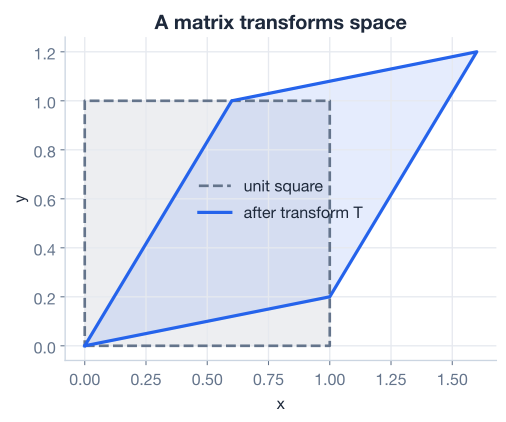
This is the key intuition to carry forward: a matrix is a recipe for moving every point in space at once. Stretching, rotating, reflecting, and shearing are all just different matrices.
The transformation reshaped the unit square, which originally had an area of exactly 1. How big is the new parallelogram? The answer is captured by a single number called the determinant.
The determinant of a square matrix tells you the factor by which the matrix scales area (in two dimensions) or volume (in higher dimensions). A determinant of 1 means area is preserved, a determinant of 2 means areas double, and a determinant between 0 and 1 means the shape shrinks.
For a matrix, the determinant has a simple formula:
For our shear matrix , plug in the values , , , :
NumPy computes determinants with np.linalg.det.
det_T = np.linalg.det(T)

print("det(T):", round(det_T, 3))
# Output:
# det(T): 0.88
The determinant is , so the transformed parallelogram has about 88 percent of the area of the original unit square. The shear pushed the square sideways but the slight vertical squeeze shrank its area a little. This matches the picture: the parallelogram is the same width along the base but a bit shorter than the square.
When the determinant is zero
If the determinant is , the matrix collapses space onto a line or a single point, flattening all area to nothing. Such a matrix throws information away and cannot be undone, which is why a zero determinant signals a matrix that is not invertible. You will meet invertibility properly in a later lesson; for now, just read the determinant as an area scale factor.
Two special operations come up constantly, and both are easy once you have the transformation view.
The identity matrix is the matrix that changes nothing. It has running down the main diagonal and everywhere else. The identity is written :
Multiplying any matrix or vector by the identity leaves it untouched, the same way multiplying a number by 1 leaves it unchanged. In the transformation view, the identity is the “do nothing” transformation: every point stays exactly where it is, and its determinant is 1 because area is preserved.
I = np.identity(2)

print("I:\n", I)
print("M @ I:\n", M @ I)
# Output:
# I:
#  [[1. 0.]
#  [0. 1.]]
# M @ I:
#  [[1. 2.]
#  [3. 4.]]
Multiplying by returns exactly. The identity is the reference point for “no change,” and it is the goal you aim for when you try to undo a transformation.
The transpose flips a matrix across its main diagonal, turning rows into columns and columns into rows. The transpose of is written . If has shape , then has shape .
The first row becomes the first column, and the second row becomes the second column. In NumPy, the transpose is the .T attribute.
print("M.T:\n", M.T)
# Output:
# M.T:
#  [[1 3]
#  [2 4]]
The transpose is more than a formatting trick. It shows up whenever you need to make shapes line up for multiplication, and it appears throughout the formulas of linear regression and neural network training. A useful rule to remember is that the transpose of a product reverses the order: .
Everything in this lesson converges on one idea that sits at the heart of modern machine learning: a layer of a neural network is a matrix multiply.
Picture a single layer that takes an input vector of feature values and produces an output vector. The layer stores its learned weights in a matrix . The core computation is:
That is a matrix multiplied by a vector (exactly the operation you have been practicing) plus a bias vector that shifts the result. The weight matrix is precisely a transformation of space: it stretches, rotates, and shears the input vector into a new representation. Stack several such layers and you are composing transformations, one after another, which is itself just more matrix multiplication.
This is why matrices matter so much. When a model “learns,” it is adjusting the numbers inside its weight matrices so that the transformations they apply pull useful structure out of the data. And when training runs fast on a GPU, it is because hardware is built to do enormous matrix multiplications in parallel.
# A tiny "layer": transform a 2-feature input with a weight matrix
W = np.array([[0.5, -0.2],
              [0.1,  0.8]])
x = np.array([2.0, 3.0])
b = np.array([1.0, -1.0])

z = W @ x + b
print("Layer output shape:", z.shape)
print("Layer output:", z)
# Output:
# Layer output shape: (2,)
# Layer output: [1.4 1.6]
The exact numbers here come from arithmetic you can check: the first output is , and the second is . A real network does the same thing with far larger matrices, but the operation is identical to what you just ran.
Now it is your turn. Try these before checking the hints.
Compute the product of these two matrices by hand, one entry at a time, then confirm your answer with NumPy’s @ operator.
import numpy as np

A = np.array([[2, 0], [1, 3]])
B = np.array([[1, 4], [2, 1]])

# Your code here: compute A @ B
Hint
Each entry is a row of dotted with a column of . The top-left entry is . Work out the other three the same way, then check with print(A @ B). You should get [[2, 8], [7, 7]].
Create the matrix below in NumPy, compute its determinant with np.linalg.det, and explain in one sentence what it tells you about how this matrix changes area.
import numpy as np

# Your code here
Hint
Use np.linalg.det(S). By the formula , the determinant is . This matrix stretches the plane by 2 horizontally and 3 vertically, so it scales every area by a factor of 6.
Using the matrices and from this lesson, verify the rule . Compute both sides and check that they are equal.
import numpy as np

M = np.array([[1, 2], [3, 4]])
N = np.array([[5, 6], [7, 8]])

# Your code here: compare (M @ N).T with N.T @ M.T
Hint
Compute left = (M @ N).T and right = N.T @ M.T, then compare them with np.array_equal(left, right), which should print True. Notice that the order flips: it is , not .
You have learned to read matrices in two ways and to perform the operations that drive machine learning under the hood. Let’s review what you covered.
Matrices as Tables and Transformations
Matrix Operations
@ (not *) in NumPy for true matrix multiplicationGeometry and Special Matrices
The Machine Learning Connection
Matrices are the language data is written in and the engine that models run on. Every dataset you load is a matrix, every layer of a neural network is a matrix multiply, and the speed of modern deep learning comes from hardware built to multiply matrices at scale. The geometric view you practiced here, seeing a matrix bend and stretch space and reading the determinant as an area scale factor, is what lets you reason about what a model is actually doing instead of treating it as a black box. When you later study how models are trained, these same operations will reappear in the formulas for predictions and gradients.
You can now multiply matrices, read their geometry, and connect them to neural network layers. Next, you will return to systems of equations and learn when a set of vectors truly carries independent information, which determines whether a system has one solution, none, or infinitely many.
Learn how solution sets are described and what it means for vectors to be linearly independent.
Return to the Math Foundations module overview.
You have taken a big step by learning to see a matrix as both a table and a transformation. That dual view is exactly how practitioners think: a dataset is a matrix to be processed, and a model is a stack of matrices that reshape data into predictions. Keep the unit-square picture in mind as you go forward. Whenever you meet a new matrix operation, ask yourself what it does to space, and the math will stay grounded in something you can actually see.