Title here
Summary here
This lesson introduces you to machine learning and the workflow that every practitioner follows, from raw data to a working model. You will learn what machine learning is, how supervised learning works, and how to build and evaluate a real classifier using scikit-learn on an actual business dataset.
By the end of this lesson, you will be able to:
No prior machine learning experience is needed. You should be comfortable with basic Python, pandas, and NumPy. Let’s begin.
Imagine you work at a bank. Your marketing team runs phone campaigns asking customers to open a term deposit (a savings product that locks money away for a fixed term in exchange for higher interest). Calling everyone is expensive, so you want to know in advance: which customers are likely to say yes?
You already have records from thousands of past calls. For each customer you know:
You could try to write rules by hand. After staring at the data, you might notice that customers who talked for a long time tend to subscribe, so you write an if statement. That works for a while. But what happens when you have 20 columns instead of 4, and the patterns interact in ways no human can spot by eye? Writing rules by hand simply does not scale.
This is where machine learning helps. Instead of you writing the rules, the algorithm discovers them from the data.
A machine learning model is a mathematical object that learns patterns from data on its own. The process has three parts:
The key word is unseen. A model that only memorizes the data it was trained on is useless. A good model generalizes, meaning it makes accurate predictions on examples it has never encountered before.
Machine learning comes in two broad families. The difference is whether your data comes with answers attached.
Supervised Learning              Unsupervised Learning
-----------------------          -----------------------
Data has labels (answers)        Data has no labels
Goal: predict the label          Goal: find hidden structure
Examples:                        Examples:
  - Subscribe vs. not             - Customer segmentation
  - Price of a house              - Grouping similar documents
  - Disease vs. healthy           - Anomaly detection
In supervised learning, every example in your training data already has the correct answer. The model learns to map inputs to those known answers. Think of showing a child many labeled photos of giraffes and zebras. After enough examples, the child can name an animal they have never seen before. That is supervised learning.
In unsupervised learning, there are no answers. The algorithm tries to find structure on its own, such as grouping similar customers together. This lesson, and most of this module, focuses on supervised learning.
Building a model is never a single step. It is a repeatable loop. Understanding this workflow up front gives you a map for everything that follows. The diagram below shows the seven stages and how evaluation feeds back into tuning.
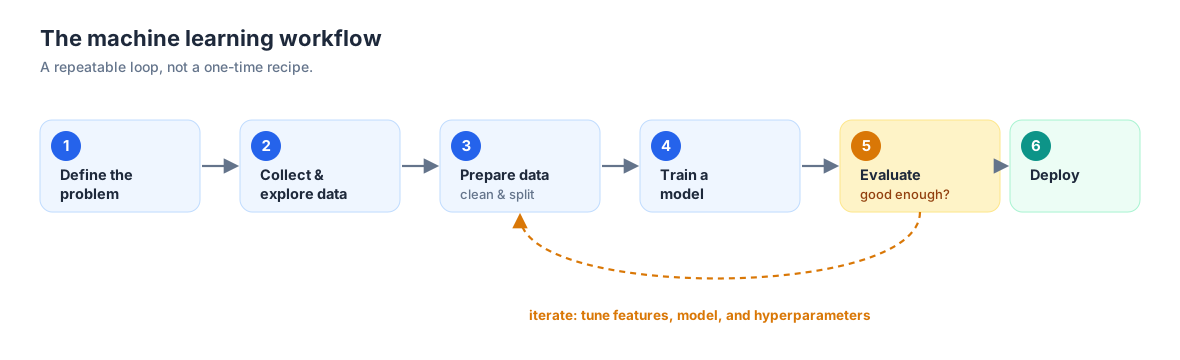
Let’s walk through each step.
Before touching any code, decide what you are actually predicting. Is the answer a category (will this customer subscribe or not?) or a number (how much will they deposit?). This single decision shapes everything else, including which algorithms you can use.
Models learn from data, so you need data. Sometimes you collect it yourself; often you use existing datasets. Once you have it, you explore: How many rows and columns? Are there missing values? How are the answers distributed?
Raw data is rarely ready for a model. You may need to clean missing values, convert text to numbers, and scale features. Crucially, you also split the data into a part for training and a part for testing.
You pick an algorithm, feed it the training data, and let it learn the patterns. In scikit-learn this is almost always a single call to .fit().
You measure performance on data the model has never seen. For classification, the simplest measure is accuracy, the fraction of predictions that are correct.
The first model is rarely the best. You adjust settings, try different algorithms, and engineer better features, then re-evaluate. Machine learning is an iterative loop, not a straight line.
Once a model is good enough, you put it into production and keep watching it, because data changes over time and performance can drift.
For the rest of this lesson, you will walk through this entire workflow on a real problem using scikit-learn, the most widely used machine learning library in Python.
Before writing code, you need two vocabulary words that you will use constantly.
Look back at the bank example. Each column described a property of a customer: their age, the length of the call, the number of contacts, and so on. Each of these columns is a feature. A feature is a measurable property of your data that the model uses as input.
There was one more column: whether the customer subscribed. This is special. It is the thing you want to predict, and it is called the target (or target variable, or label). The target is what the model produces as output.
Each row in the table is one observation, sometimes called a feature vector. It bundles all the feature values for a single example.
            features (X)                          target (y)
   +----------------------------------+      +-----------------+
   |  age  | duration | campaign  ... | ---> | subscribed?     |
   +-------+----------+---------------+      +-----------------+
   |  56   |   261    |    1      ... |      |    no  (0)      |  <- observation 1
   |  37   |   226    |    1      ... |      |    yes (1)      |  <- observation 2
   |  40   |   151    |    2      ... |      |    no  (0)      |  <- observation 3
   +-------+----------+---------------+      +-----------------+
By a strong convention you will see everywhere in scikit-learn, the features are stored in a variable called X (capital, because it is a table) and the target is stored in y (lowercase, because it is a single column).
The type of target decides the type of task:
When a classifier chooses between exactly two categories, it is a binary classifier. When it chooses among three or more, it is a multi-class classifier. This lesson builds a binary classifier: subscribe or not.
You will build a model that predicts whether a customer subscribes to a term deposit, using the real Bank Marketing dataset from a Portuguese bank’s phone campaigns. This is a classic binary classification problem drawn from actual marketing records.
You can download the dataset and load it with pandas.
import pandas as pd

# download: https://datatweets.com/datasets/bank_marketing.csv
df = pd.read_csv("bank_marketing.csv")

print("Shape:", df.shape)
# Output: Shape: (10122, 21)
The dataset has 10,122 rows and 21 columns. Each row is one phone call to one customer, and the final column y records whether that customer subscribed.
You do not need to memorize every column, but here are the key ones you will work with:
| Column | Type | Meaning |
|---|---|---|
age | int | Customer’s age in years |
job, marital, education | category | Occupation, marital status, education level |
default, housing, loan | category | Whether the customer has credit in default, a housing loan, a personal loan |
contact, month, day_of_week | category | How and when the customer was last contacted |
duration | int | Length of the last call in seconds |
campaign | int | Number of contacts during this campaign |
pdays | int | Days since last contacted (999 = never before) |
previous | int | Number of contacts before this campaign |
poutcome | category | Outcome of the previous campaign |
emp.var.rate, cons.price.idx, cons.conf.idx, euribor3m, nr.employed | float | Broad economic indicators at the time |
y | category | Target: "yes" or "no" (did the customer subscribe?) |
A subtle trap: duration leaks the answer
The duration column is strongly related to the target, because long conversations usually mean an interested customer. But you only know the duration after a call finishes, and by then you already know whether they subscribed. In a real deployment, where the goal is to decide whom to call before dialing, duration would not be available. We include it here because it is instructive for learning the workflow, but keep in mind that a production model would drop it to avoid this kind of leakage.
Now explore the basics: the size, and how the target is distributed.
# How is the target distributed?
print(df["y"].value_counts())
# Output:
# y
# no     5482
# yes    4640
# Name: count, dtype: int64

# What fraction subscribed?
print("subscribe rate:", round((df["y"] == "yes").mean(), 3))
# Output: subscribe rate: 0.458
About 46 percent of customers subscribed (4,640 out of 10,122). That is a fairly balanced dataset, which is convenient: when one class hugely outnumbers the other, accuracy can be misleading. A picture makes the balance clear.
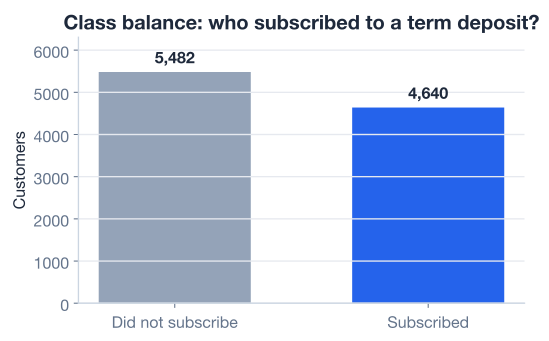
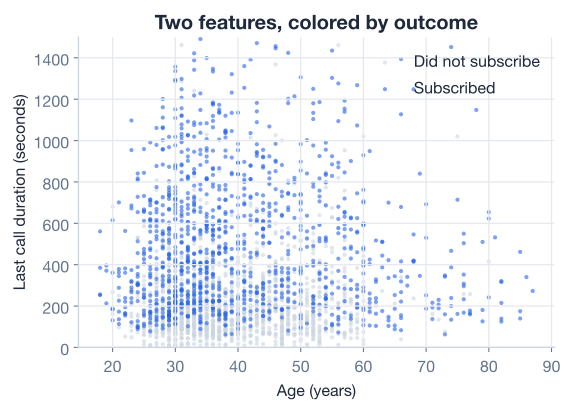
It also helps to look at how individual features relate to the target. Below, each point is one customer, plotted by age and call duration and colored by whether they subscribed. You can see that longer calls (higher up) tend to be subscribers, while short calls cluster near the bottom regardless of age.
Why exploration matters
Skipping exploration is one of the most common beginner mistakes. If a target were 99 percent one class, a model could score 99 percent accuracy by always guessing that class while being completely useless. Always look at your data first.
Most machine learning algorithms expect numbers, not text. This dataset mixes numeric columns (like age and duration) with categorical text columns (like job and month). To keep this first lesson focused on the workflow, you will select just the numeric columns as your features. You will learn how to encode categorical columns in a later lesson.
You also need to turn the target into numbers. Right now y is the text "yes" or "no"; you convert it to 1 for yes and 0 for no.
# Numeric feature columns we will use as inputs
numeric_cols = [
    "age", "duration", "campaign", "pdays", "previous",
    "emp.var.rate", "cons.price.idx", "cons.conf.idx",
    "euribor3m", "nr.employed",
]

X = df[numeric_cols]                 # features: a table of numbers
y = (df["y"] == "yes").astype(int)   # target: 1 for "yes", 0 for "no"

print("X shape:", X.shape)
print("Positive (subscribed) examples:", y.sum())
# Output:
# X shape: (10122, 10)
# Positive (subscribed) examples: 4640Here is a question that sits at the heart of machine learning: how do you know your model actually learned something useful, rather than just memorizing the data?
The answer is to hold some data back. You train the model on one portion of the data, then test it on a separate portion the model has never seen. If it performs well on the unseen test data, you can trust that it generalizes.
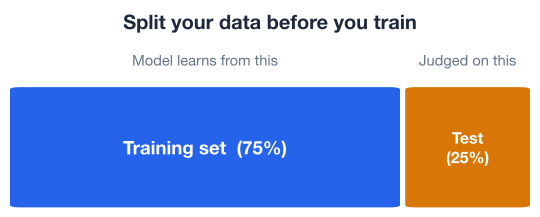
The training set is what the model learns from. The test set is locked away and used only at the end to measure performance honestly. Here you hold out 25 percent for testing.
scikit-learn provides train_test_split to do this for you.
from sklearn.model_selection import train_test_split

X_train, X_test, y_train, y_test = train_test_split(
    X, y,
    test_size=0.25,      # 25% of the data is held out for testing
    random_state=42,     # makes the random split reproducible
    stratify=y,          # keep the yes/no ratio the same in both sets
)

print("Training observations:", X_train.shape[0])
print("Test observations:    ", X_test.shape[0])
# Output:
# Training observations: 7591
# Test observations:     2531
Three details are worth remembering. First, the split is random, so each set is a fair sample of the whole. Second, random_state=42 fixes that randomness so you get the same split every time, which makes your results reproducible; any fixed number works. Third, stratify=y ensures the yes/no proportion is identical in the training and test sets, which matters for honest evaluation.
Look at the feature ranges: age is around 30 to 60, but duration runs into the hundreds and nr.employed is around 5,000. Many algorithms, including the one you are about to use, measure distances between points. If one feature has a much larger range, it dominates that distance and drowns out the others.
The fix is standardization with StandardScaler, which rescales each feature to have a mean of 0 and a standard deviation of 1. The mathematical transform applied to each value is:
where is the feature’s mean and is its standard deviation.
from sklearn.preprocessing import StandardScaler

scaler = StandardScaler()
X_train_scaled = scaler.fit_transform(X_train)  # learn mean/std on TRAIN, then apply
X_test_scaled = scaler.transform(X_test)        # apply the SAME transform to test
The golden rule
Fit the scaler on the training data only, then apply it to both sets. If you fit on the full dataset, information about the test set leaks into training, and your accuracy score becomes too optimistic. The same rule applies to the model itself: never let it see the test set during training.
Now for the exciting part. You will train a classifier. scikit-learn offers dozens of algorithms, and they all share the same simple interface, so once you learn one you can swap in another with almost no code changes.
You will use k-nearest neighbors (KNN), an intuitive algorithm that classifies a new point by looking at the labels of the training points closest to it. You will study exactly how it works in the next lesson; for now, just know that it has one main setting, n_neighbors (often written ), the number of neighbors to consult.
Building and training a model takes just two steps:
.fit(). Fitting is the same thing as training.from sklearn.neighbors import KNeighborsClassifier
# Step 1: create the model, looking at the 15 nearest neighbors
model = KNeighborsClassifier(n_neighbors=15)
# Step 2: train (fit) the model on the SCALED training data
model.fit(X_train_scaled, y_train)
print("Model trained!")
# Output: Model trained!That is it. The settings you passed in, like n_neighbors, are called hyperparameters. They are knobs you set before training, as opposed to the patterns the model learns during training.
A trained model is only useful if it makes good predictions. Now you find out how good it is, using the test set you set aside earlier.
The simplest metric for classification is accuracy: out of all the test examples, what fraction did the model classify correctly?
scikit-learn computes this with the .score() method.
test_accuracy = model.score(X_test_scaled, y_test)

print(f"Test accuracy: {test_accuracy:.4f}")
# Output: Test accuracy: 0.8692
An accuracy of about 0.869 means the model correctly classified roughly 87 percent of the customers in the test set. That is a strong result for a first attempt.
You can also look at the actual predictions to see what the model produces.
predictions = model.predict(X_test_scaled)

print("Predicted:", predictions[:5])
print("Actual:   ", y_test.values[:5])
# Output:
# Predicted: [0 1 0 0 1]
# Actual:    [0 1 0 0 1]
The .predict() method gives you the model’s guesses, and comparing them to y_test is exactly what .score() does for you behind the scenes.
The first model is rarely the last. Building good models is an iterative loop: you change something, re-evaluate, and keep what helps.
The most important knob here is n_neighbors. Too few neighbors and the model reacts to noise; too many and it blurs over real patterns. A quick way to find a good value is to try several and compare.
for k in [1, 5, 15, 31, 51]:
    knn = KNeighborsClassifier(n_neighbors=k)
    knn.fit(X_train_scaled, y_train)
    acc = knn.score(X_test_scaled, y_test)
    print(f"k={k:>3}  accuracy={acc:.4f}")
# Output:
# k=  1  accuracy=0.8333
# k=  5  accuracy=0.8684
# k= 15  accuracy=0.8692
# k= 31  accuracy=0.8665
# k= 51  accuracy=0.8613
Accuracy is low at k=1 (the model overreacts to single nearby points), peaks around k=15, and slowly declines as k grows. This kind of sweep is your first taste of hyperparameter tuning, which later lessons make systematic.
Notice the careful detail throughout: the scaler was fit on X_train only, and the model only ever sees the test set at the final scoring step. That discipline is what makes these numbers trustworthy.
Experimentation has limits
It is tempting to just try random settings until the score goes up. That works occasionally, but it does not scale: each algorithm has many knobs, and blind tuning can quietly overfit your test set. Understanding why an algorithm behaves the way it does, which the next lessons cover, lets you tune from an informed position instead of guessing.
Here is the entire workflow you just walked through, condensed into one runnable script. This is a template you can adapt for almost any classification problem.
import pandas as pd
from sklearn.model_selection import train_test_split
from sklearn.preprocessing import StandardScaler
from sklearn.neighbors import KNeighborsClassifier

# 1. Collect & explore
df = pd.read_csv("bank_marketing.csv")  # download: https://datatweets.com/datasets/bank_marketing.csv

# 2. Prepare: select numeric features, build the numeric target
numeric_cols = [
    "age", "duration", "campaign", "pdays", "previous",
    "emp.var.rate", "cons.price.idx", "cons.conf.idx",
    "euribor3m", "nr.employed",
]
X = df[numeric_cols]
y = (df["y"] == "yes").astype(int)

# 3. Prepare: split, then scale (fit on train only)
X_train, X_test, y_train, y_test = train_test_split(
    X, y, test_size=0.25, random_state=42, stratify=y
)
scaler = StandardScaler()
X_train = scaler.fit_transform(X_train)
X_test = scaler.transform(X_test)

# 4. Train
model = KNeighborsClassifier(n_neighbors=15)
model.fit(X_train, y_train)

# 5. Evaluate
print(f"Accuracy: {model.score(X_test, y_test):.4f}")
# Output: Accuracy: 0.8692
In about 20 lines you loaded real data, prepared it, trained a classifier, and measured it on unseen data. That is the machine learning workflow.
Now it is your turn. Try these before checking the hints.
The lesson used only the numeric columns. Explore the categorical ones instead: print the unique values in the job column and the subscribe rate for each job, so you can see which occupations are most likely to subscribe.
import pandas as pd
df = pd.read_csv("bank_marketing.csv")

# Your code here
Hint
Use df["job"].value_counts() to see the categories. To get the subscribe rate per job, create a numeric target with (df["y"] == "yes").astype(int), add it as a column, then use df.groupby("job")["subscribed"].mean().
Train a KNeighborsClassifier with n_neighbors=31 on the same scaled data, and print its test accuracy. How does it compare to the k=15 model from the lesson?
# Your code here (reuse X_train_scaled, X_test_scaled, y_train, y_test from the lesson)Hint
Instantiate KNeighborsClassifier(n_neighbors=31), call .fit(X_train_scaled, y_train), then .score(X_test_scaled, y_test). You should get about 0.8665, slightly below the k=15 result of 0.8692.
Swap the algorithm. Train a LogisticRegression model on the same scaled training data and compare its test accuracy to KNN. The scikit-learn interface is identical, so only one line changes.
from sklearn.linear_model import LogisticRegression

# Your code here
Hint
Instantiate LogisticRegression(max_iter=1000, random_state=42), then .fit(X_train_scaled, y_train) and .score(X_test_scaled, y_test). This is the power of a shared interface: swapping algorithms takes one line, and everything else stays the same.
Congratulations! You have completed the full machine learning workflow from start to finish on a real dataset. Let’s review what you learned.
Machine Learning Basics
The Workflow
Data Vocabulary
X) are the input columns; the target (y) is what you predictPreparing Data
0/1train_test_split, using stratify and a fixed random_stateStandardScaler, fitting on the training set only to avoid leakagescikit-learn Pattern
model = KNeighborsClassifier(...) instantiates a modelmodel.fit(X_train, y_train) trains itmodel.score(X_test, y_test) measures accuracymodel.predict(X) produces predictionsThe workflow you learned here is the backbone of every machine learning project, whether it predicts customer behavior, detects fraud, or diagnoses disease. The specific algorithm changes from problem to problem, but the steps stay the same: explore your data, split it honestly, scale it, train, evaluate, and iterate.
You also saw a glimpse of something important. You built an 87 percent accurate model without understanding how k-nearest neighbors works internally. That is both the strength and the danger of modern tools. Quick experimentation is valuable, but to tune models reliably and avoid subtle mistakes, like the duration leakage you spotted earlier, you need to understand what is happening under the hood. That is exactly what the next lessons build toward.
You now understand the machine learning workflow and have trained your first classifier. In the next lesson, you will learn your first algorithm in depth, k-nearest neighbors, and see exactly how it makes its predictions.
Learn your first machine learning algorithm and how it makes predictions.
Return to the Machine Learning Foundations module overview.
You have taken your first real step into machine learning. The workflow you practiced here, from exploring data to evaluating a model, is the same one used by professionals every day. As you learn individual algorithms in the coming lessons, keep this big picture in mind: every model fits into this same workflow. Master the process, and the algorithms become far easier to learn.