Title here
Summary here
In the previous lesson, you walked through the full machine learning workflow and trained a classifier with scikit-learn in just a couple of lines. That speed is wonderful for prototyping, but it hides something important: you never saw how the model actually made its decisions. When you do not understand the algorithm underneath, it is hard to know why it succeeds, why it fails, or how to improve it.
This lesson fixes that. You will learn k-nearest neighbors (k-NN), one of the most intuitive algorithms in all of machine learning. You will first build the idea by hand so nothing is mysterious, then train a real scikit-learn classifier on a genuine business dataset: predicting which bank customers will subscribe to a term deposit.
By the end of this lesson, you will be able to:
KNeighborsClassifier and choose a good value of kYou should be comfortable with basic Python and pandas, and you should have finished Lesson 1. Let’s begin.
Imagine you move to a new neighborhood and want to guess whether the unfamiliar house on the corner is owned or rented. You have no records, but you can look at the houses immediately around it. If most of the nearby houses are rentals, the corner house is probably a rental too. If most are owner-occupied, you would guess the same for the corner house.
That is the entire idea behind k-nearest neighbors. To classify something new, you look at the examples closest to it and let them vote.
To make this concrete, picture a dataset of bank customers. Each customer either subscribed to a product (call them class 1) or did not (class 0). Suppose you describe each customer with just two numbers: their age and how long the last sales call lasted. You can then place every customer as a point on a 2D chart. Customers who behave similarly end up near each other, and the position of a point in this feature space carries information about its likely label.
Now a brand-new customer arrives. To classify them, k-NN measures the distance from the new point to every training point, finds the closest few, and takes a majority vote of their labels. The figure below shows the idea: five neighbors are found, and whichever class holds the majority wins.
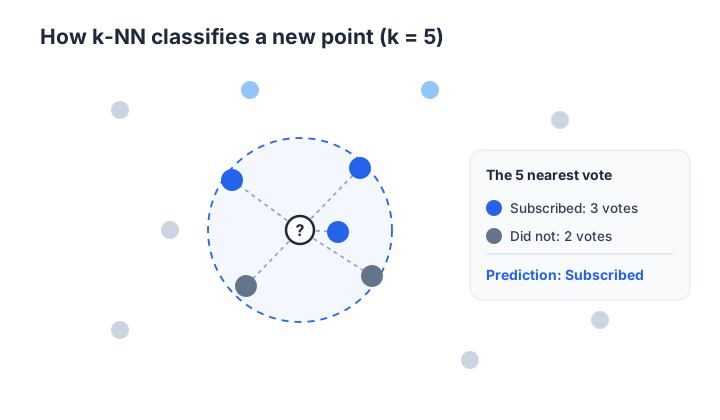
The “k” is just how many neighbors you let vote. With k = 3, you look at the three closest points; with k = 5, the five closest. You choose k yourself, and it is a setting (a hyperparameter) you can tune.
Stripped down to its essentials, k-NN works like this:
For a new, unseen observation:
  1. Compute the distance from it to EVERY observation
     in the training set, across all features.
  2. Sort those distances from smallest to largest.
  3. Keep the k observations with the smallest distances
     (these are the "k nearest neighbors").
  4. Look at the labels of those k neighbors and assign
     the most common label to the new observation.
Notice something unusual. There is no separate “training” phase where the model crunches the data and produces a tidy equation. k-NN does all its work at prediction time, by comparing each new point against the stored training data. For this reason k-NN is sometimes called a lazy learner: it postpones the work until you actually ask it for a prediction.
This has a practical consequence. Because every prediction scans the entire training set, k-NN can be slow when you have many observations or many features. Keep that trade-off in mind as you build it.
You will work with the real Bank Marketing dataset, collected from the direct-marketing campaigns of a Portuguese bank. Each row is one customer who was contacted by phone, and the goal is to predict whether they subscribed to a term deposit.
You can download the file and load it with pandas:
import pandas as pd

df = pd.read_csv("bank_marketing.csv")  # download: https://datatweets.com/datasets/bank_marketing.csv

print("shape:", df.shape)
# Output:
# shape: (10122, 21)

print(df["y"].value_counts())
# Output:
# y
# no     5482
# yes    4640
# Name: count, dtype: int64

print("subscribe rate:", round((df["y"] == "yes").mean(), 3))
# Output:
# subscribe rate: 0.458
You have 10,122 customers described by 21 columns (20 features plus the target y). About 46 percent subscribed, so the classes are reasonably balanced; you will not have to fight a heavily skewed target.
The columns fall into three groups. Here are the ones that matter most for this lesson:
| Column | Type | Meaning |
|---|---|---|
age | numeric | Customer age in years |
duration | numeric | Length of the last contact call, in seconds |
campaign | numeric | Number of contacts during this campaign |
pdays | numeric | Days since last contacted in a previous campaign (999 = never) |
previous | numeric | Number of contacts before this campaign |
emp.var.rate | numeric | Employment variation rate (economic indicator) |
cons.price.idx | numeric | Consumer price index (economic indicator) |
cons.conf.idx | numeric | Consumer confidence index (economic indicator) |
euribor3m | numeric | 3-month Euribor interest rate (economic indicator) |
nr.employed | numeric | Number of employees (economic indicator) |
job, marital, education | categorical | Job type, marital status, education level |
default, housing, loan | categorical | Credit/loan status flags |
contact, month, day_of_week | categorical | How and when the customer was contacted |
poutcome | categorical | Outcome of the previous campaign |
y | target | "yes" or "no": did the customer subscribe? |
The duration trap
The duration column is strongly correlated with the target: long calls tend to end in a subscription. But you only know a call’s duration after it happens, so in a real deployment this feature would leak the answer you are trying to predict. We include it here to teach the mechanics, but in genuine production work you would drop it. Keep this caveat in mind.
For k-NN, every feature must be numeric (you cannot subtract "technician" from "student"), so you will model with the ten numeric columns:
numeric_features = [
    "age", "duration", "campaign", "pdays", "previous",
    "emp.var.rate", "cons.price.idx", "cons.conf.idx",
    "euribor3m", "nr.employed",
]

# Encode the target as 1 = subscribed, 0 = not
y = (df["y"] == "yes").astype(int)
X = df[numeric_features]

print("feature matrix:", X.shape)
# Output:
# feature matrix: (10122, 10)
The categorical columns are not wasted forever; later in this lesson you will see how to bring them in with one-hot encoding. For now, the numeric columns are enough to build a strong model.
Before you can find the “nearest” neighbors, you need a precise definition of near. That definition is called a distance metric.
The most common one is Euclidean distance, the ordinary straight-line distance you learned in geometry. For two observations with features, and , it is:
Here is the value of feature for one observation, and is the value of the same feature for the other observation. You square each difference (so signs do not cancel), add them up, and take the square root.
When you use only a single feature, the formula collapses to something very familiar:
That is just the absolute difference between the two values.
Euclidean distance is not the only choice. You may also encounter Manhattan distance (summing absolute differences instead of squared ones), Minkowski distance (a generalization of both), and Hamming distance (for categorical data). Euclidean is an excellent default and the one you will use throughout this lesson.
Before reaching for scikit-learn, it helps to compute one prediction yourself so the algorithm is not a black box. Using a single feature, the distance is just an absolute difference, and pandas makes the rest short: .nsmallest() grabs the closest rows, and .mode() finds the majority label.
# A tiny by-hand version of k-NN on one feature, just to see the steps.
def knn_one_feature(feature, test_value, k):
    distances = (X[feature] - test_value).abs()      # step 1: distances
    nearest_index = distances.nsmallest(k).index     # steps 2-3: k closest
    return y[nearest_index].mode()[0]                # step 4: majority vote

# Predict for a customer whose last call lasted 500 seconds, using k = 5
prediction = knn_one_feature("duration", 500, k=5)
print("predicted class:", prediction)
# Output:
# predicted class: 1
That is the whole algorithm in three lines. The five customers with call durations closest to 500 seconds mostly subscribed, so k-NN predicts class 1. This by-hand version is great for understanding, but it has no scaling, no proper train/test discipline, and it is slow. For real modeling you will switch to scikit-learn, which handles the bookkeeping for you.
To judge a model honestly, you split the data into a training set (the neighbors that get to vote) and a test set (unseen customers you predict and grade). You will use scikit-learn’s train_test_split with stratify=y so both sets keep the same 46 percent subscribe rate.
from sklearn.model_selection import train_test_split

X_train, X_test, y_train, y_test = train_test_split(
    X, y,
    test_size=0.25,      # 25% held out for testing
    random_state=42,     # reproducible split
    stratify=y,          # keep the class balance in both sets
)

print("train rows:", X_train.shape[0], " test rows:", X_test.shape[0])
# Output:
# train rows: 7591 test rows: 2531Look at the ranges of two of the numeric features. They live on wildly different scales:
print("duration range:   ", X_train["duration"].min(), "to", X_train["duration"].max())
print("nr.employed range:", X_train["nr.employed"].min(), "to", X_train["nr.employed"].max())
# Output (approximate):
# duration range:    0 to 4918
# nr.employed range: 4963.6 to 5228.1
Now think about the Euclidean distance. A difference of a few thousand in duration produces a squared term in the millions, and nr.employed sits in the thousands too. Meanwhile campaign rarely exceeds 10. The big-numbered features completely dominate the distance, and small-range features barely matter, purely because of their magnitudes, not because they are more informative.
   Distance with raw features (big features drown out the rest):

   sqrt( (campaign_diff)^2 + (duration_diff)^2 + (nr.employed_diff)^2 )
           tiny                HUGE                 HUGE
   --------------------------------------------------------------------
   The result barely reflects campaign at all.
This is a serious bug for any distance-based algorithm. The fix is standardization: rescale every feature so it has mean 0 and standard deviation 1. scikit-learn’s StandardScaler does this with the formula:
where and are the mean and standard deviation of the feature.
Fit the scaler on training data only
Compute and from the training set only, then use those same numbers to transform both sets. If the test set influences the scaling, information leaks from the test data into your preparation and your score becomes dishonest, just like the golden rule from Lesson 1.
from sklearn.preprocessing import StandardScaler

scaler = StandardScaler()
X_train_scaled = scaler.fit_transform(X_train)   # learn mu, sigma on train
X_test_scaled = scaler.transform(X_test)         # apply the SAME mu, sigma

print("scaled train mean (first feature):", round(X_train_scaled[:, 0].mean(), 3))
print("scaled train std  (first feature):", round(X_train_scaled[:, 0].std(), 3))
# Output:
# scaled train mean (first feature): 0.0
# scaled train std  (first feature): 1.0
Now every feature lives on a common scale, and the distance treats them even-handedly.
With scaled features in hand, training the model is short. scikit-learn’s KNeighborsClassifier packages the entire algorithm; you only choose k (the n_neighbors argument), call .fit() to store the training data, and call .predict() to classify.
from sklearn.neighbors import KNeighborsClassifier
from sklearn.metrics import accuracy_score

knn = KNeighborsClassifier(n_neighbors=15)
knn.fit(X_train_scaled, y_train)

y_pred = knn.predict(X_test_scaled)
print("test accuracy:", round(accuracy_score(y_test, y_pred), 4))
# Output:
# test accuracy: 0.8692
With k = 15, the model classifies about 87 percent of held-out customers correctly. That is a strong result for such a simple algorithm, and it comes almost entirely from scaling the features before measuring distance.
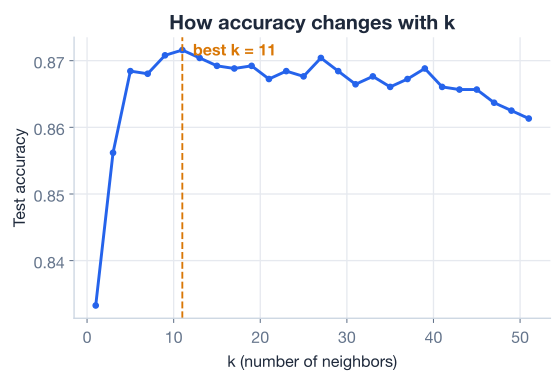
k is the one knob you most need to get right. A very small k (say 1) lets a single noisy neighbor decide the vote, so the model overfits and chases noise. A very large k averages over so many neighbors that it ignores local structure and underfits. The sweet spot is somewhere in between, and the only honest way to find it is to try several values and compare.
for k in [1, 5, 15, 31, 51]:
    model = KNeighborsClassifier(n_neighbors=k)
    model.fit(X_train_scaled, y_train)
    acc = accuracy_score(y_test, model.predict(X_test_scaled))
    print(f"k={k:3d}  accuracy={acc:.4f}")
# Output:
# k=  1  accuracy=0.8333
# k=  5  accuracy=0.8684
# k= 15  accuracy=0.8692
# k= 31  accuracy=0.8665
# k= 51  accuracy=0.8613
The pattern is clear. At k = 1 the model is noisiest and scores worst (0.8333). Accuracy climbs as k grows, peaks around k = 15 (0.8692), then slowly declines again as larger k values over-smooth the decision. Plotting accuracy against k makes the trade-off visible at a glance.
It also helps to see what the model is doing. If you train k-NN on just two standardized features, you can color every region of the plane by the class it would predict. The result is a decision boundary: the dividing line between “predict subscribe” and “predict no”. With a moderate k, the boundary is smooth but still follows the shape of the data.

A small k would produce a jagged, island-pocked boundary that hugs individual points (overfitting); a huge k would flatten it into an almost straight line that ignores local detail (underfitting). The picture is the geometric version of the accuracy curve above.
Accuracy is a fine first number, but it hides what kind of mistakes the model makes. Does it miss real subscribers, or does it flag people who never subscribe? A confusion matrix breaks predictions into four buckets so you can tell. You will use k = 31 here, a slightly larger value that produces a stable, well-behaved classifier for the deeper evaluation.
from sklearn.metrics import confusion_matrix, classification_report

knn = KNeighborsClassifier(n_neighbors=31)
knn.fit(X_train_scaled, y_train)
y_pred = knn.predict(X_test_scaled)

print(confusion_matrix(y_test, y_pred))
# Output:
# [[1177  194]
#  [ 144 1016]]

print(classification_report(y_test, y_pred, target_names=["no", "yes"]))
# Output:
#               precision    recall  f1-score   support
#
#           no       0.89      0.86      0.87      1371
#          yes       0.84      0.88      0.86      1160
#
#     accuracy                           0.87      2531
#    macro avg       0.87      0.87      0.87      2531
# weighted avg       0.87      0.87      0.87      2531
Read the confusion matrix row by row. Of the 1,371 customers who did not subscribe, the model correctly identified 1,177 and wrongly flagged 194. Of the 1,160 who did subscribe, it caught 1,016 and missed 144. Precision (how many flagged “yes” really subscribed) and recall (how many real subscribers were caught) both land around 0.87, a nicely balanced result.
One more metric rounds out the picture. ROC AUC measures how well the model ranks customers by their probability of subscribing, across every possible decision threshold. An AUC of 0.5 is random guessing; 1.0 is perfect.
from sklearn.metrics import roc_auc_score

# predict_proba gives the probability of class 1 (subscribed)
y_scores = knn.predict_proba(X_test_scaled)[:, 1]
print("ROC AUC:", round(roc_auc_score(y_test, y_scores), 3))
# Output:
# ROC AUC: 0.936
An AUC of 0.936 is excellent: the model is very good at ranking likely subscribers above unlikely ones. You will explore confusion matrices, precision, recall, and ROC curves in depth in the next lesson; for now, notice that a single accuracy number told you far less than these richer measures do.
Trying values of k by hand works, but it is tedious and you only varied one setting. KNeighborsClassifier has another useful option: weights. With weights="uniform" every neighbor votes equally; with weights="distance" closer neighbors get a heavier vote. scikit-learn’s GridSearchCV searches over combinations of settings using cross-validation (it splits the training data into folds and averages performance), so you never touch the test set while tuning.
from sklearn.model_selection import GridSearchCV

param_grid = {
    "n_neighbors": [5, 15, 31, 51],
    "weights": ["uniform", "distance"],
}

grid = GridSearchCV(
    KNeighborsClassifier(),
    param_grid,
    scoring="roc_auc",   # tune for ranking quality, not raw accuracy
    cv=5,                # 5-fold cross-validation
)
grid.fit(X_train_scaled, y_train)

print("best params:", grid.best_params_)
print("best CV AUC:", round(grid.best_score_, 4))
# Output:
# best params: {'n_neighbors': 31, 'weights': 'distance'}
# best CV AUC: 0.93
Grid search settles on k = 31 with distance weighting, reaching a cross-validated AUC of 0.93, consistent with what you measured on the test set. Because the search used only the training folds, that number is an honest estimate of how the tuned model will generalize.
So far you used only the ten numeric features. The dataset also has rich categorical columns like job, marital, and education, but k-NN cannot subtract one string from another. The standard fix is one-hot encoding: give each category its own 0/1 column.
A tempting shortcut is to map categories to integers (divorced = 1, married = 2, single = 3). This is a trap. It tells the model that single is “farther” from divorced than married is, inventing an order that does not exist and corrupting every distance. One-hot encoding avoids that by making every category equidistant:
   marital     divorced  married  single
   --------    --------  -------  ------
   divorced       1         0        0
   married        0         1        0
   single         0         0        1
pandas does this with get_dummies. With drop_first=True it uses columns for categories, since an all-zero row implies the dropped category.
# One-hot encode three categorical columns and combine with the numeric ones
categorical = ["marital", "housing", "loan"]
encoded = pd.get_dummies(df[categorical], drop_first=True)

print(encoded.columns.tolist())
# Output:
# ['marital_married', 'marital_single', 'marital_unknown',
#  'housing_unknown', 'housing_yes', 'loan_unknown', 'loan_yes']

# A richer feature matrix: numeric features plus encoded categories
X_rich = pd.concat([df[numeric_features], encoded.astype(int)], axis=1)
print("rich feature matrix:", X_rich.shape)
# Output:
# rich feature matrix: (10122, 17)
You now have a wider feature matrix you could feed through the exact same split-scale-fit pipeline. Adding well-chosen categorical features sometimes lifts performance and sometimes does not; the only way to know is to measure, which is why the evaluation tools from this lesson matter so much.
Here is the complete, runnable pipeline: load the real data, select numeric features, split with stratification, scale on training statistics, fit k-NN, and evaluate.
import pandas as pd
from sklearn.model_selection import train_test_split
from sklearn.preprocessing import StandardScaler
from sklearn.neighbors import KNeighborsClassifier
from sklearn.metrics import accuracy_score, roc_auc_score

# 1. Load the real dataset
df = pd.read_csv("bank_marketing.csv")  # download: https://datatweets.com/datasets/bank_marketing.csv

# 2. Select numeric features and encode the target
numeric_features = [
    "age", "duration", "campaign", "pdays", "previous",
    "emp.var.rate", "cons.price.idx", "cons.conf.idx",
    "euribor3m", "nr.employed",
]
X = df[numeric_features]
y = (df["y"] == "yes").astype(int)

# 3. Stratified train/test split
X_train, X_test, y_train, y_test = train_test_split(
    X, y, test_size=0.25, random_state=42, stratify=y
)

# 4. Scale on training statistics only
scaler = StandardScaler()
X_train_scaled = scaler.fit_transform(X_train)
X_test_scaled = scaler.transform(X_test)

# 5. Fit and evaluate
knn = KNeighborsClassifier(n_neighbors=31)
knn.fit(X_train_scaled, y_train)

y_pred = knn.predict(X_test_scaled)
y_scores = knn.predict_proba(X_test_scaled)[:, 1]

print("accuracy:", round(accuracy_score(y_test, y_pred), 3))
print("ROC AUC: ", round(roc_auc_score(y_test, y_scores), 3))
# Output:
# accuracy: 0.87
# ROC AUC:  0.936
In under 40 lines you loaded a real business dataset, prepared it correctly, and built a classifier that ranks likely subscribers with an AUC of 0.936. Just as important, you understand every step: distance, voting, scaling, and the choice of k.
Try these before peeking at the hints. They build directly on the code above.
You compared values of k using accuracy. Repeat the sweep over k = [1, 5, 15, 31, 51], but this time print the ROC AUC for each (use predict_proba(...)[:, 1] and roc_auc_score). Does the best k for AUC match the best k for accuracy?
# Your code hereHint
Loop over the list of k values. Inside, fit a fresh KNeighborsClassifier(n_neighbors=k) on X_train_scaled, get scores = model.predict_proba(X_test_scaled)[:, 1], and print roc_auc_score(y_test, scores). AUC often keeps improving for slightly larger k than accuracy does, because more neighbors give smoother probability estimates.
Train two KNeighborsClassifier(n_neighbors=15) models: one on the unscaled X_train/X_test, and one on the scaled versions. Print both test accuracies. How large is the gap?
# Your code hereHint
For the unscaled model, fit directly on X_train and predict on X_test. For the scaled model, use X_train_scaled and X_test_scaled. Compare with accuracy_score. The unscaled model is dragged down because duration and nr.employed dominate the distance.
Compare weights="uniform" and weights="distance" at k = 31. Fit both on the scaled training data and print the test ROC AUC for each. Which weighting wins here, and does it agree with what grid search chose?
# Your code hereHint
Build KNeighborsClassifier(n_neighbors=31, weights="uniform") and KNeighborsClassifier(n_neighbors=31, weights="distance"). Fit each on X_train_scaled, then score with roc_auc_score(y_test, model.predict_proba(X_test_scaled)[:, 1]). Grid search preferred weights="distance".
You built intuition for a complete machine learning algorithm and trained it on a real business dataset. Let’s review.
The k-NN Algorithm
k nearest, and take a majority vote of their labelsk is a hyperparameter you choose: small k overfits (sensitive to noise), large k underfits (over-smooths). Here k = 15 peaked at 0.8692 test accuracyDistance Metrics
Preparing Data
train_test_split(..., stratify=y) to keep the class balance in both setsStandardScaler () so no feature dominates the distance, and fit the scaler on training data onlypd.get_dummies(..., drop_first=True); never map categories to ordered integersEvaluation
k = 31 the model gave [[1177, 194], [144, 1016]], with precision and recall around 0.87GridSearchCV tunes settings with cross-validation; it chose k = 31, weights="distance" at CV AUC 0.93k-nearest neighbors is more than a beginner’s algorithm. It teaches the ideas that run through nearly all of machine learning: representing data as points in feature space, measuring similarity with a distance metric, and preparing features so the model can use them fairly. The single biggest lever in this lesson was not a cleverer algorithm but scaling the features, a reminder that good data preparation often beats fancy modeling.
You also saw why looking past raw accuracy matters: the confusion matrix and ROC AUC told you far more about the model’s behavior than a single percentage could. With that foundation, you are ready to study evaluation in depth, which is exactly what comes next.
You now understand and have trained your first machine learning algorithm on real data. In the next lesson, you will go beyond raw accuracy and learn richer, principled ways to judge whether a model is actually any good.
Learn how to measure whether your model is actually any good.
Return to the Machine Learning Foundations module overview.
You built a working classifier on a genuine marketing dataset and watched feature scaling transform its distances. That hands-on understanding is what separates someone who runs models from someone who truly grasps them. As you meet more algorithms, keep returning to the mental picture from this lesson: data as points in space, similarity as distance, and careful preparation as the key to fair, accurate predictions.