Title here
Summary here
In the previous lessons you trained classifiers and read off a single number: accuracy on a held-out test set. Accuracy is a fine first glance, but it is dangerously incomplete. It tells you how often a model is right, but never how it is wrong. A model that catches every fraudulent transaction and a model that misses half of them can post the same accuracy if fraud is rare enough.
This lesson teaches you to evaluate a classifier the way a practitioner does. You will build a k-nearest neighbors model on the real Bank Marketing dataset, then dissect its behavior with a confusion matrix, precision, recall, the F1 score, and the ROC curve with its AUC. By the end you will be able to defend, in plain language, what your model gets right and what it costs you when it is wrong.
By the end of this lesson, you will be able to:
You should be comfortable with basic Python, pandas, and the scikit-learn fit/predict pattern from earlier lessons. Let’s begin.
You will work with the Bank Marketing dataset, a well-known record of a Portuguese bank’s telephone campaigns. Each row is one client contacted during a campaign; the target y says whether that client ultimately subscribed to a term deposit.
You can download the exact file used here and load it with pandas:
import pandas as pd

df = pd.read_csv("bank_marketing.csv")  # download: https://datatweets.com/datasets/bank_marketing.csv

print("Shape:", df.shape)
print(df["y"].value_counts())
print("subscribe rate:", round((df["y"] == "yes").mean(), 3))
# Output:
# Shape: (10122, 21)
# y
# no     5482
# yes    4640
# Name: count, dtype: int64
# subscribe rate: 0.458
The dataset has 10,122 rows and 21 columns. The two classes are reasonably balanced: 5,482 clients said “no” and 4,640 said “yes,” so about 46 percent subscribed. That balance is convenient for learning, because it means accuracy is not completely useless here, yet the richer metrics still reveal things accuracy cannot.
You do not need every column to follow this lesson, but it helps to know what is there.
| Column | Type | Meaning |
|---|---|---|
age | int | Client age in years |
job, marital, education | categorical | Demographic profile |
default, housing, loan | categorical | Existing credit status |
contact, month, day_of_week | categorical | How and when the client was last contacted |
duration | int | Length of the last call, in seconds |
campaign | int | Number of contacts during this campaign |
pdays | int | Days since last contact in a prior campaign (999 means never contacted) |
previous | int | Number of contacts before this campaign |
poutcome | categorical | Outcome of the previous campaign |
emp.var.rate, cons.price.idx, cons.conf.idx, euribor3m, nr.employed | float | Economic indicators at contact time |
y | target | Did the client subscribe? "yes" / "no" |
The duration leak
The duration column is enormously predictive, but it is only known after a call ends. In a real deployment you would not have it before deciding whom to call, so using it would leak the answer. We include it here because this lesson is about evaluation mechanics, not deployment, but remember: a feature that is unavailable at prediction time has no business in a production model.
k-nearest neighbors measures distances between rows, so it needs purely numeric input on a comparable scale. To keep the focus on evaluation, you will use the ten numeric columns directly and encode the target as 1 for “yes” and 0 for “no.”
# Numeric features for the bank model
numeric_cols = [
    "age", "duration", "campaign", "pdays", "previous",
    "emp.var.rate", "cons.price.idx", "cons.conf.idx",
    "euribor3m", "nr.employed",
]

X = df[numeric_cols]
y = (df["y"] == "yes").astype(int)   # 1 = subscribed, 0 = did not

print(X.shape, y.shape)
# Output: (10122, 10) (10122,)
Next, split off a test set and scale the features. The split uses stratify=y so the train and test sets keep the same class balance, and the scaler is fit on the training data only so no information leaks from the test set.
from sklearn.model_selection import train_test_split
from sklearn.preprocessing import StandardScaler

# 75% train, 25% test; stratify keeps the class ratio identical in both
X_train, X_test, y_train, y_test = train_test_split(
    X, y, test_size=0.25, random_state=42, stratify=y
)

# Learn the scaling from TRAIN only, then apply it to both
scaler = StandardScaler()
X_train_scaled = scaler.fit_transform(X_train)
X_test_scaled = scaler.transform(X_test)

print("Train rows:", X_train_scaled.shape[0])
print("Test rows: ", X_test_scaled.shape[0])
# Output:
# Train rows: 7591
# Test rows:  2531
StandardScaler centers each feature to mean 0 and scales it to unit variance. The asymmetry is deliberate: fit_transform on training data learns the means and standard deviations, then transform (never fit) applies that same transformation to the test set. The scaler is part of the model, so fitting it on test rows would be a quiet form of cheating.
Before evaluating in depth, you need a trained model. The number of neighbors k is a hyperparameter, and a quick sweep shows the model is not very sensitive to it in the usable range.
from sklearn.neighbors import KNeighborsClassifier

for k in [1, 5, 15, 31, 51]:
    knn = KNeighborsClassifier(n_neighbors=k)
    knn.fit(X_train_scaled, y_train)
    acc = knn.score(X_test_scaled, y_test)
    print(f"k={k:>3}  accuracy={acc:.4f}")
# Output:
# k=  1  accuracy=0.8333
# k=  5  accuracy=0.8684
# k= 15  accuracy=0.8692
# k= 31  accuracy=0.8665
# k= 51  accuracy=0.8613
k=1 overfits (it memorizes single noisy neighbors) and the largest k begins to oversmooth. Anything from about 15 to 31 lands near 87 percent accuracy. For the rest of this lesson you will use k=31, a slightly smoother model whose error breakdown is instructive.
# The model we will evaluate in detail
knn = KNeighborsClassifier(n_neighbors=31)
knn.fit(X_train_scaled, y_train)
y_pred = knn.predict(X_test_scaled)
That accuracy=0.8665 for k=31 is the single number we are about to take apart. About 87 percent of test clients are classified correctly, but accuracy refuses to tell us which 13 percent are wrong, or whether the mistakes are the expensive kind. For that, we need the confusion matrix.
A confusion matrix is a 2x2 table that splits every prediction into one of four outcomes. For our binary problem, treat “yes” (subscribed) as the positive class:
The figure below renders these four counts as a heatmap, which is how you will most often see them in practice.
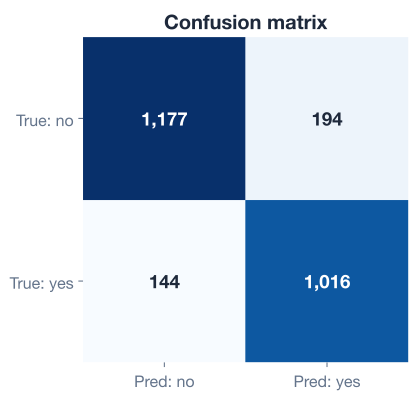
Let’s compute it for our k=31 model. scikit-learn orders the rows and columns by label, so with 0 (“no”) first and 1 (“yes”) second, the top-left cell is the true negatives.
from sklearn.metrics import confusion_matrix

cm = confusion_matrix(y_test, y_pred)
print(cm)
# Output:
# [[1177  194]
#  [ 144 1016]]
Reading this matrix against the test set’s 2,531 rows:
Notice what accuracy hid. The model makes 194 false alarms and 144 misses, and those two error types usually carry very different costs. If each call is cheap but every subscription is valuable, you care most about the 144 misses. If calling is expensive and annoys customers, you care more about the 194 false alarms. Accuracy treats both errors identically; the confusion matrix does not.
Which class is positive?
“Positive” is just a labeling convention for the class you care about detecting, not a value judgment. Here we treat subscribing (y == "yes", encoded as 1) as positive because that is the outcome the campaign wants to find. Always confirm which class is positive before interpreting precision and recall.
The four cells combine into two metrics that answer two different business questions.
Precision asks: of all the clients we predicted would subscribe, what fraction actually did? It measures how trustworthy a positive prediction is.
Recall asks: of all the clients who actually subscribed, what fraction did we catch? It measures how complete our net is.
These two pull in opposite directions. You can make precision perfect by predicting “yes” only when you are absolutely certain, but then you will miss many real subscribers and recall collapses. You can make recall perfect by predicting “yes” for almost everyone, but then precision plummets. The art is balancing them for your situation.
The F1 score combines them into one number using the harmonic mean, which punishes imbalance between the two:
scikit-learn computes all of this for both classes at once with classification_report.
from sklearn.metrics import classification_report

print(classification_report(y_test, y_pred, target_names=["no", "yes"]))
# Output:
#               precision    recall  f1-score   support
#
#           no       0.89      0.86      0.87      1371
#          yes       0.84      0.88      0.86      1160
#
#     accuracy                           0.87      2531
#    macro avg       0.87      0.87      0.87      2531
# weighted avg       0.87      0.87      0.87      2531
For the “yes” class the model reaches precision 0.84 and recall 0.88, for an F1 of 0.86. The slightly higher recall than precision tells you this model leans toward catching subscribers at the cost of a few extra false alarms, which matches the 194 false positives you saw in the confusion matrix. The support column simply counts how many test rows belong to each class (1371 “no”, 1160 “yes”).
Precision and recall describe the model at one decision threshold: by default, scikit-learn predicts “yes” whenever the predicted probability of subscribing exceeds 0.5. But that 0.5 cutoff is a choice, not a law. A ROC curve shows how the model behaves as you sweep the threshold across every possible value.
The curve plots two quantities against each other as the threshold moves:
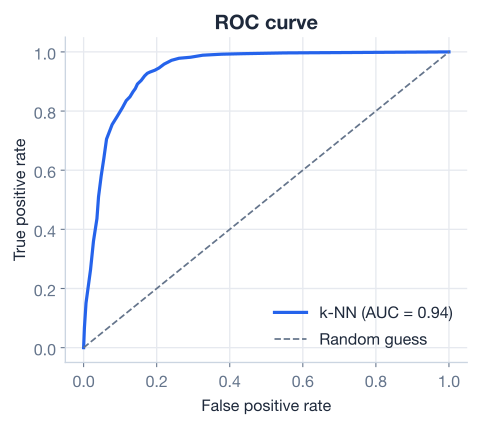
A perfect classifier hugs the top-left corner: it catches every positive with no false alarms. A model that guesses randomly traces the diagonal line. The further the curve bows toward the top-left, the better. To plot it you need the model’s predicted probabilities, not its hard yes/no predictions.
from sklearn.metrics import roc_auc_score

# Probability of the positive class (subscribed)
y_proba = knn.predict_proba(X_test_scaled)[:, 1]

auc = roc_auc_score(y_test, y_proba)
print(f"ROC AUC = {auc:.3f}")
# Output: ROC AUC = 0.936
The single number that summarizes the whole curve is the AUC, the Area Under the Curve. It ranges from 0.5 (no better than random) to 1.0 (perfect). Our model scores 0.936, which has a clean interpretation: pick one random subscriber and one random non-subscriber, and there is a 93.6 percent chance the model assigns the subscriber a higher probability. Because AUC is computed across all thresholds, it is a threshold-independent measure of how well the model ranks positives above negatives, which makes it ideal for comparing models.
AUC vs. accuracy
Accuracy depends on the threshold you happen to pick; AUC does not. Two models with identical accuracy at 0.5 can have very different AUCs, meaning one ranks its predictions far better and would pull ahead the moment you adjust the threshold. When classes are imbalanced or the threshold is negotiable, prefer AUC for comparison.
Because the threshold is yours to choose, you can deliberately trade precision for recall. Lower the threshold and you predict “yes” more readily: recall rises, precision falls, and you catch more subscribers at the cost of more false alarms. Raise the threshold and the reverse happens.
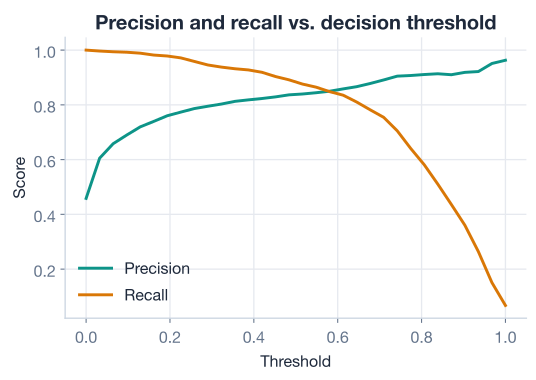
The figure shows precision and recall as functions of the threshold. They cross somewhere in the middle; where exactly you operate depends on what an error costs you. You can compute the trade-off directly with precision_recall_curve and inspect how the metrics shift as you slide the cutoff.
from sklearn.metrics import precision_recall_curve

precisions, recalls, thresholds = precision_recall_curve(y_test, y_proba)

# Inspect three example thresholds
y_test_arr = y_test.to_numpy()
for t in [0.30, 0.50, 0.70]:
    # Apply the threshold to get hard predictions
    preds = (y_proba >= t).astype(int)
    tp = int(((preds == 1) & (y_test_arr == 1)).sum())
    fp = int(((preds == 1) & (y_test_arr == 0)).sum())
    fn = int(((preds == 0) & (y_test_arr == 1)).sum())
    prec = tp / (tp + fp) if (tp + fp) else 0.0
    rec = tp / (tp + fn) if (tp + fn) else 0.0
    print(f"threshold={t:.2f}  precision={prec:.2f}  recall={rec:.2f}")
The mechanics are simple: comparing y_proba against a cutoff produces new hard predictions, which produce a new confusion matrix, which produces new precision and recall. Lower the cutoff toward 0.30 and recall climbs as you accept more false positives; raise it toward 0.70 and precision climbs as you accept more misses. There is no universally correct threshold, only the one that matches your costs.
A small sketch makes the intuition concrete:
   threshold LOW  (0.30)        threshold HIGH (0.70)
   predict "yes" often          predict "yes" rarely
   recall  up,  precision down  precision up,  recall down
   many catches + many alarms   few alarms + many misses
For the bank, if a missed subscriber costs far more than an unnecessary call, you would lower the threshold to push recall up. If calls are costly and customers dislike being contacted, you would raise it to protect precision.
You used a quick accuracy sweep to land on k=31. A more systematic search confirms it and optimizes for AUC rather than raw accuracy, using cross-validation so the choice does not depend on one lucky split.
from sklearn.model_selection import GridSearchCV

param_grid = {
    "n_neighbors": [15, 31, 51],
    "weights": ["uniform", "distance"],
}

grid = GridSearchCV(
    KNeighborsClassifier(),
    param_grid,
    scoring="roc_auc",
    cv=5,
)
grid.fit(X_train_scaled, y_train)

print("best params:", grid.best_params_)
print(f"best CV AUC: {grid.best_score_:.4f}")
# Output:
# best params: {'n_neighbors': 31, 'weights': 'distance'}
# best CV AUC: 0.9300
The search agrees with our earlier guess: 31 neighbors is the right neighborhood size, and weighting closer neighbors more heavily (weights="distance") edges out uniform voting. The cross-validated AUC of 0.93 is consistent with the 0.936 you measured on the test set, which is exactly the reassurance you want: the model’s strong ranking ability is not an artifact of one particular split. You will study GridSearchCV properly in the next lesson; here it simply confirms the model you spent this lesson evaluating is a sound one.
Now it is your turn. Try each one before opening the hint.
Using the trained k=31 model and y_pred from this lesson, compute the confusion matrix and from its four cells calculate accuracy by hand as . Confirm your hand calculation matches knn.score(X_test_scaled, y_test).
from sklearn.metrics import confusion_matrix

# Your code here
Hint
With cm = confusion_matrix(y_test, y_pred), the cells are tn, fp, fn, tp = cm.ravel(). Accuracy is (tp + tn) / cm.sum(). It should come out to about 0.87, matching the model’s score.
From the same confusion matrix, compute precision and recall for the “yes” class using the formulas in this lesson, then verify them against classification_report. Explain in one sentence why this model’s recall is higher than its precision.
from sklearn.metrics import classification_report

# Your code here
Hint
Precision is tp / (tp + fp) and recall is tp / (tp + fn). With tp=1016, fp=194, fn=144, you should get about 0.84 and 0.88. Recall is higher because the model produces more false positives (194) than false negatives (144), so it errs toward predicting “yes.”
Suppose the bank wants to catch at least 92 percent of real subscribers (recall >= 0.92), accepting lower precision. Using y_proba and precision_recall_curve, find a threshold that achieves it and report the precision you would pay for that recall.
from sklearn.metrics import precision_recall_curve

# Your code here
Hint
precisions, recalls, thresholds = precision_recall_curve(y_test, y_proba) gives aligned arrays. Find indices where recalls >= 0.92, then pick the one with the highest precision among them. Lowering the threshold below 0.5 is what buys you that extra recall, at the cost of more false positives.
You can now evaluate a classifier the way professionals do, looking past a single accuracy number to understand exactly how a model succeeds and fails.
Why Accuracy Is Not Enough
The Confusion Matrix
k=31 model produced [[1177, 194], [144, 1016]]Precision, Recall, and F1
ROC Curve and AUC
Threshold Tuning
Every consequential classification system, from medical diagnosis to fraud detection to marketing, lives or dies on the kind of mistakes it makes, not just the count. A radiology model with 99 percent accuracy that misses the rare cancers is worse than useless. The confusion matrix, precision, recall, and AUC give you the vocabulary to spot that danger and the levers to manage it. The threshold, in particular, is a free design knob most beginners never realize they can turn. Master these tools and you will never again report a bare accuracy number as if it told the whole story.
You now know how to measure a classifier’s behavior in depth. In the next lesson, you will turn model tuning into a systematic search and find the best hyperparameters without guesswork.
Tune your model to get the best possible performance.
Return to the Machine Learning Foundations module overview.
Evaluation is a habit, not a final step. Every time you train a classifier from here on, reach past accuracy: print the confusion matrix, read precision against recall, glance at the AUC, and ask whether the default threshold serves your goal. Carry these instincts forward, and the more advanced models you meet in later lessons will slot neatly into the same trustworthy evaluation workflow.