Title here
Summary here
In the previous lessons you built a k-nearest neighbors classifier on the Bank Marketing dataset, learned how KNN makes predictions, and measured it with a confusion matrix and an ROC curve. You now have a model that works. This lesson is about making it work better and proving the improvement honestly.
Two ideas do most of the heavy lifting here. The first is cross-validation, a way to estimate performance that does not hinge on a single lucky split. The second is hyperparameter optimization: choosing the algorithm’s settings deliberately instead of guessing. You will tune by hand to build intuition, then let scikit-learn’s GridSearchCV search dozens of combinations for you automatically.
By the end of this lesson, you will be able to:
GridSearchCVYou should already be comfortable with the train/test split, k-nearest neighbors, scaling features, and the basic scikit-learn fit/score/predict pattern. Let’s begin.
Throughout this lesson you will work with the real Bank Marketing dataset, the same one you used earlier in the module. It records the outcomes of a Portuguese bank’s phone campaigns: for each contacted customer you get demographics, call details, and a handful of economic indicators, plus whether the customer ultimately subscribed to a term deposit.
You can download the CSV and load it directly:
import pandas as pd

df = pd.read_csv("bank_marketing.csv")  # download: https://datatweets.com/datasets/bank_marketing.csv

print("Shape:", df.shape)
print(df["y"].value_counts())
print("subscribe rate:", round((df["y"] == "yes").mean(), 3))
# Output:
# Shape: (10122, 21)
# y
# no     5482
# yes    4640
# Name: count, dtype: int64
# subscribe rate: 0.458
The dataset has 10,122 rows and 21 columns. The target y is fairly balanced: 5,482 customers said “no” and 4,640 said “yes”, so about 46 percent subscribed. A balanced target means plain accuracy is a reasonable headline metric, though you will still lean on the richer metrics from the previous lesson.
You will not use every column, but it helps to know what is on offer. Here are the key fields:
| Column | Meaning |
|---|---|
age | Customer age in years (numeric) |
job, marital, education | Demographic categoricals |
default, housing, loan | Credit and loan status (categorical) |
contact, month, day_of_week | How and when the customer was last contacted |
duration | Last call duration in seconds (numeric) |
campaign | Number of contacts during this campaign (numeric) |
pdays | Days since the previous contact; 999 means never contacted before |
previous | Number of contacts before this campaign (numeric) |
poutcome | Outcome of the previous campaign (categorical) |
emp.var.rate, cons.price.idx, cons.conf.idx, euribor3m, nr.employed | Economic indicators (numeric) |
y | Did the customer subscribe? "yes" / "no" (target) |
The duration column leaks the answer
duration is strongly correlated with the target, but you only know a call’s length after the call ends, and by then you already know whether the customer subscribed. In a real deployment that makes duration a leak: it would inflate your offline scores and then be unavailable when you actually need a prediction. We keep it here because the original benchmark does and it keeps the numbers comparable, but in production you would drop it.
To keep the focus on tuning rather than encoding, you will model on the ten numeric columns and turn the target into a 0/1 label.
# Numeric feature columns used for modeling
feature_cols = [
    "age", "duration", "campaign", "pdays", "previous",
    "emp.var.rate", "cons.price.idx", "cons.conf.idx",
    "euribor3m", "nr.employed",
]

X = df[feature_cols]
y = (df["y"] == "yes").astype(int)   # 1 = subscribed, 0 = did not

print("Features:", X.shape)
print("Positive rate:", round(y.mean(), 3))
# Output:
# Features: (10122, 10)
# Positive rate: 0.458
That gives you a clean numeric feature matrix and a balanced binary target, ready to split and scale.
Separate a test set now and lock it away until the very end. You will use the training set for all tuning, and the test set only for the final, honest measurement.
k-nearest neighbors relies on distances between points, so features on large scales (like nr.employed, in the thousands) would dominate features on small scales (like previous, usually 0 or 1). To prevent that, you standardize every feature with StandardScaler, which centers each column at mean 0 and unit variance. As always, you fit the scaler on the training data only, then apply it to both sets so no information leaks from the test set.
from sklearn.model_selection import train_test_split
from sklearn.preprocessing import StandardScaler

# Hold out 25% for final testing; stratify keeps the yes/no balance in both sets
X_train, X_test, y_train, y_test = train_test_split(
    X, y, test_size=0.25, random_state=42, stratify=y
)

print("Training observations:", X_train.shape[0])
print("Test observations:    ", X_test.shape[0])
# Output:
# Training observations: 7591
# Test observations:     2531

# Scale features; fit on TRAIN only, then transform both sets
scaler = StandardScaler()
X_train_scaled = scaler.fit_transform(X_train)
X_test_scaled = scaler.transform(X_test)
You now have 7,591 scaled training rows and 2,531 scaled test rows. The stratify=y argument guarantees both sets keep the roughly 46 percent positive rate, so neither split is accidentally easier than the other.
When you created a KNeighborsClassifier earlier, you passed in n_neighbors, the number of neighbors used to vote on each prediction. That number is something you chose before training. The model never learns it from the data; it just uses whatever you supplied.
Settings like this are called hyperparameters. They are the knobs you turn before training to influence how the algorithm behaves.
Hyperparameters vs. learned parameters
--------------------------------------
Hyperparameters          set by YOU, before training
  (e.g. n_neighbors, weights, the distance metric)

Learned parameters       found by the MODEL, during training
  (e.g. the stored training points KNN uses to vote)
The choice of matters more than it might seem. A tiny makes the model jumpy: a single odd neighbor can flip a prediction, so it overfits. A huge blurs every prediction toward the majority class, so it underfits. The right value sits somewhere in between, and the process of searching for the settings that maximize performance is called hyperparameter optimization or hyperparameter tuning.
A simple tuning loop trains one model per candidate value of and scores each. For a first pass you can score on the test set just to see the shape of the relationship, though you will switch to a more trustworthy method in a moment.
from sklearn.neighbors import KNeighborsClassifier

for k in [1, 5, 15, 31, 51]:
    knn = KNeighborsClassifier(n_neighbors=k)
    knn.fit(X_train_scaled, y_train)
    acc = knn.score(X_test_scaled, y_test)
    print(f"k={k:>3}  accuracy={acc:.4f}")
# Output:
# k=  1  accuracy=0.8333
# k=  5  accuracy=0.8684
# k= 15  accuracy=0.8692
# k= 31  accuracy=0.8665
# k= 51  accuracy=0.8613
The pattern is exactly the one the theory predicts. At the model overfits and lands at 0.8333. Accuracy climbs as grows, peaks around at 0.8692, then slowly slips back as larger values start to underfit. The single best value here is worth almost four accuracy points over , which is why tuning earns its place in the workflow.
There is a problem with the loop above: every accuracy came from one particular test split. Swap in a different random split and the numbers would shift, sometimes enough to change which looks best. Tuning on a single split risks chasing noise rather than signal.
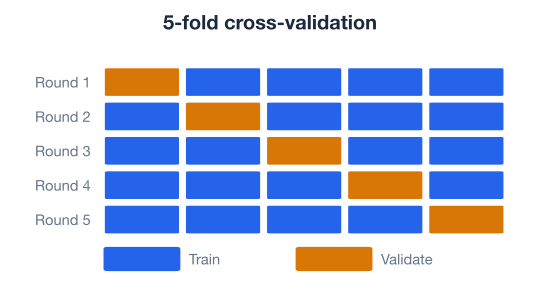
k-fold cross-validation fixes this. You slice the training data into equal parts, called folds. You train on of them and validate on the one left out, then rotate so every fold takes a turn as the validation set. Averaging the scores gives a far steadier estimate than any single split could.
The lesson uses five folds, the common default. The diagram below shows how each fold takes its turn holding out while the rest train.
You can run cross-validation directly with cross_val_score. Here it is for a single value of :
from sklearn.model_selection import cross_val_score

knn = KNeighborsClassifier(n_neighbors=15)
scores = cross_val_score(knn, X_train_scaled, y_train, cv=5, scoring="accuracy")

print("Fold scores:", scores.round(3))
print("Mean CV accuracy:", scores.mean().round(3))
Instead of one number that might be lucky, you get five and average them. Every tuning decision from here on rests on this kind of averaged estimate rather than a single split.
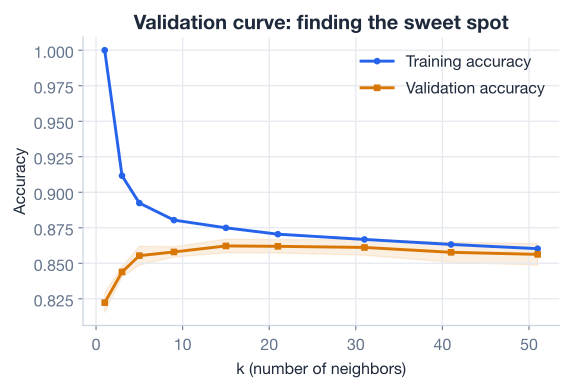
Cross-validation gives you a trustworthy score for one setting. To choose , you want to see how that score moves as changes, and how it compares to performance on the training data. That comparison is what a validation curve shows: training accuracy and validation accuracy plotted against the hyperparameter.
The shape tells a story. When is very small, training accuracy is near perfect but validation accuracy lags far behind: the model has memorized its neighbors and fails to generalize. That gap is overfitting. When is very large, both curves sag together because the model has become too simple to capture the pattern. That is underfitting. The sweet spot is where validation accuracy peaks, before it starts to fall.
scikit-learn’s validation_curve builds both curves for you, sweeping a hyperparameter and running cross-validation at each value.
import numpy as np
from sklearn.model_selection import validation_curve

k_range = [1, 5, 15, 31, 51]

train_scores, val_scores = validation_curve(
    KNeighborsClassifier(), X_train_scaled, y_train,
    param_name="n_neighbors", param_range=k_range,
    cv=5, scoring="accuracy",
)

for k, tr, va in zip(k_range, train_scores.mean(axis=1), val_scores.mean(axis=1)):
    print(f"k={k:>3}  train={tr:.3f}  validation={va:.3f}")
Reading the validation column tells you which generalizes best, while the gap between the train and validation columns tells you how much the model is overfitting. You pick the that maximizes validation accuracy, not training accuracy, because the validation number is the one that reflects unseen data.
So far you have tuned one knob at a time. But n_neighbors is not the only hyperparameter KNeighborsClassifier exposes. Another useful one is weights:
"uniform" (the default): every one of the neighbors votes equally."distance": closer neighbors count more, with weight equal to the inverse of the distance.Distance weighting often helps near class boundaries, because a very close neighbor can outvote a crowd of slightly-farther ones. To explore both weights settings across many values by hand, you would need nested loops, and the code would grow messy fast. There is a better way.
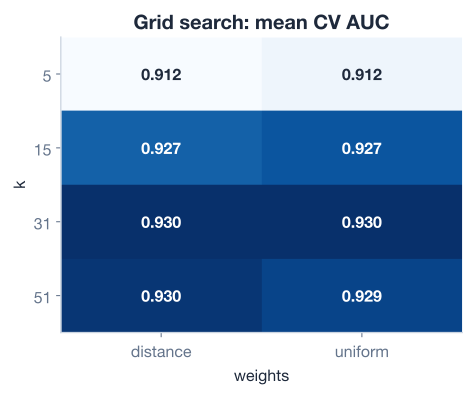
Grid search is the standard technique. You define a grid of hyperparameter values, and the search trains and cross-validates a model for every combination on the grid, then reports the best one.
A grid of hyperparameters
-------------------------
n_neighbors:  1  5  15  31  51 ...        (several values)
weights:      uniform   distance          (2 values)

   every (n_neighbors, weights) pair is scored with cross-validation
The heatmap below is what such a search produces: one cell per combination, colored by its cross-validated score, so the best region jumps out at a glance.
scikit-learn provides GridSearchCV to run this for you. You hand it three things: an estimator, a param_grid dictionary of values to try, and a scoring rule. Because the target is balanced but you care about ranking customers by their likelihood to subscribe, you will score by ROC AUC (the area under the ROC curve from the previous lesson) rather than plain accuracy.
from sklearn.model_selection import GridSearchCV

# Define the grid: every key is a hyperparameter, every value is a list to try
grid_params = {
    "n_neighbors": [5, 15, 21, 31, 41, 51],
    "weights": ["uniform", "distance"],
}

knn = KNeighborsClassifier()

# Search every combination using 5-fold cross-validation, scoring by ROC AUC
knn_grid = GridSearchCV(knn, grid_params, scoring="roc_auc", cv=5)
knn_grid.fit(X_train_scaled, y_train)

print("best params:", knn_grid.best_params_)
print(f"best CV AUC: {knn_grid.best_score_:.4f}")
# Output:
# best params: {'n_neighbors': 31, 'weights': 'distance'}
# best CV AUC: 0.9300
In a single .fit() call, GridSearchCV trained and cross-validated every combination and reported the winner: 31 neighbors with distance weighting, at a cross-validated ROC AUC of 0.93. You found that without writing a single nested loop, and the score is an average across five folds rather than a single fragile split.
The grid grows fast
The number of models grows by multiplication. Three hyperparameters with 10, 5, and 4 values each is combinations, and with 5-fold cross-validation that is 1000 model fits. Start with a coarse grid to find a promising region, then refine. When grids get large, RandomizedSearchCV samples combinations instead of trying them all.
The grid search reported a cross-validation score, computed entirely from the training data. It tells you how the model is expected to do, but it has never touched the test set you locked away. Now you bring it out for one final, honest measurement.
GridSearchCV stores the best model, already retrained on the full training set, in its best_estimator_ attribute. You score it on the scaled test set and rebuild the confusion matrix and classification report from the previous lesson. The tuned winner here is the model, so its evaluation matches the numbers you saw before.
from sklearn.metrics import confusion_matrix, classification_report, roc_auc_score

best_model = knn_grid.best_estimator_

# Predictions and predicted probabilities on the held-out test set
y_pred = best_model.predict(X_test_scaled)
y_proba = best_model.predict_proba(X_test_scaled)[:, 1]

print(confusion_matrix(y_test, y_pred))
print(classification_report(y_test, y_pred, target_names=["no", "yes"]))
print(f"ROC AUC = {roc_auc_score(y_test, y_proba):.3f}")
# Output:
# [[1177  194]
#  [ 144 1016]]
#               precision    recall  f1-score   support
#
#           no       0.89      0.86      0.87      1371
#          yes       0.84      0.88      0.86      1160
#
#     accuracy                           0.87      2531
#    macro avg       0.87      0.87      0.87      2531
# weighted avg       0.87      0.87      0.87      2531
#
# ROC AUC = 0.936
Read the confusion matrix row by row. Of the 1,371 customers who did not subscribe, the model correctly flagged 1,177 and wrongly predicted “yes” for 194. Of the 1,160 who did subscribe, it caught 1,016 and missed 144. That works out to about 0.87 accuracy overall, balanced precision and recall near 0.87 for both classes, and a strong ROC AUC of 0.936. The tuned model holds up cleanly on data it has never seen.
Here is the entire flow, from raw CSV to a tuned, evaluated model, in one runnable script.
import pandas as pd
from sklearn.model_selection import train_test_split, GridSearchCV
from sklearn.preprocessing import StandardScaler
from sklearn.neighbors import KNeighborsClassifier
from sklearn.metrics import roc_auc_score

# 1. Load the data
df = pd.read_csv("bank_marketing.csv")  # download: https://datatweets.com/datasets/bank_marketing.csv

# 2. Build the numeric feature matrix and a 0/1 target
feature_cols = [
    "age", "duration", "campaign", "pdays", "previous",
    "emp.var.rate", "cons.price.idx", "cons.conf.idx",
    "euribor3m", "nr.employed",
]
X = df[feature_cols]
y = (df["y"] == "yes").astype(int)

# 3. Split, then scale (fit the scaler on training data only)
X_train, X_test, y_train, y_test = train_test_split(
    X, y, test_size=0.25, random_state=42, stratify=y
)
scaler = StandardScaler()
X_train_scaled = scaler.fit_transform(X_train)
X_test_scaled = scaler.transform(X_test)

# 4. Grid search over hyperparameters with cross-validation
grid_params = {
    "n_neighbors": [5, 15, 21, 31, 41, 51],
    "weights": ["uniform", "distance"],
}
knn_grid = GridSearchCV(KNeighborsClassifier(), grid_params, scoring="roc_auc", cv=5)
knn_grid.fit(X_train_scaled, y_train)

# 5. Evaluate the best model on the untouched test set
y_proba = knn_grid.best_estimator_.predict_proba(X_test_scaled)[:, 1]
print("Best params:", knn_grid.best_params_)
print(f"Test ROC AUC: {roc_auc_score(y_test, y_proba):.3f}")
# Output:
# Best params: {'n_neighbors': 31, 'weights': 'distance'}
# Test ROC AUC: 0.936
That is the complete improvement workflow: prepare features, split and scale, estimate honestly with cross-validation, search hyperparameters with a grid, and confirm the winner on held-out data.
Try these before checking the hints. Each one builds on a piece of the lesson.
Using the scaled Bank Marketing training data, compute the 5-fold cross-validated accuracy for KNeighborsClassifier(n_neighbors=15). Print the five fold scores and their mean. How much do the folds vary?
# Your code hereHint
Use cross_val_score(estimator, X_train_scaled, y_train, cv=5, scoring="accuracy"). It returns one score per fold; call .mean() for the average and .std() to see how much the folds disagree.
Run a GridSearchCV over n_neighbors in [15, 21, 31, 41] and weights in ["uniform", "distance"], scoring by "roc_auc" with 5 folds. Print best_params_ and best_score_. Which combination wins, and how does its score compare to the lesson’s 0.93?
# Your code hereHint
Build grid = {"n_neighbors": [15, 21, 31, 41], "weights": ["uniform", "distance"]}, pass it to GridSearchCV(KNeighborsClassifier(), grid, scoring="roc_auc", cv=5), call .fit(X_train_scaled, y_train), then read .best_params_ and .best_score_. Remember to scale your features first.
Drop duration from feature_cols, rerun the split, scale, and the grid search from Exercise 2, then evaluate the best model’s test ROC AUC. How much does removing the leaky feature change the score? Why is the lower-but-honest number the one a real deployment should trust?
# Your code hereHint
Rebuild X = df[[c for c in feature_cols if c != "duration"]] and repeat the pipeline. Expect the AUC to drop, because duration carried a lot of signal that is only available after a call. The point of the exercise is that a model which cannot use duration at prediction time should be judged without it.
You took a working classifier and made it measurably better by estimating performance with cross-validation, reading a validation curve, and letting scikit-learn search a grid of hyperparameters. Let’s review.
Cross-Validation
cross_val_score runs it directly; most scikit-learn search tools use it internallyHyperparameters and Validation Curves
n_neighbors and weights)Grid Search
GridSearchCV automates this with cross-validation and reports the best combinationThe scikit-learn Pattern
GridSearchCV(estimator, param_grid, scoring="roc_auc", cv=5) defines the search.fit(X_train, y_train) runs it across all combinations and folds.best_params_, .best_score_, and .best_estimator_ expose the winnerbest_estimator_ on the untouched test set for a final, honest measurementAlmost every model you will ever build ships with hyperparameters, and the defaults are rarely optimal for your data. Knowing how to search for good settings, and how to estimate their effect without fooling yourself, is one of the highest-leverage skills in applied machine learning. Cross-validated grid search is the workhorse that turns a decent first attempt into a reliable model: on the Bank Marketing data it lifted you to a tuned KNN scoring 0.87 accuracy and 0.936 ROC AUC on held-out customers.
Just as important, you saw why the results are trustworthy. Cross-validation guards against lucky splits, the validation curve explains which generalizes and why, and the leakage caveat around duration is a reminder that a high score means nothing if the model could not earn it at prediction time. Tuning from that informed position is what keeps your conclusions honest as your models and datasets grow.
You can now estimate performance with cross-validation, tune hyperparameters with grid search, and validate your choices honestly. In the next lesson, you will put the entire workflow together on a real medical dataset and build a diagnostic model end to end.
Put the whole workflow together on a real medical dataset.
Return to the Machine Learning Foundations module overview.
Tuning is where good models become great ones. Every time you reach for a new algorithm, pause to ask which knobs it exposes, estimate each setting with cross-validation rather than a single split, and let a grid search settle the rest. Master this loop and you will get more out of every model you train, no matter how the data changes.