Title here
Summary here
This module is about squeezing more performance out of your models, and it starts with the inputs. Before you reach for a fancier algorithm, you can often get more from the data you already have. This lesson teaches feature engineering: the craft of transforming raw columns into features that make a model’s job easier. You will work with the real California Housing dataset, encode a categorical column, build ratio features that capture meaningful relationships, and tame a heavily skewed feature with a log transform.
By the end of this lesson, you will be able to:
You should be comfortable with basic Python, pandas, and the scikit-learn workflow (train/test split, fitting a model, scoring it). If you have completed the Machine Learning Foundations module, you are ready. Let’s begin.
A model can only learn from the features you give it. If those features hide the patterns that matter, even a powerful algorithm will struggle. Feature engineering is the process of transforming your raw data into features that expose those patterns more clearly. It is one of the highest-leverage activities in applied machine learning, and practitioners routinely spend a large share of a project on it.
The reason is simple. Algorithms are general-purpose, but your data is specific. A linear model, for example, can only add up weighted features. It cannot, on its own, discover that the number of rooms divided by the number of households is what really predicts house value. If that ratio matters, you have to hand it to the model directly. That is feature engineering: doing some of the thinking for the model so it can spend its capacity learning the rest.
Three properties of a feature are worth keeping in mind as you engineer:
In this lesson you will address all three: representation (encoding a categorical column), distribution (taming skew with a log transform), and you will create new features that capture relationships the raw columns leave implicit.
Engineering beats brute force more often than you’d think
It is tempting to assume that a better score always comes from a better algorithm. In practice, a thoughtful feature often moves the needle more than swapping models, and it does so without adding any computational cost at prediction time. Good features make every downstream model better.
You will use the California Housing dataset, drawn from the 1990 California census. Each row describes a block group, a small geographic area, and records aggregate statistics about the homes and people there. Your goal is to predict median_house_value, the median price of homes in that block group.
You can download the dataset and load it with pandas.
import pandas as pd

# download: https://datatweets.com/datasets/california_housing.csv
housing = pd.read_csv("california_housing.csv")

print("Shape:", housing.shape)
print(housing.columns.tolist())
# Output:
# Shape: (20640, 10)
# ['longitude', 'latitude', 'housing_median_age', 'total_rooms',
#  'total_bedrooms', 'population', 'households', 'median_income',
#  'median_house_value', 'ocean_proximity']
Nine of the columns are numeric. The tenth, ocean_proximity, is a text category describing how close the block group is to the coast. Here is what the key columns mean:
| Column | Type | Meaning |
|---|---|---|
longitude, latitude | float | Geographic coordinates of the block group |
housing_median_age | float | Median age of the houses |
total_rooms | float | Total number of rooms across all homes in the block |
total_bedrooms | float | Total number of bedrooms across all homes |
population | float | Number of people living in the block |
households | float | Number of households in the block |
median_income | float | Median household income (in tens of thousands of dollars) |
median_house_value | float | Target: median home price in the block |
ocean_proximity | category | Text label for distance to the ocean |
Notice something about the count columns. total_rooms, total_bedrooms, and population are totals for the whole block, not per-home values. A block with 5,000 rooms is not necessarily luxurious; it might just be a densely populated area. These raw totals confound size of the block with quality of the housing. That observation will guide the ratio features you build later.
A handful of rows are missing total_bedrooms. For this lesson you will keep things simple and drop those rows so every feature is fully populated. (Imputation is a valid alternative, but dropping a small fraction of rows is fine here and keeps the focus on engineering.)
housing = housing.dropna()

print("Shape after dropna:", housing.shape)
print("Target range:", housing["median_house_value"].min(),
      "to", housing["median_house_value"].max())
# Output:
# Shape after dropna: (20433, 10)
# Target range: 14999.0 to 500001.0
You are left with 20,433 rows. The target ranges from about $15,000 to $500,001. That upper value is suspiciously round because the original census capped house values at $500,000, but for this lesson you can treat it as given.
Most machine learning algorithms speak only the language of numbers. The ocean_proximity column is text, so before any model can use it, you must turn it into numbers. First, look at the categories it contains.
print(housing["ocean_proximity"].value_counts())
# Output:
# ocean_proximity
# <1H OCEAN     9034
# INLAND        6496
# NEAR OCEAN    2628
# NEAR BAY      2270
# ISLAND           5
# Name: count, dtype: int64
There are five categories. A tempting but wrong approach is to map them to integers like <1H OCEAN = 0, INLAND = 1, NEAR OCEAN = 2, and so on. The problem is that this invents an ordering and a spacing that do not exist. The model would assume NEAR OCEAN (2) is somehow “twice” INLAND (1), which is meaningless for categories.
The correct approach for unordered categories is one-hot encoding. You create one new column per category, and each column holds a 1 if the row belongs to that category and 0 otherwise. pandas does this in one call with get_dummies.
housing_encoded = pd.get_dummies(housing, columns=["ocean_proximity"])

print(housing_encoded.columns.tolist())
# Output:
# ['longitude', 'latitude', 'housing_median_age', 'total_rooms',
#  'total_bedrooms', 'population', 'households', 'median_income',
#  'median_house_value', 'ocean_proximity_<1H OCEAN',
#  'ocean_proximity_INLAND', 'ocean_proximity_ISLAND',
#  'ocean_proximity_NEAR BAY', 'ocean_proximity_NEAR OCEAN']
The single text column has become five binary columns, one per category. Each row now has exactly one of these set to 1. The model can assign a separate weight to each location category without assuming any false ordering between them.
When categories have a natural order
One-hot encoding is right for unordered categories like ocean proximity. If a category does have a meaningful order, such as small < medium < large, an ordinal encoding (mapping to 0, 1, 2) can preserve that order and use fewer columns. The key question is always: does the order mean something? If not, one-hot is the safe default.
Now for the most powerful kind of feature engineering in this lesson: creating new features that combine existing ones to express a relationship the raw data only hints at.
Recall the problem with the count columns. total_rooms is the total across the whole block, so it tells you as much about how many homes are in the block as about how spacious those homes are. What you really want to know is the typical home, and you get that by dividing totals by the number of households or by the population.
Three ratios capture meaningful per-unit quantities:
Each of these is scale-free: it no longer depends on how big the block is, so it isolates the signal you actually care about. Build them in pandas.
housing_encoded["rooms_per_household"] = (
    housing_encoded["total_rooms"] / housing_encoded["households"]
)
housing_encoded["bedrooms_per_room"] = (
    housing_encoded["total_bedrooms"] / housing_encoded["total_rooms"]
)
housing_encoded["population_per_household"] = (
    housing_encoded["population"] / housing_encoded["households"]
)

print(housing_encoded[[
    "rooms_per_household", "bedrooms_per_room", "population_per_household"
]].head())
# Output:
#    rooms_per_household  bedrooms_per_room  population_per_household
# 0            6.984127           0.146591                  2.555556
# 1            6.238137           0.155797                  2.109842
# 2            8.288136           0.129516                  2.802260
# 3            5.817352           0.184458                  2.547945
# 4            6.281853           0.172096                  2.181467
These new columns are far more interpretable than the raw totals. A rooms_per_household of 7 means a roughly seven-room typical home, a value that means the same thing whether the block has 10 households or 1,000.
The honest test is whether the engineered features improve a model. You will fit a simple linear regression twice: once on the raw numeric features (plus the encoded location columns) and once with the three ratio features added. Use median_house_value as the target and report the test , the fraction of variance the model explains on held-out data.
from sklearn.model_selection import train_test_split
from sklearn.linear_model import LinearRegression

target = "median_house_value"

# Baseline: raw numeric features + encoded ocean_proximity, no ratios
baseline_cols = [c for c in housing_encoded.columns
                 if c not in [target, "rooms_per_household",
                              "bedrooms_per_room", "population_per_household"]]

# Engineered: same columns plus the three ratio features
engineered_cols = [c for c in housing_encoded.columns if c != target]

y = housing_encoded[target]

def test_r2(feature_cols):
    X = housing_encoded[feature_cols]
    X_train, X_test, y_train, y_test = train_test_split(
        X, y, test_size=0.2, random_state=42
    )
    model = LinearRegression().fit(X_train, y_train)
    return model.score(X_test, y_test)

print(f"Baseline R2:   {test_r2(baseline_cols):.3f}")
print(f"Engineered R2: {test_r2(engineered_cols):.3f}")
# Output:
# Baseline R2:   0.643
# Engineered R2: 0.647
The score rises from 0.643 to 0.647. The chart below shows the two side by side.
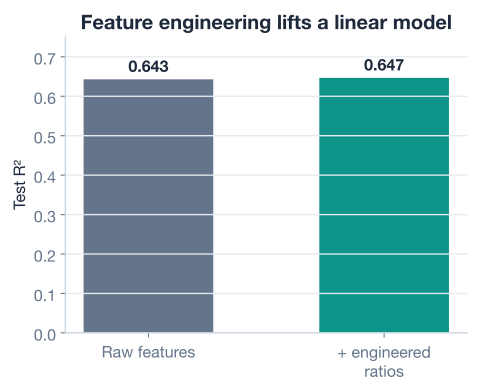
Let’s be honest about that result: it is a modest improvement, not a dramatic one. And that is an important lesson in itself. Feature engineering is not magic, and the size of the gain depends on the dataset, the features, and the model. Here, a linear model already captures much of the signal, so the ratios add a little on top. With a more flexible model, or on a different dataset, the same kind of features can matter much more. The discipline you should take away is the process: form a hypothesis about what relationship matters, build a feature that expresses it, and measure whether it helps on held-out data.
Always measure on held-out data
A new feature can make your model look better on the training data while doing nothing, or even hurting, on unseen data. The only trustworthy verdict comes from a test set the model never saw during training. Judge every engineered feature by its effect on held-out performance, never on training performance alone.
The third property to watch is distribution. Many real-world features are skewed: most values cluster in a narrow range, but a long tail of large values stretches far to the right. Income, population, and counts of things are classic examples. Skew can be a problem because a handful of extreme values can dominate a model’s fit and pull its estimates around.
Look at population, the number of people in each block group.
print(housing["population"].describe())
# Output:
# count    20433.000000
# mean      1426.560466
# std       1133.041524
# min          3.000000
# 25%        787.000000
# 50%       1166.000000
# 75%       1722.000000
# max      35682.000000
The median block has about 1,166 people, but the maximum is over 35,000, more than thirty times the median. The mean (1,426) sits well above the median, a telltale sign of right skew: the long tail of large values drags the average upward. A histogram would show a tall spike on the left and a thin tail trailing off to the right.
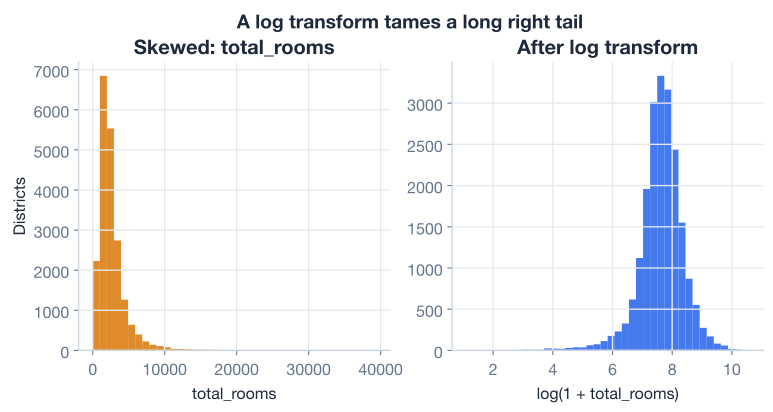
A common fix is the log transform. Replacing each value with compresses the long right tail and spreads out the crowded low values, producing a far more symmetric distribution. Because the data contains no zeros here, a plain natural log works, but the safe, standard choice is np.log1p, which computes and therefore handles zeros gracefully too.
import numpy as np

housing["population_log"] = np.log1p(housing["population"])

print("Original skew:   ", round(housing["population"].skew(), 3))
print("Log-transformed: ", round(housing["population_log"].skew(), 3))
# Output:
# Original skew:    4.935
# Log-transformed:  -0.029
The skewness statistic drops from about 4.9 (heavily right-skewed) to roughly 0 (nearly symmetric). A value near zero means the distribution is now balanced around its center, which is exactly what many models prefer. The figure below shows the same feature before and after the transform.
Why models like symmetry
Linear models and many distance-based methods implicitly assume features are not dominated by a few extreme values. A symmetric feature spreads its information more evenly across the range, so the model can use the whole feature rather than being pulled around by a small number of outliers. The log transform is the simplest, most common tool for getting there with positive, right-skewed data.
Here is the full feature-engineering pipeline you just walked through, condensed into one runnable script. You can adapt this template for almost any tabular dataset.
import numpy as np
import pandas as pd
from sklearn.model_selection import train_test_split
from sklearn.linear_model import LinearRegression

# 1. Load and clean
housing = pd.read_csv("california_housing.csv")  # download: https://datatweets.com/datasets/california_housing.csv
housing = housing.dropna()

# 2. Encode the categorical column
housing = pd.get_dummies(housing, columns=["ocean_proximity"])

# 3. Build ratio features
housing["rooms_per_household"] = housing["total_rooms"] / housing["households"]
housing["bedrooms_per_room"] = housing["total_bedrooms"] / housing["total_rooms"]
housing["population_per_household"] = housing["population"] / housing["households"]

# 4. Tame skew on a heavy-tailed feature
housing["population"] = np.log1p(housing["population"])

# 5. Train and evaluate
target = "median_house_value"
X = housing.drop(columns=[target])
y = housing[target]
X_train, X_test, y_train, y_test = train_test_split(
    X, y, test_size=0.2, random_state=42
)
model = LinearRegression().fit(X_train, y_train)
print(f"Test R2: {model.score(X_test, y_test):.3f}")
# Output: Test R2: 0.647
In a few lines you cleaned the data, made a categorical column usable, created features that express meaningful ratios, and reshaped a skewed feature. That is the core of feature engineering.
Now it is your turn. Try these before checking the hints.
Load the dataset, drop missing rows, and one-hot encode ocean_proximity with get_dummies. Then print how many columns the DataFrame has before and after encoding, and confirm the difference matches the number of categories minus one (since the original text column is replaced).
import pandas as pd
housing = pd.read_csv("california_housing.csv")  # download: https://datatweets.com/datasets/california_housing.csv

# Your code here
Hint
After housing = housing.dropna(), record housing.shape[1]. Then call pd.get_dummies(housing, columns=["ocean_proximity"]) and record the new column count. The text column (1 column) is replaced by 5 category columns, so the count should increase by 4.
The lesson built three ratios. Create a fourth: people_per_room, defined as population / total_rooms. Print its first five values and its describe() output. What does a high value suggest about a block group?
# Your code here (reuse the cleaned housing DataFrame)Hint
Compute housing["people_per_room"] = housing["population"] / housing["total_rooms"]. A high value means many people relative to the available rooms, which suggests a more crowded block group. Use .head() and .describe() to inspect it.
The total_rooms column is also right-skewed. Print its skewness before transforming, apply np.log1p, and print the skewness afterward. Confirm that the transform pulls the value much closer to zero.
import numpy as np

# Your code here (reuse the cleaned housing DataFrame)
Hint
Use housing["total_rooms"].skew() to measure skew before, then create np.log1p(housing["total_rooms"]) and call .skew() on the result. The raw column is strongly right-skewed, and the log-transformed version should be far closer to zero.
Congratulations! You have taken raw census data and engineered it into a cleaner, more informative set of features, then measured the honest impact on a real model. Let’s review what you learned.
What Feature Engineering Is
Encoding Categoricals
pd.get_dummies creates one binary column per category, with no false orderRatio Features
rooms_per_household, bedrooms_per_room, and population_per_household are scale-free and isolate the real signalTaming Skew
np.log1p) compresses the tail and produces a more symmetric distributionpopulation, skewness dropped from about 4.9 to roughly 0 after the transformThe Honest Test
Feature engineering is where domain knowledge meets machine learning. The algorithm cannot know that rooms-per-household matters more than total rooms, or that population is better used on a log scale. You supply that insight, and the model rewards you for it. Even when the gain is small, as it was here, the discipline you practiced is what professionals rely on: form a hypothesis about what relationship matters, build a feature that captures it, and measure honestly on unseen data.
This also sets up everything that follows. The cleaner your features, the more every later technique pays off. A better algorithm, careful validation, and regularization all work on top of your features, so improving the inputs first makes each of those steps more effective. With a solid feature set in hand, you are ready to ask the next question: which model should you actually use?
You now know how to turn raw data into better features. In the next lesson, you will compare several different algorithms on these same features and learn a principled way to choose between them.
Compare linear, tree, and ensemble models and learn how to pick the right one.
Return to the Model Optimization module overview.
You have taken your first step toward optimizing machine learning models, and you started in the right place: the data. The habits you practiced here, questioning what each column really measures, building features that express meaningful relationships, and reshaping skewed distributions, will serve you on every project regardless of the algorithm you eventually choose. Master your features first, and every model you build afterward will start from a stronger foundation.