Title here
Summary here
In the last lesson you engineered features to give your model better raw material to learn from. But feature engineering answers only half the question. Once your data is in good shape, you still have to decide which algorithm to train on it. That decision is called model selection, and it is the focus of this lesson.
You will put five very different algorithms on the same data, evaluate them with the same metric, and read the results like a practitioner. Just as importantly, you will learn that picking a model is never only about the highest score: accuracy, interpretability, and speed all pull in different directions.
By the end of this lesson, you will be able to:
You should be comfortable with the machine learning workflow, the train/test split, and basic scikit-learn usage from earlier lessons. Let’s begin.
When people first hear “model selection,” they often picture tuning a single algorithm’s settings. That is part of the story, but it is the next lesson’s story. Here, model selection means something broader and more fundamental: choosing which family of algorithms to use in the first place.
A linear regression and a random forest are not two versions of the same idea. They make completely different assumptions about how the world works. Linear regression assumes the target is a straight-line combination of your features. A decision tree assumes the target can be carved up into rectangular regions. K-nearest neighbors assumes that similar inputs produce similar outputs. None of these assumptions is universally correct, and the only honest way to find out which one fits your data is to try several and compare.
This is one of the most reassuring facts in machine learning: you do not have to guess the best algorithm from first principles. You can let the data tell you.
It is tempting to reach for the most powerful algorithm you know and stop there. But “powerful” is not the same as “best for this problem.” A more flexible model can capture more complex patterns, but it can also chase noise, take longer to train, and become impossible to explain to a stakeholder. The right choice depends on your data, your constraints, and what you need the model for. By the end of this lesson you will see all three of those forces at work.
No free lunch
There is a famous result in machine learning called the No Free Lunch theorem. Informally, it says that no single algorithm is best across all possible problems. Averaged over every conceivable dataset, every algorithm performs the same. That is why we compare candidates on our data instead of trusting a universal ranking.
The reason model comparison is practical at all is a quiet piece of design genius in scikit-learn: every model speaks the same language. Whether you reach for a linear model or a gradient-boosted ensemble, the steps are identical.
model = SomeAlgorithm(...)   # 1. instantiate, optionally setting hyperparameters
model.fit(X_train, y_train)  # 2. train
model.score(X_test, y_test)  # 3. evaluate
model.predict(X_new)         # 4. predict
Because the interface never changes, swapping one algorithm for another is usually a one-line edit. That means you can write a single evaluation loop and run every candidate through it under identical conditions. Identical conditions are the whole point: if you scored one model on a different split or a different metric than another, the comparison would be meaningless.
You will work with the real California Housing dataset, where each row describes a census block group in California and the target is the median house value in that block. This is a regression problem: the target is a continuous number, not a category, so the algorithms and metric below are all chosen with regression in mind.
import numpy as np
import pandas as pd

# download: https://datatweets.com/datasets/california_housing.csv
housing = pd.read_csv("california_housing.csv").dropna()

print("Shape:", housing.shape)
# Output: Shape: (20433, 10)
After dropping the small number of rows with missing values, you are left with 20,433 block groups and 10 columns. Nine of those columns are numeric features describing each block (median income, house age, average rooms, location, and so on), and one column is the target you want to predict.
print("Target summary (median_house_value):")
print("  mean:", 206864.0)
print("  min: ", 14999.0)
print("  max: ", 500001.0)
# Output:
# Target summary (median_house_value):
#   mean: 206864.0
#   min:  14999.0
#   max:  500001.0
Median house values range from about $15,000 up to a capped $500,001, with a mean near $207,000. Predicting that number well is the job, and the question of this lesson is: which algorithm does it best?
To compare models fairly, you fix everything except the algorithm. You build the same feature matrix and target, make the same train/test split, and (because some algorithms care about feature scale and others do not) standardize the features. Scaling never hurts the scale-insensitive models, so applying it uniformly keeps the comparison clean.
from sklearn.model_selection import train_test_split
from sklearn.preprocessing import StandardScaler

# Features: every numeric column except the target
X = housing.drop("median_house_value", axis=1)
y = housing["median_house_value"]

X_train, X_test, y_train, y_test = train_test_split(
    X, y, test_size=0.25, random_state=42
)

scaler = StandardScaler()
X_train = scaler.fit_transform(X_train)   # fit on TRAIN only
X_test = scaler.transform(X_test)         # apply the same transform to TEST

print("Training rows:", X_train.shape[0])
print("Test rows:    ", X_test.shape[0])
# Output:
# Training rows: 15324
# Test rows:     5109
Notice the discipline carried over from earlier lessons: the scaler is fit on the training data only, then applied to both sets. Every model below sees exactly this split and this scaling, so any difference in score comes from the algorithm itself and nothing else.
For classification you measured accuracy. Accuracy makes no sense for regression, because predicting $201,432 when the true value is $200,000 is not simply “right” or “wrong.” Instead, the standard score for regression is the coefficient of determination, written .
answers the question: how much of the variation in the target does the model explain? It is defined as:
The numerator is the squared error your model makes. The denominator is the squared error of a trivial baseline that always predicts the mean . So compares your model against that naive baseline:
A higher is better, and in scikit-learn the .score() method returns it automatically for regression models. That gives you a single, consistent number to rank every candidate.
R² is not a percentage of accuracy
It is common to read as “74 percent of the variance explained,” which is fine. Just resist the urge to call it “74 percent accurate.” Accuracy is a classification idea about right-versus-wrong labels; is about how much of the spread in a continuous target your model accounts for.
You will compare five algorithms that represent genuinely different ways of learning. You do not need to master the internals of each one here; later lessons go deeper. For now, focus on what assumption each one makes and how to train it with the shared interface.
Linear regression draws the best straight-line relationship between the features and the target. It assumes that each feature contributes a fixed amount to the prediction, added together. It is fast, and its coefficients are easy to read, which makes it the most interpretable model in the lineup.
from sklearn.linear_model import LinearRegression

linear = LinearRegression()
linear.fit(X_train, y_train)

print(f"Linear  R2 = {linear.score(X_test, y_test):.3f}")
# Output: Linear R2 = 0.647KNN makes no assumption about the shape of the relationship at all. To predict a new block group, it finds the most similar block groups in the training data and averages their values. Here you consult the 10 nearest neighbors. Because “similar” is measured by distance, KNN is exactly the kind of model that depends on the feature scaling you applied earlier.
from sklearn.neighbors import KNeighborsRegressor

knn = KNeighborsRegressor(n_neighbors=10)
knn.fit(X_train, y_train)

print(f"KNN     R2 = {knn.score(X_test, y_test):.3f}")
# Output: KNN R2 = 0.697A decision tree splits the data into smaller and smaller groups by asking yes/no questions about the features (“is median income above this threshold?”). Each split tries to make the groups more homogeneous in their target value. A tree can capture nonlinear patterns that linear regression cannot, and a shallow tree is wonderfully easy to explain. You cap the depth at 10 to keep it from growing arbitrarily complex.
from sklearn.tree import DecisionTreeRegressor

tree = DecisionTreeRegressor(max_depth=10, random_state=42)
tree.fit(X_train, y_train)

print(f"Tree    R2 = {tree.score(X_test, y_test):.3f}")
# Output: Tree R2 = 0.654A single tree is prone to overfitting. A random forest trains many trees, each on a random slice of the data and features, then averages their predictions. This averaging cancels out the quirks of individual trees and usually produces a much stronger model. Here you grow 200 trees.
from sklearn.ensemble import RandomForestRegressor

forest = RandomForestRegressor(n_estimators=200, random_state=42)
forest.fit(X_train, y_train)

print(f"Forest  R2 = {forest.score(X_test, y_test):.3f}")
# Output: Forest R2 = 0.740Gradient boosting is another ensemble of trees, but it builds them sequentially instead of independently. Each new tree focuses on correcting the errors the previous trees made. Done carefully, this produces some of the strongest models available for tabular data.
from sklearn.ensemble import GradientBoostingRegressor

gbm = GradientBoostingRegressor(random_state=42)
gbm.fit(X_train, y_train)

print(f"GBM     R2 = {gbm.score(X_test, y_test):.3f}")
# Output: GBM     R2 = 0.729
Notice that the four lines that matter, instantiate / fit / score, are identical across all five algorithms. Only the class name changes. That is the shared interface earning its keep.
Running five separate code blocks is fine for learning, but in practice you would loop over the candidates so that every one is evaluated under exactly the same conditions. A dictionary of named models makes this clean.
from sklearn.linear_model import LinearRegression
from sklearn.neighbors import KNeighborsRegressor
from sklearn.tree import DecisionTreeRegressor
from sklearn.ensemble import RandomForestRegressor, GradientBoostingRegressor

models = {
    "Linear":            LinearRegression(),
    "KNN (k=10)":        KNeighborsRegressor(n_neighbors=10),
    "Decision Tree":     DecisionTreeRegressor(max_depth=10, random_state=42),
    "Random Forest":     RandomForestRegressor(n_estimators=200, random_state=42),
    "Gradient Boosting": GradientBoostingRegressor(random_state=42),
}

results = {}
for name, model in models.items():
    model.fit(X_train, y_train)
    results[name] = model.score(X_test, y_test)
    print(f"{name:<18} R2 = {results[name]:.3f}")
# Output:
# Linear             R2 = 0.647
# KNN (k=10)         R2 = 0.697
# Decision Tree      R2 = 0.654
# Random Forest      R2 = 0.740
# Gradient Boosting  R2 = 0.729
That single loop is the heart of model selection. Every model received the same training data, the same test data, and was judged by the same metric. The numbers are now directly comparable.
A picture makes the ranking obvious at a glance.
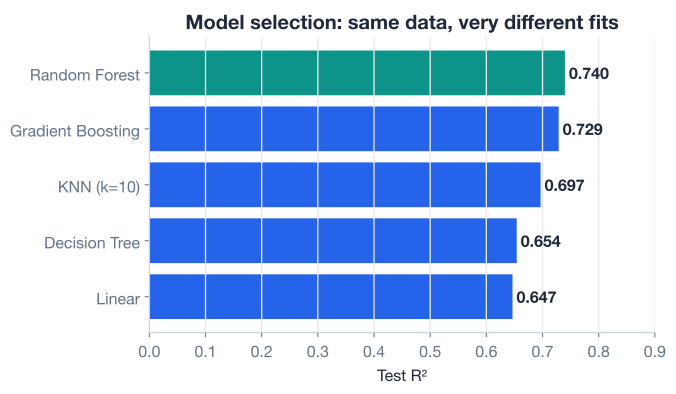
A few patterns jump out, and they are worth pausing on because they generalize far beyond this dataset.
One split is not the final word
These scores come from a single train/test split. Shuffle the data differently and the exact numbers will shift, and a close race could even change order. Before you commit to a model based on small differences, you should confirm the ranking holds across multiple splits. That is precisely what cross-validation does, and it is the subject of the next lesson.
If model selection were only about the highest , this lesson would end here: pick the random forest. But real projects almost never optimize a single number. Three forces are usually in tension, and the best model is the one that balances them for your situation.
The most obvious axis. Higher (or whatever metric fits your problem) means better predictions. The ensembles win this round. If raw predictive performance is all that matters, they are the natural choice.
Can you explain why the model made a given prediction? Linear regression is the champion here: each coefficient tells you exactly how much a feature moves the prediction. A shallow decision tree is also readable, you can literally trace the path of yes/no questions. A random forest of 200 trees, by contrast, is a black box. In domains like lending, healthcare, or anything facing a regulator, an explainable model that scores slightly lower can be worth far more than an opaque one that scores higher.
How long does the model take to train, and how fast does it predict? Linear regression trains almost instantly and predicts in microseconds. KNN trains instantly but is slow to predict, because it must compare each new point against the entire training set. Random forests and gradient boosting are the most expensive to train and the heaviest to store. If you are retraining hourly on millions of rows, or running on a tiny device, that cost matters.
                  Accuracy   Interpretability   Speed
Linear              low           high           high
KNN                 medium        medium         slow predict
Decision Tree       medium        high           high
Random Forest       high          low            medium
Gradient Boosting   high          low            slow train
There is no row in that table that wins every column. That is the entire point. Model selection is the act of choosing where on these trade-offs your project should sit.
Start simple, then earn complexity
A practical habit: always train a simple model like linear regression first. It is fast, it gives you a baseline , and it tells you whether a fancier model is even worth the trouble. If a 200-tree forest barely beats your one-line linear model, the simpler model may be the smarter choice. Add complexity only when it earns its keep.
Now it is your turn. Try these before checking the hints. Reuse the X_train, X_test, y_train, and y_test from the lesson.
The lesson used n_neighbors=10 for KNN. Train a KNeighborsRegressor for k in [3, 10, 25, 50] and print the test for each. Which value of k gives the best score?
from sklearn.neighbors import KNeighborsRegressor

# Your code here
Hint
Loop over the list of k values. Inside the loop, create KNeighborsRegressor(n_neighbors=k), call .fit(X_train, y_train), then print .score(X_test, y_test). Very small k reacts to noise; very large k blurs over real structure, so expect the best score somewhere in the middle.
The random forest used 200 trees. Train two more forests with n_estimators=50 and n_estimators=400 (keep random_state=42) and compare their test to the 200-tree result of 0.740. Does adding trees keep improving the score?
from sklearn.ensemble import RandomForestRegressor

# Your code here
Hint
Instantiate RandomForestRegressor(n_estimators=50, random_state=42) and again with 400, fitting and scoring each. You will notice the score climbs quickly at first and then flattens out: beyond a point, more trees mostly cost you time without adding accuracy.
Build the same dictionary of five models from the lesson, run them all through one evaluation loop, and print them sorted from highest to lowest. Confirm the order matches the chart.
# Build a dict of named models, fit each, score each, then sort.
# Your code here
Hint
Store results in a dictionary, then sort with sorted(results.items(), key=lambda kv: kv[1], reverse=True). The top two should be Random Forest (0.740) and Gradient Boosting (0.729), with Linear (0.647) at the bottom.
You compared five genuinely different algorithms on the same data and learned to read the results like a practitioner. Let’s review what you learned.
What Model Selection Is
The Shared Interface
.fit(), .score(), .predict()Measuring Regression
.score() returns automatically for regression modelsThe Five Families
Choosing a Model
Model selection is where machine learning stops being a recipe and starts being judgment. Anyone can call .fit() on a random forest, but knowing whether a random forest is the right tool, and being able to defend that choice against an interpretable baseline, is what separates a practitioner from a button-pusher.
The single-split comparison you ran here is the honest first step, but it is only a first step. Those five scores came from one particular shuffle of the data, and small gaps between models could vanish or reverse under a different split. To trust a ranking, you need to see it hold up repeatedly. That is exactly the gap the next lesson closes.
You now know how to put model families on a level playing field and weigh accuracy against interpretability and speed. Next, you will make these comparisons far more reliable by evaluating each model across many splits instead of just one.
Move beyond a single train/test split and evaluate models reliably across many folds.
Return to the Model Optimization module overview.
You have learned to treat algorithm choice as an experiment rather than a guess: line the candidates up, evaluate them fairly, and weigh the trade-offs that matter for your project. That habit, comparing on equal terms and refusing to optimize a single number blindly, will serve you in every machine learning problem you ever tackle. In the next lesson you will give these comparisons the statistical backbone they deserve with cross-validation.