Title here
Summary here
In the last lesson you used cross-validation to measure how well a model generalizes. This lesson gives you a tool to improve that generalization directly. You will learn regularization, a family of techniques that deliberately simplifies a model so it performs better on data it has never seen. You will work with two regularized versions of linear regression, Ridge and Lasso, on the real California Housing dataset, and you will tune their strength automatically with cross-validation.
By the end of this lesson, you will be able to:
RidgeCV and LassoCV to fit regularized models and select by cross-validationYou should be comfortable with linear regression, the train/test split, feature scaling with StandardScaler, and cross-validation from the earlier lessons. Let’s begin.
A linear regression model assumes the target is a weighted sum of the features plus some noise:
Each coefficient tells you how much the prediction changes when feature goes up by one unit. The intercept is the baseline, and absorbs everything the features cannot explain.
Here is the tension at the heart of this lesson. The more features you add, and the more freely their coefficients are allowed to grow, the more closely the model can fit your training data. But fitting the training data perfectly is not the goal. The goal is to predict new data well. A model with large, finely tuned coefficients can end up chasing noise in the training set, a problem you already know as overfitting. When that happens, training error keeps dropping while test error starts climbing.
You cannot always tell in advance which features genuinely help and which are along for the ride. Hand-removing features by trial and error is slow, and in high-dimensional problems (where the number of features approaches or exceeds the number of rows) it becomes impractical. Regularization offers an automatic alternative.
Regularization is the process of simplifying a model so it generalizes better. For linear models, the simplification takes a specific form: you push the coefficients toward zero. A coefficient that is forced close to zero contributes almost nothing to the prediction, and a coefficient that is forced exactly to zero removes its feature from the model entirely.
Because the coefficients get shrunk toward zero, regularization is also called shrinkage. The two methods you will learn, Ridge and Lasso, both shrink coefficients, but they do it with different penalties and they produce different behavior.
Simpler is not the same as worse
It feels backwards that deliberately weakening a model can improve it. The key is which data you measure on. A regularized model usually has slightly higher error on the training set but lower error on unseen data, because it has stopped memorizing noise. Regularization trades a little bias for a meaningful drop in variance.
You will use the real California Housing dataset, where each row describes a block group (a small geographic area) from the 1990 census. The task is regression: predict the median house value in each block group from features like median income, house age, average rooms, and location.
import numpy as np
import pandas as pd

# download: https://datatweets.com/datasets/california_housing.csv
housing = pd.read_csv("california_housing.csv").dropna()

print("Shape:", housing.shape)
print("Target mean:", round(housing["median_house_value"].mean(), 0))
# Output:
# Shape: (20433, 10)
# Target mean: 206864.0
After dropping rows with missing values, you have 20,433 block groups and 10 columns. The target, median_house_value, averages about $206,864 and ranges from roughly $15,000 to the capped value of $500,001.
You will predict median_house_value from the numeric features. The dataset also contains a categorical ocean_proximity column; since regularization here is about numeric coefficients, you set that text column aside and use the numeric predictors.
# Features: all numeric columns except the target
X = housing.drop(["ocean_proximity", "median_house_value"], axis=1)
y = housing["median_house_value"]

print("Features used:", list(X.columns))
# Output:
# Features used: ['longitude', 'latitude', 'housing_median_age', 'total_rooms',
# 'total_bedrooms', 'population', 'households', 'median_income']There is one step you must never skip with regularized models: standardization.
Look at the scale of these features. housing_median_age is measured in tens of years, while population and total_rooms run into the thousands. A coefficient is interpreted as the change in the target per one-unit change in its feature, so a feature measured in the thousands naturally earns a tiny coefficient, while a feature measured in tens earns a large one.
This becomes a real problem for regularization because the penalty term looks at the magnitude of the coefficients. If coefficients are on wildly different scales, the penalty hits them unevenly: large-magnitude coefficients get punished hard regardless of how useful they are, and small ones slip through. The fix is to put every feature on the same scale first.
You standardize each feature so it has mean 0 and standard deviation 1. For a raw value , the standardized value is:
where is the feature’s mean and is its standard deviation. scikit-learn’s StandardScaler does this for you.
from sklearn.model_selection import train_test_split
from sklearn.preprocessing import StandardScaler

X_train, X_test, y_train, y_test = train_test_split(
    X, y, test_size=0.20, random_state=762
)

scaler = StandardScaler()
X_train_scaled = scaler.fit_transform(X_train)  # learn mean/std on TRAIN
X_test_scaled = scaler.transform(X_test)        # apply SAME transform to test

print("Scaled training shape:", X_train_scaled.shape)
# Output:
# Scaled training shape: (16346, 8)
Standardization is mandatory for regularization
With ordinary linear regression, scaling is optional: it changes the coefficients but not the predictions. With Ridge or Lasso it is not optional. The penalty term compares coefficient magnitudes directly, so features must share a scale or the penalty will be applied unfairly. As always, fit the scaler on the training set only, then apply it to the test set, to avoid leaking test information into training.
Ridge regression has exactly the same form as ordinary linear regression. What changes is how the coefficients are estimated.
Ordinary linear regression picks the coefficients that minimize the mean squared error (MSE), the average squared gap between predictions and the truth:
Ridge keeps that loss and adds a penalty term equal to the sum of the squared coefficients:
This squared-coefficient penalty, , is called the L2 penalty. Read the new objective carefully. The model now has two competing pressures: it wants to lower the MSE (which usually means larger coefficients), but it also wants to keep the penalty small (which means smaller coefficients). Unless a large coefficient earns its keep by genuinely cutting the MSE, Ridge shrinks it toward zero.
The strength of that pressure is set by the tuning parameter (alpha), a hyperparameter you choose before training:
You can watch this happen by fitting Ridge across a wide range of values and plotting how each coefficient changes. This sweep is called a regularization path.
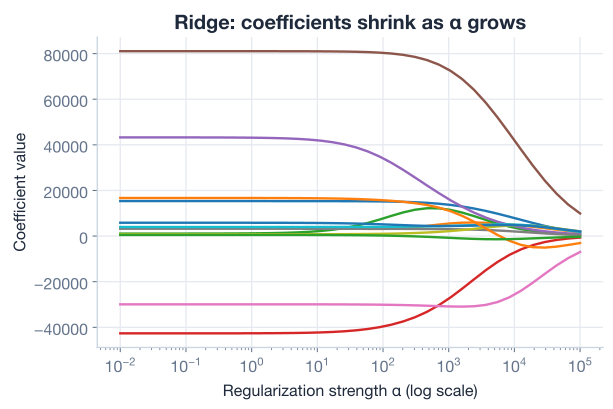
Notice two things in the figure. First, larger shrinks the coefficients smoothly toward zero. Second, and this is the signature of Ridge, the coefficients get small but never become exactly zero. Ridge shrinks; it does not select.
You can confirm the direction of this effect by comparing a gentle penalty to a heavy one.
from sklearn.linear_model import Ridge

ridge_small = Ridge(alpha=1).fit(X_train_scaled, y_train)
ridge_big = Ridge(alpha=1000).fit(X_train_scaled, y_train)

print("Sum of |coef|, alpha=1:   ", round(np.abs(ridge_small.coef_).sum(), 0))
print("Sum of |coef|, alpha=1000:", round(np.abs(ridge_big.coef_).sum(), 0))
# Output:
# Sum of |coef|, alpha=1:    287834.0
# Sum of |coef|, alpha=1000: 196566.0
The total coefficient magnitude drops sharply as rises from 1 to 1000, exactly as the penalty intends.
You should never hand-pick . It is a hyperparameter, so the right way to choose it is to let cross-validation tell you which value generalizes best, just as you tuned hyperparameters in the previous lesson.
scikit-learn makes this painless with RidgeCV, a version of Ridge with cross-validation built in. You hand it a list of candidate values, and it fits and validates each one, keeping the best.
from sklearn.linear_model import RidgeCV

# Try 100 alpha values spread across several orders of magnitude
alphas = np.logspace(-1, 4, num=100)   # from 0.1 up to 10,000

ridge_cv = RidgeCV(alphas=alphas).fit(X_train_scaled, y_train)

print("Best alpha:", round(ridge_cv.alpha_, 2))
print("CV R2:     ", round(ridge_cv.best_score_, 3))
# Output:
# Best alpha: 203.09
# CV R2:      0.635
The fitted model exposes the winning value in alpha_. Here cross-validation lands on , with a cross-validated of about 0.635. That number is your honest estimate of how well this Ridge model generalizes.
Search alpha on a log scale
The useful range for spans many orders of magnitude, so search it with np.logspace, which spaces candidates evenly in powers of ten, rather than np.linspace. If the chosen lands on the very edge of your range, your bounds were too narrow; widen them and search again so the best value sits comfortably in the middle.
To see how performance depends on , it helps to plot cross-validated against . The curve has a clear shape: too small an lets the model overfit, too large an starves it into underfitting, and the best score sits at a balance point in between.
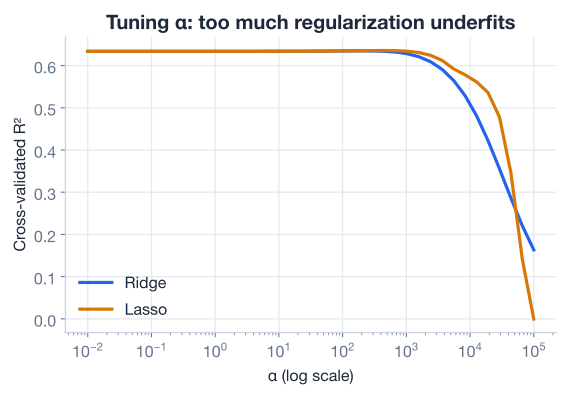
The dip on the far right of the curve is the cost of over-regularizing. Push high enough and every coefficient is squeezed toward zero, so the model can do little more than predict the average house value, and collapses.
Lasso is the second regularized model, and it is close cousin to Ridge. The name stands for Least Absolute Shrinkage and Selection Operator, which spells out what it does: shrinkage and selection.
Lasso also starts from the MSE and adds a penalty, but it penalizes the absolute values of the coefficients instead of their squares:
This is the L1 penalty: . Swapping squares for absolute values looks like a tiny change, but it has a striking consequence. Ridge’s squared penalty shrinks coefficients smoothly and never quite reaches zero. Lasso’s absolute-value penalty can drive coefficients exactly to zero. A coefficient of exactly zero removes its feature from the model completely, so Lasso performs automatic feature selection.
That makes Lasso especially valuable in high-dimensional problems, where you suspect many features add no real predictive power. Lasso can zero them out for you, leaving a sparse, interpretable model that uses only the features that matter.
As with Ridge, scikit-learn provides a cross-validating version, LassoCV, which optimizes for you.
from sklearn.linear_model import LassoCV

lasso_cv = LassoCV(alphas=np.logspace(-1, 4, num=100),
                   max_iter=10000, random_state=762)
lasso_cv.fit(X_train_scaled, y_train)

# Cross-validated R2 at the chosen alpha
lasso_r2 = lasso_cv.score(X_train_scaled, y_train)
print("Lasso best CV R2:", round(lasso_r2, 3))
print("Features kept:   ", int((lasso_cv.coef_ != 0).sum()), "of", len(lasso_cv.coef_))
# Output:
# Lasso best CV R2: 0.636
# Features kept:    8 of 8
Lasso reaches a cross-validated of about 0.636, essentially tied with Ridge’s 0.635. On the second curve in the validation plot above, you can see Lasso tracing the same rise-then-fall shape as Ridge.
It is worth pausing on why the scores are so close. Lasso’s edge is its ability to discard useless features. But on this dataset, every numeric feature carries genuine signal about house value, so there is little to throw away, and Lasso keeps all eight. With nothing to prune, Lasso behaves much like Ridge, and the two land at almost identical performance.
That is exactly the lesson. Reach for Lasso when you believe many features are dead weight and you want a sparse model. Reach for Ridge when you believe most features contribute a little and you simply want to tame their magnitudes. When the features are all useful, as here, both deliver about the same result.
Ridge keeps everyone, Lasso fires some
A handy mental model: Ridge is the manager who keeps the whole team but quietly reduces everyone’s influence. Lasso is the manager who decides some team members add nothing and lets them go entirely. Neither is universally better; the right choice depends on whether your features are all pulling their weight.
Here is the full regularization workflow on the California Housing data in one runnable script: load, standardize, then tune both Ridge and Lasso by cross-validation.
import numpy as np
import pandas as pd
from sklearn.model_selection import train_test_split
from sklearn.preprocessing import StandardScaler
from sklearn.linear_model import RidgeCV, LassoCV

# 1. Load
housing = pd.read_csv("california_housing.csv").dropna()  # download: https://datatweets.com/datasets/california_housing.csv
X = housing.drop(["ocean_proximity", "median_house_value"], axis=1)
y = housing["median_house_value"]

# 2. Split, then standardize (fit on train only)
X_train, X_test, y_train, y_test = train_test_split(
    X, y, test_size=0.20, random_state=762
)
scaler = StandardScaler()
X_train = scaler.fit_transform(X_train)
X_test = scaler.transform(X_test)

# 3. Tune Ridge and Lasso by cross-validation
alphas = np.logspace(-1, 4, num=100)
ridge = RidgeCV(alphas=alphas).fit(X_train, y_train)
lasso = LassoCV(alphas=alphas, max_iter=10000, random_state=762).fit(X_train, y_train)

print(f"Ridge: best alpha={ridge.alpha_:.2f}  CV R2={ridge.best_score_:.3f}")
print(f"Lasso: CV R2={lasso.score(X_train, y_train):.3f}")
# Output:
# Ridge: best alpha=203.09  CV R2=0.635
# Lasso: CV R2=0.636
In a few lines you standardized the features, then let cross-validation find the regularization strength that generalizes best for each model. That discipline, scale first then tune by cross-validation, is the entire recipe for using regularized linear models well.
Now it is your turn. Try these before checking the hints.
Fit a plain Ridge model at three different values on the scaled training data and print the total coefficient magnitude (the sum of absolute coefficients) for each. Confirm that larger gives smaller total magnitude.
from sklearn.linear_model import Ridge
import numpy as np

# Your code here (reuse X_train_scaled, y_train from the lesson)
for a in [1, 100, 10000]:
    pass
Hint
Inside the loop, fit Ridge(alpha=a).fit(X_train_scaled, y_train), then compute np.abs(model.coef_).sum(). The total should fall monotonically as a increases, because a bigger penalty pulls every coefficient harder toward zero.
Fit a LassoCV model on the scaled training data using np.logspace(-1, 4, num=100) for alphas, then count how many coefficients are exactly zero versus nonzero. How many features did Lasso keep on this dataset?
from sklearn.linear_model import LassoCV
import numpy as np

# Your code here (reuse X_train_scaled, y_train from the lesson)
Hint
After fitting, use (lasso.coef_ != 0).sum() for the kept features and (lasso.coef_ == 0).sum() for the dropped ones. On California Housing every feature carries signal, so you should find that Lasso keeps all 8, which is why its CV R2 of about 0.636 nearly matches Ridge’s 0.635.
Fit a RidgeCV with a normal range of , then fit a second Ridge with an enormous fixed (say 1,000,000) and compare their test . Show that too much regularization makes the model underfit.
from sklearn.linear_model import RidgeCV, Ridge

# Your code here (reuse the scaled train/test splits from the lesson)
Hint
Fit RidgeCV(alphas=np.logspace(-1, 4, num=100)) and score it on X_test_scaled, y_test, then fit Ridge(alpha=1_000_000) and score that. The giant-alpha model should have a much lower R2, because crushing every coefficient toward zero leaves it predicting little more than the average house value.
Congratulations! You can now fight overfitting in linear models with regularization and tune its strength automatically. Let’s review what you learned.
Regularization and Shrinkage
The Penalty Term
The Alpha Hyperparameter
RidgeCV or LassoCV, searching on a log scaleStandardization
StandardScaler on the training set only, then apply it to the test setResults on California Housing
Regularization is one of the most practical tools in machine learning, and it scales far beyond linear regression. The same idea, adding a penalty that discourages overly complex models, appears in logistic regression, support vector machines, and the loss functions of neural networks. Once you understand the trade-off between fitting the training data and keeping the model simple, you can reason about overfitting in almost any model you meet.
You also learned a decision you will make again and again: Ridge when most features help a little, Lasso when you want a sparse model that selects only the important features. And you saw that the honest way to set the strength is never by hand but by cross-validation, the same principle that guided you in the previous lesson. Tame complexity deliberately, measure it honestly, and your models will generalize.
You now know how to keep linear models from overfitting. But some relationships in data are not linear at all. In the next lesson, you will move beyond straight-line models and see how to capture curved, more complex patterns, and how regularization keeps those richer models in check too.
Capture nonlinear patterns with polynomial features and learn how to keep flexible models from overfitting.
Return to the Model Optimization module overview.
You have added a powerful, general-purpose technique to your toolkit. Regularization is not a niche trick for linear models; it is the disciplined way to balance fit against simplicity in nearly every model you will ever train. As you continue, keep asking the question regularization forces you to confront: is my model learning the signal, or memorizing the noise? Answer that honestly, tune with cross-validation, and your models will keep generalizing to the data that matters most, the data they have never seen.