Title here
Summary here
Every model you have built so far in this module has been linear. Linear regression, Ridge, and Lasso all fit a straight line (or a flat plane in higher dimensions) through the data. That is a powerful starting point, but the real world rarely lies along a straight line. In this lesson you will give your models the ability to bend. You will start with polynomial features, which let a linear model trace curves, and you will use them to see the bias-variance trade-off with your own eyes. Then you will switch to tree-based models, which learn nonlinear patterns automatically, and watch them outperform everything you have built before.
By the end of this lesson, you will be able to:
PolynomialFeatures and fit them with LinearRegressionYou should be comfortable with the train/test split, the score, and regularization from the earlier lessons in this module. Let’s begin.
Recall the prediction task from the housing thread: you want to predict the median house value for a California census block. So far you have treated every relationship as a straight line. But consider just one feature, median_income, plotted against house value. As income rises, value rises too, but not at a constant rate. At low incomes the curve climbs gently; in the middle it steepens; at the top it flattens as house values bump against the dataset’s price cap. A single straight line cannot follow all three of those phases at once.
This is the core limitation of linear models. They assume the effect of a feature is constant everywhere: each extra unit of income adds the same fixed amount of value, no matter where you are on the income scale. When the true relationship curves, a straight line is forced to compromise, running too high in some regions and too low in others.
There are two broad ways to fix this. You can keep your familiar LinearRegression model but feed it cleverer features, specifically powers of the original feature, so the line is free to curve. Or you can switch to a different family of models that learns nonlinear shapes on its own. This lesson covers both, in that order.
First, load the dataset. You will use the real California Housing dataset, where each row is a census block group with features like median income, house age, and average rooms, and the target is the median house value.
import pandas as pd

# download: https://datatweets.com/datasets/california_housing.csv
housing = pd.read_csv("california_housing.csv").dropna()

print("Shape:", housing.shape)
print("Median house value mean:", round(housing["median_house_value"].mean()))
# Output:
# Shape: (20433, 10)
# Median house value mean: 206864
After dropping rows with missing values, you have 20,433 blocks and 10 columns. The average block has a median house value of about $206,864. That is the number your models will try to predict.
A polynomial model of degree extends a simple linear model by adding increasing powers of the feature:
Each power gets its own coefficient. Here is the subtle part: this is still a linear model in the technical sense, because the prediction is a linear combination of the terms. What changed is the terms themselves. You are no longer feeding the model just ; you are feeding it , , , and so on. The model stays the same trusty LinearRegression, but the features now describe a curve.
scikit-learn does not have a separate “polynomial regression” class. Instead it gives you a helper that manufactures the powered features for you: PolynomialFeatures in the preprocessing module. You transform your features first, then hand the result to LinearRegression.
from sklearn.preprocessing import PolynomialFeatures

poly = PolynomialFeatures(degree=2, include_bias=False)
X_poly = poly.fit_transform(X_train)
Two arguments matter. degree sets the highest power to generate; degree=2 produces and . include_bias=False tells the transformer not to add a column of ones for the intercept, since LinearRegression already fits its own intercept.
As always, you fit_transform on the training data and transform the test data with the same fitted object, so both sets receive the identical transformation:
X_poly_test = poly.transform(X_test)Still linear under the hood
It is easy to be confused by the phrase “polynomial regression.” The curve in your prediction comes entirely from the features. The model itself is plain linear regression solving for a set of coefficients. That is why you keep using LinearRegression: you are just giving it richer inputs.
Let’s make this concrete. You will predict median_house_value from a single feature, median_income, and compare polynomial models of different degrees. Using one feature keeps the picture easy to plot and reason about.
from sklearn.model_selection import train_test_split
from sklearn.preprocessing import PolynomialFeatures
from sklearn.linear_model import LinearRegression
from sklearn.metrics import r2_score

X = housing[["median_income"]].values
y = housing["median_house_value"].values

X_train, X_test, y_train, y_test = train_test_split(
    X, y, test_size=0.2, random_state=42
)

for degree in [1, 4, 15]:
    poly = PolynomialFeatures(degree=degree, include_bias=False)
    X_train_poly = poly.fit_transform(X_train)
    X_test_poly = poly.transform(X_test)

    model = LinearRegression()
    model.fit(X_train_poly, y_train)
    r2 = r2_score(y_test, model.predict(X_test_poly))
    print(f"degree {degree:>2}  test R2={r2:.3f}")
# Output:
# degree  1  test R2=0.479
# degree  4  test R2=0.487
# degree 15  test R2=0.113
Read those three numbers carefully, because they tell the whole story of this lesson. A straight line (degree 1) scores . Adding a gentle curve (degree 4) nudges it up to , a small but real improvement, because the true relationship genuinely bends. But cranking the degree all the way to 15 does not keep helping. It collapses to , far worse than the straight line you started with.
That collapse is not a bug. It is one of the most important phenomena in all of machine learning, and it has a name.
Why does a more flexible model do worse? To answer that, you need two ideas.
Bias is error from a model that is too simple to capture the real pattern. A straight line forced onto a curved relationship has high bias: it is systematically wrong because its shape is too rigid. We say such a model underfits, it has not learned enough.
Variance is error from a model that is too sensitive to the specific training data. A degree-15 polynomial has enough freedom to wiggle through nearly every training point, including the random noise. It practically memorizes the training set. We say it overfits, it has learned too much, including things that will not repeat in new data.
The trade-off is that these two errors pull in opposite directions. As you make a model more flexible, bias falls but variance rises. The best model sits in the middle, flexible enough to capture the real curve, but not so flexible that it chases noise.

Look at the three panels. On the left, the degree-1 line is too straight: it misses the curvature entirely and sits above or below the cloud of points in whole regions. That is high bias. In the middle, the degree-4 curve follows the general shape of the data without contorting itself. That is the sweet spot. On the right, the degree-15 curve swings violently up and down to pass near individual training points, especially at the edges where data is sparse. Those wild swings look impressive on the training data but predict garbage on new data, which is exactly why its test cratered to 0.113.
A high training score can be a trap
The degree-15 model would score very well if you measured it on the training data, because it nearly memorized those points. That is precisely the danger. Always judge a model by its performance on held-out data. A model that looks brilliant in training and fails in testing is overfitting, and the only way to catch it is the test set you set aside.
You can see the trade-off directly in the three test scores: 0.479, then 0.487, then 0.113. Performance improves a little, then falls off a cliff. If you plotted test against degree, it would rise to a gentle peak around degree 4 and then plunge. That inverted-U shape is the signature of the bias-variance trade-off, and it appears far beyond polynomials. Every flexibility knob you tune, the depth of a tree, the number of neighbors in KNN, the strength of regularization, produces some version of this curve. Your job as a practitioner is to find its peak.
This connects directly to regularization from the previous lesson. Regularization is one tool for controlling variance: it penalizes large coefficients, which discourages a model from wiggling too hard. Choosing a sensible polynomial degree is another. Both are ways of dialing flexibility up or down to land on the peak of that curve.
Polynomial features are a clever trick, but they have real downsides. You have to guess the right degree, they extrapolate terribly outside the training range, and with many features the number of polynomial terms explodes. There is a whole family of models that sidesteps all of this by learning nonlinear patterns directly from the data, with no feature engineering required: tree-based models.
A decision tree predicts by asking a sequence of yes/no questions about the features. “Is median income above 3.5? If yes, is house age below 20?” Each question splits the data, and the tree keeps splitting until it reaches a leaf that holds a prediction. Because the tree can split anywhere and combine conditions, it naturally carves the feature space into regions with different predictions, capturing curves and interactions automatically. The downside is that a single deep tree overfits easily, memorizing the training data much like the degree-15 polynomial did.
The fix is to combine many trees, an idea called ensembling:
The beautiful thing is that in scikit-learn these models share the exact same interface as everything else you have used. Swapping in a random forest is a one-line change.
Now for the payoff. You will predict median_house_value using all the numeric features and compare a linear baseline against three tree-based models. This uses the full feature set, not just income, so it reflects how these models perform on the real problem.
from sklearn.model_selection import train_test_split
from sklearn.linear_model import LinearRegression
from sklearn.tree import DecisionTreeRegressor
from sklearn.ensemble import RandomForestRegressor, GradientBoostingRegressor
from sklearn.metrics import r2_score

# Use all numeric features as inputs
feature_cols = [c for c in housing.columns
                if c != "median_house_value"
                and housing[c].dtype != "object"]
X = housing[feature_cols].values
y = housing["median_house_value"].values

X_train, X_test, y_train, y_test = train_test_split(
    X, y, test_size=0.2, random_state=42
)

models = {
    "Linear":            LinearRegression(),
    "Decision Tree":     DecisionTreeRegressor(random_state=42),
    "Random Forest":     RandomForestRegressor(random_state=42),
    "Gradient Boosting": GradientBoostingRegressor(random_state=42),
}

for name, model in models.items():
    model.fit(X_train, y_train)
    r2 = r2_score(y_test, model.predict(X_test))
    print(f"{name:<18} test R2={r2:.2f}")
# Output:
# Linear             test R2=0.65
# Decision Tree      test R2=0.65
# Random Forest      test R2=0.74
# Gradient Boosting  test R2=0.73
The linear baseline explains about 65 percent of the variance in house value, a respectable score. A single decision tree matches it almost exactly at 0.65: on its own, the tree’s tendency to overfit cancels out the advantage of its flexibility. But the ensembles change the picture. The random forest jumps to 0.74, and gradient boosting reaches 0.73. Both clearly beat the linear model by averaging away the variance that hobbles a lone tree.
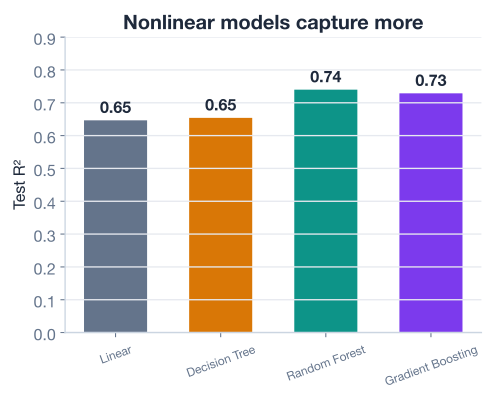
The lesson here is twofold. First, nonlinear models can capture relationships a straight line cannot, which is why the random forest pulls ahead. Second, flexibility alone is not enough: the single decision tree was just as flexible as the forest but performed no better than the linear model, because it overfit. The ensembles win by combining flexibility with variance control, the very same balance the polynomial example taught you.
Why tree ensembles are a great default
Random forests and gradient boosting are often the first models professionals reach for on tabular data. They capture nonlinear patterns and feature interactions automatically, need little preprocessing (no scaling, no manual polynomial terms), and resist overfitting through ensembling. When you are not sure where to start, a random forest is rarely a bad choice.
You now have two routes past the straight line, and they suit different situations.
Reach for polynomial features when you have a small number of features, you suspect a smooth curved relationship, and you value an interpretable model whose coefficients you can read. They keep you inside the familiar linear-model world and pair naturally with regularization. Just keep the degree modest, degree 2 or 3 is usually plenty, and remember that high degrees overfit and extrapolate disastrously.
Reach for tree-based models when you have many features, the relationships are complex or full of interactions, and raw predictive accuracy matters more than reading off coefficients. They demand almost no feature engineering and handle nonlinearity out of the box. Start with a random forest or gradient boosting and tune from there.
In both cases the guiding principle is the same one this whole module has circled back to: more flexibility is not automatically better. The goal is a model that generalizes, and that means finding the balance point on the bias-variance curve, never the most complex model you can build.
Now it is your turn. Try these before checking the hints.
Using median_income to predict median_house_value, fit polynomial models for every degree from 1 to 8 and print the test for each. Which degree gives the highest score, and what happens as the degree keeps climbing?
import pandas as pd
from sklearn.model_selection import train_test_split
from sklearn.preprocessing import PolynomialFeatures
from sklearn.linear_model import LinearRegression
from sklearn.metrics import r2_score

housing = pd.read_csv("california_housing.csv").dropna()  # download: https://datatweets.com/datasets/california_housing.csv
X = housing[["median_income"]].values
y = housing["median_house_value"].values
X_train, X_test, y_train, y_test = train_test_split(X, y, test_size=0.2, random_state=42)

# Your code here
Hint
Loop over for degree in range(1, 9):. Inside the loop, create PolynomialFeatures(degree=degree, include_bias=False), call fit_transform on X_train and transform on X_test, fit a LinearRegression, and print r2_score(y_test, model.predict(X_test_poly)). You should see the score peak in the low single digits of degree and then start to slide, the same inverted-U from the lesson.
Using all the numeric features, train a DecisionTreeRegressor and a RandomForestRegressor, then print both test scores side by side. By how much does the forest improve on the single tree?
# Your code here (reuse X_train, X_test, y_train, y_test on the full feature set)Hint
Instantiate DecisionTreeRegressor(random_state=42) and RandomForestRegressor(random_state=42), call .fit(X_train, y_train) on each, then r2_score(y_test, model.predict(X_test)). You should get about 0.65 for the single tree and 0.74 for the forest, a jump of roughly 0.09 from ensembling.
Swap in a GradientBoostingRegressor on the same full-feature data and compare its test to the random forest. The scikit-learn interface is identical, so only the model line changes.
from sklearn.ensemble import GradientBoostingRegressor

# Your code here
Hint
Instantiate GradientBoostingRegressor(random_state=42), then .fit(X_train, y_train) and r2_score(y_test, model.predict(X_test)). You should get about 0.73, very close to the random forest’s 0.74. Both ensembles land in the same strong range, comfortably ahead of the linear baseline.
Congratulations! You have moved past straight lines and learned two complementary ways to capture nonlinear patterns, while meeting the single most important idea in model building: the bias-variance trade-off. Let’s review.
Polynomial Features
LinearRegressionPolynomialFeatures(degree=d, include_bias=False), fitting on train and transforming testThe Bias-Variance Trade-Off
Tree-Based Models
.fit() / .predict() interface as every other scikit-learn modelChoosing an Approach
The bias-variance trade-off is the conceptual spine of machine learning. Every choice you make, which model, how deep, how regularized, how many features, is ultimately a decision about where to sit on that curve. Once you can see underfitting and overfitting for what they are, you stop chasing the flashiest model and start chasing the one that performs best on data it has never seen.
You also closed the loop on the housing thread. You began this module with a plain linear model scoring around 0.64, added engineered features, selected among algorithms, validated with cross-validation, and tamed variance with regularization. Now you have seen tree ensembles push past 0.74 by capturing the nonlinear structure linear models could never reach. Every technique you learned fits together: feature engineering, model selection, cross-validation, regularization, and nonlinear models are all tools for landing on the peak of the same bias-variance curve. In the next lesson you will put the entire toolkit to work on a fresh dataset from start to finish.
You have completed the conceptual arc of this module. The final lesson is a hands-on guided project where you apply everything, feature engineering, model selection, cross-validation, regularization, and nonlinear models, to optimize predictions on a brand-new problem.
Apply the full optimization toolkit end to end on a new dataset in a guided project.
Return to the Model Optimization module overview.
You have learned to give linear models curves, to read the unmistakable signature of overfitting, and to reach for tree ensembles when the relationships get complex. More importantly, you now hold the lens of the bias-variance trade-off, which brings every other technique in this module into focus. Carry that lens into every project: ask not “what is the most powerful model?” but “what is the model that generalizes best?” Master that question, and you have mastered the heart of practical machine learning.