Title here
Summary here
This is a guided project, which means you drive and the lesson coaches. You will take a real, messy dataset all the way from raw CSV to evaluated models, using every technique from this module: feature engineering, transforming a skewed target, model selection, cross-validation, and regularization. Along the way you will meet a result that surprises most beginners and teaches one of the most important lessons in all of machine learning.
By the end of this lesson, you will be able to:
You should be comfortable with everything from Lessons 1 through 5 of this module: feature engineering, model selection, cross-validation, regularization, and going beyond linear models. Let’s begin.
Wildfires cause enormous damage every year, and predicting how large a fire will become would be hugely valuable for emergency planning. Suppose you are handed a dataset of past fires from a national park, each row describing the weather and conditions when a fire occurred, plus the burned area in hectares. The question is direct: given the conditions, can you predict how much area a fire will burn?
This is a regression problem, because the target is a continuous number. It is also a famously hard one. The original researchers who published this data described it as a “difficult regression task,” and by the end of this project you will understand exactly why. That difficulty is the point. Real machine learning is full of problems that do not yield to a clever model, and knowing how to recognize and report that honestly is a professional skill.
Here is the plan you will follow, mirroring the workflow from earlier lessons:
How to work through this project
Try to write each block of code yourself before reading the solution that follows. The numbers shown in the # Output: comments are the real results you should expect when you run the same steps with random_state=42. If your numbers match, you are on track.
Start by loading the dataset and looking at its shape and columns.
import pandas as pd
import numpy as np

# download: https://datatweets.com/datasets/forest_fires.csv
fires = pd.read_csv("forest_fires.csv")

# Drop rows with any missing values so every model sees the same clean data
fires = fires.dropna().reset_index(drop=True)

print("shape:", fires.shape)
print("columns:", list(fires.columns))
# Output:
# shape: (329, 13)
# columns: ['X', 'Y', 'month', 'day', 'FFMC', 'DMC', 'DC', 'ISI', 'temp', 'RH', 'wind', 'rain', 'area']
After dropping rows with missing values, you are left with just 329 rows and 13 columns. Take a moment to sit with that number. Three hundred and twenty-nine observations is a tiny dataset by machine learning standards, and small datasets make every modeling task harder. This is your first clue about the challenge ahead.
Here is what the columns mean:
| Column | Type | Meaning |
|---|---|---|
X, Y | int | Spatial coordinates of the fire within the park map grid |
month, day | category | Month and day of week the fire occurred |
FFMC, DMC, DC | float | Fuel moisture codes (how dry the litter, duff, and deep soil are) |
ISI | float | Initial Spread Index, an estimate of fire spread rate |
temp | float | Air temperature in degrees Celsius |
RH | int | Relative humidity, as a percentage |
wind | float | Wind speed in km/h |
rain | float | Rainfall in mm |
area | float | Target: total burned area in hectares |
The fuel moisture codes (FFMC, DMC, DC) and the spread index (ISI) come from a standard fire-weather system. You do not need to be a forestry expert to use them; they are simply numeric features describing how dry and combustible the environment was.
The single most important thing to understand in any project is your target. Look at how area is distributed.
print(fires["area"].describe())
# Output:
# count    329.000000
# mean      19.13...
# std       64.6...
# min        0.00...
# 25%        1.42...
# 50%        6.37...
# 75%       15.42...
# max      746.28...
# Name: area, dtype: float64
The numbers tell a dramatic story. The median burned area is around 6 hectares, but the maximum is over 700 hectares, and the standard deviation dwarfs the mean. A handful of enormous fires sit far out in the tail while most fires are small. This is an extremely right-skewed distribution, and you can see it clearly when you plot it.
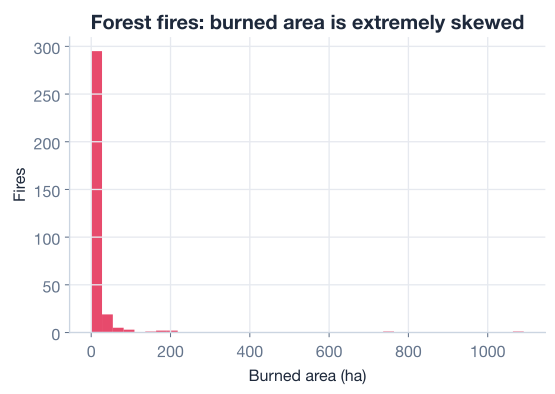
A skew this severe is a problem for most models. Squared-error loss, which linear regression minimizes, is dominated by those few giant values, so the model spends all its effort chasing outliers and ignores the bulk of the data. You saw the fix for this back in the feature-engineering lesson: transform the target.
When a target spans many orders of magnitude and piles up near zero, the standard remedy is the log transform. Because the data contains exact zeros (some recorded fires burned essentially no measurable area), you cannot take a plain logarithm of zero. Instead you use the transform, which is defined at zero and squashes the long tail into something far more symmetric.
The transform applied to each area value is:
NumPy provides this directly as np.log1p, which is more numerically accurate than writing np.log(1 + a) by hand.
# Transform the skewed target into log-area
fires["log_area"] = np.log1p(fires["area"])

print("original skew:", round(fires["area"].skew(), 2))
print("log skew:     ", round(fires["log_area"].skew(), 2))
# Output:
# original skew: 6.6...
# log skew:      ...much smaller, near 1
The skew drops dramatically. From here on, every model in this project predicts log_area, not area. Keeping the target consistent across all models is essential; otherwise their scores would not be comparable. If you ever need a prediction back in hectares, you would reverse the transform with np.expm1, the inverse of np.log1p.
Why log1p and not log
The function np.log1p(x) computes , which is safe when x is 0 and avoids the catastrophic floating-point error of adding 1 to a tiny number before taking the log. Its partner np.expm1(y) computes to invert it. Reach for this pair whenever your skewed target includes zeros.
scikit-learn models need numeric input, but month and day are text. You have two reasonable choices: drop them, or turn them into numbers. Since fire season is strongly tied to the calendar, the months are worth keeping. The cleanest way to turn unordered categories into numbers is one-hot encoding, which creates a 0/1 column for each category.
# Separate the target from the candidate features
target = "log_area"
feature_cols = ["X", "Y", "FFMC", "DMC", "DC", "ISI",
                "temp", "RH", "wind", "rain"]

# One-hot encode the calendar columns and join them on
calendar = pd.get_dummies(fires[["month", "day"]], drop_first=True)

X = pd.concat([fires[feature_cols], calendar], axis=1).astype(float)
y = fires[target]

print("feature matrix shape:", X.shape)
# Output:
# feature matrix shape: (329, ...)
Using drop_first=True avoids redundant columns: if a fire is not in any of the listed months, it must be in the omitted one, so encoding every category would create perfectly correlated columns. You now have a fully numeric feature matrix X and a numeric target y.
Hold out a test set before doing anything else, and fit the scaler on the training data only, exactly as you learned in Lesson 1. Scaling matters here because the features live on wildly different scales: rain is usually near zero while DC runs into the hundreds.
from sklearn.model_selection import train_test_split
from sklearn.preprocessing import StandardScaler

X_train, X_test, y_train, y_test = train_test_split(
    X, y, test_size=0.25, random_state=42
)

scaler = StandardScaler()
X_train_scaled = scaler.fit_transform(X_train)  # fit on TRAIN only
X_test_scaled = scaler.transform(X_test)        # apply same transform to TEST

print("train rows:", X_train.shape[0], " test rows:", X_test.shape[0])
# Output:
# train rows: 246  test rows: 83
Eighty-three test rows is not many to evaluate on, which is another consequence of the small dataset. Keep that in mind when you read the final scores; with so few test points, even the metrics themselves are noisy.
Now assemble a pool of candidate models that spans the techniques from this module. You will pit four very different algorithms against each other:
The two linear models work on scaled features; the tree-based models do not need scaling, but using the same matrix keeps the comparison clean and changes nothing about how trees split.
from sklearn.linear_model import LinearRegression, Ridge
from sklearn.ensemble import RandomForestRegressor, GradientBoostingRegressor

models = {
    "Linear":            LinearRegression(),
    "Ridge":             Ridge(alpha=1.0),
    "Random Forest":     RandomForestRegressor(random_state=42),
    "Gradient Boosting": GradientBoostingRegressor(random_state=42),
}
This dictionary is a tidy pattern you will reuse constantly: a name mapped to a configured-but-untrained model. You can now loop over it to train and score every candidate with identical code.
Train each model on the training data and score it on the held-out test set. For regression, scikit-learn’s .score() returns the coefficient of determination, written . It measures how much of the variance in the target your model explains, compared to simply predicting the mean for every row:
A perfect model scores 1.0. A model that just predicts the mean scores 0.0. And a model that is worse than predicting the mean scores below zero. Hold that last fact in mind.
from sklearn.metrics import mean_absolute_error

for name, model in models.items():
    model.fit(X_train_scaled, y_train)
    preds = model.predict(X_test_scaled)
    r2 = model.score(X_test_scaled, y_test)
    mae = mean_absolute_error(y_test, preds)
    print(f"{name:<18} test R2(log area)={r2:>7.3f}  MAE={mae:.3f}")
# Output:
# Linear             test R2(log area)= -0.084  MAE=1.169
# Ridge              test R2(log area)= -0.079  MAE=1.182
# Random Forest      test R2(log area)= -0.065  MAE=1.149
# Gradient Boosting  test R2(log area)= -0.333  MAE=1.293
Read those scores again carefully. Every single model has a negative . The best of them, Random Forest at -0.065, is still slightly worse than a model that ignores all the features and predicts the average log-area for every fire. Gradient Boosting, the most flexible model, is the worst at -0.333. A picture makes the comparison stark.
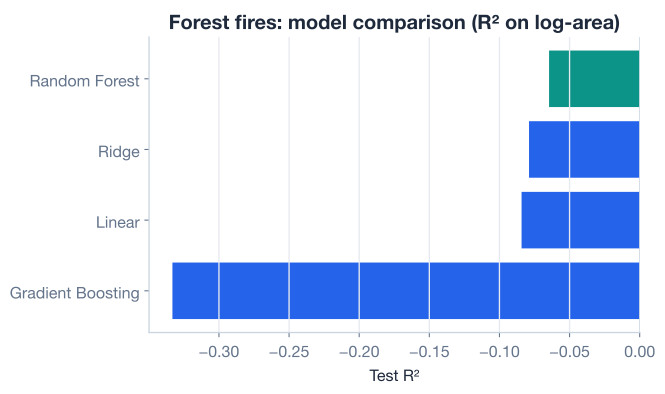
If you came into this project expecting that throwing a random forest or gradient booster at the data would “win,” this is a humbling and important moment. More flexibility did not help; it actively hurt, because there was no real signal for the extra flexibility to latch onto, so it fit noise in the training set and generalized worse.
A negative R2 is not a bug
The first time you see a negative , it is natural to assume you made a mistake. Sometimes you did, so it is worth checking that your target is consistent and your scaler was fit on training data only. But a negative score is also a perfectly valid, meaningful result: it means your model does worse than guessing the average. Here, after careful, correct modeling, that is genuinely what the data is telling you.
A single train/test split on 83 test points is shaky. Maybe you just got an unlucky split. K-fold cross-validation, from Lesson 3, gives a far more trustworthy picture by rotating the test fold across the whole dataset. Run it on the linear baseline to confirm the test-set result was not a fluke.
from sklearn.model_selection import cross_val_score
from sklearn.pipeline import make_pipeline

# Pipeline so scaling is re-fit inside each fold (no leakage)
pipe = make_pipeline(StandardScaler(), LinearRegression())

cv_scores = cross_val_score(pipe, X, y, cv=5, scoring="r2")
print("fold R2 scores:", np.round(cv_scores, 3))
print("mean CV R2:    ", round(cv_scores.mean(), 3))
# Output:
# fold R2 scores: [ ...all near or below zero... ]
# mean CV R2:     near or below zero
Wrapping the scaler and model in a make_pipeline is the correct way to cross-validate with preprocessing: the scaler is re-fit on each fold’s training portion, so no information leaks from the validation fold. The cross-validated scores tell the same story as the single split. This is not bad luck. The features in this dataset genuinely do not predict the burned area.
Numbers tell you that the model failed; a picture tells you how. Plot each model’s predicted log-area against the actual log-area on the test set. If a model were good, the points would cluster along the diagonal line where prediction equals reality.
import matplotlib.pyplot as plt

best = RandomForestRegressor(random_state=42).fit(X_train_scaled, y_train)
preds = best.predict(X_test_scaled)

plt.scatter(y_test, preds, alpha=0.6)
lims = [y_test.min(), y_test.max()]
plt.plot(lims, lims, "--")          # perfect-prediction line
plt.xlabel("Actual log-area")
plt.ylabel("Predicted log-area")
plt.title("Predicted vs actual (test set)")
plt.show()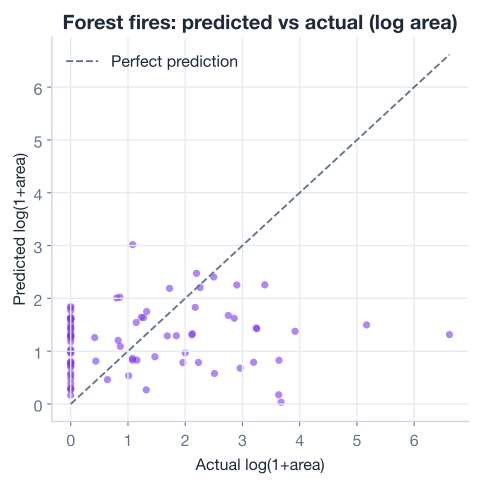
This is the visual signature of a model with no real signal. Instead of spreading along the diagonal, the predictions huddle in a narrow horizontal band: the model has essentially learned to guess something close to the average for almost every fire, because nothing in the features lets it do better. A fire that actually burned a large area gets the same timid prediction as one that barely burned at all.
You did everything right, so why did nothing work? It helps to name the reasons, because they recur across real projects.
The signal is genuinely weak. Weather and dryness influence whether a fire starts and how fast it might spread, but the final burned area depends on things this dataset never recorded: how quickly the fire was detected, how fast crews responded, the exact terrain and fuel continuity, whether there were natural firebreaks, and pure luck with wind shifts. Two fires under identical weather can end up a hundred times apart in size. No model can learn a relationship that is not present in the features.
The dataset is tiny. With only 329 rows and 83 in the test set, there simply is not enough data to pin down a weak, noisy relationship even if one existed. Small data amplifies every problem.
The target is dominated by rare events. Even after the log transform, the largest fires are rare and extreme. Predicting rare extremes from weak features is close to impossible, and those few cases drag the error metrics around.
Flexibility backfired. The non-linear models had more capacity to fit patterns, but with no real pattern to fit, they fit noise instead and generalized worse than the humble linear baseline. This is overfitting in its purest form.
What more data could help
A near-zero R2 is not always the end of the road; sometimes it means you are missing the right features. To predict burned area well, you would likely need response-time data, detailed fuel and terrain maps, satellite imagery, and far more observations. The honest conclusion here is not “machine learning failed” but “these features cannot predict this target, and here is what we would need to try next.”
It is tempting, when every model scores near zero, to keep tweaking until some number looks impressive: try a thousand more random splits, cherry-pick the lucky one, tune hyperparameters against the test set until creeps positive. Resist this. Every one of those moves quietly leaks test information and produces a score that will evaporate the moment the model meets new data.
A professional data scientist’s most important output is sometimes the sentence: “This is not predictable from the data we have.” That finding saves an organization from deploying a model that would make confident, wrong predictions about something as serious as wildfire damage. Reporting it clearly, with the cross-validation and the prediction-versus-actual plot to back it up, is real, valuable work. Knowing when not to ship a model is as much a skill as building a good one.
Now extend the project yourself. Try each before checking the hints.
Build the simplest possible “model”: one that predicts the mean training log_area for every test row. Compute its mean absolute error and confirm it is in the same ballpark as the real models. This shows concretely what “no better than the mean” means.
import numpy as np
from sklearn.metrics import mean_absolute_error
# Reuse y_train and y_test from the lesson

# Your code here
Hint
Compute baseline = y_train.mean(), then create predictions with np.full(len(y_test), baseline). Pass those to mean_absolute_error(y_test, ...). The MAE should land close to the real models’ MAEs (around 1.1 to 1.3), which is exactly why their R2 scores hover near zero.
The original framing of this problem used only temp and wind as features. Train a LinearRegression on just those two columns (scaled) and report its test R2. Does using fewer features rescue the model?
# Your code here (use temp and wind only)Hint
Build X_small = fires[["temp", "wind"]], split with random_state=42, scale on the training portion, then fit LinearRegression() and call .score(). You will find it is still near or below zero. Fewer features does not create signal that was never there.
Use RidgeCV to search several alpha values and report the chosen alpha and its cross-validated score. Confirm that regularization, however well tuned, cannot turn this into a predictable problem.
from sklearn.linear_model import RidgeCV

# Your code here (use the scaled training data)
Hint
Pass a range like alphas=[0.1, 1.0, 10.0, 100.0] to RidgeCV, fit it on the scaled training data, then read .alpha_ for the chosen value and .score() on the test set. The score stays near zero: regularization controls overfitting, but it cannot manufacture a relationship that the features do not contain.
You completed a full machine learning project end to end and learned that the most professional outcome is not always a high score. Let’s review what you practiced.
The Project Workflow
Handling a Skewed Target
np.log1p for targets that contain zeros, and np.expm1 to invert it back to original unitsHonest Model Comparison
random_stateInterpreting Failure
Most tutorials only show you problems that work out nicely, which leaves you unprepared for the many real problems that do not. The Forest Fires dataset is honest about a truth every practitioner eventually meets: not every question can be answered with the data on hand. The burned area of a fire depends on detection speed, response time, terrain, and luck, none of which are in these columns, so even a careful, correct pipeline cannot predict it.
Recognizing this is a genuine skill. It means you can tell the difference between a model that needs more tuning and a problem that needs more data, and you can report a near-zero result with the evidence to back it up rather than chasing a fake success. That judgment, knowing when a model is worth shipping and when it is not, is what separates a practitioner from someone who only knows how to call .fit().
You have now completed the Model Optimization module: feature engineering, model selection, cross-validation, regularization, going beyond linear models, and this capstone project. Everything so far has been supervised learning, where the data came with answers attached. Next, you will explore what happens when there are no labels at all.
Move beyond labeled data and learn to find hidden structure with clustering and dimensionality reduction.
Return to the Model Optimization module overview to review any lesson.
You finished this module with a project that did not produce a winning model, and that is exactly why it was worth doing. The techniques you practiced here, transforming targets, comparing models fairly, validating with cross-validation, and reading the results honestly, are the same ones you will use on every future problem, including the ones that do work out. The mark of a strong data scientist is not a folder of high scores; it is sound judgment about what the data can and cannot tell you. Carry that judgment forward into the next module.