Title here
Summary here
This lesson introduces you to natural language processing (NLP) and the special challenges that come with teaching machines to work with human language. You will learn what NLP is, why raw text is so much harder for models than tidy tables of numbers, and what the classic text preprocessing pipeline does. Along the way you will meet the dataset you will use for the rest of this module: a real collection of tweets, some about genuine disasters and some not.
By the end of this lesson, you will be able to:
You should be comfortable with basic Python and pandas. No prior deep learning or NLP experience is needed. Let’s begin.
Natural language processing, usually shortened to NLP, is the branch of machine learning that deals with human language: the words you type, speak, and read every day. When your phone suggests the next word in a message, when a spam filter quietly deletes a junk email, or when a search engine understands that “how do I fix a flat tire” and “repairing a punctured wheel” mean almost the same thing, NLP is doing the work.
The goal is to let computers analyze, understand, and even generate language. Some of the most common NLP tasks are:
In this module you will focus on text classification, and specifically on a problem with real stakes: deciding whether a tweet is reporting an actual disaster.
Up to now you may have worked mostly with non-text data: tables of numbers, dates, and categories. A spreadsheet of house prices, a log of sensor readings, or a customer database are all non-text data. Each value already lives in a neat, numeric, fixed-width cell that a model can consume directly.
Text data is different. It is the raw language found in emails, articles, product reviews, and social media posts. A large, organized collection of such text is called a corpus. The disaster tweets you will work with form a corpus of short social media messages.
The trouble is that machine learning models do not understand words. They understand numbers. Every model you will build in this module ultimately operates on arrays of floating-point values. So the central question of NLP is this: how do you turn messy, variable, ambiguous human language into clean numbers that a model can learn from, without throwing away the meaning?
Before you write any code, it helps to appreciate exactly why text is challenging. Three properties of language make it fundamentally harder than a table of numbers.
Every row in a numeric dataset has the same shape. A house has one price, one square footage, one number of bedrooms. But text has no fixed length. One tweet might be three words; another might be thirty. A book chapter could be thousands of words.
Most models, especially neural networks, expect inputs of a fixed size. You cannot simply hand a model “a sentence” the way you hand it “an age.” You need a strategy to turn pieces of text of wildly different lengths into vectors of the same length. Handling variable length is one of the recurring themes of this entire module.
Words rarely mean exactly one thing. Consider the word bank:
Same five letters, completely different meanings. Humans resolve this instantly from surrounding words, but a naive model that treats each word as an isolated symbol has no way to tell them apart. Sarcasm, idioms, and typos make this even worse. The tweet “Oh great, another Monday” uses a positive word to express a negative feeling.
The meaning of a word depends on the words around it, sometimes words that are far away in the sentence. Compare:
Both contain the word “disaster,” but one describes something that did not happen and the other describes something that did. Word order and context flip the meaning entirely. Capturing context is precisely what the more advanced models later in this module, like sequence models and transformers, are designed to do.
Why this matters for the disaster tweets task
Your goal in this module is to decide whether a tweet describes a real disaster. The word “fire” appears in “There is a fire in the building, evacuate now!” and also in “This new album is fire.” Variable length, ambiguity, and context are not abstract concerns here. They are exactly what stands between you and an accurate classifier.
Because models need clean numbers and language is messy, NLP almost always begins with a preprocessing pipeline: a sequence of steps that standardizes raw text before anything else happens. You will not feed raw tweets directly into a model. First you clean them.
The diagram below shows the conceptual flow. Each step reduces noise and shrinks the number of distinct symbols the model has to learn.
raw text
   |
   v
[ lowercasing ]      "Fire!" and "fire" become the same token
   |
   v
[ tokenization ]     split text into individual words (tokens)
   |
   v
[ stopword removal ] drop common, low-meaning words like "the", "a"
   |
   v
cleaned tokens  ->  ready to be turned into numbers (Lesson 2)
Let’s look at each step in turn.
Computers treat "Fire", "fire", and "FIRE" as three completely different strings, even though they are obviously the same word to you. Lowercasing converts everything to a single case so that these variants collapse into one token. This standardization shrinks your vocabulary and prevents the model from wasting effort learning that three spellings mean the same thing.
Tokenization is the process of breaking a string of text into smaller pieces called tokens. Most often a token is a single word. The sentence
"Forest fire near La Ronge"becomes a list of five tokens:
["forest", "fire", "near", "la", "ronge"]Tokens are the atoms of NLP. Almost everything that follows, counting words, building a vocabulary, turning words into numbers, operates on tokens rather than raw character strings. Note that real tokenizers also have to make decisions about punctuation, contractions like “don’t”, hashtags, and URLs, all of which appear constantly in tweets.
Some words appear so often that they carry very little meaning on their own. Words like “the”, “a”, “an”, “of”, “to”, and “in” are called stopwords. They glue sentences together but rarely help you decide whether a tweet is about a disaster.
Removing stopwords trims the noise and lets the model focus on the words that actually distinguish one class from another, such as “earthquake”, “evacuate”, or “wildfire”.
Preprocessing is a set of choices, not a fixed recipe
Every preprocessing step throws information away on purpose, and sometimes that information matters. Removing the word “not” can flip the meaning of a sentence. Lowercasing erases the difference between “US” (the country) and “us” (the pronoun). There is no single correct pipeline; the right choices depend on your data and your task. Modern deep learning models, which you will build later, can sometimes learn from rawer text and need less aggressive cleaning than older approaches did.
You will spend the rest of this module working with a single, consistent dataset so that you can compare different modeling approaches fairly. It is a real collection of tweets, each hand-labeled as either describing a genuine disaster or not.
The task is binary text classification: given the text of a tweet, predict whether it refers to a real disaster (1) or not (0). This is exactly the kind of problem that emergency response teams and news organizations care about, because being able to surface real reports from the flood of social media chatter is genuinely useful.
You can download the dataset and load it with pandas.
import pandas as pd

# download: https://datatweets.com/datasets/disaster_tweets.csv
df = pd.read_csv("disaster_tweets.csv")

print("Shape:", df.shape)
# Output: Shape: (7613, 2)
The dataset has 7,613 rows and 2 columns. Each row is one tweet. The two columns are simple:
| Column | Type | Meaning |
|---|---|---|
text | string | The raw text of the tweet |
target | int | Target: 1 if the tweet describes a real disaster, 0 otherwise |
Let’s look at a few raw tweets to get a feel for the language you are dealing with.
# Peek at a few examples from each class
print(df[df["target"] == 1]["text"].iloc[0])
# Output: Forest fire near La Ronge Sask. Canada

print(df[df["target"] == 0]["text"].iloc[0])
# Output: What's up man?
Even from two examples you can see the challenge. The disaster tweet reads like a news bulletin; the non-disaster tweet is casual chatter. But many tweets sit in a gray zone, using disaster words metaphorically, and that is what makes the problem interesting.
The first thing to check in any classification problem is how the target is distributed. If one class hugely outnumbers the other, accuracy can be misleading, and you have to be careful about how you evaluate.
# How is the target distributed?
print(df["target"].value_counts())
# Output:
# target
# 0    4342
# 1    3271
# Name: count, dtype: int64

# What fraction of tweets are real disasters?
print("disaster rate:", round(df["target"].mean(), 2))
# Output: disaster rate: 0.43
About 43 percent of the tweets describe real disasters (3,271 out of 7,613), and the remaining 4,342 do not. That is a fairly balanced dataset. Neither class dominates, which is convenient: it means plain accuracy will be a reasonable first metric, and a model that simply guessed “not a disaster” every time would only be right about 57 percent of the time. A picture makes the balance clear.
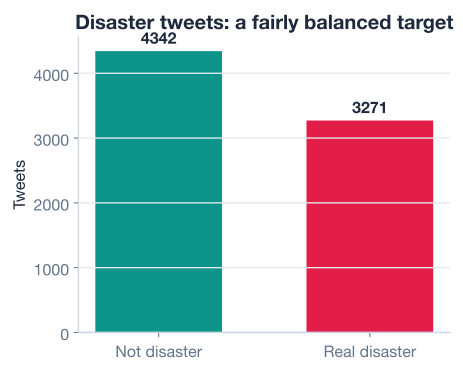
Always check the balance first
Imagine a dataset that was 95 percent non-disaster tweets. A model could score 95 percent accuracy by always predicting “not a disaster” while being completely useless for spotting real emergencies. Checking class balance before you model tells you whether accuracy alone is trustworthy or whether you need other metrics. You will return to this idea in later lessons.
Remember that variable length is one of the core difficulties of text. Before you can decide how to handle it, you need to know how long your texts actually are. A natural measure is the number of words in each tweet.
You can compute the word count for every tweet by splitting each string on whitespace and counting the pieces.
# Count the number of words in each tweet
df["word_count"] = df["text"].str.split().str.len()

print("Average words per tweet:", round(df["word_count"].mean(), 1))
print("Longest tweet (words):  ", df["word_count"].max())
# Output:
# Average words per tweet: 14.9
# Longest tweet (words):   31
The average tweet is about 15 words long, and the longest is 31 words. That is short text, which is both a blessing and a curse: short texts are cheap to process, but they give the model very few words to work with, so every word counts.
It is also worth asking whether disaster tweets tend to be longer or shorter than non-disaster tweets. If the lengths differed a lot by class, length itself might be a useful clue.
# Average length by class
print(df.groupby("target")["word_count"].mean().round(1))
# Output:
# target
# 0    14.7
# 1    15.2
# Name: word_count, dtype: float64
The two classes are very close in length, around 15 words each, so length on its own will not separate disasters from non-disasters. The signal has to come from which words appear, not from how many. The chart below shows the full distribution of tweet lengths for both classes overlaid.
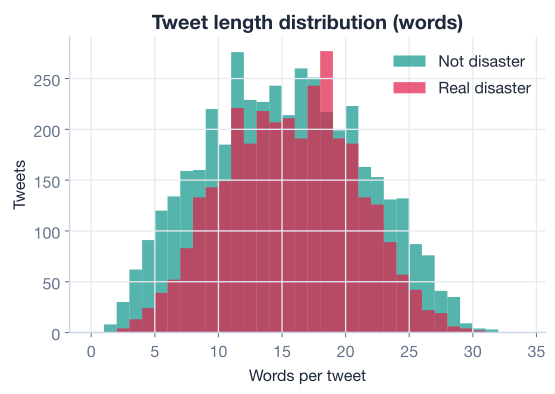
Knowing the length distribution is practical, not just academic. When you turn tweets into fixed-length numeric sequences in the next lesson, you will need to pick a sequence length. Knowing that almost every tweet fits within about 31 words tells you that a modest length will capture nearly all of the content without wasting memory on padding.
The models you build in this module will be neural networks, and you will build them with TensorFlow and its high-level interface, Keras. TensorFlow is a widely used open-source library for deep learning, and Keras is the friendly API layered on top of it that lets you assemble models out of simple building blocks.
You do not need to train anything yet. For now, simply confirm your environment is ready and look at the tools Keras gives you for text.
import tensorflow as tf
from tensorflow import keras

print("TensorFlow version:", tf.__version__)
# Output: TensorFlow version: 2.x
Keras includes a layer designed specifically to standardize and tokenize raw text, called TextVectorization. You will use it heavily starting in the next lesson, but it is worth meeting now because it performs several preprocessing steps for you in one place: it lowercases the text, strips punctuation, and splits on whitespace into tokens.
from tensorflow.keras.layers import TextVectorization

# A small example: how Keras tokenizes text by default
sample = tf.constant(["Forest fire near La Ronge Sask. Canada"])

vectorizer = TextVectorization(output_mode="int")
vectorizer.adapt(sample)            # learn the vocabulary from the text

# Show the cleaned, tokenized vocabulary Keras built
print(vectorizer.get_vocabulary())
# Output (order may vary):
# ['', '[UNK]', 'sask', 'ronge', 'near', 'la', 'forest', 'fire', 'canada']
Notice what happened. The capital letters were lowercased, the period after “Sask” was stripped as punctuation, and the sentence was split into individual word tokens. The two extra entries at the front, '' and '[UNK]', are special tokens Keras reserves for padding and for unknown words it has never seen. This is the classic preprocessing pipeline from earlier, packaged into a single reusable layer.
Let the framework do the boring work
Early NLP code often spelled out lowercasing, punctuation stripping, and tokenization by hand. Modern frameworks like Keras fold these steps into a single configurable layer. That is good news: it means fewer bugs and less boilerplate. But you still need to understand what the layer does under the hood, because the defaults are choices, and sometimes you will want to change them.
Here is the full exploration you just walked through, condensed into one runnable script. It loads the data, checks the balance, measures tweet lengths, and confirms the environment, everything you need before modeling begins in the next lesson.
import pandas as pd
import tensorflow as tf

# 1. Load the data
df = pd.read_csv("disaster_tweets.csv")  # download: https://datatweets.com/datasets/disaster_tweets.csv
print("Shape:", df.shape)
# Output: Shape: (7613, 2)

# 2. Check the class balance
print(df["target"].value_counts())
# Output:
# target
# 0    4342
# 1    3271
# Name: count, dtype: int64
print("disaster rate:", round(df["target"].mean(), 2))
# Output: disaster rate: 0.43

# 3. Measure tweet lengths
df["word_count"] = df["text"].str.split().str.len()
print("avg words:", round(df["word_count"].mean(), 1), "max:", df["word_count"].max())
# Output: avg words: 14.9 max: 31

# 4. Confirm the deep learning environment is ready
print("TensorFlow version:", tf.__version__)
# Output: TensorFlow version: 2.x
In a handful of lines you loaded a real text dataset, confirmed it is balanced, learned that tweets are short and similar in length across classes, and verified your tools. You now understand the shape of the problem and why it is hard. The next lesson turns these tweets into numbers a model can actually learn from.
Now it is your turn. Try these before checking the hints.
Print five raw disaster tweets and five raw non-disaster tweets side by side. Read them and note which words seem to signal a real disaster and which ones might be used metaphorically.
import pandas as pd
df = pd.read_csv("disaster_tweets.csv")

# Your code here
Hint
Filter the dataframe by class with a boolean mask: df[df["target"] == 1] gives the disaster tweets and df[df["target"] == 0] gives the non-disaster tweets. Then select the text column and use .head(5) to print the first five of each. Pass .to_string() if you want to see the full untruncated text.
The lesson reported the mean length per class. Go further: compute the full set of summary statistics (count, mean, std, min, quartiles, max) of word_count grouped by target. Does any statistic suggest length could help separate the classes?
import pandas as pd
df = pd.read_csv("disaster_tweets.csv")
df["word_count"] = df["text"].str.split().str.len()

# Your code here
Hint
Use df.groupby("target")["word_count"].describe(). This returns one row per class with all the summary statistics as columns. Compare the rows: if the means, medians, and spreads are all very close (and they are, both classes average about 15 words), then length alone is not a strong signal.
Take the first disaster tweet and run it through the classic pipeline yourself, without Keras: lowercase it, split it into tokens, and remove a small set of stopwords ({"a", "an", "the", "of", "to", "in", "near"}). Print the cleaned list of tokens.
import pandas as pd
df = pd.read_csv("disaster_tweets.csv")

tweet = df[df["target"] == 1]["text"].iloc[0]
stopwords = {"a", "an", "the", "of", "to", "in", "near"}

# Your code here
Hint
First lowercase with tweet.lower(). Then tokenize with .split() to get a list of words. Finally use a list comprehension to keep only the words that are not stopwords: [w for w in tokens if w not in stopwords]. This is exactly the lowercase, tokenize, remove-stopwords sequence the TextVectorization layer automates for you.
Congratulations! You have taken your first step into natural language processing and you understand the problem you will solve throughout this module. Let’s review what you learned.
What NLP Is
Why Text Is Hard
The Preprocessing Pipeline
The Disaster Tweets Dataset
text column and a binary target (1 = disaster, 0 = not)Tooling
TextVectorization layer bundles lowercasing, punctuation stripping, and tokenization into one reusable stepEverything you do for the rest of this module rests on the ideas in this lesson. The reason you will spend the next lesson on vectorization and embeddings is precisely because text is variable in length, ambiguous, and context-dependent. The reason later lessons introduce sequence models and transformers is to capture the context that simpler models miss.
Understanding the dataset matters just as much. Knowing that the classes are balanced tells you accuracy is a fair first metric. Knowing that tweets max out around 31 words tells you how long your numeric sequences need to be. Knowing that length does not separate the classes tells you the signal lives in which words appear, not how many. These small facts, gathered through exploration, will guide every modeling decision you make from here on.
You now understand what NLP is, why text is hard, and what the disaster tweets dataset looks like. In the next lesson, you will turn these raw tweets into numbers a model can learn from, using text vectorization and word embeddings.
Turn raw tweets into numeric vectors and learn how word embeddings capture meaning.
Return to the NLP for Deep Learning module overview.
You have laid the foundation for everything that follows. The instinct you practiced here, exploring a dataset before modeling it and asking why text is hard rather than jumping straight to a model, is exactly what separates careful practitioners from those who simply copy code. As you move into vectorization, embeddings, and neural networks in the coming lessons, keep returning to the three challenges of text: variable length, ambiguity, and context. Every technique you learn is, at heart, another answer to one of those three problems.