Title here
Summary here
Neural networks do arithmetic, not reading. Before any model can classify a tweet, you have to turn that tweet into numbers, and the way you choose to do that has an enormous effect on how well the model learns. This lesson shows you the modern, built-in way to vectorize text in Keras, and introduces the single most important idea in deep learning for language: the word embedding.
By the end of this lesson, you will be able to:
TextVectorization layer to build a vocabulary and produce padded integer sequencesmax_tokens, standardize, output_mode, and output_sequence_lengthEmbedding layer and inspect the vectors it learnsYou should be comfortable with basic Python, pandas, and NumPy, and have seen the general machine learning workflow. No prior deep learning or TensorFlow experience is required. Let’s begin.
Imagine you work for an emergency response team that monitors social media. During a wildfire or a flood, people post about it in real time, often before official alerts go out. If you could automatically flag the tweets that describe a real disaster and ignore the ones that just use disaster words casually (“this party was fire”), you could react faster.
That is a binary classification problem: each tweet is either about a real disaster (1) or not (0). You already know how a classifier works in principle. The new challenge is the input. A tweet is a string of characters, and a neural network only understands tensors of floating-point numbers. Somewhere between the raw text and the first layer of the network, the words have to become numbers.
Converting text into numeric vectors is called text vectorization, and it is the foundation of every NLP model. Do it well and the model has a fighting chance; do it badly and even the best architecture will struggle.
You will work with the real Disaster Tweets dataset, a collection of tweets each hand-labeled as describing a genuine disaster or not. Download it and take a quick look.
import pandas as pd

# download: https://datatweets.com/datasets/disaster_tweets.csv
df = pd.read_csv("disaster_tweets.csv")

print("Shape:", df.shape)
print(df["target"].value_counts())
# Output:
# Shape: (7613, 2)
# target
# 0    4342
# 1    3271
# Name: count, dtype: int64
The dataset has 7,613 tweets in two columns: text (the tweet) and target (1 for a real disaster, 0 otherwise). About 43 percent are real disasters, so the classes are reasonably balanced. A quick check on tweet length tells you how long the sequences you feed the model need to be.
word_counts = df["text"].str.split().str.len()
print("avg words:", round(word_counts.mean(), 1), " max:", word_counts.max())
# Output: avg words: 14.9  max: 31
Tweets are short. On average a tweet has about 15 words, and the longest has 31. That number matters: it tells you that a sequence length in the low tens will comfortably hold almost every tweet without throwing away much text.
Why this dataset is a good teacher
Short, messy, real text is ideal for learning vectorization. Tweets have slang, hashtags, and repeated words, so you immediately see what tokenization, lowercasing, and a fixed vocabulary actually do. The same techniques scale directly to reviews, support tickets, or news articles.
The first step in vectorization is tokenization: splitting a string into smaller units called tokens. For most English NLP, a token is a word. The sentence
“A wildfire is spreading fast”
becomes the list of tokens
["a", "wildfire", "is", "spreading", "fast"]
Once text is a list of tokens, you can assign each distinct token an integer ID and represent any sentence as a sequence of those IDs. The full collection of tokens the model knows about is called the vocabulary.
Two practical problems show up immediately. First, the same word appears in different forms: Fire, fire, and fire! are the same word to a human but three different strings to a computer. Standardization (lowercasing and stripping punctuation) collapses them into one. Second, real corpora have tens of thousands of distinct words, many appearing only once. Keeping all of them wastes memory and adds noise, so you cap the vocabulary at the most frequent max_tokens words and treat everything else as a single “unknown” token.
You could write all of this by hand, but Keras gives you a layer that does it for you, consistently at training time and at prediction time.
TextVectorization is a Keras layer that takes raw strings as input and returns integer sequences as output. Because it is a layer, it can live inside your model, which means the exact same preprocessing is applied automatically whenever the model sees text, with no separate pipeline to keep in sync.
The four parameters you will use most often are:
max_tokens: the maximum vocabulary size. The layer keeps the most frequent words and maps the rest to an “out of vocabulary” token.standardize: how to clean text before tokenizing. "lower_and_strip_punctuation" lowercases and removes punctuation.output_mode: the form of the output. "int" returns a sequence of integer token IDs, which is what embeddings need.output_sequence_length: the fixed length of every output sequence. Shorter sequences are padded with zeros; longer ones are truncated.You create the layer, then call adapt() on your training text. The adapt() step is where the layer scans the corpus, counts word frequencies, and builds the vocabulary. It is the text-preprocessing equivalent of fitting a scaler: you learn the vocabulary from the training data only.
import tensorflow as tf
from tensorflow.keras.layers import TextVectorization

max_tokens = 10000          # keep the 10,000 most frequent words
output_sequence_length = 32 # every tweet becomes a length-32 sequence

vectorizer = TextVectorization(
    max_tokens=max_tokens,
    standardize="lower_and_strip_punctuation",
    output_mode="int",
    output_sequence_length=output_sequence_length,
)

# Learn the vocabulary from the training tweets only
vectorizer.adapt(df["text"].values)

print("Vocabulary size:", len(vectorizer.get_vocabulary()))
print("First 8 tokens:", vectorizer.get_vocabulary()[:8])
# Output:
# Vocabulary size: 10000
# First 8 tokens: ['', '[UNK]', 'the', 'a', 'to', 'of', 'in', 'and']
Notice the first two entries of the vocabulary. Index 0 is the empty string, reserved for padding, and index 1 is [UNK], the catch-all for unknown words. Keras always reserves these two slots, and the most frequent real words (the, a, to) follow. The order is by frequency, so common words get small integer IDs.
The best way to understand a vectorizer is to run a few sentences through it.
examples = [
    "A wildfire is spreading fast",
    "this party was fire",
]
print(vectorizer(examples).numpy())
# Output (illustrative shape; exact IDs depend on the learned vocabulary):
# array of shape (2, 32), dtype int64
# each row is a padded sequence of token IDs, e.g.
# [   3  ...   0   0   0 ... ]   <- trailing zeros are padding
We deliberately do not print exact token IDs here, because they depend on the learned vocabulary and are not meaningful to memorize. What matters is the shape and the structure: two input strings produce a (2, 32) integer array. Each row is one tweet, each number is a token ID, and the trailing zeros are padding that fills every row out to the chosen length of 32.
Choosing output_sequence_length
You measured earlier that the longest tweet has 31 words and the average is about 15. Setting output_sequence_length=32 means almost no tweet gets truncated, while keeping sequences short enough to train quickly. When you move to longer documents, pick this number from your own length distribution rather than guessing.
Because neural networks process data in batches, every sequence in a batch must be the same length. output_sequence_length enforces that:
"a wildfire is spreading fast"   ->  [ 3 412 9 880 651 0 0 0 ... 0 ]   (padded to 32)
"flood warning issued for the
 entire coastal region tonight
 stay safe ..." (>32 words)      ->  [ ... 32 IDs ... ]                (truncated)
Padding adds zeros to the end of short sequences; truncation drops tokens from the end of long ones. Either way, every tweet leaves the layer as a length-32 row of integers, ready for the next stage.
You now have integer sequences. But an integer ID like 412 is not something a network should do arithmetic on directly, because the numbers are arbitrary labels, not quantities. Token 412 is not “twice as much” as token 206.
The classic fix is one-hot encoding. With a vocabulary of size , you represent each word as a vector of length that is all zeros except for a single 1 at the word’s index. With a 10,000-word vocabulary, the word at index 412 becomes:
One-hot encoding works, but it has two serious weaknesses. First, it is enormously wasteful: every word needs a 10,000-dimensional vector that is 99.99 percent zeros. Second, and worse, every word is equally distant from every other word. In one-hot space, fire is exactly as far from flame as it is from picnic. The representation carries no notion of meaning at all, so the model has to learn every relationship from scratch.
We need a representation that is compact and that lets similar words have similar vectors. That is exactly what a word embedding provides.
A word embedding represents each word as a short, dense vector of real numbers, say 16 or 64 values instead of 10,000. Crucially, these numbers are not fixed in advance. They are learned during training, so the network can arrange words in a way that helps the task.
The picture below shows the core idea: each word in the vocabulary maps to one row of a lookup table, and that row is the word’s dense vector.
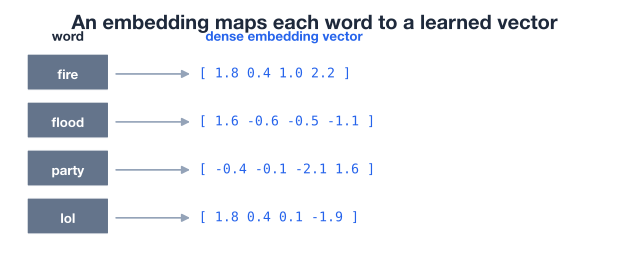
Two properties make embeddings powerful:
You can think of each of the dimensions as a learned feature the model invented for itself, perhaps “how alarming is this word” or “how casual is this word”, though in practice the dimensions rarely map onto neat human concepts. What matters is that the geometry becomes useful.
In Keras, an embedding is just another layer: tf.keras.layers.Embedding. It takes integer token IDs as input and looks up the corresponding dense vector for each one. Its main parameters are:
input_dim: the vocabulary size. Set this to max_tokens so the table has a row for every possible token ID.output_dim: the embedding dimension , the length of each word vector.The layer holds a weight matrix of shape (input_dim, output_dim). When an integer ID arrives, the layer returns the matching row. Those rows start as small random numbers and are updated by gradient descent like any other weights, which is exactly why they end up encoding useful structure.
from tensorflow.keras.layers import Embedding

embedding_dim = 16

embedding_layer = Embedding(
    input_dim=max_tokens,    # one row per vocabulary token
    output_dim=embedding_dim # each word becomes a 16-number vector
)

# Feed it the integer sequences from the vectorizer
sample_ids = vectorizer(["a wildfire is spreading fast"])
print("Input IDs shape:    ", sample_ids.shape)
print("Embedded output:    ", embedding_layer(sample_ids).shape)
# Output:
# Input IDs shape:     (1, 32)
# Embedded output:     (1, 32, 16)
Follow the shapes carefully, because they tell the whole story. One tweet enters as a (1, 32) array of token IDs. The embedding layer replaces each of the 32 integers with its 16-number vector, so the output is (1, 32, 16): one tweet, 32 token positions, 16 numbers per position. The layer has turned a row of integers into a small matrix of dense features, which is precisely the input a neural network wants.
The vectorizer and embedding are partners
These two layers are designed to work together. TextVectorization produces integer IDs in the range 0 to max_tokens - 1, and Embedding is built with input_dim=max_tokens so it has a row for every one of those IDs. Keeping the two numbers in sync is the most common thing to get right, and the most common thing beginners get wrong.
At first the embedding table is random, so the word vectors carry no meaning. The interesting part is what happens after the network trains on the labeled tweets. To learn, the model nudges the embedding for each word in whatever direction reduces classification error. Words that consistently signal a real disaster get pulled toward one region of the space; words that signal casual chatter get pulled toward another.
To make this concrete, you can build the simplest possible model that exercises the embedding: vectorize the text, embed it, average the word vectors of each tweet into a single vector, and feed that to a small output layer. Averaging the embeddings (called global average pooling) collapses the (32, 16) matrix into one 16-number summary per tweet.
from tensorflow.keras import Input
from tensorflow.keras.models import Sequential
from tensorflow.keras.layers import GlobalAveragePooling1D, Dense

model = Sequential([
    Input(shape=(1,), dtype=tf.string),         # raw text in
    vectorizer,                                  # -> integer sequences
    Embedding(input_dim=max_tokens, output_dim=embedding_dim),
    GlobalAveragePooling1D(),                    # average word vectors
    Dense(1, activation="sigmoid"),             # -> probability of disaster
])

model.compile(optimizer="adam", loss="binary_crossentropy", metrics=["accuracy"])
Note that the raw strings go straight into the model: the TextVectorization layer is the first real layer, so you never preprocess text by hand at prediction time. After training this small model and evaluating it on held-out tweets, you get a modest but clearly-better-than-chance result:
# After training on the disaster tweets and evaluating on a held-out test set:
# Output:
# dense (embedding + pooling)  test accuracy = 0.710   AUC = 0.850
About 71 percent accuracy from such a tiny model is encouraging, and the AUC of 0.85 (a measure of how well the model ranks disaster tweets above non-disaster ones, where 0.5 is random and 1.0 is perfect) shows the embedding is capturing real signal. You will build richer classifiers in the next lessons, but the point here is what the embedding learned along the way.
A 16-dimensional space is impossible to picture, so you can compress it to two dimensions with PCA (principal component analysis), which keeps the directions of greatest variation. Plotting the result reveals the geometry the model discovered.
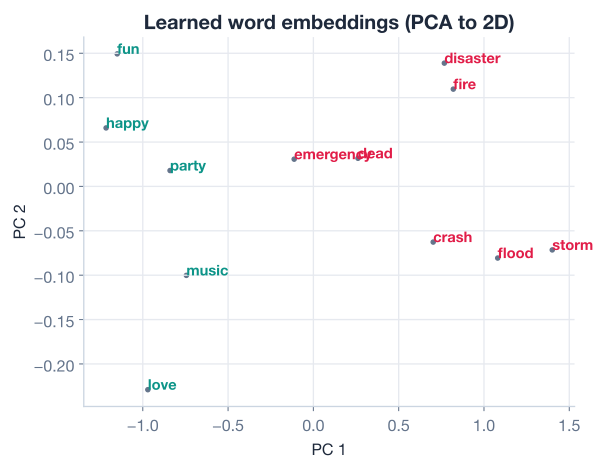
This is the payoff. The model was never told that fire, flood, storm, and dead are related, nor that love, happy, and party belong together. It only saw tweets and their 0/1 labels. Yet to reduce its loss, it learned to place disaster words in one region and everyday words in another, because that separation is exactly what makes the final classification easy. The embedding turned an arbitrary integer code into a map of meaning.
Embeddings are task-specific
The structure you see emerges from this task and this data. An embedding trained to detect disasters arranges words by disaster relevance, not by grammar or general semantics. If you change the task or the dataset, the geometry changes too. This is why large pretrained embeddings exist: they are trained on huge general corpora so their geometry is broadly useful before you ever fine-tune them.
Now it is your turn. Try these before checking the hints.
Build a TextVectorization layer with max_tokens=10000 and adapt it to the tweets. Then look up the integer ID assigned to the words "fire" and "flood", and confirm that index 0 is padding and index 1 is the unknown token.
import tensorflow as tf
from tensorflow.keras.layers import TextVectorization
import pandas as pd

df = pd.read_csv("disaster_tweets.csv")

# Your code here
Hint
After vectorizer.adapt(df["text"].values), get the list with vocab = vectorizer.get_vocabulary(). Then vocab.index("fire") gives the ID for "fire", and vocab[0] and vocab[1] show the reserved padding ('') and unknown ('[UNK]') tokens. The exact IDs for fire and flood depend on their frequency in the corpus.
Create two vectorizers identical except for output_sequence_length: one set to 10 and one set to 40. Run the same long tweet through both and compare the output shapes. Which one truncates the tweet, and which one pads it?
# Reuse the adapted vocabulary idea; build two layers with different lengths
# Your code here
Hint
Each layer outputs sequences of exactly its output_sequence_length, so the shapes will be (1, 10) and (1, 40). A tweet longer than 10 words loses its tail in the first layer (truncation); the second layer pads short tweets with trailing zeros. Print layer(["..."]).shape for each.
Take the small embedding-plus-pooling model from the lesson and change output_dim from 16 to 32. Print the output shape of the embedding layer for one tweet, and explain how many numbers now represent each word.
from tensorflow.keras.layers import Embedding

# Your code here
Hint
With output_dim=32, each word is now a 32-number vector, so embedding a (1, 32) sequence yields shape (1, 32, 32): one tweet, 32 token positions, 32 numbers each. A larger embedding can capture more nuance but adds parameters; on a small dataset like this, bigger is not automatically better.
You took raw tweets all the way to dense, meaningful vectors, the exact pipeline that sits at the front of nearly every deep learning NLP model. Let’s review what you learned.
Text to Numbers
The TextVectorization Layer
adapt() scans the training text and builds the vocabulary by word frequencymax_tokens caps the vocabulary; index 0 is padding and index 1 is the unknown tokenoutput_mode="int" returns integer sequences; output_sequence_length pads or truncates every sequence to a fixed lengthOne-Hot vs. Embeddings
The Embedding Layer
Embedding(input_dim=max_tokens, output_dim=d) is a learned lookup table of shape (batch, seq_len) array of IDs into a (batch, seq_len, d) array of dense vectorsVectorization decides what the rest of the model can possibly learn. A clean, consistent TextVectorization layer removes a whole category of bugs, because the same preprocessing is baked into the model itself. And the embedding is the quiet workhorse of modern NLP: every architecture you will meet next, from dense networks to recurrent models to transformers, takes embedded tokens as its input. You saw the most striking evidence of why embeddings matter when the projection plot revealed that the model, given only tweets and 0/1 labels, taught itself that fire and flood belong together and party does not. That ability to learn meaning from data, rather than having it hand-coded, is what makes deep learning for language so effective.
You can now turn raw text into integer sequences and dense embeddings. In the next lesson, you will stack these layers into complete text classification models, train them properly, and compare their performance on the disaster tweets.
Assemble vectorization and embeddings into full classifiers, then train and evaluate them.
Return to the NLP for Deep Learning module overview.
You have learned the two layers that begin almost every deep NLP model: TextVectorization and Embedding. The leap from a sparse one-hot vector to a dense, learned embedding is one of the most important ideas in the field, and you saw it work with your own eyes when disaster words clustered away from everyday words. Keep that picture in mind as you build deeper models in the next lessons, because no matter how sophisticated the architecture becomes, it all starts with turning words into vectors that carry meaning.