Title here
Summary here
In the previous lessons you learned how raw text becomes numbers and what a word embedding represents. Now you will put those pieces together into a complete, trainable model. You will build a neural network in Keras that reads a tweet and predicts whether it describes a real disaster, train it on actual data, and measure how well it generalizes to tweets it has never seen.
By the end of this lesson, you will be able to:
TextVectorization, Embedding, GlobalAveragePooling1D, and Dense layersYou should be comfortable with basic Python and pandas, and have seen TextVectorization and the Embedding layer from the earlier lessons in this module. Let’s begin.
A text classifier has one job: read a piece of text and output a label. For our problem, the input is the text of a tweet, and the label is binary, either 1 (the tweet is about a real disaster) or 0 (it is not).
Between the raw text and that single number sits a small stack of layers, each transforming the data a little further:
"Forest fire near La Ronge..."   <- raw tweet (a Python string)
        |
        v
TextVectorization                <- turn words into integer token IDs
        |
        v
Embedding                        <- map each token to a learned vector
        |
        v
GlobalAveragePooling1D           <- average the word vectors into one vector
        |
        v
Dense layers (ReLU)              <- learn combinations of features
        |
        v
Dense(1, sigmoid)                <- output a probability between 0 and 1
        |
        v
        0.87                     <- "probably a real disaster"
You already met the first two layers. The new and interesting part of this lesson is what happens in the middle, where a variable-length list of word vectors gets squeezed into a single fixed-length vector that the dense layers can work with.
Here is the core problem. After the Embedding layer, every tweet is a sequence of vectors, one per token. But tweets have different lengths, and Dense layers expect a fixed-size input. You need a way to collapse “however many word vectors this tweet has” down to “one vector of a known size.”
The simplest answer is to average them. If a tweet has the word vectors , you compute their mean:
This single averaged vector becomes the document’s representation. Because every tweet, long or short, collapses to one vector of the same dimension, the dense layers downstream always see a consistent input shape.
This approach has a name: the bag-of-embeddings (or continuous bag-of-words) representation. The word “bag” is the giveaway. Just as a bag of marbles has no first or last marble, averaging treats the tweet as an unordered collection of words. The model knows which words appeared, but not in what order.
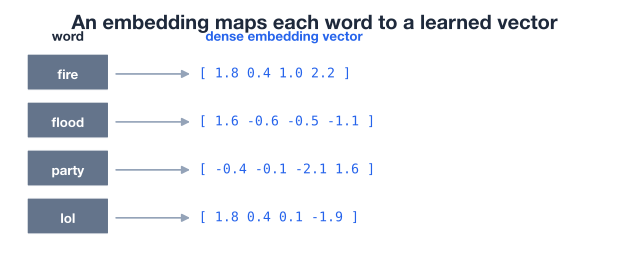
In Keras, this averaging is done by a single layer, GlobalAveragePooling1D. The “1D” refers to the one dimension being collapsed (the sequence of tokens), and “global average pooling” simply means “take the average over the entire sequence.” You drop it in right after the embedding, and it handles the mean for you.
Why averaging is a strong baseline
Averaging word vectors sounds almost too simple to work, but it is a remarkably strong baseline for text classification. For many tasks, the presence of certain words (“fire”, “evacuate”, “flood”) carries most of the signal, and their exact ordering matters less. Starting simple also gives you a clear yardstick: any fancier model you build later has to beat this one to earn its complexity.
You will train on the Disaster Tweets dataset, a collection of real tweets that have each been hand-labeled as either describing an actual disaster or not. It is a classic binary text classification problem: the text is short, messy, and full of the slang and abbreviations you find on social media.
Download the dataset and load it with pandas.
import pandas as pd

# download: https://datatweets.com/datasets/disaster_tweets.csv
df = pd.read_csv("disaster_tweets.csv")

print("Shape:", df.shape)
# Output: Shape: (7613, 2)
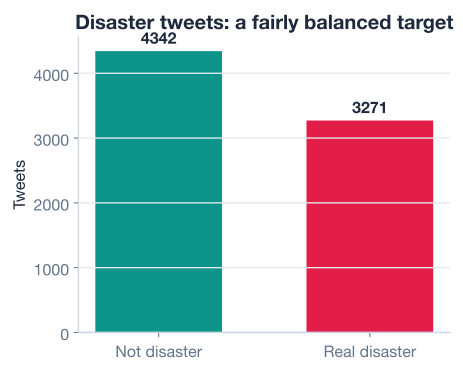
The dataset has 7,613 rows and two columns we care about: the tweet text and the target label (1 for a real disaster, 0 otherwise).
# How is the target distributed?
print(df["target"].value_counts())
# Output:
# target
# 0    4342
# 1    3271
# Name: count, dtype: int64

print("disaster rate:", round(df["target"].mean(), 2))
# Output: disaster rate: 0.43
About 43 percent of the tweets describe a real disaster (3,271 out of 7,613), so the dataset is reasonably balanced. That matters: with a roughly even split, accuracy is a meaningful metric and a model cannot score well just by always guessing the majority class.
It also helps to know how long the tweets are, because that influences how many tokens your model needs to handle per example.
word_counts = df["text"].str.split().str.len()

print("avg words:", round(word_counts.mean(), 1))
print("max words:", word_counts.max())
# Output:
# avg words: 14.9
# max words: 31
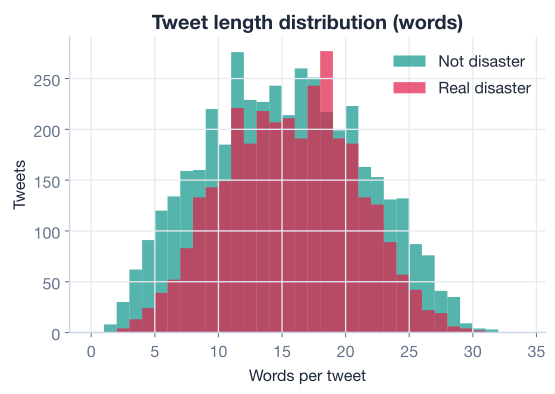
Tweets average about 15 words, and the longest reaches 31. These are short documents, which is exactly the kind of text where a simple averaging model performs well.
Just as in any supervised learning task, you split the data into a training set the model learns from and a test set you reserve for honest evaluation. The features are the raw tweet strings, and the target is the binary label.
from sklearn.model_selection import train_test_split

X = df["text"]
y = df["target"]

X_train, X_test, y_train, y_test = train_test_split(
    X, y,
    test_size=0.2,       # hold out 20% for testing
    random_state=42,     # reproducible split
    stratify=y,          # keep the class balance in both sets
)

print("Training tweets:", len(X_train))
print("Test tweets:    ", len(X_test))
# Output:
# Training tweets: 6090
# Test tweets:     1523
Notice what you are not doing: there is no manual cleaning, tokenizing, or vectorizing here. That work happens inside the model itself, in the TextVectorization layer. Keeping the text transformation inside the model is convenient, because the exact same preprocessing is applied automatically at training time and at prediction time, with no chance of the two drifting apart.
Now you assemble the network. You will build it as a Sequential model, stacking layers in order so each one feeds into the next.
The TextVectorization layer needs to learn a vocabulary before it can convert text to integers. You build it once and call .adapt() on the training text, which scans those tweets and assigns an integer ID to each of the most frequent words.
import tensorflow as tf
from tensorflow.keras import layers
from tensorflow.keras.models import Sequential

max_tokens = 10000           # keep the 10,000 most frequent words
output_sequence_length = 32  # pad / truncate every tweet to 32 tokens

vectorizer = layers.TextVectorization(
    max_tokens=max_tokens,
    output_mode="int",
    output_sequence_length=output_sequence_length,
)
vectorizer.adapt(X_train)    # learn the vocabulary from training tweets only

print("Vocabulary size:", len(vectorizer.get_vocabulary()))
# Output: Vocabulary size: 10000
Two choices are worth a word. The max_tokens=10000 cap keeps the vocabulary to the 10,000 most common words, which covers almost everything in tweets this short while keeping the model small. Setting output_sequence_length=32 pads shorter tweets with zeros and truncates longer ones, so every tweet leaves this layer as a sequence of exactly 32 integer token IDs. We chose 32 because the longest tweet in the data is 31 words, so nothing meaningful gets cut off.
Adapt on training data only
Call .adapt() on X_train, never on the full dataset. The vocabulary is something the model learns, so letting it see the test tweets would leak information and make your evaluation overly optimistic. This is the same discipline you apply when fitting a scaler: learn the transformation from training data, then apply it everywhere.
With the vectorizer ready, you build the full model. Each line adds one layer to the stack.
embedding_dim = 16

model = Sequential([
    tf.keras.Input(shape=(1,), dtype=tf.string),  # one raw string per example
    vectorizer,                                    # string -> 32 token IDs
    layers.Embedding(input_dim=max_tokens,
                     output_dim=embedding_dim),    # token IDs -> word vectors
    layers.GlobalAveragePooling1D(),               # average vectors into one
    layers.Dense(32, activation="relu"),           # learn feature combinations
    layers.Dense(16, activation="relu"),
    layers.Dense(1, activation="sigmoid"),         # output a probability
])

model.summary()
Read that stack from top to bottom and you can trace a tweet’s entire journey:
Input layer declares that each example is a single string.TextVectorization turns the string into 32 integer token IDs.Embedding looks up a learned 16-dimensional vector for each of those tokens, so the tweet becomes a 32-by-16 grid of numbers.GlobalAveragePooling1D averages down the 32 token vectors into one 16-dimensional vector, the bag-of-embeddings representation.Dense layers with ReLU activations learn nonlinear combinations of those 16 features.Dense(1, activation="sigmoid") squashes everything to a single number between 0 and 1, interpreted as the probability that the tweet is a real disaster.Before training, you compile the model, which tells Keras how to learn. For binary classification you use:
binary_crossentropy, the standard loss for a model that outputs a probability for a yes/no question. It penalizes confident wrong answers heavily.adam, a reliable default that adjusts the learning rate as it goes.accuracy (the fraction of correct predictions) and AUC (explained below).model.compile(
optimizer="adam",
loss="binary_crossentropy",
metrics=["accuracy", tf.keras.metrics.AUC(name="auc")],
)Why a sigmoid output?
The sigmoid function maps any real number to the range , making the output read naturally as a probability. With one output node and a sigmoid, the model says “I am 0.87 confident this is a disaster.” You then threshold at 0.5 to get a hard 0/1 label. This pairing of a single sigmoid node with binary cross-entropy loss is the standard recipe for binary classification.
Training happens with a single call to .fit(). You pass the training tweets and labels, choose how many epochs (full passes over the data) to run, and set aside a slice of the training data as a validation set so you can watch performance on held-out examples after each epoch.
history = model.fit(
    X_train, y_train,
    epochs=10,
    validation_split=0.2,   # use 20% of training data to validate each epoch
    batch_size=32,
)
As training runs, Keras prints the loss and metrics for both the training data and the validation set after every epoch. The numbers you should watch are the two accuracy curves: training accuracy tells you how well the model fits data it is learning from, and validation accuracy tells you how well it generalizes to data it is not.
The plot below shows how those two curves typically evolve over the ten epochs.
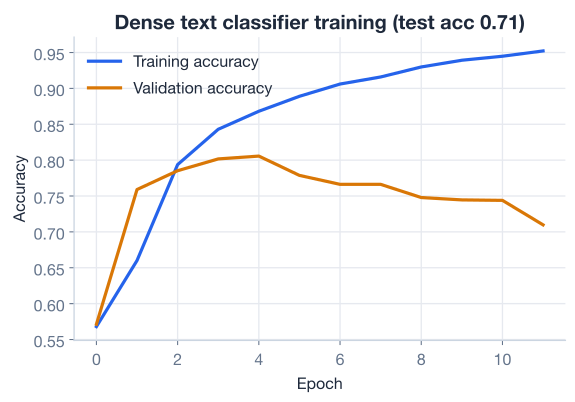
Read the shape of those curves carefully. Early on, both accuracies rise together as the model learns genuine patterns. Later, the training accuracy keeps climbing while the validation accuracy flattens out and may even dip. That widening gap is overfitting: the model is starting to memorize quirks of the training tweets that do not generalize. The validation curve, not the training curve, is your honest signal of progress.
The validation set is your early-warning system
Always train with a validation split. Without it, you only see training accuracy, which almost always looks great and tells you nothing about generalization. The moment validation accuracy stops improving while training accuracy keeps rising, you know further training is just memorization, and it is time to stop, add regularization, or rethink the architecture.
Training accuracy is not the real test. To judge the model honestly, you evaluate it on the test set you held out at the very start, tweets it has never seen in any form.
test_loss, test_acc, test_auc = model.evaluate(X_test, y_test, verbose=0)

print(f"Test accuracy: {test_acc:.3f}")
print(f"Test AUC:      {test_auc:.3f}")
# Output:
# Test accuracy: 0.710
# Test AUC:      0.850
Your bag-of-embeddings model reaches about 0.710 accuracy and 0.850 AUC on the test set. In plain terms, it correctly classifies roughly 71 percent of unseen tweets, which is a solid result for a model this simple built directly on raw, noisy social media text.
Why report both accuracy and AUC? They answer different questions.
Accuracy counts how many predictions are correct after you threshold the probability at 0.5:
It is intuitive but depends entirely on that 0.5 cutoff. AUC (the area under the ROC curve) measures something subtler: given a random disaster tweet and a random non-disaster tweet, how often does the model assign a higher probability to the disaster one? An AUC of 0.5 is pure chance, and 1.0 is perfect. Your model’s 0.850 means that across all possible thresholds, it ranks tweets correctly about 85 percent of the time, a clearer picture of the underlying quality than accuracy alone.
import numpy as np

# Peek at a few raw probabilities and the labels they produce
probs = model.predict(X_test[:5], verbose=0).ravel()
preds = (probs >= 0.5).astype(int)

print("Probabilities:", np.round(probs, 2))
print("Predicted:    ", preds)
print("Actual:       ", y_test[:5].values)
# Output (probabilities will vary slightly between runs):
# Probabilities: [0.12 0.88 0.41 0.73 0.20]
# Predicted:     [0 1 0 1 0]
# Actual:        [0 1 0 1 0]
The model produces a probability for each tweet, and you turn it into a 0/1 label by checking whether it clears the 0.5 threshold. Exact probabilities shift a little from run to run because of the randomness in training, so treat the numbers above as illustrative of the shape of the output, not exact values to reproduce.
Accuracy can hide imbalance
On a balanced dataset like this one, accuracy is reasonably trustworthy. But on skewed data, where one class dominates, a model can hit high accuracy by ignoring the rare class entirely. AUC, and the precision and recall metrics you will meet in the project lesson, do not fall for that trick, which is why practitioners rarely rely on accuracy alone.
Your model works, but it has a built-in blind spot that is worth understanding clearly, because it sets up the entire next lesson.
Recall what GlobalAveragePooling1D does: it averages all the word vectors into one. Averaging is commutative, meaning the order of the inputs does not change the result. That has a stark consequence: as far as this model is concerned, these two sentences are identical.
"the fire stopped the panic"
"the panic stopped the fire"
Both contain exactly the same five tokens, so both produce exactly the same average, and therefore the same prediction. Yet to a human reader they describe opposite situations. By averaging, the model throws away every clue that lives in word order: negation (“not a real fire”), subject-verb-object structure, and the difference between “shooting at the range” and “range of the shooting.”
For many tweets this loss does not hurt much, because the mere presence of words like “earthquake” or “wildfire” is a strong enough signal on its own. That is why a bag-of-embeddings model still reaches 71 percent accuracy. But to push past that ceiling, the model needs to actually read the words in sequence and let earlier words shape its understanding of later ones.
That is exactly what the next lesson is about. Sequence models process tokens one after another, carrying forward a memory of what came before, so order finally matters. They are the natural next step once you have felt, firsthand, the limits of averaging.
Here is the complete pipeline you built, condensed into one runnable script. It is a template you can adapt for almost any short-text binary classification task.
import pandas as pd
import tensorflow as tf
from tensorflow.keras import layers
from tensorflow.keras.models import Sequential
from sklearn.model_selection import train_test_split

# 1. Load the data
df = pd.read_csv("disaster_tweets.csv")  # download: https://datatweets.com/datasets/disaster_tweets.csv
X, y = df["text"], df["target"]

# 2. Split
X_train, X_test, y_train, y_test = train_test_split(
    X, y, test_size=0.2, random_state=42, stratify=y
)

# 3. Adapt the text vectorizer on training text only
vectorizer = layers.TextVectorization(
    max_tokens=10000, output_mode="int", output_sequence_length=32
)
vectorizer.adapt(X_train)

# 4. Build the bag-of-embeddings classifier
model = Sequential([
    tf.keras.Input(shape=(1,), dtype=tf.string),
    vectorizer,
    layers.Embedding(input_dim=10000, output_dim=16),
    layers.GlobalAveragePooling1D(),
    layers.Dense(32, activation="relu"),
    layers.Dense(16, activation="relu"),
    layers.Dense(1, activation="sigmoid"),
])

# 5. Compile, train, evaluate
model.compile(optimizer="adam", loss="binary_crossentropy",
              metrics=["accuracy", tf.keras.metrics.AUC(name="auc")])
model.fit(X_train, y_train, epochs=10, validation_split=0.2, batch_size=32)

test_loss, test_acc, test_auc = model.evaluate(X_test, y_test, verbose=0)
print(f"Test accuracy: {test_acc:.3f}")
print(f"Test AUC:      {test_auc:.3f}")
# Output:
# Test accuracy: 0.710
# Test AUC:      0.850
In well under 40 lines you loaded real tweets, built a model that learns its own text preprocessing and word embeddings, trained it, and measured it honestly on unseen data.
Try these before checking the hints.
After adapting the TextVectorization layer, print the first 15 entries of its vocabulary. What special tokens appear at the very start, and what kind of words show up after them?
vectorizer = layers.TextVectorization(
    max_tokens=10000, output_mode="int", output_sequence_length=32
)
vectorizer.adapt(X_train)

# Your code here
Hint
Use vectorizer.get_vocabulary()[:15]. The first entry is an empty string (the padding token) and the second is "[UNK]" (the out-of-vocabulary token). After those, you will see the most frequent ordinary words like "the", "a", and "in", because the vocabulary is sorted by frequency.
The lesson used a 16-dimensional embedding. Rebuild the model with output_dim=32 instead, train it for the same 10 epochs, and compare the test accuracy. Does a bigger embedding clearly help?
# Your code here (reuse the adapted vectorizer, X_train, y_train, X_test, y_test)Hint
Change only the layers.Embedding(..., output_dim=32) line, then recompile and refit a fresh model. For short tweets, a larger embedding often gives little or no improvement and can even overfit faster, since there is not much text per example to justify the extra capacity. Watching the validation accuracy curve will tell you more than the single test number.
Write two short strings, one that sounds like a real disaster and one that does not, and ask the trained model for its probability on each. Does it assign a higher probability to the disaster-sounding tweet?
samples = [
    "Massive wildfire forces thousands to evacuate the city",
    "This new pizza place is absolutely on fire, so good",
]

# Your code here
Hint
Pass the list straight to model.predict(samples) because the vectorizer is part of the model and handles the raw strings for you. Print the rounded probabilities. Note how the second tweet uses “fire” figuratively. A bag-of-embeddings model, blind to context and order, can be fooled by exactly this kind of wordplay, which is another reminder of why sequence models come next.
You built and trained your first complete neural text classifier from raw strings to a probability. Let’s review what you learned.
The Classifier Pipeline
TextVectorization -> Embedding -> GlobalAveragePooling1D -> Dense layers -> a sigmoid outputTextVectorization inside the model means the same preprocessing runs automatically at training and prediction time.adapt() learns the vocabulary, and it must see training data only to avoid leakageBag of Embeddings
GlobalAveragePooling1D performs that average, so variable-length tweets become a consistent input for the dense layersTraining and Evaluation
binary_crossentropy loss is the standard recipe for binary classificationThe Limit of Averaging
Every text classifier you will ever build, from spam filters to sentiment analysis to content moderation, rests on the same backbone you assembled here: turn text into vectors, collapse them into a fixed representation, and let dense layers map that to a decision. Starting with the simplest possible collapse, a plain average, gives you a working, honestly-evaluated baseline in a few dozen lines of code.
Just as importantly, you saw exactly where this approach breaks down. The model’s blind spot to word order is not a bug you can patch; it is a fundamental property of averaging. Recognizing that limitation is what makes the more powerful models in the coming lessons feel necessary rather than arbitrary. You will appreciate sequence models far more now that you have felt the cost of ignoring sequence.
You have a working text classifier and a clear-eyed view of its weakness. In the next lesson, you will build models that process tweets word by word, so that order, negation, and context finally count.
Move beyond averaging and learn models that read text in order to capture context and word sequence.
Return to the NLP for Deep Learning module overview.
You just turned a stack of layers into a model that reads real tweets and makes real predictions. The pipeline you built, vectorize, embed, pool, and classify, is the foundation of practical NLP, and the discipline you practiced, holding out a test set and watching validation accuracy, is what separates trustworthy results from wishful ones. Carry both forward: as the architectures grow more sophisticated, the same honest evaluation habits keep your conclusions sound.