Title here
Summary here
This lesson pulls together every technique from the module into a single, realistic project. You will play the role of a data scientist at a news-monitoring company that wants to flag which tweets describe genuine disasters and which only borrow disaster language. You will load real data, clean and vectorize messy tweet text, train three different model families, and then evaluate the strongest one honestly.
By the end of this lesson, you will be able to:
You should be comfortable with the earlier lessons in this module: text vectorization, embeddings, sequence models, and the transformer’s attention mechanism. Let’s build.
Twitter is one of the first places people post during emergencies: wildfires, floods, earthquakes, and accidents all show up there in real time. A news-monitoring team would love to surface those tweets automatically. The trouble is that people also use disaster words constantly when nothing is wrong. “This new album is fire.” “I’m literally dying at this meme.” “Traffic today was a total disaster.” A keyword filter drowns in these false alarms.
So this is a binary text classification problem. Each tweet gets a label:
1 means the tweet is about a real disaster.0 means it is not.Your job is to learn the difference from the words themselves, which is exactly what the models in this module are built for.
The dataset is disaster_tweets.csv. Each row is one tweet with an id, an optional keyword, an optional location, the tweet text, and the target label you want to predict.
import numpy as np
import pandas as pd
import tensorflow as tf

# download: https://datatweets.com/datasets/disaster_tweets.csv
df = pd.read_csv("disaster_tweets.csv")

print("Shape:", df.shape)
print(df[["text", "target"]].head(3).to_string(index=False))
# Output:
# Shape: (7613, 5)
#                                              text  target
#  Our Deeds are the Reason of this #earthquake ...       1
#              Forest fire near La Ronge Sask. ...       1
#  All residents asked to 'shelter in place' ...        1
The full file has 7,613 tweets. The keyword and location columns are blank for many rows and add little predictive power once the model reads the text itself, so you can drop them and focus on text and target.
df = df[["text", "target"]]Before modeling anything, look at how the labels are distributed. If one class dominated, accuracy would be a misleading score, so this check shapes how you read every later result.
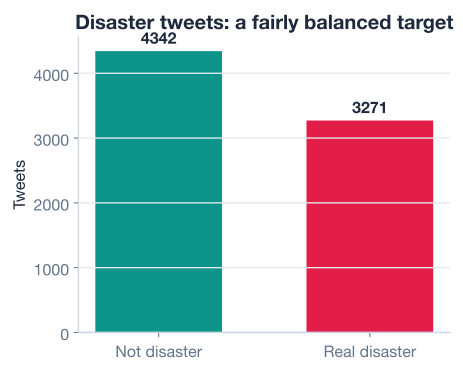
print(df["target"].value_counts())
print("disaster rate:", round(df["target"].mean(), 2))
# Output:
# target
# 0    4342
# 1    3271
# Name: count, dtype: int64
# disaster rate: 0.43
About 43 percent of the tweets describe real disasters, so the dataset is reasonably balanced. A model that blindly guessed “not a disaster” every time would score only 57 percent, which gives you a clear baseline to beat.
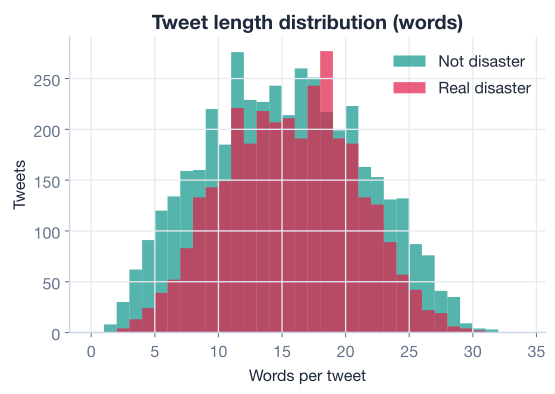
It also helps to know how long these tweets are, because that decides how many tokens your models need to read.
word_counts = df["text"].str.split().apply(len)
print("avg words:", round(word_counts.mean(), 1), "max:", word_counts.max())
# Output:
# avg words: 14.9 max: 31
Tweets average about 15 words and top out around 31, so a sequence length of 30 or so will capture nearly every tweet without wasting memory on padding.
Always explore before you model
Two minutes of exploration just told you three useful things: the dataset is balanced (so accuracy is meaningful), the baseline to beat is 57 percent, and tweets are short (so a modest sequence length is fine). Skipping this step is one of the most common beginner mistakes.
Raw tweets are noisy. They contain URLs, hashtags, mentions, punctuation, numbers, and inconsistent capitalization. A neural network can sometimes learn through this noise, but cleaning the text first makes the signal easier to find and shrinks the vocabulary the model has to memorize.
You will apply a few standard steps: lowercase everything, strip URLs and mentions, remove punctuation and numbers, and collapse extra whitespace.
import re

def clean_text(text):
    text = text.lower()
    text = re.sub(r"http\S+|www\.\S+", " ", text)   # remove URLs
    text = re.sub(r"@\w+", " ", text)                # remove @mentions
    text = re.sub(r"[^a-z\s]", " ", text)            # keep letters only
    text = re.sub(r"\s+", " ", text).strip()         # collapse whitespace
    return text

df["clean"] = df["text"].apply(clean_text)

print(df["text"].iloc[0])
print(df["clean"].iloc[0])
# Output:
# Our Deeds are the Reason of this #earthquake May ALLAH Forgive us all
# our deeds are the reason of this earthquake may allah forgive us all
Notice what survived: the hashtag #earthquake became the plain word earthquake, which is exactly the kind of token that signals a real disaster. Cleaning keeps meaning while throwing away formatting noise.
Let the layer do the splitting
You could tokenize and remove stopwords by hand with a library like NLTK, and that is a fine exercise. But Keras’s TextVectorization layer already lowercases, strips punctuation, splits on whitespace, and builds the vocabulary for you. The light cleaning above handles what the layer does not (URLs and mentions), and you let the layer handle the rest. Fewer moving parts means fewer bugs.
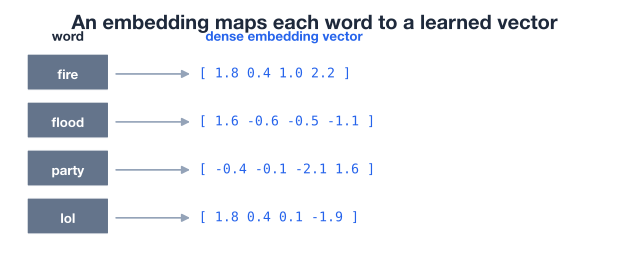
Models need numbers, not strings. The TextVectorization layer maps each tweet to a fixed-length sequence of integer token IDs, and an Embedding layer then turns each ID into a dense vector the network can learn from. This is the same two-layer foundation you met earlier in the module.
First, hold out a test set so every model is judged on tweets it never saw during training. As in the rest of the module, fix the random seed so your split is reproducible.
from sklearn.model_selection import train_test_split

X = df["clean"].values
y = df["target"].values

X_train, X_test, y_train, y_test = train_test_split(
    X, y, test_size=0.2, random_state=42, stratify=y
)

print("Train:", len(X_train), "Test:", len(X_test))
# Output:
# Train: 6090 Test: 1523
Now build the vectorizer and adapt it on the training text only. Adapting is how the layer learns its vocabulary; doing it on the training split alone keeps test information from leaking in.
from tensorflow.keras.layers import TextVectorization

MAX_TOKENS = 10000
SEQ_LEN = 30

vectorizer = TextVectorization(
    max_tokens=MAX_TOKENS,
    output_mode="int",
    output_sequence_length=SEQ_LEN,
)
vectorizer.adapt(X_train)   # learn the vocabulary from TRAIN only

print("Vocabulary size:", len(vectorizer.get_vocabulary()))
# Output:
# Vocabulary size: 10000
With the data split and the vectorizer ready, you can build models. Each model will start with this same vectorizer followed by an Embedding layer, so the only thing that changes between them is what happens after the embeddings.
Start simple. The first model embeds each token, averages the embeddings across the tweet with GlobalAveragePooling1D, and feeds that single averaged vector through a couple of dense layers. Averaging throws away word order, which makes this a kind of learned bag-of-words. It is fast, hard to overfit, and a good baseline.
from tensorflow.keras.models import Sequential
from tensorflow.keras.layers import (
    Embedding, GlobalAveragePooling1D, Dense, Dropout
)

EMBED_DIM = 64

dense_model = Sequential([
    vectorizer,
    Embedding(MAX_TOKENS, EMBED_DIM),
    GlobalAveragePooling1D(),
    Dense(32, activation="relu"),
    Dropout(0.3),
    Dense(1, activation="sigmoid"),
])

dense_model.compile(
    optimizer="adam",
    loss="binary_crossentropy",
    metrics=["accuracy"],
)

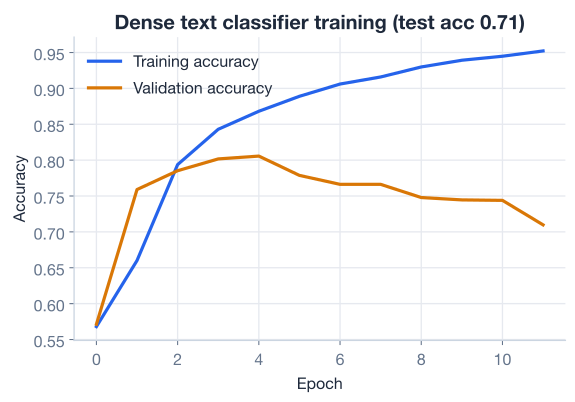
dense_model.fit(
    X_train, y_train,
    validation_split=0.1,
    epochs=10,
    batch_size=32,
    verbose=0,
)

loss, acc = dense_model.evaluate(X_test, y_test, verbose=0)
print(f"Dense model test accuracy: {acc:.3f}")
# Output:
# Dense model test accuracy: 0.710
The dense model reaches about 0.710 accuracy on the test set, comfortably above the 0.57 baseline. Not bad for a model that ignores word order entirely.
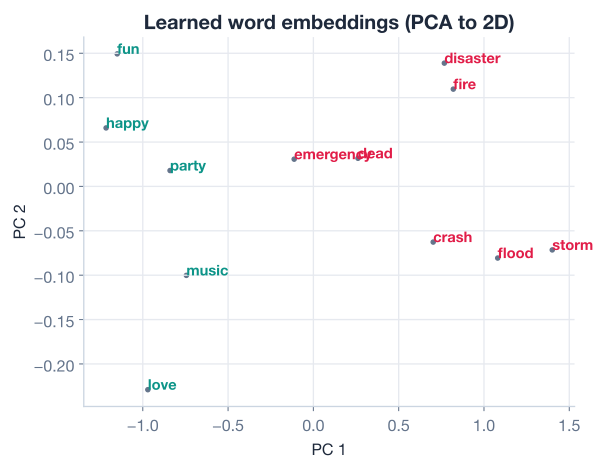
Because the embedding layer learns a vector for every word, you can project those vectors down to two dimensions and see related words cluster together, a sign the model is learning genuine meaning rather than noise.
The dense model’s weakness is that it ignores order. “Fire crews contained the blaze” and “this party is fire” share words but mean opposite things. A bidirectional LSTM reads the sequence forward and backward, so it can use context on both sides of a word to decide what it means.
from tensorflow.keras.layers import LSTM, Bidirectional

lstm_model = Sequential([
    vectorizer,
    Embedding(MAX_TOKENS, EMBED_DIM),
    Bidirectional(LSTM(64, return_sequences=True)),
    Bidirectional(LSTM(32)),
    Dense(32, activation="relu"),
    Dropout(0.3),
    Dense(1, activation="sigmoid"),
])

lstm_model.compile(
    optimizer="adam",
    loss="binary_crossentropy",
    metrics=["accuracy"],
)

lstm_model.fit(
    X_train, y_train,
    validation_split=0.1,
    epochs=10,
    batch_size=32,
    verbose=0,
)

loss, acc = lstm_model.evaluate(X_test, y_test, verbose=0)
print(f"BiLSTM test accuracy: {acc:.3f}")
# Output:
# BiLSTM test accuracy: 0.751
The BiLSTM lifts test accuracy to about 0.751. Reading word order pays off: the model can now tell that “contained the blaze” is reporting and “this party is fire” is slang. That jump of roughly four points over the dense model is the payoff for modeling sequence.
Sequence models are slower
The BiLSTM is far more expensive to train than the dense model because it processes tokens one step at a time and cannot fully parallelize across the sequence. On short tweets the cost is bearable, but on long documents this is exactly the bottleneck the transformer was invented to remove.
The transformer replaces step-by-step recurrence with self-attention: every token looks at every other token in one parallel operation and decides which ones matter. This is the architecture that powers modern language models, and you met its attention mechanism earlier in the module.
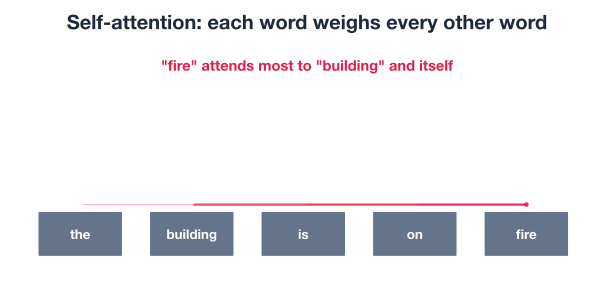
You can build a compact transformer encoder block in Keras: a multi-head attention layer followed by a small feed-forward network, each wrapped in a residual connection and layer normalization. Here the model is trained from scratch on the tweets, so it has no outside knowledge of language to lean on.
from tensorflow.keras import Input, Model
from tensorflow.keras.layers import (
    MultiHeadAttention, LayerNormalization, Add
)

inputs = Input(shape=(1,), dtype=tf.string)
x = vectorizer(inputs)
x = Embedding(MAX_TOKENS, EMBED_DIM)(x)

# one transformer encoder block
attn = MultiHeadAttention(num_heads=2, key_dim=EMBED_DIM)(x, x)
x = LayerNormalization()(Add()([x, attn]))
ff = Dense(64, activation="relu")(x)
ff = Dense(EMBED_DIM)(ff)
x = LayerNormalization()(Add()([x, ff]))

x = GlobalAveragePooling1D()(x)
x = Dropout(0.3)(x)
outputs = Dense(1, activation="sigmoid")(x)

transformer = Model(inputs, outputs)
transformer.compile(
    optimizer="adam",
    loss="binary_crossentropy",
    metrics=["accuracy"],
)

transformer.fit(
    X_train, y_train,
    validation_split=0.1,
    epochs=10,
    batch_size=32,
    verbose=0,
)

loss, acc = transformer.evaluate(X_test, y_test, verbose=0)
print(f"Transformer test accuracy: {acc:.3f}")
# Output:
# Transformer test accuracy: 0.753
The transformer edges out the BiLSTM at about 0.753 accuracy, and it gets there with far more parallel computation, which matters enormously at scale. On these short tweets the accuracy gap is small, but the architectural advantage is real.
Lining the results up side by side makes the story clear.
results = {
    "Dense (embedding + pooling)": 0.710,
    "Bidirectional LSTM":          0.751,
    "Transformer (self-attention)": 0.753,
}
for name, acc in results.items():
    print(f"{name:<32} {acc:.3f}")
# Output:
# Dense (embedding + pooling)      0.710
# Bidirectional LSTM               0.751
# Transformer (self-attention)     0.753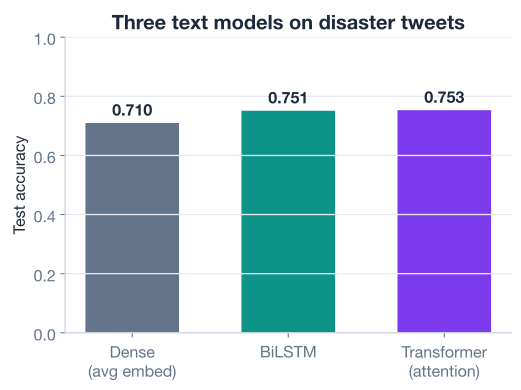
The pattern matches what the module taught. Modeling word order (the BiLSTM) clearly beats ignoring it (the dense model), and self-attention (the transformer) matches or slightly exceeds recurrence while being far easier to parallelize. The transformer is your winner, so evaluate it more carefully.
Accuracy alone hides which kinds of mistakes a model makes. A confusion matrix breaks predictions into four buckets, and from those you can compute precision and recall.
from sklearn.metrics import confusion_matrix, precision_score, recall_score

probs = transformer.predict(X_test, verbose=0).ravel()
preds = (probs >= 0.5).astype(int)

cm = confusion_matrix(y_test, preds)
print(cm)
print("precision:", round(precision_score(y_test, preds), 3))
print("recall:   ", round(recall_score(y_test, preds), 3))
# Output:
# [[672 197]
#  [179 475]]
# precision: 0.707
# recall:    0.726
Here is what those four numbers mean for this problem, where the positive class is “real disaster”:
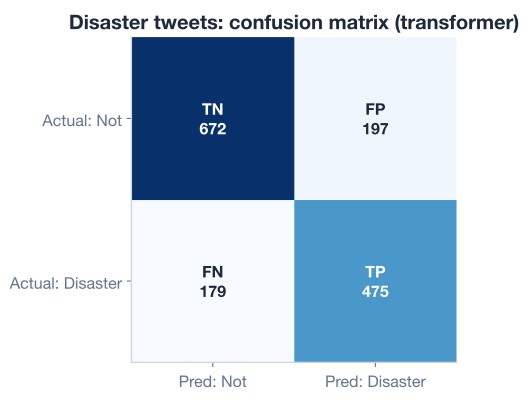
From the matrix you get two metrics that accuracy cannot show:
A precision of 0.707 means that when the model shouts “disaster,” it is right about 71 percent of the time. A recall of 0.726 means it catches about 73 percent of the real disasters. For a news team, recall is often the more important number, because a missed earthquake is worse than an extra false alarm to review. If you cared even more about recall, you could lower the 0.5 threshold and accept more false positives in exchange for catching more real disasters.
Roughly 75 percent accuracy may sound modest next to the textbook 99 percent you see on clean benchmarks. It is actually a respectable result, and looking at the errors shows why these tweets are genuinely hard.
# inspect a few tweets the model got wrong
import numpy as np
wrong = np.where(preds != y_test)[0]
for i in wrong[:3]:
    print(f"true={y_test[i]} pred={preds[i]} | {X_test[i]}")
# Output (illustrative):
# true=0 pred=1 | this party is fire everyone is here
# true=1 pred=0 | so many families displaced after the storm last night
# true=0 pred=1 | i am literally dying these jokes are too good
Two failure modes show up again and again:
These are not bugs you can simply patch. Human language is ambiguous, and short tweets give the model very little context to disambiguate. Against that, getting three out of four right is a solid outcome.
How to push past 75 percent
Every model here learned its word meanings from only 6,090 training tweets. A pretrained transformer such as DistilBERT arrives already knowing how English works from billions of words, so you fine-tune it rather than teach it language from scratch. On a dataset this size, that transfer of knowledge is the single biggest lever you have for accuracy, typically pushing scores into the low-to-mid 80s. That is exactly where you would go next on a production version of this project.
Now it is your turn. Try these on the same data and models before checking the hints.
Pick five raw tweets that contain a URL or a @mention and print their cleaned versions side by side, so you can confirm clean_text is removing the noise you expect.
import pandas as pd
df = pd.read_csv("disaster_tweets.csv")  # download: https://datatweets.com/datasets/disaster_tweets.csv

# Your code here: apply clean_text and compare before/after
Hint
Filter the raw text with df["text"].str.contains("http|@") to find rows that actually have URLs or mentions, then apply your clean_text function and print the text and clean columns together with df[["text", "clean"]].head().
The transformer flags a tweet as a disaster when its probability is at least 0.5. Recompute precision and recall using a threshold of 0.35 instead, and describe what happens to each metric.
# Reuse probs and y_test from the lesson
# Your code here: apply a 0.35 threshold and recompute precision and recall
Hint
Build new predictions with preds_low = (probs >= 0.35).astype(int), then call precision_score and recall_score again. Lowering the threshold flags more tweets as disasters, so you should expect recall to rise (you catch more real disasters) while precision falls (you also raise more false alarms).
The transformer used a single encoder block. Stack a second identical block on top of the first and retrain. Does the extra depth help on this small dataset?
# Start from the transformer code in the lesson
# Your code here: repeat the attention + feed-forward block once more before pooling
Hint
Wrap the attention-plus-feed-forward block in a small helper function that takes x and returns the updated x, then call it twice in a row before GlobalAveragePooling1D. With only 6,090 training tweets, more depth often does not help and can even overfit, so compare test accuracy carefully rather than assuming deeper is better.
Congratulations! You have built a complete deep learning text classification pipeline from raw tweets to an evaluated, winning model. Let’s review what you learned.
Loading and Exploring Text Data
Cleaning and Vectorizing
TextVectorization turns text into integer sequences, and an Embedding layer maps each token to a learned vectorComparing Model Families
Evaluating Honestly
Error Analysis
This project is a miniature of nearly every real NLP system you will build: get messy text, clean it, turn it into numbers, try a few architectures of increasing power, and then judge the winner with metrics that match the business cost of its errors. The specific dataset changes, but the workflow does not.
It also makes a quieter point about modern machine learning. The transformer barely beat the LSTM here, not because attention is weak, but because it learned English from scratch on only a few thousand tweets. The real power of transformers shows up when they arrive pretrained on enormous corpora and you simply fine-tune them. Understanding that distinction is what separates someone who can copy a model from someone who knows which lever to pull next.
You have assembled the entire module into one working project and evaluated it like a professional. From here, revisit the broader program or return to this module’s overview to review any technique you want to strengthen.
Return to the full Machine Learning program and explore the other modules.
Return to the Natural Language Processing for Deep Learning module overview.
You just took a noisy, real-world dataset and turned it into a model that catches roughly three out of four disaster tweets, with a clear-eyed understanding of where and why it fails. That combination of building and critiquing is the heart of practical machine learning. Carry the habit forward: whatever model you train next, do not stop at the accuracy number. Look at the confusion matrix, read the mistakes, and ask what the next lever should be. That is how good models become great ones.