Title here
Summary here
In the previous lesson you learned what a linear regression model is and saw how a straight line can summarize the relationship between two columns. Fitting that line is only half the job. The real payoff of linear regression is that the numbers it produces, the intercept and the coefficients, carry plain-English meaning. They tell you how each feature relates to the thing you are predicting.
This lesson is about reading those numbers correctly. You will fit models with scikit-learn on a real dataset of cars, then interpret what each parameter is telling you. Along the way you will hit a subtle problem: raw coefficients are measured in different units, so you cannot compare them directly. The fix, standardization, will let you line up every predictor on the same scale and finally answer the question everyone wants to ask: which feature matters most?
By the end of this lesson, you will be able to:
LinearRegression model with scikit-learn and read its intercept_ and coef_You should be comfortable with basic Python, pandas, and the idea of a train/test split from the previous lesson. Let’s begin.
You will work with the automobiles dataset, a classic collection of car specifications drawn from automobile import records. Each row is one car model, and your goal is to predict its price in US dollars from physical and mechanical features like engine size, horsepower, and weight.
You can download the dataset and load it with pandas.
import pandas as pd

df = pd.read_csv("automobiles.csv")  # download: https://datatweets.com/datasets/automobiles.csv

print("Shape:", df.shape)
# Output: Shape: (159, 26)
The dataset has 159 rows and 26 columns, with no missing values, which keeps this lesson focused on interpretation rather than cleaning.
You will not use all 26 columns. Here are the ones that matter for this lesson:
| Column | Type | Meaning |
|---|---|---|
price | int | Target: the car’s price in US dollars |
engine_size | int | Engine displacement (larger engines, roughly, mean more power) |
horsepower | int | Engine power output |
curb_weight | int | Weight of the car in pounds with standard equipment |
width | float | Width of the car in inches |
length | float | Length of the car in inches |
highway_mpg | int | Fuel efficiency on the highway (miles per gallon) |
city_mpg | int | Fuel efficiency in the city |
fuel_type | category | "gas" or "diesel" |
make | category | Manufacturer (e.g. "toyota", "bmw") |
A quick look at the target tells you the range you are working with.
print(df["price"].describe()[["mean", "min", "max"]].round(0))
# Output:
# mean    11446.0
# min      5118.0
# max     35056.0
# Name: price, dtype: float64
Prices run from about $5,118 for the cheapest car to about $35,056 for the most expensive, with a mean near $11,446. Keep that mean in mind; it will reappear, almost exactly, as the intercept of a well-chosen model.
A simple linear regression uses a single predictor. The model is a straight line:
where is the predicted price, is the predictor, is the intercept, and is the slope (the coefficient on ). Fitting the model means choosing and so the line passes as close as possible to the data points.
scikit-learn puts linear regression in its linear_model module. You import the LinearRegression class, create an instance, then call .fit() with your features and target. Let’s predict price from engine_size alone.
from sklearn.linear_model import LinearRegression

X = df[["engine_size"]]   # features: a table, even with one column
y = df["price"]           # target: a single column

model = LinearRegression()
model.fit(X, y)

print("Intercept:", round(model.intercept_, 1))
print("Slope:    ", round(model.coef_[0], 2))
# Output:
# Intercept: -7914.1
# Slope:     162.38
Two details about the scikit-learn interface are worth noticing. The features X are passed as a two-dimensional table (note the double brackets), even when there is only one column, because the model is built to handle many predictors. After fitting, the learned parameters live in two attributes with a trailing underscore: intercept_ (a single number) and coef_ (an array, one entry per predictor).
The fitted model is:
The scatter plot below shows the data and this fitted line running through it.
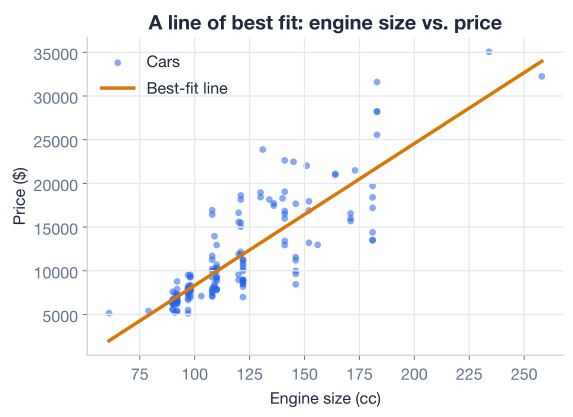
How well does a single feature explain price? scikit-learn’s .score() method returns the coefficient of determination, written , which measures the fraction of variation in the target that the model explains:
Here is an actual price, is the model’s prediction, and is the mean price. An of 1 is a perfect fit; an of 0 means the model does no better than always guessing the mean.
print("R-squared:", round(model.score(X, y), 3))
# Output: R-squared: 0.708
Engine size alone explains about 71 percent of the variation in price. That is a strong start for a single feature, and the next sections will show how interpreting and adding features makes the model both clearer and better.
Now to reading the parameters. Start with the intercept, .
To see what the intercept represents, take the average of both sides of the model equation. The model says each price is plus some random error, and we assume those errors average out to zero. So the expected (average) price is:
Now set the predictor to zero. Everything multiplied by vanishes, leaving:
So the intercept is the predicted value of the outcome when every predictor equals zero. For our model, that is the predicted price of a car with an engine size of zero, which the math reports as .
A negative price is obviously nonsense, and that is the point: an intercept is only meaningful if a predictor value of zero is meaningful. No car has a zero-displacement engine, so this intercept is a mathematical anchor for the line, not a real-world prediction. You will see in a moment how standardizing the features makes the intercept interpretable again.
An intercept is not always interpretable
Whenever a predictor of zero is impossible or far outside your data (zero engine size, zero square feet, a newborn’s salary), treat the intercept as a fitting artifact rather than a real prediction. It still anchors the line correctly; it just does not describe any car you would ever see.
The slope, , is where the interpretation gets useful. To isolate it, compare two cars that differ by exactly one unit in the predictor. Write the expected price at some value , and again at :
Subtract the first from the second. The intercept cancels, the terms cancel, and you are left with:
So the slope is the change in the expected outcome for a one-unit increase in the predictor. For our model, , which means each additional unit of engine size is associated with about $162 more in price, on average.
The relationship scales linearly, so a non-unit change just multiplies the slope. A car with an engine 100 units larger is predicted to cost about more. You can confirm this directly with the model.
small = model.predict([[100]])[0]
big = model.predict([[200]])[0]
print("Predicted change for +100 engine size:", round(big - small, 0))
# Output: Predicted change for +100 engine size: 16238.0
That predictability is the whole appeal of linear regression. Once you have the slope, you can reason about “how much more” with simple multiplication.
A single feature rarely tells the whole story. A car’s price depends on its engine, its weight, its size, and its efficiency all at once. Multiple linear regression lets you use several predictors together:
The interpretation of each slope gains one crucial phrase. Repeat the one-unit-increase argument from before, but now with two predictors. Increase by one while holding fixed:
The subtraction only cancels the term if is the same in both cases. So in multiple regression, each coefficient is the change in the outcome for a one-unit increase in that predictor, holding all the other predictors constant. That last phrase, often written as “controlling for” the other features, is what makes multiple regression powerful: it isolates the effect of one feature after accounting for the others.
Let’s build a real multiple regression. You will predict price from five physical features, and this time you will do it properly with a train/test split so you can measure honest performance.
from sklearn.model_selection import train_test_split

features = ["engine_size", "horsepower", "curb_weight", "width", "highway_mpg"]
X = df[features]
y = df["price"]

X_train, X_test, y_train, y_test = train_test_split(
    X, y,
    test_size=0.25,     # hold out 25% for honest evaluation
    random_state=42,    # fixed seed makes the split reproducible
)

print("Training cars:", X_train.shape[0])
print("Test cars:    ", X_test.shape[0])
# Output:
# Training cars: 119
# Test cars: 40You could fit this model directly and read the five coefficients, but you would run into a trap. Look at the units of the features: engine_size is in the low hundreds, curb_weight is in the thousands of pounds, and width is around 65 inches. Because each coefficient is “dollars per one unit of that feature,” and the units differ wildly, the raw coefficients are not comparable. A small coefficient on curb_weight might still dominate the prediction simply because weight spans a huge range, while a large coefficient on width might barely move price because width barely varies.
To compare predictors fairly, put them all on the same scale first. Standardization rescales each feature to have a mean of 0 and a standard deviation of 1, using the transform applied to each value :
where is the feature’s mean and its standard deviation. After this, a “one-unit increase” means “one standard deviation increase” for every feature, so the coefficients are all in the same currency: dollars per standard deviation. Now they can be compared directly.
scikit-learn’s StandardScaler does this. Fit it on the training data only, then apply the same transform to both sets.
from sklearn.preprocessing import StandardScaler

scaler = StandardScaler()
X_train_scaled = scaler.fit_transform(X_train)  # learn mean/std on TRAIN
X_test_scaled = scaler.transform(X_test)        # apply the SAME transform to test
Fit the scaler on training data only
Always call fit_transform on the training set and transform on the test set. If you fit the scaler on the full dataset, information about the test cars leaks into training and your evaluation becomes too optimistic. The same discipline you used for the train/test split applies to every preprocessing step.
Now fit the multiple regression on the scaled features and inspect the parameters.
model = LinearRegression()
model.fit(X_train_scaled, y_train)

for name, coef in zip(features, model.coef_):
    print(f"{name:>14}  coef = {coef:>8.1f}")
print(f"{'intercept':>14}  =      {model.intercept_:>8.1f}")
# Output:
#    engine_size  coef =   1808.4
#     horsepower  coef =    336.5
#    curb_weight  coef =   1935.4
#          width  coef =   1892.0
#    highway_mpg  coef =     82.6
#      intercept  =      11442.5
Because the features are standardized, every coefficient is now directly comparable. The bar chart below ranks them by magnitude.
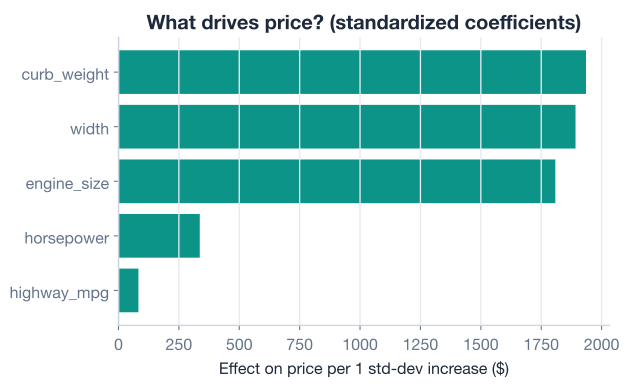
Read these as “dollars per one standard deviation of the feature, holding the others constant”:
curb_weight (1935.4) has the largest effect. A car one standard deviation heavier than average is predicted to cost about $1,935 more, holding engine size, horsepower, width, and efficiency fixed.width (1892.0) and engine_size (1808.4) are close behind. Wider cars and bigger engines both command large price premiums.horsepower (336.5) matters much less than you might expect, because much of its influence is already captured by engine size and weight, which it correlates with. This is the “controlling for” effect in action: once weight and engine size are in the model, horsepower has little left to explain.highway_mpg (82.6) has the smallest effect of the five.Notice the intercept: 11442.5, almost exactly the mean price of $11,446 you saw at the start. That is not a coincidence. With standardized features, every predictor is zero at its own mean, so the intercept becomes the predicted price of an average car. Standardizing turned a meaningless negative intercept into a genuinely useful number.
Evaluate on the held-out test set. Alongside , report two error metrics in the target’s own units: RMSE (root mean squared error) and MAE (mean absolute error).
from sklearn.metrics import mean_squared_error, mean_absolute_error
import numpy as np

preds = model.predict(X_test_scaled)

r2 = model.score(X_test_scaled, y_test)
rmse = np.sqrt(mean_squared_error(y_test, preds))
mae = mean_absolute_error(y_test, preds)

print(f"TEST  R^2 = {r2:.3f}")
print(f"TEST  RMSE = ${rmse:,.0f}")
print(f"TEST  MAE  = ${mae:,.0f}")
# Output:
# TEST  R^2 = 0.793
# TEST  RMSE = $2,327
# TEST  MAE  = $1,863
Five features lift from 0.708 (engine size alone) to 0.793 on unseen cars. The model’s typical error is about $2,327 (RMSE) or $1,863 (MAE), against prices averaging $11,446, so it is usually within a couple of thousand dollars. The plot below compares predicted prices to actual prices; points hugging the diagonal line are accurate predictions.
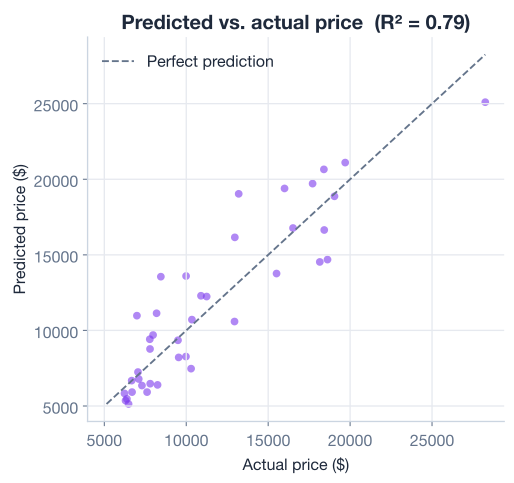
You will dig into residuals and goodness-of-fit properly in the next lesson; for now, the takeaway is that interpretable coefficients and good predictions can come from the same model.
So far every predictor has been a continuous number where “one unit more” makes intuitive sense. Many useful features are categories, though. The automobiles dataset has fuel_type, which is either "gas" or "diesel". How do you put that into a regression?
The standard approach is one-hot encoding: turn a category with levels into binary (0/1) columns. The level you leave out becomes the reference group. For fuel_type, you can build a single fuel_type_diesel column that is 1 for diesel cars and 0 for gas cars, which makes gas the reference.
# 1 for diesel, 0 for gas -> gas is the reference group
X_fuel = (df["fuel_type"] == "diesel").astype(int).to_frame("fuel_type_diesel")

model = LinearRegression()
model.fit(X_fuel, df["price"])

print("Intercept (gas baseline):", round(model.intercept_, 1))
print("Diesel coefficient:      ", round(model.coef_[0], 1))
# Output:
# Intercept (gas baseline): 10951.6
# Diesel coefficient:       5238.0
The interpretation shifts slightly for categorical predictors:
Read that carefully: the coefficient is a difference, not a level. A positive coefficient means the category is associated with a higher outcome than the reference; a negative one means lower. This is exactly the same “change in the average” idea as a continuous slope, where the unit increase happens to be a switch from one category to another.
Watch which level gets dropped
pd.get_dummies(df["fuel_type"], drop_first=True) drops a level alphabetically, which would drop "diesel" and keep a gas column, flipping the reference. Building the indicator by hand, as above, keeps the reference where you want it. Whichever you choose, always confirm which level is the baseline before interpreting, because it changes the sign and meaning of every coefficient.
Here is the full multiple-regression workflow, from raw data to interpreted, evaluated model, in one runnable script.
import numpy as np
import pandas as pd
from sklearn.model_selection import train_test_split
from sklearn.preprocessing import StandardScaler
from sklearn.linear_model import LinearRegression
from sklearn.metrics import mean_squared_error, mean_absolute_error

# 1. Load
df = pd.read_csv("automobiles.csv")  # download: https://datatweets.com/datasets/automobiles.csv

# 2. Select features and target
features = ["engine_size", "horsepower", "curb_weight", "width", "highway_mpg"]
X = df[features]
y = df["price"]

# 3. Split, then scale (fit on train only)
X_train, X_test, y_train, y_test = train_test_split(
    X, y, test_size=0.25, random_state=42
)
scaler = StandardScaler()
X_train = scaler.fit_transform(X_train)
X_test = scaler.transform(X_test)

# 4. Fit
model = LinearRegression()
model.fit(X_train, y_train)

# 5. Interpret
for name, coef in zip(features, model.coef_):
    print(f"{name:>14}  coef = {coef:>8.1f}")
print(f"{'intercept':>14}  =      {model.intercept_:>8.1f}")

# 6. Evaluate
preds = model.predict(X_test)
print(f"TEST  R^2 = {model.score(X_test, y_test):.3f}")
print(f"TEST  RMSE = ${np.sqrt(mean_squared_error(y_test, preds)):,.0f}")
# Output:
#    engine_size  coef =   1808.4
#     horsepower  coef =    336.5
#    curb_weight  coef =   1935.4
#          width  coef =   1892.0
#    highway_mpg  coef =     82.6
#      intercept  =      11442.5
# TEST  R^2 = 0.793
# TEST  RMSE = $2,327
In about 20 lines you loaded real car data, scaled it, fit a multiple regression, and produced coefficients you can actually explain to a non-technical colleague.
Try these before checking the hints.
Fit a simple LinearRegression predicting price from horsepower alone (no scaling, no split). Print the intercept, the slope, and the R^2. How would you describe, in one sentence, what the slope means in dollars?
import pandas as pd
df = pd.read_csv("automobiles.csv")

# Your code here
Hint
Set X = df[["horsepower"]] and y = df["price"], then model = LinearRegression() and model.fit(X, y). The slope is model.coef_[0]; interpret it as “each additional unit of horsepower is associated with about that many more dollars of price, on average.” Use model.score(X, y) for the R^2.
Using the standardized five-feature model from the lesson, drop curb_weight and refit on the remaining four features. Print the new engine_size coefficient. Did it grow or shrink compared to the lesson’s value of 1808.4, and why?
# Your code here (reuse the train/test split and StandardScaler pattern)Hint
Set features = ["engine_size", "horsepower", "width", "highway_mpg"] and rerun the split, scale, and fit. The engine_size coefficient grows, because engine_size and curb_weight are correlated: with weight removed, engine size now has to “absorb” some of the price variation that weight used to explain. This is the “controlling for” effect from a different angle.
One-hot encode aspiration (which is "std" or "turbo") with pd.get_dummies(..., drop_first=True), fit a regression of price on the single resulting column, and report the intercept and coefficient. Which aspiration type is the reference group, and how much more (or less) does the other type cost on average?
# Your code hereHint
pd.get_dummies(df["aspiration"], drop_first=True) drops "std" alphabetically, leaving a turbo column, so "std" is the reference. The intercept is the average price of a standard-aspiration car; the coefficient is how much more (positive) or less (negative) a turbo car costs on average. Add them to get the average turbo price.
You moved from fitting linear regressions to genuinely understanding them. Let’s review.
Fitting with scikit-learn
LinearRegression, create an instance, and call .fit(X, y)X are always a two-dimensional table; the target y is one columnmodel.intercept_ (one number) and model.coef_ (one per predictor)model.score(X, y) returns , the fraction of variation the model explainsInterpreting the parameters
Standardization
StandardScaler rescales each feature to mean 0, standard deviation 1, using Categorical predictors
A model that only predicts is a black box; a model you can interpret is a tool for understanding. By standardizing features and reading the coefficients, you learned that for these cars, weight, width, and engine size drive price far more than raw horsepower or fuel economy, and you can say by how much. That kind of insight is what makes linear regression a workhorse in business, science, and policy, where the explanation often matters as much as the prediction.
You also evaluated the model honestly on a test set, reaching an of 0.793 with an average error around $2,300. Whether that is “good enough” is the question the next lesson tackles head-on.
You can now fit a regression and explain every number it produces. Next, you will learn how to judge whether the fit is actually trustworthy, using residuals and diagnostic plots.
Learn how to tell whether your regression is any good.
Return to the Regression module overview.