Title here
Summary here
In the previous lesson you learned what a decision tree is, how it splits data, and how impurity measures like Gini and entropy decide where each split goes. You did that by hand on tiny examples, and it became clear how much arithmetic a single split involves. In this lesson you hand that work to a library. You will use scikit-learn to build a real decision tree classifier on an actual dataset, from raw columns all the way to a trained, scored model.
By the end of this lesson, you will be able to:
DecisionTreeClassifier with scikit-learn.predict()feature_importances_ to see which inputs drove its decisionsYou should be comfortable with basic Python and pandas, and you should understand what features, a target, and a train/test split are from the previous lessons. Let’s begin.
In the last lesson you computed Gini impurity and evaluated candidate thresholds by hand. Even for a single node with a couple of columns, that was a lot of arithmetic. Now picture a real dataset: dozens of columns and tens of thousands of rows. The algorithm must consider every possible split point on every feature at every node, and it repeats this down level after level. Doing that manually is not just slow, it is error-prone. One slip in one calculation and the whole tree is wrong.
This is exactly the kind of work a library should handle. scikit-learn does all of it for you reliably and in seconds. It implements the same CART algorithm you studied, so the trees it builds follow rules you already understand. Your job shifts from grinding through arithmetic to the parts that actually require judgment: preparing the data, choosing settings, and interpreting the result.
scikit-learn also gives you a single, consistent interface. Every model is created the same way, trained with .fit(), and evaluated with .score(). Once you learn the pattern on a decision tree, the same three lines work for almost any other model in the library.
The same workflow you already know
The steps in this lesson, split into features and target, hold out a test set, fit, then evaluate, are the same workflow from the foundations module. The only thing that changes is the algorithm. That consistency is the whole point of scikit-learn, and it is why learning one model teaches you most of the rest.
You will work with the Adult Income dataset, drawn from real United States census records. Each row describes one person, and the task is a classic binary classification problem: predict whether that person earns more than $50,000 a year based on demographic and employment information.
You can download the dataset and load it with pandas.
import pandas as pd

# download: https://datatweets.com/datasets/adult_income.csv
df = pd.read_csv("adult_income.csv")

print("Shape:", df.shape)
# Output: Shape: (30162, 12)
The dataset has 30,162 rows and 12 columns. Eleven of them describe a person; the last, income, is the target you want to predict. Here are the columns you will work with.
| Column | Type | Meaning |
|---|---|---|
age | int | Person’s age in years |
education_num | int | Years of education completed (higher means more schooling) |
hours_per_week | int | Hours worked per week |
capital_gain | int | Income from investment gains |
capital_loss | int | Losses from investments |
workclass | category | Type of employer (private, government, self-employed, …) |
marital_status | category | Marital status (married, never married, divorced, …) |
occupation | category | Job category (executive, sales, craft, …) |
relationship | category | Role in the household (husband, wife, own-child, …) |
sex | category | Reported sex |
race | category | Reported race |
income | category | Target: "<=50K" or ">50K" |
Before doing anything else, check how the target is distributed. This habit catches problems early.
print(df["income"].value_counts())
# Output:
# income
# <=50K    22654
# >50K      7508
# Name: count, dtype: int64

print("rate >50K:", round((df["income"] == ">50K").mean(), 3))
# Output: rate >50K: 0.249
About 25 percent of people earn more than $50,000. This is an imbalanced dataset: the <=50K class is roughly three times larger than >50K. That matters for how you read accuracy later, because a lazy model that always guesses <=50K would already be right about 75 percent of the time. Keep that 75 percent baseline in mind as the number to beat.
Always know your baseline
When classes are imbalanced, accuracy alone can flatter a useless model. Here, predicting <=50K for everyone scores about 0.75 without learning anything. Any model worth keeping must clearly beat that floor. You will explore better evaluation metrics in the next lesson; for now, treat 0.75 as the bar.
scikit-learn trees only work with numbers, but several of our columns are text: workclass, marital_status, occupation, and so on. You cannot feed "Married-civ-spouse" directly into a tree. You have to convert these categorical columns into numeric form first. This preprocessing step is where you will spend most of your effort, and getting it right is what makes the model possible.
These categorical columns are nominal: their values have no natural order. There is no sense in which "Sales" is greater than "Tech-support". So you cannot just number them 0, 1, 2, because that would invent a ranking the tree would take seriously.
The correct approach is one-hot encoding: create a new column for each category, holding a 1 when the row belongs to that category and a 0 otherwise. A single occupation column with twelve values becomes twelve 0/1 columns, exactly one of which is 1 per row.
pandas makes this a single call with pd.get_dummies.
categorical_cols = [
    "workclass", "marital_status", "occupation",
    "relationship", "sex", "race",
]

df_encoded = pd.get_dummies(df, columns=categorical_cols)

print("Shape after encoding:", df_encoded.shape)
# Output: Shape after encoding: (30162, 47)
The 12-column frame expands to 47 columns. Each original categorical column was replaced by one new column per category. The numeric columns (age, education_num, and the rest) pass through untouched, and income is still there as the target.
You can see what the new column names look like.
print([c for c in df_encoded.columns if c.startswith("marital_status")])
# Output:
# ['marital_status_Divorced', 'marital_status_Married-AF-spouse',
#  'marital_status_Married-civ-spouse', 'marital_status_Married-spouse-absent',
#  'marital_status_Never-married', 'marital_status_Separated',
#  'marital_status_Widowed']
Each unique value of marital_status became its own column, prefixed with the original column name so you always know where it came from. The column marital_status_Married-civ-spouse, for example, holds a 1 for people in a civil marriage and a 0 for everyone else.
Why not just number the categories?
If you mapped occupation to 0, 1, 2, ..., the tree could split on occupation <= 4.5, treating those numbers as if they were ordered. For unordered categories that is meaningless and can hurt the model. One-hot encoding avoids this by giving each category its own yes/no column, so every split is an honest “is it this category or not” question.
With every column numeric, separate the inputs from the answer. By convention, features go in X and the target goes in y. You also convert the text target into 1 for ">50K" and 0 for "<=50K", since the tree works with numbers.
X = df_encoded.drop(columns=["income"])
y = (df_encoded["income"] == ">50K").astype(int)

print("X shape:", X.shape)
print("Positive (>50K) examples:", y.sum())
# Output:
# X shape: (30162, 46)
# Positive (>50K) examples: 7508
X now holds 46 numeric feature columns, and y is a single column of 0s and 1s. Notice that X has one fewer column than df_encoded because you dropped income.
You can never judge a model on the data it learned from, because it could simply memorize those rows. Instead you hold out a portion of the data, train on the rest, and measure performance only on the part the model has never seen. scikit-learn’s train_test_split does this for you.
from sklearn.model_selection import train_test_split

X_train, X_test, y_train, y_test = train_test_split(
    X, y,
    test_size=0.25,      # hold out 25% for testing
    random_state=42,     # makes the split reproducible
    stratify=y,          # keep the >50K ratio the same in both sets
)

print("Training observations:", X_train.shape[0])
print("Test observations:    ", X_test.shape[0])
# Output:
# Training observations: 22621
# Test observations:     7541
Two settings are worth remembering. random_state=42 fixes the randomness so you get the same split every run, which makes results reproducible; any fixed number works. And stratify=y keeps the 25 percent >50K proportion identical in both the training and test sets, which is especially important with imbalanced data, so the test set is a fair reflection of the whole.
The test set is sacred
The model must never see the test set during training. It exists for one purpose: a single, honest measurement at the very end. If you tune your model by repeatedly checking the test score, you are quietly letting test information leak into your choices, and your reported accuracy becomes too optimistic. Touch it once, at the end.
Now the part the previous lesson made you appreciate: scikit-learn finds every split for you. Building and training a decision tree takes the same two steps as any scikit-learn model.
.fit().You will create a DecisionTreeClassifier and cap its depth with max_depth=8. The depth limits how many questions the tree can ask along any path from root to leaf. Without a limit, a tree keeps splitting until it isolates the training data almost perfectly, which usually means it memorizes noise. A depth of 8 keeps the tree expressive but disciplined. You will study exactly how depth affects performance in the next lesson; for now, take it as a reasonable setting.
from sklearn.tree import DecisionTreeClassifier

# Step 1: create the model
tree = DecisionTreeClassifier(max_depth=8, random_state=42)

# Step 2: train (fit) it on the training data
tree.fit(X_train, y_train)

print("Tree trained!")
# Output: Tree trained!
That is the entire training process. Behind that single .fit() call, scikit-learn evaluated thousands of candidate splits using the Gini criterion, exactly the calculations you did by hand, and assembled the tree. The settings you passed in, max_depth and random_state, are hyperparameters: knobs you set before training, as opposed to the split thresholds the model learns during training.
random_state on the tree itself
You set random_state on the classifier, not just on the split. When several candidate splits tie for the best score, scikit-learn breaks the tie randomly. Fixing random_state makes that choice repeatable, so you and anyone running your code get the exact same tree every time.
A trained tree is only useful if it predicts well on data it has not seen. The simplest metric for classification is accuracy: the fraction of test examples the tree labels correctly.
scikit-learn computes this with .score().
test_accuracy = tree.score(X_test, y_test)

print(f"Test accuracy: {test_accuracy:.3f}")
# Output: Test accuracy: 0.851
The tree reaches about 0.851 on the test set. Compare that to the 0.75 baseline you noted earlier: predicting <=50K for everyone would score 0.75, so the tree has genuinely learned patterns that push it well above guessing. That gap is the value the model adds.
You can also look at the raw predictions to see what the tree actually outputs.
predictions = tree.predict(X_test)

print("Predicted:", predictions[:8])
print("Actual:   ", y_test.values[:8])
# Output:
# Predicted: [0 0 1 0 0 1 0 0]
# Actual:    [0 0 1 0 1 1 0 0]
The .predict() method returns the tree’s guesses, one per row. Comparing them to y_test is exactly what .score() does for you behind the scenes; here you can see it correctly labeled seven of the first eight people.
A model is meant to be used. To predict for a brand-new person, build a one-row DataFrame with the same columns, in the same order, that the tree was trained on. The cleanest way to guarantee that is to start from a row of zeros using X.columns, then set the values that apply.
import pandas as pd

# Start with every feature at 0, in the exact training column order
new_person = pd.DataFrame([dict.fromkeys(X.columns, 0)])

# Fill in a 45-year-old, 16 years of education, married, working 50 hrs/week
new_person["age"] = 45
new_person["education_num"] = 16
new_person["hours_per_week"] = 50
new_person["capital_gain"] = 0
new_person["marital_status_Married-civ-spouse"] = 1

prediction = tree.predict(new_person)
print("Prediction:", ">50K" if prediction[0] == 1 else "<=50K")
# Output: Prediction: >50K
The tree predicts this person earns more than $50,000. Starting from X.columns is the safe pattern: it ensures every feature is present and ordered exactly as the model expects, so a new prediction never silently lines up the wrong columns.
One of the best things about decision trees is that they are not black boxes. A trained tree can tell you which features it relied on most. As it builds, scikit-learn tracks how much each feature reduced impurity across all the splits where it was used, then normalizes those contributions so they sum to 1. The result lives in the feature_importances_ attribute.
import pandas as pd

importances = pd.Series(
    tree.feature_importances_, index=X.columns
).sort_values(ascending=False)

print(importances.head(6).round(3))
# Output:
# marital_status_Married-civ-spouse    0.409
# education_num                        0.215
# capital_gain                         0.194
# capital_loss                         0.065
# age                                  0.054
# hours_per_week                       0.033
# dtype: float64
These six features carry almost all of the tree’s decision-making weight. A picture makes the ranking clearer.
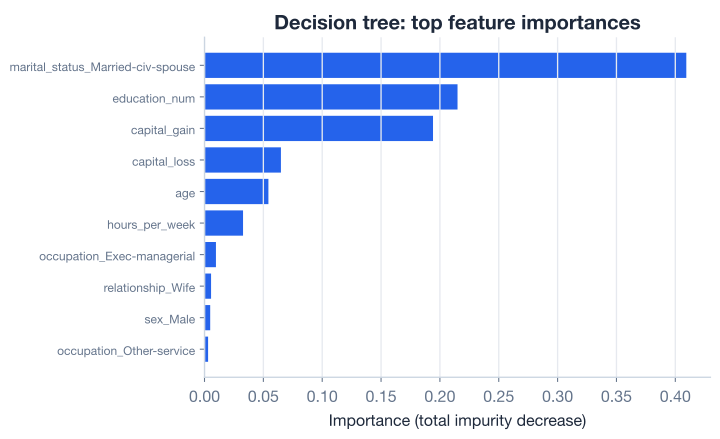
The story is striking. A single feature, marital_status_Married-civ-spouse, accounts for about 41 percent of the tree’s decisions. In this census data, being in a civil marriage is the strongest single signal for higher income the tree could find. After that, education_num (years of schooling) at about 21 percent and capital_gain (investment income) at about 19 percent do most of the remaining work. Together these top three explain roughly 82 percent of how the tree decides.
The features further down, capital_loss, age, and hours_per_week, contribute smaller but real amounts. Everything else, including the dozens of one-hot columns from workclass, occupation, and race, barely registers. The tree found that it could classify most people well using only a handful of inputs.
Importance is about prediction, not cause
High importance means a feature was useful for splitting the data, not that it causes the outcome. Marriage being predictive of higher income reflects patterns in this particular census snapshot, not a claim that marriage raises pay. Feature importances are a powerful tool for understanding a model, but read them as “what the tree leaned on,” never as proof of cause and effect.
Here is the entire workflow, from raw CSV to a scored, interpretable tree, in one runnable script. This is a template you can adapt for almost any classification problem with mixed numeric and categorical columns.
import pandas as pd
from sklearn.model_selection import train_test_split
from sklearn.tree import DecisionTreeClassifier

# 1. Load
df = pd.read_csv("adult_income.csv")  # download: https://datatweets.com/datasets/adult_income.csv

# 2. Encode categorical columns into 0/1 columns
categorical_cols = [
    "workclass", "marital_status", "occupation",
    "relationship", "sex", "race",
]
df_encoded = pd.get_dummies(df, columns=categorical_cols)

# 3. Split features and target
X = df_encoded.drop(columns=["income"])
y = (df_encoded["income"] == ">50K").astype(int)

# 4. Train/test split
X_train, X_test, y_train, y_test = train_test_split(
    X, y, test_size=0.25, random_state=42, stratify=y
)

# 5. Train
tree = DecisionTreeClassifier(max_depth=8, random_state=42)
tree.fit(X_train, y_train)

# 6. Evaluate
print(f"Test accuracy: {tree.score(X_test, y_test):.3f}")
# Output: Test accuracy: 0.851
In about a dozen lines you loaded real census data, encoded it, split it honestly, trained a decision tree, and measured it on unseen people. The arithmetic that would have taken months by hand finished in under a second.
Try these before checking the hints.
After running pd.get_dummies on the categorical columns, find out how many new columns each original categorical column produced. Print the number of dummy columns whose name starts with "occupation".
import pandas as pd
df = pd.read_csv("adult_income.csv")

categorical_cols = ["workclass", "marital_status", "occupation",
                    "relationship", "sex", "race"]
df_encoded = pd.get_dummies(df, columns=categorical_cols)

# Your code here
Hint
Build a list comprehension over df_encoded.columns and keep the names where c.startswith("occupation"), then take its len(). The count equals the number of unique occupations in the original column, which you can confirm with df["occupation"].nunique().
Train a DecisionTreeClassifier with max_depth=3 instead of 8 on the same training data, and print its test accuracy. How does limiting the tree to three questions deep compare to the depth-8 model?
# Your code here (reuse X_train, X_test, y_train, y_test from the lesson)Hint
Instantiate DecisionTreeClassifier(max_depth=3, random_state=42), call .fit(X_train, y_train), then .score(X_test, y_test). You should get a number a bit below 0.851. A shallower tree asks fewer questions, so it captures less detail, but it is still well above the 0.75 baseline.
Using the trained depth-8 tree, find the feature with the lowest importance among those the tree actually used (importance greater than 0). Print its name and value.
import pandas as pd
# Reuse the trained `tree` and `X` from the lesson

# Your code here
Hint
Build pd.Series(tree.feature_importances_, index=X.columns), keep only entries greater than 0 with boolean indexing, then use .idxmin() for the name and .min() for the value. Many features have an importance of exactly 0 because the tree never split on them at all.
You took a decision tree from raw census data all the way to a trained, scored, and interpretable model using scikit-learn. Let’s review what you learned.
Why scikit-learn
.fit(), .score(), .predict()Preparing Data for Trees
pd.get_dummies turns each category into its own 0/1 column, with no invented orderingX and the target into y, converting the text target to 0/1train_test_split with stratify and a fixed random_state, especially when classes are imbalancedBuilding and Evaluating
DecisionTreeClassifier(max_depth=8, random_state=42) creates a depth-limited tree.fit(X_train, y_train) trains it; .score(X_test, y_test) measures accuracy on unseen data.predict() labels new rows; build new rows from X.columns to keep columns alignedInterpreting the Tree
feature_importances_ shows how much each feature reduced impurity, normalized to sum to 1marital_status_Married-civ-spouse (0.409), education_num (0.215), and capital_gain (0.194) dominatedMost of the work in machine learning is not the model, it is getting the data into a shape the model can use. You just saw that firsthand: a few lines trained the tree, but the encoding and splitting set it all up. That ratio holds across real projects, which is why preprocessing skills like one-hot encoding pay off everywhere.
You also got something tree models give you for free that many algorithms do not: a clear, ranked account of what drove the predictions. Being able to say “this model leans mostly on marital status, education, and capital gains” turns a model from a mysterious score into something you can explain, question, and trust. That interpretability is one of the main reasons trees, and the forests built from them, remain so widely used.
You can now build and read a single decision tree. But you set max_depth=8 somewhat arbitrarily. In the next lesson you will see exactly how depth controls the balance between underfitting and overfitting, and how to choose it properly.
See how tree depth drives overfitting, and learn to tune it for the best honest accuracy.
Return to the Trees and Ensembles module overview.
You just turned raw census records into a working classifier and learned to read what it cares about. The pattern you practiced here, encode, split, fit, score, interpret, is the same one professionals use on far larger and messier datasets. Master this loop on a single tree, and the next steps, controlling overfitting and combining many trees into an ensemble, will feel like natural extensions rather than new mysteries.