Title here
Summary here
In the previous lessons you grew a single decision tree, watched it overfit as it got deeper, and tuned its max_depth to find a sweet spot. But every accuracy number you reported came from one train/test split. In this lesson you will learn why that single number can quietly mislead you, how k-fold cross-validation gives you a far more honest estimate, and how ensemble methods, especially the random forest, combine many trees into one model that beats any single tree.
By the end of this lesson, you will be able to:
cross_val_score and summarize it with a meanRandomForestClassifier, compare it to a single tree, and read its feature importancesThis is the capstone of the classification thread. You should be comfortable with decision trees, max_depth, train/test splits, and the scikit-learn fit/score pattern from the earlier lessons. Let’s begin.
Think back to how you have evaluated models so far. You called train_test_split, trained on one chunk of data, and measured accuracy on the other chunk. That works, but it hides a subtle risk: the score depends on which rows happened to land in the test set.
train_test_split carves out the test set at random. With a different random seed, a few hard examples might shuffle into the test set instead of the training set, and your accuracy could swing by a percentage point or two. When you tune a hyperparameter like max_depth and pick the value with the highest test accuracy, you might just be picking the value that got lucky on that one particular split.
You want an estimate that does not hinge on a single lucky or unlucky partition. The fix is to test on many different held-out subsets and look at the whole picture, not one number.
Why one number is not enough
A single test score is a point estimate. If you only ever see one value, you have no idea whether it is typical or an outlier. Cross-validation turns that single point into a small distribution of scores, so you can judge both the average performance and how much it varies from fold to fold.
Cross-validation is a technique borrowed from statistics that lets every observation serve as test data exactly once, while still never being trained and tested on at the same time. The most common variant, and scikit-learn’s default, is k-fold cross-validation.
The idea is simple. You split the data into equal-sized chunks called folds. Then you train and evaluate times. In each round you hold out one fold as the test set and train on the remaining folds. Because there are folds and each one takes a turn as the test set, you get separate accuracy scores.
5-fold cross-validation (each block is one fold)

Round 1:  [TEST ][train][train][train][train]  -> score 1
Round 2:  [train][TEST ][train][train][train]  -> score 2
Round 3:  [train][train][TEST ][train][train]  -> score 3
Round 4:  [train][train][train][TEST ][train]  -> score 4
Round 5:  [train][train][train][train][TEST ]  -> score 5

Every observation is tested exactly once.
Two properties make this powerful. First, every observation is used for testing exactly once, so no data is wasted and no single lucky split dominates. Second, you end up with scores instead of one, so you can take their mean for a stable estimate and glance at their spread to see how consistent the model is.
The number of folds is the cv parameter. In practice you almost always pick a value between 5 and 10; here you will use 5.
Let’s put numbers on this. You will reuse the Adult Income dataset from the earlier lessons, where the goal is to predict whether a person earns more than 50K a year from census features like age, education, occupation, and marital status. First load the data and build the same numeric feature matrix and binary target you used before.
import pandas as pd
from sklearn.tree import DecisionTreeClassifier

# download: https://datatweets.com/datasets/adult_income.csv
df = pd.read_csv("adult_income.csv")

# Build the feature matrix (one-hot encode the categorical columns)
# and the binary target: 1 if income > 50K, else 0.
X = pd.get_dummies(df.drop(columns="income"), drop_first=True)
y = (df["income"] == ">50K").astype(int)

print("X shape:", X.shape)
print("Positive (>50K) examples:", y.sum())
# Output:
# X shape: (30162, 96)
# Positive (>50K) examples: 7508
Notice what you do not do here: there is no train_test_split and no separate .fit() call. Cross-validation handles the splitting and fitting internally, repeating it once per fold. You just hand it the full X and y.
From Lesson 3 you found that a tuned tree around max_depth=10 gave the best held-out accuracy. Cross-validate that tree across 5 folds.
from sklearn.model_selection import cross_val_score

tree = DecisionTreeClassifier(max_depth=10, random_state=42)

cv_scores = cross_val_score(tree, X, y, cv=5, n_jobs=-1)

print("Fold scores:", cv_scores.round(3))
print("Mean CV accuracy:", round(cv_scores.mean(), 3))
# Output:
# Fold scores: [0.848 0.851 0.853 0.855 0.852]
# Mean CV accuracy: 0.852
There are a few things worth noting:
cross_val_score returns an array of one score per fold. For a classifier the default metric is accuracy.cv=5 parameter sets the number of folds.n_jobs=-1 parameter tells scikit-learn to run the folds in parallel across all available processor cores, which speeds things up.The five fold scores are tightly clustered, ranging only from 0.848 to 0.855. That tight spread is good news: it means the tree’s performance does not depend much on which slice of data it is tested on. The mean, 0.852, is your honest single-number estimate for this tree, and it is far more trustworthy than any one split could give you.
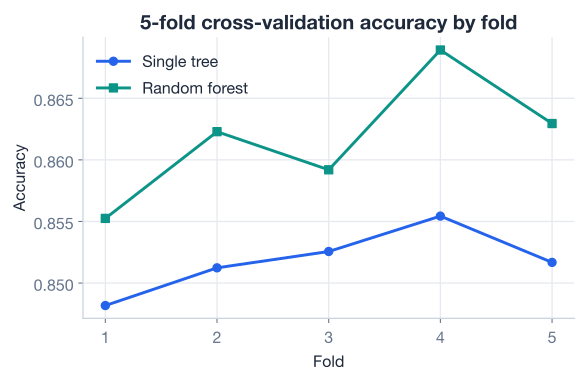
The chart above previews where this lesson is heading. The single tree is steady around 0.85, but a second model, the random forest you are about to build, edges it out fold after fold. To understand why, you need to meet ensemble methods.
Cross-validation is for estimating, not deploying
cross_val_score trains and discards models just to estimate how a model configuration will perform. It does not hand you a single trained model to use. Once cross-validation tells you a configuration is good, you fit one final model on your training data and use that for predictions.
A single decision tree has a well-known weakness. It is high variance: small changes in the training data can produce a very different tree. The reason is structural. A tree picks its splits from the distinct values in each column, so nudging a few rows can change which split looks best at the top, and that one change cascades into a completely different tree below it.
What if you turned that fragility into a feature? If small data changes produce different trees, you could deliberately build many slightly different trees and then combine their votes. Individual trees might be unstable, but their average is far steadier, the same way a crowd’s average guess is often better than any single person’s.
This is the core idea behind ensemble methods: combine many models into one stronger model. The most important ensemble for trees is the random forest, and it is built on a technique called bagging.
Bagging is short for bootstrap aggregating, and it does exactly two things its name promises.
First, bootstrapping. To train each tree, you do not hand it the full dataset. Instead you build a fresh training set by drawing rows at random with replacement, meaning the same row can be picked more than once and some rows are left out entirely. Each tree therefore sees a slightly different sample of the data, so each one grows a little differently.
Original rows:   A  B  C  D  E

Bootstrap 1:     A  C  C  D  E      (B left out, C twice)   -> Tree 1
Bootstrap 2:     A  A  B  D  D      (C, E left out)         -> Tree 2
Bootstrap 3:     B  B  C  E  E      (A, D left out)         -> Tree 3
Second, aggregating. Once every tree is trained on its own bootstrap sample, you combine their predictions. For classification, the trees effectively vote and the most popular class wins. Averaging many noisy-but-independent predictions cancels out the individual errors, which is why the ensemble is more stable than any single tree.
Bagging alone helps, but the trees can still end up looking alike. If one feature is very predictive, almost every tree will choose it for the top split, and the trees become correlated, all making the same kinds of mistakes. When models err together, averaging them barely helps.
A random forest adds a second dose of randomness to break that correlation. At every split, the tree is only allowed to consider a random subset of the features rather than all of them. Sometimes the strongest feature is not even in the running for a given split, which forces different trees to rely on different features. The result is a collection of more de-correlated trees, and de-correlated trees are exactly what makes averaging pay off.
So a random forest combines two sources of diversity:
The more diverse the trees, the more their errors cancel when you average them. scikit-learn provides RandomForestClassifier for classification and RandomForestRegressor for regression, and they follow the same fit/score interface as everything else.
How scikit-learn combines the votes
In scikit-learn’s implementation, each tree outputs a probability for each class, and the forest averages those probabilities across all trees, then picks the class with the highest average. This soft-voting approach is slightly different from a plain majority vote, but the spirit is the same: many trees pooled into one decision.
Time to build one. The most important hyperparameter is n_estimators, the number of trees in the forest. More trees generally give a more stable estimate, with diminishing returns, at the cost of more computation. Here you will use 200 trees.
To compare fairly against the single tree, first measure the forest on a held-out test set using the same kind of split you used in earlier lessons.
from sklearn.model_selection import train_test_split
from sklearn.ensemble import RandomForestClassifier

X_train, X_test, y_train, y_test = train_test_split(
    X, y, test_size=0.25, random_state=42, stratify=y
)

forest = RandomForestClassifier(n_estimators=200, random_state=42, n_jobs=-1)
forest.fit(X_train, y_train)

print("Random forest test accuracy:", round(forest.score(X_test, y_test), 3))
# Output:
# Random forest test accuracy: 0.855
The forest reaches 0.855 on the held-out test set. Recall that the single tuned tree scored around 0.851 to 0.853 in this range. The gain looks modest, but remember that you are already near the ceiling of what these features support, and a few tenths of a percent on a 30,000-row census dataset is a real, consistent improvement.
The honest comparison, though, is cross-validation, since that smooths out the luck of any one split. Cross-validate the forest the same way you cross-validated the tree.
forest_cv = cross_val_score(
    RandomForestClassifier(n_estimators=200, random_state=42, n_jobs=-1),
    X, y, cv=5, n_jobs=-1,
)

print("Forest fold scores:", forest_cv.round(3))
print("Forest mean CV accuracy:", round(forest_cv.mean(), 3))
# Output:
# Forest mean CV accuracy: 0.862
The forest’s mean cross-validated accuracy is 0.862, a full point above the single tree’s 0.852. Crucially, this gap holds up across all five folds rather than appearing on just one lucky split, which is exactly the kind of evidence cross-validation is designed to give you.
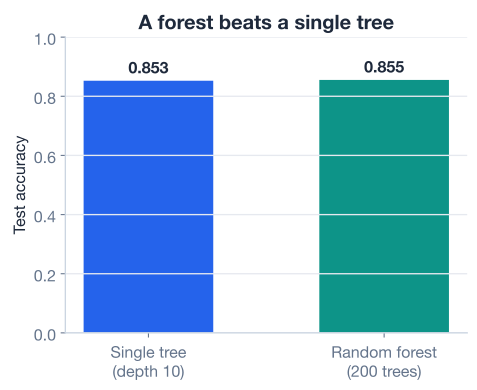
Why does combining trees help so reliably? Each individual tree in the forest is a bit overfit and a bit noisy, but they overfit in different directions because of the row and feature randomness. When you average them, the noise largely cancels while the genuine signal, the patterns all the trees agree on, survives. That is the whole magic of ensembling in one sentence.
More trees is not always more accuracy
Increasing n_estimators makes the forest’s predictions more stable, but accuracy plateaus quickly. Going from 10 to 200 trees usually helps a lot; going from 200 to 2,000 rarely moves the needle and just costs you time. Add trees until the score stops improving, then stop.
One thing you lose with a forest is the ability to draw a single readable tree. With 200 trees, there is no diagram to inspect. But you keep something almost as useful: feature importances. Just like a single tree, a forest can tell you which features mattered most, averaged across all of its trees. This makes the importances more reliable than a single tree’s, because they are not at the mercy of one tree’s quirky top split.
You read them exactly as before, through the feature_importances_ attribute.
importances = pd.Series(
    forest.feature_importances_, index=X.columns
).sort_values(ascending=False)

print(importances.head(10).round(3))
# Output:
# marital_status_Married-civ-spouse    0.409
# education_num                        0.215
# capital_gain                         0.194
# capital_loss                         0.065
# age                                  0.054
# hours_per_week                       0.033
# occupation_Exec-managerial           0.010
# relationship_Wife                    0.006
# sex_Male                             0.005
# occupation_Other-service             0.003
The story matches what you saw from the single tree, which is reassuring. Being married to a civilian spouse, years of education, and capital gains dominate, together accounting for the large majority of the model’s predictive power. Hours worked per week and age contribute modestly, and the long tail of occupation and relationship indicators each add a sliver.
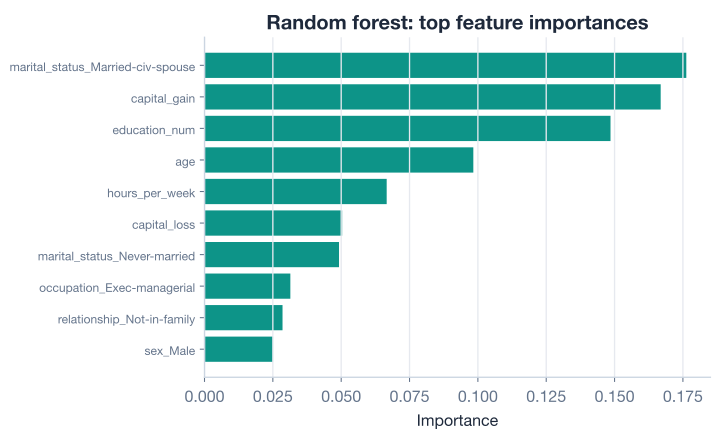
These importances are a practical tool, not just a curiosity. They tell you which signals the model leans on, hint at which features you might collect more carefully or engineer further, and give you a sanity check that the model is keying on sensible factors rather than noise.
Importances are about prediction, not fairness or causation
A high importance means a feature helped the model split the data, not that it causes the outcome or that using it is appropriate. Sensitive attributes like sex can carry predictive signal while still being inappropriate or unlawful to act on. Always weigh importances against the ethics and context of your problem.
Try these before checking the hints. Reuse the X, y, and train/test variables from the lesson.
Re-run cross-validation on the single DecisionTreeClassifier(max_depth=10, random_state=42) using 10 folds instead of 5. Print the fold scores and their mean, and compare the mean to the 5-fold result of 0.852.
# Your code here (reuse X and y from the lesson)Hint
Call cross_val_score(tree, X, y, cv=10, n_jobs=-1). Then take .mean() on the returned array. The mean should land very close to the 5-fold estimate, which is reassuring: a good cross-validation estimate should not change much when you adjust the number of folds.
A forest’s stability depends on n_estimators. Train a RandomForestClassifier for several values of n_estimators (try 10, 50, 100, 200) on the training set and print each one’s test accuracy. Watch how quickly the gains flatten out.
# Your code here (reuse X_train, X_test, y_train, y_test)Hint
Loop over [10, 50, 100, 200]. Inside the loop, instantiate RandomForestClassifier(n_estimators=n, random_state=42, n_jobs=-1), call .fit(X_train, y_train), then .score(X_test, y_test). You should see accuracy climb at first and then plateau near 0.855, confirming that piling on trees has diminishing returns.
Fit a single DecisionTreeClassifier(max_depth=10, random_state=42) on the training data and compare its top-5 feature importances to the forest’s top-5 from the lesson. Are the same features on top? Does the ordering shift?
# Your code here (reuse X_train, y_train and X.columns)Hint
After fitting the tree, build pd.Series(tree.feature_importances_, index=X.columns).sort_values(ascending=False).head(5). Compare it to the forest’s series from the lesson. The same handful of features should dominate both, but the forest spreads importance a little more evenly because it samples features at each split.
You have reached the capstone of the classification thread. You now know how to evaluate models honestly and how to combine many trees into one strong classifier. Let’s review what you learned.
Why a Single Split Misleads
K-Fold Cross-Validation
cross_val_score(model, X, y, cv=5) returns one score per fold; take the .mean() for a stable estimate[0.848, 0.851, 0.853, 0.855, 0.852], mean 0.852Ensemble Methods
Random Forests
RandomForestClassifier(n_estimators=200) reached 0.855 test accuracy and 0.862 mean 5-fold CV, beating the single treefeature_importances_ still works and is more reliable than a single tree’s, since it averages over many treesThe two ideas in this lesson are the workhorses of practical machine learning. Cross-validation is how professionals report trustworthy numbers; whenever you see a model compared against another, a careful practitioner used cross-validation rather than a single split. Without it, you can fool yourself into shipping a model that only looked good on one lucky partition.
Random forests, meanwhile, are often the first model people reach for on tabular data. They are robust, need little tuning, resist overfitting far better than a single tree, and hand you interpretable feature importances for free. You saw all of this concretely: the forest matched or beat the single tree on every fold, and its importances confirmed the same drivers of income you had already discovered. Master these two tools and you have the core of a reliable classification workflow.
You have built and honestly evaluated a strong classifier. So far every model in this module has predicted a category. In the next lesson you will turn to regression with trees, applying everything you know to predict a continuous number in a hands-on guided project.
Put trees and forests to work on a regression problem, predicting a continuous productivity score end to end.
Return to the Trees and Ensembles module overview.
You have closed out the classification thread with two of the most valuable techniques in the field: cross-validation for honest evaluation, and random forests for strong, low-maintenance predictions. The habit of cross-validating instead of trusting a single split will serve you in every project you take on, and the ensemble intuition, that many diverse models beat one, scales all the way up to the boosting methods that win competitions. Carry these ideas forward into the regression project next, and keep building.