Title here
Summary here
This lesson is a guided project. Instead of introducing a new algorithm, you will put everything you have learned about decision trees and random forests to work on a single, realistic problem from start to finish. You will predict how productive garment factory teams will be, using a real industrial dataset, and you will make every decision a practitioner makes along the way: cleaning messy columns, encoding categories, splitting honestly, fitting models, and interpreting what they learned.
By the end of this lesson, you will be able to:
DecisionTreeRegressor and a RandomForestRegressor to a continuous targetThis is a capstone for the module, so you should already be comfortable with decision trees, random forests, train/test splitting, and basic pandas. Let’s build something.
The garment industry is enormously labor-intensive, and a factory’s success depends on whether its teams hit their production targets day after day. Managers would love to know, in advance, which teams are likely to fall short, so they can intervene with incentives, scheduling changes, or support before a deadline slips.
You will model this with the real Garment Productivity dataset, which records daily performance for production teams over about two and a half months at a clothing factory. Each row is one team on one day. The column you want to predict is actual_productivity, a number between 0 and 1 that measures the fraction of the day’s target the team actually delivered.
Because the target is a continuous number rather than a category, this is a regression problem. That is the key difference from the classification work earlier in this module: instead of DecisionTreeClassifier you will reach for DecisionTreeRegressor, and instead of accuracy you will measure error in productivity units.
Start by loading the data and taking a first look.
import pandas as pd

# download: https://datatweets.com/datasets/garment_productivity.csv
df = pd.read_csv("garment_productivity.csv")

print("Shape:", df.shape)
print(df.head(3))
# Output:
# Shape: (1197, 14)
#          date   quarter   department        day  team  targeted_productivity   smv     wip  over_time  incentive  idle_time  idle_men  no_of_style_change  no_of_workers  actual_productivity
# 0  1/1/2015  Quarter1     sweing   Thursday     8                   0.80  26.16   1108       7080         98        0.0         0                   0           59.0             0.940725
# 1  1/1/2015  Quarter1  finishing   Thursday     1                   0.75   3.94    NaN        960          0        0.0         0                   0            8.0             0.886500
# 2  1/1/2015  Quarter1     sweing   Thursday    11                   0.80  11.41    968       3660         50        0.0         0                   0           30.0             0.800570
The dataset has 1,197 rows and 14 columns. A few columns deserve a quick definition, because they shape your cleaning decisions:
| Column | Type | Meaning |
|---|---|---|
date | text | The day, as MM/DD/YYYY, spanning roughly two and a half months |
quarter | category | Which quarter of the month (the month is split into quarters) |
department | category | The team’s department (sewing or finishing) |
day | category | Day of the week |
team | int | Team identifier (1-12); a label, not a quantity |
targeted_productivity | float | The productivity target set for that team that day |
smv | float | Standard minute value: the allotted time for the task |
wip | float | Work in progress: count of unfinished items |
over_time | int | Overtime worked, in minutes |
incentive | int | Financial incentive paid, in local currency |
idle_time, idle_men | float/int | Duration and number of idle workers during interruptions |
no_of_style_change | int | Number of product style changes |
no_of_workers | float | Number of workers on the team |
actual_productivity | float | Target: the fraction of the target actually delivered (0-1) |
Before cleaning, look at the structure. The .info() method tells you the data types and, crucially, which columns have missing values.
print(df.info())
# Output (abridged):
# RangeIndex: 1197 entries, 0 to 1196
# Data columns (total 14 columns):
#  #   Column                 Non-Null Count  Dtype
# ---  ------                 --------------  -----
#  2   department             1197 non-null   object
#  7   wip                    691 non-null    float64
#  14  actual_productivity    1197 non-null   float64
Two things jump out. First, wip is missing in many rows; only 691 of 1,197 are filled. Second, every other column is complete. Now look at the target itself, since understanding what you are predicting is always step one.
print(df["actual_productivity"].describe()[["mean", "min", "max"]].round(3))
# Output:
# mean    0.735
# min     0.234
# max     1.120
The average team delivers about 73.5 percent of its target. The values mostly sit between 0 and 1, but notice the maximum is 1.12: a handful of teams beat their target, so the value can slightly exceed 1. That is real data, not an error, and you will leave it as is.
A picture makes the shape of the target clear.
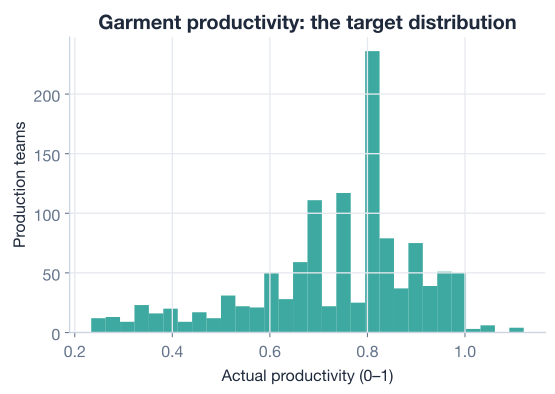
The distribution is lopsided: a tall cluster of high-productivity days near 0.75 to 0.85, and a thinner tail of struggling days stretching down toward 0.2. Keep this shape in mind. A target that is squeezed into a narrow band is genuinely hard to predict precisely, and that will matter when you interpret your scores later.
Why explore first
The five minutes you spend on .info() and .describe() repay themselves many times over. You just discovered a column full of missing values and a target with an unexpected maximum above 1, both of which would have caused confusion or errors later. Always meet your data before you model it.
Tree models are forgiving about feature scales, but they still need clean, numeric input. You have three cleaning jobs: fix a typo in a category, handle the missing wip values, and drop a column that cannot help.
Look closely at the department column. It should have exactly two values, but value counts reveal a subtle mess.
print(df["department"].value_counts())
# Output:
# department
# sweing         691
# finishing      257
# finishing      249
# Name: count, dtype: int64
Something is wrong. There appear to be three departments, but a garment line only has two. Two problems are hiding here. First, "sweing" is a misspelling of "sewing". Second, "finishing" shows up twice because some rows have a trailing space: pandas treats "finishing " and "finishing" as different values. Until you fix this, the model would split the same real department into separate branches.
You can clean both issues at once: strip surrounding whitespace, then correct the spelling.
df["department"] = df["department"].str.strip()
df["department"] = df["department"].replace({"sweing": "sewing"})

print(df["department"].value_counts())
# Output:
# department
# sewing       691
# finishing    506
# Name: count, dtype: int64
Now there are exactly two clean departments, as there should be.
Trailing spaces are invisible saboteurs
A trailing space is impossible to see by eye but very real to pandas. They sneak in through manual data entry and exports from spreadsheets all the time. Whenever a categorical column has more unique values than you expect, suspect whitespace first and run .str.strip() before anything else.
wip ValuesThe wip column (work in progress) is missing in over 500 rows. You have a few options, and the right one depends on why the values are missing.
Here, the gap is not random. The finishing department does not track work in progress the way the sewing line does, so those rows are blank by design. A missing wip effectively means “no work in progress recorded,” which is meaningfully zero, not unknown. So you will fill the missing values with 0 rather than dropping the rows or imputing a mean.
df["wip"] = df["wip"].fillna(0)

print("Missing wip values:", df["wip"].isnull().sum())
# Output: Missing wip values: 0
Filling with zero keeps all 1,197 rows. Dropping them would have thrown away every finishing-department record, which is nearly half your data.
The date column is complete, so why remove it? Because it cannot generalize. The data covers only about two and a half months of a single year. A tree could memorize that “January 12th was a good day,” but that fact is useless for predicting any future date. With a full year of data you might extract seasonality, but with this slice the column is just noise dressed up as information.
df = df.drop("date", axis=1)

print("Columns now:", df.shape[1])
# Output: Columns now: 13
That leaves 13 columns: 12 potential features and the target.
scikit-learn’s tree models only accept numbers, so you must convert the text columns into numeric form. Three columns are categorical: quarter, department, and day. There is also a subtle one: team looks numeric, but the numbers are just labels. Team 8 is not “more” than Team 2; the ordering is meaningless. So team is categorical too.
The cleanest tool here is pd.get_dummies, which turns each category into its own 0/1 column (one-hot encoding). This avoids implying a false ordering. You will encode quarter, department, day, and team.
categorical_cols = ["quarter", "department", "day", "team"]
df = pd.get_dummies(df, columns=categorical_cols, drop_first=True)

print("Shape after encoding:", df.shape)
# Output: Shape after encoding: (1197, 33)
The dataset widened from 13 to 33 columns because each category became its own indicator column. The drop_first=True argument removes one category from each group to avoid redundant columns, a small but standard habit.
Why one-hot encoding for team?
It is tempting to leave team as the integers 1 through 12 because they are already numbers. But a tree would then treat the split “team less than or equal to 6” as meaningful, as if low-numbered teams shared something with each other. They do not; the numbers are just IDs. One-hot encoding lets each team stand on its own, which is the honest representation.
With everything numeric, separate the inputs from the thing you want to predict, then split into training and test sets. Predict on data the model has never seen, exactly as you have done throughout this module.
from sklearn.model_selection import train_test_split

X = df.drop("actual_productivity", axis=1)   # all features
y = df["actual_productivity"]                 # the continuous target

X_train, X_test, y_train, y_test = train_test_split(
    X, y,
    test_size=0.25,      # hold out 25% for honest evaluation
    random_state=42,     # reproducible split
)

print("Training rows:", X_train.shape[0])
print("Test rows:    ", X_test.shape[0])
# Output:
# Training rows: 897
# Test rows:     300
Notice there is no stratify argument here. Stratification keeps class proportions balanced, which only makes sense for classification. In regression your target is continuous, so you simply take a random split.
Now the part you have been building toward. A DecisionTreeRegressor works just like the classifier you already know, but at each leaf it predicts a number (the average target of the training examples that landed there) instead of a class.
You will cap the depth at 6. Left unconstrained, a regression tree happily grows until each leaf holds a single training row, which memorizes the training data and generalizes terribly. A max_depth of 6 keeps the tree expressive but disciplined.
from sklearn.tree import DecisionTreeRegressor
from sklearn.metrics import r2_score, mean_absolute_error

tree = DecisionTreeRegressor(max_depth=6, random_state=42)
tree.fit(X_train, y_train)

tree_preds = tree.predict(X_test)

print(f"Tree test R^2: {r2_score(y_test, tree_preds):.3f}")
print(f"Tree test MAE: {mean_absolute_error(y_test, tree_preds):.3f}")
# Output:
# Tree test R^2: 0.387
# Tree test MAE: 0.086
Two metrics, two stories. The mean absolute error (MAE) of 0.086 says the tree’s predictions are off by about 0.086 in productivity units on average. Since productivity runs from roughly 0.2 to 1.1, being within about nine percentage points is genuinely useful for a manager deciding where to focus.
The of 0.387 is the fraction of the variation in productivity the model explains. It ranges from 0 (no better than always guessing the mean) to 1 (perfect). Formally:
where is the true value, the prediction, and the mean of the target. An of 0.387 means the tree explains about 39 percent of the variation. That is modest. Hold that thought; you will dig into why shortly.
A single tree is a bit jumpy: change a few training rows and its splits can shift. A random forest averages many trees, each trained on a different bootstrap sample with a random subset of features at each split. The averaging usually smooths out the noise and improves predictions. You already know how to build one; only the estimator name changes.
from sklearn.ensemble import RandomForestRegressor

forest = RandomForestRegressor(n_estimators=300, random_state=42)
forest.fit(X_train, y_train)

forest_preds = forest.predict(X_test)

print(f"Forest test R^2: {r2_score(y_test, forest_preds):.3f}")
print(f"Forest test MAE: {mean_absolute_error(y_test, forest_preds):.3f}")
# Output:
# Forest test R^2: 0.377
# Forest test MAE: 0.080
Here is a result worth pausing on. The forest’s of 0.377 is actually a hair lower than the single tree’s 0.387, while its MAE of 0.080 is a touch better than the tree’s 0.086. The two models are essentially tied, with the forest making slightly smaller average errors but explaining slightly less of the variance.
This is a healthy reminder that ensembles are not magic. On many datasets a random forest comfortably beats a single tree, but here the signal is limited enough that averaging more trees does not unlock much. When two reasonable models land this close, the honest conclusion is that you are near the ceiling of what these features can predict, not that one model is clearly superior.
A scatter of predicted versus actual productivity shows what “explaining 38 percent” looks like in practice.
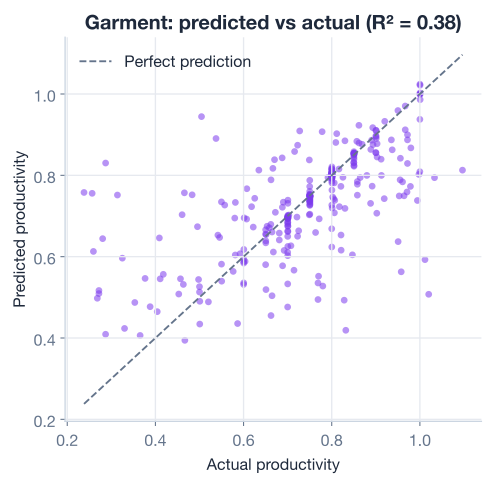
If the model were perfect, every point would sit exactly on the diagonal line. Instead the points form a loose band around it. The model captures the broad trend (high-target days do tend to be high-productivity days) but misses a lot of the detail. That visual scatter is an of 0.38.
One of the best things about tree models is that they tell you which features drove their decisions. The feature_importances_ attribute scores each feature by how much it reduced prediction error across the forest. Let’s rank them.
import pandas as pd

importances = pd.Series(
    forest.feature_importances_, index=X.columns
).sort_values(ascending=False)

print(importances.head(6).round(3))
# Output:
# targeted_productivity    0.242
# smv                      0.129
# team                     0.110
# incentive                0.107
# over_time                0.092
# no_of_workers            0.088
(Here team aggregates the importance across its one-hot columns for readability.) A bar chart makes the ranking easy to read.
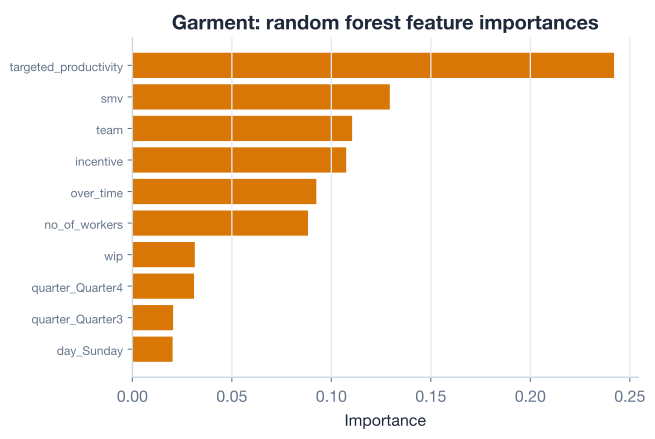
The story is intuitive and you can hand it straight to a non-technical manager:
targeted_productivity (0.242) is by far the strongest signal. The target a team is set tends to track what they actually deliver: ambitious targets often come with the conditions to meet them, and modest targets with the conditions that hold teams back.smv (0.129), the allotted time per task, matters next. The complexity of the work shapes how much gets done.team (0.110) carries real weight, which tells leadership that who is on the line matters. Some teams consistently outperform others.incentive (0.107) and over_time (0.092) round out the top five. These are the levers management can actually pull, and the model says they move the needle.That last point is the practical payoff. Of the top drivers, incentives and overtime are the two a manager directly controls, so they are the natural place to experiment.
A modest score is not a failure; it is information. It is worth understanding why the ceiling is where it is, because that tells you whether to keep tuning or to go get better data. Several forces are at work here:
So what could actually improve it? Concrete next moves, roughly in order of likely payoff:
over_time / no_of_workers), or incentive per worker, may carry more signal than the raw counts.max_depth, min_samples_leaf, and n_estimators can squeeze out a bit more.Honest reporting builds trust
When you present a model, resist the urge to oversell. Telling stakeholders “this explains about 38 percent of productivity variation, and here is why the rest is hard” is far more credible than implying the model is near-perfect. A clear-eyed account of a model’s limits is a mark of a strong practitioner, not a weak model.
Now it is your turn. This is a project, so treat these as extensions you actually run. Try each before peeking at the hint.
The raw over_time and no_of_workers columns may carry more signal as a ratio. Create a new feature over_time_per_worker = over_time / no_of_workers, add it to your features, refit the random forest, and see whether the test moves.
# Start from the cleaned, encoded df before the split
# Your code here
Hint
Create the column before encoding or splitting with df["over_time_per_worker"] = df["over_time"] / df["no_of_workers"]. Then rebuild X and y, re-run train_test_split with the same random_state=42, and refit RandomForestRegressor(n_estimators=300, random_state=42). Compare the new r2_score to the baseline of about 0.377.
You capped the decision tree at depth 6, but was that the best choice? Loop over several depths, fit a DecisionTreeRegressor for each, and print the test . Which depth performs best, and where does the score start to drop from overfitting?
for depth in [3, 5, 6, 8, 12, None]:
    # Your code here
    pass
Hint
Inside the loop, build DecisionTreeRegressor(max_depth=depth, random_state=42), fit it on X_train/y_train, predict on X_test, and print r2_score(y_test, preds). Watch what happens at None (unlimited depth): the test score should fall as the tree memorizes the training set.
Use GridSearchCV to search over max_depth and min_samples_leaf for the random forest, using as the scoring metric. Report the best parameters and the best cross-validated score.
from sklearn.model_selection import GridSearchCV
from sklearn.ensemble import RandomForestRegressor

# Your code here
Hint
Define a grid like {"max_depth": [6, 10, None], "min_samples_leaf": [1, 3, 5]}, pass it to GridSearchCV(RandomForestRegressor(n_estimators=300, random_state=42), param_grid, scoring="r2", cv=5), then .fit(X_train, y_train). Read grid.best_params_ and grid.best_score_. Given the modest ceiling, expect gains to be small but real.
Congratulations! You have completed a full regression project with tree models on a real industrial dataset, from raw CSV to interpreted results. Let’s review what you did.
Regression with Trees
actual_productivity is regression, so you use DecisionTreeRegressor and RandomForestRegressorCleaning for Tree Models
wip was filled with 0 because missing meant “none recorded,” not “unknown”date over a two-month windowEncoding
pd.get_dummiesteam is categorical even though it looks numeric, because the team numbers are labels with no orderModeling and Interpretation
feature_importances_ ranked targeted_productivity, smv, team, incentive, and over_time as the top driversReal projects rarely look like the tidy examples in a lesson. They look like this one: a column with a hidden typo, a target that slightly exceeds its stated maximum, missing values that mean different things, and a final score that is useful but far from perfect. Learning to navigate that messiness, and to explain it honestly, is what separates someone who can run scikit-learn from someone who can deliver a trustworthy model.
You also practiced the most valuable habit in applied machine learning: connecting a model back to the decision it serves. The feature importances did not just rank columns; they told a factory manager that incentives and overtime are levers worth pulling. A model that produces an action is worth far more than a model that only produces a score.
You have built, evaluated, and interpreted tree-based models end to end. Your models scored reasonably, but you also saw clear room to do better through feature engineering and hyperparameter tuning. That is exactly where the course goes next: turning a working model into the best model it can be.
Learn to systematically tune hyperparameters, validate properly, and squeeze the most out of every model.
Return to the Trees and Ensembles module overview.
You just carried a project the whole way, from a messy CSV to a model whose limits you understand and can defend. That arc, clean honestly, model carefully, interpret clearly, is the heart of practical machine learning, and it is the same whether you are predicting factory output, customer churn, or hospital readmissions. The algorithms will keep changing as you grow, but this disciplined, skeptical, decision-focused way of working is what will make you the practitioner people trust with real problems.