Title here
Summary here
This lesson opens up the most widely used clustering algorithm and shows you exactly how it works. Rather than treating k-means as a black box, you will build its core loop by hand on a real dataset, watch the centroids move from one iteration to the next, and learn the simple objective the algorithm is quietly optimizing the whole time.
By the end of this lesson, you will be able to:
You should be comfortable with basic Python, pandas, and NumPy, and you should have met the idea of unsupervised learning. No prior experience with clustering is required. Let’s begin.
Imagine you manage a shopping mall. You have a record for every member of your loyalty program, and two numbers stand out for each person: their annual income and a spending score the mall assigns from 1 to 100 based on how much and how often they spend. You suspect there are natural groups hiding in this data, careful high earners, enthusiastic big spenders, budget-conscious savers, but nobody has labeled anyone. There is no “correct” group column to learn from.
This is a classic unsupervised learning problem. There are no answers attached to the rows, so you cannot train a classifier. Instead you want the algorithm to look at the points and discover the groups on its own. The tool for this job is k-means clustering.
Let’s load the data and see what you are working with. The Mall Customers dataset has 200 rows, one per loyalty member.
import pandas as pd

# download: https://datatweets.com/datasets/mall_customers.csv
customers = pd.read_csv("mall_customers.csv")

print("Shape:", customers.shape)
# Output: Shape: (200, 4)

print(customers.columns.tolist())
# Output: ['CustomerID', 'Age', 'Annual Income', 'Spending Score']
For this lesson you will cluster on just two features, Annual Income and Spending Score, because two dimensions are easy to plot and reason about. Everything you learn generalizes directly to more features.
cols_to_keep = ["Annual Income", "Spending Score"]
customers = customers[cols_to_keep].copy()

print(customers.head())
# Output:
#    Annual Income  Spending Score
# 0             15              39
# 1             15              81
# 2             16               6
# 3             16              77
# 4             17              40
If you plot these two columns against each other, the structure jumps out even before any algorithm runs. There appear to be a handful of loose blobs of points rather than one uniform cloud.
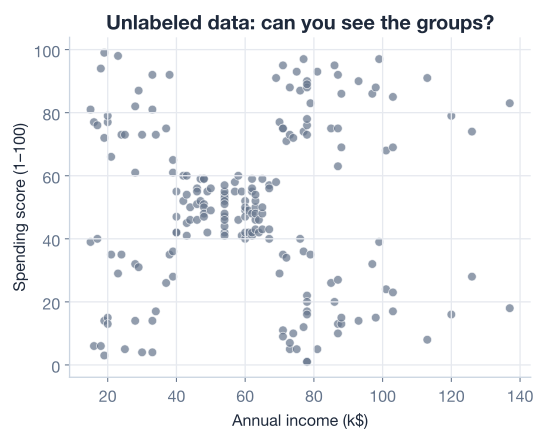
Your goal is to teach a computer to find those blobs automatically. That is exactly what k-means does.
K-means represents each cluster by a single point called a centroid, which sits at the center of the cluster. You decide up front how many clusters you want; that number is called k. The algorithm then settles on centroids such that every data point belongs to the centroid nearest to it.
The whole method is just two steps repeated until nothing changes:
1. Pick k and place k centroids somewhere to start.
2. Repeat until stable:
     a. ASSIGN  -> attach each point to its nearest centroid.
     b. UPDATE  -> move each centroid to the mean of its assigned points.
That is the entire algorithm. Step (a) groups points around the current centroids; step (b) nudges each centroid into the true middle of the points that chose it. Because moving a centroid can change which points are closest, you then re-run step (a), which can change the centroids again in step (b), and so on. The loop keeps tightening until the centroids stop moving.
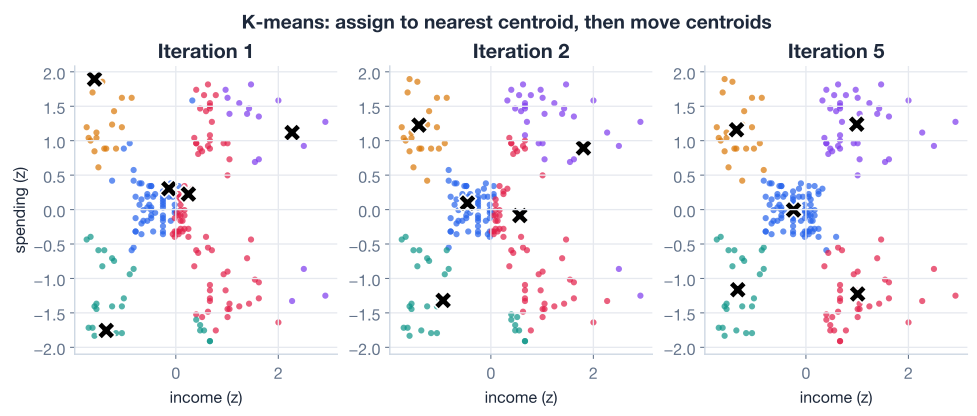
The figure below shows three snapshots of this process. On the left, the centroids start in arbitrary positions. In the middle, after a couple of rounds of assign-and-update, they have drifted toward the dense regions of points. On the right, they have settled into the centers of the natural groups and stopped moving.
Why it is called k-means
The name is literal. You choose k, the number of clusters, and each centroid is repeatedly set to the mean of the points assigned to it. K means: k of them, and they are means.
Both steps of k-means rest on one idea: the distance between two points. To assign a point to its nearest centroid, you need to measure “nearest,” and for that k-means uses ordinary straight-line distance, the Euclidean distance.
For a point with coordinates and a centroid at , the Euclidean distance is:
This is just the Pythagorean theorem: the straight-line gap between the two points on the plane. With more than two features the idea is identical; you sum the squared differences across every feature before taking the square root.
You can compute the distance from every customer to a single centroid in one vectorized expression. Suppose a centroid sits at income 50 and spending score 50:
import numpy as np

centroid = [50, 50]

dist = np.sqrt(
    (customers["Annual Income"] - centroid[0]) ** 2
    + (customers["Spending Score"] - centroid[1]) ** 2
)

print(dist.head().round(3))
# Output:
# 0    37.643
# 1    43.139
# 2    58.795
# 3    42.953
# 4    33.106
# dtype: float64
Each value is how far that customer is from the centroid. The assignment step simply asks, for each point, which centroid produces the smallest such distance.
Before going further, there is a subtle trap you must avoid. K-means measures distance, and distance is sensitive to scale.
In this dataset both features happen to live on similar ranges, so the issue is muted. But imagine income were measured in dollars (tens of thousands) while spending score stayed between 1 and 100. The income differences would be hundreds of times larger than the spending-score differences. When you square and sum them, income would completely dominate the distance, and spending score would barely matter. K-means would effectively cluster on income alone, ignoring the second feature.
The fix is standardization: rescale each feature so it has a mean of 0 and a standard deviation of 1. The transform applied to each value is:
where is the feature’s mean and is its standard deviation. After this, every feature contributes to the distance on equal footing.
from sklearn.preprocessing import StandardScaler

scaler = StandardScaler()
scaled = scaler.fit_transform(customers)

print("means:", scaled.mean(axis=0).round(6))
print("stds: ", scaled.std(axis=0).round(6))
# Output:
# means: [-0. -0.]
# stds:  [1. 1.]
Standardize before any distance-based method
K-means, k-nearest neighbors, and most clustering methods rely on distances. If your features have wildly different ranges, the large-range feature silently takes over. Standardizing (or otherwise scaling) your features is not optional for these algorithms, it is part of preparing the data correctly. To keep the income and spending numbers readable in this lesson we cluster on the original scale, but in real projects you scale first.
K-means needs somewhere to start. The simplest way to place the first centroids is to pick actual data points at random and use them as the starting centers. Each centroid is just a pair of coordinates.
Let’s write a small helper that draws a random sample of rows. It returns both the sampled rows (handy for plotting) and their coordinates as a plain list of [income, score] pairs (handy for computation).
def get_centroids(df, k):
    """Pick k random rows as the starting centroids."""
    centroids = df.sample(k, random_state=42).reset_index(drop=True)
    return centroids, centroids.values.tolist()

centroids, coords = get_centroids(customers, k=2)

print(coords)
# Output: [[54, 14], [126, 28]]
You now have two starting centroids. They are nothing special yet, just two customers chosen at random, but the loop will refine them into meaningful cluster centers.
Why a random_state
Passing random_state=42 fixes the randomness so you get the same starting centroids every time you run the code. This makes the results in this lesson reproducible. Any fixed number works; the point is that without it, the random sample, and therefore the final clusters, can differ from run to run.
With centroids in hand, the assignment step computes the distance from every point to every centroid, then labels each point with whichever centroid is closest.
To handle any number of centroids, loop over them and create one distance column per centroid. Each column records how far every customer is from that particular centroid.
def calculate_distance(df, centroids_coords):
    """Add one distance column per centroid; return the df and the new names."""
    names = []
    for i, centroid in enumerate(centroids_coords):
        name = f"dist_centroid_{i + 1}"
        df[name] = np.sqrt(
            (df.iloc[:, 0] - centroid[0]) ** 2
            + (df.iloc[:, 1] - centroid[1]) ** 2
        )
        names.append(name)
    return df, names

customers, dist_names = calculate_distance(customers, coords)

print(dist_names)
# Output: ['dist_centroid_1', 'dist_centroid_2']

print(customers.head())
# Output:
#    Annual Income  Spending Score  dist_centroid_1  dist_centroid_2
# 0             15              39        47.010637       111.543714
# 1             15              81        80.131143       121.165177
# 2             16               6        38.832976       110.018180
# 3             16              77        72.422372       115.502381
# 4             17              40        45.617979       109.658560
Now each row knows its distance to both centroids. Assigning the cluster is just a matter of picking the smaller one. The pandas method idxmin(axis=1) returns, for each row, the name of the column holding the minimum value, which is exactly the nearest centroid.
customers["cluster"] = (
    customers[dist_names].idxmin(axis=1).str.split("_").str[-1]
)

print(customers[["Annual Income", "Spending Score", "cluster"]].head())
# Output:
#    Annual Income  Spending Score cluster
# 0             15              39       1
# 1             15              81       1
# 2             16               6       1
# 3             16              77       1
# 4             17              40       1
The .str.split("_").str[-1] part just trims dist_centroid_1 down to the bare label 1. Every point now belongs to a cluster, chosen purely by which centroid is nearest.
The starting centroids were random, so the first assignment is rough. The update step fixes that: move each centroid to the mean position of the points currently assigned to it. A groupby on the cluster label, averaging the two feature columns, does this in one line.
variables = ["Annual Income", "Spending Score"]

new_centroids = round(customers.groupby("cluster")[variables].mean(), 4)
new_coords = new_centroids.values.tolist()

print(new_centroids)
# Output:
#          Annual Income  Spending Score
# cluster
# 1              44.1538         52.2785
# 2              90.8814         42.4915

print(new_coords)
# Output: [[44.1538, 52.2785], [90.8814, 42.4915]]
Notice how far the centroids have already moved from their random starting points. Each one has slid to the center of mass of its assigned customers. That is one full iteration: assign, then update.
But the story is not over. Because the centroids moved, some points that were closest to centroid 1 might now be closer to centroid 2. So you assign again, which can move the centroids again, which can change the assignments again. This is why k-means is iterative.
A single iteration rarely settles the clusters. You need to repeat assign-and-update until the centroids stop moving. The cleanest way is a for loop that runs up to some maximum number of iterations but breaks early the moment an update produces the same centroids as the previous round.
That early-stopping check is important. When a centroid is already sitting exactly at the mean of its points, the update step leaves it unchanged. If no centroid moves, no assignment can change either, so the algorithm has converged and any further iterations would be wasted work.
# Fresh start
customers = pd.read_csv("mall_customers.csv")[variables].copy()

centroids, coords = get_centroids(customers, k=2)

for i in range(100):
    last_coords = coords.copy()   # remember where the centroids were

    # ASSIGN: distance to each centroid, then nearest wins
    customers, dist_names = calculate_distance(customers, coords)
    customers["cluster"] = (
        customers[dist_names].idxmin(axis=1).str.split("_").str[-1]
    )

    # UPDATE: each centroid becomes the mean of its points
    centroids = round(customers.groupby("cluster")[variables].mean(), 4)
    coords = centroids.values.tolist()

    # STOP: centroids did not move, so we have converged
    if coords == last_coords:
        break

print(f"Converged after {i + 1} iterations")
# Output: Converged after 8 iterations
With this data and these starting points, the loop converges in just 8 iterations, far fewer than the 100-iteration ceiling. The two parameters working together here are worth naming explicitly:
Most runs stop early because the convergence check fires first. The cap only matters for difficult datasets or unlucky initializations.
Stop early, save work
If you removed the convergence check and always ran the full 100 iterations, you would get the identical clustering, just much slower. On this data the last 92 iterations would do nothing at all. Always let the loop break as soon as the centroids stabilize.
You now have every piece. Bundling them into a single function gives you a tidy kmeans you can call with any two-column DataFrame, any k, and any iteration cap. This is the same logic you just wrote, organized for reuse.
def kmeans(df, k, max_iterations=100):
    """Cluster a two-column DataFrame into k groups; return the cluster labels."""
    variables = list(df.columns)
    centroids, coords = get_centroids(df, k)

    for i in range(max_iterations):
        last_coords = coords.copy()

        # assign
        df, dist_names = calculate_distance(df, coords)
        df["cluster"] = (
            df[dist_names].idxmin(axis=1).str.split("_").str[-1]
        )

        # update
        centroids = round(df.groupby("cluster")[variables].mean(), 4)
        coords = centroids.values.tolist()

        if coords == last_coords:
            break

    print(f"Converged after {i + 1} iterations")
    return df["cluster"]


data = pd.read_csv("mall_customers.csv")[variables].copy()
clusters = kmeans(data, k=2)
# Output: Converged after 8 iterations

print(clusters.value_counts())
# Output:
# cluster
# 1    124
# 2     76
# Name: count, dtype: int64
In a few dozen lines you have implemented k-means end to end: initialize, assign, update, repeat, stop. Every production library does something more optimized under the hood, but the heart of it is exactly the loop you just built.
So far we described k-means as a procedure. But there is a precise quantity it is quietly driving down at every step, and naming it makes the whole algorithm click.
For a given clustering, look at one cluster. Take every point in it and measure the squared distance from that point to its centroid. Add those up across all points in all clusters. That total is the within-cluster sum of squares, also called inertia. Formally, with clusters and centroid for cluster :
Inertia is a measure of how tight the clusters are. Small inertia means points sit close to their centroids; large inertia means clusters are loose and spread out. K-means is nothing more than an attempt to make this number as small as possible for a fixed .
Here is the elegant part: the two steps of the loop each reduce inertia.
Because both steps push inertia down and it can never go below zero, the loop must eventually stop changing. That is the mathematical reason k-means always converges.
You can read inertia straight off a fitted scikit-learn model through its inertia_ attribute, which is handy for comparing different choices of :
from sklearn.cluster import KMeans

X = pd.read_csv("mall_customers.csv")[variables].values

model = KMeans(n_clusters=2, random_state=42, n_init=10)
model.fit(X)

print("inertia:", round(model.inertia_, 2))
# Output: inertia: 269.69
A local minimum, not the global one
K-means is guaranteed to reach a minimum of inertia, but not necessarily the best possible one. Where it ends up depends on where the centroids started. A poor initialization can trap the algorithm in a worse clustering. That is exactly the problem the next section solves.
Because the final clusters depend on the starting centroids, the naive approach of picking random points has a real weakness. If two starting centroids land close together, or all of them land in the same dense region, the algorithm can converge to a lopsided, high-inertia solution that misses the true structure.
There are two standard defenses, and good libraries use both:
n_init parameter; with n_init=10 it runs ten times and returns the best result.The good news is that scikit-learn uses k-means++ by default, so you get this protection for free.
# init="k-means++" is the default; shown here to be explicit
model = KMeans(
    n_clusters=2,
    init="k-means++",   # spread the starting centroids apart
    n_init=10,          # try 10 starts, keep the lowest-inertia one
    random_state=42,
)
model.fit(X)

print("inertia:", round(model.inertia_, 2))
# Output: inertia: 269.69
The combination of smart initialization and multiple restarts is why the library version is so much more reliable than a single naive run, even though the underlying assign-and-update loop is identical to the one you wrote.
Now it is your turn. Try these before checking the hints. They all build on the get_centroids, calculate_distance, and kmeans functions from this lesson.
Load the data, initialize 3 centroids with get_centroids(customers, k=3), run calculate_distance once, and assign clusters with idxmin(axis=1). Print how many points landed in each cluster after this single assignment step.
import pandas as pd, numpy as np
variables = ["Annual Income", "Spending Score"]
customers = pd.read_csv("mall_customers.csv")[variables].copy()

# Your code here
Hint
Call centroids, coords = get_centroids(customers, k=3), then customers, dist_names = calculate_distance(customers, coords), then build the cluster column with customers[dist_names].idxmin(axis=1).str.split("_").str[-1]. Finish with customers["cluster"].value_counts(). The three counts should add up to 200.
Call your kmeans function with k=3, k=4, and k=5 and note how many iterations each one needs to converge. Does asking for more clusters always mean more iterations?
# Your code here (reuse the kmeans function from the lesson)Hint
Loop over for k in [3, 4, 5]:, reload a fresh copy of the data inside the loop with pd.read_csv("mall_customers.csv")[variables].copy() so each run starts clean, then call kmeans(data, k). The “Converged after N iterations” line prints each time. There is no fixed rule, the iteration count depends on both k and where the random centroids happen to start.
Use scikit-learn’s KMeans to fit the data for k from 2 to 5, and print the inertia_ for each. Confirm that inertia goes down as k increases.
from sklearn.cluster import KMeans
import pandas as pd
variables = ["Annual Income", "Spending Score"]
X = pd.read_csv("mall_customers.csv")[variables].values

# Your code here
Hint
Loop with for k in range(2, 6):, build KMeans(n_clusters=k, random_state=42, n_init=10), call .fit(X), and print model.inertia_. You should see roughly 269.69, 157.70, 108.92, and 65.57, a steady decline. Why inertia always falls as k grows, and how to choose a good k despite that, is the subject of the next lesson.
Congratulations! You have built the k-means algorithm from the inside out and watched it discover groups in unlabeled data. Let’s review what you learned.
The K-Means Loop
Distance and Scale
The Objective
Initialization
n_init) and keeping the lowest-inertia result makes the outcome reliable; scikit-learn does both by defaultParameters You Set
k: the number of clustersK-means is one of the most used algorithms in all of data science, powering customer segmentation, image compression, document grouping, and anomaly detection. Knowing the assign-and-update loop, rather than just calling a library function, lets you reason about why it behaves the way it does: why it needs scaled features, why different runs can give different answers, and why it sometimes lands on a clustering that looks wrong.
That understanding also exposes the one decision the algorithm cannot make for you. Throughout this lesson you simply picked k=2 because it was convenient, but how do you know two is the right number of groups for the mall’s customers? Inertia keeps dropping as you add clusters, so it cannot answer the question by itself. Finding a principled way to choose k is exactly where you go next.
You now understand how k-means turns raw points into clusters by repeating two simple steps. The remaining question is how many clusters to ask for in the first place. The next lesson gives you a systematic way to decide.
Use inertia and the elbow method to choose a sensible number of clusters for your data.
Return to the Unsupervised Learning module overview.
You have gone from seeing k-means as a black box to building its core loop with your own hands. That is the deepest way to learn an algorithm: implement it, watch it move, and connect each step back to the objective it optimizes. Carry this habit forward. As you meet new clustering and machine learning methods, ask what they are really minimizing and how they decide when to stop, and they will feel far less mysterious.