Title here
Summary here
In the previous lessons you built K-Means by hand, learned how distance and inertia work, and used the elbow method and silhouette score to settle on a number of clusters. Now you will put it all together with the real tool that professionals reach for: scikit-learn. You will run the whole pipeline end to end on the Mall Customers dataset, then do the part that actually creates value: interpreting the clusters and turning them into a story the marketing team can act on.
By the end of this lesson, you will be able to:
KMeans class using n_clusters=5labels_ and cluster_centers_ and attach cluster labels back to your dataYou should be comfortable with pandas and have completed the earlier lessons on K-Means, inertia, and choosing the number of clusters. Let’s begin.
Writing K-Means from scratch was a worthwhile exercise. It forced you to understand assignment, centroid updates, and inertia from the inside out. But in day-to-day work you almost never hand-roll the algorithm. Instead you reach for scikit-learn, which ships a fast, well-tested KMeans implementation.
There are three reasons to prefer it.
First, it is fast. scikit-learn works on optimized NumPy arrays rather than looping over pandas rows, so it handles large datasets comfortably.
Second, it is robust to bad luck. Recall that K-Means starts from random centroids, and a poor starting point can trap the algorithm in a bad solution. scikit-learn quietly runs the whole algorithm several times from different random starts and keeps the run with the lowest inertia. The n_init parameter controls how many times it restarts.
Third, it follows the same interface as every other scikit-learn model, so the skills you build here transfer directly to the rest of the library.
Understanding still matters
Using a library does not excuse you from understanding the algorithm. When a clustering result looks strange, or when you need to explain why scaling changed everything, the from-scratch knowledge you built earlier is exactly what lets you debug with confidence instead of guessing.
You will work with the Mall Customers dataset, the same 200-customer table you used in the earlier K-Means lessons. Each row is one shopper, described by their age, estimated annual income (in thousands of dollars), and a spending score from 1 to 100 that the mall assigns based on purchasing behavior.
import pandas as pd

# download: https://datatweets.com/datasets/mall_customers.csv
customers = pd.read_csv("mall_customers.csv")

print("Shape:", customers.shape)
print(customers.columns.tolist())
# Output:
# Shape: (200, 4)
# ['customer_id', 'age', 'annual_income', 'spending_score']
There are 200 rows and 4 columns. The customer_id column is just a unique identifier and carries no useful pattern, so you will leave it out of the model. For this segmentation you will cluster on the three columns that describe behavior: age, annual_income, and spending_score.
features = ["age", "annual_income", "spending_score"]
X = customers[features]

print(X.head())
# Output:
#    age  annual_income  spending_score
# 0   19             15              39
# 1   21             15              81
# 2   20             16               6
# 3   23             16              77
# 4 31 17 40K-Means measures distances between points. If one feature spans a much wider numeric range than the others, it will dominate every distance calculation and quietly hijack the clusters.
Look at the ranges here. Age runs roughly 18 to 70, income runs from the teens up into the hundreds, and spending score runs 1 to 100. Income’s larger spread would pull the clustering toward income and largely ignore age. The fix is standardization: rescale each feature so it has a mean of 0 and a standard deviation of 1. The transform applied to each value is
where is the feature’s mean and is its standard deviation. After this, every feature contributes on equal footing.
scikit-learn provides StandardScaler for exactly this.
from sklearn.preprocessing import StandardScaler

scaler = StandardScaler()
X_scaled = scaler.fit_transform(X)

print(type(X_scaled))
print(X_scaled[:3])
# Output:
# <class 'numpy.ndarray'>
# [[-1.42  -1.74  -0.43 ]
#  [-1.28  -1.74   1.20 ]
#  [-1.35  -1.70  -1.72 ]]
fit_transform does two things in one call: it learns each column’s mean and standard deviation (fit), then applies the z-score formula to every value (transform). The result is a NumPy array, which is exactly what KMeans wants to consume.
Always scale before K-Means
Skipping standardization is one of the most common clustering mistakes. Without it, a feature measured in large units (like income) silently overwhelms features measured in small units (like a 1 to 100 score), and your clusters end up reflecting only the loud feature. If your clusters look like they ignore a variable you care about, check your scaling first.
You already decided on five clusters in the previous lesson: the elbow bends sharply at , and the silhouette score peaks there too (about 0.555). So you will create a KMeans object with n_clusters=5 and fit it to the scaled data.
Unlike a classifier, K-Means has no separate train-then-predict step, because there are no labels to predict against. Instead you call fit_predict, which runs the algorithm and hands back the cluster assignment for every row in one go.
from sklearn.cluster import KMeans

model = KMeans(n_clusters=5, n_init=10, random_state=42)
labels = model.fit_predict(X_scaled)

print(labels[:20])
# Output:
# [4 2 4 2 4 2 4 2 4 2 4 2 4 2 4 2 4 2 4 2]
Two arguments are worth a note. n_init=10 tells scikit-learn to restart from ten different random seedings and keep the best run, which guards against unlucky initialization. random_state=42 fixes the randomness so you get the same result every time you run the code; any fixed integer works.
The returned labels array holds one integer per customer, from 0 to 4, naming the cluster each one was assigned to. The exact integer is arbitrary, what matters is which customers share a number.
After fitting, the model object exposes everything K-Means learned. The two you will use constantly are labels_ and cluster_centers_.
print("Labels match fit_predict:", (model.labels_ == labels).all())
print("Inertia:", round(model.inertia_, 2))
print("Iterations to converge:", model.n_iter_)
print("Features used:", model.n_features_in_)
# Output:
# Labels match fit_predict: True
# Inertia: 65.57
# Iterations to converge: 6
# Features used: 3
A quick tour of what each attribute tells you:
model.labels_ is the same array fit_predict returned: the cluster index for every point.model.inertia_ is the total within-cluster distance, the quantity K-Means minimizes. Lower is tighter. Here it is 65.57, matching the value from your elbow analysis.model.n_iter_ is how many assign-update rounds it took to settle, just 6 here.model.cluster_centers_ holds the coordinates of the five final centroids, which you will look at next.The centroids live in the scaled space, so their raw numbers are z-scores rather than dollars and ages. You can inspect them directly, but they are far easier to interpret once you convert them back to the original units with the scaler’s inverse_transform.
import numpy as np

centers_original = scaler.inverse_transform(model.cluster_centers_)
centers_df = pd.DataFrame(
    np.round(centers_original, 1),
    columns=features,
)
centers_df.index.name = "cluster"
print(centers_df)
# Output:
#           age  annual_income  spending_score
# cluster
# 0        42.7           55.3            49.5
# 1        32.7           86.5            82.1
# 2        25.3           25.7            79.4
# 3        41.1           88.2            17.1
# 4        45.2           26.3            20.9
These five rows are the heart of the whole analysis. Each row is the average customer in that cluster, expressed in real units. Cluster 1, for example, is a 33-year-old with an $86.5k income and a spending score of 82, a young, high-earning, free-spending shopper. You will turn each of these rows into a named segment shortly.
The labels are most useful when they live alongside the original customer records, so add them as a new column. This lets you group, count, and profile customers by segment.
customers["cluster"] = labels

print(customers["cluster"].value_counts().sort_index())
# Output:
# cluster
# 0    81
# 1    39
# 2    22
# 3    35
# 4    23
# Name: count, dtype: int64
The clusters are not equal in size, and that is completely normal. Cluster 0 is the largest with 81 customers, while cluster 2 is the smallest with 22. Uneven sizes often carry meaning: a big middle cluster of average shoppers plus several smaller, more distinctive groups is a very common shape for customer data.
Because you clustered on three features, a single scatterplot cannot show everything, but plotting income against spending score reveals the structure beautifully. Each point is a customer, colored by cluster, with the centroids marked.
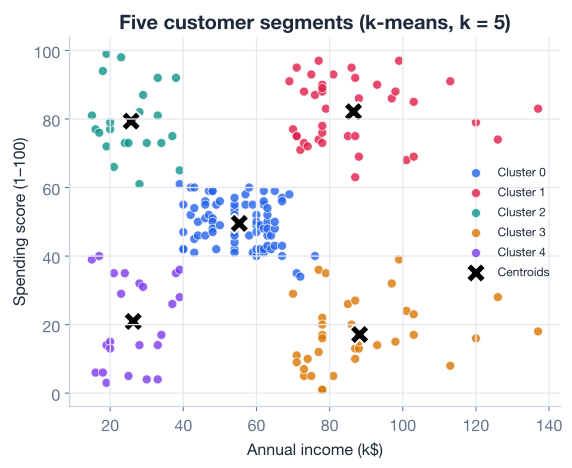
Notice the pleasing pattern. There is a dense blob in the middle (the average shoppers), and four groups fanning out toward the corners: high income with high spending, high income with low spending, low income with high spending, and low income with low spending. The fifth group sits in the center. This corner-and-center shape is what makes the Mall Customers dataset such a clean teaching example, the segments practically tell their own story.
A clustering model that you cannot explain is worthless. The numbers in cluster_centers_ are the raw material; your job now is to read them like a business analyst and give each cluster a name and a recommendation.
Start by looking at the three averages side by side. The bar chart below shows each cluster’s mean income and mean spending score, which makes the differences jump out far faster than a table does.
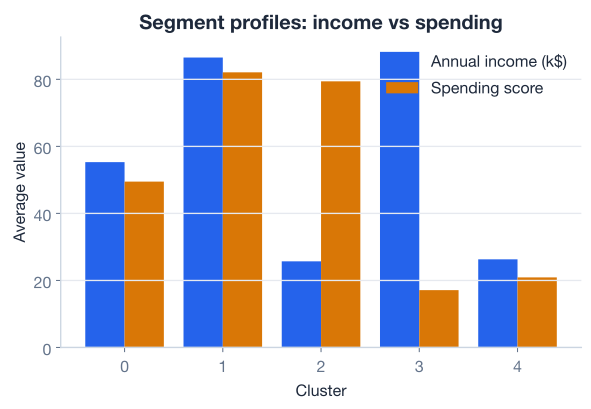
Now walk through the profile table one row at a time and translate each into plain English.
age 42.7 income 55.3 spending 49.5Middle of the road on every axis: moderate age, moderate income, moderate spending. This is the largest group (81 customers) and represents the typical mall visitor. They are the dependable baseline. There is no urgent action here, but because they are so numerous, even a small lift in their spending moves the total revenue more than a big lift in a tiny group would.
age 32.7 income 86.5 spending 82.1Young, high earners who also spend freely. This is the dream segment: high income and high spending score. They already love spending at the mall and they have the money to do more. Loyalty programs, premium product launches, and early access to sales should be aimed squarely at this group. They are the highest-value customers you have.
age 25.3 income 25.7 spending 79.4The youngest group, with modest incomes but a very high spending score. They spend enthusiastically relative to what they earn. They are price-sensitive but engaged, so they respond well to discounts, student offers, and trendy, affordable lines. The long game matters here: as their incomes grow, today’s enthusiasts can become tomorrow’s prime targets.
age 41.1 income 88.2 spending 17.1High income but the lowest spending score of all. These customers clearly can spend, but they choose not to, at least not here. This is the most interesting segment for the marketing team, because there is untapped money on the table. The question is why they hold back: is it product fit, perceived value, or simply that they shop elsewhere? Targeted campaigns, surveys, and premium experiences could convert even a fraction of them into a large revenue gain.
age 45.2 income 26.3 spending 20.9Lower income and low spending: customers who watch their wallets. Aggressive premium marketing is wasted here. Instead, value bundles, essentials, and loyalty rewards on everyday purchases keep them coming back without straining their budgets.
Name your clusters
Cluster numbers like “cluster 3” mean nothing to a stakeholder. The moment you replace them with names like “Careful Wealthy” or “Prime Targets,” your analysis becomes a conversation the business can act on. Naming is not decoration, it is the step that turns a model into a decision.
Put the five profiles together and you have a complete map of the mall’s customer base:
| Cluster | Name | Age | Income | Spending | What to do |
|---|---|---|---|---|---|
| 0 | Average Shopper | 42.7 | 55.3 | 49.5 | Steady base; nudge the majority |
| 1 | Prime Targets | 32.7 | 86.5 | 82.1 | Reward and retain; highest value |
| 2 | Young Enthusiasts | 25.3 | 25.7 | 79.4 | Discounts now; grow them over time |
| 3 | Careful Wealthy | 41.1 | 88.2 | 17.1 | Convert untapped spend |
| 4 | Budget Conscious | 45.2 | 26.3 | 20.9 | Value offers; everyday loyalty |
This single table is the deliverable. It took an unlabeled spreadsheet of 200 shoppers and, with no answers given in advance, surfaced five distinct groups, each with a clear marketing implication. That is the entire promise of unsupervised learning: structure where you started with none.
Notice how the two high-income clusters (1 and 3) split on behavior alone. Same money, opposite habits. A segmentation that used income by itself would have lumped them together and missed the single most actionable insight in the dataset, that there is a wealthy group quietly under-spending.
Clustering is the beginning, not the end
K-Means hands you the segments; it does not tell you what to do with them. The value comes from the interpretation: pairing each profile with domain knowledge and a concrete action. Always budget as much time for reading the clusters as you spend producing them.
Here is everything you did, condensed into one runnable script. This is a template you can adapt to almost any customer-segmentation problem.
import pandas as pd
import numpy as np
from sklearn.preprocessing import StandardScaler
from sklearn.cluster import KMeans

# 1. Load
customers = pd.read_csv("mall_customers.csv")  # download: https://datatweets.com/datasets/mall_customers.csv
features = ["age", "annual_income", "spending_score"]
X = customers[features]

# 2. Scale
scaler = StandardScaler()
X_scaled = scaler.fit_transform(X)

# 3. Fit K-Means with k = 5
model = KMeans(n_clusters=5, n_init=10, random_state=42)
customers["cluster"] = model.fit_predict(X_scaled)

# 4. Profile each cluster in original units
profiles = customers.groupby("cluster")[features].mean().round(1)
print(profiles)
# Output:
#           age  annual_income  spending_score
# cluster
# 0        42.7           55.3            49.5
# 1        32.7           86.5            82.1
# 2        25.3           25.7            79.4
# 3        41.1           88.2            17.1
# 4        45.2           26.3            20.9
In about a dozen lines you loaded raw data, scaled it, segmented it, and produced the profile table that drives every business decision above.
Try these before checking the hints.
Instead of converting cluster_centers_ back to original units, compute the cluster profiles directly from the data using groupby. Group customers by the cluster column and take the mean of age, annual_income, and spending_score. Confirm the numbers match the centroid table.
# customers already has a "cluster" column from the lesson
# Your code here
Hint
Use customers.groupby("cluster")[["age", "annual_income", "spending_score"]].mean().round(1). You should get exactly the same five rows as the centroid table, because a centroid is the mean of its cluster.
How many customers fall into each cluster, and which segment is the largest? Print the size of every cluster, sorted from largest to smallest.
# Your code hereHint
Use customers["cluster"].value_counts(). With no sort_index() it returns counts in descending order. You should see cluster 0 (the Average Shopper) on top with 81 customers and cluster 2 (the Young Enthusiasts) at the bottom with 22.
See for yourself why scaling matters. Fit KMeans(n_clusters=5, n_init=10, random_state=42) on the unscaled X and compare the profiles to the scaled version. Do the segments still separate income and spending cleanly?
# Your code here (use the raw X, not X_scaled)Hint
Call model.fit_predict(X) on the raw features, attach the labels, and groupby to profile. You will see the clusters split mostly along annual_income and spending_score while age barely influences the result, because the unscaled income and score ranges dwarf the age range. That is exactly the distortion StandardScaler prevents.
You ran K-Means end to end with scikit-learn and, more importantly, turned its output into something a business can use. Let’s review.
Scikit-Learn K-Means
KMeans(n_clusters=5, n_init=10, random_state=42) creates a configured modelfit_predict(X_scaled) runs the algorithm and returns a cluster label for every rown_init restarts the algorithm from several random seedings and keeps the lowest-inertia runrandom_state makes the result reproducibleReading the Model
model.labels_ holds the cluster assignment for each pointmodel.cluster_centers_ holds the centroid coordinates (in scaled space)model.inertia_ is the within-cluster total distance, here 65.57 for scaler.inverse_transform(...) converts centroids back to real-world units for interpretationScaling
StandardScaler applies the z-score transform Interpretation
The mechanical part of clustering, scale, fit, read the labels, takes only a few lines. The skill that separates a useful analysis from a useless one is interpretation. You took 200 unlabeled shoppers and produced five named segments, each with a clear marketing recommendation: reward the prime targets, convert the careful wealthy, nurture the young enthusiasts, and serve value to the budget conscious. The most valuable insight, that two equally wealthy groups behave in opposite ways, only emerged because you clustered on behavior and then read the result carefully. That habit of turning model output into a business story is what makes unsupervised learning pay off in the real world.
You have completed the full mall-segmentation workflow, from raw data to named segments. Now it is time to do it yourself, end to end, on a fresh dataset with no walkthrough.
Apply everything you have learned to segment wholesale customers in a hands-on guided project.
Return to the Unsupervised Learning module overview.
You now have the full unsupervised toolkit: K-Means from the inside out, the elbow method and silhouette score for choosing , scaling for fair distances, and the interpretation skills that turn clusters into decisions. The next lesson lets you prove it on your own. As you tackle new datasets, remember that the model is only half the job. The other half, and the part stakeholders remember, is the story you tell about what the clusters mean.