Title here
Summary here
This lesson is different from the ones before it. Instead of introducing a new idea piece by piece, you will run a complete clustering project from start to finish on a brand-new, higher-dimensional dataset. You take on the role of a data analyst at a wholesale distributor. Your clients are businesses, restaurants, cafes, and shops, and each one buys very different amounts of different products from you. Management wants to group these clients into meaningful segments so the sales team can tailor its approach to each one.
By the end of this lesson, you will be able to:
This lesson assumes you are comfortable with KMeans, standardization, the elbow method, and the silhouette score from the earlier lessons in this module. You should also be at ease with pandas and basic plotting. Let’s get to work.
You work for a wholesale distributor. Some of your clients are large grocery retailers that order enormous quantities of packaged goods. Others are small restaurants that buy mostly fresh produce and frozen items. A few are cafes and corner shops that load up on milk, cleaning supplies, and dry goods. Right now your sales team treats every client the same way, which is inefficient. A restaurant does not care about a promotion on detergents, and a retailer does not need a fresh-produce delivery schedule built for a kitchen.
If you could automatically group clients by how they actually spend, the sales team could design a strategy for each group: different promotions, different delivery frequencies, different account managers. That is exactly what clustering is for. You have no labels telling you which client is a “restaurant” or a “retailer.” You only have spending numbers, and you want the algorithm to surface the natural groups hidden inside them.
This is the unsupervised mindset you have been building toward: no answer key, just structure waiting to be discovered.
You will use the real Wholesale Customers dataset. Each row is one client of the distributor, and the columns record that client’s annual spending (in monetary units) across six product categories: Fresh, Milk, Grocery, Frozen, Detergents_Paper, and Delicassen. There are also two administrative columns, Channel and Region, that describe how and where the client operates.
import pandas as pd

# download: https://datatweets.com/datasets/wholesale_customers.csv
df = pd.read_csv("wholesale_customers.csv")

print("Shape:", df.shape)
print("Columns:", list(df.columns))
# Output:
# Shape: (440, 8)
# Columns: ['Channel', 'Region', 'Fresh', 'Milk', 'Grocery', 'Frozen', 'Detergents_Paper', 'Delicassen']
You have 440 clients and 8 columns. Take a quick look at the first few rows to get a feel for the numbers.
print(df.head())
# Output:
#    Channel  Region  Fresh  Milk  Grocery  Frozen  Detergents_Paper  Delicassen
# 0        2       3  12669  9656     7561     214              2674        1338
# 1        2       3   7057  9810     9568    1762              3293        1776
# 2        2       3   6353  8808     7684    2405              3516        7844
# 3        1       3  13265  1196     4221    6404               507        1788
# 4        2       3  22615  5410     7198    3915              1777        5185
Two things jump out. First, the spending values are large and they vary wildly: one client spends 12,669 on Fresh while another spends 6,353. Second, Channel and Region are not spending amounts at all. They are categorical codes (Channel is 1 or 2; Region is 1, 2, or 3). They describe the client rather than measure how they buy, so for a spending-based segmentation you will set them aside and cluster on the six product columns only.
spend_cols = ["Fresh", "Milk", "Grocery", "Frozen", "Detergents_Paper", "Delicassen"]
spend = df[spend_cols]

print(spend.describe().round(0))
# Output:
#          Fresh    Milk  Grocery  Frozen  Detergents_Paper  Delicassen
# count      440     440      440     440               440         440
# mean     12000    5796     7951    3072              2881        1525
# std      12647    7380     9503    4855              4768        2820
# min          3      55        3      25                 3           3
# 25%       3128    1533     2153     742               257         408
# 50%       8504    3627     4756    1526               816         966
# max     112151   73498    92780   60869             40827       47943
Look closely at those statistics. For almost every column the standard deviation is as large as or larger than the mean, and the maximum is dozens of times bigger than the median. That is the signature of strongly right-skewed data: most clients spend modest amounts, but a handful of giants spend orders of magnitude more. You will need to deal with this before clustering.
Why a few giants are a problem for KMeans
KMeans measures distances between points and places centroids at the mean of each cluster. Means and Euclidean distances are both extremely sensitive to outliers. If a single client spends 112,151 on Fresh, that one number can pull a centroid far away from the bulk of clients and dominate the whole clustering. Reining in the skew first lets the algorithm respond to the shape of typical spending rather than chasing a few extreme values.
When data is heavily right-skewed and strictly positive, a logarithm is the classic fix. The log compresses the long upper tail: the gap between 1,000 and 10,000 becomes the same size as the gap between 10,000 and 100,000. After a log transform, the difference between a small client and a medium client matters just as much as the difference between a large client and a giant, which is exactly what you want when grouping by spending behavior rather than raw size.
You will use numpy.log1p, which computes . The 1 + keeps the function well-behaved if any value happens to be zero, since is undefined.
import numpy as np

spend_log = np.log1p(spend)

print(spend_log.describe().round(2))
# Output:
#          Fresh   Milk  Grocery  Frozen  Detergents_Paper  Delicassen
# count   440.00 440.00   440.00  440.00            440.00      440.00
# mean      8.84   8.16     8.39    7.20              6.39        6.49
# std       1.30   1.08     1.05    1.40              2.15        1.30
# min       1.39   4.02     1.39    3.26              1.39        1.39
# 25%       8.05   7.34     7.68    6.61              5.55        6.01
# 50%       9.05   8.20     8.47    7.33              6.71        6.87
# max      11.63  11.21    11.44   11.02             10.62       10.78
The numbers tell the story. Before, the means were in the thousands and the maxima in the tens of thousands. Now every column sits on a comparable scale, roughly 6 to 9, and the gap between the median and the maximum has shrunk dramatically. The extreme clients are still the largest, but they no longer tower over everyone else. The data now describes how clients allocate their spending rather than how big they are.
The log transform fixed the skew, but the columns still have slightly different spreads and centers. Detergents_Paper has a standard deviation of 2.15, while Grocery is at 1.05. Because KMeans is distance-based, a feature with a larger spread would quietly count for more than the others. To give every product category an equal voice, you standardize: rescale each column to have a mean of 0 and a standard deviation of 1.
The transform applied to each value is:
where is the column’s mean and is its standard deviation. scikit-learn’s StandardScaler does this for you.
from sklearn.preprocessing import StandardScaler

scaler = StandardScaler()
X = scaler.fit_transform(spend_log)

print("Scaled shape:", X.shape)
print("Column means (should be ~0):", X.mean(axis=0).round(2))
print("Column stds  (should be ~1):", X.std(axis=0).round(2))
# Output:
# Scaled shape: (440, 6)
# Column means (should be ~0): [ 0.  0.  0.  0.  0.  0.]
# Column stds  (should be ~1): [1. 1. 1. 1. 1. 1.]
Your data is now log-transformed and standardized. Every column is centered at zero with unit spread, so each product category contributes equally to the distance calculations that KMeans relies on. The order matters here: log first, then standardize. The log reshapes the distribution; standardizing then puts the reshaped columns on a common scale.
A reusable preprocessing recipe
Skewed, strictly-positive, distance-based clustering shows up constantly: spending, transaction counts, web sessions, income. The recipe you just applied, log-transform then standardize, is a dependable default for this whole family of problems. When you meet a new dataset that looks like this one, reach for it first.
KMeans needs you to choose the number of clusters, , in advance. You do not know the “right” number of customer segments, so you let the data guide you with the elbow method. You fit KMeans for a range of values and record each model’s inertia, the total squared distance from every point to its assigned centroid. Inertia always falls as grows, but you look for the “elbow,” the point where adding another cluster stops buying you much improvement.
from sklearn.cluster import KMeans

inertias = []
for k in range(1, 11):
    km = KMeans(n_clusters=k, random_state=42, n_init=10)
    km.fit(X)
    inertias.append(km.inertia_)
    print(f"k={k:>2} inertia={km.inertia_:8.2f}")
# Output:
# k= 1 inertia= 2640.00
# k= 2 inertia= 1844.06
# k= 3 inertia= 1553.42
# k= 4 inertia= 1386.86
# k= 5 inertia= 1266.15
# k= 6 inertia= 1174.76
# k= 7 inertia= 1086.36
# k= 8 inertia= 1028.49
# k= 9 inertia=  973.14
# k=10 inertia=  932.00
Now plot the curve and look for the bend.
import matplotlib.pyplot as plt

plt.plot(range(1, 11), inertias, marker="o")
plt.xlabel("Number of clusters (k)")
plt.ylabel("Inertia")
plt.title("Elbow Method for Wholesale Customers")
plt.show()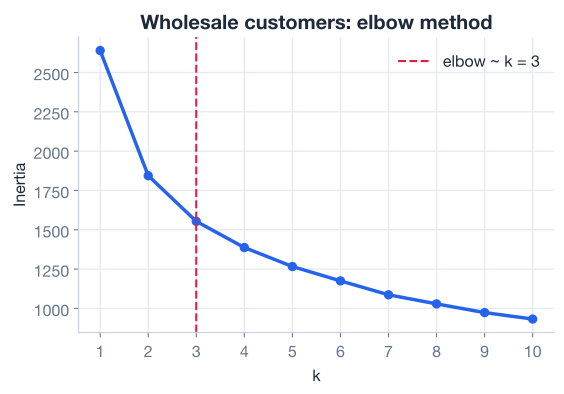
Read the curve. Inertia plunges from 2640 at to 1844 at and 1553 at . After that the drops shrink: each additional cluster shaves off less and less. The bend, the place where the steep descent gives way to a gentle slope, sits at . That is your signal that three clusters capture most of the meaningful structure, and adding more would mostly carve the data into ever-finer slices without revealing genuinely new groups. You will use .
The elbow is a judgment call
The elbow is rarely a perfectly sharp corner, and reasonable analysts can disagree by one. The method narrows the choice to a small range; you then bring in domain knowledge and downstream metrics like the silhouette score to settle it. Three clusters is both visually supported here and easy to explain to the sales team, which is a real advantage.
With chosen, fit the final model on the full six-dimensional scaled data and assign every client to a cluster.
kmeans = KMeans(n_clusters=3, random_state=42, n_init=10)
labels = kmeans.fit_predict(X)

print("Cluster sizes:")
print(pd.Series(labels).value_counts().sort_index())
# Output:
# Cluster sizes:
# 0    113
# 1    110
# 2    217
Every client now carries a cluster label of 0, 1, or 2. Before you interpret the groups, check the quality of the split with a silhouette score, which measures how tight and well-separated the clusters are. It ranges from -1 to 1; higher is better.
from sklearn.metrics import silhouette_score

sil = silhouette_score(X, labels)
print(f"Silhouette score: {sil:.3f}")
# Output:
# Silhouette score: 0.259
A silhouette of 0.259 is modest. It tells you the clusters are real but not crisply separated. That is completely normal for customer data: real businesses do not fall into perfectly distinct buckets, they sit on a continuum, and the boundaries between segments are fuzzy. A modest silhouette does not mean failure. It means you should describe the clusters as tendencies (“this group leans toward fresh produce”) rather than hard categories, and lean on the profiles in Step 7 to judge whether the groups are useful for the business.
Here you hit a practical wall. Your clusters live in six dimensions, one per product category, and you cannot draw a six-dimensional scatter plot. You need a way to see the clusters on a flat page.
The tool for this is Principal Component Analysis (PCA). PCA finds new axes, called principal components, that capture as much of the data’s variation as possible in as few dimensions as possible. By projecting your six-dimensional data down onto its first two principal components, you get a 2D map you can actually plot, while keeping as much of the original structure as the two components can hold.
from sklearn.decomposition import PCA

pca = PCA(n_components=2, random_state=42)
coords = pca.fit_transform(X)

print("Explained variance ratio:", pca.explained_variance_ratio_.round(3))
print("Total captured:", pca.explained_variance_ratio_.sum().round(3))
# Output:
# Explained variance ratio: [0.441 0.272]
# Total captured: 0.713
The first component captures 44.1% of the total variation and the second captures 27.2%, so the two together preserve about 71.3% of the structure in just two dimensions. That is enough to give an honest picture. Now color each point by its cluster label.
import matplotlib.pyplot as plt

plt.scatter(coords[:, 0], coords[:, 1], c=labels, cmap="viridis", s=30, alpha=0.7)
plt.xlabel("Principal Component 1")
plt.ylabel("Principal Component 2")
plt.title("Wholesale Clusters (2D PCA projection)")
plt.show()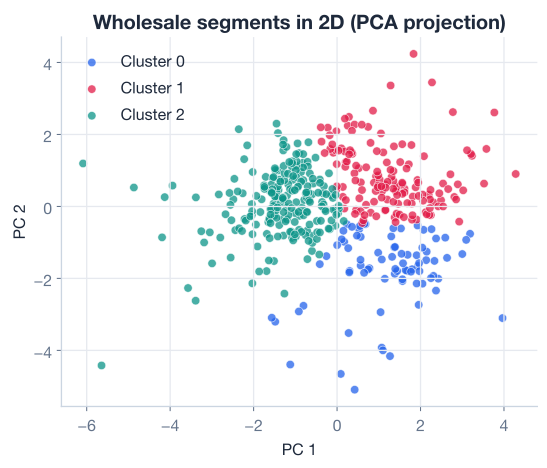
The plot shows three regions that mostly occupy different parts of the map, with some overlap at the edges, exactly the picture a silhouette of 0.259 would lead you to expect. The clusters are distinguishable but not cleanly walled off from one another.
This is the most important conceptual point in the lesson, so make sure it lands. You used PCA only to draw the picture. You clustered on the full six-dimensional standardized data, and then projected the result down to 2D for the human eye.
It is tempting to flip the order: run PCA first, keep two components, and cluster on those. Resist that here. The two components preserve 71% of the variation, which means roughly 29% of the structure is discarded. Some of what gets thrown away may be precisely what separates two segments, and KMeans would never see it. By fitting KMeans on all six dimensions, you let the algorithm use every product category to decide who belongs together. PCA then serves its proper role: a faithful-enough sketch for communication, not the basis for the decision.
Visualize with PCA, decide on the full data
A common beginner mistake is to cluster on a 2D PCA projection because it is easy to plot, then wonder why the groups look odd. Unless dimensionality reduction is itself a deliberate goal, fit your clustering on the full, properly-scaled features and reduce to 2D afterward purely for visualization. The picture should follow the decision, not drive it.
Cluster labels of 0, 1, and 2 mean nothing to the sales team. Your final job is to translate them into plain-language client types. The cleanest way is to attach the labels to the original, untransformed spending and compute the average spend per category for each cluster. You report in real monetary units, not log-scaled or standardized numbers, because those are the numbers a business person understands.
profiles = spend.copy()
profiles["cluster"] = labels

cluster_means = profiles.groupby("cluster").mean().round(0).astype(int)
print(cluster_means)
# Output:
#          Fresh   Milk  Grocery  Frozen  Detergents_Paper  Delicassen
# cluster
# 0         2899   7136    12570     607              5554         783
# 1        17043  10560    13334    4133              4987        2847
# 2        11939   2006     2502    3266               424         891
Plot these averages as grouped bars so the contrasts are obvious at a glance.
cluster_means.T.plot(kind="bar")
plt.ylabel("Average annual spend")
plt.title("Average Spend per Category by Cluster")
plt.xticks(rotation=45)
plt.legend(title="Cluster")
plt.tight_layout()
plt.show()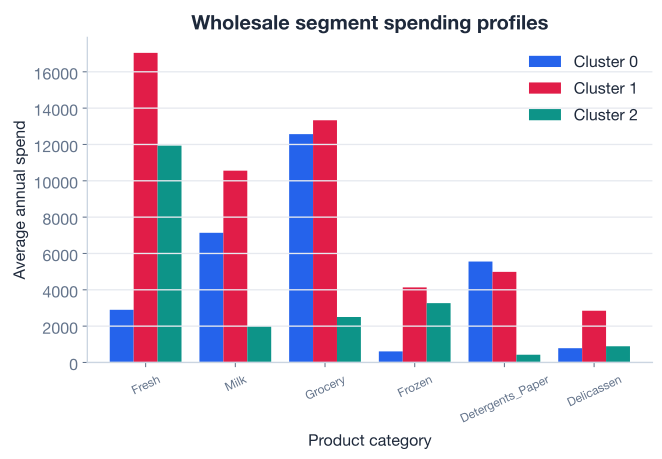
Now read the table like a story. Each cluster has a clear personality:
Cluster 0 — Grocery & cleaning specialists (retailers and cafes). This group’s defining traits are very high Grocery (12,570) and Detergents_Paper (5,554) spending, with solid Milk (7,136), but the lowest Fresh (2,899) and Frozen (607) of any group. That profile fits convenience stores, cafes, and small retailers: they stock packaged goods, dairy, and cleaning supplies, and buy little raw produce. Pitch them dry-goods bundles and household-supply promotions.
Cluster 1 — Big all-round buyers (large retailers). This cluster spends the most almost everywhere: top Fresh (17,043), Milk (10,560), Grocery (13,334), Frozen (4,133), and Delicassen (2,847). These are your largest, highest-value accounts that order across the entire catalog. Give them dedicated account managers, volume pricing, and reliable bulk delivery; they are worth protecting.
Cluster 2 — Fresh & frozen buyers (restaurants). This group is dominated by Fresh (11,939) and Frozen (3,266) while spending almost nothing on Grocery (2,502) and Detergents_Paper (424). That is the unmistakable signature of restaurants and food-service kitchens: lots of raw ingredients, very few packaged retail goods. Offer them fresh-produce delivery schedules and frozen-supply contracts tuned to a kitchen’s rhythm.
In three short paragraphs you have turned anonymous spending numbers into three actionable customer types, each with its own sales strategy. That translation from clusters to a business narrative is the real deliverable of any segmentation project. The model is only the means; the story is the product.
Now it is your turn. Work through these before peeking at the hints.
Re-run the workflow but cluster on data that is only standardized, without the log transform first. Standardize the raw spend columns, fit KMeans with k=3, and compute the silhouette score. Compare it to the 0.259 you got with the log transform.
# Your code here (reuse spend, the six raw spending columns)Hint
Build a second scaled array directly from the raw columns: X_raw = StandardScaler().fit_transform(spend). Then labels_raw = KMeans(n_clusters=3, random_state=42, n_init=10).fit_predict(X_raw) and silhouette_score(X_raw, labels_raw). You should see the skew let a few extreme clients distort the clusters, which is exactly why the log transform earns its place in the pipeline.
The elbow pointed to k=3, but the choice is partly a judgment call. Fit KMeans with k=4 on the same log-transformed, standardized X, profile the four clusters by their average raw spend, and decide whether the fourth group tells a genuinely new business story or just splits an existing one.
# Your code here (reuse X and the original spend DataFrame)Hint
Run labels4 = KMeans(n_clusters=4, random_state=42, n_init=10).fit_predict(X), attach it to a copy of spend, and call .groupby("cluster").mean(). Read the four profiles the same way you read the three: does each cluster have a distinct spending personality, or does one of the original groups simply break into two near-duplicates?
You used two principal components for the 2D plot. Fit a PCA with n_components=3 on X and inspect the explained variance ratio. How much additional structure would a third component capture, and what does that tell you about how much you lost by visualizing in only two dimensions?
from sklearn.decomposition import PCA

# Your code here (reuse X)
Hint
Fit PCA(n_components=3, random_state=42).fit(X) and print .explained_variance_ratio_. The first two values match what you saw before, [0.441, 0.272]; the third tells you the extra variation a 3D view would add. Summing all three shows how much closer to the full picture you would get, and reinforces why clustering happens on all six dimensions, not the projection.
Congratulations! You just ran a complete, professional clustering project end to end: from raw, messy spending data to three actionable customer segments with a business story attached. Let’s review what you did.
The End-to-End Clustering Workflow
k, fit KMeans, evaluate, visualize, and profilePreparing Skewed, High-Dimensional Data
np.log1p) to compress the long tail, then standardize with StandardScaler so every feature counts equallyChannel and Region when segmenting by behaviorChoosing and Evaluating Clusters
k; the bend (here k=3) marks diminishing returnsPCA for Visualization
[0.441, 0.272]), enough for an honest 2D plotFrom Clusters to a Business Story
Everything in this module pointed here. Individually, KMeans, standardization, the elbow method, the silhouette score, and PCA are just techniques. Strung together on a real, six-dimensional dataset, they become a repeatable process for turning raw behavioral data into decisions. That process — clean the data so distances mean something, let the data suggest how many groups exist, fit and sanity-check the model, then translate the result into language a non-technical stakeholder can use — is what employers actually pay for.
The hardest and most valuable step was the last one. A clustering algorithm will always return clusters; it cannot tell you whether they are useful. That judgment, reading the profiles and recognizing “this is a restaurant” in a row of average spends, is where your domain understanding turns a model output into business value. Keep that habit: every clustering you ever run should end not with a label column, but with a story.
You have completed the Unsupervised Learning module. You can now run a full clustering project, from messy raw data to an interpretable, decision-ready segmentation. Next, you will step into deep learning and build neural networks from the ground up.
Build neural networks from scratch in NumPy: forward pass, gradient descent, backpropagation, and optimizers.
Return to the Unsupervised Learning module overview.
You just delivered a real data product: three wholesale customer segments, each with a clear identity and a sales strategy. That is the shape of nearly every clustering project you will ever do, only the dataset and the story change. The techniques you practiced here, taming skew, scaling fairly, choosing k, evaluating honestly, visualizing with PCA, and profiling into plain language, transfer directly to churn analysis, market research, anomaly detection, and beyond. Run this workflow on a dataset of your own, and you will cement it for good.