Title here
Summary here
Every task in every DAG this course has built so far did its own work, inside an Airflow worker process, using whatever Python libraries that worker had installed. That stops here. This module’s tasks don’t run a PySpark job themselves — they hand it to Kubernetes, and the real work happens somewhere else entirely: a pod, scheduled by the same datatweets-docker-k8s Kind cluster Course 3 built. Before writing a line of that, it’s worth being precise about the path a task actually takes to make that happen, because every piece of it is about to be real, and “real” means each piece needs to genuinely exist somewhere.
By the end of this lesson, you will be able to:
kubectl subprocess instead of apache-airflow-providers-cncf-kubernetes, and why that’s a legitimate choice, not a shortcutinsecure-skip-tls-verify: true trades away on this local cluster, and why that trade is a reasonable one hereHere is the whole path, stated plainly, before any of it is code:
kubectl subprocess. subprocess.run([kubectl_path, "--kubeconfig", kubeconfig_path, "apply", "-f", "-"], input=manifest_yaml, ...) — a real external command, not a Python client library.https://host.docker.internal:<port> from inside the Airflow containers..status.succeeded.kubectl subprocess pattern, until it sees success, failure, or a timeout — and only then reads the pod’s logs to see what the job actually produced.Every one of those six hops is a real process talking to a real other process. Nothing here is simulated, and nothing is hidden behind a library that does steps 2-6 invisibly. That’s deliberate, and it’s worth explaining why.
kubectl Instead of a Provider PackageAirflow has an official way to do this: apache-airflow-providers-cncf-kubernetes, whose KubernetesPodOperator builds a pod spec, submits it, and watches it — inside Airflow’s own process. This course’s Airflow image does not have that package installed, and this module isn’t going to install it. Two real reasons, not one excuse:
KubernetesPodOperator does under the hood is: build a manifest, submit it, poll it, read results. A @task that shells out to the real kubectl binary this course already host-mounted into the Airflow containers — at /opt/airflow/dags/bin/kubectl, pointed at /opt/airflow/dags/data/kubeconfig-kind.yaml — does the exact same real steps, against the exact same real cluster, with no additional install at all.Same cluster, same kubectl, same kubeconfig, every lesson
Every task in this module that needs Kubernetes uses the identical pattern: subprocess.run([KUBECTL_BIN, "--kubeconfig", KUBECONFIG_PATH, ...]). There’s no per-lesson variation in how a task reaches Kubernetes — only in what it asks Kubernetes to do.
A Kubernetes Job is a real Kubernetes object whose whole purpose is running something to completion, once, and remembering whether it worked. Its shape is worth building by hand, in plain Python, before Lesson 2 ever applies one for real:
import yaml

JOB_NAME = "cityflow-architecture-demo"
IMAGE = "python:3.13-slim"

manifest_text = f"""\
apiVersion: batch/v1
kind: Job
metadata:
  name: {JOB_NAME}
  namespace: default
  labels:
    app: {JOB_NAME}
spec:
  backoffLimit: 0
  ttlSecondsAfterFinished: 3600
  template:
    metadata:
      labels:
        app: {JOB_NAME}
    spec:
      restartPolicy: Never
      containers:
        - name: cityflow-hello
          image: {IMAGE}
          imagePullPolicy: IfNotPresent
          command: ["python", "-c", "print('hello from CityFlow')"]
"""

# Parse it back the way `kubectl apply` itself would -- proof this is real,
# well-formed Kubernetes YAML, not just a string that looks plausible.
manifest = yaml.safe_load(manifest_text)

assert manifest["kind"] == "Job"
assert manifest["metadata"]["name"] == JOB_NAME
assert manifest["spec"]["backoffLimit"] == 0, "a Job that fails should fail once and report it, not silently retry"
assert manifest["spec"]["template"]["spec"]["restartPolicy"] == "Never"
container = manifest["spec"]["template"]["spec"]["containers"][0]
assert container["image"] == IMAGE
print(f"real, parseable Job manifest for {JOB_NAME!r}, image {container['image']!r}")
print(f"restartPolicy={manifest['spec']['template']['spec']['restartPolicy']!r}, backoffLimit={manifest['spec']['backoffLimit']}")
real, parseable Job manifest for 'cityflow-architecture-demo', image 'python:3.13-slim'
restartPolicy='Never', backoffLimit=0Two fields are worth pausing on, because Lesson 2’s real submission depends on both being right:
restartPolicy: Never. A Job’s pod is not a long-running service — it runs once and stops. Never tells Kubernetes not to restart the container in place on failure; instead the Job itself decides whether to try again, governed by the next field.backoffLimit: 0. How many times the Job may retry a failed pod before giving up entirely. Zero means: fail once, report it, stop — the right default for a job whose failure an Airflow task is about to poll for and needs to see promptly, rather than one that silently retries three more times first.Here is the distinction this whole module rests on: an Airflow task that submits a Job succeeds the instant kubectl apply returns — which tells you the Job was created, not that the work it describes has finished. Those are two different real events, seconds or minutes apart. A second, separate task has to ask Kubernetes directly:
kubectl get job <job-name> -o jsonpath='{.status.succeeded}'That field is empty while the pod is still running, becomes "1" the moment the pod’s container exits with code 0, and a parallel .status.failed field turns positive if it exits non-zero instead. A polling task’s whole job is to keep asking that question, on an interval, until one of those two things becomes true — exactly what Lesson 2’s poll_job_completion task does for real.
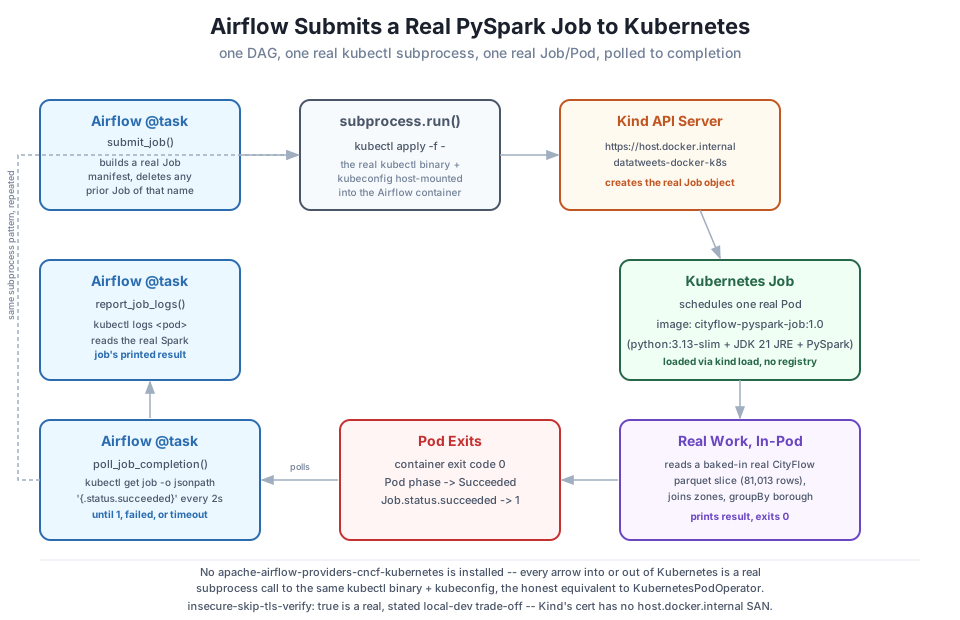
insecure-skip-tls-verify: trueThe kubeconfig this course host-mounted into the Airflow containers points at https://host.docker.internal:<port> and sets insecure-skip-tls-verify: true. That’s worth being upfront about rather than glossing over: Kind generates a real TLS certificate for its API server, but that certificate’s list of valid hostnames doesn’t include host.docker.internal — it was never told to expect a client reaching it through Docker’s own container-to-host DNS alias. Skipping verification means this connection is encrypted but not authenticated — a client can’t cryptographically confirm it’s really talking to this specific cluster and not something impersonating it on the same address.
That is a real trade-off, and it would be a genuine problem on a production cluster reachable from the wider internet. On a local Kind cluster that only ever exists on this one machine, for the lifetime of this course, it’s a defensible, deliberate simplification — not a mistake, and not something to pretend isn’t happening. Production Kubernetes access uses certificates that actually list every real hostname a client might use, precisely so this shortcut is never necessary there.
kubectl subprocess, Kubernetes creates the Job and schedules a pod, the pod runs and exits, a second task polls .status.succeeded, a third task reads the pod’s real logs.kubectl subprocess instead of apache-airflow-providers-cncf-kubernetes — a real, load-conscious choice for a shared image, not a workaround pretending to be the provider-based operator.restartPolicy: Never and backoffLimit: 0 together mean: run once, don’t restart in place, don’t silently retry — fail fast and let the polling task see it.insecure-skip-tls-verify: true is a real, stated trade-off specific to this local Kind cluster, not something to hide from a reader building the same setup themselves.Exercise 1 — Modify the manifest-building code above to set backoffLimit: 2 instead of 0, parse it back, and explain in a comment what would change about how many times a genuinely failing pod gets retried before the Job itself reports .status.failed.
Exercise 2 — Add a resources.requests/resources.limits block to the container in the manifest above (reuse a value from Course 3’s own Job lessons if you have one handy), parse the manifest back, and assert the values round-trip correctly through yaml.safe_load.
Exercise 3 — Without running anything yet, write out (in a comment or on paper) what you’d expect kubectl get job cityflow-architecture-demo -o jsonpath='{.status.succeeded}' to print at three different moments: immediately after kubectl apply returns, while the pod is still Running, and after the pod reaches Completed. Lesson 2 will let you check your prediction against a real run.
Keep DATATWEETS free. Help fund practical data, AI, and engineering lessons for learners worldwide.
