Title here
Summary here
Every DAG this course has built lives entirely inside Airflow’s own view of the world — the Grid view has been the one place to check whether something worked. This module changed that the moment submit_job handed real work to Kubernetes: now there are genuinely two systems with a legitimate claim to know what happened, and they’ve never spoken to each other directly. Airflow knows a task called kubectl and got a zero exit code back. Kubernetes knows a Job it was asked to run, and that the pod it scheduled exited cleanly. Neither one has any idea the other exists. This lesson looks at both, for the exact same real event, side by side.
By the end of this lesson, you will be able to:
This is Lesson 3’s real triggered run — lesson3_m7_verify_1784973224 — captured from the Airflow Grid view immediately after it reached success:
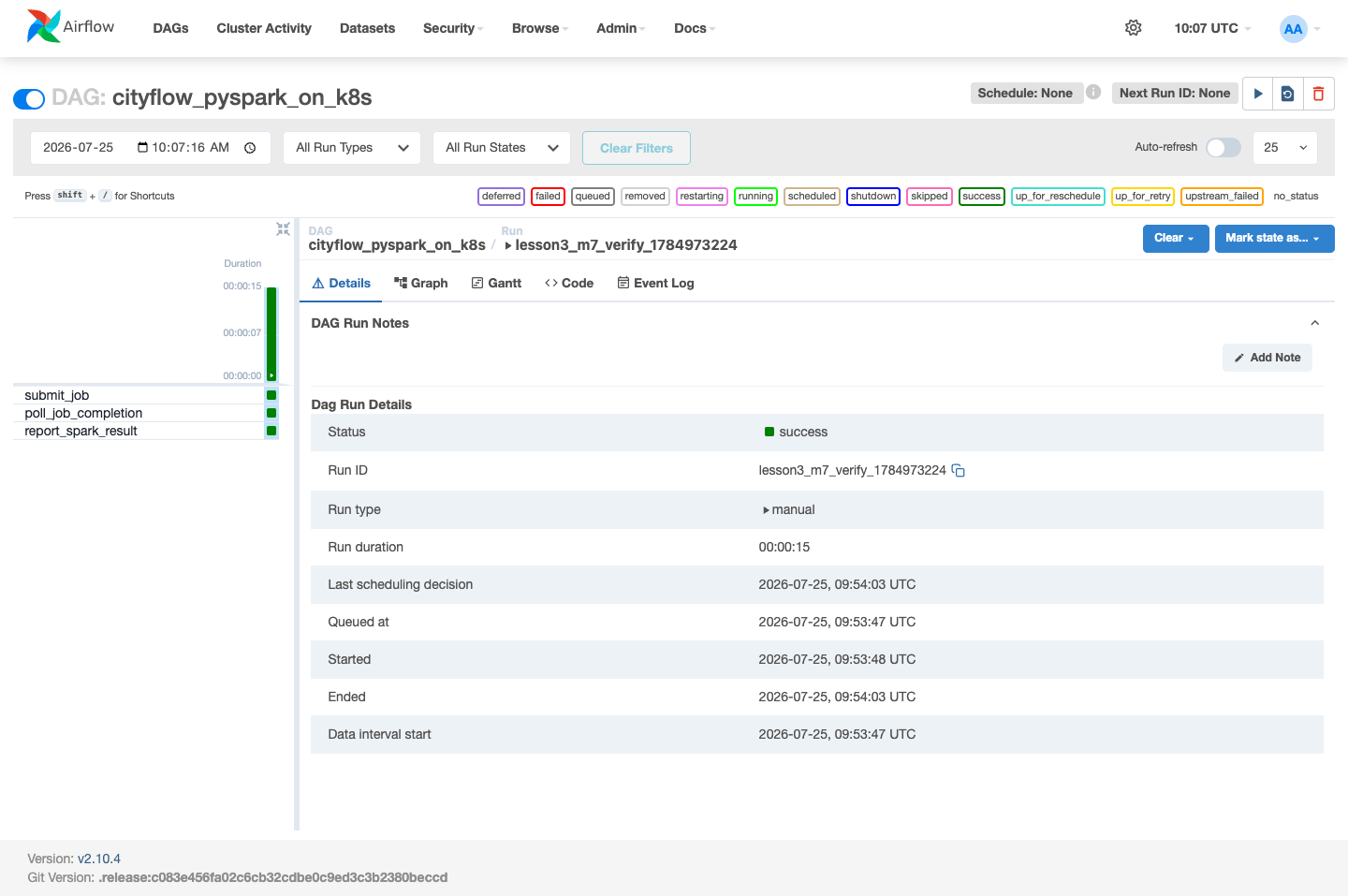
Read literally, this view says exactly what Airflow actually knows and nothing more: three tasks ran, in order, all exited successfully, and the whole DAG run took 15 real seconds from Queued at to Ended. It does not say “a Spark job computed a borough-revenue breakdown” — Airflow has no idea what cityflow-pyspark-job:1.0 even does. What it knows is narrower and just as real: submit_job ran a command that exited 0, poll_job_completion kept asking a question until the answer was yes, and report_spark_result read some text back and didn’t raise. That’s the honest limit of what a Grid view like this one can tell you once a task’s real work has moved outside the Airflow process itself.
The Kubernetes Dashboard has never heard of Airflow, submit_job, or DAG run lesson3_m7_verify_1784973224. It has heard of a Job named cityflow-pyspark-on-k8s, because something applied that manifest to its API server:
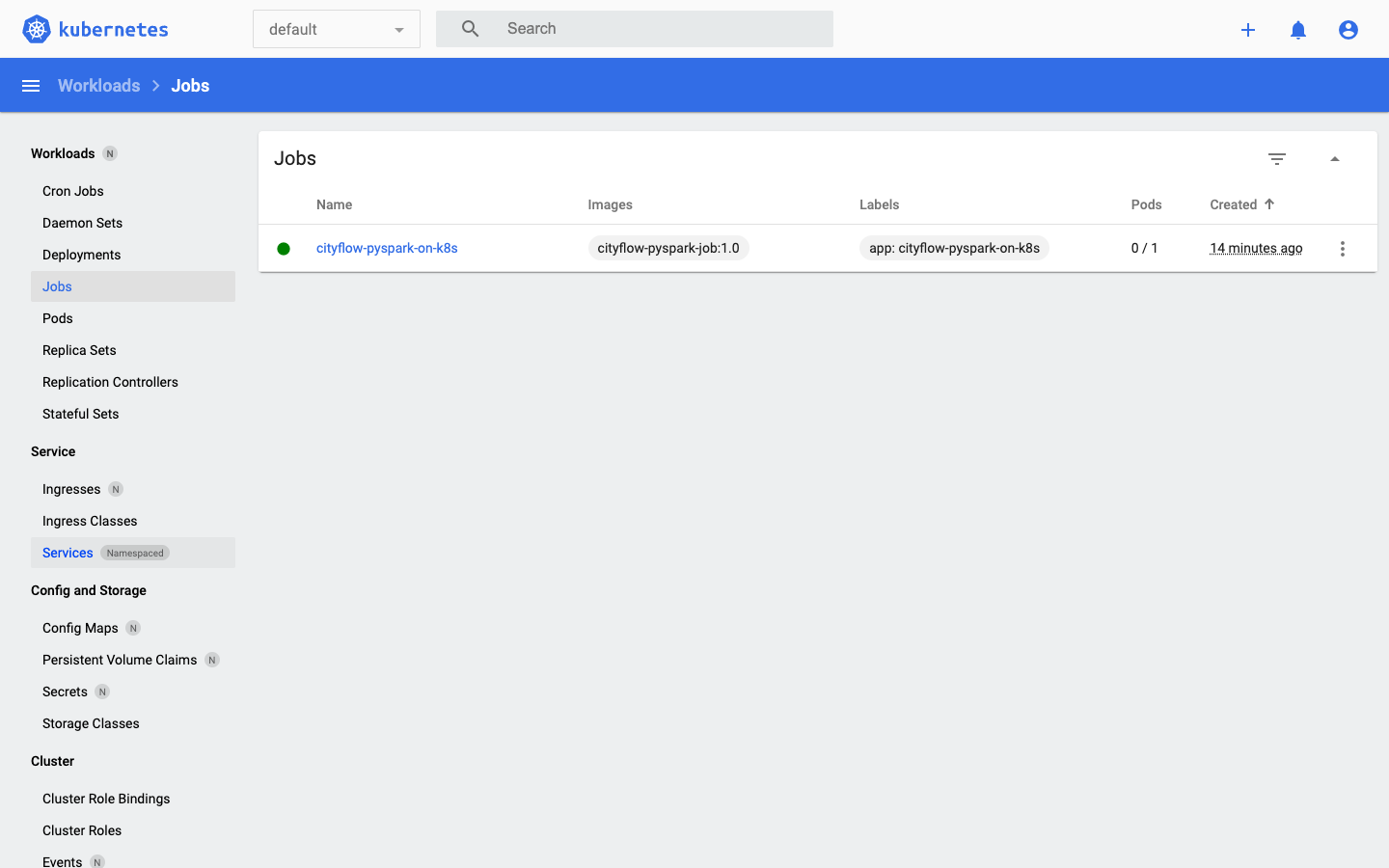
Read this one literally too: a Job named cityflow-pyspark-on-k8s, using image cityflow-pyspark-job:1.0, currently has 0 of 1 pods — meaning the one pod it needed to run has already finished and isn’t running anymore, which for a Job (unlike a Deployment) is the correct, successful end state, not a problem. The green status dot is Kubernetes’ own read of .status.succeeded, the exact field poll_job_completion was polling on the Airflow side. Two completely independent systems, reading from two completely independent stores of state, landed on the same real conclusion — because there was only one real event for either of them to be honest about.
It would be easy to read these two screenshots as saying the same thing twice. They don’t, quite — each one is the only place to see something the other genuinely cannot show:
0/1 pods, the exact image tag actually running, real resource usage if it were set. Airflow’s Grid view has no visibility into any of that; from Airflow’s side, submit_job is just a Python function that happened to shell out to kubectl.That split is the whole reason this module’s architecture puts a real system boundary between orchestration and execution: Airflow stays the one place that knows the shape of the pipeline, and Kubernetes stays the one place that knows the real state of what’s actually running, and neither one needs to duplicate the other’s job to do its own well.
lesson3_m7_verify_1784973224’s submit_job task and the cityflow-pyspark-on-k8s Job are the same real object seen from two sides of a real system boundary.0/1 pods and a green status, no idea a DAG or a scheduler asked for it.Exercise 1 — Open the real Graph view for cityflow_pyspark_on_k8s (not the Grid view) for the same run. Confirm it shows the same three-task linear shape — submit_job → poll_job_completion → report_spark_result — and explain in one sentence what the Graph view makes easier to see than the Grid view does for a DAG this simple.
Exercise 2 — In the Kubernetes Dashboard, click into the cityflow-pyspark-on-k8s Job itself (not just the Jobs list) and find its Pods tab. Confirm the one real pod it lists matches the pod name report_spark_result’s own task log printed (cityflow-pyspark-on-k8s-g7g5f).
Exercise 3 — Delete the completed Job with kubectl delete job cityflow-pyspark-on-k8s -n default, then refresh the Kubernetes Dashboard’s Jobs page. Confirm the Job disappears from Kubernetes’ view. Now check the Airflow Grid view for the same DAG run again — does it still show success? Write one sentence explaining why Airflow’s record and Kubernetes’ record don’t have to agree forever, only at the moment each one observed the same real event.
Keep DATATWEETS free. Help fund practical data, AI, and engineering lessons for learners worldwide.
