Title here
Summary here
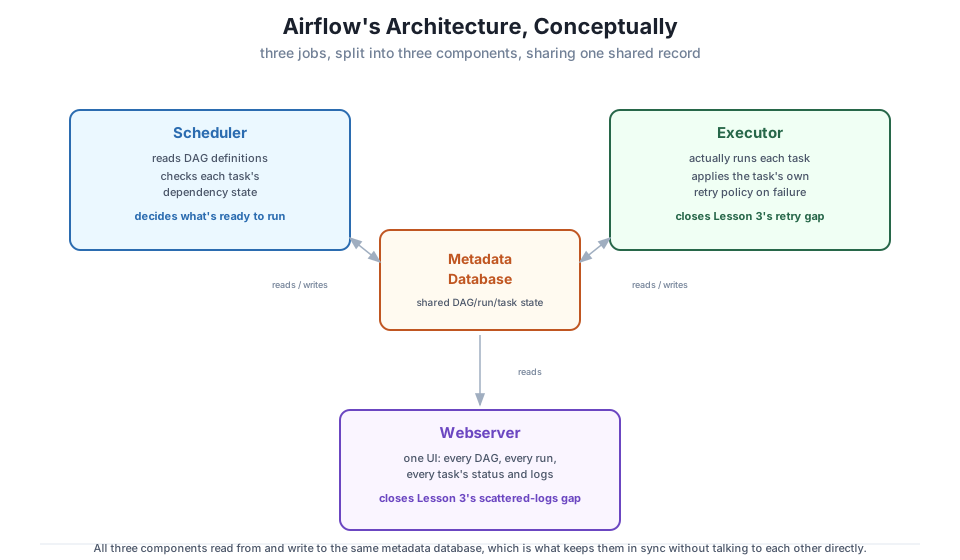
Module 1 Lesson 4 built a mental model entirely on paper: a scheduler that decides what’s ready, an executor that runs it, a webserver that shows it to a human, all three reading and writing one shared metadata database. Four components, no software installed. This lesson closes that gap the other direction — not by installing anything new (that’s Lesson 2), but by pointing at CityFlow’s Airflow stack, already running, and matching every piece of the paper model to a real, live process.
By the end of this lesson, you will be able to:
docker ps output and explain what each container’s healthcheck is actually checkingCityFlow’s Airflow stack is defined in .airflow-local/docker-compose.yaml and has been running the whole time you’ve been reading this course. Here’s what’s actually up right now:
docker ps --filter "name=airflow-local" --format "table {{.Names}}\t{{.Image}}\t{{.Status}}\t{{.Ports}}"NAMES IMAGE STATUS PORTS
airflow-local-airflow-webserver-1 apache/airflow:2.10.4 Up 2 hours (healthy) 0.0.0.0:8080->8080/tcp
airflow-local-airflow-scheduler-1 apache/airflow:2.10.4 Up 2 hours (healthy) 8080/tcp
airflow-local-postgres-1 postgres:13 Up 2 hours (healthy) 5432/tcpThree containers, not four. Match them to Module 1’s mental model:
airflow-local-postgres-1 — the metadata database. Every DAG definition Airflow has parsed, every run it’s ever recorded, every task’s state — all of it lives in this one Postgres instance, exactly the shared record Lesson 4 of Module 1 described.airflow-local-airflow-webserver-1 — the webserver. The UI at http://localhost:8080 you’ll log into in Lesson 2 is this container, and nothing else — it reads the metadata database to draw every page, it never runs a task itself.airflow-local-airflow-scheduler-1 — the scheduler, watching every DAG’s schedule and dependency state and deciding what’s ready to run. This is also where the fourth component, the executor, actually lives — see below.Each (healthy) status is a real Docker healthcheck, not a guess that the process started. docker-compose.yaml defines them explicitly:
  postgres:
    healthcheck:
      test: ["CMD", "pg_isready", "-U", "airflow"]
      interval: 10s
      retries: 5

  airflow-webserver:
    healthcheck:
      test: ["CMD", "curl", "--fail", "http://localhost:8080/health"]
      interval: 30s
      timeout: 10s
      retries: 5

  airflow-scheduler:
    healthcheck:
      test: ["CMD", "curl", "--fail", "http://localhost:8974/health"]
      interval: 30s
      timeout: 10s
      retries: 5
Postgres proves itself healthy by accepting connections; the webserver and scheduler each expose their own /health endpoint (Lesson 2 reads the webserver’s for real) and Docker polls it on a schedule, only reporting (healthy) once several checks in a row succeed. A container that’s merely Up but not yet (healthy) hasn’t finished starting — this is Airflow itself telling you, not a guess based on how long ago you ran docker compose up.
Where Module 1’s diagram still applies
The relationship diagram from Module 1 Lesson 4 is still exactly correct — scheduler, executor, and webserver all reading and writing one metadata database. Revisit it here: Airflow’s architecture. What this lesson adds is where each box in that diagram physically runs.
Four components, three containers — the arithmetic only works because the executor isn’t a separate service in this stack. Airflow’s executor is a pluggable strategy for how the scheduler actually runs a task once it’s ready, and which one is active is just a config value:
import subprocess

result = subprocess.run(
    ["docker", "exec", "airflow-local-airflow-scheduler-1",
     "airflow", "config", "get-value", "core", "executor"],
    capture_output=True, text=True, check=True,
)
executor = result.stdout.strip()
print("active executor:", executor)
assert executor == "LocalExecutor", f"expected LocalExecutor, got {executor!r}"
print("confirmed: this stack runs LocalExecutor, not CeleryExecutor")
active executor: LocalExecutor
confirmed: this stack runs LocalExecutor, not CeleryExecutorLocalExecutor runs each task as a subprocess on the same machine as the scheduler — there’s no separate worker container, no message broker, because there’s nothing to hand a task off to. The scheduler’s own process forks a child process, that child runs the task, and the result flows straight back into the metadata database. That’s the entire reason this stack is three containers instead of Apache’s own default six (postgres + redis + airflow-webserver + airflow-scheduler + airflow-worker + flower): CeleryExecutor hands tasks to a message broker (Redis) for separate worker containers to pick up, which is genuinely necessary once you need to spread task execution across multiple machines, but is pure overhead for a single-machine course stack. Lesson 2 covers exactly why this course picked LocalExecutor over the heavier default.
The metadata database is what makes this substitution invisible to everything else — the scheduler, the webserver, and (for CeleryExecutor) the workers all agree on task state purely by reading and writing the same Postgres tables, so swapping how a task actually runs never has to change how the scheduler decides what’s ready or how the webserver shows it to you.
One more real check ties the whole picture together — every container present, every one healthy, and the DAGs volume mount ready for Lesson 3’s first DAG:
import subprocess

result = subprocess.run(
    ["docker", "ps", "--filter", "name=airflow-local", "--format", "{{.Names}}\t{{.Status}}"],
    capture_output=True, text=True, check=True,
)
lines = [line for line in result.stdout.strip().splitlines() if line]
containers = dict(line.split("\t", 1) for line in lines)

print("containers seen:")
for name, status in sorted(containers.items()):
    print(f"  {name}: {status}")

required = (
    "airflow-local-postgres-1",
    "airflow-local-airflow-webserver-1",
    "airflow-local-airflow-scheduler-1",
)
for name in required:
    assert name in containers, f"missing container: {name}"
    assert "healthy" in containers[name].lower(), f"{name} is not healthy: {containers[name]}"

print("\nall three core containers are present and healthy")
containers seen:
airflow-local-airflow-scheduler-1: Up 2 hours (healthy)
airflow-local-airflow-webserver-1: Up 2 hours (healthy)
airflow-local-postgres-1: Up 2 hours (healthy)
all three core containers are present and healthyThat’s the whole architecture, confirmed against the real stack rather than taken on faith: one metadata database, one webserver, and one scheduler that also does the executor’s job because LocalExecutor needs nothing more. Lesson 2 walks through installing this exact stack from nothing.
postgres (metadata database), airflow-webserver (webserver/UI), airflow-scheduler (scheduler) — each with its own real Docker healthcheck.airflow config get-value core executor.Exercise 1 — Run docker ps --filter "name=airflow-local" yourself (no --format) and identify, from the PORTS column alone, which container is reachable from your browser and which two are only reachable from inside Docker’s network.
Exercise 2 — Use docker exec airflow-local-airflow-scheduler-1 airflow config get-value database sql_alchemy_conn to print the real connection string the scheduler uses to reach the metadata database. Identify which container name in that string is the Docker Compose service name for Postgres, and explain how Docker’s internal DNS makes that hostname resolvable without an IP address.
Exercise 3 — Without running anything, predict what docker ps would show if you swapped this stack to CeleryExecutor: how many containers, and which new ones. Then check your answer against the commented x-airflow-common section of the official Airflow docs’ docker-compose.yaml referenced at the top of .airflow-local/docker-compose.yaml.
Keep DATATWEETS free. Help fund practical data, AI, and engineering lessons for learners worldwide.