Title here
Summary here
Lesson 1 pointed at a stack that was already running and matched its containers to the architecture you already understood. This lesson is the part before that — actually installing Airflow, the way you would on a fresh machine, using the exact Docker Compose file CityFlow’s stack runs from.
By the end of this lesson, you will be able to:
docker-compose.yaml normally brings up, and why this course’s version is smallerairflow-init, then up -d) and read what each step actually does/health endpoint, not a guessApache Airflow publishes an official docker-compose.yaml for exactly this purpose — a self-contained local install with no cloud dependency. Its default configuration brings up six services: postgres, redis, airflow-webserver, airflow-scheduler, airflow-worker, and flower (a monitoring UI for the workers). That’s the right shape for CeleryExecutor, where the scheduler hands tasks to redis as a message broker and one or more separate airflow-worker containers pull tasks off it and run them — genuinely necessary once task execution needs to spread across multiple machines.
This course runs on one machine, so that shape is pure overhead: a broker with nothing to broker, workers that could only ever be talking to themselves. .airflow-local/docker-compose.yaml starts from Apache’s own file and strips it down to what LocalExecutor actually needs — Lesson 1 already confirmed which executor is active. The x-airflow-common block every service shares makes the swap explicit:
x-airflow-common:
  &airflow-common
  image: ${AIRFLOW_IMAGE_NAME:-apache/airflow:2.10.4}
  environment:
    &airflow-common-env
    AIRFLOW__CORE__EXECUTOR: LocalExecutor
    AIRFLOW__DATABASE__SQL_ALCHEMY_CONN: postgresql+psycopg2://airflow:airflow@postgres/airflow
    AIRFLOW__CORE__FERNET_KEY: ''
    AIRFLOW__CORE__DAGS_ARE_PAUSED_AT_CREATION: 'true'
    AIRFLOW__CORE__LOAD_EXAMPLES: 'false'
    AIRFLOW__API__AUTH_BACKENDS: 'airflow.api.auth.backend.basic_auth,airflow.api.auth.backend.session'
    AIRFLOW__SCHEDULER__ENABLE_HEALTH_CHECK: 'true'
  volumes:
    - ${AIRFLOW_PROJ_DIR:-.}/dags:/opt/airflow/dags
    - ${AIRFLOW_PROJ_DIR:-.}/logs:/opt/airflow/logs
    - ${AIRFLOW_PROJ_DIR:-.}/plugins:/opt/airflow/plugins
AIRFLOW__CORE__EXECUTOR: LocalExecutor is the one line that removes the need for redis, airflow-worker, and flower entirely. AIRFLOW__CORE__LOAD_EXAMPLES: 'false' is the other setting worth naming: without it, Airflow ships dozens of example DAGs that would have made Lesson 3’s “your first DAG” screenshot much less obviously yours. The volumes block is what makes .airflow-local/dags/ on your host machine the same folder as /opt/airflow/dags inside both the webserver and scheduler containers — any .py file you drop there, the scheduler will find, which is exactly what Lesson 3 relies on.
Three real services remain:
services:
  postgres:
    image: postgres:13
    environment:
      POSTGRES_USER: airflow
      POSTGRES_PASSWORD: airflow
      POSTGRES_DB: airflow
    healthcheck:
      test: ["CMD", "pg_isready", "-U", "airflow"]

  airflow-webserver:
    <<: *airflow-common
    command: webserver
    ports:
      - "8080:8080"

  airflow-scheduler:
    <<: *airflow-common
    command: scheduler
Same image (apache/airflow:2.10.4), same environment, same volumes — the only difference between the webserver and scheduler containers is the one-word command each runs. That’s a direct, physical illustration of Lesson 1’s point: the webserver and the scheduler are the same software, just started to do a different job.
docker compose up airflow-initBefore anything can run, the metadata database needs its schema and an admin user needs to exist. A dedicated airflow-init service does both, once, and then exits — it’s not a long-running container the way the webserver and scheduler are:
cd .airflow-local && docker compose up airflow-init Container airflow-local-postgres-1 Running
Attaching to airflow-init-1
Container airflow-local-postgres-1 Waiting
Container airflow-local-postgres-1 Healthy
Container airflow-local-airflow-init-1 Starting
Container airflow-local-airflow-init-1 Started
airflow-init-1 | DB: postgresql+psycopg2://airflow:***@postgres/airflow
airflow-init-1 | Performing upgrade to the metadata database postgresql+psycopg2://airflow:***@postgres/airflow
airflow-init-1 | Database migrating done!
airflow-init-1 | airflow already exist in the db
airflow-init-1 | 2.10.4
airflow-init-1 exited with code 0docker compose up airflow-init first waits for Postgres to report itself Healthy (the same healthcheck from Lesson 1), then runs Alembic migrations to create every table Airflow needs, then creates the airflow/airflow admin user this course logs in with. This exact output is from re-running the command against CityFlow’s already-initialized stack — airflow already exist in the db instead of a fresh creation message is Airflow correctly recognizing the user already exists and skipping recreation. airflow-init is safe to re-run any time; it’s an idempotent setup step, not something that resets your data.
docker compose up -dWith the database ready, bring up the two long-running services in the background:
docker compose up -d Container airflow-local-postgres-1 Running
Container airflow-local-airflow-webserver-1 Running
Container airflow-local-airflow-scheduler-1 Running-d means “detached” — the containers keep running after the command returns, instead of tying up your terminal. Run it again later (as this course’s stack was, well before this lesson was written) and Compose simply reports each service already running; nothing restarts, nothing loses state.
“The containers are running” and “Airflow is actually healthy” are different claims — the second one is checkable directly, with the same /health endpoint the webserver’s own Docker healthcheck polls:
import json
import urllib.request

with urllib.request.urlopen("http://localhost:8080/health", timeout=10) as resp:
    health = json.load(resp)

print(json.dumps(health, indent=2))

assert health["metadatabase"]["status"] == "healthy"
assert health["scheduler"]["status"] == "healthy"
print("\nmetadata database and scheduler both report healthy")
{
"metadatabase": {
"status": "healthy"
},
"scheduler": {
"latest_scheduler_heartbeat": "2026-07-22T17:12:39.202357+00:00",
"status": "healthy"
},
"dag_processor": {
"latest_dag_processor_heartbeat": null,
"status": null
},
"triggerer": {
"latest_triggerer_heartbeat": null,
"status": null
}
}
metadata database and scheduler both report healthyTwo fields, dag_processor and triggerer, show null — this stack doesn’t run those as standalone components (the scheduler process handles DAG parsing itself in this configuration, and nothing in this course needs the triggerer, which exists for deferrable operators). Neither null is a problem; the assertion above only requires the two components this course actually depends on, metadatabase and scheduler, to be healthy — and a real request to a real endpoint just confirmed they are.
http://localhost:8080 in a browser, username airflow, password airflow (both set by the _AIRFLOW_WWW_USER_* variables inside airflow-init’s environment). With AIRFLOW__CORE__LOAD_EXAMPLES: 'false' in effect and nothing in .airflow-local/dags/ yet, the DAGs list is genuinely empty — not a loading state, not an error, just nothing to show yet:
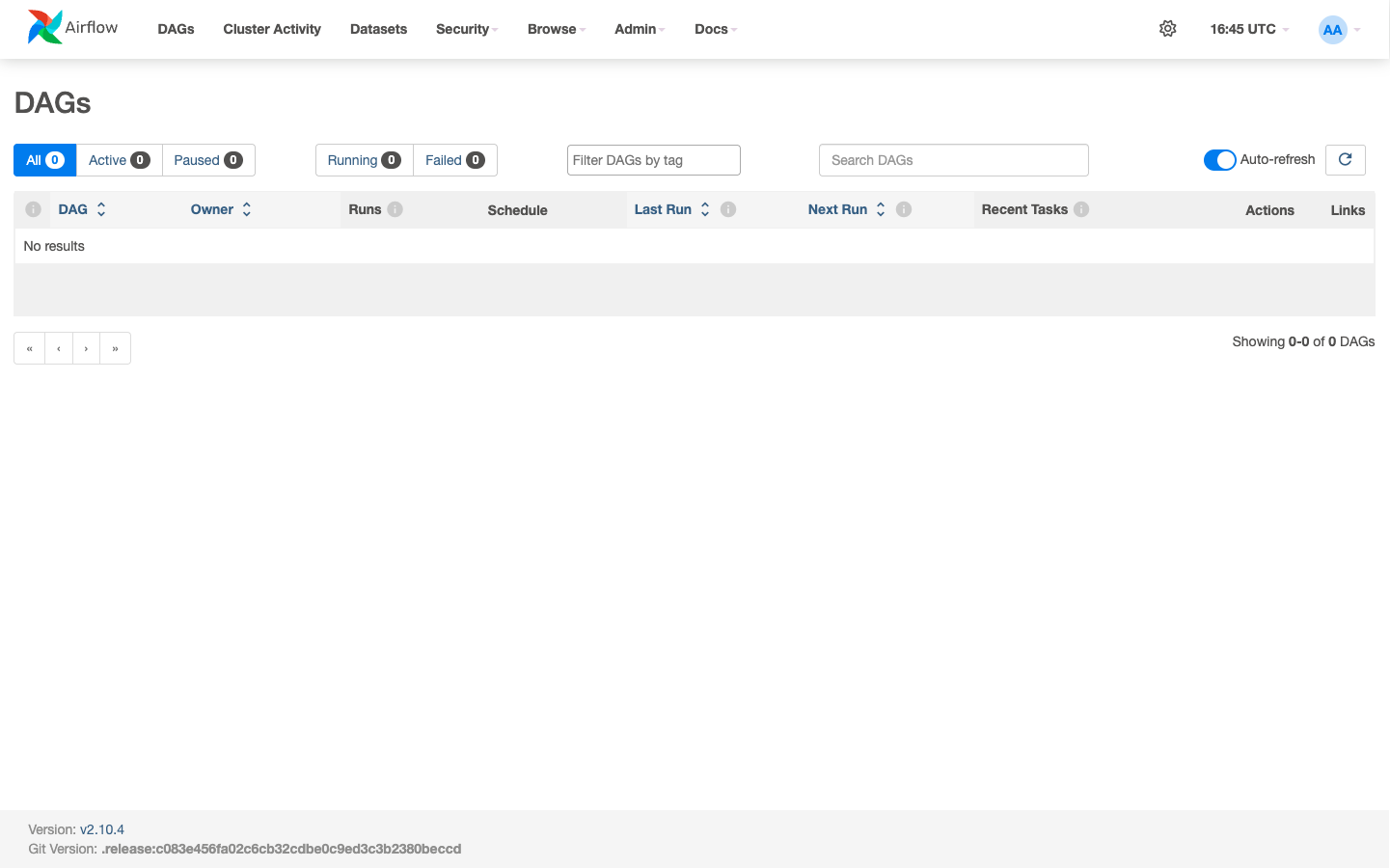
Notice the footer: Version: v2.10.4, matching the image pinned in docker-compose.yaml exactly, and the counts across the top — All 0, Active 0, Paused 0 — all reading zero because this is a genuinely fresh, empty DAGs folder rather than a stale cache. Lesson 3 is what changes that.
docker-compose.yaml defaults to CeleryExecutor’s six services (postgres, redis, airflow-webserver, airflow-scheduler, airflow-worker, flower); this course’s version sets AIRFLOW__CORE__EXECUTOR: LocalExecutor to drop to three, because a single machine has no worker to broker tasks to.docker compose up airflow-init runs the metadata database’s schema migration and creates the admin user; it’s idempotent and safe to re-run, correctly reporting airflow already exist in the db on a second run instead of erroring.docker compose up -d brings up the webserver and scheduler in the background; run again on an already-running stack, it changes nothing.http://localhost:8080/health is a real, checkable source of truth for whether Airflow is actually working, independent of whether the containers merely started — metadatabase and scheduler both reporting "healthy" is the bar this course cares about.All 0) is the correct state, not a bug — it means AIRFLOW__CORE__LOAD_EXAMPLES is off and nothing has been placed in the mounted dags/ folder yet.Exercise 1 — Run curl http://localhost:8080/health yourself from your host machine (not inside a container) and confirm you get the same JSON shape. Explain why this works without logging in first — check AIRFLOW__API__AUTH_BACKENDS in the compose file and consider whether /health is subject to the same auth as the rest of the API.
Exercise 2 — Log into http://localhost:8080 in a browser yourself and find the Version and Git Version strings in the page footer. Confirm the version matches AIRFLOW_IMAGE_NAME’s default (apache/airflow:2.10.4) in the compose file.
Exercise 3 — docker compose up airflow-init waited for Postgres to become Healthy before starting. Using docker-compose.yaml’s depends_on blocks, trace exactly which services wait on which, and explain what would happen if airflow-webserver didn’t declare airflow-init: condition: service_completed_successfully as a dependency.
Keep DATATWEETS free. Help fund practical data, AI, and engineering lessons for learners worldwide.
