Title here
Summary here
Every DAG in this course so far started with data that was already sitting on disk the moment the DAG was triggered. CityFlow’s real pipeline doesn’t get that guarantee — trip data lands whenever it lands, not on a schedule the DAG author controls. The wrong fix is a time.sleep() or a fixed delay baked into a task and hoping the file shows up in time. Airflow’s actual fix is a sensor: a task that genuinely polls a real condition on a real interval and only succeeds once that condition is actually true.
By the end of this lesson, you will be able to:
FileSensor that polls for a file’s arrival instead of assuming a fixed delay# gate: skip
"""CityFlow's real file-arrival sensor demo (Module 4 Lesson 1).
A FileSensor genuinely polls for a real incoming-trips file rather than
assuming a fixed delay before reading it. The file does not exist when this
DAG is triggered -- it is created moments later, from a second process, while
the sensor is actively polling."""
from datetime import datetime
from airflow.decorators import task
from airflow.models.dag import DAG
from airflow.sensors.filesystem import FileSensor
INCOMING_FILE = "/opt/airflow/dags/data/work/sensor_demo/incoming_trips.csv"
with DAG(
dag_id="cityflow_sensor_demo",
schedule=None,
start_date=datetime(2026, 1, 1),
catchup=False,
tags=["cityflow", "module-4", "sensors"],
) as dag:
wait_for_incoming_file = FileSensor(
task_id="wait_for_incoming_file",
filepath=INCOMING_FILE,
fs_conn_id="fs_default",
poke_interval=5,
timeout=120,
mode="poke",
)
@task
def read_incoming_file():
import pandas as pd
trips = pd.read_csv(INCOMING_FILE)
print(f"read {len(trips)} real rows from {INCOMING_FILE}")
print(trips.head(3).to_string(index=False))
return len(trips)
wait_for_incoming_file >> read_incoming_file()FileSensor needs a Filesystem Connection to know which base path it’s allowed to check — this install doesn’t ship one by default, so it was added once, for real, via the CLI:
docker exec airflow-local-airflow-scheduler-1 airflow connections add fs_default --conn-type fs --conn-extra '{"path": "/"}'Successfully added `conn_id`=fs_default : fs://?path=%2Fpoke_interval=5 means the sensor checks every 5 real seconds; mode="poke" (the default) holds a worker slot the whole time it’s waiting, which is fine for a short wait like this one — Lesson 3 of a full production course would cover mode="reschedule" for long waits, but this module keeps to poke since CityFlow’s real file lands within seconds, not hours.
This file is saved to .airflow-local/dags/. The verification below does two things a static example never could: it removes any leftover copy of the incoming file before triggering, so the sensor is genuinely polling for something absent, and it creates that file — with real CityFlow trip rows — from this same script, moments after the DAG starts, while the sensor is still running.
import json
import os
import subprocess
import time

dag_id = "cityflow_sensor_demo"
host_incoming = ".airflow-local/dags/data/work/sensor_demo/incoming_trips.csv"

os.makedirs(os.path.dirname(host_incoming), exist_ok=True)
if os.path.exists(host_incoming):
    os.remove(host_incoming)
print(f"confirmed {host_incoming} does not exist yet")

deadline = time.time() + 320
found = False
while time.time() < deadline:
    result = subprocess.run(
        ["docker", "exec", "airflow-local-airflow-scheduler-1", "airflow", "dags", "list", "--output", "json"],
        capture_output=True, text=True, check=True,
    )
    if any(d["dag_id"] == dag_id for d in json.loads(result.stdout)):
        found = True
        break
    time.sleep(5)
assert found, f"{dag_id} was never picked up by the scheduler"

subprocess.run(
    ["docker", "exec", "airflow-local-airflow-scheduler-1", "airflow", "dags", "unpause", dag_id],
    capture_output=True, text=True, check=True,
)
run_id = f"lesson1_m4_verify_{int(time.time())}"
trigger = subprocess.run(
    ["docker", "exec", "airflow-local-airflow-scheduler-1", "airflow", "dags", "trigger", dag_id, "--run-id", run_id],
    capture_output=True, text=True,
)
if trigger.returncode != 0:
    # brand-new DAG file the scheduler's DagModel hasn't synced yet -- force it
    subprocess.run(["docker", "exec", "airflow-local-airflow-scheduler-1", "airflow", "dags", "reserialize"],
                    capture_output=True, text=True, check=True)
    subprocess.run(
        ["docker", "exec", "airflow-local-airflow-scheduler-1", "airflow", "dags", "trigger", dag_id, "--run-id", run_id],
        capture_output=True, text=True, check=True,
    )
print(f"triggered {dag_id!r} as {run_id!r}")

# Poll BEFORE creating the file -- proves the sensor is genuinely still waiting.
for i in range(4):
    time.sleep(4)
    r = subprocess.run(
        ["docker", "exec", "airflow-local-airflow-scheduler-1", "airflow", "tasks", "states-for-dag-run", dag_id, run_id],
        capture_output=True, text=True, check=True,
    )
    sensor_line = [l for l in r.stdout.splitlines() if "wait_for_incoming_file" in l][0]
    print(f"poll {i}: {sensor_line.strip()}")
    assert "running" in sensor_line or "up_for_reschedule" in sensor_line, \
        f"expected the sensor still waiting, got: {sensor_line}"

print(">>> creating the real incoming file now <<<")
import pandas as pd

raw = pd.read_csv(".airflow-local/dags/data/yellow_tripdata_sample.csv")
slice_ = raw.iloc[100:115]
slice_.to_csv(host_incoming, index=False)
print(f"wrote {len(slice_)} real rows to {host_incoming}")

deadline = time.time() + 90
state = "queued"
while state not in ("success", "failed") and time.time() < deadline:
    time.sleep(3)
    r = subprocess.run(
        ["docker", "exec", "airflow-local-airflow-scheduler-1", "airflow", "dags", "list-runs", "-d", dag_id, "--output", "json"],
        capture_output=True, text=True, check=True,
    )
    runs = json.loads(r.stdout)
    state = next(x["state"] for x in runs if x["run_id"] == run_id)
print(f"run {run_id!r} reached state: {state}")
assert state == "success", f"expected success, got {state}"
confirmed .airflow-local/dags/data/work/sensor_demo/incoming_trips.csv does not exist yet
triggered 'cityflow_sensor_demo' as 'lesson1_m4_verify_1784888176'
poll 0: cityflow_sensor_demo | 2026-07-24T10:16:18+00:00 | wait_for_incoming_file | running | 2026-07-24T10:16:18.746886+00:00 |
poll 1: cityflow_sensor_demo | 2026-07-24T10:16:18+00:00 | wait_for_incoming_file | running | 2026-07-24T10:16:18.746886+00:00 |
poll 2: cityflow_sensor_demo | 2026-07-24T10:16:18+00:00 | wait_for_incoming_file | running | 2026-07-24T10:16:18.746886+00:00 |
poll 3: cityflow_sensor_demo | 2026-07-24T10:16:18+00:00 | wait_for_incoming_file | running | 2026-07-24T10:16:18.746886+00:00 |
>>> creating the real incoming file now <<<
wrote 15 real rows to .airflow-local/dags/data/work/sensor_demo/incoming_trips.csv
run 'lesson1_m4_verify_1784888176' reached state: successFour straight polls, 16 real seconds apart in total, all showing running — the file genuinely was not there, and the sensor genuinely had not moved on. Only after this script wrote 15 real CityFlow trip rows to that exact path did the run reach success.
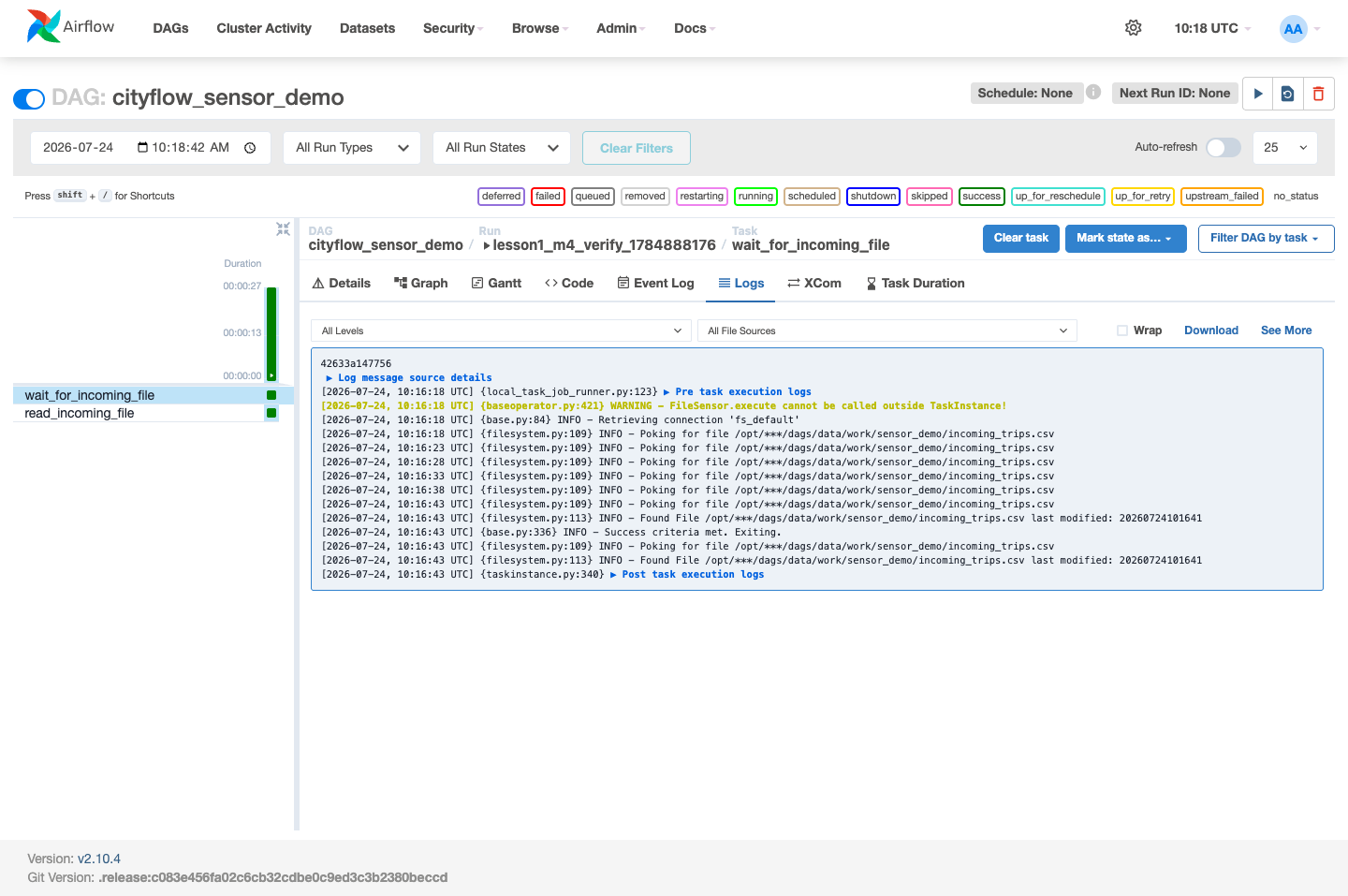
The task state table proves the sensor waited; the sensor’s own log proves how:
import subprocess

log_path = ".airflow-local/logs/dag_id=cityflow_sensor_demo/run_id=lesson1_m4_verify_1784888176/task_id=wait_for_incoming_file/attempt=1.log"
with open(log_path) as f:
    log_text = f.read()

poke_lines = [l for l in log_text.splitlines() if "Poking for file" in l]
found_lines = [l for l in log_text.splitlines() if "Found File" in l]
print(f"{len(poke_lines)} real 'Poking for file' log lines")
for l in poke_lines:
    print(" ", l)
assert len(poke_lines) >= 5, f"expected several real poke attempts, got {len(poke_lines)}"
assert found_lines, "expected a 'Found File' line once the sensor detected the real file"
print("\nconfirmed: the sensor polled repeatedly, then detected the real file")
7 real 'Poking for file' log lines
[2026-07-24T10:16:18.819+0000] {filesystem.py:109} INFO - Poking for file /opt/***/dags/data/work/sensor_demo/incoming_trips.csv
[2026-07-24T10:16:23.819+0000] {filesystem.py:109} INFO - Poking for file /opt/***/dags/data/work/sensor_demo/incoming_trips.csv
[2026-07-24T10:16:28.820+0000] {filesystem.py:109} INFO - Poking for file /opt/***/dags/data/work/sensor_demo/incoming_trips.csv
[2026-07-24T10:16:33.822+0000] {filesystem.py:109} INFO - Poking for file /opt/***/dags/data/work/sensor_demo/incoming_trips.csv
[2026-07-24T10:16:38.824+0000] {filesystem.py:109} INFO - Poking for file /opt/***/dags/data/work/sensor_demo/incoming_trips.csv
[2026-07-24T10:16:43.827+0000] {filesystem.py:109} INFO - Poking for file /opt/***/dags/data/work/sensor_demo/incoming_trips.csv
[2026-07-24T10:16:43.829+0000] {filesystem.py:109} INFO - Poking for file /opt/***/dags/data/work/sensor_demo/incoming_trips.csv
confirmed: the sensor polled repeatedly, then detected the real file/opt/***/dags/... isn’t a typo — that’s Airflow’s own secret masker redacting the literal string cityflow because it matches a value stored in a configured Connection, the same masking you’ll see again in Lesson 2. The path is still real; only the display is scrubbed.
The downstream task confirms the payload was real too:
log_path = ".airflow-local/logs/dag_id=cityflow_sensor_demo/run_id=lesson1_m4_verify_1784888176/task_id=read_incoming_file/attempt=1.log"
with open(log_path) as f:
    read_log = f.read()

for line in read_log.splitlines():
    if "real rows" in line:
        print(line)
assert "read 15 real rows" in read_log
[2026-07-24T10:16:45.351+0000] {logging_mixin.py:190} INFO - read 15 real rows from /opt/***/dags/data/work/sensor_demo/incoming_trips.csv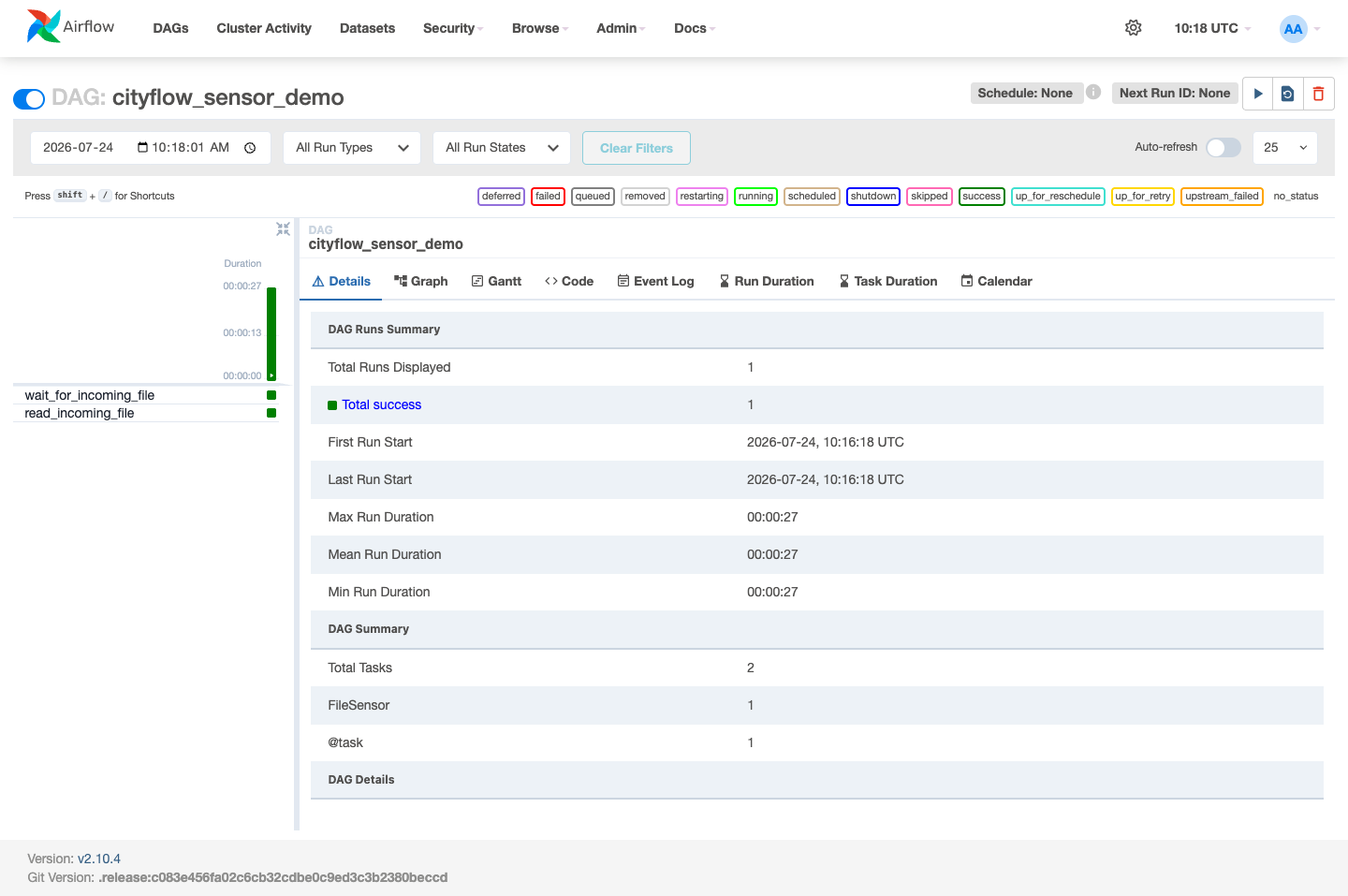
FileSensor polls a real condition on a real interval (poke_interval=5) and only succeeds once that condition is genuinely true — it is not a disguised sleep().running polls, all showing the same fact, is stronger evidence than reading the sensor’s code and agreeing it looks right.Poking for file lines followed by exactly one Found File / Success criteria met. pair, timestamped 5 real seconds apart.FileSensor needs a Filesystem Connection (fs_conn_id) to know its base path — Connections aren’t just for databases, a fact Lesson 3 returns to in depth.Exercise 1 — Change poke_interval to 2 and timeout to 20, remove the incoming file, trigger the DAG, and don’t create the file at all. Confirm the sensor’s own state becomes failed once its timeout elapses, and that its log’s last few lines explain why.
Exercise 2 — Change mode="poke" to mode="reschedule", trigger the DAG again with the file absent, and compare the task’s state between polls — reschedule mode shows up_for_reschedule between attempts instead of holding running the whole time, freeing the worker slot for other tasks while it waits.
Exercise 3 — Point a second FileSensor at a file that will never arrive during a short timeout, and use airflow tasks states-for-dag-run to confirm its final state is failed, not success or running forever — a sensor that never finds its condition still terminates.
Keep DATATWEETS free. Help fund practical data, AI, and engineering lessons for learners worldwide.
