Title here
Summary here
Lesson 2’s hook already avoided hardcoding a host, port, or password by naming a Connection (cityflow_postgres) instead — this lesson stops and looks at Connections and Variables as first-class Airflow objects in their own right: where they live, how you manage them for real through the UI and CLI, and what a task looks like when it reads everything configurable from them instead of a literal in the code.
By the end of this lesson, you will be able to:
cityflow_postgres (added in Lesson 2) and fs_default (added in Lesson 1) are both real, persistent Airflow Connections, stored in Airflow’s own metadata database and visible in the live UI’s Admin → Connections page:
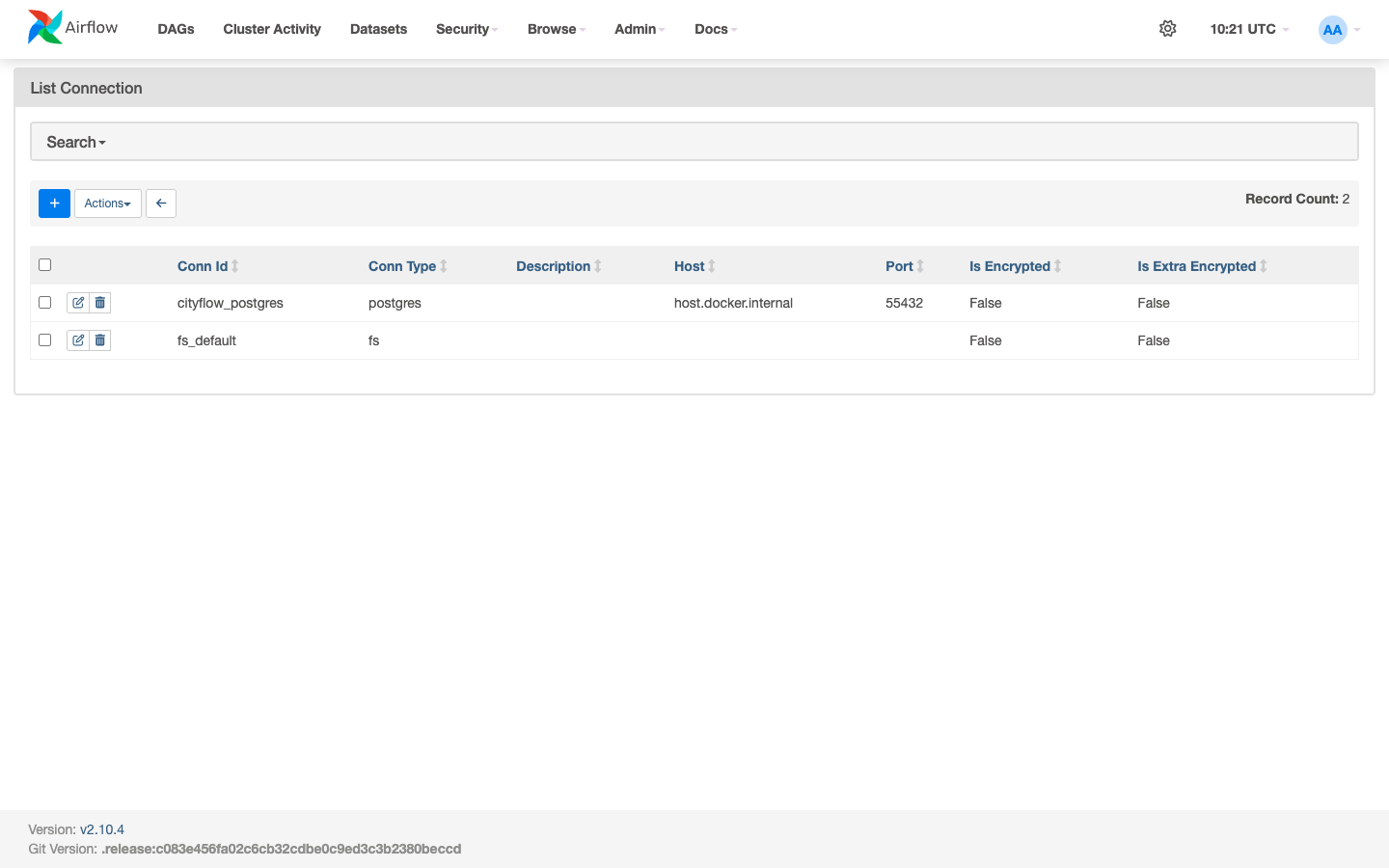
Every field a task needs to reach Postgres — host, port, login, password, schema — lives here, not in any DAG file. A DAG only ever names cityflow_postgres; changing the actual host or port later (say, a real production migration) means editing this one row, not hunting through every task that used it.
A Variable is Airflow’s equivalent for a single named value that isn’t a connection — here, which table name this module’s hook tasks should write to. Added via the CLI:
docker exec airflow-local-airflow-scheduler-1 airflow variables set cityflow_hook_demo_table cityflow_hook_demoVariable cityflow_hook_demo_table created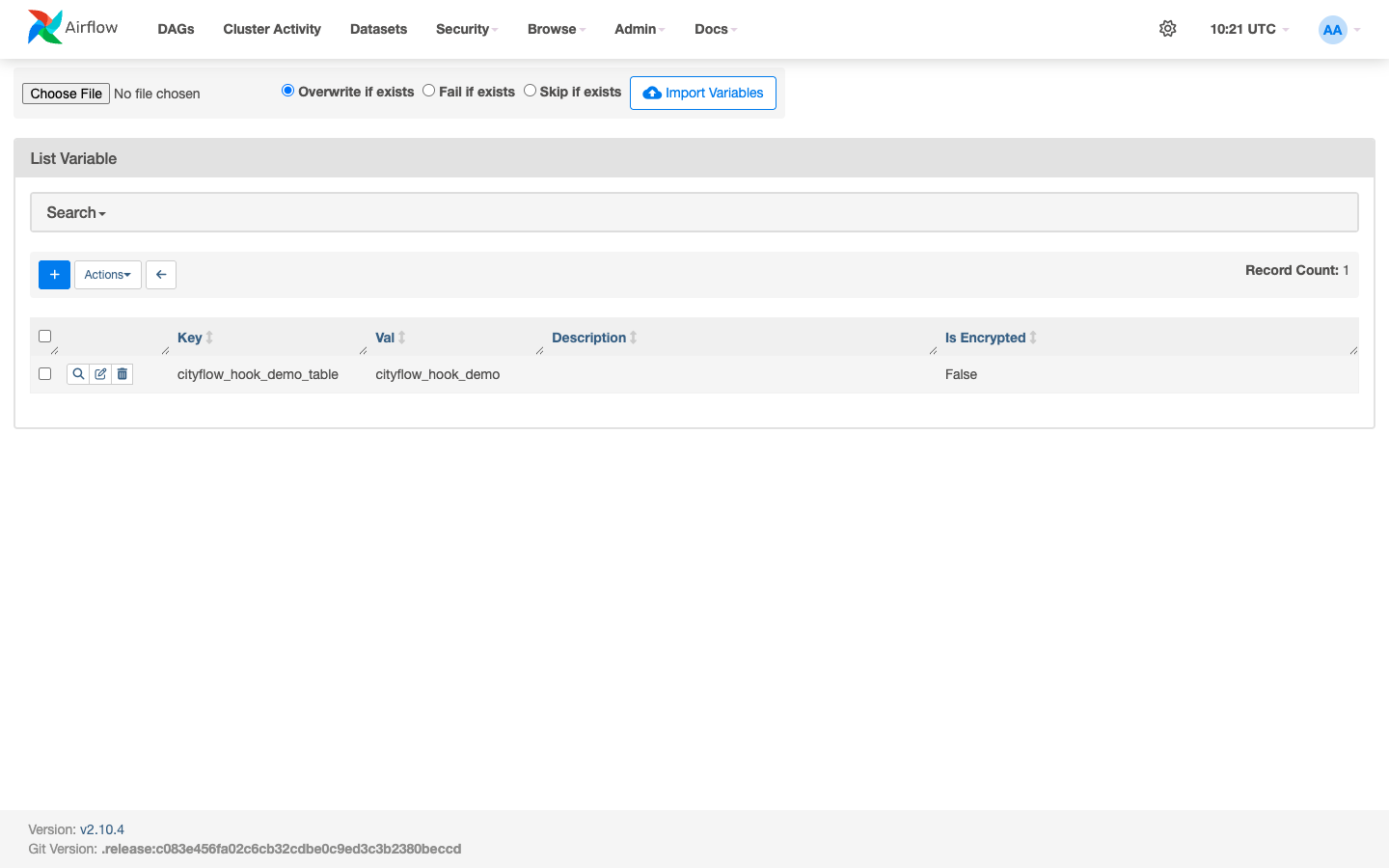
# gate: skip
"""CityFlow's real Connections + Variables demo (Module 4 Lesson 3).

Nothing here is a hardcoded connection string or a hardcoded table name: the
task reads the Airflow Variable 'cityflow_hook_demo_table' to learn which
table to write to, and reaches Postgres through the named 'cityflow_postgres'
Connection via PostgresHook -- both configured for real through the Airflow
UI / CLI, not passed as literals in this file."""
from datetime import datetime

from airflow.decorators import dag, task
from airflow.models import Variable

POSTGRES_CONN_ID = "cityflow_postgres"


@dag(
    dag_id="cityflow_connections_variables_demo",
    schedule=None,
    start_date=datetime(2026, 1, 1),
    catchup=False,
    tags=["cityflow", "module-4", "connections-variables"],
)
def cityflow_connections_variables_demo_dag():
    @task
    def add_nyc_total_row() -> int:
        """Read the target table's name from a real Airflow Variable, then
        use the real 'cityflow_postgres' Connection (via PostgresHook) to
        insert one more row and confirm the new total."""
        from airflow.providers.postgres.hooks.postgres import PostgresHook

        table_name = Variable.get("cityflow_hook_demo_table")
        print(f"read Variable cityflow_hook_demo_table -> {table_name!r}")

        hook = PostgresHook(postgres_conn_id=POSTGRES_CONN_ID)

        hook.run(
            f"DELETE FROM {table_name} WHERE zone_name = %s;",
            parameters=("ALL_NYC_TOTAL",),
        )
        hook.run(
            f"INSERT INTO {table_name} (zone_name, zone_count) VALUES (%s, %s);",
            parameters=("ALL_NYC_TOTAL", 265),
        )
        print(f"inserted ALL_NYC_TOTAL row into {table_name!r} via the named Connection")

        row_count = hook.get_first(f"SELECT COUNT(*) FROM {table_name};")[0]
        print(f"SELECT COUNT(*) via hook: {row_count} rows in {table_name!r}")
        return row_count

    add_nyc_total_row()


cityflow_connections_variables_demo_dag()
Neither POSTGRES_CONN_ID nor the table name is a literal database credential or an assumption baked into the DAG’s logic — POSTGRES_CONN_ID names a Connection the UI manages, and Variable.get(...) resolves the table name from the Variable screenshotted above. Point cityflow_postgres at a different database, or change the Variable’s value to a different table, and this file doesn’t change at all.
This table only has Lesson 2’s 8 borough rows if Lesson 2’s DAG ran against this Postgres instance first — the verification below replays it before triggering this lesson’s own DAG, exactly like a fresh environment would need to.
# gate: setup: docker rm -f cityflow-lessons-db >/dev/null 2>&1; docker run -d --name cityflow-lessons-db -e POSTGRES_USER=cityflow -e POSTGRES_PASSWORD=cityflow -e POSTGRES_DB=cityflow -p 55432:5432 postgres:13 >/dev/null && sleep 4
# gate: teardown: docker rm -f cityflow-lessons-db >/dev/null 2>&1
import json
import subprocess
import time


def trigger_and_wait(dag_id, run_id_prefix):
    deadline = time.time() + 320
    found = False
    while time.time() < deadline:
        result = subprocess.run(
            ["docker", "exec", "airflow-local-airflow-scheduler-1", "airflow", "dags", "list", "--output", "json"],
            capture_output=True, text=True, check=True,
        )
        if any(d["dag_id"] == dag_id for d in json.loads(result.stdout)):
            found = True
            break
        time.sleep(5)
    assert found, f"{dag_id} was never picked up by the scheduler"

    subprocess.run(
        ["docker", "exec", "airflow-local-airflow-scheduler-1", "airflow", "dags", "unpause", dag_id],
        capture_output=True, text=True, check=True,
    )
    run_id = f"{run_id_prefix}_{int(time.time())}"
    trigger = subprocess.run(
        ["docker", "exec", "airflow-local-airflow-scheduler-1", "airflow", "dags", "trigger", dag_id, "--run-id", run_id],
        capture_output=True, text=True,
    )
    if trigger.returncode != 0:
        subprocess.run(["docker", "exec", "airflow-local-airflow-scheduler-1", "airflow", "dags", "reserialize"],
                        capture_output=True, text=True, check=True)
        subprocess.run(
            ["docker", "exec", "airflow-local-airflow-scheduler-1", "airflow", "dags", "trigger", dag_id, "--run-id", run_id],
            capture_output=True, text=True, check=True,
        )
    print(f"triggered {dag_id!r} as {run_id!r}")

    deadline = time.time() + 90
    state = "queued"
    while state not in ("success", "failed") and time.time() < deadline:
        time.sleep(3)
        r = subprocess.run(
            ["docker", "exec", "airflow-local-airflow-scheduler-1", "airflow", "dags", "list-runs", "-d", dag_id, "--output", "json"],
            capture_output=True, text=True, check=True,
        )
        runs = json.loads(r.stdout)
        state = next(x["state"] for x in runs if x["run_id"] == run_id)
    print(f"run {run_id!r} reached state: {state}")
    assert state == "success", f"expected success, got {state}"
    return run_id


# Step 1: replay Lesson 2's DAG so this fresh Postgres instance has the real
# 8-borough table Lesson 3's DAG is about to add a 9th row to.
trigger_and_wait("cityflow_hooks_demo", "lesson3_seed")

# Step 2: this lesson's own Connections+Variables-driven DAG.
trigger_and_wait("cityflow_connections_variables_demo", "lesson3_m4_verify")

# Independent check: query cityflow-lessons-db directly.
import psycopg2

conn = psycopg2.connect(host="localhost", port=55432, user="cityflow", password="cityflow", dbname="cityflow")
cur = conn.cursor()
cur.execute("SELECT zone_name, zone_count FROM cityflow_hook_demo ORDER BY zone_name;")
rows = cur.fetchall()
for r in rows:
    print(" ", r)
print(f"direct psycopg2 check: {len(rows)} rows")
assert len(rows) == 9, f"expected 9 rows (8 boroughs + ALL_NYC_TOTAL), got {len(rows)}"
conn.close()
triggered 'cityflow_hooks_demo' as 'lesson3_seed_1784888600'
run 'lesson3_seed_1784888600' reached state: success
triggered 'cityflow_connections_variables_demo' as 'lesson3_m4_verify_1784888619'
run 'lesson3_m4_verify_1784888619' reached state: success
('ALL_NYC_TOTAL', 265)
('Bronx', 43)
('Brooklyn', 61)
('EWR', 1)
('Manhattan', 69)
('Outside of NYC', 1)
('Queens', 69)
('Staten Island', 20)
('Unknown', 1)
direct psycopg2 check: 9 rowsThe task’s own log confirms it never saw a literal table name or connection string — only the Variable and the Connection ID:
[2026-07-24T10:23:41.589+0000] {logging_mixin.py:190} INFO - read Variable cityflow_hook_demo_table -> 'cityflow_hook_demo'
[2026-07-24T10:23:41.614+0000] {sql.py:553} INFO - Running statement: SELECT COUNT(*) FROM ***_hook_demo;, parameters: None
[2026-07-24T10:23:41.616+0000] {logging_mixin.py:190} INFO - SELECT COUNT(*) via hook: 9 rows in '***_hook_demo'
9 real rows — Lesson 2’s 8 boroughs plus this lesson’s ALL_NYC_TOTAL row — reached both by the task’s own hook query and by this script’s completely independent psycopg2 connection.
Variable.get(...) and PostgresHook(postgres_conn_id=...) are two independent lookups against two different tables in Airflow’s metadata database, composed in one task.Exercise 1 — Add a second Variable, cityflow_hook_demo_alert_threshold, holding an integer, and change add_nyc_total_row to only insert the ALL_NYC_TOTAL row if the table’s current row count is below that threshold — confirm via the UI’s Variables list that both Variables coexist correctly.
Exercise 2 — Use airflow connections export - (or the UI’s own connection edit page) to view cityflow_postgres’s stored fields without ever typing the password again, and explain why that’s meaningfully different from a hardcoded connection string in a DAG file that anyone with repo read access could see.
Exercise 3 — Change the Variable’s value to a table name that doesn’t exist yet (e.g. cityflow_hook_demo_v2) via airflow variables set, trigger the DAG, and read the real error in the task’s log — confirm it’s a missing-table SQL error, not a Variable-lookup error, since the Variable itself resolved fine.
Keep DATATWEETS free. Help fund practical data, AI, and engineering lessons for learners worldwide.
