Title here
Summary here
If you already know pandas, you’ve probably heard Polars described as “pandas, but faster.” That description is true and also badly incomplete. Polars is a different design from the ground up: instead of stepping through data imperatively, you describe the transformation you want as an expression, and Polars figures out how to execute it — in parallel, across every CPU core you have, without you writing a single loop.
This lesson doesn’t ask you to take that on faith. You’re going to see two real problems Python developers run into constantly — one a performance wall, one a silent correctness bug — and then see how Polars’s design avoids both, with real code you run yourself.
By the end of this lesson, you will be able to:
You don’t need Polars installed yet for this lesson — Lesson 4 handles that. For now, just read and run the comparisons.
Ask working Python developers what frustrates them about processing tabular data, and two answers come up over and over:
for loop over a DataFrame’s rows re-enters the Python interpreter for every single row. On a few hundred rows, nobody notices. On a few hundred thousand, it’s the difference between a script that finishes while you make coffee and one that finishes tomorrow. Lesson 2 measures this difference for real, with a stopwatch and real numbers — this lesson just names the problem.The second problem is the one worth seeing in actual code, because it’s subtle enough that even experienced developers get bitten by it.
Say you’re maintaining Thistlewood Goods’ product catalog, and you need to raise the price of every Kitchen item by 10%. The obvious-looking pandas code is to filter to Kitchen products, then update their price:
import warnings
warnings.filterwarnings("ignore")
import pandas as pd

products = pd.DataFrame({
    "product_name": ["Copper Skillet", "Linen Towel Set", "Cast Iron Griddle", "Woven Planter"],
    "category": ["Kitchen", "Bath", "Kitchen", "Outdoor"],
    "price": [64.00, 38.00, 72.00, 26.00],
})

kitchen_items = products[products["category"] == "Kitchen"]
kitchen_items["price"] = kitchen_items["price"] * 1.10

print("Original products dataframe:")
print(products)
print("\nThe 'updated' subset:")
print(kitchen_items)
Original products dataframe:
product_name category price
0 Copper Skillet Kitchen 64.0
1 Linen Towel Set Bath 38.0
2 Cast Iron Griddle Kitchen 72.0
3 Woven Planter Outdoor 26.0
The 'updated' subset:
product_name category price
0 Copper Skillet Kitchen 70.4
2 Cast Iron Griddle Kitchen 79.2Look closely: kitchen_items shows the raised prices, exactly as expected — 64.00 became 70.40, 72.00 became 79.20. But products, the DataFrame you presumably actually wanted to update, is completely unchanged. No error. No warning printed. The code ran top to bottom without complaint, and it silently did nothing to the object you cared about.
Here’s why: products[products["category"] == "Kitchen"] returns a new object, kitchen_items. Whether that new object is a fresh copy of the data or a view into the same underlying memory as products has historically been ambiguous in pandas, and modern pandas (with copy-on-write behavior) resolves that ambiguity by always giving you an independent copy. That’s more predictable than older pandas versions, which sometimes silently mutated the original and sometimes didn’t — but it’s still a trap: the code looks like it updates products, reads like it updates products, and doesn’t. You’d only find out by checking products afterward, which most people don’t do until a report downstream comes out wrong.
This isn’t a contrived example. It’s one of the most commonly hit pandas footguns, precisely because it looks so reasonable to write.
Why this happens
The root cause is pandas’s index: every DataFrame and Series carries row labels, and operations like filtering, slicing, and assignment all have to reason about whether they’re touching the original data or a derived copy that merely shares an index. That reasoning is exactly what causes ambiguity. Lesson 2 explains Polars’s no-index model in more depth — this is the first place you’re seeing why it matters.
Polars removes the entire category of bug you just saw, not by patching pandas’s behavior, but by not having an index at all, and by never letting you silently operate on “maybe a copy, maybe not.” Every operation in Polars takes a DataFrame and returns a new DataFrame. There’s no ambiguity about views versus copies, because there’s no in-place mutation of a filtered subset to begin with — you don’t update kitchen_items and hope it flows back to products; you build the whole new answer in one expression.
Here’s the identical price-increase task, done the way Polars expects:
import polars as pl

products = pl.DataFrame({
    "product_name": ["Copper Skillet", "Linen Towel Set", "Cast Iron Griddle", "Woven Planter"],
    "category": ["Kitchen", "Bath", "Kitchen", "Outdoor"],
    "price": [64.00, 38.00, 72.00, 26.00],
})

updated = products.with_columns(
    pl.when(pl.col("category") == "Kitchen")
    .then(pl.col("price") * 1.10)
    .otherwise(pl.col("price"))
    .round(2)
    .alias("price")
)

print(updated)
shape: (4, 3)
┌───────────────────┬──────────┬───────┐
│ product_name ┆ category ┆ price │
│ --- ┆ --- ┆ --- │
│ str ┆ str ┆ f64 │
╞═══════════════════╪══════════╪═══════╡
│ Copper Skillet ┆ Kitchen ┆ 70.4 │
│ Linen Towel Set ┆ Bath ┆ 38.0 │
│ Cast Iron Griddle ┆ Kitchen ┆ 79.2 │
│ Woven Planter ┆ Outdoor ┆ 26.0 │
└───────────────────┴──────────┴───────┘Notice what’s different in the shape of the code, not just the result: there’s no intermediate kitchen_items variable that might or might not be connected to products. Instead, pl.when(...).then(...).otherwise(...) describes, in one expression, “for every row, if this condition holds, use this value, otherwise use that value” — and it’s evaluated against the whole price column at once, producing a complete new DataFrame, updated, with every row present (Kitchen prices raised, everything else untouched). There’s nothing to silently forget to reassign.
This is what “expression-based” means in practice: you’re not writing step-by-step imperative instructions (“take this subset, mutate this column”); you’re writing a declarative description of the output you want, and Polars is responsible for making it happen correctly and efficiently.
The other half of what makes Polars fast is that expressions aren’t executed the instant you write them the way a Python statement is. Polars can look at the full chain of operations you’ve described — filter, then select, then aggregate, say — and plan the most efficient way to execute all of it together: which columns actually need to be read, which filters can run first to shrink the data early, and which parts can run on separate threads at the same time. Module 10 goes deep on this (it’s the difference between eager and lazy execution), but the important idea for now is: Polars doesn’t just run your code faster line by line — it can rearrange and parallelize the whole plan before running any of it.
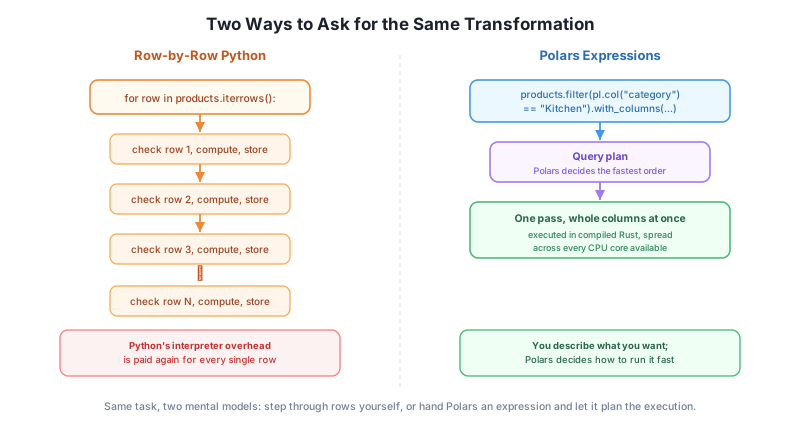
Every lesson from here on works against one real, growing example: Thistlewood Goods, a small home-goods retailer selling kitchenware, bedding, lighting, and more. By the end of this module, you’ll have generated Thistlewood Goods’ actual data — customers, products, orders, and order line items — and used Polars to read it and produce a first real summary. Every later module in this course builds on that same dataset, so the numbers you compute now stay meaningful for the rest of the course.
For this lesson, small hand-written examples were enough to see the core idea. Starting in Lesson 3, you’ll be working with real, larger data.
Using the pandas example above, add a second filter-and-assign step after the first one: try to also give every item under $30 a flat $2 discount, using the same chained-indexing style (products[products["price"] < 30]["price"] = ...). Run it and check whether products changed. Explain, in a sentence, why the outcome is the same kind of silent no-op as the Kitchen price increase.
Hint
The bug isn’t about categories or prices specifically — it’s about the shape of the code: df[condition][column] = value always creates an intermediate object first, then assigns into that intermediate, not into df.
Fix the pandas version from Exercise 1 so it actually updates products (hint: assign back to products directly using .loc, e.g. products.loc[condition, "price"] = ...). Then write the same $30-discount rule as a Polars expression using pl.when().then().otherwise(), the way this lesson’s example did. Confirm both give you the same final prices.
Polars is not “pandas, but faster” — it’s built around expressions that describe a transformation once, evaluated as a query plan rather than executed step by step. You saw a real pandas bug where filtering and assigning through a chained expression silently updated a throwaway copy and left the original DataFrame untouched — no error, no warning, just a wrong answer waiting to surface downstream. The equivalent Polars code, written as one with_columns expression, has no such ambiguity: there’s no copy to silently diverge from, because every operation returns a complete new DataFrame.
pl.when(...).then(...).otherwise(...)) that Polars evaluates against whole columns, not a step-by-step imperative instruction.df[condition][column] = value as two separate indexing steps, which creates an intermediate object that may not be connected back to df.Silent bugs are the most expensive kind, because nothing tells you they happened — you find them when a number in a report looks wrong, usually much later and often much more publicly than a stack trace would have been. A tool whose design makes an entire class of that bug structurally impossible is worth learning properly, not just adopting for a speed bump.
Lesson 1 named the problems. Lesson 2 measures one of them for real: the same task, done as a plain Python loop and as Polars, with an honest stopwatch on both.
Keep DATATWEETS free. Help fund practical data, AI, and engineering lessons for learners worldwide.
