Title here
Summary here
Lesson 3 gave CityFlow a partitioned analytics table: the zone-hour report written out as Parquet, clustered by month, so a dashboard query for February reads February’s files and skips the rest. That table is the thing the scheduler will rebuild every night. Which surfaces the question this whole module has been building toward — the one that separates a demo from a job you can actually leave running. What happens when the job runs twice? Not hypothetically: a task fails and Spark retries it, a schedule fires twice because someone re-enabled it, an on-call engineer re-runs last night’s backfill by hand to be safe. A job that produces the right answer once and the wrong answer on the retry is not a job you can trust to run unattended, and unattended is the entire point.
This is the same problem Course 1 solved in its capstone with a SQLite warehouse: a primary key on (zone, hour) and INSERT OR REPLACE, so loading the same batch twice replaced rows instead of appending them and no total ever double-counted. Spark writes to files, not to a keyed table, so the mechanism is different — but the property is identical. A job is idempotent when running it again produces the same result as running it once. This lesson proves the danger for real (a naive append that doubles CityFlow’s revenue), then builds the file-world equivalent of INSERT OR REPLACE: dynamic partition overwrite, which replaces only the partitions a run produced and leaves every other partition exactly as it was. Every number here is measured, and the finish line is the one you already know to the cent — 240,917 buckets, 9,554,757 trips, $256,692,373.14 — holding steady across a re-run.
By the end of this lesson, you will be able to:
mode("append") the same partitioned data twice and watch the totals doublemode("overwrite") for a full rebuild, and say precisely why it is idempotent but wasteful for incremental workspark.sql.sources.partitionOverwriteMode=dynamic) to replace only the partitions a run produces, leaving the rest of the table untouched_SUCCESS marker and the trap of emitting partitions you didn’t mean to replaceYou’ll need pyspark (JDK 17 or 21 — see the course setup) and the three taxi-quarter Parquet files. No new packages; every write mode is built into DataFrameWriter.
To study re-runs we need something worth re-running: CityFlow’s analytics table from Lesson 3 — the zone-hour report, written as Parquet and partitioned by pickup month. Start the standard session and build it. The cleaning and transform are the Module 6 body you already know: filter to the report window, derive the truncated pickup hour, aggregate trips and revenue per zone-hour, then add a pickup_month column to partition on. We cache() the result because every demo below writes it, and we don’t want to re-scan 153 MB each time.
import warnings
warnings.filterwarnings("ignore")
import os, shutil
from pyspark.sql import SparkSession
import pyspark.sql.functions as F

spark = (SparkSession.builder
         .appName("cityflow")
         .master("local[*]")
         .config("spark.ui.showConsoleProgress", "false")
         .getOrCreate())
spark.sparkContext.setLogLevel("ERROR")

QUARTER = ["yellow_tripdata_2024-01.parquet",
           "yellow_tripdata_2024-02.parquet",
           "yellow_tripdata_2024-03.parquet"]


def build_report(paths):
    """Module 6's ETL body: read -> clean (window) -> transform (zone-hour aggregate),
    plus a pickup_month column to partition on. Reversals kept; keyed on LocationID."""
    df = spark.read.parquet(*paths)
    clean = df.filter((F.col("tpep_pickup_datetime") >= "2024-01-01") &
                      (F.col("tpep_pickup_datetime") < "2024-04-01"))
    return (clean
        .withColumn("pickup_hour", F.date_trunc("hour", "tpep_pickup_datetime"))
        .groupBy("PULocationID", "pickup_hour")
        .agg(F.count("*").alias("trips"),
             F.sum("total_amount").alias("revenue"))
        .withColumn("pickup_month", F.date_format("pickup_hour", "yyyy-MM"))
        .withColumnRenamed("PULocationID", "zone"))


report = build_report(QUARTER).cache()
report.count()   # materialize the cache once


def totals(df, label):
    r = df.agg(F.count("*").alias("buckets"),
               F.sum("trips").alias("trips"),
               F.sum("revenue").alias("revenue")).first()
    print(f"{label:<26} buckets={r['buckets']:>8,}  "
          f"trips={r['trips']:>12,}  revenue=${r['revenue']:,.2f}")
    return r


totals(report, "in-memory report")
print("\nby partition (pickup_month):")
for r in (report.groupBy("pickup_month")
          .agg(F.count("*").alias("b"), F.sum("trips").alias("t"),
               F.sum("revenue").alias("rev"))
          .orderBy("pickup_month").collect()):
    print(f"  {r['pickup_month']}   {r['b']:>6,} buckets   "
          f"{r['t']:>9,} trips   ${r['rev']:,.2f}")
in-memory report buckets= 240,917 trips= 9,554,757 revenue=$256,692,373.14
by partition (pickup_month):
2024-01 77,530 buckets 2,964,617 trips $79,456,198.67
2024-02 74,376 buckets 3,007,533 trips $80,073,797.21
2024-03 89,011 buckets 3,582,607 trips $97,162,377.26There is the table, matching Course 1’s ground truth exactly: 240,917 buckets, 9,554,757 trips, $256,692,373.14, split across three monthly partitions that sum to the whole. Notice one honest detail already: the per-month counts are keyed on the pickup time, not the source file — a trip whose pickup falls in February counts toward 2024-02 even if it happened to be recorded in the January file. That is exactly what “partition by pickup month” means, and it will matter in a moment. This is the table every re-run below has to preserve.
mode("append") Doubles EverythingLet’s make the bug real before we fix it. The most natural way to write a partitioned table is mode("append") — it adds this run’s files alongside whatever is already there. That is perfect for new data. It is a disaster for a re-run, because a re-run is the same data, and append has no idea it has seen it before. Watch what one accidental second run does.
APP = "c2m6l4_append"
if os.path.exists(APP):
    shutil.rmtree(APP)

# first run: write the quarter, partitioned by month
report.write.mode("overwrite").partitionBy("pickup_month").parquet(APP)
totals(spark.read.parquet(APP), "after first write")

# the retry: the EXACT same job runs again, this time appending
report.write.mode("append").partitionBy("pickup_month").parquet(APP)
totals(spark.read.parquet(APP), "after append SAME data")
after first write buckets= 240,917 trips= 9,554,757 revenue=$256,692,373.14
after append SAME data buckets= 481,834 trips= 19,109,514 revenue=$513,384,746.28Every number doubled. Buckets went from 240,917 to 481,834, trips from 9,554,757 to 19,109,514, and revenue from $256.7 M to $513,384,746.28 — a second, phantom quarter of taxi money that never happened. Nothing errored. No warning printed. The dashboard would light up with twice the ridership and Spark would report a clean, successful job, because appending duplicate files is what append is designed to do. This is the failure Course 1 warned about, in Spark form: a job that is correct exactly once. And in production, “exactly once” is a bet you always lose eventually — the retry, the double schedule, the nervous manual re-run all arrive on their own timetable. Idempotency is what makes running twice safe, and everything below is a way to get it.
mode("overwrite"): Idempotent by Full RebuildThe bluntest fix is the one that works: mode("overwrite") deletes the output location and writes it fresh. Because the table is replaced rather than added to, running the job ten times leaves exactly what running it once does. This is genuine idempotency, and for a full nightly rebuild it is often the right choice.
FULL = "c2m6l4_full"
if os.path.exists(FULL):
    shutil.rmtree(FULL)

report.write.mode("overwrite").partitionBy("pickup_month").parquet(FULL)
totals(spark.read.parquet(FULL), "after 1st rebuild")

report.write.mode("overwrite").partitionBy("pickup_month").parquet(FULL)   # re-run
totals(spark.read.parquet(FULL), "after re-run")
after 1st rebuild buckets= 240,917 trips= 9,554,757 revenue=$256,692,373.14
after re-run buckets= 240,917 trips= 9,554,757 revenue=$256,692,373.14Identical before and after: 240,917 / 9,554,757 / $256,692,373.14 both times. The re-run changed nothing, which is the definition of idempotent. So why isn’t this the end of the lesson? Because overwrite rebuilds everything. To correct a single bad hour in February, this job re-reads all three months, re-aggregates 9.5 million rows, and rewrites all three partitions — throwing away January’s and March’s work only to write back exactly what was already there. For a small quarter on a laptop that waste is invisible. For a table with two years of daily partitions that a corrected batch touches one day of, rebuilding the whole thing every night is the difference between a job that finishes and one that doesn’t. Full overwrite is idempotent and wasteful; the incremental pattern keeps the idempotency and drops the waste.
Overwrite replaces the whole path — including partitions this run never saw
By default, mode("overwrite") on a partitioned path is a static overwrite: it clears the entire output directory before writing, regardless of which partitions the current DataFrame contains. That is fine when the DataFrame is the whole table. It is a landmine when the DataFrame is only one month — as the next section demonstrates, statically overwriting February’s slice deletes January and March along with it.
Here is the pattern that makes incremental jobs idempotent. Spark has a second overwrite behavior, switched on by one config: spark.sql.sources.partitionOverwriteMode=dynamic. In dynamic mode, mode("overwrite") on a partitioned write no longer clears the whole directory — it replaces only the partitions present in the data being written, and leaves every other partition on disk exactly as it was. That is the file-world INSERT OR REPLACE: the partition is the key, and writing a partition overwrites that partition in place.
To see why it matters, first watch the trap it avoids. With the default (static) overwrite, suppose February’s numbers were corrected and we re-run only February, writing just that month’s slice back to the table:
# the Feb slice of the analytics table -- exactly one partition's worth of rows
feb_slice = report.filter(F.col("pickup_month") == "2024-02")

STAT = "c2m6l4_static"
if os.path.exists(STAT):
    shutil.rmtree(STAT)
report.write.mode("overwrite").partitionBy("pickup_month").parquet(STAT)      # full table
feb_slice.write.mode("overwrite").partitionBy("pickup_month").parquet(STAT)    # re-run Feb, STATIC

print("partitions left:",
      sorted(d for d in os.listdir(STAT) if d.startswith("pickup_month=")))
totals(spark.read.parquet(STAT), "after static Feb re-run")
partitions left: ['pickup_month=2024-02']
totals: after static Feb re-run buckets= 74,376 trips= 3,007,533 revenue=$80,073,797.21Re-running one month with a static overwrite deleted the other two. Only pickup_month=2024-02 survives, and the table collapsed from the full quarter to February alone — 3,007,533 trips, a third of the real number. The job “succeeded.” This is the exact partitioned-write footgun the callout warned about, and it is why you cannot naively reuse the full-rebuild code for incremental work.
Now flip the one switch and run the identical re-run:
spark.conf.set("spark.sql.sources.partitionOverwriteMode", "dynamic")

DYN = "c2m6l4_dyn"
if os.path.exists(DYN):
    shutil.rmtree(DYN)
report.write.mode("overwrite").partitionBy("pickup_month").parquet(DYN)        # full table
totals(spark.read.parquet(DYN), "after full write")

feb_slice.write.mode("overwrite").partitionBy("pickup_month").parquet(DYN)      # re-run Feb, DYNAMIC
totals(spark.read.parquet(DYN), "after dynamic Feb re-run")

print("\nby partition after the Feb re-run:")
for r in (spark.read.parquet(DYN).groupBy("pickup_month")
          .agg(F.count("*").alias("b"), F.sum("trips").alias("t"))
          .orderBy("pickup_month").collect()):
    print(f"  {r['pickup_month']}   {r['b']:>6,} buckets   {r['t']:>9,} trips")
after full write buckets= 240,917 trips= 9,554,757 revenue=$256,692,373.14
after dynamic Feb re-run buckets= 240,917 trips= 9,554,757 revenue=$256,692,373.14
by partition after the Feb re-run:
2024-01 77,530 buckets 2,964,617 trips
2024-02 74,376 buckets 3,007,533 trips
2024-03 89,011 buckets 3,582,607 tripsUnchanged. The dynamic re-run replaced February’s partition in place — same 74,376 buckets, same 3,007,533 trips — and touched neither January nor March, so the table still reads the verified 240,917 / 9,554,757 / $256,692,373.14. Run it again, or ten more times, and the answer never moves: the operation is idempotent, because a partition overwritten with itself is itself. This is the whole pattern. Reprocessed February? Write February’s slice with a dynamic overwrite. It costs one partition’s worth of work, not the quarter’s, and a retry is a no-op instead of a doubling. It is INSERT OR REPLACE for files, with the partition playing the role of the primary key.
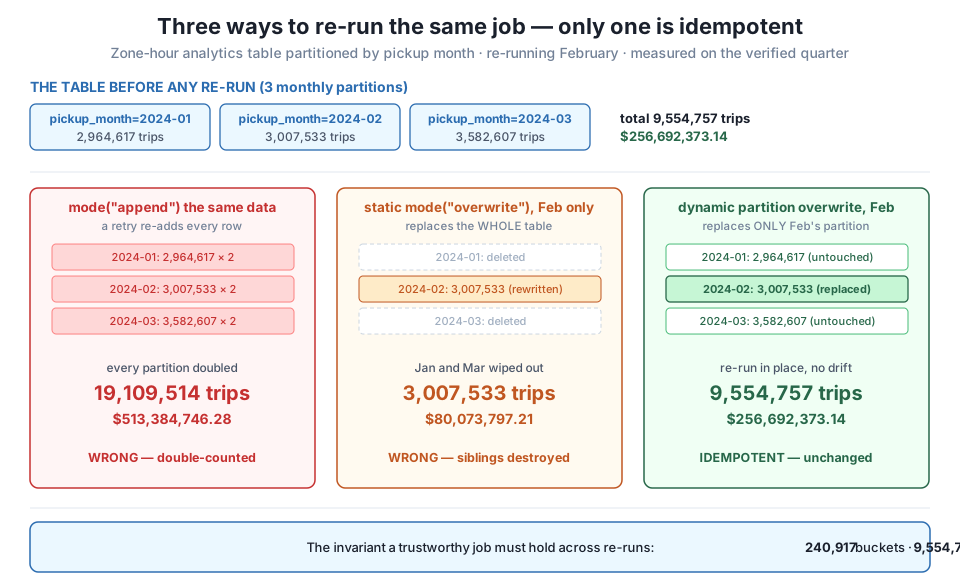
append re-adds every row and doubles the table to 19,109,514 trips and $513,384,746.28. Static overwrite of one month clears the whole path first, deleting January and March and collapsing the quarter to February's 3,007,533 trips. Dynamic partition overwrite replaces only pickup_month=2024-02 in place and leaves the siblings untouched, so the table holds at 240,917 buckets, 9,554,757 trips, $256,692,373.14 — Course 1's ground truth, unchanged across the re-run.Dynamic overwrite is powerful and slightly sharp: it replaces exactly the partitions your DataFrame produces — no more, no less. That cuts both ways. If your “February re-run” quietly emits a handful of rows for other months, dynamic overwrite will happily clobber those partitions too. And re-reading a raw source file does exactly that, because the taxi files carry cross-month stragglers — a trip picked up on the 1st but recorded in the previous month’s file, and so on. Watch what the February source file actually produces when you re-aggregate it:
feb_from_file = build_report(["yellow_tripdata_2024-02.parquet"])
print("re-aggregating the Feb FILE lands rows in these partitions:")
for r in (feb_from_file.groupBy("pickup_month")
          .agg(F.count("*").alias("b"), F.sum("trips").alias("t"))
          .orderBy("pickup_month").collect()):
    print(f"  {r['pickup_month']}   {r['b']:>6,} buckets   {r['t']:>6,} trips")
re-aggregating the Feb FILE lands rows in these partitions:
2024-01 10 buckets 11 trips
2024-02 74,376 buckets 3,007,511 trips
2024-03 2 buckets 2 tripsThe February file holds 13 straggler trips whose pickups fall in January or March. A dynamic overwrite of feb_from_file would replace not just 2024-02 but also 2024-01 and 2024-03 — swapping their real millions of rows for these 11 and 2 stragglers, silently wrecking two months you never meant to touch. That is why the clean re-run above wrote feb_slice — the February slice of the analytics table, filtered to pickup_month == "2024-02", which contains that one partition and nothing else. The mental model to carry out of this lesson: choose the partition key to be your unit of reprocessing, and make each run emit exactly the partitions it intends to replace. Dynamic overwrite replaces what you hand it; hand it precisely the partitions you mean.
There is one more artifact worth knowing about — the _SUCCESS marker. A normal write drops an empty _SUCCESS file at the top of the output when the job commits, a flag downstream tools read as “this output is complete, safe to consume.” Dynamic partition overwrite, because it commits partitions individually rather than the table as a whole, skips that table-level marker:
print("full rebuild (static) top level:", sorted(os.listdir(FULL)))
print("dynamic overwrite  top level:", sorted(os.listdir(DYN)))
full rebuild (static) top level: ['_SUCCESS', 'pickup_month=2024-01', 'pickup_month=2024-02', 'pickup_month=2024-03']
dynamic overwrite top level: ['pickup_month=2024-01', 'pickup_month=2024-02', 'pickup_month=2024-03']The static full rebuild wrote a _SUCCESS marker; the dynamic overwrite did not. The reason is the same one that makes dynamic mode useful: it isn’t committing the whole table, only the partitions it swapped, so a single table-wide “done” flag doesn’t fit. Under the hood each partition is written to a temporary location and atomically moved into place at commit, which is what keeps a crashed or retried write from leaving a half-written partition a reader could see. If a downstream consumer of yours gates on _SUCCESS, that is a real consideration when you choose dynamic overwrite — plan to signal completion another way (a marker you write yourself, or an orchestrator’s own success state, which Module 8 will provide).
spark.stop()

# tidy up every table this lesson wrote; leave the staged datasets intact
for path in [APP, FULL, STAT, DYN, "spark-warehouse"]:
    shutil.rmtree(path, ignore_errors=True)
print("cleaned:",
      [p for p in [APP, FULL, STAT, DYN] if os.path.exists(p)] or "all temp tables removed")
print("session closed")
cleaned: all temp tables removed
session closedExercise 1 — Prove the doubling grows without bound. Take the append demo and run the mode("append") write a third time on the same report, then a fourth. Read the table back after each and record buckets, trips, and revenue. Confirm the totals climb as exact integer multiples of the true quarter (2x, 3x, 4x) and that revenue tracks them to the cent. Then explain, in one comment, why append can never be made idempotent no matter how many times you run it — what would have to change about the write to make a retry safe?
Hint
Each append adds another full copy of all 240,917 buckets’ worth of files, so run number n yields n * 9,554,757 trips and n * $256,692,373.14. The fix isn’t a different number of runs; it’s a different mode. append has no notion of identity, so it cannot recognize data it already wrote. Idempotency has to come from overwrite (replace the whole path) or dynamic partition overwrite (replace matching partitions) — a write that keys on where the data goes, not one that only ever adds.
Exercise 2 — Reprocess two months at once, safely. Build a slice of report for February and March together (pickup_month in ("2024-02", "2024-03")), set dynamic partition overwrite, and write it back over the full table. Confirm that January is untouched and that February and March were replaced in place, so the quarter still totals 9,554,757 trips and $256,692,373.14. Then, as a contrast, repeat it with the mode left at static and record how much of the table survives.
Hint
Under dynamic mode, the write replaces 2024-02 and 2024-03 (the two partitions your slice contains) and leaves 2024-01 alone — total unchanged. Under static mode, mode("overwrite") clears the whole path first, so only the two months you wrote survive and January’s 2,964,617 trips vanish, leaving 6,590,140. The slice you hand the writer is the exact set of partitions dynamic mode will touch; that’s the property to lean on.
Exercise 3 — Catch the straggler trap in the act. Using feb_from_file from the lesson (the February source file re-aggregated, which carries 13 cross-month stragglers), write it back over a fresh full copy of the table with dynamic partition overwrite. Read the table back per partition and show that January and March were overwritten with the 11 and 2 straggler trips — the quarter now totals far less than 9,554,757. Then fix it by filtering to pickup_month == "2024-02" before the write, and confirm the total is restored. Explain what property of feb_from_file made the naive version dangerous.
Hint
Dynamic overwrite replaces every partition present in the written DataFrame. feb_from_file contains rows for 2024-01 and 2024-03 (11 and 2 trips), so those partitions get replaced by the stragglers and their real millions are lost. Filtering to pickup_month == "2024-02" makes the DataFrame contain exactly one partition, so exactly one partition is replaced. The danger was never dynamic mode itself — it was handing it partitions you didn’t intend to touch. The reprocessing unit and the emitted partitions must be the same set.
A production ETL job gets re-run — by a retry, a double-trigger, or a nervous human — and a job that isn’t idempotent double-counts. We proved the danger on CityFlow’s month-partitioned analytics table: writing it once gave the verified 240,917 buckets, 9,554,757 trips, $256,692,373.14, but a single mode("append") of the same data doubled everything to 19,109,514 trips and $513,384,746.28, with no error and no warning. mode("overwrite") fixes double-counting by rebuilding the whole table — genuinely idempotent (re-running left 240,917 / 9,554,757 / $256,692,373.14 unchanged) but wasteful, since correcting one month re-reads and rewrites all three. The incremental answer is dynamic partition overwrite: setting spark.sql.sources.partitionOverwriteMode=dynamic makes mode("overwrite") replace only the partitions the written data contains. Re-running February’s slice under dynamic mode replaced pickup_month=2024-02 in place and left January (2,964,617) and March (3,582,607) untouched, holding the quarter at 240,917 / 9,554,757 / $256,692,373.14; the same single-month re-run under the default static mode deleted the siblings and collapsed the table to February’s 3,007,533 trips. The catch is that dynamic overwrite replaces exactly the partitions you emit — re-aggregating the raw February file carries 13 cross-month stragglers that would clobber January and March — so a clean re-run writes the filtered feb_slice, one partition and no others. And where a full rebuild writes a _SUCCESS marker, dynamic overwrite skips it, committing partitions individually and atomically instead.
append is never idempotent (it doubled the quarter); overwrite-based writes are.mode("overwrite") is a full, static rebuild — it clears the entire output path and rewrites it, so re-runs are idempotent but every run reprocesses the whole table. Correct for a nightly full refresh, wasteful for touching one partition, and dangerous on a single-month slice because it deletes the months you didn’t write.spark.sql.sources.partitionOverwriteMode=dynamic + partitionBy + mode("overwrite") replaces only the partitions present in the written data and leaves the rest intact. It is the file-world INSERT OR REPLACE, with the partition as the key, and the real pattern for incremental idempotent jobs._SUCCESS and atomicity — a full write drops a top-level _SUCCESS marker signaling a complete, safe-to-read output; dynamic overwrite commits partitions individually and skips it. Each partition is staged and atomically moved into place, so a crashed or retried write never exposes a half-written partition.The gap between a script that works when you run it and a job you can schedule and forget is almost entirely the gap this lesson closed. Schedulers retry. People re-run. The question is never whether your job runs twice but what happens when it does, and “the totals silently double” is the kind of answer that surfaces as an executive asking why last Tuesday’s ridership spiked 100% with no event to explain it. Dynamic partition overwrite is the standard production answer because it makes the safe thing cheap: a corrected batch rewrites only its own partitions, a retry is a harmless no-op, and the table you read tomorrow is the same table whether the job ran once or five times last night. That is precisely the trustworthiness Module 6 set out to build — a pipeline that reads, cleans, transforms, writes a partitioned table, and survives its own re-runs — and it is the property an orchestrator will lean on when Module 8 turns this job into a scheduled one.
You now have every piece of a production ETL job in Spark: an explicit schema that acts as a contract (Lesson 1), a read-clean-transform body written as reusable functions (Lesson 2), a partitioned Parquet analytics table that prunes reads (Lesson 3), and an idempotent write that survives a re-run (this lesson). Lesson 5, the guided project The Quarterly ETL, is where they stop being four separate demos and become one job. You’ll assemble them into a single script structured the way a real pipeline is — functions, a main(), run-time logging — that declares the schema, reads all three months, cleans them (reversals preserved, strays quarantined), aggregates the zone-hour report, writes it as a partitioned table, and re-runs itself idempotently to prove nothing changed. Everything you measured in isolation across this module gets cross-verified end to end against the number you now know by heart: 240,917 buckets, 9,554,757 trips, $256,692,373.14. Bring the dynamic-overwrite pattern from this lesson — it is the last stage of the job, the one that makes it safe to run tonight and every night.
Keep DATATWEETS free. Help fund practical data, AI, and engineering lessons for learners worldwide.
