Title here
Summary here
In Module 1 you felt CityFlow’s data outgrow memory and traced the cost to how pandas stores columns. But pandas didn’t invent that storage — it borrowed it. Underneath every pandas column, every fast numeric operation you’ll write for the rest of this course, sits NumPy: arrays of a single type, laid out in one unbroken block of memory that the CPU can crunch at the speed of compiled C.
To understand why NumPy is the foundation, it helps to first see what it replaces. Python’s built-in list is wonderfully flexible — it can hold numbers, strings, and other lists all at once — but that flexibility has a price, and on a column of a few hundred thousand taxi fares the price is large and easy to measure. In this lesson you’ll take one real numeric column from the taxi sample, hold it two ways — as an ordinary Python list and as a NumPy array — and put a hard number on the difference in both memory and speed. Then you’ll see exactly why the array wins, so the vectorized code you write in the rest of this module rests on a mental model, not on faith.
By the end of this lesson, you will be able to:
ndarray is laid out.float64 array.Start with the data. CityFlow’s teaching sample holds 200,000 real yellow-taxi trips. You’ll pull one numeric column — total_amount, the full charge for each trip in dollars — and load it once as a plain Python list of floats. That list is our stand-in for “the naive way” to keep a pile of numbers in Python.
import pandas as pd

url = "https://datatweets.com/datasets/nyc-taxi/yellow_tripdata_sample.csv"
trips = pd.read_csv(url)

amounts = trips["total_amount"].tolist()  # a plain Python list of floats
print(f"values:      {len(amounts):,}")
print(f"type:        {type(amounts).__name__}")
print(f"first three: {amounts[:3]}")
values: 200,000
type: list
first three: [90.96, 22.5, 12.5]Two hundred thousand fares in an ordinary Python list. It works, it’s easy, and for a handful of numbers you’d never think twice. But a data engineer processes columns like this millions of times over, so the how of that storage matters. Here is the mental model, and it’s the crux of the whole lesson.
A Python list does not actually store your numbers. It stores a row of pointers — memory addresses — and each pointer leads off to a separate, full-blown Python float object living somewhere else in memory. Every one of those objects carries not just the 8 bytes of the number itself but a chunk of bookkeeping overhead (a type tag, a reference count, and more). So a single float that is conceptually “just 8 bytes” costs about 24 bytes as a Python object, plus the 8-byte pointer in the list that points to it — roughly 32 bytes per value, scattered across memory.
A NumPy ndarray does the opposite. It stores the raw 8-byte values themselves, all of one dtype (here float64), packed side by side in one contiguous block of memory. No per-value objects, no pointers, no scattering — just numbers in a row. That single design decision is where both the memory savings and the speed come from, and now we’ll measure each.
Let’s convert the list into a NumPy array and weigh both honestly. For the list, we count its container plus one Python float object per value; for the array, nbytes reports exactly how many bytes of raw data it holds.
import sys
import numpy as np

py_list = trips["total_amount"].tolist()
np_array = np.array(py_list, dtype="float64")

# The list's own container of pointers, plus one float object per value.
one_float = sys.getsizeof(py_list[0])
list_total = sys.getsizeof(py_list) + one_float * len(py_list)
array_total = np_array.nbytes

print(f"one Python float object: {one_float} bytes")
print(f"list, all-in:            {list_total / 1024**2:6.1f} MB")
print(f"numpy float64 array:     {array_total / 1024**2:6.1f} MB")
print(f"list is larger by:       {list_total / array_total:.1f}x")
one Python float object: 24 bytes
list, all-in: 6.1 MB
numpy float64 array: 1.5 MB
list is larger by: 4.0xThere’s the first number. The exact same 200,000 fares take 6.1 MB as a Python list and 1.5 MB as a NumPy array — a clean 4x difference. The array’s 1.5 MB is easy to account for: bytes is exactly 1,600,000 bytes, or about 1.5 MB, and that is all it is. The list’s 6.1 MB is the raw numbers plus a Python float object’s worth of overhead for every single value plus the pointer that finds it. You’re paying four times over for the privilege of Python’s flexibility on a column that only ever holds one kind of thing: a number.
Why 24 bytes for one number
sys.getsizeof(3.14) reports 24 bytes because a Python float is a full object: 8 bytes for the value, plus 16 bytes of header (a reference count and a pointer to its type). NumPy strips all of that away — in a float64 array the value is the storage, 8 bytes flat, because the array already knows every element is a float64 and doesn’t need to label them one by one. Multiply that saving across a million-row column and it’s the difference between a comfortable job and a MemoryError.
Memory is half the story. The layout that makes an array small also makes it fast, and the gap is even bigger. Let’s add up every fare two ways: with a plain Python for loop over the list, and with NumPy’s vectorized .sum() over the array. Same 200,000 numbers, same answer — we’ll time both.
import time

def loop_sum(values):
    total = 0.0
    for v in values:
        total += v
    return total

# Time the pure-Python loop over the list.
t0 = time.perf_counter()
loop_result = loop_sum(py_list)
loop_seconds = time.perf_counter() - t0

# Time the vectorized NumPy sum over the array.
t0 = time.perf_counter()
np_result = np_array.sum()
np_seconds = time.perf_counter() - t0

print(f"Python loop:  {loop_result:14.2f}  in {loop_seconds*1000:8.2f} ms")
print(f"NumPy .sum(): {np_result:14.2f}  in {np_seconds*1000:8.2f} ms")
print(f"same answer:  {round(loop_result, 2) == round(float(np_result), 2)}")
print(f"speedup:      {loop_seconds / np_seconds:.0f}x")
Python loop: 5343779.62 in 4.12 ms
NumPy .sum(): 5343779.62 in 0.08 ms
same answer: True
speedup: 50xBoth agree that CityFlow’s sample collected $5,343,779.62 in fares — identical to the penny. But the Python loop took 4.12 ms and NumPy’s .sum() took 0.08 ms: about 50x faster for the very same arithmetic. The loop isn’t slow because addition is hard; it’s slow because of everything Python does around each addition — fetch the next pointer, follow it to the float object, unbox the value, box the running total back up, check types, and repeat 200,000 times. NumPy does the whole sweep in one compiled C loop over the contiguous block, doing none of that per-value ceremony.
The advantage isn’t limited to reductions like sum. It’s just as dramatic for an element-wise transform — say, converting every fare from dollars to integer cents, the kind of clean-up step a pipeline runs constantly.
# Convert every fare from dollars to cents, both ways.
t0 = time.perf_counter()
cents_loop = [round(v * 100) for v in py_list]
loop_ms = (time.perf_counter() - t0) * 1000

t0 = time.perf_counter()
cents_vec = np.round(np_array * 100).astype("int64")
vec_ms = (time.perf_counter() - t0) * 1000

print(f"list comprehension: {loop_ms:7.2f} ms")
print(f"vectorized NumPy:   {vec_ms:7.2f} ms")
print(f"speedup:            {loop_ms / vec_ms:.0f}x")
print(f"same first values:  {cents_loop[:3]} vs {cents_vec[:3].tolist()}")
list comprehension: 17.51 ms
vectorized NumPy: 0.76 ms
speedup: 23xThe single expression np_array * 100 transforms all 200,000 values at once, and it lands about 23x faster than the list comprehension while producing the identical result ([9096, 2250, 1250] either way). This is vectorization — expressing a whole-array operation as one call and letting NumPy’s compiled core do the looping — and it’s the habit that the rest of this module is built around.
Your milliseconds will differ — the order of magnitude won’t
Exact timings shift from run to run and machine to machine, so if you see 40x on one line and 60x on another, that’s expected — timing a few milliseconds is inherently noisy. What is stable and reproducible is the shape of the result: the vectorized NumPy version is tens of times faster than the Python loop, every time, and the memory ratio is essentially exact. Focus on the order of magnitude, not the second decimal place.
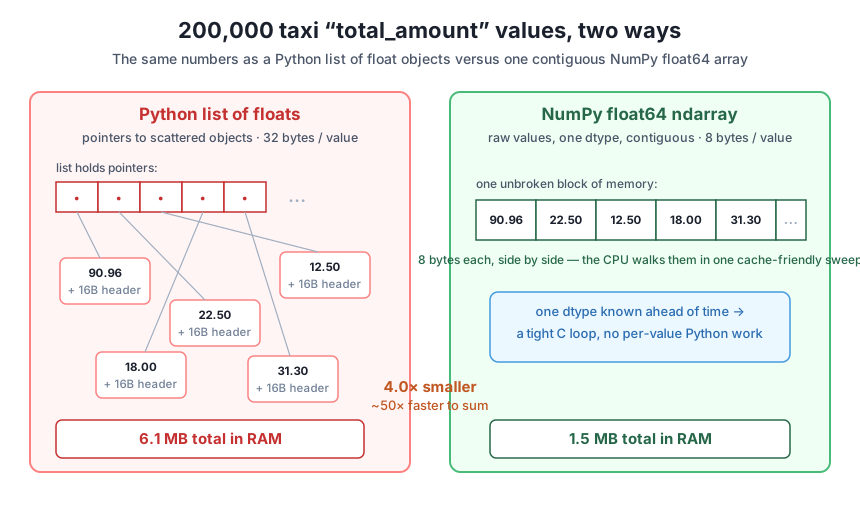
You’ve now measured both halves of the win. It’s worth stating plainly why the two come from the same source, because that single idea powers everything from NumPy to pandas to Spark.
One dtype means no per-value labels. Because every element of the array is declared float64, NumPy stores 8 raw bytes per value and nothing else. A Python list can’t assume that — any slot might hold a float, a string, or another list — so it stores a general pointer to a self-describing object for each element. Homogeneity is what lets the array drop the overhead you measured as 24-plus bytes per value down to 8.
Contiguous memory means the CPU stays fed. The array’s values sit in one unbroken run of memory, in order. Modern CPUs are built for exactly this: they pull memory in cache-sized chunks, so when NumPy reads value 0 it gets the next several values essentially for free, already sitting in fast cache. A list’s floats are scattered wherever Python happened to allocate them, so the CPU is forever chasing pointers to distant addresses and stalling while it waits for memory — the opposite of cache-friendly.
Together they enable a C loop with no Python in it. Put homogeneity and contiguity together and NumPy can hand the entire operation to a pre-compiled C routine that marches straight down the block, eight bytes at a time, adding or multiplying as it goes. There is no Python interpreter in that inner loop — no unboxing, no type checks, no reference counting per element. That is the whole reason np_array.sum() beat your for loop by 50x. The loop paid Python’s per-element tax 200,000 times; NumPy paid it essentially zero times.
This is why pandas is fast, too
Every pandas numeric column is a NumPy array under the hood, which is why df["total_amount"].sum() is fast for the same reason np_array.sum() is. When you learned in Module 1 that a column costs 8 bytes per value, that was NumPy’s float64 layout you were measuring. Understanding arrays directly is understanding the engine room of the entire PyData stack — and it’s why the vectorization habit you build here pays off in every tool that follows.
Load the taxi sample and pull trip_distance as a Python list with .tolist(). Build the equivalent float64 NumPy array. Print the list’s all-in size (its sys.getsizeof container plus 24 bytes per value) and the array’s nbytes, both in MB, and compute the ratio. Confirm you land near the same 4x you saw for total_amount.
Hint
The ratio is a property of the layout, not the specific numbers, so any float column of the same length gives essentially the same 4x. The array size is exactly len(values) * 8 bytes — check that np_array.nbytes matches your hand calculation before trusting the ratio.
Using total_amount as both a Python list and a NumPy array, compute the mean two ways: a Python loop that sums and divides by the count, and NumPy’s np_array.mean(). Time both with time.perf_counter(), print the two means (they should match) and the speedup. Explain in a sentence where the loop’s time actually goes.
Hint
Wrap the loop in a function so its local-variable access is fair, and read the timer immediately before and after each computation only — don’t include the array construction in the timed section. The loop’s cost is Python’s per-element overhead (pointer-chasing, unboxing, type checks), not the arithmetic itself.
Compute each trip’s tip as a percentage of fare_amount: tip_amount / fare_amount * 100. Do it once with a Python loop over two lists (guarding against a zero fare_amount) and once as a single vectorized NumPy expression on two arrays. Confirm the first few results match and time both. Note which version is shorter to write and faster to run.
Hint
In the vectorized version, tips / fares * 100 operates on whole arrays at once — no loop needed. To sidestep division by zero cleanly, use np.where(fares > 0, tips / fares * 100, 0.0), which chooses element-by-element without a Python loop. Vectorization usually makes code both faster and clearer, which is why it’s the default habit for data engineers.
You put hard numbers on why NumPy is the foundation of fast numeric work. Taking 200,000 real total_amount values from the taxi sample, you measured that a Python list needs 6.1 MB of RAM while the equivalent float64 array needs just 1.5 MB — a 4x difference — because the list stores a full 24-byte Python float object plus an 8-byte pointer for every value, where the array stores 8 flat bytes. You then measured that NumPy’s .sum() ran the identical arithmetic about 50x faster than a Python loop (0.08 ms versus 4.12 ms), and a vectorized dollars-to-cents transform ran roughly 23x faster than a list comprehension. Finally you connected both wins to one cause: a single dtype in contiguous memory lets the CPU stream values through a compiled C loop with no per-value Python overhead.
ndarray is raw values of one dtype, contiguous. A float64 array stores exactly 8 bytes per value in one block, which is why the same column dropped from 6.1 MB to 1.5 MB.np_array.sum(), np_array * 100) lets NumPy loop in compiled C — about 50x faster on the sum here.Data engineering is, at bottom, moving and transforming large columns of values efficiently, and NumPy’s array is the object that makes that affordable. The 4x memory saving and 50x speedup you measured here aren’t a micro-optimization for one column — they compound across every column, every transform, and every stage of a pipeline. A CityFlow job written as Python loops over lists might take minutes and blow past RAM where the vectorized array version finishes in seconds and fits comfortably. Knowing why the array wins — one dtype, contiguous memory, C-level loops — is what lets you reach for the fast path deliberately instead of stumbling onto it, and it’s the mental model that every tool in this course, from pandas to Spark, is built on top of.
You’ve seen that a NumPy array is small and fast because it holds one dtype in contiguous memory — but so far you’ve used only the default float64. In Lesson 2, you’ll learn to choose the smallest safe dtype for a column: how int8, int16, int32, and their float cousins trade range for bytes, how to right-size a taxi column so it stops wasting the 8-byte default, and how to avoid the silent overflow trap that corrupts your data when a value outgrows the type you picked. It’s the difference between an array that’s merely faster than a list and one that’s as lean as the data actually allows.
Keep DATATWEETS free. Help fund practical data, AI, and engineering lessons for learners worldwide.

