Title here
Summary here
In Lesson 1 you saw why a NumPy array beats a Python list: it stores one value type, packed tightly, so the CPU can stream through it at C speed. That single-type rule has a name — the array’s dtype — and it is the lever CityFlow uses to shrink the taxi pipeline. Every array is a block of identical cells, and the dtype decides how many bytes each cell costs and which numbers it can hold. Pick a wider dtype than you need and you burn memory; pick a narrower one than the data requires and you silently corrupt it.
This lesson is about hitting that target exactly. You will learn the byte cost and value range of every common integer and float dtype, then choose the smallest safe type for real taxi columns and measure the savings in bytes. You will also meet the trap that catches every engineer once: cast PULocationID — whose values run up to 265 — down to an int8, and NumPy quietly wraps 265 around to 9, wrecking most of the column with no error at all. By the end you will have a small helper that reads a column’s minimum and maximum and returns the narrowest integer dtype that still fits. Every number below was measured on the real 200,000-row NYC taxi sample your team develops against (yellow_tripdata_sample.csv).
By the end of this lesson, you will be able to:
int8/int16/int32/int64 and their uint variants) and the floats (float16/float32/float64)PULocationID to int8 corrupts the data and why int16 is the safe minimumfloat32 precision is enough (per-trip fares) and when it is not (naive sums of millions)smallest_int_dtype() helper that picks a safe integer dtype from a column’s rangeYou only need numpy and pandas. Let’s map the dtypes.
A NumPy integer dtype is described by two numbers: how many bytes each value occupies, and the range of whole numbers it can represent. The two are linked. An int8 uses 8 bits — one byte — and 8 bits encode distinct patterns. A signed integer splits those patterns evenly around zero, so int8 covers to . Double the width to int16 (2 bytes, 16 bits) and you get patterns, spanning to . The pattern is mechanical: the number in the dtype name is its bit width, and the range doubles its reach with every extra bit.
NumPy will tell you the exact limits with np.iinfo (integers) and np.finfo (floats). Ask it directly:
import numpy as np

for dt in [np.int8, np.int16, np.int32, np.int64]:
    info = np.iinfo(dt)
    d = np.dtype(dt)
    print(f"{d.name:<6} {d.itemsize} byte(s)   {info.min:>26,}  ..  {info.max:,}")

print()
for dt in [np.uint8, np.uint16, np.uint32]:
    info = np.iinfo(dt)
    d = np.dtype(dt)
    print(f"{d.name:<6} {d.itemsize} byte(s)   {info.min:>26,}  ..  {info.max:,}")
int8 1 byte(s) -128 .. 127
int16 2 byte(s) -32,768 .. 32,767
int32 4 byte(s) -2,147,483,648 .. 2,147,483,647
int64 8 byte(s) -9,223,372,036,854,775,808 .. 9,223,372,036,854,775,807
uint8 1 byte(s) 0 .. 255
uint16 2 byte(s) 0 .. 65,535
uint32 4 byte(s) 0 .. 4,294,967,295The uint (“unsigned”) variants spend none of their patterns on negatives, so for the same byte cost they reach twice as high: uint8 covers to instead of to . That extra headroom is free only when a column can never be negative — counts, IDs, codes — which describes most of the taxi integer columns.
Floats trade a little exactness for an enormous range. Instead of asking “what is the biggest whole number,” the useful question is “how many significant digits stay reliable”:
import numpy as np

for dt in [np.float16, np.float32, np.float64]:
    info = np.finfo(dt)
    d = np.dtype(dt)
    print(f"{d.name:<8} {d.itemsize} bytes   ~{info.precision} significant digits   max ~{info.max:.2e}")
float16 2 bytes ~3 significant digits max ~6.55e+04
float32 4 bytes ~6 significant digits max ~3.40e+38
float64 8 bytes ~15 significant digits max ~1.80e+308float64, pandas’ default, carries about 15 reliable digits — far more than a $13.50 fare needs. float32 still carries about 6, which is plenty for money and distances. float16 keeps only about 3 and is rarely worth the fragility outside machine-learning weights. The engineering lesson mirrors the integer one: the default is the widest choice, and most columns are paying for precision or range they will never use.
The right dtype for a column is not a matter of taste — it is dictated by the column’s actual minimum and maximum. So before choosing, measure. Load the CityFlow sample and read the range of the four integer-shaped columns:
import warnings
warnings.filterwarnings("ignore")
import pandas as pd

taxi = pd.read_csv("https://datatweets.com/datasets/nyc-taxi/yellow_tripdata_sample.csv")

for c in ["passenger_count", "PULocationID", "DOLocationID", "payment_type"]:
    values = taxi[c].dropna()
    print(f"{c:<16} min = {values.min():>4.0f}   max = {values.max():>4.0f}")
passenger_count min = 0 max = 8
PULocationID min = 1 max = 265
DOLocationID min = 1 max = 265
payment_type min = 0 max = 4Now match each column to the narrowest dtype whose range still covers it:
passenger_count runs 0 to 8. It never goes negative and never exceeds 255, so uint8 (1 byte, 0–255) fits with room to spare — an 8× cut from the int64 default.PULocationID and DOLocationID run 1 to 265. That single value, 265, is the whole story: it is past the int8 ceiling of 127, so int8 is unsafe. The smallest type that holds 265 is a 2-byte one — int16 (up to 32,767) or uint16 — a 4× cut, and the smallest you can safely go.payment_type runs 0 to 4 — a tiny set of codes. int8 (or uint8) holds it easily, another 8× cut.The fares and distances (fare_amount, trip_distance, and friends) are decimals, so they belong in a float dtype. Their per-value magnitudes are small and only a couple of decimal places matter, so float32 replaces float64 at half the bytes.
Measure the whole column, not a guess
Always read min and max from the entire column (and remember dropna() first, since a single missing value makes pandas store an integer column as float64). A dtype chosen from a small preview can betray you: if rows 1 through 100 top out at 120 you might reach for int8, only to hit a 200 in row 5,000 and corrupt it. The range is a property of all the data, so measure all of it.
A plan is worth what it saves. Convert each column to its chosen narrow dtype as a NumPy array and compare nbytes — the array’s exact memory footprint — against the int64/float64 default:
import warnings
warnings.filterwarnings("ignore")
import numpy as np
import pandas as pd

taxi = pd.read_csv("https://datatweets.com/datasets/nyc-taxi/yellow_tripdata_sample.csv")

plan = {
    "passenger_count": np.uint8,
    "PULocationID":    np.int16,
    "DOLocationID":    np.int16,
    "payment_type":    np.int8,
    "fare_amount":     np.float32,
    "trip_distance":   np.float32,
}

wide_total = narrow_total = 0
for column, narrow in plan.items():
    values = taxi[column].dropna()
    wide = values.to_numpy(dtype=np.int64 if np.issubdtype(narrow, np.integer) else np.float64)
    small = values.to_numpy(dtype=narrow)
    wide_total += wide.nbytes
    narrow_total += small.nbytes
    saved = wide.nbytes - small.nbytes
    print(f"{column:<16} {str(wide.dtype):<7} {wide.nbytes:>9,} B  ->  "
          f"{small.dtype.name:<7} {small.nbytes:>9,} B   saved {saved:>9,} B")

print("-" * 66)
print(f"{'TOTAL':<16} {'':7} {wide_total:>9,} B  ->  {'':7} {narrow_total:>9,} B   "
      f"saved {wide_total - narrow_total:>9,} B")
print(f"That is {wide_total/1024/1024:.2f} MB shrunk to {narrow_total/1024/1024:.2f} MB "
      f"({wide_total/narrow_total:.1f}x smaller) across these six columns.")
passenger_count int64 1,523,912 B -> uint8 190,489 B saved 1,333,423 B
PULocationID int64 1,600,000 B -> int16 400,000 B saved 1,200,000 B
DOLocationID int64 1,600,000 B -> int16 400,000 B saved 1,200,000 B
payment_type int64 1,600,000 B -> int8 200,000 B saved 1,400,000 B
fare_amount float64 1,600,000 B -> float32 800,000 B saved 800,000 B
trip_distance float64 1,600,000 B -> float32 800,000 B saved 800,000 B
------------------------------------------------------------------
TOTAL 9,523,912 B -> 2,790,489 B saved 6,733,423 B
That is 9.08 MB shrunk to 2.66 MB (3.4x smaller) across these six columns.Six columns fell from 9.08 MB to 2.66 MB — a 3.4× cut that reclaimed 6.4 MB with zero loss, purely by matching each dtype to its column’s real range. (passenger_count counts fewer bytes because its 9,511 missing values are dropped before conversion.) That ratio is not a sample artifact: the same per-value savings apply to the full 2.96-million-row month, where the identical plan turns hundreds of megabytes of integer and float columns into a fraction of the size. This is the core move of memory-lean data engineering — and the next section is the reason you must get the safe part exactly right.
Narrowing a dtype is only free when the new type can hold every value. Cross that line and NumPy does not warn you — it wraps the value around, like an odometer rolling past its maximum. PULocationID tops out at 265; int8 stops at 127. Watch what a careless cast does to five real zone IDs:
import warnings
warnings.filterwarnings("ignore")
import numpy as np
import pandas as pd

taxi = pd.read_csv("https://datatweets.com/datasets/nyc-taxi/yellow_tripdata_sample.csv")

zone_ids = taxi["PULocationID"].to_numpy(dtype=np.int64)

# Five real pickup-zone IDs, all above 127
sample = np.array([132, 138, 161, 236, 265], dtype=np.int64)
print("true zone IDs:        ", sample.tolist())
print("cast to int8 (1 byte):", sample.astype(np.int8).tolist())
print("cast to int16 (2 byte):", sample.astype(np.int16).tolist())

corrupted = (zone_ids.astype(np.int8).astype(np.int64) != zone_ids).sum()
print(f"\nint8 corrupts {corrupted:,} of {len(zone_ids):,} rows "
      f"({100 * corrupted / len(zone_ids):.1f}%)")
print("why: 265 wraps to", int(np.array([265], dtype=np.int64).astype(np.int8)[0]),
      "because 265 - 256 = 9")
true zone IDs: [132, 138, 161, 236, 265]
cast to int8 (1 byte): [-124, -118, -95, -20, 9]
cast to int16 (2 byte): [132, 138, 161, 236, 265]
int8 corrupts 155,504 of 200,000 rows (77.8%)
why: 265 wraps to 9 because 265 - 256 = 9Every one of those zone IDs comes back wrong under int8. Manhattan zone 132 becomes -124; zone 236 becomes -20; JFK’s 265 becomes 9 — a completely different, real-looking zone. There is no exception, no NaN, no red text. Across the whole sample, 155,504 of 200,000 rows (77.8%) are silently corrupted, and if that column later joined to the zone lookup, CityFlow’s dashboard would attribute three-quarters of its trips to the wrong neighborhoods and never know. The int16 cast, by contrast, returns every value untouched: 2 bytes is the safe minimum for a column that reaches 265.
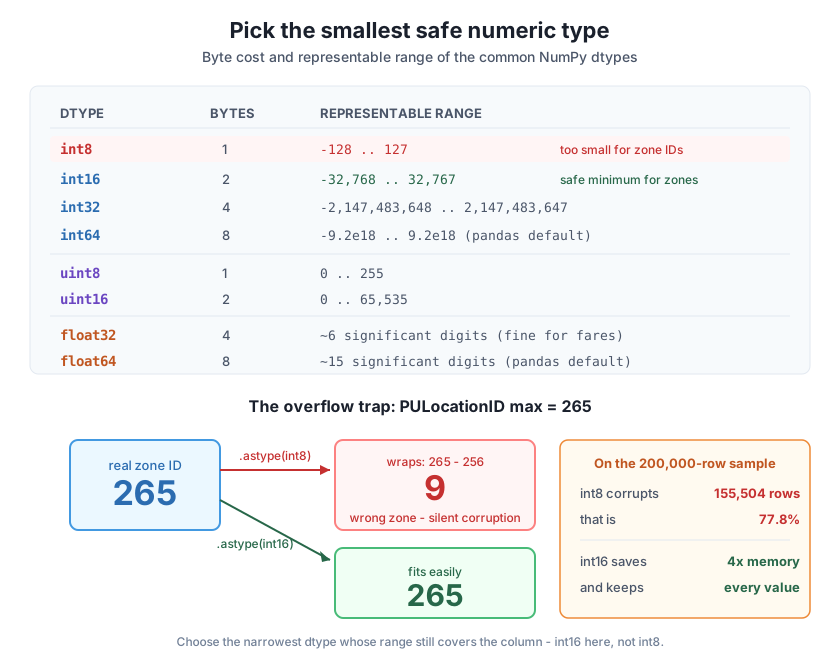
PULocationID value 265 to int8 wraps it to 9, because 265 exceeds the 127 ceiling and rolls over by 256; the same cast corrupts 155,504 of the sample's 200,000 rows. int16 holds 265 exactly at 2 bytes per value — the safe minimum, still a 4× cut from int64. The rule: choose the narrowest dtype whose range still covers the column's real maximum.Overflow is silent - the checker is your min and max
NumPy does not raise on integer overflow during .astype(); it wraps, by design, for speed. That means the only thing standing between you and corrupted data is checking the column’s range before you narrow it. The rule is simple and non-negotiable: a dtype is safe for a column only if the column’s minimum and maximum both fall inside np.iinfo(dtype).min and .max. Never pick an integer dtype without confirming both ends fit.
Integers overflow loudly (wrong numbers you can spot); floats fail quietly (small rounding that accumulates). float32 keeps about 6 significant digits, which is more than enough to store any single taxi fare exactly to the cent. The risk appears only when you add up millions of them in a float32 accumulator, where each addition can lose a fraction of a cent and the errors pile up:
import warnings
warnings.filterwarnings("ignore")
import numpy as np
import pandas as pd

taxi = pd.read_csv("https://datatweets.com/datasets/nyc-taxi/yellow_tripdata_sample.csv")

fares64 = taxi["fare_amount"].to_numpy(dtype=np.float64)
fares32 = fares64.astype(np.float32)

print("first three fares as float64:", fares64[:3].tolist())
print("first three fares as float32:", [round(float(x), 2) for x in fares32[:3]])
print(f"largest single-fare rounding error: {np.abs(fares64 - fares32.astype(np.float64)).max():.6f}")

total_f64 = fares64.sum()
total_f32 = fares32.sum(dtype=np.float32)          # accumulate in float32 - risky
total_safe = fares32.sum(dtype=np.float64)         # store float32, add in float64
print(f"\nsum, float64 throughout:      ${total_f64:,.2f}")
print(f"sum, float32 accumulator:     ${float(total_f32):,.2f}")
print(f"sum, float32 stored + float64: ${total_safe:,.2f}")
first three fares as float64: [70.0, 13.5, 10.0]
first three fares as float32: [70.0, 13.5, 10.0]
largest single-fare rounding error: 0.000024
sum, float64 throughout: $3,621,819.17
sum, float32 accumulator: $3,621,819.00
sum, float32 stored + float64: $3,621,819.17Storing the fares as float32 is harmless: the largest error on any single fare is about 0.000024 dollars, far below a cent. But summing 200,000 of them in a float32 accumulator drifts the total to $3,621,819.00 — 17 cents off the true $3,621,819.17, and that gap grows with row count. The fix is not to abandon float32 storage; it is to accumulate in float64 by passing dtype=np.float64 to .sum(). You keep the halved storage and recover the exact total. So float32 is the right storage dtype for money and distances — just reduce with a wide accumulator when the total spans millions of rows.
You now narrow columns often enough to automate the choice. A safe picker needs only a column’s minimum and maximum: if the minimum is non-negative it can use the uint ladder (which reaches higher per byte); otherwise it uses the signed ladder. It walks from narrowest to widest and returns the first dtype whose range covers both ends — guaranteeing no overflow.
import warnings
warnings.filterwarnings("ignore")
import numpy as np
import pandas as pd

taxi = pd.read_csv("https://datatweets.com/datasets/nyc-taxi/yellow_tripdata_sample.csv")

def smallest_int_dtype(values):
    """Return the narrowest NumPy integer dtype that safely holds every value."""
    lo, hi = int(np.nanmin(values)), int(np.nanmax(values))
    candidates = ([np.uint8, np.uint16, np.uint32, np.uint64] if lo >= 0
                  else [np.int8, np.int16, np.int32, np.int64])
    for dtype in candidates:
        info = np.iinfo(dtype)
        if info.min <= lo and hi <= info.max:
            return np.dtype(dtype)
    return np.dtype(np.int64)

for column in ["passenger_count", "PULocationID", "DOLocationID", "payment_type"]:
    values = taxi[column].dropna().to_numpy()
    chosen = smallest_int_dtype(values)
    print(f"{column:<16} range [{int(values.min())}, {int(values.max())}]  ->  "
          f"{chosen.name} ({chosen.itemsize} byte/value)")
passenger_count range [0, 8] -> uint8 (1 byte/value)
PULocationID range [1, 265] -> uint16 (2 byte/value)
DOLocationID range [1, 265] -> uint16 (2 byte/value)
payment_type range [0, 4] -> uint8 (1 byte/value)The helper agrees with the hand analysis and sharpens it. Because every taxi ID is non-negative, it reaches for uint16 on PULocationID rather than int16 — the same 2 bytes, still safely clear of the int8 trap, just spending none of its range on negatives it will never see. For payment_type and passenger_count it lands on the 1-byte uint8. Point this at any integer column and you get the narrowest safe dtype without ever eyeballing a range by hand, and without the overflow risk of guessing.
Safe first, small second
Notice the order the helper enforces: it never returns a dtype until it has confirmed both ends fit. That is the whole discipline of this lesson in one function. Memory savings are the goal, but safety is the constraint — a corrupted int8 column that saved 8× is worthless, while a correct int16 that saved 4× is a win you can ship. When in doubt, step one width wider.
Exercise 1 — Find the overflow boundary. Using np.iinfo, print the maximum value of int8, int16, and int32. Then, for the taxi PULocationID column (max 265), state which of the three is the smallest dtype that holds it safely and explain in one line why the one below it fails.
Hint
np.iinfo(np.int8).max is 127, np.iinfo(np.int16).max is 32,767. A dtype is safe only if the column’s maximum is less than or equal to that number. Since but , the smallest safe type is int16; int8 fails because 265 wraps around past 127.
Exercise 2 — Prove the wrap for a value you choose. Build a NumPy int64 array of [100, 127, 128, 200, 265] and cast it to int8 with .astype(np.int8). Print the before and after. Which values survive unchanged, and what is the wrapped result of 200? Confirm your answer matches .
Hint
Values at or below 127 survive; anything above wraps by subtracting 256 (once) until it lands in range. So 128 becomes and 200 becomes . Only 100 and 127 come through untouched.
Exercise 3 — Measure a column’s savings yourself. Take taxi["DOLocationID"], drop nulls, and compute its memory as a NumPy array in int64 versus the dtype smallest_int_dtype() picks for it. Print both nbytes values and the reduction factor. Does it match the 4× you saw for PULocationID?
Hint
values.to_numpy(dtype=np.int64).nbytes gives the wide size; values.to_numpy(dtype=smallest_int_dtype(values)).nbytes gives the narrow size. Divide the first by the second for the factor. Because DOLocationID also maxes at 265, the helper picks a 2-byte type and you should see the same 4× reduction (8 bytes down to 2).
You learned to hit the memory target exactly by matching each column’s dtype to its real range. Integer dtypes trade bytes for reach — int8 (1 byte, ±127), int16 (2 bytes, ±32,767), int32 (4 bytes), int64 (8 bytes) — and the uint variants reach twice as high for the same cost when a column is never negative. Floats trade a little precision for enormous range: float32 keeps ~6 significant digits at 4 bytes, float64 ~15 at 8. Reading the taxi columns’ real ranges, you chose uint8 for passenger_count and payment_type, int16 for the 265-max location IDs, and float32 for fares and distances — cutting six columns from 9.08 MB to 2.66 MB, a 3.4× reduction with no data loss. You then reproduced the overflow trap: casting PULocationID to int8 wraps 265 to 9 and silently corrupts 77.8% of the column, which is why int16 is the safe minimum. You saw the quieter float trap — float32 stores any fare fine but a float32 accumulator drifts a millions-row sum by 17 cents unless you reduce in float64. Finally, your smallest_int_dtype() helper reads a column’s min and max and returns the narrowest safe integer dtype, safety first, size second.
int8=1 byte (±127), int16=2 (±32,767), int32=4, int64=8; uint variants trade the negative half for double the positive reach.dropna(), never guessed from a preview.int8), corrupting values that still look plausible. int16 is the safe minimum for the 265-max zone IDs.float32 holds any single fare to the cent, but summing millions in a float32 accumulator drifts; reduce with dtype=np.float64 to keep the halved storage and an exact total.smallest_int_dtype(values) — reads min and max, walks the uint/int ladder from narrowest, and returns the first dtype that safely covers both ends.Dtype choice is where memory engineering meets data integrity, and the two pull in opposite directions. Narrowing columns is the cheapest, highest-leverage way to make CityFlow’s pipeline fit in RAM — a measured 3.4× here, and larger once low-cardinality codes become categoricals. But the same move, done without checking the range, is one of the most dangerous things you can do to a dataset, because overflow corrupts silently and the wrong numbers survive every downstream step until someone notices the dashboard is nonsense. The discipline you practiced — measure the range, pick the narrowest dtype that safely covers it, accumulate wide when you sum — is exactly what separates a pipeline that is merely small from one that is small and correct.
You can now size every taxi column to the byte and know precisely where the overflow line sits. Lesson 3, Vectorization, turns from storing the data leanly to computing on it fast. You will replace the Python for loop — which pulls each value out into a slow Python object one at a time — with whole-array operations that run in compiled C over the tightly-packed dtypes you just chose, and you will measure the speedup on real per-trip calculations like fare-per-mile and trip duration. The narrow, contiguous arrays from this lesson are exactly what make that vectorized speed possible, so the two ideas compound: lean storage feeding fast computation.
Keep DATATWEETS free. Help fund practical data, AI, and engineering lessons for learners worldwide.

