Title here
Summary here
In Module 1 you profiled CityFlow’s taxi sample and wrote a reduction plan. The plan was specific: the zone IDs and payment codes are stored as int64 (8 bytes each) but NYC has only 265 taxi zones and a handful of payment types, so they are overpaying 4–8×; the fare and distance columns are float64 (8 bytes each) but carry only a couple of decimal places, so float32 would halve them. This lesson executes the first line of that plan. Downcasting means replacing a column’s dtype with the smallest numeric type that still holds its actual values, and pandas gives you two tools to do it precisely.
The stakes are the same ones Module 1 measured: the full month of trips expands from a 50 MB file to over 400 MB in pandas, and a big slice of that is numeric columns wearing a size they do not need. Narrowing them is the cheapest, safest memory win available — lossless for integers, and for floats bounded by a tolerance pandas checks for you. By the end you will have driven the sample’s numeric block down by more than half, with every byte verified.
By the end of this lesson, you will be able to:
int64/float64 even when the values fit in far lesspd.to_numeric(col, downcast="integer") and downcast="float"df.astype({...})memory_usage(deep=True)You only need pandas. Let’s shrink some columns.
When read_csv meets a column of whole numbers, it stores them as int64; a column with a decimal point becomes float64. Both use 8 bytes per value. Pandas picks the widest types on purpose: it has not looked at your data’s range, so it chooses the type that cannot possibly overflow. An int64 holds numbers up to about 9.2 quintillion; a float64 carries about 15 significant digits. That caution is sensible as a default and wasteful as a permanent choice, because most real columns use a tiny fraction of that range.
CityFlow’s development sample is the 200,000-trip file you profiled in Module 1. It lives on the site here:
# gate: skip
# CityFlow's teaching sample: 200,000 real NYC yellow-taxi trips (~15 MB).
import pandas as pd
taxi = pd.read_csv("https://datatweets.com/datasets/nyc-taxi/yellow_tripdata_sample.csv")
Download that file once and save it next to your notebook; every runnable block below reads the local copy by name. Load it and look at what the defaults cost:
import warnings
warnings.filterwarnings("ignore")
import pandas as pd

taxi = pd.read_csv("yellow_tripdata_sample.csv")
numeric = ["passenger_count", "trip_distance", "PULocationID", "DOLocationID",
           "payment_type", "fare_amount", "tip_amount", "total_amount"]
print(taxi[numeric].dtypes)
print()
print(taxi[numeric].memory_usage(index=False, deep=True))
passenger_count float64
trip_distance float64
PULocationID int64
DOLocationID int64
payment_type int64
fare_amount float64
tip_amount float64
total_amount float64
dtype: object
passenger_count 1600000
trip_distance 1600000
PULocationID 1600000
DOLocationID 1600000
payment_type 1600000
fare_amount 1600000
tip_amount 1600000
total_amount 1600000
dtype: int64Every numeric column is exactly 1,600,000 bytes — 200,000 rows × 8 bytes. They are all the same size because int64 and float64 are both 8-byte types, regardless of how small the numbers inside actually are. PULocationID never exceeds 265, yet it is stored with room for 9.2 quintillion. That gap is the opportunity.
pd.to_numeric has a downcast argument that does the thinking for you. Pass downcast="integer" and it walks from the smallest integer type upward — int8, int16, int32 — and returns the first one that holds every value in the column. Start with a single column so you can see exactly what happens:
import warnings
warnings.filterwarnings("ignore")
import pandas as pd

taxi = pd.read_csv("yellow_tripdata_sample.csv")
before = taxi["PULocationID"]
after = pd.to_numeric(before, downcast="integer")

print("min:", before.min(), " max:", before.max())
print("before:", before.dtype, f"{before.memory_usage(index=False, deep=True):>9,} bytes")
print("after: ", after.dtype, f"{after.memory_usage(index=False, deep=True):>10,} bytes")
print("values identical:", (before == after).all())
min: 1 max: 265
before: int64 1,600,000 bytes
after: int16 400,000 bytes
values identical: TrueThe values run 1 to 265. That fits in an int16, which spans −32,768 to 32,767, so pandas chose int16 — 2 bytes instead of 8, a clean 4× cut from 1.6 MB to 0.4 MB. The last line is the part that matters most: (before == after).all() is True, so not one of the 200,000 values changed. This is the defining property of integer downcasting — as long as every value fits inside the narrower type’s range, the conversion is perfectly lossless. You are storing the identical numbers in less space.
Downcast never overshoots
pd.to_numeric(downcast="integer") will only pick a type that fits every value in the column, including the minimum and maximum. If a single row held 40,000, it would skip int16 (which stops at 32,767) and land on int32. You never have to check the range yourself — that is exactly the check the function performs. Downcasting can only ever shrink a column safely or leave it unchanged; it cannot silently truncate a value.
The three genuinely-integer columns in the taxi data are the two zone IDs and the payment code. Loop over them and downcast each in place:
import warnings
warnings.filterwarnings("ignore")
import pandas as pd

taxi = pd.read_csv("yellow_tripdata_sample.csv")
int_cols = ["PULocationID", "DOLocationID", "payment_type"]
for col in int_cols:
    taxi[col] = pd.to_numeric(taxi[col], downcast="integer")

print(taxi[int_cols].dtypes)
PULocationID int16
DOLocationID int16
payment_type int8
dtype: objectThe two location IDs became int16 (max 265 needs 2 bytes), while payment_type — whose values run 0 to 4 — slipped all the way down to int8 (1 byte), an 8× reduction. This is exactly what Module 1 predicted from the dtype ranges: a column’s real minimum and maximum decide the narrowest type that fits, and to_numeric finds it automatically.
You might have expected passenger_count to join this list — it holds whole numbers of riders. But watch what happens when you try:
import warnings
warnings.filterwarnings("ignore")
import pandas as pd

taxi = pd.read_csv("yellow_tripdata_sample.csv")
pc = taxi["passenger_count"]

print("missing values:", pc.isna().sum())
print("downcast='integer' ->", pd.to_numeric(pc, downcast="integer").dtype)
print("downcast='float'   ->", pd.to_numeric(pc, downcast="float").dtype)
missing values: 9511
downcast='integer' -> float64
downcast='float' -> float32passenger_count has 9,511 missing values, and pandas marks a missing number with NaN, which is a float. A column containing NaN cannot be a plain integer type, so it loaded as float64 and downcast="integer" refuses to touch it — it will not throw away the ability to represent the gaps. Downcasting it as a float to float32 still halves it, though, so that is the right move here. (Truly integer-typed missing data needs pandas’ nullable Int16 type, which is a topic for later; for storage, float32 is the pragmatic win.)
Floats are different from integers in one crucial way: narrowing them can lose precision. A float64 carries about 15 significant digits; a float32 carries about 7. For money and distances that is usually plenty — a fare of \$12.35 has four significant digits and survives float32 untouched — but the risk is real, so pd.to_numeric(downcast="float") does not blindly convert. It casts to float32, compares against the original, and keeps the narrower type only if every value still matches within a small tolerance. Apply it to the five float columns:
import warnings
warnings.filterwarnings("ignore")
import pandas as pd

taxi = pd.read_csv("yellow_tripdata_sample.csv")
float_cols = ["passenger_count", "trip_distance", "fare_amount", "tip_amount", "total_amount"]
for col in float_cols:
    taxi[col] = pd.to_numeric(taxi[col], downcast="float")

print(taxi[float_cols].dtypes)
passenger_count float32
trip_distance float64
fare_amount float32
tip_amount float32
total_amount float32
dtype: objectFour of the five dropped to float32, but trip_distance stayed float64. That is not a bug — it is the safety guard doing its job. to_numeric allows a float32 downcast only when the worst rounding error stays under an absolute tolerance of 5e-4. Measure the worst-case error for a column it accepted versus the one it rejected:
import warnings
warnings.filterwarnings("ignore")
import pandas as pd

taxi = pd.read_csv("yellow_tripdata_sample.csv")
for col in ["fare_amount", "trip_distance"]:
    orig = taxi[col]
    err = (orig.astype("float32").astype("float64") - orig).abs().max()
    print(f"{col:<14} max value {orig.max():>10,.2f}   worst float32 error {err:.6f}")
fare_amount max value 591.70 worst float32 error 0.000024
trip_distance max value 72,975.97 worst float32 error 0.001250There it is. fare_amount tops out near $592, and float32 reproduces it to within 0.000024 — comfortably under the tolerance, so the downcast is accepted. trip_distance contains a 72,975.97-mile trip (one of the data-quality oddities in this dataset — no real taxi ride crosses three-quarters of the way to the moon), and at that magnitude float32’s coarser spacing produces a 0.00125 error, which exceeds the tolerance. Rather than lose precision, pandas leaves the column as float64. The guard turned a dirty-data outlier into an automatic, conservative decision — you did not have to catch it yourself.
float32 stores money fine; do math in float64
float32 is an excellent choice for storing fares and tips — the values round-trip to the cent. The caveat is accumulation: summing millions of float32 values compounds their tiny rounding errors faster than float64 does. The common pattern is to store columns as float32 to save memory, then cast up (.astype("float64")) inside a heavy aggregation if you need the extra precision in the result. Storage and arithmetic are two different decisions.
pd.to_numeric is convenient because it chooses the type for you. Sometimes you want to state the type outright — because you already profiled the column, because you want the same schema every time the pipeline runs, or because you want trip_distance as float32 on purpose and accept the rounding. df.astype takes a dictionary mapping column names to exact dtypes and applies them in one call:
import warnings
warnings.filterwarnings("ignore")
import pandas as pd

taxi = pd.read_csv("yellow_tripdata_sample.csv")
dtype_map = {
    "PULocationID": "int16",
    "DOLocationID": "int16",
    "payment_type": "int8",
    "fare_amount": "float32",
    "tip_amount": "float32",
    "total_amount": "float32",
}
taxi = taxi.astype(dtype_map)
print(taxi[list(dtype_map)].dtypes)
PULocationID int16
DOLocationID int16
payment_type int8
fare_amount float32
tip_amount float32
total_amount float32
dtype: objectThe difference in philosophy matters. to_numeric is discovery — “find me the smallest safe type,” with the float guard protecting you. astype is declaration — “make it exactly this,” and it will do what you say even if that loses precision, because you asked. For a one-off exploration, reach for to_numeric; for a production loader whose output schema must be identical every run, an explicit astype map is clearer and repeatable. You will build exactly such a map into CityFlow’s reusable loader in this module’s guided project.
astype does what you say, guard included or not
astype("int16") on a column whose values exceed 32,767 will overflow and corrupt data silently — there is no range check, unlike to_numeric. Reach for an explicit astype map only for columns whose range you have already confirmed (as you did by profiling in Module 1). When in doubt, let to_numeric(downcast=...) prove the fit first.
Individual columns are satisfying; the number your team actually reports is the whole DataFrame. Wrap the two moves — integer downcast, then float downcast — into a small function that handles any numeric column, and measure the frame before and after:
import warnings
warnings.filterwarnings("ignore")
import pandas as pd

def downcast_numeric(df):
    """Return a copy with every numeric column narrowed to its smallest safe type."""
    out = df.copy()
    for col in out.select_dtypes(include="integer"):
        out[col] = pd.to_numeric(out[col], downcast="integer")
    for col in out.select_dtypes(include="float"):
        out[col] = pd.to_numeric(out[col], downcast="float")
    return out

taxi = pd.read_csv("yellow_tripdata_sample.csv")
lean = downcast_numeric(taxi)

before = taxi.memory_usage(deep=True).sum()
after = lean.memory_usage(deep=True).sum()
print(f"before: {before:>11,} bytes  ({before/1024/1024:.1f} MB)")
print(f"after:  {after:>11,} bytes  ({after/1024/1024:.1f} MB)")
print(f"saved:  {before-after:>11,} bytes  ({(before-after)/1024/1024:.1f} MB, {100*(before-after)/before:.0f}%)")
before: 23,600,132 bytes (22.5 MB)
after: 16,600,132 bytes (15.8 MB)
saved: 7,000,000 bytes (6.7 MB, 30%)Downcasting numerics alone cut the whole DataFrame from 22.5 MB to 15.8 MB — 6.7 MB, or 30%, gone without touching a single value’s meaning. And that 30% is diluted by the two big text timestamp columns, which downcasting cannot help (they need date parsing, a later lesson). Look at just the numeric block and the effect is far larger. A per-column report makes it concrete:
import warnings
warnings.filterwarnings("ignore")
import pandas as pd

def downcast_numeric(df):
    out = df.copy()
    for col in out.select_dtypes(include="integer"):
        out[col] = pd.to_numeric(out[col], downcast="integer")
    for col in out.select_dtypes(include="float"):
        out[col] = pd.to_numeric(out[col], downcast="float")
    return out

taxi = pd.read_csv("yellow_tripdata_sample.csv")
lean = downcast_numeric(taxi)

report = pd.DataFrame({
    "before": taxi.dtypes.astype(str),
    "after": lean.dtypes.astype(str),
    "before_MB": (taxi.memory_usage(deep=True).drop("Index") / 1024 / 1024).round(2),
    "after_MB": (lean.memory_usage(deep=True).drop("Index") / 1024 / 1024).round(2),
})
report["shrink"] = (report["before_MB"] / report["after_MB"]).round(1)
print(report.to_string())
before after before_MB after_MB shrink
tpep_pickup_datetime str str 5.15 5.15 1.0
tpep_dropoff_datetime str str 5.15 5.15 1.0
passenger_count float64 float32 1.53 0.76 2.0
trip_distance float64 float64 1.53 1.53 1.0
PULocationID int64 int16 1.53 0.38 4.0
DOLocationID int64 int16 1.53 0.38 4.0
payment_type int64 int8 1.53 0.19 8.1
fare_amount float64 float32 1.53 0.76 2.0
tip_amount float64 float32 1.53 0.76 2.0
total_amount float64 float32 1.53 0.76 2.0The column-by-column picture tells the whole story: payment_type shrank 8.1×, the two zone IDs 4× each, the money columns 2×, trip_distance held at float64 for safety, and the text columns are untouched. The numeric block that started at 12.8 MB is now 5.8 MB — a 2.2× reduction on the part downcasting can reach. The figure below shows the same before/after for every numeric column.
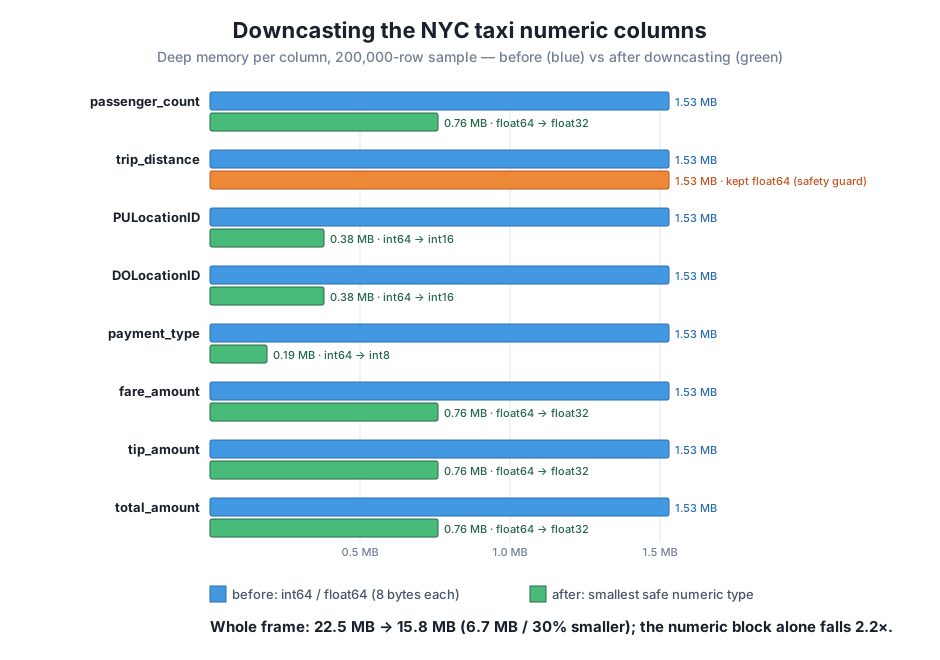
A memory win that quietly corrupted your data would be a disaster, not an optimization. So make the losslessness explicit rather than trusting it. For the integer columns, every value should be identical; for the float columns, the change should be bounded by that sub-thousandth tolerance:
import warnings
warnings.filterwarnings("ignore")
import pandas as pd

def downcast_numeric(df):
    out = df.copy()
    for col in out.select_dtypes(include="integer"):
        out[col] = pd.to_numeric(out[col], downcast="integer")
    for col in out.select_dtypes(include="float"):
        out[col] = pd.to_numeric(out[col], downcast="float")
    return out

taxi = pd.read_csv("yellow_tripdata_sample.csv")
lean = downcast_numeric(taxi)

for col in ["PULocationID", "DOLocationID", "payment_type"]:
    print(f"{col:<14} identical: {(taxi[col] == lean[col]).all()}")
for col in ["fare_amount", "tip_amount", "total_amount"]:
    worst = (taxi[col] - lean[col].astype('float64')).abs().max()
    print(f"{col:<14} max change: {worst:.6f}")
PULocationID identical: True
DOLocationID identical: True
payment_type identical: True
fare_amount max change: 0.000024
tip_amount max change: 0.000012
total_amount max change: 0.000022The three integer columns are bit-for-bit identical — downcasting integers is genuinely lossless. The three money columns changed by at most 0.000024 — less than three hundred-thousandths of a dollar, far below the cent that fares are even measured in. That is the safety story in one screen: for integers within range, downcasting changes nothing at all; for floats, it changes numbers only by amounts smaller than the data’s own precision. This check is worth keeping in your pipeline as an assertion, so a future schema change can never silently truncate a column.
Exercise 1 — Downcast the whole numeric block and report the win. Load the taxi sample, use pd.to_numeric to downcast every integer column and every float column, and print the total memory_usage(deep=True).sum() before and after in megabytes, plus the percentage saved. Confirm you reproduce the 22.5 MB → 15.8 MB result.
Hint
df.select_dtypes(include="integer") and include="float" give you the two groups of columns to loop over. Sum memory_usage(deep=True) before and after, divide by 1024 * 1024 for megabytes, and compute 100 * (before - after) / before for the percentage.
Exercise 2 — Explain the two survivors. After downcasting, two columns keep their 8-byte width: trip_distance stays float64, and passenger_count refuses downcast="integer". In a short comment, state the different reason each one resists, then show the evidence: print passenger_count’s missing-value count, and print trip_distance’s maximum alongside its worst-case float32 rounding error.
Hint
passenger_count has NaNs, so it must stay a float type — check Series.isna().sum(). trip_distance has a 72,975.97 outlier whose float32 error exceeds to_numeric’s 5e-4 tolerance — compute it with (col.astype("float32").astype("float64") - col).abs().max().
Exercise 3 — Build a declarative schema with astype. Write a dictionary mapping each of the six safely-downcastable columns (PULocationID, DOLocationID, payment_type, passenger_count, fare_amount, tip_amount) to the exact dtype you would choose, apply it with a single df.astype(...) call, and verify the resulting dtypes. Then confirm the integer columns are unchanged in value with an equality check against a fresh load.
Hint
Use the ranges you measured: the zone IDs need int16, payment_type fits int8, and the money columns take float32; passenger_count must be float32 (not an integer type) because of its NaNs. After df.astype(dtype_map), compare each integer column with (fresh[col] == converted[col]).all().
You executed the first fix in Module 1’s reduction plan: narrowing the taxi data’s numeric columns to the smallest types that safely hold their real values. pd.to_numeric(col, downcast="integer") walks up from int8 and returns the first integer type that fits every value — it turned the zone IDs into int16 (4× smaller) and payment_type into int8 (8× smaller), losslessly, because the values sit well inside those ranges. downcast="float" narrows floats to float32 but only when the worst rounding error stays under a 5e-4 tolerance, which is why it accepted the money columns yet left trip_distance as float64 — a 72,975-mile outlier pushed it past the guard. df.astype({...}) gives you the explicit, repeatable alternative when you already know the schema you want. Measured live, downcasting cut the whole DataFrame from 22.5 MB to 15.8 MB (30%), and the numeric block alone by 2.2× — with every integer bit-for-bit identical and every float changed by less than a hundred-thousandth of a dollar.
read_csv picks int64/float64 (8 bytes) because it has not inspected the data’s range; most columns use a tiny fraction of that range, which is the room downcasting reclaims.pd.to_numeric(downcast="integer") — returns the smallest integer type that holds every value; lossless for in-range integers, and it never overshoots. A column with NaNs cannot become an integer type and is left as a float.pd.to_numeric(downcast="float") — narrows to float32 only if the worst error stays within a 5e-4 absolute tolerance, automatically protecting columns like trip_distance whose large outliers would lose precision.df.astype({col: dtype}) — declares exact types in one call; repeatable for production schemas, but it performs no range check, so confirm the fit first (with profiling or to_numeric).memory_usage(deep=True) per column and summed shows the real win; an equality check on integers and a bounded-error check on floats prove nothing was corrupted.Downcasting is the highest-leverage, lowest-risk memory optimization a data engineer has: it changes storage, not meaning, and pandas does the safety checking for you. For CityFlow, a 30% cut on the sample scales directly to the full month — the same moves shave well over a hundred megabytes off the 400 MB in-memory footprint you measured in Module 1, which can be the difference between a pipeline that runs on a modest worker and one that crashes. Just as important is the discipline you practiced: measure before and after, and prove the values survived. That habit turns “I think this is smaller” into “this is 6.7 MB smaller and provably lossless” — the kind of claim you can put in a pull request. Downcasting is only the first lever, though, and it barely touched the two heaviest columns in the frame.
Downcasting handled the numbers, but look back at the per-column report: the two timestamp columns are still 5.15 MB each, and columns like payment_type — now a tidy int8 — still store the value 2 two hundred thousand separate times even though there are only a handful of distinct payment codes in the entire dataset. That repetition is the opening for the next technique. In Lesson 2, Categoricals for Low-Cardinality Columns, you will convert columns whose values repeat across many rows — payment type, and eventually the zone IDs — into pandas’ category dtype, which stores each distinct value once in a small lookup table and replaces every row with a tiny integer code. For a column like payment_type that can beat even int8, and it is the move that finally makes a real dent in the columns downcasting could not touch.
Keep DATATWEETS free. Help fund practical data, AI, and engineering lessons for learners worldwide.

