Title here
Summary here
Ledgerly’s three-person team edits the same files every week: Invoice, Customer, Subscription, and the rest of the codebase you met in earlier modules. Without a system for tracking who changed what, two developers editing invoice.py on the same afternoon would overwrite each other’s work with no way to undo the damage. Version control is that system, and this lesson opens Module 4, “Delivery & Operations,” with a short conceptual pass over it.
This lesson is deliberately brief. It gives you the mental model — commits, branches, remotes — and a handful of commands you will use every day, using real output from an actual git repository built for this lesson. It does not teach branching strategies, merge conflicts, rebasing, or pull request review in depth. Those topics belong to a full nine-module course, “Version Control with Git and GitHub,” linked later in this lesson, and this overview intentionally stays out of its way.
By the end of this lesson, you will be able to:
git status, git add, git commit, git branch, and git pushBefore Ledgerly used version control, a developer editing PaymentGateway had no record of the file’s previous state. If a change broke production billing, nobody could say exactly what had changed, when, or who to ask about it. Fixing the bug meant guessing, not checking history.
Version control solves three problems at once for a team like Ledgerly’s. It keeps a full history of every change, so any file can be compared against any earlier version. It lets multiple developers work on the same codebase without directly overwriting each other’s files. It gives every change an author, a timestamp, and a message explaining why the change happened.
Git is the version control tool Ledgerly uses, and it is the tool nearly every professional software team uses today. Git does not live on a central server that could go down or get lost. Every developer’s computer holds a complete copy of the project’s full history.
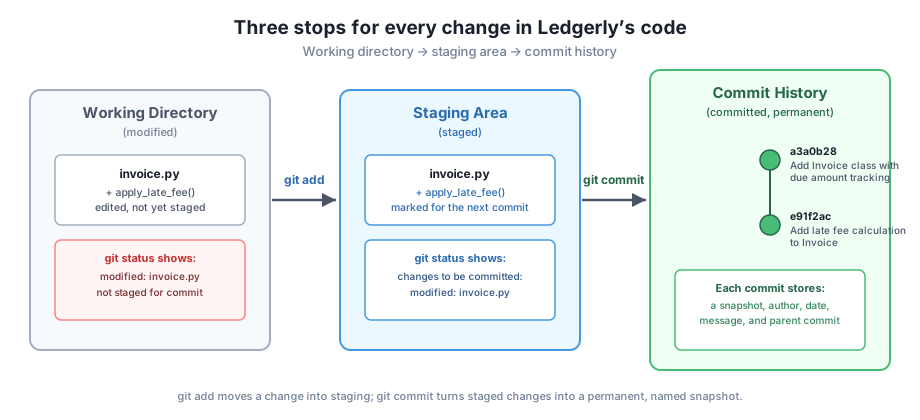
Git moves a change through three stops before it becomes permanent. Understanding these three stops is the single most useful thing to learn about Git early on.
The working directory is the folder on your computer where you edit files normally, with no special git behavior. The staging area is a holding zone where you choose exactly which edited lines will go into the next snapshot. The commit history is the permanent, ordered record of every snapshot ever made.
Here is that flow in a real Ledgerly repository. A developer edits invoice.py to add a late-fee method, then checks what git sees:
$ git status
On branch feature-late-fees
Changes not staged for commit:
  (use "git add <file>..." to update what will be committed)
  (use "git restore <file>..." to discard changes in working directory)
	modified:   invoice.py

no changes added to commit (use "git add" and/or "git commit -a")
The file is modified in the working directory, but git has not been told to include it in the next snapshot yet. Running git add moves it into the staging area:
$ git add invoice.py
$ git status
On branch feature-late-fees
Changes to be committed:
  (use "git restore --staged <file>..." to unstage)
	modified:   invoice.py
A commit is the act of turning everything in the staging area into a permanent, named snapshot. Each commit records the file contents, an author, a timestamp, and a message describing why the change happened.
$ git commit -m "Add late fee calculation to Invoice"
[feature-late-fees 236fd87] Add late fee calculation to Invoice
 1 file changed, 3 insertions(+)
The short code 236fd87 is the commit’s unique identifier. Once a commit exists, that exact snapshot of invoice.py is preserved forever, even if the file changes again later.
A branch is a separate line of history that starts from a shared point and can move forward independently. Ledgerly’s team gives every new feature its own branch, instead of all three developers committing directly onto one shared line of history.
This matters for a concrete reason. If one developer is adding a late-fee feature and another is fixing a bug in NotificationService, working on separate branches means neither person’s half-finished code touches the other’s work until both are ready. The main branch stays in a state the team can always deploy.
$ git branch
* feature-late-fees
  main
The asterisk marks the branch currently checked out. Creating a branch is cheap in git — it does not copy the whole project, only a pointer to a starting commit — so Ledgerly’s developers create a new branch for nearly every task, however small.
A remote is a copy of the repository stored somewhere other than a developer’s own laptop, most commonly on GitHub. Ledgerly’s team keeps one shared remote so that a commit made on any developer’s machine can reach everyone else’s.
Pushing uploads commits from a local branch to the remote. Here is Ledgerly’s feature-late-fees branch being pushed to a shared remote for the first time:
$ git push -u origin feature-late-fees
To ../ledgerly-remote2.git
 * [new branch]      feature-late-fees -> feature-late-fees
branch 'feature-late-fees' set up to track 'origin/feature-late-fees'.
The name origin is the conventional label for a team’s main remote — it is just a name, not a special kind of repository. The -u flag records that this local branch tracks that remote branch, so later pushes from the same branch need no extra flags.
$ git remote -v
origin	../ledgerly-remote2.git (fetch)
origin	../ledgerly-remote2.git (push)

$ git branch -a
* feature-late-fees
  main
  remotes/origin/feature-late-fees
  remotes/origin/main
The remotes/origin/* entries are git’s local record of what exists on the shared remote. When a teammate pushes new commits, fetching from the remote updates that record, which is how the whole team eventually sees the same history.
Want to go deeper?
This lesson only covers the mental model and a few daily commands. Branching strategies, merging, resolving conflicts, rebasing, pull requests, and automating checks with GitHub Actions all have a full, dedicated course: Version Control with Git and GitHub. Visit it before your team’s first real merge conflict, not after.
A Ledgerly developer edits customer.py to add an email-validation check. List, in order, the exact git commands needed to move that change from an edited file into a permanent commit, and name which of the three stops (working directory, staging area, commit history) the file is in after each command.
Hint
The edited file starts in the working directory. git add customer.py moves it into the staging area. git commit -m "..." moves the staged snapshot into commit history. Running git status after each step shows exactly which stop the file is currently in.
A new Ledgerly developer asks why the team does not just have everyone commit directly to the main branch, since that would mean one less command to run per feature. Write a two-sentence answer explaining what could go wrong without feature branches.
Hint
Without feature branches, an unfinished or broken change from one developer sits directly on the branch everyone else builds from and deploys. Feature branches isolate unfinished work so main stays deployable at all times, and each developer’s changes only join it when ready.
A teammate runs git push -u origin feature-search and shares this output: * [new branch] feature-search -> feature-search. Explain in plain words what just happened to the shared GitHub repository, and what the -u flag changed for future pushes.
Hint
A new branch named feature-search, which previously existed only on the teammate’s computer, now also exists on the shared remote repository. The -u flag linked the local branch to that remote branch, so future runs of git push from feature-search no longer need to specify origin feature-search explicitly.
Version control gives Ledgerly’s team a complete, shared history of every change, instead of guesswork about what happened and when. Every change passes through the same three stops: the working directory holds an edit, git add moves it into the staging area, and git commit turns it into a permanent snapshot in commit history. Branches let each feature develop on its own line, so main stays stable while work is in progress. A remote, usually on GitHub, gives the whole team one shared copy of that history, and git push sends local commits there for everyone else to see.
Every other tool in this module assumes a team can trust its history. Automated tests need to know exactly what changed between two commits, and a deployment pipeline needs to know which commit is currently live. Get the mental model in this lesson right, and the rest of Module 4 — continuous integration, deployment, and monitoring — has a solid foundation to build on.
Learn how Ledgerly automates testing and deployment every time a commit reaches the shared GitHub remote.
Return to the Delivery & Operations module overview
You now have the core mental model behind every version control workflow: a change moves from working directory to staging area to commit history, branches isolate work in progress, and a shared remote keeps the whole team in sync. The next lesson builds on this by showing how Ledgerly automates what happens the moment a commit reaches that shared remote.
Keep DATATWEETS free. Help fund practical data, AI, and engineering lessons for learners worldwide.