Title here
Summary here
Ledgerly’s three-person team now has a clean, tested codebase. Module 3 gave them pricing.py and nine automated tests that catch pricing regressions in a fraction of a second. Lesson 1 of this module showed how the team uses Git to track every change and review it before merging. This lesson connects those two pieces: instead of a developer remembering to run the tests by hand, a pipeline runs them automatically on every commit, and only lets tested code move toward real customers.
This automatic pipeline, and the practices around it, go by two names you will hear constantly in a software job: CI/CD and DevOps. CI/CD is the technical machinery. DevOps is the way a team works so that machinery actually gets used well. You will build a real pipeline definition for Ledgerly, run a Python script that behaves like one pipeline stage, and watch it genuinely pass and genuinely fail, using the same pricing code from Module 3.
By the end of this lesson, you will be able to:
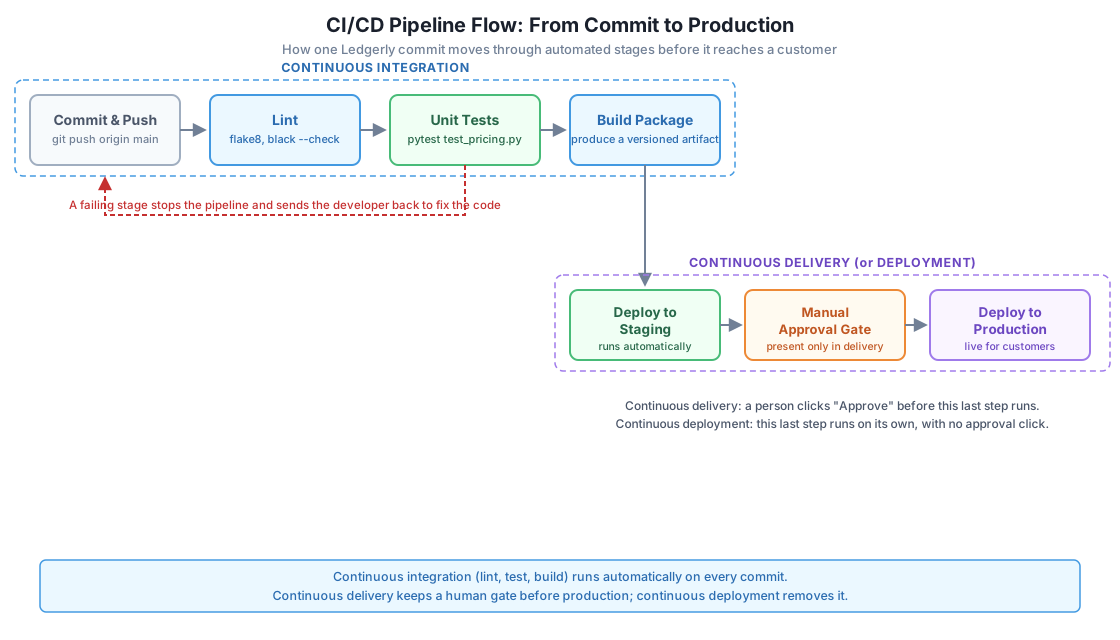
Continuous integration, usually shortened to CI, means every developer merges their code into one shared repository often, at least once a day, and an automated process checks that merge immediately. The check runs the same lint rules, the same tests, and the same build every single time, without a person needing to remember to run them.
Without CI, a bug can sit unnoticed for days. Imagine a Ledgerly developer changes apply_tier_discount on Monday, and nobody runs the pricing tests until Friday’s release. By then, three other people have built more code on top of the broken function, and the fix touches far more than it would have on Monday. CI removes that gap: the moment the change reaches the shared repository, a machine runs the checks and reports the result within minutes.
The core idea is simple, even though real pipelines have many steps: turn every check a developer would otherwise skip under deadline pressure into something a machine runs every time, whether anyone remembers to ask for it or not.
Ledgerly’s team uses GitHub Actions, a CI service built into GitHub that runs jobs described in a YAML file stored inside the repository. The file below defines three stages: lint the code for style problems, run the unit tests from Module 3, and build a distributable package. GitHub runs this file automatically every time someone pushes a commit or opens a pull request.
# .github/workflows/ci.yml
name: Ledgerly CI Pipeline

on:
  push:
    branches: [main]
  pull_request:
    branches: [main]

jobs:
  lint-test-build:
    runs-on: ubuntu-latest

    steps:
      - name: Check out the repository
        uses: actions/checkout@v4

      - name: Set up Python
        uses: actions/setup-python@v5
        with:
          python-version: "3.12"

      - name: Install dependencies
        run: |
          python -m pip install --upgrade pip
          pip install flake8 pytest pytest-cov

      - name: Lint the pricing and billing modules
        run: flake8 pricing.py payment_gateway.py --max-line-length=100

      - name: Run the unit tests from Module 3
        run: pytest -v test_pricing.py test_billing.py

      - name: Check test coverage
        run: pytest --cov=pricing --cov-fail-under=90 test_pricing.py

      - name: Build a versioned package
        run: python -m zipapp . -o dist/ledgerly-${{ github.sha }}.pyz -m "app:main"

      - name: Upload the build artifact
        uses: actions/upload-artifact@v4
        with:
          name: ledgerly-build
          path: dist/
Each step depends on the one before it succeeding. If flake8 finds a style violation, GitHub Actions stops the job right there and never runs the tests or the build. If the tests fail, the build step never runs either. This ordering matters: it puts the fastest, cheapest checks first, so a broken commit fails in seconds rather than waiting for a slow build to finish first.
Order stages fast to slow
Lint checks in the pipeline above finish in a few seconds, because they only scan text for style rules. The unit tests finish almost as fast, because Module 3’s fake payment gateway avoids any real network call. Placing slow, expensive steps last means a developer with a typo in their code gets an answer in seconds, not minutes, and never wastes pipeline time building a package that a lint error would have blocked anyway.
Underneath a step like pytest -v test_pricing.py in the YAML above, the pipeline runner does something simple: it runs a program, reads the exit code that program returns, and treats any non-zero exit code as a failure that stops the whole pipeline. The script below plays the role of that pipeline stage directly, using Python’s own pytest library instead of a separate shell command.
# ci_pipeline_stage.py
"""Simulates one stage of Ledgerly's CI pipeline: run the test suite,
then fail the whole build the moment any test fails."""
import sys
import pytest


def run_test_stage(test_path):
    """Runs pytest against test_path and returns True only if every test passed."""
    print(f"CI STAGE: running test suite at '{test_path}'")
    exit_code = pytest.main(["-v", test_path])
    return exit_code == 0


if __name__ == "__main__":
    test_path = sys.argv[1] if len(sys.argv) > 1 else "test_pricing.py"
    all_tests_passed = run_test_stage(test_path)

    print("-" * 50)
    if all_tests_passed:
        print("BUILD PASSED: every test succeeded, proceeding to build stage")
        sys.exit(0)
    else:
        print("BUILD FAILED: at least one test failed, stopping the pipeline")
        sys.exit(1)
This script points at pricing.py and test_pricing.py, the same nine tests from Module 3. Running it for real against the correct pricing code produces this output.
CI STAGE: running test suite at 'test_pricing.py'
test_pricing.py::test_calculate_subtotal_sums_price_times_quantity PASSED
test_pricing.py::test_apply_tier_discount_for_gold_customer PASSED
test_pricing.py::test_apply_tier_discount_for_unknown_tier_applies_no_discount PASSED
test_pricing.py::test_apply_loyalty_discount_for_member PASSED
test_pricing.py::test_apply_loyalty_discount_for_non_member PASSED
test_pricing.py::test_add_tax_adds_eight_percent PASSED
test_pricing.py::test_add_late_fee_when_overdue PASSED
test_pricing.py::test_add_late_fee_when_not_overdue PASSED
test_pricing.py::test_calculate_invoice_total_matches_full_pipeline PASSED

9 passed in 0.02s
--------------------------------------------------
BUILD PASSED: every test succeeded, proceeding to build stage
Now suppose a developer accidentally changes the gold tier discount in TIER_DISCOUNTS from 0.15 to 0.12, a small, easy typo to make while editing a nearby line. Running the exact same script against the exact same tests, with only that one line changed, produces this real output instead.
CI STAGE: running test suite at 'test_pricing.py'
test_pricing.py::test_calculate_subtotal_sums_price_times_quantity PASSED
test_pricing.py::test_apply_tier_discount_for_gold_customer FAILED
test_pricing.py::test_apply_tier_discount_for_unknown_tier_applies_no_discount PASSED
test_pricing.py::test_apply_loyalty_discount_for_member PASSED
test_pricing.py::test_apply_loyalty_discount_for_non_member PASSED
test_pricing.py::test_add_tax_adds_eight_percent PASSED
test_pricing.py::test_add_late_fee_when_overdue PASSED
test_pricing.py::test_add_late_fee_when_not_overdue PASSED
test_pricing.py::test_calculate_invoice_total_matches_full_pipeline FAILED

=================================== FAILURES ===================================
__________________ test_apply_tier_discount_for_gold_customer __________________

    def test_apply_tier_discount_for_gold_customer():
>       assert apply_tier_discount(150, "gold") == pytest.approx(127.5)
E       assert 132.0 == 127.5 ± 1.3e-04
E       comparison failed
E       Obtained: 132.0
E       Expected: 127.5 ± 1.3e-04

test_pricing.py:19: AssertionError
______________ test_calculate_invoice_total_matches_full_pipeline ______________

    def test_calculate_invoice_total_matches_full_pipeline():
        line_items = [{"price": 40, "quantity": 3}, {"price": 15, "quantity": 2}]
        total = calculate_invoice_total(line_items, "gold", True, 45)
>       assert total == 141.69
E       assert 146.69 == 141.69

test_pricing.py:49: AssertionError

2 failed, 7 passed in 0.03s
--------------------------------------------------
BUILD FAILED: at least one test failed, stopping the pipeline
Two tests failed the moment the discount rate changed, and the script’s own exit code turned non-zero. In a real GitHub Actions run, this exact failure is what stops the pipeline before the build step ever runs, and before that broken discount rate could reach a real customer’s invoice. Reverting the line back to 0.15 and running the script again produces the original nine-passed output, exactly as before the mistake was introduced. This is continuous integration doing its job: the same typo that could sit unnoticed for days without a pipeline gets caught within seconds of the commit that introduced it.
Once the CI stages pass, Ledgerly’s pipeline has a tested, versioned package ready to run somewhere. What happens next is where continuous delivery and continuous deployment stop meaning the same thing, even though people often use the two terms loosely.
Continuous delivery means every change that passes CI is proven ready to release, but a person still decides exactly when it goes live, usually by clicking an approval button. Continuous deployment removes that button: every change that passes CI goes live automatically, with no human step in between.
Picture a concrete Ledgerly scenario. A developer fixes a bug in add_late_fee so it no longer charges a fee one day too early. The pipeline lints the code, runs the tests, builds the package, and deploys it automatically to a staging environment, a copy of Ledgerly used for final checks before real customers see the change.
# .github/workflows/deploy.yml (continuous delivery version)
jobs:
  deploy-staging:
    needs: lint-test-build
    runs-on: ubuntu-latest
    steps:
      - name: Deploy the build to staging
        run: ./scripts/deploy.sh staging ${{ github.sha }}

  deploy-production:
    needs: deploy-staging
    runs-on: ubuntu-latest
    environment:
      name: production  # GitHub requires a named reviewer to approve this job
    steps:
      - name: Deploy the build to production
        run: ./scripts/deploy.sh production ${{ github.sha }}
The environment: production line above tells GitHub Actions to pause deploy-production until a designated reviewer, one of Ledgerly’s three developers, clicks approve inside GitHub. Staging deploys happen automatically every time, but production waits for a person, because a mistake in production reaches real customers with real invoices. This is continuous delivery: always ready to deploy, always one click away, never fully automatic.
If Ledgerly instead removed that environment: production line entirely, the deploy-production job would run the instant deploy-staging finished, with nobody clicking anything. That single change turns the same pipeline into continuous deployment. Whether a team chooses delivery or deployment is a judgment call about risk, not a technical limitation, since both use the identical pipeline underneath.
Before DevOps became common practice, many companies split “development,” the people who write code, from “operations,” the people who keep it running in production, into two separate teams that rarely talked. Developers wrote code, handed it off, and moved to the next feature. Operations received unfamiliar code and had to keep it running, often at 3 a.m., with no way to reach the person who wrote it.
DevOps culture removes that wall by making one team responsible for both writing the code and watching it run in production. At Ledgerly, this means the same three developers who write PricingEngine and InvoiceRepository also carry the pager when a production deploy causes an error spike. That direct feedback changes behavior: a developer who personally gets woken up by a bad deploy writes more careful tests and reviews pull requests more carefully next time.
DevOps is a way of working, not a tool
Buying a CI service or a monitoring dashboard does not make a team practice DevOps. DevOps culture means small, frequent changes instead of large risky ones, blameless review of what went wrong instead of blaming a person, and shared ownership of production instead of throwing code over a wall. Ledgerly’s pipeline only works because the whole team agrees to keep it green, fix it fast when it breaks, and treat a red build as everyone’s problem to fix immediately.
Frequent, small deployments are a direct result of this culture, not a separate goal. A team that deploys one large batch of changes once a month has to guess which of dozens of changes caused a new bug. A team that deploys ten small changes a day, the way CI/CD enables, can point at the one commit that broke something within minutes, because so little changed between one deploy and the next.
The ci.yml file in this lesson already runs pytest --cov=pricing --cov-fail-under=90 test_pricing.py as its own step. Explain, in your own words, what would happen to the pipeline if pricing.py’s test coverage measured 82% instead of 90%, and why placing this step after the plain test run still adds value even though the tests already passed.
Hint
--cov-fail-under=90 makes pytest exit with a non-zero code if coverage falls below 90%, even when every existing test passes. GitHub Actions treats that non-zero exit code exactly like a failed test, so the pipeline stops before the build step runs. This step adds value beyond the plain test run because a passing test suite says nothing about code nobody has written a test for yet, and the coverage gate catches new, untested code before it reaches the build stage.
Suppose a developer changes LATE_FEE_THRESHOLD_DAYS in pricing.py from 30 to 20, without changing anything else. Using the nine tests from Module 3 shown earlier in this lesson, name the specific test you expect to fail, and explain why ci_pipeline_stage.py would print BUILD FAILED even though eight of the nine tests still pass.
Hint
test_add_late_fee_when_not_overdue calls add_late_fee(100, days_overdue=10) and expects 100, no late fee. With the threshold lowered to 20, ten days overdue is now still under the new threshold, so that specific test would still pass. The one that actually breaks is test_add_late_fee_when_overdue, which passes days_overdue=45; that test would still pass too, since 45 stays over both thresholds. Working through each test’s exact numbers against the changed threshold, rather than guessing from the variable’s name, is exactly the kind of check ci_pipeline_stage.py automates, and it is why run_test_stage treats any single failing test as reason enough to fail the whole build.
Ledgerly’s team is about to ship a change that adds a new "platinum" tier with a 20% discount to TIER_DISCOUNTS, directly affecting how much real customers get charged. Using the staging-to-production scenario from this lesson, argue whether this specific change should use continuous delivery or continuous deployment, and explain what you would recommend instead if the change only fixed a typo in an email subject line.
Hint
A change to discount rates directly changes real invoice amounts, so continuous delivery, with a person clicking approve after staging, gives the team one last chance to catch a mistake like the gold-tier typo shown earlier in this lesson, before it charges a real customer incorrectly. A typo fix in an email subject line carries far less risk if something goes wrong, so continuous deployment, no manual gate at all, fits it well; forcing every low-risk change through a manual approval step slows the team down without meaningfully reducing risk.
Continuous integration runs lint, the Module 3 pricing tests, and a build automatically on every commit, so a broken change gets caught within seconds instead of sitting unnoticed for days. The ci_pipeline_stage.py script showed this directly: the same nine tests reported nine passes against correct pricing code, and two real failures the moment a gold-tier discount typo was introduced, with the script’s own exit code flipping from success to failure. Continuous delivery and continuous deployment both start from that same tested, built package, differing only in whether a human clicks approve before the change reaches production. DevOps culture is what makes all of this work in practice: the same people who write Ledgerly’s code also feel the consequences when it breaks, which is why small, frequent, well-tested deploys beat large, rare, risky ones.
A pipeline that never runs, or a team that ignores a red build, provides no protection at all. The value in this lesson comes from seeing a real test suite genuinely fail after a one-line pricing mistake, and genuinely pass again once that mistake is reverted, exactly what happens inside a real CI service on every Ledgerly commit. Knowing when to require a manual approval, as continuous delivery does, versus when to let a low-risk change ship itself, as continuous deployment does, is a judgment every engineering team makes daily. DevOps culture is what turns these tools from a checkbox into a habit that actually protects customers from bugs like the gold-tier discount typo this lesson walked through.
Learn how to keep Ledgerly's customer data and payment details safe, from input validation to secrets management in a CI/CD pipeline.
Return to the Delivery & Operations module overview
You can now explain why continuous integration catches bugs early, read and adapt a real GitHub Actions pipeline, and tell continuous delivery apart from continuous deployment using a concrete staging-to-production scenario. The next lesson builds directly on this pipeline, adding the security checks Ledgerly needs before any of this automation can be trusted with real customer payment data.
Keep DATATWEETS free. Help fund practical data, AI, and engineering lessons for learners worldwide.